Kaizen #125 Manipulating Multi-Select Lookup fields (MxN) using Zoho CRM APIs
Hello everyone!
Welcome back to another week of Kaizen. In last week's post in the Kaizen series, we discussed how subforms work in Zoho CRM and how to manipulate subform data using Zoho CRM APIs.
In this post, we will discuss how to manipulate a multi-select lookup fields using Zoho CRM APIs.
Multi-select lookup field
The Multi-Select Lookup Field enables you to establish a many-to-many relationship between two different modules in CRM. It allows you to associate multiple records with each other, from two different modules.
These associations are stored in an individual module called "Linking Module". Consider there are two modules, Employees and Skills. The Employees module contains details regarding Zylker's workforce, and the Skills module contains details regarding various skills like Social Media Marketing and Content Marketing.
We want to associate multiple skills to an employee. So, a multi-select lookup can be created in the Employees module. When doing so, similar multi-select lookup field will be automatically created in the Skills module, along with the EmpXSkills linking module by Zoho CRM. The underlying data model is described in the below image.
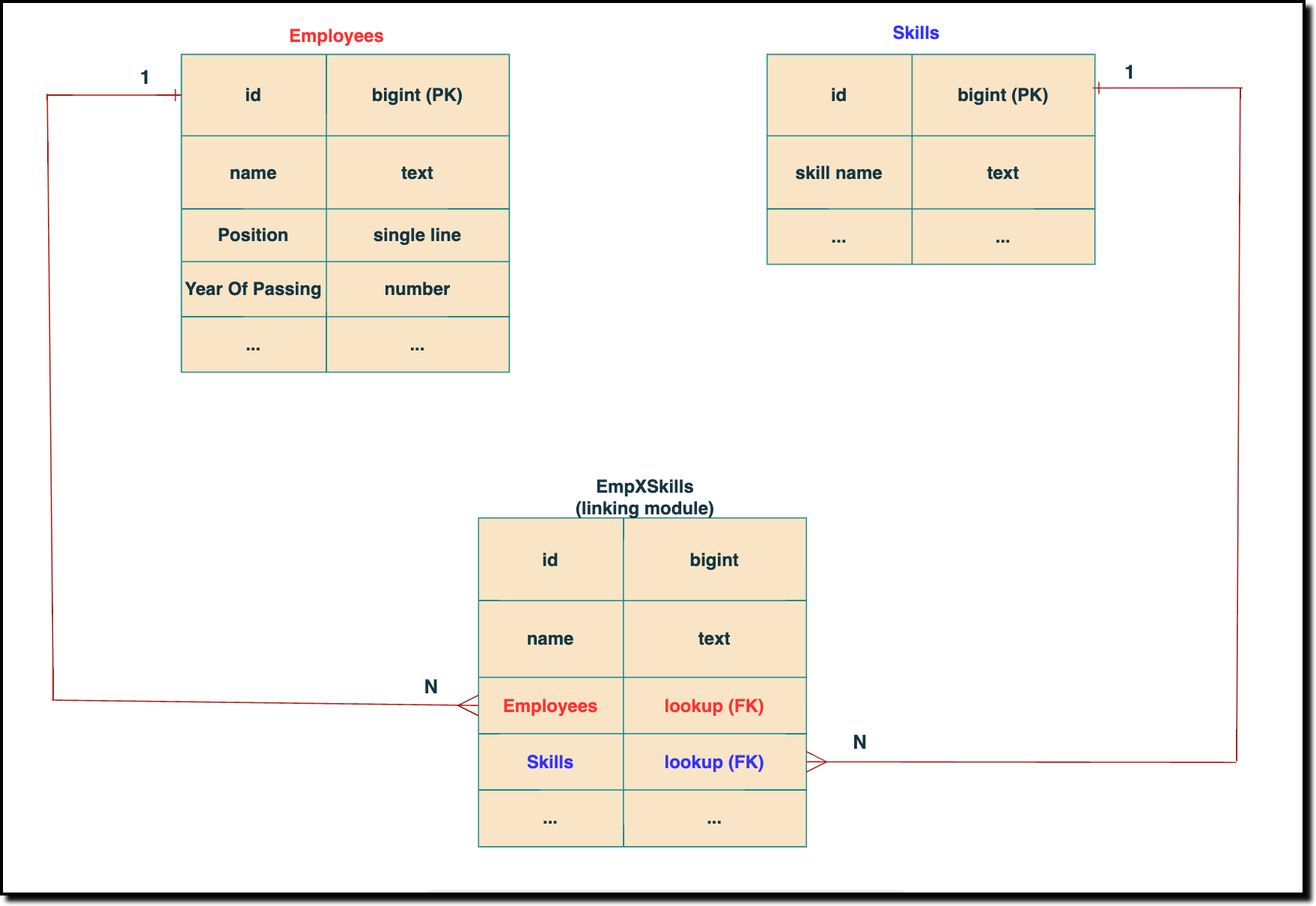 The above chart shows the data model representation when you create a multi-select lookup field in a module. Here, there are two lookup fields—one pointing to the Employees module and the other pointing to the Skills module.
In the linking module, two lookup fields (lookup fields with api names - Employees and Skills) will be created. The lookup fields, one pointing to Employees and the other pointing to Skills from the linking module, establish a connection between the linking module and its associated module.
How to associate an employee's skills while creating an Employee record through the Insert Records API
API names you need before invoking the API
- The API name of the multi-select lookup field in the modules you want to insert data.
- API names of the lookup fields in the linking module. Eg: here the API Name of the linking module is "EmpXSkills" and the corresponding lookup field api names are "Employees" & "Skills". You can use the Fields Metadata API for Employees and Skills to get these details.
Step 1
Know the API name of the multi-select lookup field in the module (In our case, Skills is the multi-select lookup field in the Employees module)
To know the API names of the multi-select lookup fields, make a GET - Fields Metadata API call. Among all the Employee's fields, multi-select lookup field can be identified by the json key data_type with the value multiselectlookup. The corresponding connected module can be found from the json connected_module. Below is the API call & response for such a multi-select lookup field.
Request URL : {api-domain}/crm/v6/settings/fields?module=Employees
Request Method: GET
Sample Response:
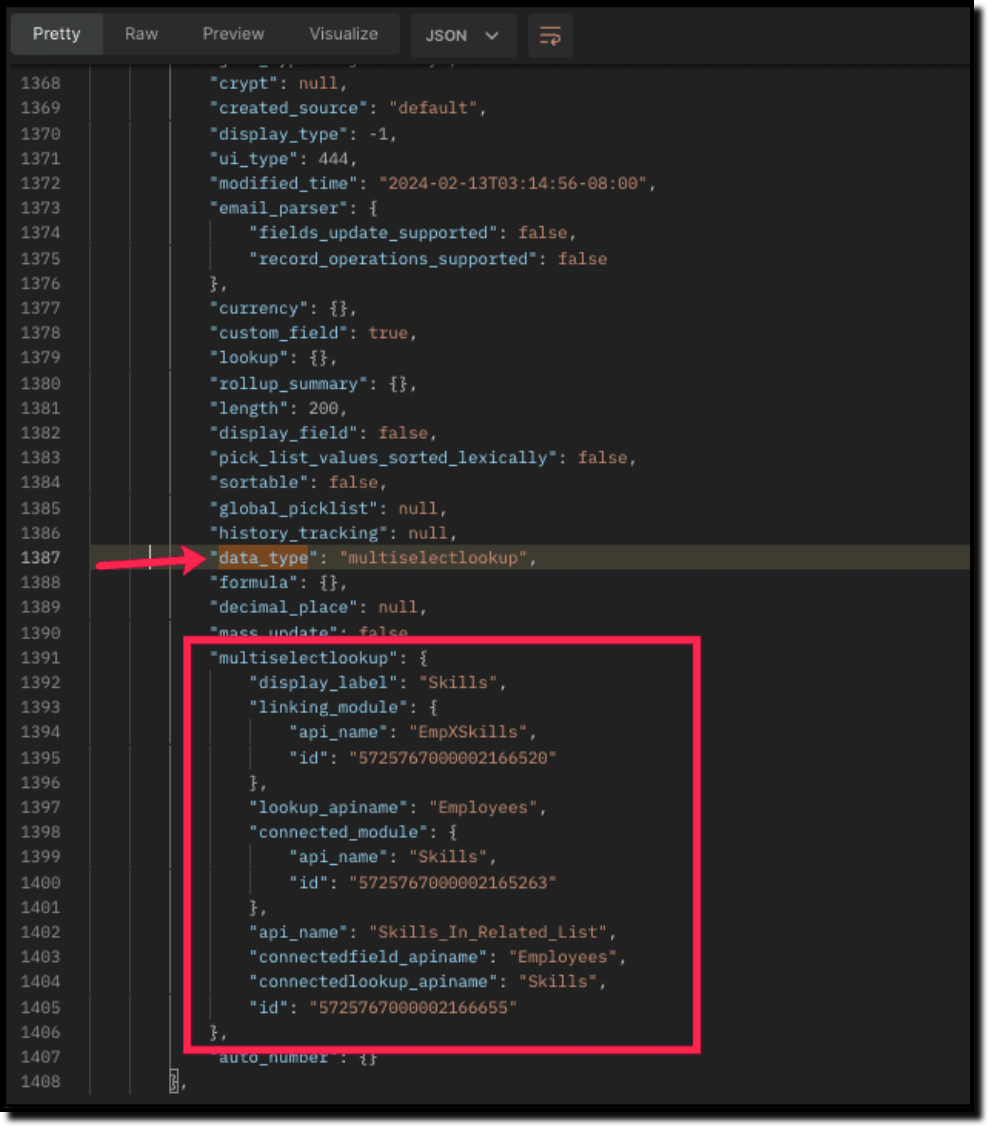
The above highlighted keys are the details of the Multi select lookup field. The corresponding keys are explained below:
"multiselectlookup": { "display_label": "Skills", //Display label of the MxN field in the Employees module "linking_module": { "api_name": "EmpXSkills", //API name of the linking module "id": "5725767000002166520" ... "lookup_apiname": "Employees", //API name of the Employee lookup field in the linking module "connected_module": { "api_name": "Skills", //API name of the connected module "id": "5725767000002165263" }, "api_name": "Skills_In_Related_List", //API of the related list of the connected module Skills in the Employees module. "connectedfield_apiname": "Employees", //API Name of the multi-select lookup field in the connected module (Skills) "connectedlookup_apiname": "Skills", //API name of the Skills module lookup field in the linking module. "id": "5725767000002166655" //Related List ID }, ... |
Step 2
Using the api_name of the linking module, make a GET Fields metadata API call to get the list of fields (along with their api_name) present in it. It lists all fields of the linking module in the response.
Sample Request and Response
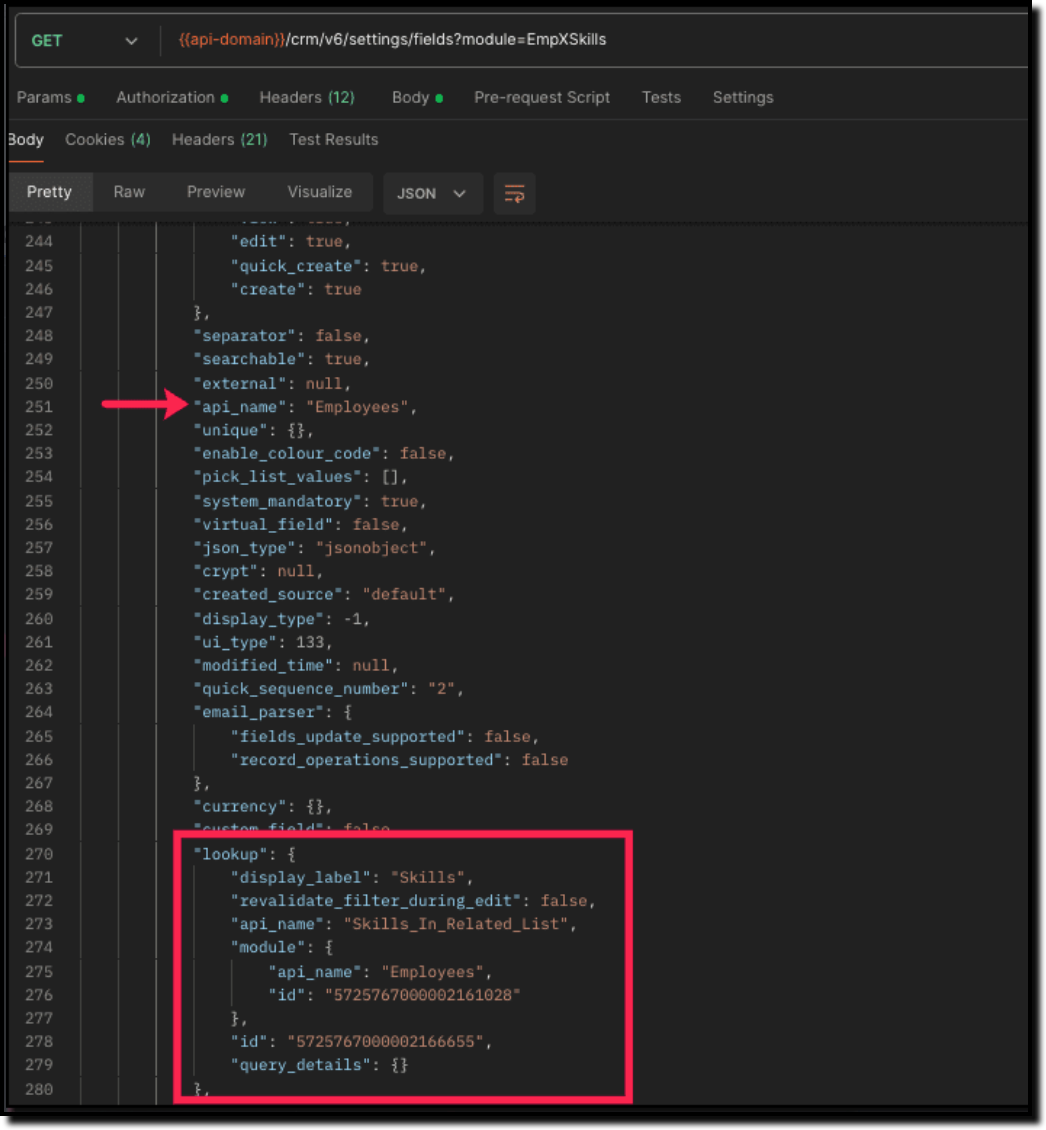
Search for the "data_type": "lookup" in the response. The lookup fields represent the connected modules in association with the linking module.
For example, in our case, the response will have two lookup fields. One of the lookup fields (with api name Employees) points to the Employees module, and the other one (with api name Skills) points to the Skills module.
Step 3
Associate records via the Multi-select lookup field using the Insert Records API
To associate records via the MxN field, you need to know the IDs of the records in the Skills module. Here is the input body to insert the skills in the Employee module with the multi-select lookup field Skills.
Here is the input body to insert a new Employee record and associate a Skills record to it using the MxN field.
Request URL: {{api-domain}}/crm/v6/Employees
Request Method: POST
Sample Input:
{ "data": [ { "Name": "Patricia", "Email": "patricia@mail.com", "Position": "Marketing Specialist", "Year_of_Experience": 5, "Skills": [ //API name of the multi-select lookup field in Employee module { "Skills": { //API Name of the lookup field pointing to the Skills module in the linking module "name": "Marketing", "id": "5725767000002149427" //Record ID in the Skills module } }, { "Skills": { "name": "Social Media Marketing", "id": "5725767000002149476" } } ] } ] } |
How to disassociate an employee & skills relation while updating an Employee record through the Update Records API
Request URL: {{api-domain}}/crm/v6/Employees
Request Method: PUT
Sample Input:
{ "data": [ { "id": "7890710000097291", "Name": "Patricia", "Email": "patricia@mail.com", "Position": "Marketing Specialist", "Year_of_Experience": 5, "Skills": [ { "_delete": null, //This association in the linking module will be deleted "id": "5725767000008126002" //Record created in the linking module } ] } ] } |
Sending _delete:null will cause delinking of the association.
How to associate an employee's skills via "Linking Module"
You can associate the relationship between Employees and Skills module by creating records in the Linking module (EmpXSkills). Use the API names for the corresponding lookup fields, Employee (API Name: Employees) and Skills (API Name: Skills) in the input body.
Request URL: {{api-domain}}/crm/v6/EmpXSkills
Request Method: POST
Sample Response
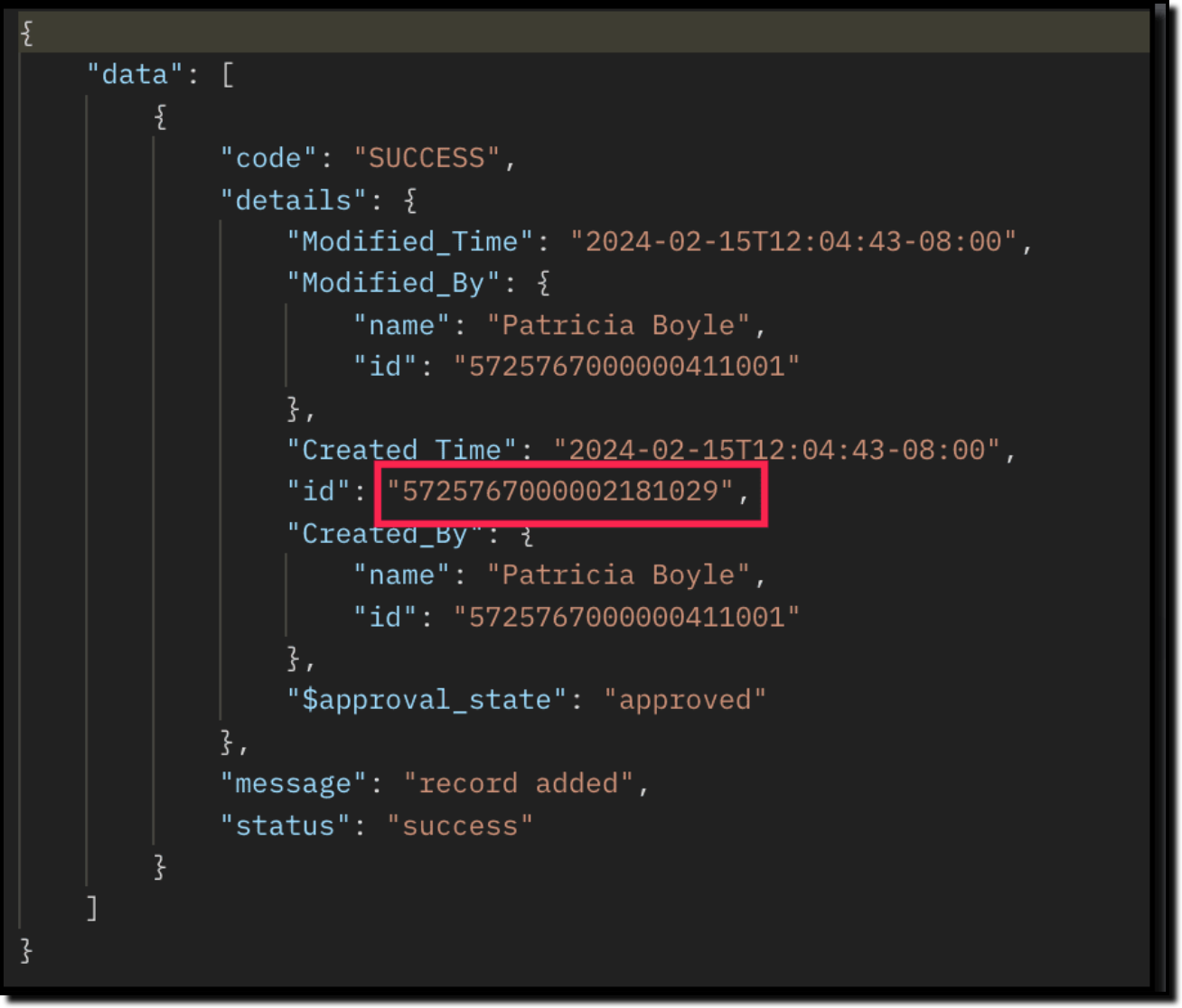
The id in the above response is the Primary Key ID of an Employee-Skill association record in the linking module. This ID can later be used to do specific operations like association update or deletion via API.
How to disassociate an employee & skills relationship via "Linking Module"
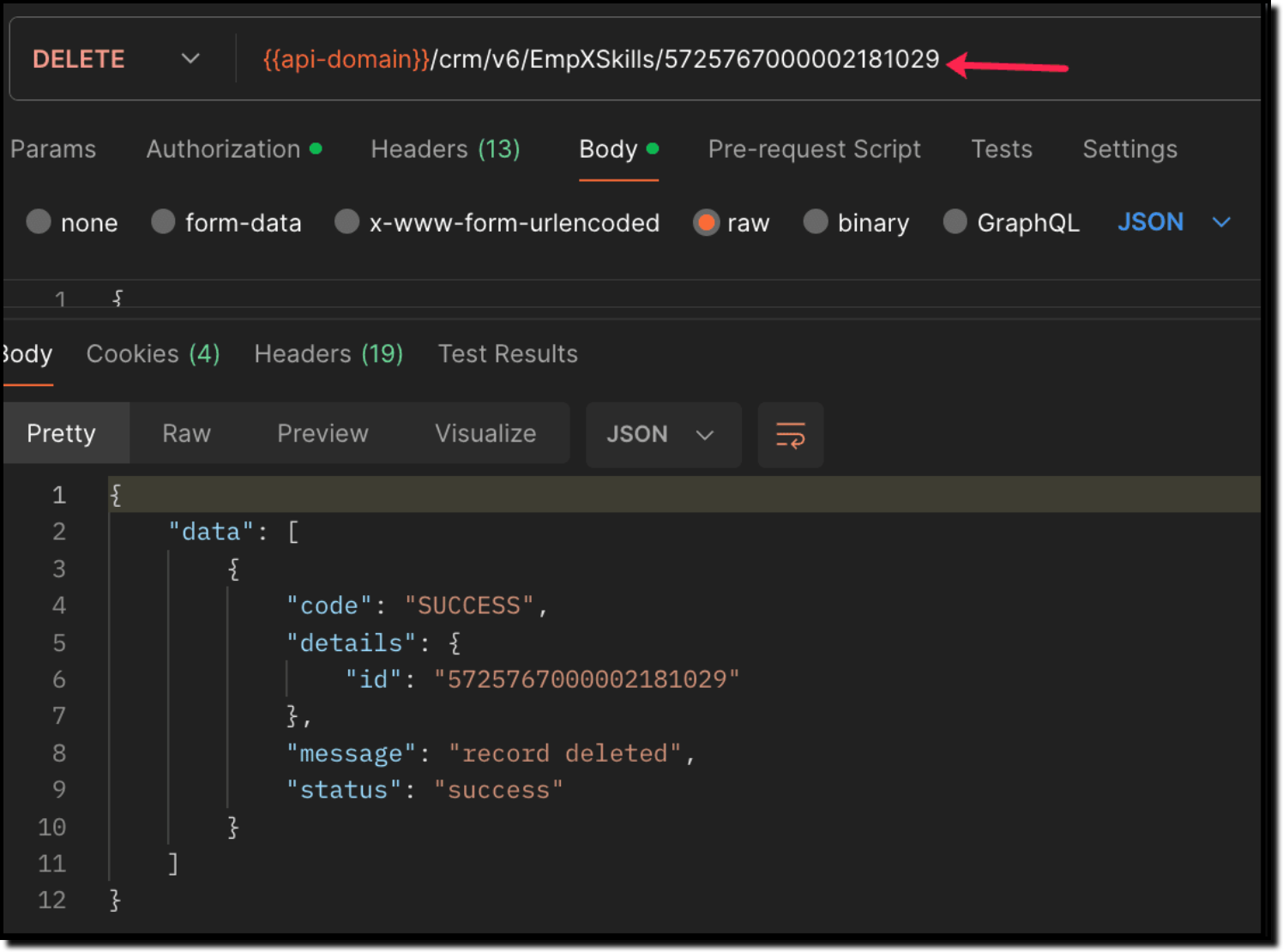
Use the Delete Records API to delete the record which corresponds to the specific relation between Employee and Skills module in the EmpXSkills module. You can get the record ID for the specific association using the Get Records API for the linking module.
Use the Delete Record API to delete the specific record, thereby deleting the specific association between the Employee and Skills record. Please note that only the association is removed, and not the individual records.
Sample Request and Response
When to use create/update operation in Employees/EmpXSkills module?
Use "Employees" module: When you want to create/update records in the Employees module, and associate the record with a Skills record in a single API call.
Use "EmpXSkills" module: When you want to associate/disassociate the relationship between existing Employees and Skills records.
Retrieve data via COQL API and Bulk Read API
There may be situations where you need to fetch records based upon certain conditions.
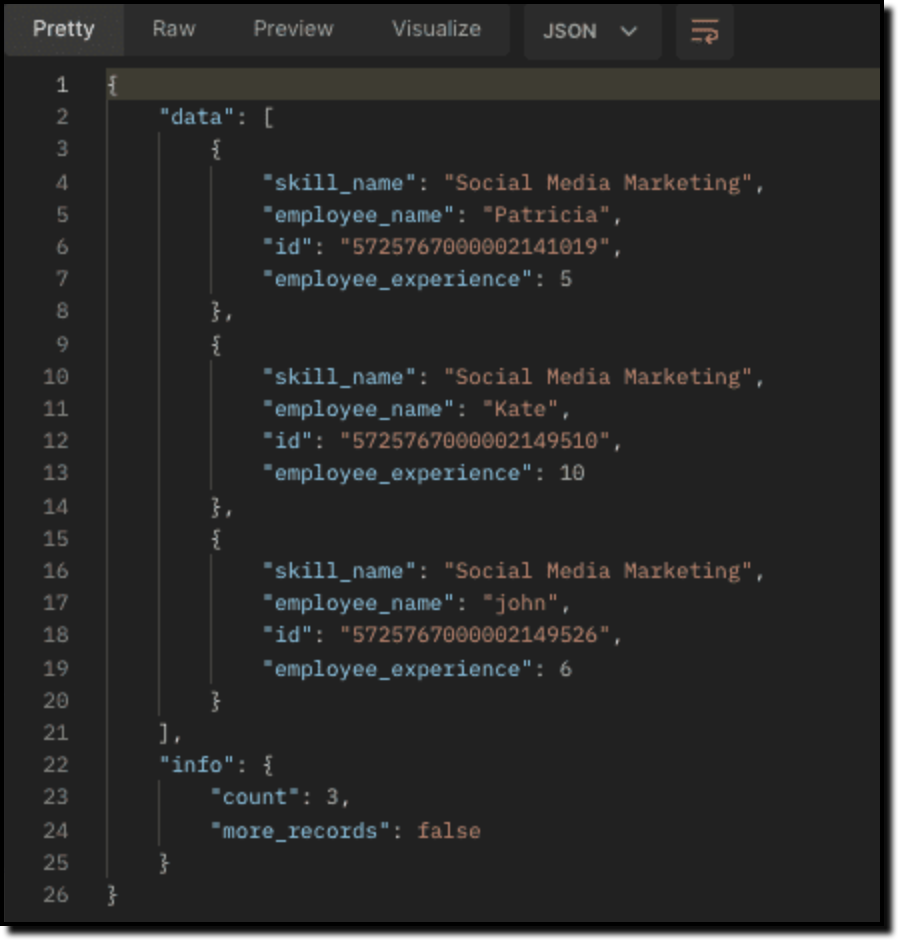
For example, Zylker's HR team wants to retrieve the list of employees having more than 4 years of experience and are experts in Social media marketing. In this case, they can use Zoho CRM's COQL API or Bulk Read API. Let's see how to achieve this.
Retrieving MxN data via COQL API
We know that both the Employees and Skills modules' association data is maintained in the linking module. In order to retrieve data from the linking module, query using the API name of the lookup fields in the linking module.
Request URL: {{api-domain}}/crm/v6/coql
Request Method: POST
Sample Input:
{ "select_query" : "select Employees.Name as employee_name, Employees.Year_of_Experience as employee_experience, Skills.Name as skill_name from EmpXSkills where Employees.Year_of_Experience > 4 and Skills.Name like '%Social%'" } |
From the SQL perspective, above COQL can be interpreted as
select emp.Name as employee_name, emp.Year_of_Experience as employee_experience, skill.Name as skill_name from EmpXSkills left join Employees as emp on EmpXSkills.Employees = emp.id left join Skills as ski on EmpXSkills.Skills = ski.id where emp.Year_of_Experience > 4 and ski.Name like '%Social%' |
Sample Response
Retrieving MxN data via Bulk Read API
Bulk Read API allows you to fetch a large set of data i.e., you can fetch a maximum of 200,000 records in a single API call.
To export linking module records, use its API name.
Request URL: https://www.zohoapis.com/crm/bulk/v6/read
Request Method: POST
Sample input to export linking module's records:
{ "callback": { "method": "post" }, "query": { "module": { "api_name": "EmpXSkills" //API name of the linking module }, "file_type": "csv" } } |
Export linking module records that meet the specified criteria
To export linking module's records based on the given criteria above (similar to the COQL API).
{ "callback": { "method": "post" }, "query": { "module": { "api_name": "EmpXSkills" }, "fields": [ "Employees.Name", "Employees.Year_of_Experience", "Skills.Name" ], "criteria": { "group": [ { "field": { "api_name": "Employees.Year_of_Experience" }, "comparator": "greater_than", "value": "4" }, { "field": { "api_name": "Skills.Name" }, "comparator": "contains", "value": "Social" } ], "group_operator": "AND" } } } |
As the API is an asynchronous API, the response will not be available instantly; the bulk read job is scheduled, and the status can be checked. Once the job is completed, you will be notified in the callback URL. The records are available in a downloadable CSV file or ICS file (for events). See the Bulk Read API document to know how to view the status of the scheduled job and download the file, along with more sample requests and responses.
We trust that this post meets your needs and is helpful. Let us know your thoughts in the comment section or reach out to us at support@zohocrm.com
Stay tuned for more insights in our upcoming Kaizen posts!
------------------------------------------------------------------------------------------------------------------------------
Previous Kaizen Post : Kaizen #124 - Manipulating Subform using Zoho CRM APIs
-------------------------------------------------------------------------------------------------------------------------------
Cheers!
Additional Reading:
Kaizen Posts:
- Kaizen #26 - Linking module and Multi-select Lookup fields
- Kaizen #77 - Multi-select Lookup Fields in API V4
- Kaizen #80 - COQL API - Part I
- Kaizen #81 - COQL API - Part II
API Documentation - Linking Module APIs
Topic Participants
Subramanian K
Andres
Haiku Technical Support
David
Mohammedismail M
Sticky Posts
Announcing the new SKILL.md for Zoho CRM and the updated OAS repository!
We are introducing a new zoho-crm skill to make working with Zoho CRM Developer tools (like APIs, functions, widgets, client scripts, queries etc) easier and faster, with the help of AI in your preferred AI harness like Claude Code, Codex, Cursor, VSCodeKaizen #261 : Using Zoho CRM Skill to generate complex COQL queries
Hello everyone, In the previous Kaizen posts, we introduced the zoho-crm SKILL.md and discussed how it can help you when you are working with Zoho CRM APIs and Client Script. In this Kaizen, we will focus on using the Zoho CRM `SKILL.md` with GitHub CopilotKaizen #256 - Build an Arrival Readiness Web Tab in Zoho CRM
Hi everyone! Welcome back to the Kaizen series! In the post, we discuss a use case in hospitality industry: how an Arrival Readiness web tab widget can be used to let reception staff identify and resolve issues before arrival of guests. Use case In theKaizen #198: Using Client Script for Custom Validation in Blueprint
Nearing 200th Kaizen Post – 1 More to the Big Two-Oh-Oh! Do you have any questions, suggestions, or topics you would like us to cover in future posts? Your insights and suggestions help us shape future content and make this series better for everyone.Kaizen #226: Using ZRC in Client Script
Hello everyone! Welcome to another week of Kaizen. In today's post, lets see what is ZRC (Zoho Request Client) and how we can use ZRC methods in Client Script to get inputs from a Salesperson and update the Lead status with a single button click. In this
Recent Topics
WhatsApp con bot en Make y derivación a una persona en Zoho CRM
Estamos implementando en Zoho CRM un flujo de atención por WhatsApp con un bot en Make y una derivación a una persona. Necesitamos que cada mensaje quede registrado, que me avise cuando requiere atención y poder seguir la misma charla con el cliente.Webhooks for Bigin
Hello everyone, Say hello to webhooks in Bigin—a way to send information to other applications automatically the moment something happens to a record. Whether it's a deal moving stage, a contact being created, or a field changing, Bigin can now send anGiving someone access to my FSM to develop + scope.
Good evening, I’m new to Zoho, and had a CRM/Creator customized and it was missing something and not working. I realized it’s the functions and process and FSM was the missing link. I am trying to get FSM setup and all I have to do connect to CRM, Books,Set Custom Icon for Custom Modules in new Zoho CRM UI
Reassign a team member's follow-up tasks without moving their customers | Kiosk Studio Session #13
Hello folks, It's almost year-end, and a lot of people on your team will take time off. Their customers will still need things while they're away. Say Amanda is out next week (on leave). She has a renewal purchase order to chase for Grace, a quote VikramWorkDrive and CRM not in sync
1/ There is a CRM file upload field with WorkDrive file set as the source: 2/ Then the file is renamed in WorkDrive (outside CRM): 3/ The File in CRM is not synced after the change in WorkDrive; the file name (reference) in CRM record is not updated (hereShort product videos on Zoho Commerce product pages: what works?
Short product videos are becoming a normal part of online store pages, and I have been thinking about how to use them well on a Zoho Commerce store. A few points that seem to matter: Keep them short. 6 to 15 seconds showing the product from a few anglesError AS101 when adding new email alias
Hi, I am trying to add apple@(mydomain).com The error AS101 is shown while I try to add the alias.Meet the new Zoho Analytics: The Agentic Analytics platform
Every major release of Zoho Analytics has changed what you can do with data. This one changes who does the work. For years, analytics meant a chain of hands. The engineer shaped the data, the analyst wrote the query, the designer built the dashboard,Function failure APIs report "no failures" (204 / empty 200) while the Failures view lists real failures
We want to monitor custom-function failures through the API so we can find and re-run failed functions quickly. We could not find a function-failures endpoint in the API reference (only webhook failures are documented), so we tried the paths that existZoho Writer workflows now support custom stages, parallel reviews, and external approvers
Hello everyone, Zoho Writer now lets you build your own approval chains. The pre-built workflows also get new review modes, completion criteria, and external approver support. What’s new Custom workflows: Design review and approval processes from scratch,Unlock more with Linkthread's new Basic plan
Hey everyone, Last year, we introduced Linkthread by Zoho Social with a simple idea: help users bring everything they want to share into one link. Since then, Linkthread has continued to evolve, and we’re excited to announce its next milestone—the launchRating system button not translated to Spanish + "Done"
I've run into a issue with the new system for rating support interactions when the chat is ended: Missing Spanish translation: The button is still showing in English as "Done," even though the interface language is set to Spanish. It should display something【11/19(木)15時〜・先着5名】後回しになっているZohoの設定、一緒に進めませんか?|オンラインもくもく会
ユーザーの皆さま、こんにちは。 コミュニティグループの中野です。 「試したい機能や設定があるけれど、日々の業務で後回しになっている」 「一人で検証していると、途中で手が止まってしまう」 「ほかのユーザーがどう運用しているか、聞いてみたい」 そんな方に向けて、11月19日(木)にオンラインの「Zoho ワークアウト」を開催します。 参加者それぞれが取り組みたいテーマを持ち寄り、設定・検証・運用改善を進める少人数の「もくもく会」です。 各自で作業しながら、必要に応じてユーザー同士で相談や情報交換ができます。Connection into Cliq?
I have the SalesIQ chat widget on my site using the Zohobot but I'm not always on and my employees don't keep it open all the time. We do have Cliq open all the time though so I'd love a way to manage those discussions directly in Cliq as they come in.Thunderbird cannot authenticate Zoho on android
I keep getting a message from Thunderbird on Android that it could not authenticate for my account, dadashton@zoho.com., and to update my server settings. Now the settings are exactly the same for my other devices (1 Windows, 1 Mac and 2 Linux) Can anybodySharedmail box access via an api
Hi, I am trying to access a sharedmailbox via an API. I am the moderator and creator of this shared mailbox. I have created a self client but when when i try to get list of all emails, it does not list the sharedmailbox. Help me to resolve this or provideMultiple Topics assigned to a single Campaign
Hello, is it possible to assign multiple Topics to a single Campaign? We frequently write a content to our subscribers that spans multiple Topics and we would like to send it to all Contacts that are subscribed to at least one of the Topics. But it looksHow to sync Organisation Contacts to Android / AES
After migration form Exchange compatible server, I got Org Contacts: I've turned on EAS Organisation contacts sync. But on my phone they don't appear and there is no contacts folder to select for these contacts. Only personal contacts. They do appearZoho Campaigns - Accept Rollup Summary As Format In Use
Hi Zoho Team, I would like to request an enhancement to the integration between Zoho CRM and Zoho Campaigns. Currently, Rollup Summary fields in Zoho CRM are available for selection during field mapping, but I am unable to map a Rollup Summary field containingIs it possible to change the percentage field in zoho crm , to put 3 decimals ?
Hello , I need to write 1,444 in the percentage field in zoho CRM. However, I've noticed that there is a limitation of 2 decimals for this field. I've found out that if I replace this field with a Decimal one (.OO), I can choose to have 3 decimals. I'veSave hours daily this peak season: Better Inventory & Shipping with Zoho on Easyship
Peak season shouldn't mean losing control of your inventory just to keep up with demand. When the holiday rush hits, everything in your business gets tested at once. Orders surge, stock runs low, and shipping costs climb as customers expect faster deliveryHow Can Zoho Desk and Knowledge Base Help Manage Technical Support for an Android TV Website?
Hello everyone, I manage MXL TV App, an independent technology website covering Android applications, Android TV, Smart TVs, digital entertainment, installation guides, and troubleshooting. I'm exploring ways to organize technical questions and make helpfulBuild a Legacy of Support with Zoho Desk
Hi everyone, World Heritage Day, also known by the name International Day for Monuments and Sites, is a moment to celebrate the stories, culture, and history preserved in the monuments, landscapes, and heritage around us. At Zoho Desk, heritage is notDocuments greater than 40MB Preview
hello, Documents bigger than 40 MB cannot be previewed in WorkDrive Web App or Mobile App. would it be resolved in future?IP de salida 165.173.182.12 en lista negra (nosolicitado.org) – correos rechazados por Odoo
Hola equipo de soporte de Zoho Mail: Les escribo porque mis correos están siendo rechazados por un destinatario debido a que una de sus IPs de salida aparece en una lista negra. Detalles del rebote: - Cuenta / dominio: [tu correo] / [tu dominio] - Destinatario:Issues with Zoho Sheet in Mac
I have downloaded the Zoho App from App Store but It is failing to Save As, Open & Download Operations. App StoreTo-do lists screwed up by update
My app just updated, and now it's unusable for my grocery and packing lists and pretty much everything I use this app for. It used to be that when you checked a box on a to-do list, the item was automatically migrated to the bottom of the list. Then whenCampaign send from unverified e-dress
L.S. I have a problem with z-Campaigns. My email (sender) address seems to be unverified: Verified domain. Sender couldn’t be verified This email is from your organization’s verified domain, but the sender couldn’t be verified. It may be an automatedChange default "Sort by"
Is there a way to change the default "sort by" when searching across modules?" in Zoho CRM? Currently the default sort method is "Modified time" but i would like to utilize the second option of "relevance" as the sort by default and not have to changeNew Search Function
Hey Team, The search function updated in our CRM about a week ago, so I assume it was an automated update across Zoho. It no longer displays leads/deals etc in Chronological order so that the most recently created or updated is the first to display whichLarge List on Sub-Forms
Hi, I would like to be able to add and use the Large List on a Sub-Form, currently it doesnt appear to show up for Sub-Forms. Thanks DanFeature Request: Post-commit Subform Row Event (onRowSave / afterRowCommit) in Client Scripts
Hello Zoho CRM Product & Engineering Team, Requested Feature: Introduce an afterRowCommit (or post-commit onRowSave) subform event in Client Scripts that fires immediately after an inline subform row has been successfully committed to the database, passing#CyberSecurityAwareness - Be diligent when it comes to Widget security
We love Widgets in Zoho CRM! And in our experience they have become an essential tool for extending the feature set and providing a rich user experience beyond standard CRM UI, functionality and integrations. BUT BEWARE... If you are thinking of addingIntroducing the Zoho Campaigns MCP server
Hello everyone, We are pleased to announce that Zoho Campaigns is now available in Zoho MCP. You can now connect your Zoho Campaigns organization to AI tools such as Claude, ChatGPT, GitHub Copilot in VS Code, and Cursor, and manage your email marketingDeluge {"trigger":{"workflow"}} Do we need to add the id of rules of functions or rules in the workflow ?
Hello , I've user {"trigger":{"workflow"}} in Deluge language. In my Deluge code, in order to trigger the workflow, I've specified the id of the workflow, of the rules and of the function called by the workflow. However, Zoho CRM told me that it was notLet’s Talk Recruit: Answering your hiring review’s top five questions
Picture this, it's the final week of the month, and your hiring review is just around the corner. You already know the questions you'll be asked. Which roles have been open the longest? Why did the Product Designer pipeline go quiet after the second interview?What's New in Zoho POS - October 2026
Hello everyone, Welcome to Zoho POS’s monthly update, where we bring you the latest feature releases, enhancements, events, and more. Let’s take a quick look at the new item price override option for embedded barcodes and how it can help streamline yourVENDORS ARE NOT SYNCHED WITH CONTACTS IN CRM
Hello, While the ACCOUNTS and CONTACTS (Including the primary contact) are synced with the CONTACTS module in CRM, the vendor's CONTACTS are not synced with CRM - which basically forces the users to re-enter all vendor's contacts twice and then updateHide Inactive Social Sign-In Providers from Login Screen
Hello Zoho Team, We hope you are doing well. Currently, Zoho One allows admins to configure security policies and enable or disable Social Sign-In options for third-party providers such as Apple, Google, Microsoft, LinkedIn, Yahoo, Twitter, Facebook,Next Page