Kaizen 241 - Automating Deal Risk Escalation Using Workflow APIs, Connected Workflows, and Functions

Kaizen 241 - Automating Deal Risk Escalation Using Workflow APIs, Connected Workflows, and Functions


Hello everyone!

Welcome to another Kaizen week.

In many organizations, sales teams work in Zoho CRM, finance teams manage invoices in Zoho Books, and support teams handle customer issues in Zoho Desk. Now consider this scenario:

A sales representative is working on a high-value upsell opportunity for an existing customer. The deal has reached the final negotiation stage and is ready to move forward. From the sales team’s perspective, everything looks fine. However, the finance team may know that the customer has unpaid invoices, while the support team may already be handling unresolved tickets for the same customer.

Sales teams typically do not verify these details manually every time a deal progresses, which can lead to risky business decisions.

In this post, we will build a cross-app risk validation flow for high-value deals in Zoho CRM. When a deal enters the Negotiation/Review stage, the automation checks for unpaid invoices in Zoho Books and open support tickets in Zoho Desk, updates risk fields in CRM, escalates risky deals into a connected review process, and resumes deal progression only after approval.

To implement this, we will use a combination of:

 Prerequisites 

Before implementing this flow, make sure the following are already available:

  • Zoho CRM with access to Workflows, Custom Functions, and Connected Workflows.

  • Zoho Books and Zoho Desk configured for the same business context, and integrated with Zoho CRM. Check these links for more details : CRM - Books integration help, CRM - Desk integration help.

  • Active connections from Zoho CRM to Zoho Books and Zoho Desk.

  • The Deals module in CRM.

  • A custom module called Risk Reviews.


NOTE: This implementation assumes that the Zoho Books and Zoho Desk integrations are already configured and CRM connections are available for use inside Deluge invokeurl calls. In the sample function, these are referenced as books_connection and desk_connection.

The connections must include the scopes required by the APIs used in the custom function:

  • the Zoho Books connection should include scope(s) to read invoices

  • the Zoho Desk connection should include scope(s) to read contacts and tickets

If these scopes are missing, the invokeurl calls in the custom function will fail even if the workflow and Deluge logic are configured correctly.

 CRM Setup   

 Fields to Add 

Add three fields to the Deals module:

  • Approval_Status : Tracks the validation/approval state (Picklist field : Pending Validation, Approved, Escalation Required)

  • Invoice_Risk_Count : Number of problematic invoices found (Number field)

  • Open_Ticket_Count : Number of open support tickets found (Number field)

 Risk Reviews Module 

Create a custom module called Risk Reviews to store escalation records for Deals. Each Risk Review record remains connected to the originating Deal so that the review process is traceable and the original Deal can be updated automatically after approval.

Include the following fields in the Risk Reviews module:

  • Review_Status (Picklist: Pending, Approved, Rejected, Needs Clarification)

  • Risk_Type (Multiselect Picklist: Invoice Risk, Support Risk, Both)

  • Deal (Lookup to Deals module)

  • Account (Lookup to Accounts module)

  • Deal_Amount (Currency)

  • Reviewer (User field)

  • Comments (Long Text)

  • Escalated_On (DateTime - auto-populated when created)

  • Reviewed_On (DateTime - populated when review is completed)

 Step 1: Create the workflow rule   

Whenever a deal enters the final negotiation stage, we want the system to validate whether the customer has any financial or support-related risks before allowing the deal to move forward.

Workflow Trigger Conditions:

  • Stage = Negotiation/Review

  • Deal Amount > threshold value. In this example, we use ₹250000 as the high-value threshold.

This ensures that only high-value deals go through this validation process.Create this using the Create Workflow Rule API. The workflow contains a single instant action: execute a custom function.

Find the Workflow Rule API input JSON here.


 Solution flow
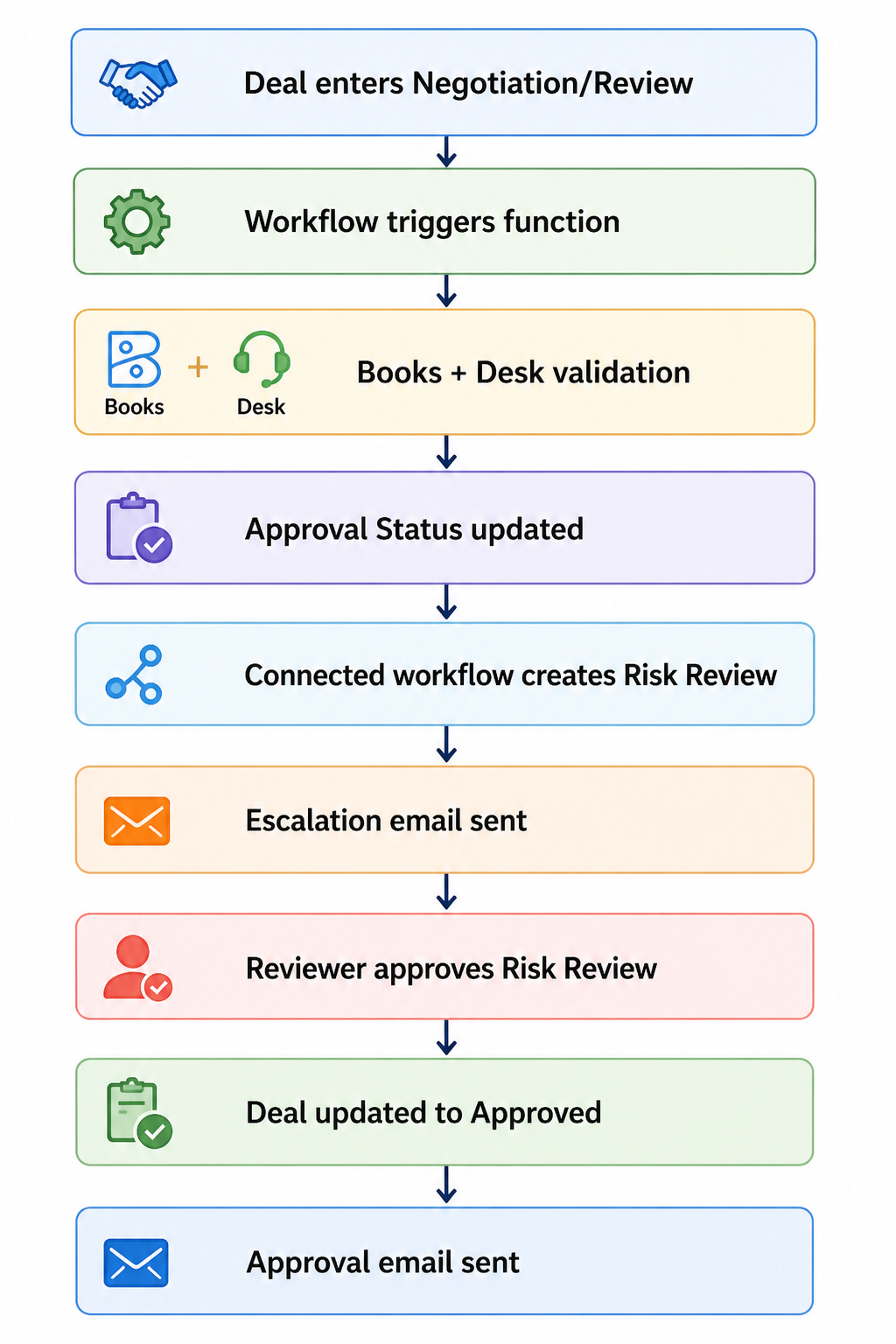

Custom Function 

Once triggered, the workflow executes a custom function.  The function accepts a single input parameter, dealId, from the workflow context and performs the validation logic in five steps.

 1. Fetch deal details from Zoho CRM   

It first fetches the deal record and extracts:

  • Deal stage

  • Deal amount

  • Current approval status

  • Account details

  • Contact details

These values are used both for qualification checks and for matching records across Zoho CRM, Zoho Books, and Zoho Desk.

 2. Check whether the deal qualifies for validation   

We do not want every deal to go through this process. The function exits if:

  • the deal is not in the Negotiation/Review stage

  • the deal amount is below ₹250000

This avoids unnecessary API calls and keeps the validation logic focused only on high-value deals. In a production implementation, this threshold can be moved into a configurable setting instead of being hard-coded in the function.

 3. Check invoice risk in Zoho Books   

The function fetches invoices using the configured Books connector and Zoho Books APIs. It then loops through the returned invoices and counts records where:

  • customer_name matches the CRM Account name

  • status is one of:

    • unpaid

    • overdue

    • draft

The count is stored in Invoice_Risk_Count.

In the current implementation, the CRM Account is matched to Zoho Books using the account display name. This works for simple cases, but according to your implementation,  it is better to match using a stable customer identifier instead of relying only on account names.


 4. Check support risk in Zoho Desk   

The function validates support risk in two stages.

First, it fetches Desk contacts using the configured desk_connection and identifies the matching contact by comparing the Desk contact email with the CRM Contact email.

Once a match is found, the function fetches Desk tickets and counts records where:

  • contactId matches the identified Desk contact

  • status = Open

The final count is stored in Open_Ticket_Count.

 5. Determine approval status   

Once both validations are complete, the function determines the new approval state:

  • if Invoice_Risk_Count > 0 or Open_Ticket_Count > 0, set Approval_Status to Escalation Required

  • otherwise, set Approval_Status to Approved

The function always refreshes:

  • Invoice_Risk_Count

  • Open_Ticket_Count

It updates Approval_Status only if the new value is different from the current one. This avoids unnecessary status updates while still keeping the numeric risk fields current.

Find the full Deluge function code here.

To make this automation safer in implementations, it is also a good idea to prevent duplicate escalations. For example, before creating or triggering a new review cycle, you can check whether an open Risk Review record already exists for the same Deal.  

Note: If you have high invoice volumes or large contact bases, extend this implementation with pagination, server-side filtering, and error handling.

Step 2: Create the Connected Workflow  

At this stage, the function has already identified whether the deal is risky.

If no risks are found, the Deal is approved and moves forward.

If risks are found, the process needs to do more: create a review record, notify stakeholders, wait for a human decision, and then update the original Deal once that decision is made. This kind of multi-record, multi-stage flow can technically be assembled using a combination of separate workflow rules and custom functions, each reacting to field changes across modules. But that means you are manually maintaining the relationships between those rules, keeping track of which record triggered what, and ensuring updates flow back correctly to the originating Deal.

Connected Workflows are built specifically for this pattern. They let you define the entire cross-record process in one place, where each stage is explicitly linked to the record that triggered it. The Risk Review stays connected to the Deal it came from, so when a reviewer approves it, the platform knows exactly which Deal to update, without you wiring that logic together separately.

This keeps the process traceable, reduces the number of moving parts you need to maintain, and makes the flow easier to extend later if you add outcomes like Rejected or Needs Clarification.

The first step is to create a Connected Workflow using the Create a Connected Workflow API, where you define the root node, name and description. After that, you can add rules using the Add a Rule to a Connected Workflow API.

Download the input JSON to create a Connected Workflow for Deals module here.

 First Connected Workflow Rule: Deal > Risk Review   

The first connected workflow rule runs when the Deal record gets updated by the function.

Trigger: Approval_Status = Escalation Required

When this happens, the rule performs two actions.

 Action 1: Create a connected record  

A connected Risk Review record gets created automatically.

Fields such as Deal name, Account, Deal amount, and risk-related details are mapped from the Deal. Additional fields such as Review_Status and Risk_Type are also populated so that reviewers can immediately understand why the Deal was escalated.

Action 2: Send escalation email  

Once the review record is created, an email notification is sent to the relevant stakeholders to inform them that the deal requires review before progressing further. This action is created using the Email Notifications API. Click here for the input JSON to create Email Notification Action request.
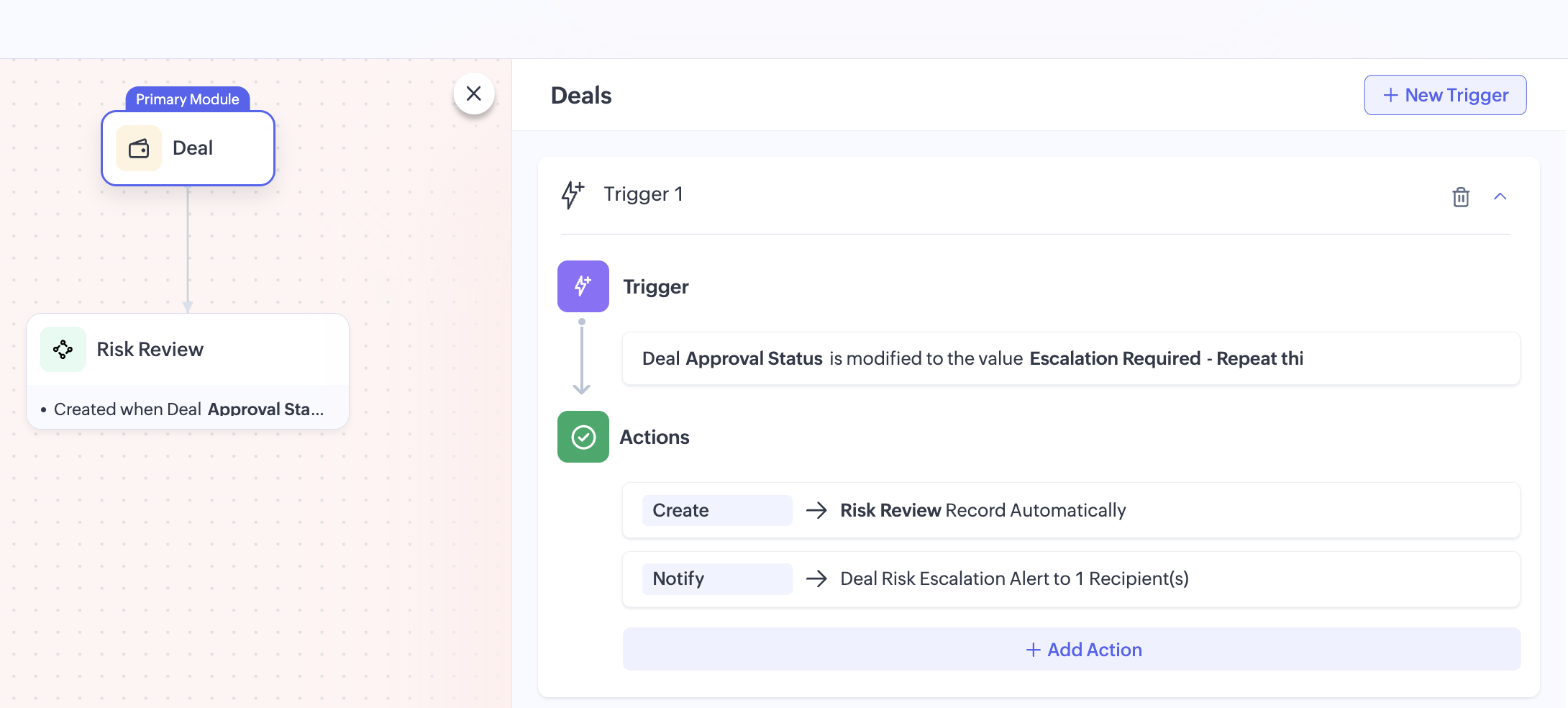

To download the input JSON for adding this rule to the Connected Workflow, click here.

 Second Connected Workflow Rule: Risk Review > Deal   

Once reviewers complete their review, the process should move back to the original Deal. This is handled by the second connected workflow rule.

Trigger: Review_Status = Approved

When the Risk Review record is updated to Approved, the rule performs two actions.

 Action 1: Update the Deal record   

The related Deal record gets automatically updated using a field update action. The Approval_Status will be updated to Approved, allowing the sales team to continue progressing the Deal. 

This action is created using the Create Field Update Action API. Click here to download the input JSON for this request.

 Action 2: Send approval email   

Once the Deal is approved, another email notification is sent.

This informs stakeholders that the review is complete, risks were addressed and the deal can now move forward. This action is created using the Create Email Notification API.

You can also extend this flow by defining additional outcomes such as Rejected or Needs Clarification, depending on your review process.

Attached files:
 

By combining Zoho CRM workflows, custom functions, Connected Workflows, and action APIs, we can turn a manual risk checkpoint into a structured and traceable approval process.

This pattern is useful whenever CRM decisions depend on data spread across multiple Zoho applications. By combining workflows, custom functions, and Connected Workflows, businesses can enforce validations, reduce manual checks, and create more reliable approval processes.

For production use, you can extend this implementation further by:

  • making the threshold configurable

  • storing stable cross-app identifiers for more reliable matching

  • preventing duplicate review creation

  • adding rejection or revalidation paths

  • logging integration failures for easier troubleshooting.

If your business process depends on data spread across multiple Zoho applications, this is a practical way to orchestrate that logic inside CRM.

You can find all the sample files used in this implementation, including the workflow JSONs, Connected Workflow configurations, email actions, field update actions, and Deluge function code here: Project files

We hope you found this useful. If you have any questions, feel free to leave a comment below or reach out to us at support@zohocrm.com


      • Sticky Posts

      • Kaizen #198: Using Client Script for Custom Validation in Blueprint

        Nearing 200th Kaizen Post – 1 More to the Big Two-Oh-Oh! Do you have any questions, suggestions, or topics you would like us to cover in future posts? Your insights and suggestions help us shape future content and make this series better for everyone.
      • Kaizen #226: Using ZRC in Client Script

        Hello everyone! Welcome to another week of Kaizen. In today's post, lets see what is ZRC (Zoho Request Client) and how we can use ZRC methods in Client Script to get inputs from a Salesperson and update the Lead status with a single button click. In this
      • Kaizen #222 - Client Script Support for Notes Related List

        Hello everyone! Welcome to another week of Kaizen. The final Kaizen post of the year 2025 is here! With the new Client Script support for the Notes Related List, you can validate, enrich, and manage notes across modules. In this post, we’ll explore how
      • Kaizen #217 - Actions APIs : Tasks

        Welcome to another week of Kaizen! In last week's post we discussed Email Notifications APIs which act as the link between your Workflow automations and you. We have discussed how Zylker Cloud Services uses Email Notifications API in their custom dashboard.
      • Kaizen #216 - Actions APIs : Email Notifications

        Welcome to another week of Kaizen! For the last three weeks, we have been discussing Zylker's workflows. We successfully updated a dormant workflow, built a new one from the ground up and more. But our work is not finished—these automated processes are

        • Recent Topics

        • Zoho Team Inbox - roadmap

          Hi, would be good to understand the Teaminbox roadmap, in particular: 1. API / Zoho Deluge connections. We have a process where the each email needs to be either tagged or assigned daily. It would be great if we could automate a 5pm alert for any exemptions
        • Zoho CRM Community Digest - July 2026 | Part 1

          Hello everyone, July is here! The first two weeks brought six CRM updates ranging from privacy-ready webforms to a significantly more powerful Layout Rules engine, two community wins worth a look (a dashboard workaround for spotting leads with no activities,
        • How do I migrate from Office 365 to Zoho Mail?

          Check out Advik Email Migration Wizard, this software is specially developed to move mailboxes from Office 365 to Zoho Webmail. In addition you can migrate from Gmail, Yahoo, Rediffmail and 80+ webmail servers to ZOHO MAIL. Isn't it amazing? This is an all in one email migration solution. Steps to export emails from Office 365 to Zoho Webmail are as follows; Run Advik Email Migration Tool in your system. Select Office 365 as source and enter its login credentials. Select mailbox folders and choose
        • Topics not loading in individual contact records in Zoho Marketing Automation

          When working correctly, an individual contact record in ZMA shows a "Topics" section in the "Subscription" tab of the individual record. However, in 2+ different Zoho accounts and different browsers, the "Topics" section doesn't load and instead it spins
        • Help: Capture full page URL in hidden field when same Zoho Form is embedded on multiple pages (iframe)

          Hi all, Goal Use one Zoho Form across multiple pages and record the exact page URL (incl. subdomain + path + hash) where the user submitted it. Example pages: https://www.example.com/cargo/ https://www.example.com/cargo/containers/#contact https://cargo.example.com/auto/
        • how to get transcripts with speaker and time marks?

          Hello, I downloaded the transcript of a recent meeting and noticed that the TXT file does not bring the speaker name and the time mark. Is there any way to make it happen using ootb resources from Zoho Meeting? best
        • SalesIQ's Summer '26 Release: For The Moments That Matter

          Every customer journey is made up of moments. The moment someone discovers your business. The moment they need help. The moment you decide to reach out. The moment a simple chat turns into something more. And the moments that continue long after the conversation
        • Cannot deploy digital employee-

          I followed the guide here https://help.zoho.com/portal/en/kb/salesiq-2-0/for-administrators/operators/articles/zia-agents-in-zoho-salesiq#Supported_SalesIQ_Tools but no matter how many times I try I cannot for the love of god make it work I get this error
        • Displaying only unread tickets in ticket view

          Hello, I was wondering if someone might be able to help me with this one. We use filters to display our ticket list, typically using a saved filter which displays the tickets which are overdue or due today. What I'd really like is another filter that
        • 【受付開始】Zoholics Japan 2026 開催のご案内

          Zoho が年に一度開催するユーザー向けイベント「Zoholics」。 今年は 「AI-Powered DX with Zoho」 をテーマに、2026年9月25日(金)に 東京駅直結の会場とオンラインのハイブリッド形式で開催します。 今すぐ申し込む AIの活用が加速する今、業務効率化やDX推進に取り組む企業にとって、 「どのようにAIを業務へ取り入れ、成果につなげるか」が重要なテーマとなっています。 Zoholicsでは、Zohoの最新AI機能や製品アップデートに加え、実際の活用事例や業務改善のヒントをご紹介します。
        • Print checks for owner's draw

          Hi.  Can I use Zoho check printing for draws to Owner's Equity?  This may be a specific case of the missing Pay expenses via Check feature.  If it's not available, are there plans to add this feature?
        • Reconciliation: don't auto-select transactions outside the entered Period

          When initiating a reconciliation for a defined Period (say April 1 to April 30), Zoho Books auto-checks transactions whose Statement Detail dates fall after the period end date. With "Show based on grouped bank statements" enabled (the default), the screen
        • How can be requests for new job managed in Zoho recruit?

          If we use both Zoho people and recruit, can our managers (heads of department) use Zoho products to create requests for new job to HR department? The current workflow is following: a head of department needs some extra HR, he creates a request describing the job and send it to HR director, HR director approves a request and forward to a HR manager. I see only one way to partly solve the problem - grant the heads of departments recruit administrator permissions, so they could create new jobs. It is
        • Linking the Overview window between reports on a dashboard

          Is there a way to link the Overview window for two or more charts on a dashboard? We have several dashboards where users often want to set the window for 3 or 4 reports to the same time period. Doing it manually is time-consuming and cumbersome, but I
        • Subforms and automation

          If a user updates a field how do we create an automation etc. We have a field for returned parts and i want to get an email when that field is ticked. How please as Zoho tells me no automation on subforms. The Reason- Why having waited for ever for FSM
        • "code":3001 ["Failed to update data."]

          I would like to seek your expertise - I might be wrong on my approach also.. I highly appreciate your advice. 1 problem remains is when a new row was added on the existing one [from another form that trigger upon Successful form submission ], it gets
        • BUG: If you put "Blueprint" at the top of Workqueue, tab switching leads to long loading and no display

        • WORKFLOW ISSUE: Zoho Finance Extension

          Workflows are no longer triggering in my extension. This is true for the testing environment and 5 other organizations it is installed on. There are no conditions set for the workflow, and this is true for both create and delete related actions. Workflows
        • Drive Zoho CRM adoption and usage through our native integration with Zoho DAP

          You chose Zoho CRM for its depth: its powerful automation, its rich analytics, and its extensive customizability. But there's a hidden last mile in every rollout: the gap between the software's capabilities and your team's daily execution. When new hires
        • Moving from Office365 to Zoho Mail

          I have few mailboxes on Office365. One of the mailbox is coming up for renewal. How can I move this mailbox to Zoho Mail and continue to have other mail boxes continue to use Office365 mail? Thanks, -Naveen
        • Best sales insights for target accounts?

          Question for all the sales power-users out there: I would like to gain insights from Zoho CRM for a rotating list of target accounts. Each Outside Salesperson has 5 target accounts, and they can change these targets quarterly with management approval.
        • WhatsApp Vendors

          Hello, so WhatsApp works with the below, mainly with the customer side modules. Can we get functionality on the vendor side modules? WhatsApp is often the preferred method of communication with some vendors. Credit Notes Payment Receipts Sales Receipts
        • Text on Zoho Sign confirmation dialouge is very small compared to text used everywhere else on Zoho Sign.

          I've reported multiple times through Zoho's support email that the text on this notification is very small in contrast to all the other text on the Zoho Sign app. I think it's a bug and it just needs the font size to be increased. It's very minor but
        • Time Zone is incorrect

          Time zone is not working properly...I've checked it twice. I'm eastern U.S. time it's currently 12:22 pm EST. CRM shows 3:22 pm EST.
        • Over-the-Air (OTA) Updates for V3 Attendee Apps | Zoho Backstage

          Keeping participants on the latest version of your event app shouldn’t depend on App Store or Play Store review timelines. With Over-the-Air (OTA) updates for our V3 attendee app, the latest version is delivered directly to participants through an in-app
        • Please Remove the Confirmation Popup

          Currently, every time a recruiter changes the status of a candidate in Zoho Recruit, a popup confirmation appears that requires clicking “OK, Got it” before proceeding. This creates unnecessary friction in the workflow, especially for users handling high
        • Zoho Projects: Q2 Updates 2026

          Dear Users, During the first quarter, we launched our most advanced version of Zoho Projects, namely Zoho Projects Infinity. With support for Custom Modules, Custom Dashboards & Reports, along with built-in AI tools, we enabled users to create their own
        • Overview on users IMAP settings

          We have about 30 users who all have the channels/email/email configuration/IMAP integration/O365 enabled and emails are synchronized. Here my problem: Passwords for the email accounts are expiring on individual bases and most of the users forget to update
        • What is a realistic turnaround time for account review for ZeptoMail?

          On signing up it said 2-3 business days. I am on business-day 6 and have had zero contact of any kind. No follow-up questions, no approval or decline. Attempts to "leave a message" or use the "Contact Us" form have just vanished without a trace. It still
        • crm to books

          We currently sync CRM Contacts to Zoho Books Customers using two-way sync. We now wish to change to "Accounts & their Contacts". What happens to existing Books customers? Will they be merged with CRM Accounts, duplicated, left unchanged, or recreated?
        • Alternate color rows

          After I changed the background color to a dark gray and changed the alternate rows to a light gray. I have discovered that I can no longer change the text in the light gray rows to Bold.
        • Tax/Vat Number Field As Standard - Customer & Vendor

          Hello, when are you'll going to have the customer & vendor tax/vat number as a standard field under the relevant profile pages? I find it strange that after 6 years of using Zoho Inventory that I still have to use a custom field for a tax/vat number,
        • Restricting coupon codes and plans to specific customers

          Having the ability to restrict coupon codes, plans and add ons to specific customers (new or existing) e.g. sending an invite link out to a certain customer or allowing a certain group of customers the ability to use a certain promo code or sign up to
        • Coupon Management Lacks functionality

          Hey Zoho Team, Let me start of by saying I'm a huge fan of the entire Zoho suite. I have a couple of thoughts about the way coupons are handled and believe there they are in need of some improvement. There are a couple of key issues: 1. Coupons need to
        • Free Webinar Alert! Zoho Mail + Zoho CRM: Turn inbox replies into CRM deals

          Hello Zoho Community! Are your sales conversations happening in Zoho Mail while your customer data lives in Zoho CRM? Join our upcoming webinar to learn how integrating the two can help you automate follow-ups, capture leads faster, and keep every customer
        • Introducing the Employee Portal for internal job posting

          Employee referrals and internal applications are one of the most trusted hiring channels. But in many organizations, employees only hear about openings through messages, word of mouth, or after the role has already been open for a while. When employees
        • Marketing Tip #42: Keep policy pages updated and accessible

          Policy pages may not be the most exciting part of your store, but they play a big role in building trust. Before buying, many customers look for information on shipping, returns, refunds, privacy, and terms. If these pages are missing, outdated, or hard
        • Extend the Image Choice Field

          Hi, The New Yes/No field is great for what it does, and the Image Choice Field is good but could be better with some functions from the Yes/No field. Take an example, rather than just Yes/No you want Yes/No/Maybe (Or more than 3 choices), but unlike the
        • Migrate from Zoho Mail to G Suite

          I am unable to find any documentation on how one can migrate from Zoho Mail to another platform, like G Suite or Office 365. Please point me to the right documentation. Thank you.
        • The All New Attendee App | Zoho Backstage

          The Zoho Backstage attendee app is the primary touchpoint for attendees, speakers, exhibitors, and sponsors during an event. It helps participants access event information, manage their schedules, connect with other participants, engage with exhibitors
        • Next Page