Kaizen 249: Build an AI Room Recommendation Assistant with CRM Widgets, Catalyst, and Zia Agent

Kaizen 249: Build an AI Room Recommendation Assistant with CRM Widgets, Catalyst, and Zia Agent


Welcome to another week of Kaizen!

This Kaizen post is inspired in part by Zoho CRM’s hospitality use-case article, which presents a broader AI-powered CRM approach for guest personalization and hotel operations. That use case spans additional scenarios such as identity validation, self check-in, and competitor bench marking, whereas this Kaizen focuses specifically on building a guest room recommendation assistant using Zoho CRM Widgets, Catalyst, and Zia Agents.
In the hospitality business, every guest interaction is an opportunity to create a lasting impression. Returning guests expect hotels to remember their preferences, anticipate their needs, and personalize each stay.

Business Problem

Imagine a front desk executive opening a guest's CRM record before check-in. The CRM record contains details from previous stays, room preferences, and special requests. 
Consider this guest profile of Ms. Elene Martinez.
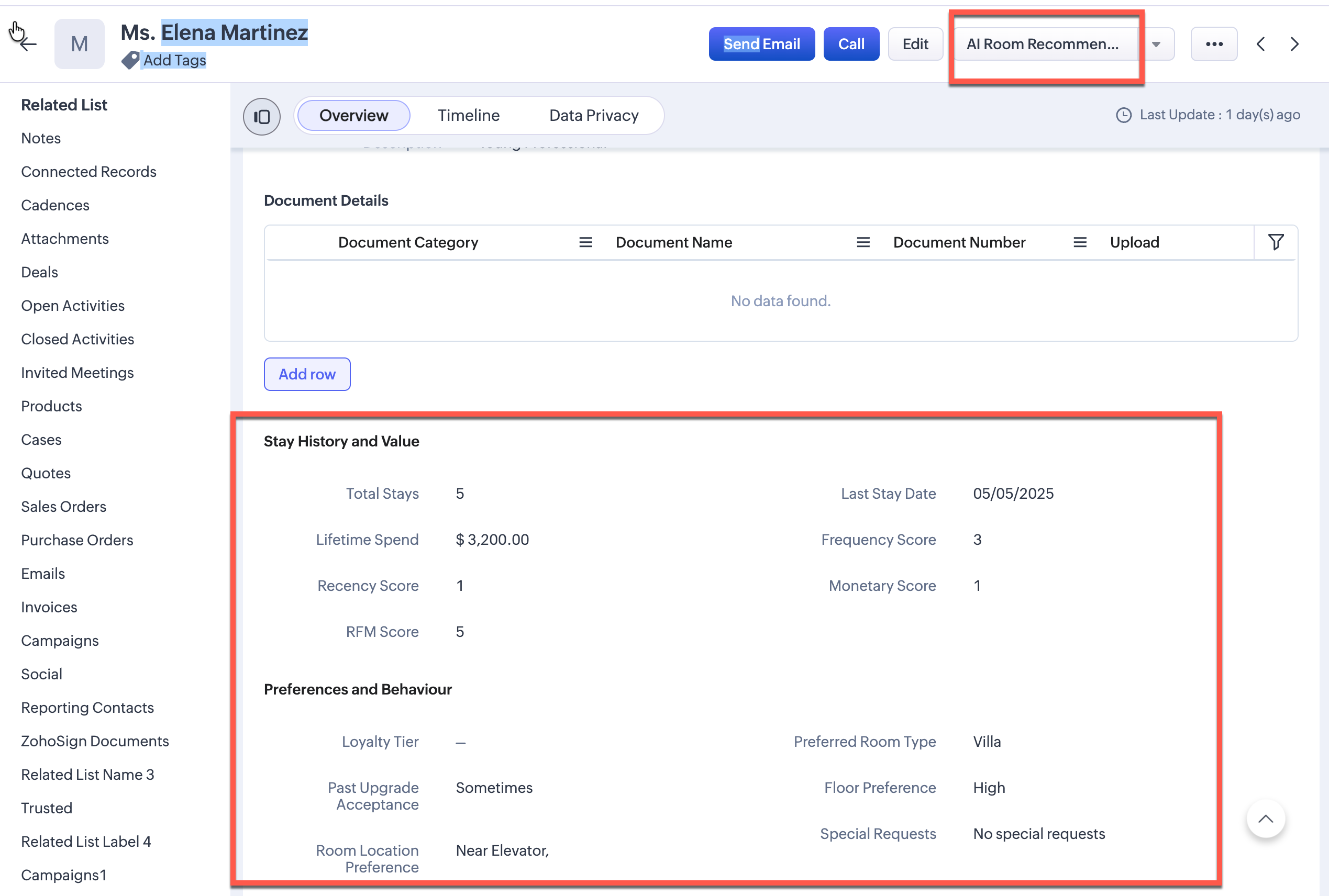

These are the key points the record:
  1. 5 previous stays
  2. High lifetime spend
  3. A preference for rooms near elevator
The hotel has dozens of available rooms. If dozens of rooms are available, which one should be assigned to her?
While all the required data already exists in CRM, the executive still has to review the guest profile manually, compare it against available rooms, remember special requests, and make the best possible decision. This process is time-consuming and tedious.

Solution

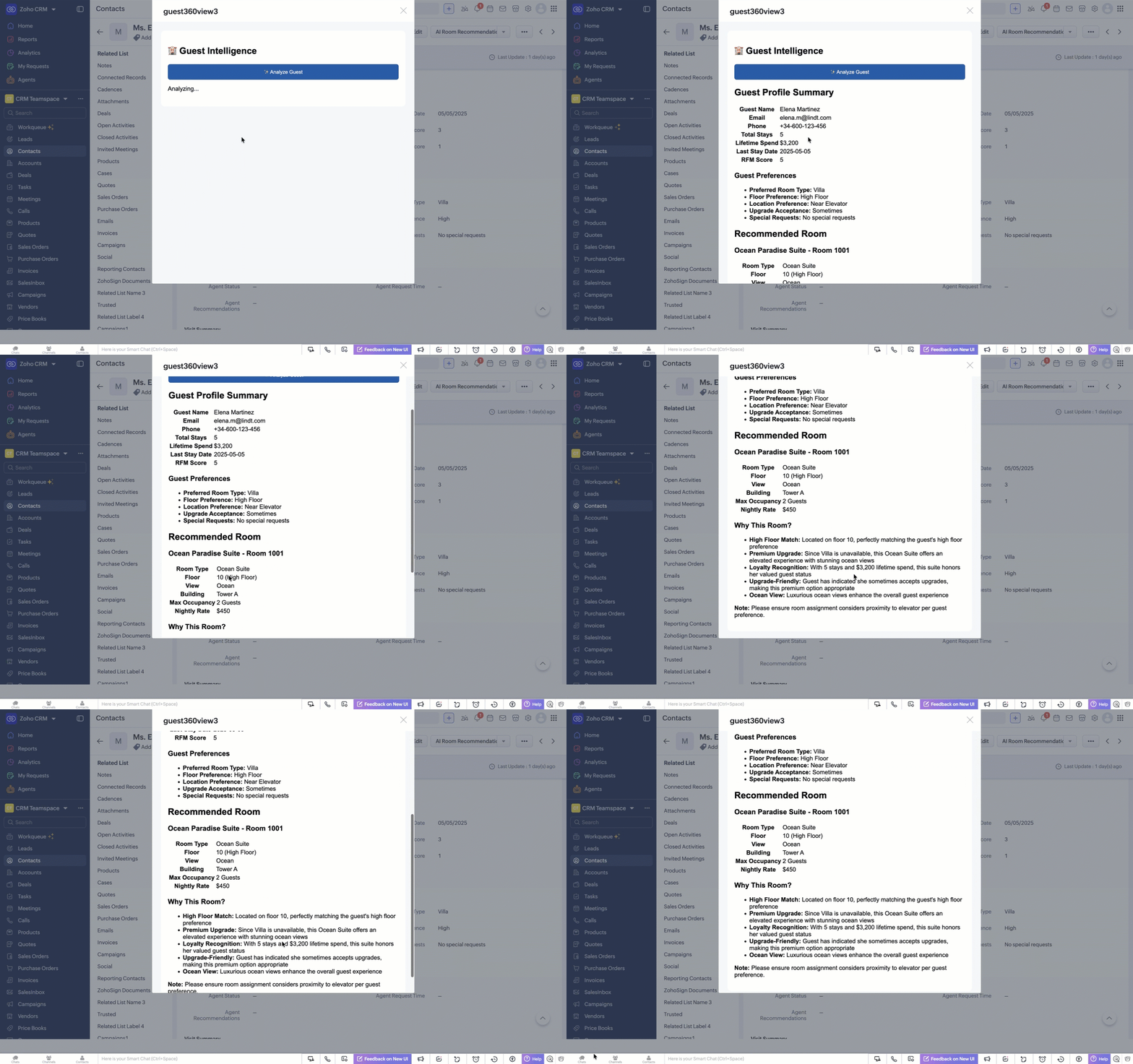
Instead of relying on manual analysis, we can delegate this reasoning to an AI agent. A front desk executive can simply click the button AI Room Recommendation Then, by clicking on Analyze Guest, the user can trigger a Zia Agent that will review the guest profile, evaluate the available rooms, and generate a recommendation within seconds.
In this Kaizen post, we will combine Zoho CRM Widgets, Catalyst Functions, Catalyst Connections, and Zia Agent to build an intelligent assistant that generates personalized room recommendations directly inside Zoho CRM.
We will place a custom button, AI Room Recommendation, inside the Contact record. When clicked, it opens a CRM widget where the executive can analyze the guest and view the recommendation.
When the front desk executive clicks Analyze Guest, the system will:
  1. Identify the current guest
  2. Retrieve the guest profile from CRM
  3. Send the guest context to a Zia Agent
  4. Allow the agent to fetch additional CRM data using CRM tools
  5. Generate a personalized room recommendation
  6. Display the result inside the CRM widget

Architecture

This solution has four parts:
  1. Zoho CRM Widget – captures the current Contact ID and displays the recommendation
  2. Catalyst Advanced I/O Function – receives the Contact ID and triggers the Zia Agent
  3. Catalyst Connection – securely manages authentication for the Zia Agent API
  4. Zia Agent – fetches CRM data, reasons over guest preferences and room availability, and returns the recommendation as HTML
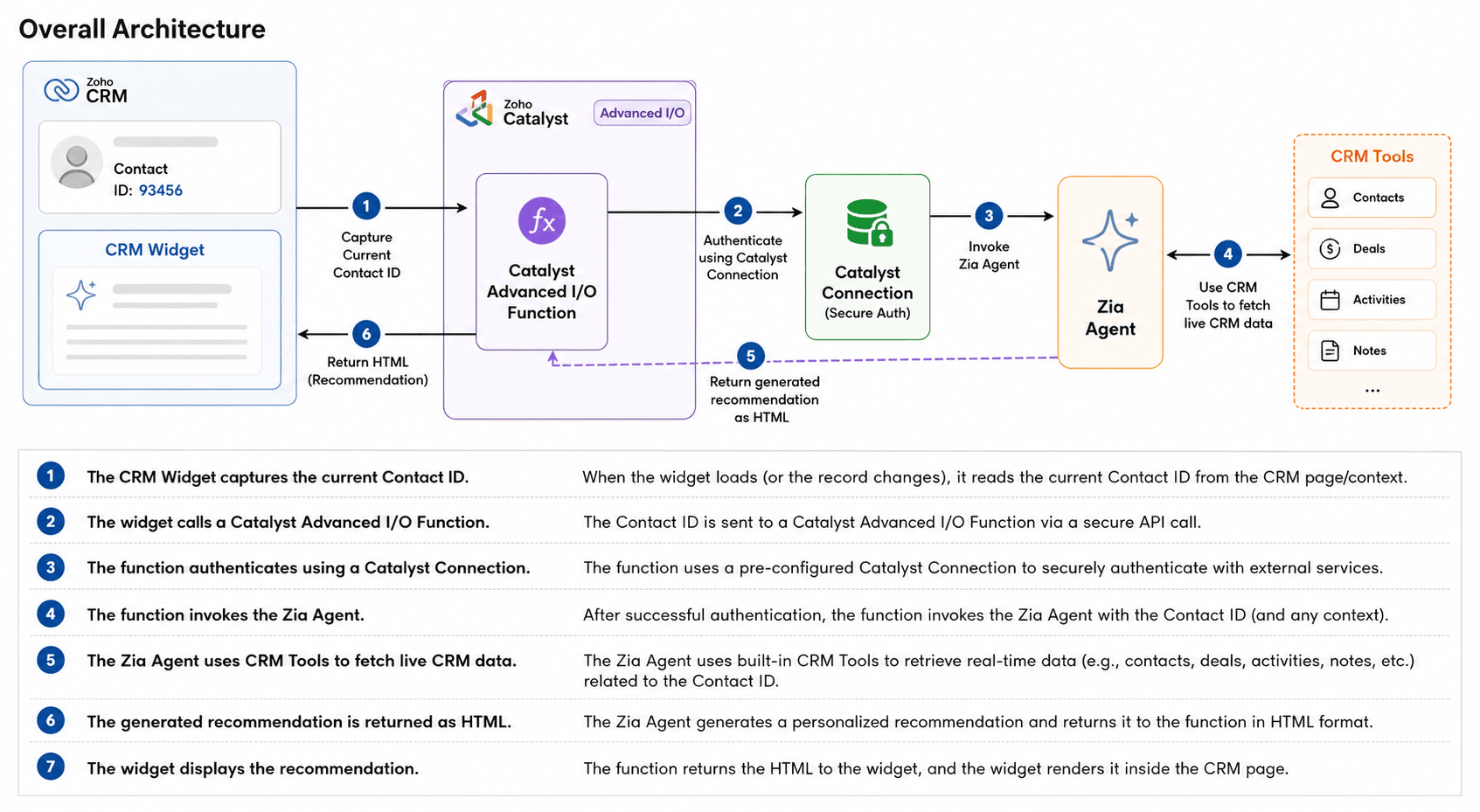
Although a Zia Agent can be invoked directly from a custom button, in this solution we use a Zoho CRM widget and Catalyst function. This gives us more flexibility for future customization, such as returning additional data like the recommended room ID, integrating a booking action, applying business rules, etc.

Implementation

Step 1 – Create a Zia Agent

Create a Zia Agent that can recommend the best room for a guest based on their CRM profile. 
The agent should have access to the required CRM tools, such as:
  1. crm_getRecordById to fetch the Contact record
  2. crm_getRecords to retrieve records from the rooms module

Agent Prompt:
The prompt is sent from the Catalyst Function.

Agent Instructions:
Provide agent instructions based on your module and field details.
**Guest Profile Data Structure (from Contacts module):**

Each guest profile has these fields:
- First_Name: Guest's first name (e.g., "Michael")
- Last_Name: Guest's last name (e.g., "O'Brien")
- Full_Name: Combine First_Name + " " + Last_Name for display
- Email: Guest's email address
- Phone: Guest's phone number
- Loyalty_Tier: Diamond, Platinum, Gold, Silver, Bronze
- Total_Stays: Number of completed stays
- Lifetime_Spend: Total revenue from this guest in USD
- Last_Stay_Date: Date of most recent stay (YYYY-MM-DD)
- Preferred_Room_Type: Guest's preferred room category
- Past_Upgrade_Acceptance: Always, Sometimes, Never
- Floor_Preference: High Floor, Mid Floor, Low Floor, Any Floor
- Room_Location_Preference: Quiet Area, Near Elevator, Pool View, Garden View, Ocean View, Beach View, City View
- Special_Requests: Any special requests (multi-line text)
- RFM_Score: Combined Recency, Frequency, Monetary score (max 15)

**Available Rooms Data Structure (from Rooms module):**

Each room in the availableRooms list has these fields:
- Name: The room's display name
- Room_Number: Physical room number
- Room_Type: Category (e.g., "Ocean Suite", "Executive Suite")
- Floor_Number: The floor the room is on
- Building_Wing: Building identifier
- Max_Occupancy: Maximum guests allowed
- Base_Price: Nightly rate in USD
- View_Type: View from the room (e.g., "Ocean", "City", "Garden")

You can test the agent directly in the test bed.


Once the response is validated, Deploy the agent using connection to Zoho CRM.
Deploying the agent creates a new Agent Version that can be invoked through the Zia Agents Trigger API. Your Catalyst function calls this deployed version whenever a user clicks Analyze Guest in the CRM widget.
In the deployed Zia Agent configuration, these CRM tools, crm_getRecordById  and crm_getRecords, are attached to the agent, so when the Catalyst function triggers the agent with the Contact ID, the agent can independently fetch both the guest detail from Contacts module and the available room inventory from Rooms module.

Step 2 – Create the Catalyst Project

Create a Catalyst project to host the server-side logic.
In this solution, a Catalyst Advanced I/O Function (NodeJS stack)  is used to:
  1. receive the Contact ID from the CRM widget
  2. invoke the Zia Agent
  3. return the generated HTML back to the widget
Using a Catalyst function keeps the widget free from business logic. It is also easier to maintain and avoids exposing credentials in the browser.  Since the Zia Agent response is asynchronous, the Catalyst function is a good place to handle the request lifecycle and error management. You can find the Catalyst function call in the Kaizen github repository. Replace the Zia Agent org id and api end point in the function.
 
Expose the Advanced I/O Function through Catalyst > Cloud Scale > API Gateway.
This provides an endpoint that can be called directly from the CRM widget.

Step 3 – Secure Authentication with Catalyst Connections

The Catalyst function needs to invoke a protected Zia Agent API. Instead of embedding OAuth tokens in code, we will create a Catalyst Connection. Create a Connection "ziaagent" in Catalyst for Zia Agent.
Grant the required scope: ZiaAgents.agents.TRIGGER


This keeps authentication centralized and secure.

Step 4 – Create the CRM widget

We use a button-type CRM widget because we want the recommendation to appear directly alongside the guest record.
Using the Widget SDK, the current Contact ID is captured.
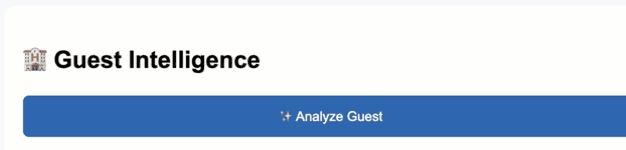
When the user clicks “Analyze Guest” in the widget, it shows a loading message and sends a POST request to your Catalyst serverless function endpoint with { contactId } as JSON.  When the Catalyst function returns a successful response, the widget renders the returned HTML on the screen. You can find the widget code in Kaizen github repository. Replace with the Catalyst serverless function URL in the widget code.

The widget sends only one value:
Contact ID
The Catalyst function forwards it to the Zia Agent:
systemArgs: {
    crm_getRecordById: {
        record_id: contactId
    }
}
As the response is rendered inside a CRM widget, the Zia Agent is instructed to return HTML instead of Markdown. This allows the widget to display the recommendation directly without any additional parsing or formatting.

Final Experience   

Now, when the front desk executive clicks Analyze Guest, the assistant:
  1. reviews the guest profile
  2. reasons over CRM and room availability data
  3. recommends the best available room
  4. explains the rationale behind the choice
  5. suggests alternative options
All of this happens within a few seconds, directly inside Zoho CRM.

Conclusion   

By combining Zoho CRM widgets, Catalyst function, Catalyst Connections, and Zia Agent, we built an AI-powered assistant that transforms guest data into actionable recommendations without leaving CRM.

Although our example focuses on hospitality, the same architecture can power intelligent assistants for sales, customer support, insurance, healthcare, and many other domains where AI needs to reason over CRM data. For example:
  1. Sales: An AI sales coach that analyzes customer interactions, open deals, past purchases, and activities to recommend the next best action, identify upsell opportunities, or generate personalized follow-up emails.
  2. Customer Support: A support assistant that reviews previous tickets, product history, and customer sentiment to suggest troubleshooting steps, draft responses, or recommend escalation when necessary.
  3. Insurance: An underwriting or claims assistant that retrieves policy details, claim history, and customer interactions to summarize cases, identify missing documents, and recommend the next processing step.
  4. Healthcare: A patient engagement assistant that uses appointment history, care plans, and previous interactions to generate follow-up recommendations, appointment reminders, or personalized wellness guidance.
We hope this Kaizen post is useful. If you have questions or suggestions, share them in the comments. 


      • Sticky Posts

      • Kaizen #198: Using Client Script for Custom Validation in Blueprint

        Nearing 200th Kaizen Post – 1 More to the Big Two-Oh-Oh! Do you have any questions, suggestions, or topics you would like us to cover in future posts? Your insights and suggestions help us shape future content and make this series better for everyone.
      • Kaizen #226: Using ZRC in Client Script

        Hello everyone! Welcome to another week of Kaizen. In today's post, lets see what is ZRC (Zoho Request Client) and how we can use ZRC methods in Client Script to get inputs from a Salesperson and update the Lead status with a single button click. In this
      • Kaizen #222 - Client Script Support for Notes Related List

        Hello everyone! Welcome to another week of Kaizen. The final Kaizen post of the year 2025 is here! With the new Client Script support for the Notes Related List, you can validate, enrich, and manage notes across modules. In this post, we’ll explore how
      • Kaizen #217 - Actions APIs : Tasks

        Welcome to another week of Kaizen! In last week's post we discussed Email Notifications APIs which act as the link between your Workflow automations and you. We have discussed how Zylker Cloud Services uses Email Notifications API in their custom dashboard.
      • Kaizen #216 - Actions APIs : Email Notifications

        Welcome to another week of Kaizen! For the last three weeks, we have been discussing Zylker's workflows. We successfully updated a dormant workflow, built a new one from the ground up and more. But our work is not finished—these automated processes are

        • Recent Topics

        • Why can't we choose Fixed Asset account for Purchased Items? (eTims issue?)

          Hello, When the company purchase items not for sale and not supposed to be in the inventory stock, like equipment for operational use, there is no way to access the Fixed Asset accounts in the drop down list. Is that an eTims limitation again? Or something
        • "Track Inventory for this item" is forced checked by default for goods items (eTims issue?)

          Hello, Since connecting our Zoho books to eTims (Kenya) the "Track Inventory for this item" is forced checked by default (eTims issue?) in the Item creation page for any type of goods. So when purchasing anything that the company does not intend to sale,
        • Zoho CRM Functions: Redesigned Interface, Rich Analytics, and Multi-Language Support

          Hello everyone! We have given Functions in Zoho CRM a major overhaul with a new interface that makes it easier to build, organize, monitor, and troubleshoot your functions throughout their lifecycle. As part of this revamp, we have also introduced a unified
        • Can you import projects into Zoho Projects yet?

          I see some very old posts asking about importing project records into Zoho Projects. But I can't find anything up to date about the topic. Has this functionality been added? Importing tasks is helpful. But we do have a project where importing projects
        • reset password

          Hi I need to reset my password and need help
        • Is it possible to set a value to a field based on certain conditions

          Greetings Say i have a field that i want to set its value based on the value of another field.. for example if "number" field has value greater than 10, i want to set my field's value to X. Or if radio group had option 1 selected, then i want to set my
        • Native SMS and MMS Channel Support

          89% of US consumers say they prefer to communicate with businesses via SMS / MMS (aka "texting"). (link) Unfortunately, Zoho Desk does not currently support the most popular channel for consumer communications in the United States. For those of us in
        • Zoho CRM Layout Rules: Nine New Actions, Profile-Based Execution, and Interactive Preview

          Hello everyone, Availability: This feature is now available for customers in the JP and SA DCs. It is planned to be released for other customers in soon. We’re excited to announce powerful new enhancements to Layout Rules in Zoho CRM - a feature built
        • Global Sets for Multi-Select pick lists

          When is this feature coming to Zoho CRM? It would be very useful now we have got used to having it for the normal pick lists.
        • How to add line breaks in formula with Concat?

          I am trying to combine different fields with a formula field, but want to add line breaks.  I.e. the current code looks like:  Concat(${Contacts.Company_Name}, ' ' ,${Contacts.First_Name}, ' ' ,${Contacts.Last_Name}) And the result should be:  John Doe
        • Introducing spam detection for webforms: An additional layer of protection to keep your Zoho CRM clean and secure

          Greetings all, One of the most highly anticipated feature launches—Spam Detection in webforms—has finally arrived! Webforms are a vital tool for record generation, but they're also vulnerable to submissions from unauthenticated or malicious sources, which
        • Is Zoho Assist Secure Connect even practical for 1 person shop?

          I was gun ho with Zoho Assist to replace my existing Remote Access product I have been using but I need to implement MFA on each unattended connection. Right now each of these connections in my other product has a rotating token that I have enter off
        • Join the Zoho Desk Virtual Classroom Training (VCRT)

          Hello everyone, Have you heard about Zoho's Virtual Classroom Training (VCRT)? Zoho Desk's Virtual Classroom Training offers end-to-end training for Zoho Desk users. Join the VCRT and get hands-on guidance for setting up Zoho Desk and getting your business
        • Zoho CRM's revamped timeline view now extends to 3 years and support notes, filters, and email statuses

          Editions: All DCs: All Release plan: These enhancements are being rolled out to customers in a phased manner. They will be available to most organizations by the end of May. For organizations with huge volumes of data, they will be available by the end
        • Zoho Mail App Unable to connect to server

          Hi all, For the last two weeks, my Zoho Mail App on my iPhone which has worked fine up to this point has been unable to connect to the mail server. I can't access my emails even though I will get notification banners on the screen saying that they have been received. I can open Safari on my phone and then log in that way. This issue happens when I'm connected to wifi and on my phone data.  I've tried deleting the app several times and reinstalling, and have updated to the latest version. But it still
        • Specific ListView Canvas on Canvas Home Page Always Loads Most Recent ListView, Not the One Specified

          I had mentioned this to ZOHO, but I mainly wanted to see if others in the Community are also facing this problem. I created a Canvas ListView for a Custom Module, and then created a Canvas Home page (technically on a tab item, but I'm not sure if that
        • Add the Zoom Option to the Camera

          Hi, I use the ZOHO Forms Camera so I can manage metadata, compression, etc. but this doesnt have the zoom parameter activated, so when we have photos in a tight space and want to use 0.5 for example, we can't, can this be enabled please. Thanks Dan
        • Manage booking pages from your Android phone

          Hello everyone! We are happy to announce that users can now add and manage booking pages from their Bigin Android app. It is a multi-step form that users can create for purposes like booking appointments, scheduling calls or meetings, conducting webinars,
        • New UI - Color Preference Not Saving Permanently

          Small, not very urgent problem I'd like to share regarding the new UI theme color. I've changed my theme preference to the default blue color around 20 times by now. It always reverts to a green color theme. I've followed the instructions of changing
        • Automating Employee Birthday Notifications in Zoho Cliq

          Have you ever missed a birthday and felt like the office Grinch? Fear not, the Cliq Developer Platform has got your back! With Zoho Cliq's Schedulers, you can be the office party-cipant who never forgets a single cake, balloon, or awkward rendition of
        • Unbundle feature for composite items

          We receive composite items from our vendors and sell them either individually or create other composite items out of them. So, there is a lot of bundling and unbundling involved with our composite items. Previously, this feature was supported in form
        • Inventory Barcode Creation - Add Picture of Item

          Hi I am trying to set up bar code labels and include a picture of the item on the label - any idea on how to add that field to the barcode generator?
        • Gemini Action - Add "inineData" Support

          Thank you guys for adding a Gemini action. I like Gemini models for the "grunt work" of AI, as they have the cheapest tokens of the trustworthy providers One thing that's missing in the action, though, is the ability to pass file data. If you pass a base64-encoded
        • Protect backed up and exported data using password encryption

          Hello everyone, Protecting live data is crucial for any organization or product, as it contains sensitive customer information. However, protecting data does not end within the platform. Backup and export files often contain sensitive information and
        • Smarter holiday planning with yearly-specific Holiday Lists

          Hello everyone! Managing holidays and business hours is now easier and more efficient. Holiday Lists now support holidays that fall on different dates every year, while business hours now supports more than one holiday list. This helps businesses manage
        • Zoho Projects - Cloning a task does not trigger task workflow when created

          Hello! I have a Project where my team uses a set of tasks from a tasklist as templates, so we could simply clone it and drag it to another list in kanban view to avoid creating a new one from scratch. The process works well, but after cloning it the new
        • Best way to setup Inventory bin tracking for products with multiple boxes/crates

          Hi - we need some advice from the community on setting up Items in the Inventory for products with multiple crates. We have large products in our warehouse where the product is delivered as two large (double pallet) crates. We've setup the Items for these
        • Cliq iOS can't see shared screen

          Hello, I had this morning a video call with a colleague. She is using Cliq Desktop MacOS and wanted to share her screen with me. I'm on iPad. I noticed, while she shared her screen, I could only see her video, but not the shared screen... Does Cliq iOS is able to display shared screen, or is it somewhere else to be found ? Regards
        • not able to access Zoho from home WIFI

          for some reasone i am not able to access Zoho on my laptop or my iphone while i am connected to my home Wifi, i am able to access these sites both on laptop as well as Iphone and associated apps on any other Wifi as well as when I am on my 4G connection
        • Five Guided Conversations Updates in Zoho Desk

          Hello everyone, Guided Conversations is getting updates that make it easier to create more inclusive customer experiences, retain important conversation context, customize your widget, keep track of changes, and connect with external services. Here are
        • zoho desk

          Hello, Did Zoho Desk have any issues today? Are tickets coming in late? I have an email account linked, and messages seem to be arriving with a delay—some email threads aren't coming through completely, and so on.
        • An important update for Zoho Cliq desktop users

          The latest version of the Zoho Cliq desktop app (v1.8.0) will no longer be supported on macOS 10.15 Catalina and earlier versions. This is because the framework we use (Electron) no longer supports some older macOS versions. If you’re using macOS 10.15
        • Simplify eSignatures: Automate document workflows with Zoho WorkDrive

          Hello everyone, We’re excited to invite you to our upcoming live webinar, where Zoho WorkDrive and Zoho Sign will come together to show you how to simplify and automate document workflows. From creating and collaborating on documents to approvals, e-signatures,
        • Function #7: Fetch a value from Deal in Zoho CRM to the related Estimate in Zoho Books

          We're here with another function for those using the integration with Zoho CRM. You know that potentials can be linked to transactions in Zoho Books. But if you're including additional details about a Deal (potential) in Zoho CRM and you want to inherit
        • Turn off workflow Applied pop-up

          hi We are new to Desk. I have a rule to set to "waiting for customer" when agent sends reply. This comes up every time. How to i turn off? Or am i seeing as admin.
        • Workflows being applied and the Large unwanted popup

          When a workflow is being applied do to an action, then the Agent is left with a large Window asking if they would like the see the changes this workflow did. Is there any way to disable this prompt from appearing?
        • Maintenance notice for Zoho CommunitySpaces US data centers on August 23, 2026

          Dear customers, We have scheduled a maintenance activity for Zoho CommunitySpaces in our United States (US) data centers on August 23, 2026, from 1:30 a.m. to 2:00 a.m. During this 30-minute maintenance window, Zoho CommunitySpaces will be temporarily
        • Knowledge base: The nitty-gritty of SEO tags

          A well-optimized knowledge base with great SEO can benefit your company by allowing customers to find help articles and support resources using search engines. This enables customers to quickly and efficiently find the information they need without direct
        • zoho desk: Can tickets be created from Microsoft Teams messages?

          I am trying to see if there is a way to integrate Microsoft teams with zohodesk. we have a few customers who prefer to communicate requests through Teams, and it would be great to create tickets when they do.
        • ´´Send Email Reply´´ action does not work when the message body contains placeholders.

          Hi Community, I am working on a workflow where the Customer contact is notified via email when their ticket status goes On Hold. To do that, I chose the Send Email Reply action, and the minute I add a placeholder, the workflow does not work and the ticket´s
        • Next Page