Let’s Talk Recruit: Forms that think before you do!
Let’s Talk Recruit: Forms that think before you do!


Welcome back to our
Let's Talk Recruit series. In our previous post, we shared highlights from our community meetups held across India.

This time, we’re talking about something that often gets overlooked but makes a huge difference once you set it up right: Webforms and Form Rules.

Let’s say you're rolling out a hiring drive or posting jobs on multiple channels. Candidates start pouring in—but half of them forget to attach their resumes, a few skip critical questions, and some apply to the wrong roles altogether. And that’s before you’ve even started shortlisting.

That’s exactly the kind of cleanup Webforms and Form Rules are built to prevent. They help you collect the right details, personalize the experience for candidates, and automate the little things that usually slow you down. And once you get the hang of them, you'll wonder why you didn’t start sooner.

The Problem

If your team still relies on email attachments or inconsistent spreadsheets to gather applicant info, chances are you’re wasting time fixing errors that shouldn’t exist in the first place.

  • Candidates entering outdated contact details

  • Missing info on key fields like skill set, location, or availability

  • Manually categorizing candidates for different roles or hiring pipelines

Without a structure in place, things slip through the cracks. And when you're hiring at scale, that’s a problem.

Why Webforms matter  

A webform is often the first step a candidate takes to engage with your company. Whether it’s embedded on your careers page, linked on a social post, or shared during campus drives — it sets the tone.

But a lot of recruiters still use basic forms. Candidates fill them out, and then it’s a game of manual edits, sorting, and follow-ups.

What if the form did more? What if it already knew:

  • Which fields to show and when?

  • Whom to assign the record to?

  • Whether the candidate should be redirected after submission?

That’s where form rules come in.

What are Form Rules?  

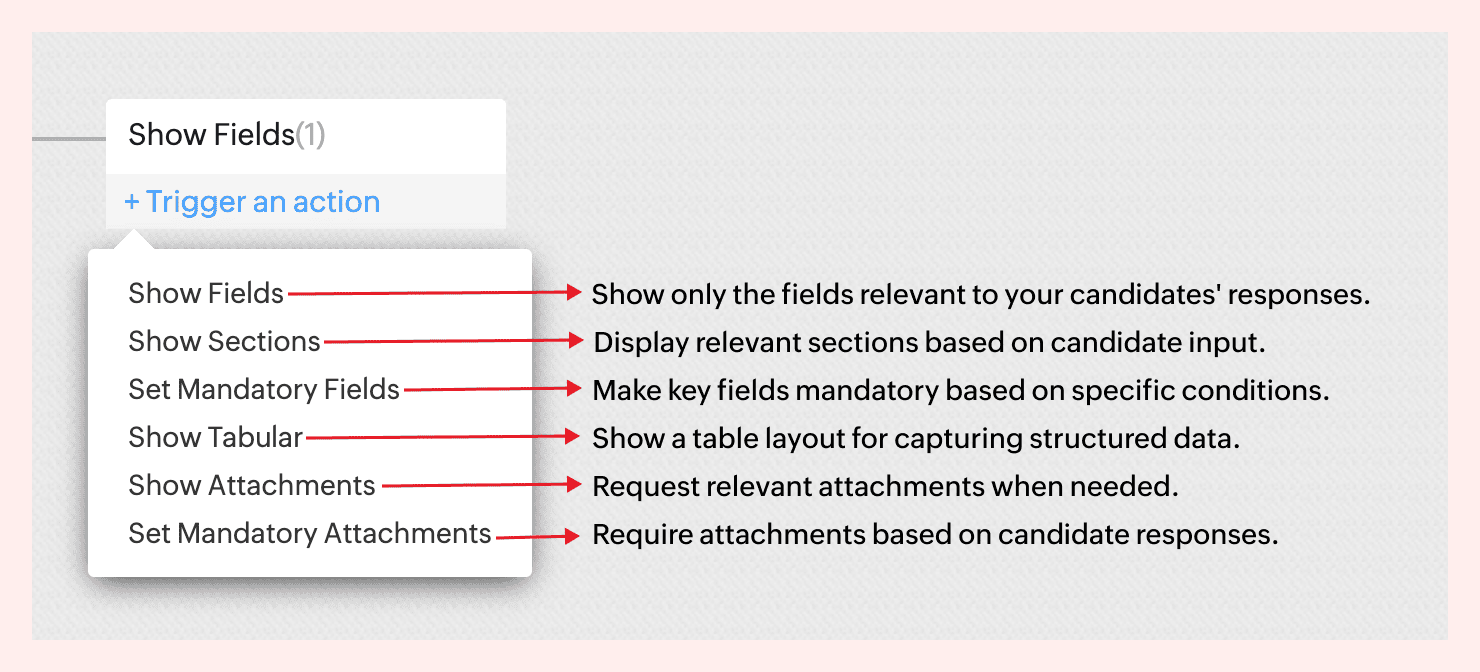
Form rules let you customize the candidate’s experience while they’re filling out the form by triggering actions based on their input.

Actions include:

For instance, not all candidates come with the same background—and your forms shouldn’t treat them like they do.
If a candidate indicates they’re a fresher, there’s no need to show fields like Work History or Current Salary. But if they’re experienced, you might want to ask about key projects, past employers, or management experience.


With form rules, you can create this branching logic in just a few clicks—keeping the form clean for early talent and detailed where it matters.
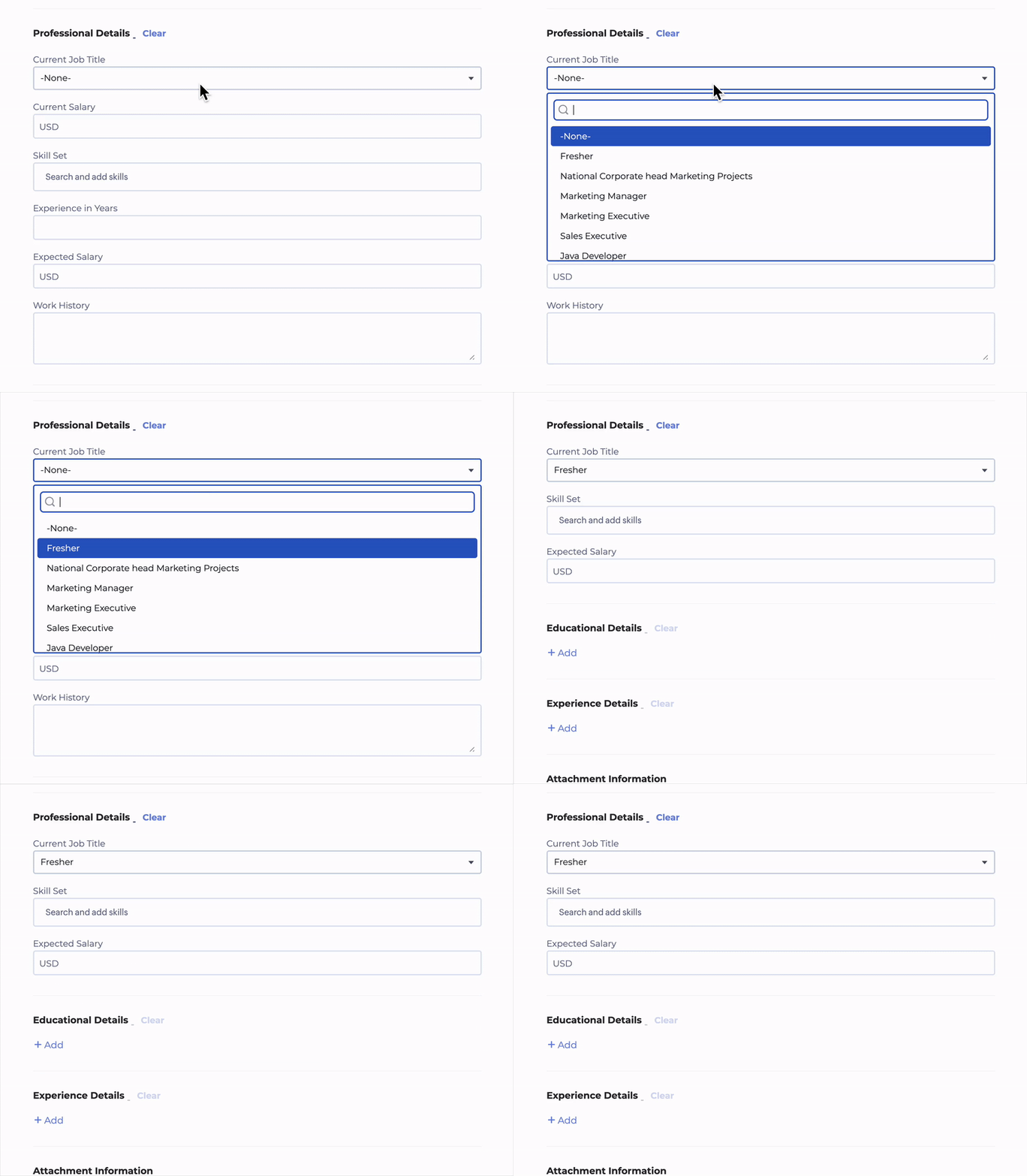
 

No code required. Just simple logic-based conditions.
→ Learn more  

A few use cases to consider  

Client Intake to Job Requisition  
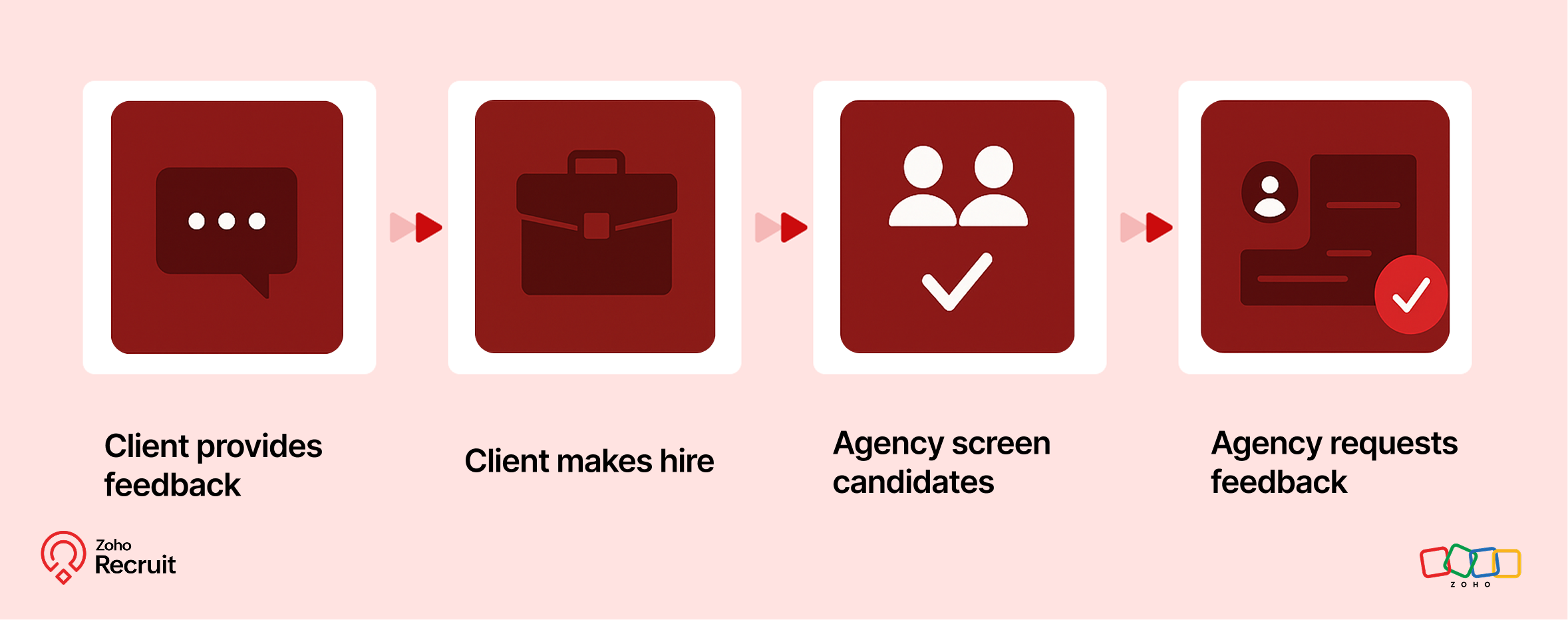

Step 1: Client submits contact form
Embed a Contact webform on your website to capture leads—clients who want to work with your staffing agency.

Step 2: Client shares job details
Once onboarded, clients can submit job requirements through a Job Requisition form. These details feed directly into your system.

Step 3: Agency hires candidates
Use the shared job details to source, match, and hire candidates for the role.

Step 4: Agency requests feedback
After successfully filling positions, request feedback from clients using a Feedback webform.

Candidate Onboarding & Documentation  
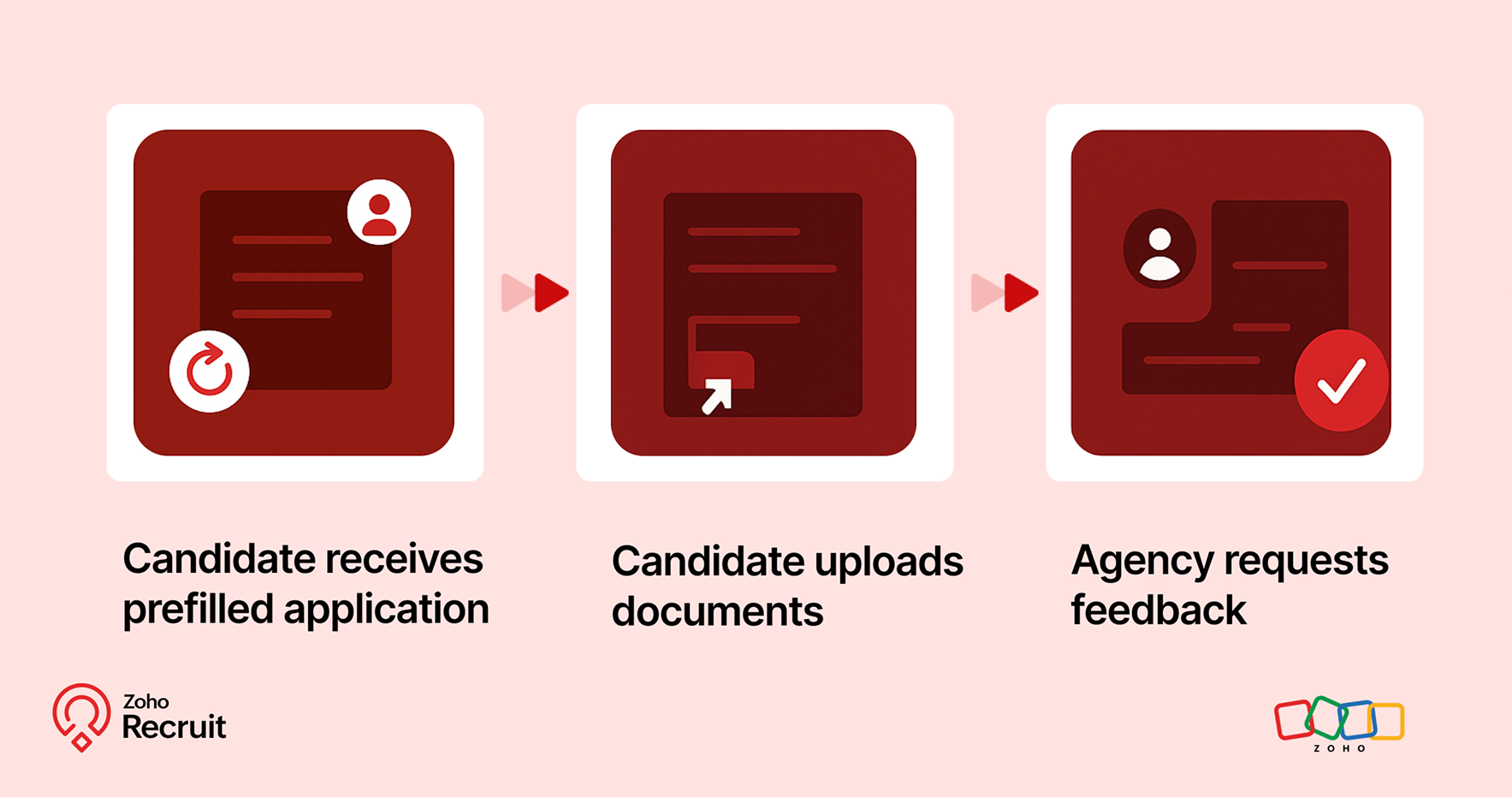

Step 1: Candidate receives prefilled application
Once candidates are selected, use known data to prefill details into a Background Check form.

Step 2: Candidate uploads documents
Share the form with candidates to collect necessary documents—ensuring accuracy and reducing redundant data entry.

Step 3: Agency requests feedback
After onboarding is complete, send a Feedback webform to capture the candidate’s experience.

Notes
Note:
Throughout the process, Form Rules keep the experience smooth—displaying only relevant fields, validating entries, and guiding users as they fill out each form.

A quick look at the numbers  

Webforms and Form Rules aren’t just about convenience — they actually influence how well candidates interact with your hiring process.
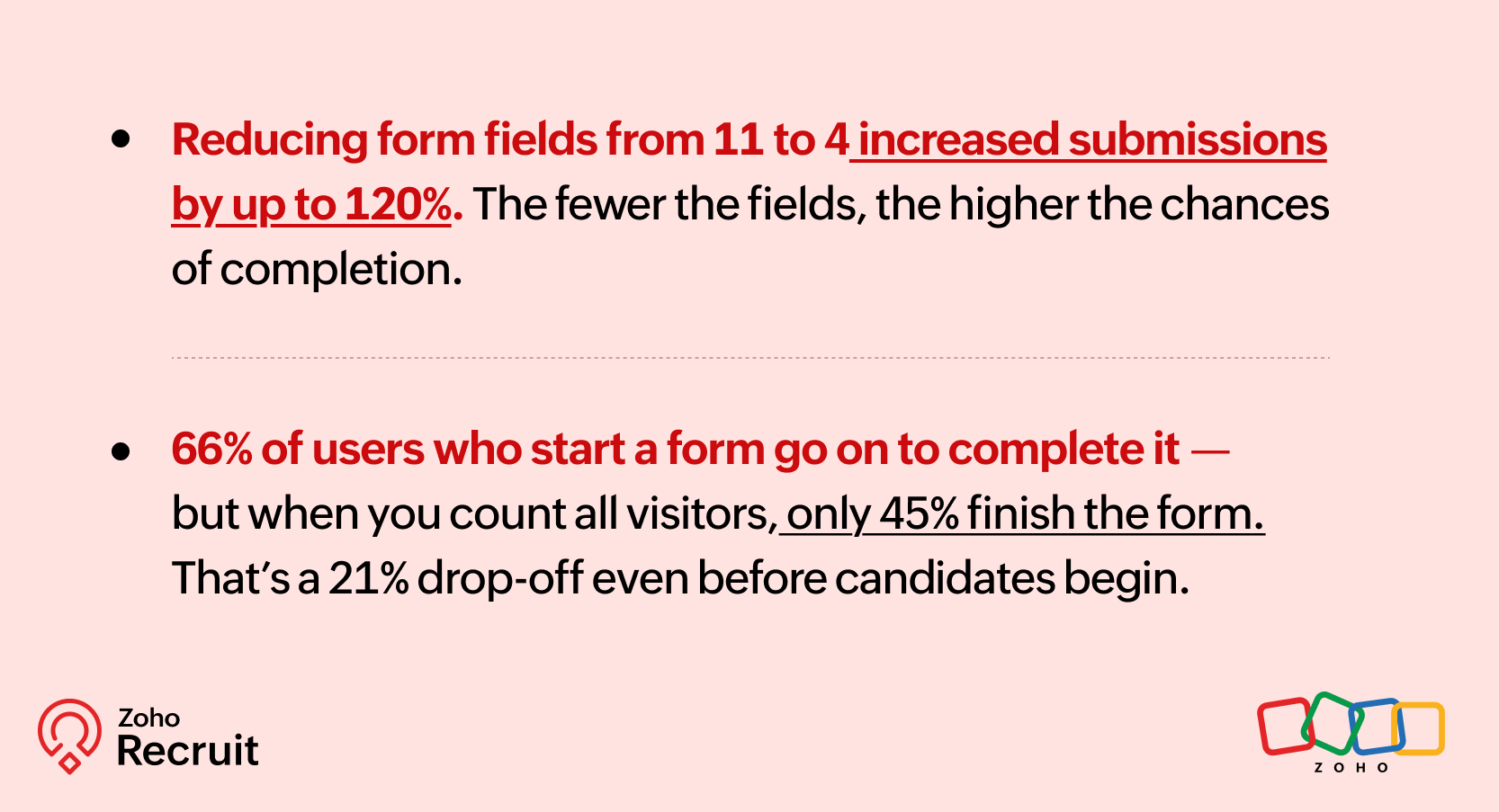

Sources: [1] [2]

These numbers reinforce what we already know — clearer, shorter, and smarter forms can keep more candidates moving forward.

Getting started: A few setup tips  

If you’re new to webforms or haven’t reviewed your setup in a while, here are three things to check:

  1. Do you have job-specific forms?
    A generic form might be easier to maintain — but it might also be collecting unnecessary or missing important info.

  2. Have you mapped fields correctly?
    Ensure that all form fields map directly to your Recruit modules (Candidate, Job Opening, etc.) to avoid duplicates or errors.

  3. Are you using rules to simplify things?
    Even one simple rule — like showing a “Notice Period” field only for full-time roles — can improve form quality.

Need help setting this up? Here’s how to build a webform and how to configure Form Rules.

Let’s Talk Recruit!

Do you already use Webforms in your hiring flow? Have you explored conditional form rules yet—or is that still on your to-do list?

Drop your experience below or tell us what kind of form use case you'd love to automate—we're all ears (and maybe one of our product folks will drop in with a tip or two!).


      • Sticky Posts

      • Zoho Recruit Community Meet-up - India (Venues Finalised)

        Zoho Recruit Community Meet-up - India (Venues Finalised) Namaste, India. 🙏🏼 The Zoho Recruit team is hitting the road—and we're absolutely excited behind the scenes. Join us for the Zoho Recruit India Meet-up 2026, a morning designed to make your recruiting
      • Zoho Recruit Community Meetup - London 🇬🇧 (Venue Finalised)

        Hello Recruiters! We’re excited to announce that the Zoho Recruit team is coming to the UK for an in-person Zoho User Group (ZUG) Meetup in London! This is your chance to connect with fellow Zoho users, learn from experts, and walk away with actionable
      • An update to improve email delivery | Email Authentication & Relay

        Update Rollout Latest Update: Enterprise users (8th July, 2025) This update is now live for Enterprise plan users in all regions. This includes People Plus, but not Zoho One, which will be covered in an upcoming update. Professional users (31st May 2025)
      • Zoho Recruit User Group Meet-up | INDIA 2025 (Venue Finalised)

        Hello Zoho Recruit users from India, We’re pleased and excited to announce our 2025 edition of Zoho user group meet-up in India in five cities! In this meet-up, our team of experts will help you understand the intricate nuances to use Zoho Recruit better,
      • Zoho Recruit is coming to the UK | Zoho Community Learning Series

        Customers from the United Kingdom, Exciting news: We will be in London for the Zoho Recruit user meet up. Our team will help you better understand the intricate nuances of Zoho Recruit to help you hire faster, inform about new and upcoming features, and

        • Recent Topics

        • Thunderbird not retrieving Mail automatically

          Hi, I have set up Zoho in Thunderbird all fine, the only problem is that the mails are not coming to Thunderbird automatically, they only come when I initially start up Thunderbird,  any ideas for a fix on this cheers
        • Free Webinar Alert! Don’t take the bait: Everyday email safety in Zoho Mail

          Hello Zoho Community! Think you can spot a suspicious email before it catches you off guard? Join our upcoming webinar, “Don’t take the bait: Everyday email safety in Zoho Mail,” and learn how to recognize common email threats and build safer habits for
        • Do you know which 20% of your products generate 80% of your revenue?

          Not all products earn their place in your inventory. In almost every catalog, a small group of items drives most of the revenue, while a long tail quietly ties up storage, counting effort, and working capital. The trouble is, most teams treat every SKU
        • How can we allocate incoming PO stock to Sales Orders, and does Backorder automatically reserve it upon receipt?

          Hello Everyone, We want to allocate incoming Purchase Order quantities to specific Sales Orders before the stock arrives. For example, from an existing PO of 100 pieces: 40 pieces assigned to SO-A. 35 pieces assigned to SO-B. 25 pieces left unallocated.
        • Convert an Existing Single Item into an Item with Variants

          Hello Zoho Team, Introducing variants is a great addition to Zoho Inventory. However, we would like to request an option to convert an existing single item into an item with variants. For example, Item A initially comes in only one colour, so we create
        • inventory removal at packing list or shipment.

          currently our system is set to remove inventory at invoice. This is creating an inventory nightmare? Is it possible to change the settings to remove the item from inventory at either the packing slip stage or shipping the item.
        • Delug script

          I have been looking at auto-update a amount (home currency) field from another module. Zoho native multicurrency was used in the other module (we have 4 here). Custom script was input with no error, but the field was not updated on trigger. Script as
        • Zoho Desk API modifiedTimeRange returns HTTP 500 around 2026-03-08T02:00:00.000Z

          Hello Zoho Support Team, We are experiencing a reproducible HTTP 500 Internal Server Error when querying the Zoho Desk API search endpoint with a specific modifiedTimeRange boundary. ### API Endpoint GET /api/v1/tickets/search ### Reproduction Steps &
        • GEO and Zoho Desk

          Has anyone done anything with GEO (generative engine optimization) and zoho desk KB? Are there any plans from Zoho on adding the ability in inject GEO scripts in KB Articles?
        • How to add custom lookup-type field to meeting module form in Zoho CRM

          We need to have a lookup field to a custom module's record in Zoho CRM. But it appears that look-up fields are not enabled in Meetings/Events module in Zoho CRM. How do I design/implement a custom look-up type field that will lookup records from custom
        • AI-Powered Automation for Repetitive Tasks

          Incorporating AI into Zoho People can streamline and automate repetitive administrative tasks, boosting productivity and efficiency. Automate Data Entry: Use AI to auto-capture and input data from emails and forms, reducing errors. Schedule Management:
        • Rotate an Image in Workdrive Image Editor

          I don't know if I'm just missing something, but my team needs a way to rotate images in Workdrive and save them at that new orientation. For example one of our ground crew members will take photos of job sites vertically (9:16) on his phone and upload
        • [IDEA] Bring Layout - Conditional Rules and Client Scripts to Zoho Books

          The problem We run Zoho Books with two e-invoicing integrations: myData (Greek tax authority, AADE) and PEPPOL (EU e-invoicing). Between the two, our Invoice form carries a large number of custom fields — document type codes, VAT exemption categories,
        • Last four Digit field in Zoho Payment Received

          One of our client's payment received doc has Notes, Last four digit and Transaction ID fields set, I couldn't find api parameter for these fields in the documentation... when I checked the site, it's not custom fields as well. where do i find it, any
        • Automatically remove commas

          Team, Please be consistent in Zoho Books. In Payments, you have commas here: But when we copy and paste the amount in the Payments Made field, it does not accept it because the default setting is no commas. Please have Zoho Books remove commas autom
        • Show my cost or profit while creating estimate

          Hi, While creating estimate it becomes very important to know exact profit or purchased price of the products at one side just for our reference so we can decide whether we can offer better disc or not .
        • Cash Flow Forecast Dashboard in Zoho Reports

          I am exploring the capabilities of Zoho Reports and created a simplified Cash Flow Dashboard - http://db.zoho.com/ZDBDataSheetView.cc?DBID=97137000000016024 This is just a sample of the useful financial information for small businesses that can be created with this powerful business intelligence tool from Zoho.
        • Admin Logging in as another User

          How can a Super Admin login as another user. For example, I have a sales rep that is having issues with their Accounts and I want to view their Zoho Account with out having to do a GTM and sharing screens. Latest Update (27th April 2026): With the early
        • Zoho CRM Layout Rules: Nine New Actions, Profile-Based Execution, and Interactive Preview

          Hello everyone, Availability: This feature is now available for all users. We’re excited to announce powerful new enhancements to Layout Rules in Zoho CRM - a feature built to guide our teams through form-filling by showing the right information to the
        • Lookups and Custom Modules

          I created a Custom Module that I'm calling "Item Purchasing Group". This module will store information for groups of Items that must be purchased together (including minimum overall quantities and/or values, etc.). This will have a one-to-many relationship
        • can't access zoho account

          I can't log in to my zoho account, can you help me
        • Auto sync Photo storage

          Hello I am new to Zoho Workdrive and was wondering if the is a way of automatically syncing photos on my Android phone to my workdrive as want to move away from Google? Thanks
        • Has anyone integrated Zoho with Go High Level (GHL)? Looking for guidance

          Hi everyone, I’m exploring the possibility of integrating Zoho applications with Go High Level (GHL) and wanted to check if anyone in the community has experience with this. Specifically, I’m interested in understanding: Whether a direct integration is
        • Updating Unit Code for New Item Creation, Quote and Invoicing is so inconvenient

          The Zoho Team has implemented many updates, but these updates should be optional. Before rolling out any new feature, they should already have a solution in place that allows users to remove or disable it if they choose not to use it. Just yesterday,
        • Item/service subtotal

          Just discovered & really pleased that we can drag to re-order the line items in Sales orders & Invoices, a very nice feature which doesn't seem to be documented? It would be nice to be able to insert a subtotal as a line item to complete this great feature
        • Set Custom Icon for Custom Modules in new Zoho CRM UI

        • I want to prefill CRM Account information using the GSTIN of the Customer

          Currently i need to add account details manually in zoho crm and when it syncs in zoho books manual working needs to be done. Whereas in zoho books i can prefill the customer details using the GSTIN which is great feature. Can the same be enabled for
        • #5 Is This Actually The Right Tool For Me?

          Day 5: Before Meera brought six months of business history into Zoho Invoice, she stopped and asked herself a very sensible question: Is this actually the right tool for me? It is much easier to ask that now than after moving all your data. The Usual
        • Timesheet entry and comment on the actual timesheet

          Dear madam/sir, It would be really helpful if we could add an option to comment on a specific timesheet entry, after the employee logs a time-log. Would that be possible in the future? Or can you suggest another way to do this?
        • OpenAI Is Moving to the Responses API: Here's What It Means for SalesIQ

          OpenAI has deprecated its Assistants API and is moving to the Responses API. If you're using OpenAI Assistants with SalesIQ, you may be wondering if you need to make any changes to your existing setup. You don't. SalesIQ has already taken care of the
        • Need Native Support for docx files in Zoho Writer

          Absolutely love Zoho Writer, but often need to share files by email with people who are in the Office ecosystem. Downloading a file as docx, then sending it by email, getting the comments back, converting it to Zoho format, editing it, then converting
        • CRM integration issues

          hi Just start testing Campaigns. Read up on up on these issues but can not find an answer. I am super admin. 1) its only showing 1002 contacts, I have a 2500 plan which is confirmed in dashboard. I says it sync'd 1400. I've looked at missing contacts,
        • What's New in Zoho Expense: Integrated Business Travel and AI-Powered Expense Management

          This release brings a wide range of updates across Zoho Expense, including new AI-powered capabilities, enhancements to corporate cards, expense management, audits, and more. Keep reading to know how the new updates can transform your travel and expense
        • ChatGPT Plugin / MCP Server auth error

          Hi all I'm trying to connect the ChatGPT plugin for Zoho CRM but after username stage of the auth process, I get this error from the URL https://mcp.zoho.eu/mcp-client/ {"error_description":"Invalid request url, Request is not as per defined in oauth
        • Project Management Platforms for AI Agents: What Matters Most?

          Zoho Projects is already going beyond basic AI assistance with MCP, AI Bridge, and integrations that let AI models access project data and perform actions. That raises an interesting question: what should a project management platform for AI agents actually
        • Sync workdrive feature inside ZohoCRM

          Hi, I'm exploring the new workdrive/ZohoCRM connector released by Zoho to replace the free extension workdriveforCRM which is decomissioned https://marketplace.zoho.com/app/crm/zoho-workdrive-for-zoho-crm I'm rather upset with this long awaited feature,
        • Adding Custom Status Options in Work Order Action Menu

          Hello FSM Team, We would like to inquire if it is possible to add more custom options in the Work Order action/status dropdown (e.g., Cancel, Terminate, Non-Billable, Void, etc.). Currently, the available options are limited, and we are unable to customize
        • MTA - BAD IP reputation by outlook/hotmail

          Messages to Microsoft email servers are bouncing back due to poor reputation. Message: 4.7.650 The mail server [136.143.188.206] has been temporarily rate limited due to IP reputation. For e-mail delivery information see https://postmaster.live.com (S775)
        • Timesheet Task Icons

          In the image below which shows the task field drop down when creating a timesheet against a project and task. What do the icons mean the the right side column against each task? I can't find any documentation or guide that explains what the no entry sign,
        • Open Records in a New Browser Tab

          Hi FSM Team, Just a suggestion: It would be helpful to have a right-click → Open in New Tab option in FSM, similar to CRM. This should ideally work for any clickable record or module, allowing users to open multiple records in separate tabs without losing
        • Next Page