Let’s Talk Recruit: Forms that think before you do!
Let’s Talk Recruit: Forms that think before you do!


Welcome back to our
Let's Talk Recruit series. In our previous post, we shared highlights from our community meetups held across India.

This time, we’re talking about something that often gets overlooked but makes a huge difference once you set it up right: Webforms and Form Rules.

Let’s say you're rolling out a hiring drive or posting jobs on multiple channels. Candidates start pouring in—but half of them forget to attach their resumes, a few skip critical questions, and some apply to the wrong roles altogether. And that’s before you’ve even started shortlisting.

That’s exactly the kind of cleanup Webforms and Form Rules are built to prevent. They help you collect the right details, personalize the experience for candidates, and automate the little things that usually slow you down. And once you get the hang of them, you'll wonder why you didn’t start sooner.

The Problem

If your team still relies on email attachments or inconsistent spreadsheets to gather applicant info, chances are you’re wasting time fixing errors that shouldn’t exist in the first place.

  • Candidates entering outdated contact details

  • Missing info on key fields like skill set, location, or availability

  • Manually categorizing candidates for different roles or hiring pipelines

Without a structure in place, things slip through the cracks. And when you're hiring at scale, that’s a problem.

Why Webforms matter  

A webform is often the first step a candidate takes to engage with your company. Whether it’s embedded on your careers page, linked on a social post, or shared during campus drives — it sets the tone.

But a lot of recruiters still use basic forms. Candidates fill them out, and then it’s a game of manual edits, sorting, and follow-ups.

What if the form did more? What if it already knew:

  • Which fields to show and when?

  • Whom to assign the record to?

  • Whether the candidate should be redirected after submission?

That’s where form rules come in.

What are Form Rules?  

Form rules let you customize the candidate’s experience while they’re filling out the form by triggering actions based on their input.

Actions include:
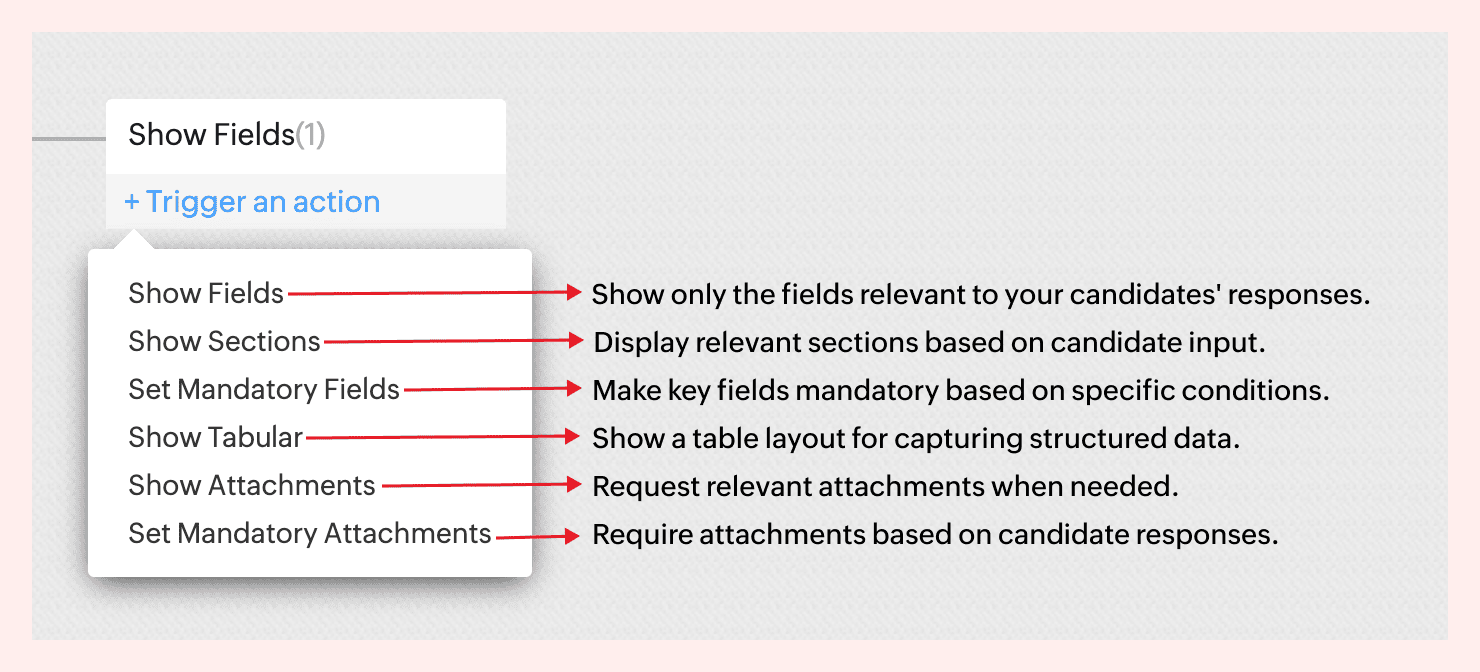

For instance, not all candidates come with the same background—and your forms shouldn’t treat them like they do.
If a candidate indicates they’re a fresher, there’s no need to show fields like Work History or Current Salary. But if they’re experienced, you might want to ask about key projects, past employers, or management experience.


With form rules, you can create this branching logic in just a few clicks—keeping the form clean for early talent and detailed where it matters.
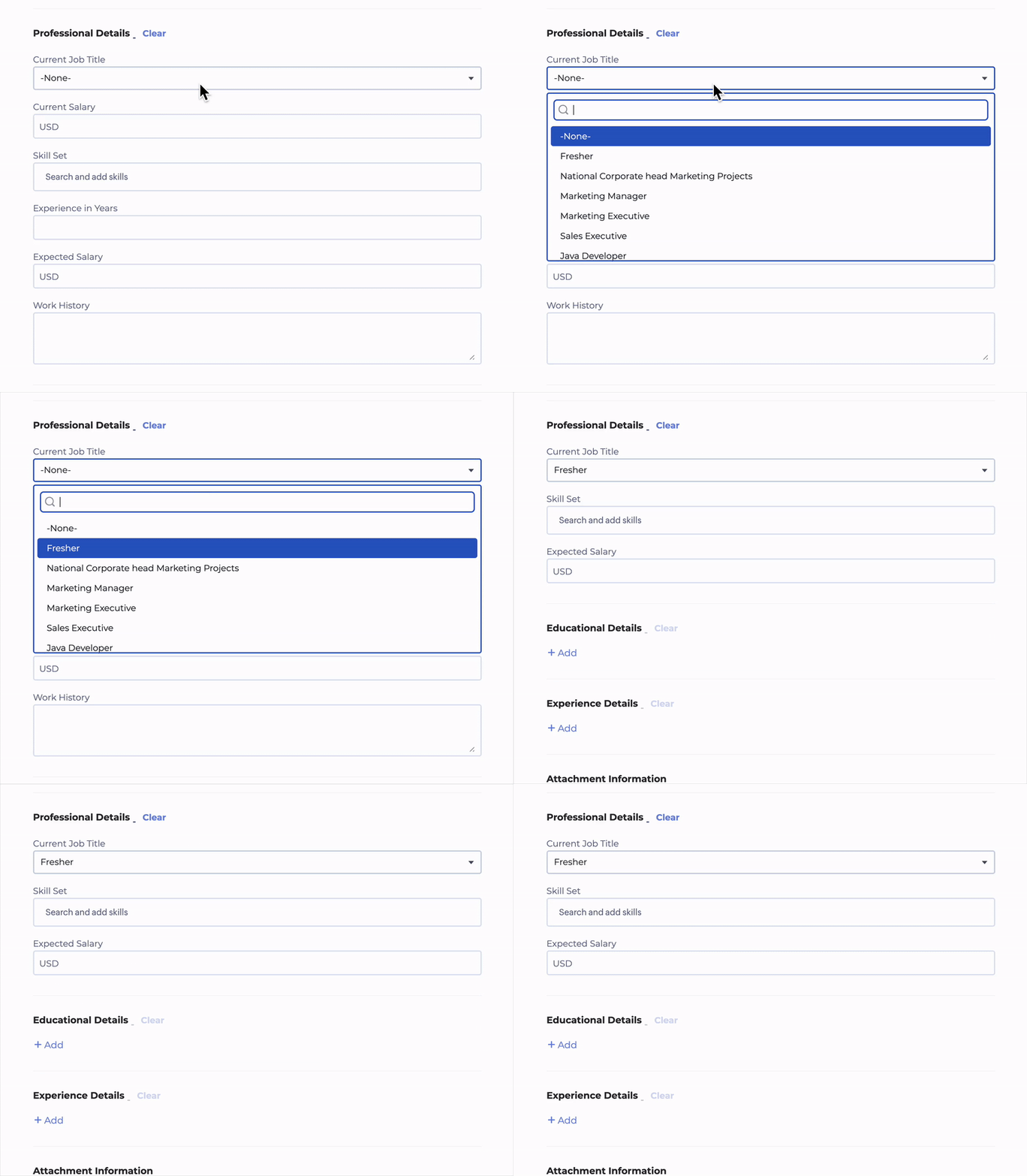
 

No code required. Just simple logic-based conditions.
→ Learn more  

A few use cases to consider  

Client Intake to Job Requisition  
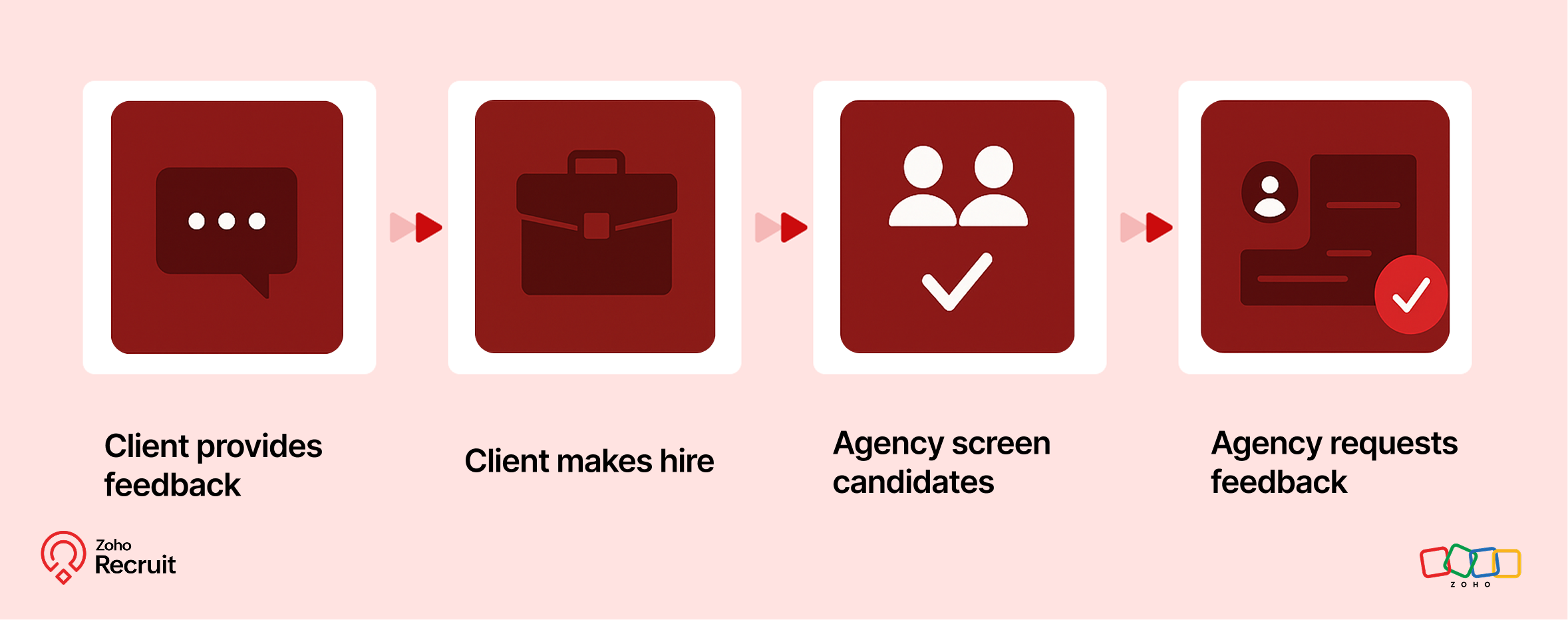

Step 1: Client submits contact form
Embed a Contact webform on your website to capture leads—clients who want to work with your staffing agency.

Step 2: Client shares job details
Once onboarded, clients can submit job requirements through a Job Requisition form. These details feed directly into your system.

Step 3: Agency hires candidates
Use the shared job details to source, match, and hire candidates for the role.

Step 4: Agency requests feedback
After successfully filling positions, request feedback from clients using a Feedback webform.

Candidate Onboarding & Documentation  
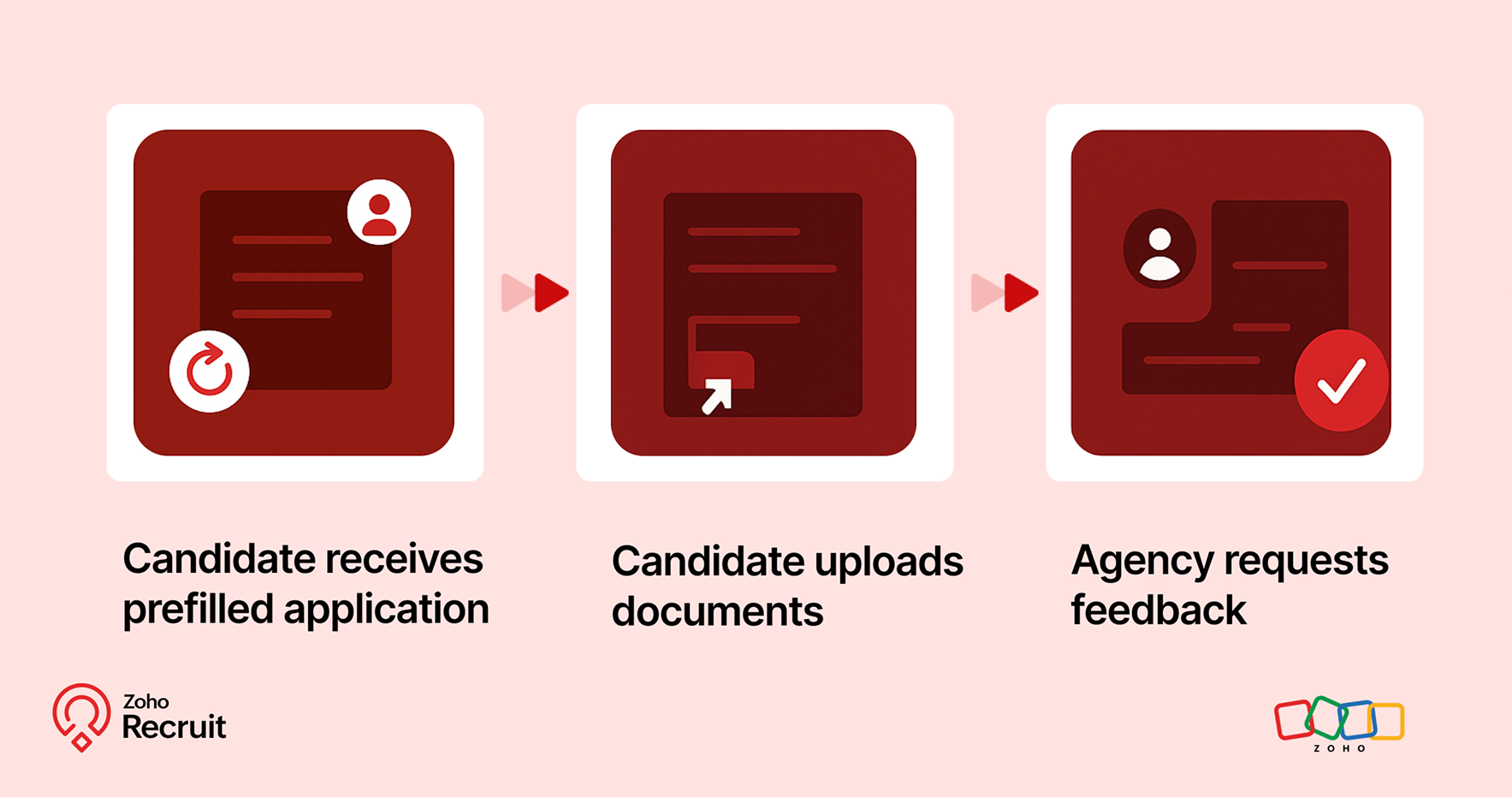

Step 1: Candidate receives prefilled application
Once candidates are selected, use known data to prefill details into a Background Check form.

Step 2: Candidate uploads documents
Share the form with candidates to collect necessary documents—ensuring accuracy and reducing redundant data entry.

Step 3: Agency requests feedback
After onboarding is complete, send a Feedback webform to capture the candidate’s experience.

Notes
Note:
Throughout the process, Form Rules keep the experience smooth—displaying only relevant fields, validating entries, and guiding users as they fill out each form.

A quick look at the numbers  

Webforms and Form Rules aren’t just about convenience — they actually influence how well candidates interact with your hiring process.
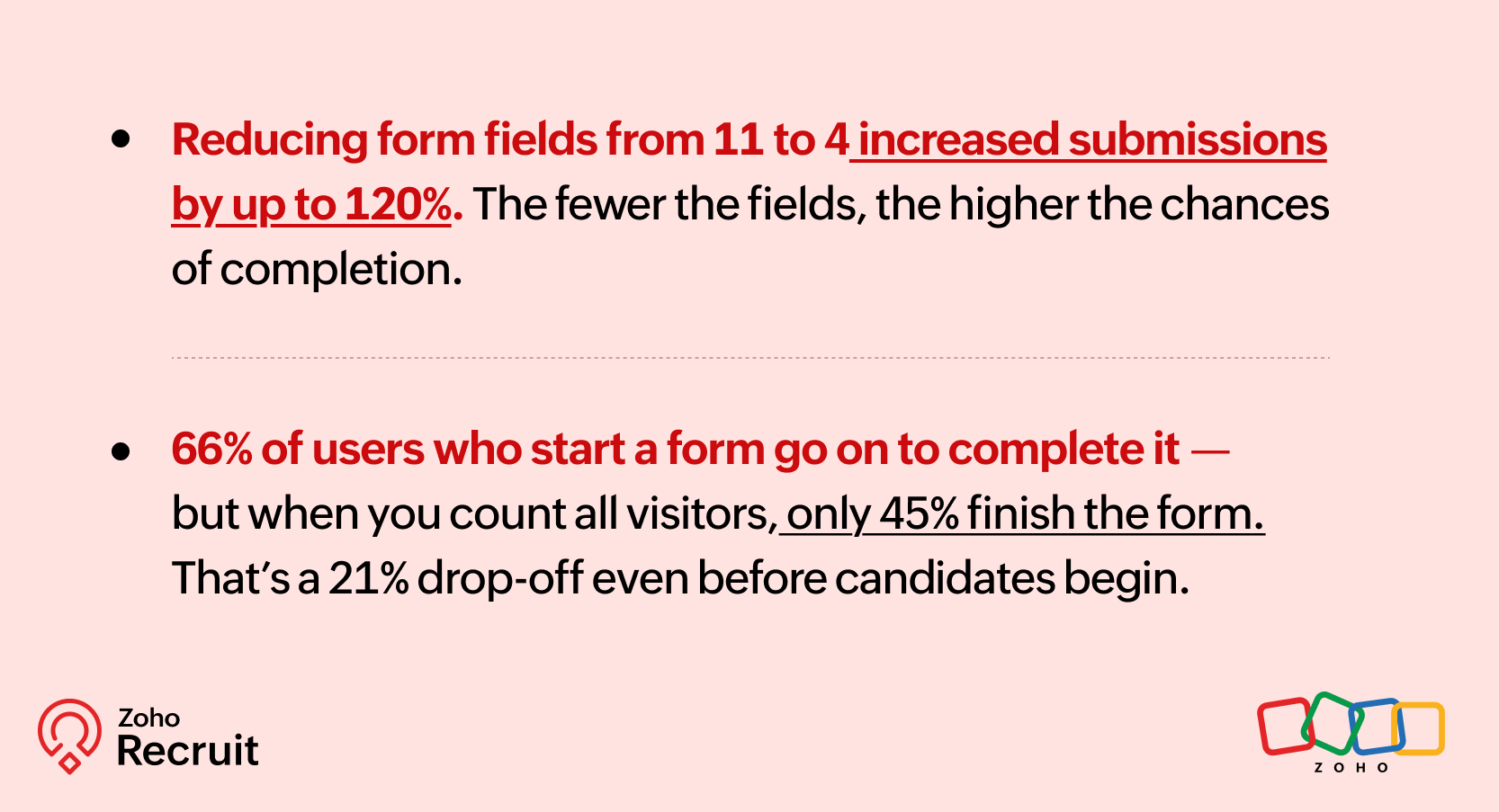

Sources: [1] [2]

These numbers reinforce what we already know — clearer, shorter, and smarter forms can keep more candidates moving forward.

Getting started: A few setup tips  

If you’re new to webforms or haven’t reviewed your setup in a while, here are three things to check:

  1. Do you have job-specific forms?
    A generic form might be easier to maintain — but it might also be collecting unnecessary or missing important info.

  2. Have you mapped fields correctly?
    Ensure that all form fields map directly to your Recruit modules (Candidate, Job Opening, etc.) to avoid duplicates or errors.

  3. Are you using rules to simplify things?
    Even one simple rule — like showing a “Notice Period” field only for full-time roles — can improve form quality.

Need help setting this up? Here’s how to build a webform and how to configure Form Rules.

Let’s Talk Recruit!

Do you already use Webforms in your hiring flow? Have you explored conditional form rules yet—or is that still on your to-do list?

Drop your experience below or tell us what kind of form use case you'd love to automate—we're all ears (and maybe one of our product folks will drop in with a tip or two!).


      • Sticky Posts

      • Zoho Recruit Community Meet-up - India (Venues Finalised)

        Zoho Recruit Community Meet-up - India (Venues Finalised) Namaste, India. 🙏🏼 The Zoho Recruit team is hitting the road—and we're absolutely excited behind the scenes. Join us for the Zoho Recruit India Meet-up 2026, a morning designed to make your recruiting
      • Zoho Recruit Community Meetup - London 🇬🇧 (Venue Finalised)

        Hello Recruiters! We’re excited to announce that the Zoho Recruit team is coming to the UK for an in-person Zoho User Group (ZUG) Meetup in London! This is your chance to connect with fellow Zoho users, learn from experts, and walk away with actionable
      • An update to improve email delivery | Email Authentication & Relay

        Update Rollout Latest Update: Enterprise users (8th July, 2025) This update is now live for Enterprise plan users in all regions. This includes People Plus, but not Zoho One, which will be covered in an upcoming update. Professional users (31st May 2025)
      • Zoho Recruit User Group Meet-up | INDIA 2025 (Venue Finalised)

        Hello Zoho Recruit users from India, We’re pleased and excited to announce our 2025 edition of Zoho user group meet-up in India in five cities! In this meet-up, our team of experts will help you understand the intricate nuances to use Zoho Recruit better,
      • Zoho Recruit is coming to the UK | Zoho Community Learning Series

        Customers from the United Kingdom, Exciting news: We will be in London for the Zoho Recruit user meet up. Our team will help you better understand the intricate nuances of Zoho Recruit to help you hire faster, inform about new and upcoming features, and

        • Recent Topics

        • Cannot receive emails

          Sent one days ago still no feedbacks, cannot call customer services number
        • Email Password Reset - Vishal & shaik Vali Babu

          Hi Team, The below-mentioned employees are unable to log in to their Gmail due to a password error. Kindly look into this on priority vishal.r@jumbotail.com shaik.babu@jumbotail.com
        • Live Chat

          Is live chat inthe website in zoho desk?
        • DKIM 2048 too long

          I'm trying to add a DKIM TXT record for my domain in Zoho Mail but my DNS provider (Shopify) has a character limit on TXT record values. The 2048-bit DKIM key is too long to enter. Can anyone advise how to generate a shorter 1024-bit key instead, or another
        • Using IMAP configuration for shared email inboxes

          Our customer service team utilizes shared email boxes to allow multiple people to view and handle incoming customer requests. For example, the customer sends an email to info@xxxx.com and multiple people can view it and handle the request. How can I configure
        • Technical personnel are required to assist in synchronizing license quotas and solving the problem of being unable to add users.

          We are a cross-border jewelry e-commerce company and currently use Zoho Mail Lite corporate email service. I have paid to purchase 1 Mail Lite annual user license (order number 133627785, payment time 2026-06-29). It has been more than 12 hours since
        • non ricevo ne invio mail

          non riesco ad inviare né ricevere posta. URGENTISSIMO
        • 重要詢問:電子報回信沒有收到

          我使用zoho作為寄電子報的mail, 但是我發現從電子報回信,完全都沒有收到!!!(包含垃圾郵件) kit那邊設定確定都沒有問題,請問這邊是哪裡設定有問題導致沒收到呢? (我確認過mail是一樣的)
        • Mail Id’s backup

          Dear Zoho Team, Kindly share the backup of my all mail id’s associated with Zoho account. Thanks, Saurabh Sharma +91 8851066915
        • Feature Request - Option To Hide Default System Fields on Items

          Hi Zoho Inventory Team, As far as I know it is not possible to hid some of the defult system fields on Items, such as UPC, MPN, EAN, ISBN. A good use case is that in many cases ISBN is not relevant and it would be an improved user experience if we could
        • Important update on our transition to the new video platform framework

          As part of our ongoing platform changes, users in select regions, including the United States and other supported data center locations, have been migrated to our new video platform framework. Due to this migration, some participants may notice changes
        • Account review. Does anyone still work here?

          Are accounts still being reviewed? Mine has been under review for over two weeks now. I also created a support ticket and reached out on Twitter but never received any kind of response. Is this company still alive?
        • Seamless and safe way to migrate all my hubspot forms to zoho forms?

          Hi community! Our website (B2B consulting / market research), offers a wide variety of public report in PDF formats stored behind forms previously hosted via Hubspot. As we are migrating to Zoho Forms, I am facing an issue. Example: Form A (Report A),
        • E-Mail Distribution List

          How do I create an e-mail distribution list in Zoho Mail?
        • Zoho Contacts *Web Interface Does Not Load* (Tested in Firefox, Safari)

          When trying to load https://contacts.zoho.com the error shown in the console is: The resource from “https://static.zohocdn.com/zmail/zm/newContactsChange11/js/main.js” was blocked due to MIME type (“application/json”) mismatch (X-Content-Type-Options:
        • Automatically calculate and include tax on quotes

          I've recently been VAT registered and now need to include VAT on my quotes. I have been able to set the tax label and amount but still need to click the tax link and select the tax I wish to include before it appears on the quote. Does anyone know of
        • Zoho Desk: Chromium (Google Chrome, Edge) filename issue when opening/download attachments in a ticket.

          Hello Zoho Desk Team. When opening a PDF attachment in a ticket, Chromium-based browsers such as Google Chrome and Microsoft Edge display the file with the title “content” When the file is saved, it is downloaded as content.pdf instead of using the original
        • how to Solve Conflict Invoices in Zoho POS

          Hello Team, I am facing a repeated issue in Zoho POS while saving a sale that contains service-based items. My products are intentionally created as Service (Non-Inventory) items because I do not want to track stock for them. However, every time I try
        • Cliq iOS can't see shared screen

          Hello, I had this morning a video call with a colleague. She is using Cliq Desktop MacOS and wanted to share her screen with me. I'm on iPad. I noticed, while she shared her screen, I could only see her video, but not the shared screen... Does Cliq iOS is able to display shared screen, or is it somewhere else to be found ? Regards
        • Zoho Desk Community Module Reporting

          I can't seem to find any reporting for the community module in Zoho Desk. Am I missing something or are there just no reports available?
        • Zia AI capabilities now available in all paid editions

          Hello everyone, We are expanding the availability of AI-powered features in Desk to the other paid subscriptions from 7th July 2026. Right now, the following AI-based features are available for Enterprise edition users: Intelligence: Sentiment analysis,
        • Feature Request: Integración con la Lista del Artículo 69-B del SAT para Zoho Books México

          Feature Request: Integración con la Lista del Artículo 69-B del SAT para Zoho Books México Hola equipo de Zoho, Durante los últimos meses he observado una necesidad recurrente entre varios clientes en México relacionada con el cumplimiento fiscal del
        • Business Day Logic Update: More Accurate Scheduling for Your Workflows

          Hello everyone, We’re improving how business-day calculations work in workflows, especially when triggers happen on weekends. This update ensures that offsets like +0, +1, and +2 business days behave exactly as intended, giving you clearer and more predictable
        • Workflow Assistance in Zoho CRM

          Our client's sales team visits customers on-site and currently fills a physical paper form to capture customer details, and then separately re-enters the same data into Zoho CRM via the mobile app — resulting in double data entry. We want the salesperson
        • Can we generate APK and IOS app?

          Dears, I want to know the availability to develop the app on zoho and after that .. generate the APK or IOS app  and after that I added them to play store or IOS store.. Is it possible to do this .. I want not to use zoho app or let my customers use it. thanks 
        • Pricelists

          So we have them in books but I cannot find them in commerce?
        • Collapsible Sections & Section Navigation Needed

          The flexibility of Zoho CRM has expanded greatly in the last few years, to the point that a leads module is now permissible to contain up to 350 fields. We don't use that many, but we are using 168 fields which are broken apart into 18 different sections.
        • Validation Rule Not Working for Mandatory Field in Zoho Blueprint

          As a Zoho user, we created a validation rule for a specific field. However, we noticed that when we made the same field mandatory within a Blueprint, the validation rule we defined did not work. When we reported this issue to Zoho Support, they stated
        • Ticket id issues

          When I reply a ticket from desktop, it doesn't have ticket id in the subject and it's great. When I reply a ticket from Zoho desk mobile, Zoho adds ticket id in the subject and I don't want that. Please help in this matter.
        • Une collaboration simplifiée grâce à l’interopérabilité des calendriers

          L’interopérabilité des calendriers permet aux équipes utilisant différentes plateformes, comme Zoho Calendar et Google Calendar, de consulter facilement les disponibilités de leurs collègues sans avoir à utiliser plusieurs outils. Dans les entreprises
        • Format of data after export to spreadsheet

          Dear Zoho, can you explain to me what is the point of a report exporting to XLSX if the format of the amounts that will be created there is in text format and not suitable for anything? Why do I need data in a sheet with which nothing more can be do
        • How to add custom icons in Sites ?

          I've been trying to upload some of my own icons (specific to my business) to my zoho Site draft, and can't find a way to do it. I guess the workaround could be to insert images instead of icons and upload my icons as images, but I was wondering if its possible to customize the icon library.
        • Zoho Forms API

          Is there any way to get all form entry list using API? Looking forward to hear from you
        • #21 Five Minutes Every Monday That Replace an Hour of Digging

          Welcome to the final stretch of our journey. In this series so far, you have configured Zoho Invoice, created and managed your transactions and built a workflow that shares invoices and collects payments almost on its own. You have been doing the work.
        • Kaizen #251: From Campaign Leads to Sales Orders with Zoho CRM Mass Action APIs

          Hello all!! In growing businesses, sales teams often deal with a large volume of records every day - leads from campaigns, qualified prospects ready for conversion, and approved quotes that must be converted into sales orders. Performing these actions
        • Zoho Mail is down?

          We stopped getting new emails since 8:42am EST and mail.zoho.com shows an error.
        • Forwarding without verification

          Hi, I use Tripit to keep track of all my business travel. I've recently moved over to Zoho and wanted to set up a forwarding rule to send various travel confirmation emails automatically to plans@tripit.com Obviously this is an email address I don't control,
        • Disappearing Mouse cursor in Zoho Mail / Windows 11 (Chrome + Edge)

          I'm seeing an issue when writing mails with the light theme with the mouse cursor being white and the document area also being white - making it nearly impossible to see the mouse cursor. I see the problem on Windows 11 under Chrome and Edge. (Yet to
        • Request to unblock user creation error (This user is not allowed to add in Zoho)

          Hello Zoho Support Team, I am the Super Admin of my Zoho Mail organization. When I try to create a new business email user account, I encounter the following error message: "This user is not allowed to add in Zoho. Please contact support-as@zohocorp.com
        • Zoho Mail account blocked after malware incident – request for review and unblock

          Hi Zoho team and community, My Zoho Mail account has been blocked due to outgoing email activity that was detected as spam or unusual sending behavior. The root cause was a malware infection on my computer, which compromised several of my accounts, including
        • Next Page