New permissions for accessing emails sent via Zoho CRM

New permissions for accessing emails sent via Zoho CRM

AlertLast modified on Nov 4, 2024:
Dear all,
 
We're excited to announce significant enhancements to accessing and sharing emails within Zoho CRM.
 
One of the critical aspects of data management is ensuring that sensitive information is accessible only to the appropriate users.
 
Until now, user permissions weren't applied to emails sent directly from Zoho CRM's servers. However, this limitation did not apply to emails sent through configured IMAP or POP servers. As a result, all emails sent from Zoho CRM—including individual emails, emails sent using the organization's email address, mass emails, workflow, and others—were accessible to any user with record viewing permissions, regardless of their roles. For instance, a standard user could view the emails of an admin when the record was shared, and vice versa. 

What've we enhanced?

Permissions for emails

With our latest enhancements, you can now set organization-level permissions that govern access to emails sent from within Zoho CRM. You can find these controls in Data Sharing Settings.

By default, the sharing type will be set to Public Read/Write/Delete. 

You can also set Private, Public Read Only, or Public Read/Write as the default access type.
  • Read: Enables users to view emails.
  • Write: Enables users to send replies, forward emails, edit drafts, and schedule emails.
  • Delete: Enables users to delete drafted or scheduled emails.
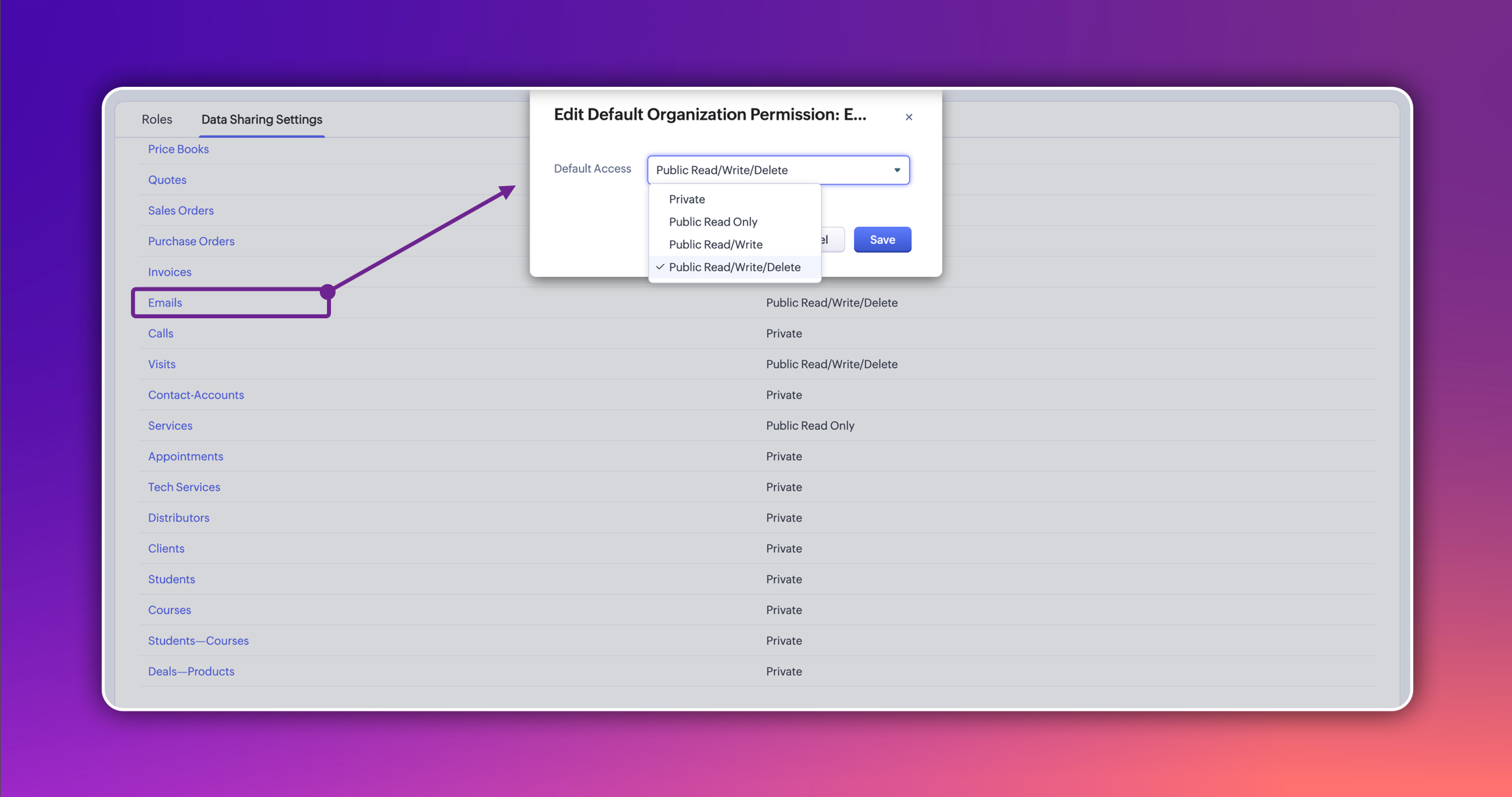
Here's how the different access types work:

  • When the access type is set to Private, only the email record owner (the person who sends the email) can view and reply to emails—plus any user higher than them in the role hierarchy. This ensures that those at higher levels in the organization can still access emails when necessary, even if the access type is set to Private.

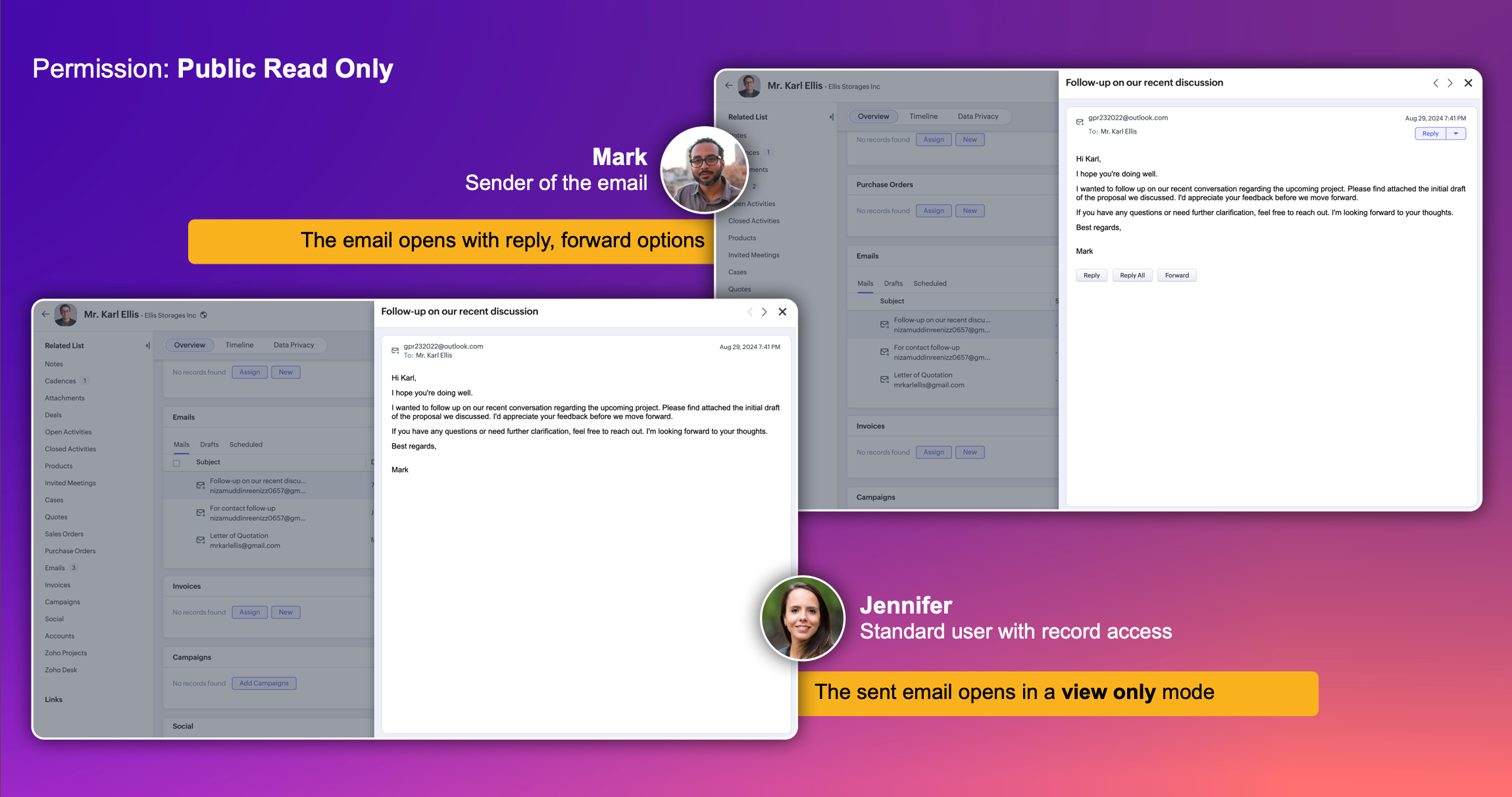
  • In the Public Read Only access type, every user in the organization can view emails sent by others. Additional actions, such as replying, forwarding, editing drafts, or deleting emails, are available only to the email's owner and those above them in the role hierarchy. Users at the same level or below the owner are limited to viewing emails and cannot perform these actions.


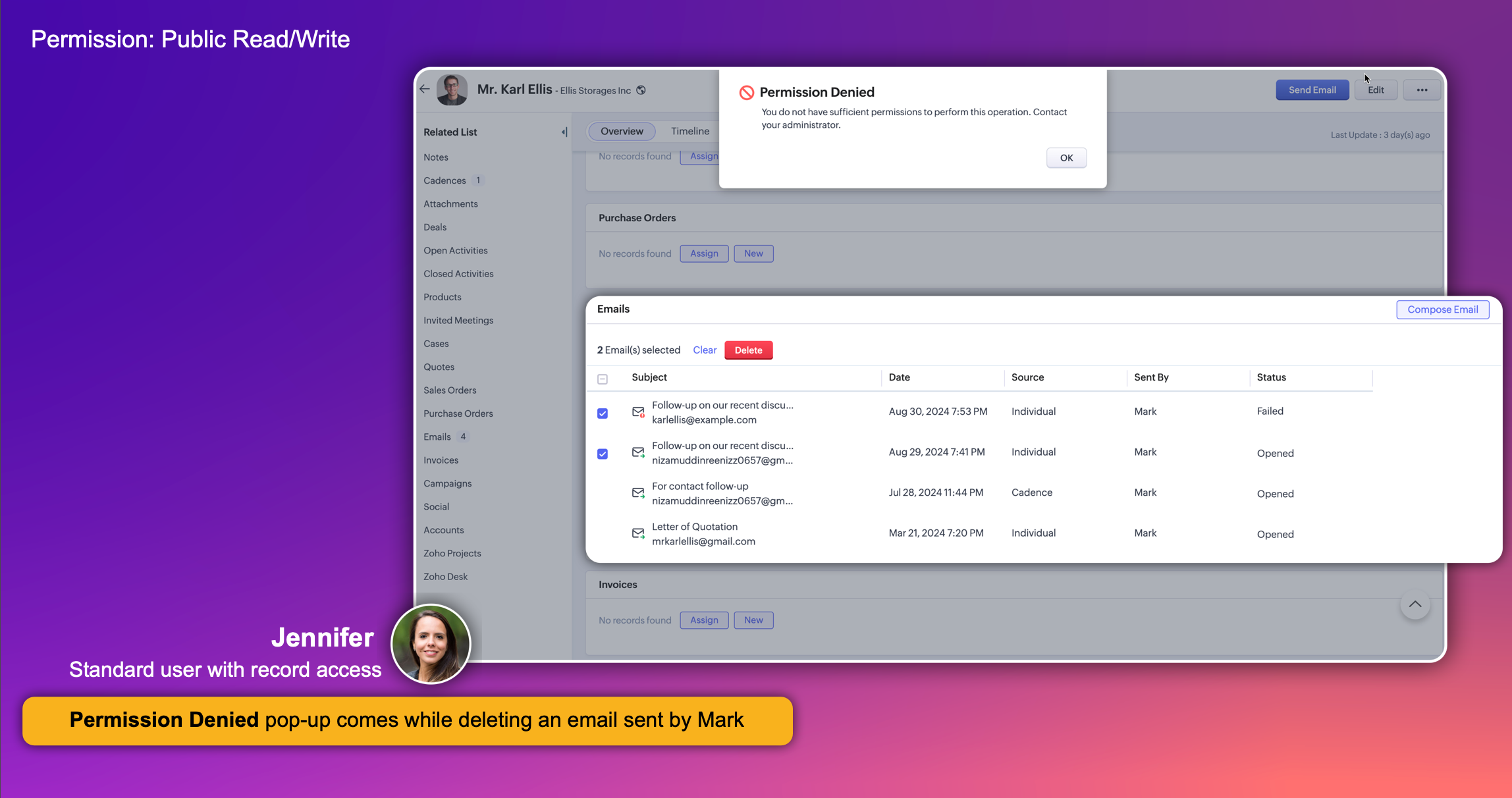
  • In the Public Read/Write setting, every user in the CRM can see all emails as well as reply, forward, and edit both drafts and scheduled emails. However, users aren't able to delete emails.


  • The Public Read/Write/Delete setting provides the most extensive level of access for emails. All users in the organization can view and reply to all emails, as well as edit and delete drafts or scheduled emails.

Changes for draft emails

  • For the draft owner: The draft email opens directly in the compose window, enabling the owner to continue editing and sending the email.
  • For other users: The draft email opens in a view mode. If the user has the necessary permissions to edit the draft, an "Edit" button will be available. Clicking this button will open the draft in the compose window and enable the user to make changes.
 
Additionally, when an admin or another user with higher permissions edits a draft created by another user, a pop-up notification will appear. This notification informs the user that the ownership of the draft will be transferred to the person making the edits.


Changes for scheduled emails

In the current interface, both admins and email record owners can delete scheduled emails, but only the owner can edit them.
In the latest enhancement, users with the necessary permissions can now edit and delete scheduled emails created by other users.

Changes related to reports

Previously, anyone with access to email reports could view the email data of other users. With our latest enhancement, that's no longer the case. Now, users can only view the email report data they have permission to access, just like with reports in other CRM modules.
However, it's important to note that these permissions apply only when Emails is selected as the report's primary module. If another module is set as the primary, then only that module's permissions will be considered.

That's all for these enhancements. Please share your feedback and suggestions in the comments below.


Thanks,
Nizamuddin


        • Recent Topics

        • Article Numbers for KB articles

          Hello, I was wondering if it's possible to turn on article numbers/ part numbering for KB articles. If this is not already a feature, we'd like to request it. Frequently a solution will require multiple articles so tracking which articles are referenced
        • Applying a record template

          Hi all, I can't figure this out. I hope you can help. The scenario: We have learners who have to complete a 'digital' journal with tasks in order to qualify. Those tasks, once completed, need a final signature from their 'Mentor', which will trigger their
        • Cancel and refund

          Hi, Yesterday I paid for the Zoho email subscription. Within a few minutes, I realized that the subscription counts one email ID as one user. To make another email ID for the same domain name, I'd have to pay for another user. I emailed right away to
        • Refund Request ,Zoho Mail Subscription (zoho suport is not replying)

          Hi Zoho Team, I recently subscribed to the Zoho Mail yearly plan, but after evaluating it, I found that the interface does not suit my workflow. I’ve already canceled the subscription from my end. As I’m well within your 30-day refund window, I’m requesting
        • Introducing Connected Workflows in Zoho CRM for Everyone : Free Your Teams to Focus on What Matters

          Hello Everyone, We’re thrilled to introduce the next big evolution in Zoho CRM for Everyone -- Connected Workflows. This new feature builds on our commitment to deliver a CRM that’s truly inclusive, adaptable, and designed for consistent collaboration
        • File Encryption - Zoho Desk iOS app update

          Hello, Everyone! We have now introduced the 'File Encryption' option within the Zoho Desk app as part of the HIPAA Compliance. This option allows the user to encrypt the attachments within the Desk mobile app, which acts as an additional layer of security.
        • Data encryption - Zoho Desk iOS

          Hello, Everyone! In the recent iOS version(v2.8.23) of the Zoho Desk app, we have supported data encryption. As a part of HIPAA Compliance, the Zoho Desk mobile app now allow users to encrypt the Desk mobile database as an additional layer of security.
        • Notify Admin when a user forgets to check-in or check-out at the designated time.

          Hello, I would like notify the Admin via email when a user forgets to check-in or check-out at the designated time. What is the best way to setup this email notification?
        • Assistance Needed with Prospect Conversion Issue

          Hi, I attempted to convert a prospect to an account, but received a pop-up notification indicating that the contact information matches an existing contact. I selected the option to add it to the existing contact, but it appears the prospect was not successfully
        • Agents permission per department

          Hi Team, can I setup permission for each agent what they can do in each department, for example I want account department agents to only have view access to support department tickets and not allowed to assign or reply to clients. I am sure this would
        • Announcing Early Access to "Zoho CRM for Everyone" — A new and exciting update to Zoho CRM

          Zoho CRM For Everyone is now officially available to all customers, and the Early Access Program has come to a close. We want to extend our sincere thanks to everyone who participated in the program. Your valuable feedback played a key role in shaping
        • Sending merged mail templates for signatures fail since today

          We have ZOHO one, we use merge templates in CRM to edit in ZOHO Writer, and from there send it for signature through zoho sign. This all worked up until today, suddenly we read in the log that the merge is succesfull but the sending for signature failed.
        • Currency transition

          We are using Zoho CRM in Curacao, Dutch Caribbean. Our currency is currently the ANG. Curacao will be transition ing from using the ANG (Antillean Guilder) to using the XCG currency (Caribbean Guilder) on March 31st 2025, see: https://www.mcb-bank.com/caribbean-guilder.
        • Mail Merge - unable to send more than 50 email

          Hi, I've subscribed to the pay email service because of the Mail Merge feature. However, I've found that this feature only allow to send up to 50 emails. I've to attach a screenshot for your reference. This limitation is not mentioned anywhere in service.
        • Issue with Zoho Projet

          Zoho Project on all the cellphones of my customer is crashing. He has mixed brands (Samsung and Pixel). Everything is fine on website and mobile website. Could not reproduce the issue in workshop using Samsung/Pixel/iPhone Uninstallation of Zoho Project
        • Introducing Connected Records to bring business context to every aspect of your work in Zoho CRM for Everyone

          Hello Everyone, We are excited to unveil phase one of a powerful enhancement to CRM for Everyone - Connected Records, available only in CRM's Nextgen UI. With CRM for Everyone, businesses can onboard all customer-facing teams onto the CRM platform to
        • Feature Request: Improve Category Page Sorting for "Out of Stock" Products

          Hi there, I'm writing to request a new feature that I believe would significantly improve the user experience in my online store. Currently, on category pages, products are sorted by popularity. However, when a popular product goes "Out of Stock," it
        • Zoholics Europe 2025: Your Ultimate Data Analysis (Zoho Analytics) Workshop Experience

          Why should you attend? Limited Period Offer Get additional free passes with every general pass you purchase, a valuable opportunity for teams aiming to enhance your analytics expertise. Secure your spots today! This year, Zoholics Europe 2025 is putting
        • How do you get a counter signature after a form has been submitted?

          I would like to be able to get a signature on a form that has already been submitted. Is it possible? Currently when I try and get a signature after the form has been submitted i get an error saying "the field no longer available" .
        • Issue when downloading a Mail Merged Zoho Writer Document as .docx

          Hi, We are using within Zoho CRM mailmerge to create documents. This results in a Zoho Writer document. When we try to download as a Microsoft Docx file we get following error: "Word experienced an error trying to open the file. Try these suggestions.
        • Alternative / optional Position

          How do you create an alternative position or an optional position (article) in offers?
        • Any solution for getting portal users list in deluge or in widget

          Hi Team, Has anyone able to find the solution to get portal users list in deluge or in zoho creator widgets? Thanks, Payal
        • UK payroll entries

          Hey guys, Nett payroll payments are imported direct into the bank, using an external payroll system (will be glad for Zoho to have a UK payroll app) At present I have monthly recurring bills for HMRC which are auto entered & paid when due. This seems
        • Closing Accounting Periods - Invoice/Posting dates

          Hi, I have seen in another thread but I'm unsure on how the 'transaction locking' works with regards to new and old transactions. When producing monthly accounts if I close December 24 accounts on 8th Jan 25 will transaction locking prevent me from posting
        • Invoice status on write-off is "Paid" - how do I change this to "Written off"

          HI guys, I want to write off a couple of outstanding invoices, but when I do this, the status of the invoices shows as "Paid". Clearly this is not the case and I need to be able to see that they are written off in the customer's history. Is there a way
        • Reverse Charge Services (Non-EU) Showing Correctly in 84/85 and 67, But Missing in Box 46 - Germany

          Hi, I'm located in Germany and I’ve set up my expenses for non-EU services (e.g., OpenAI, DeepSeek) under the reverse charge mechanism (§ 13b UStG) in Zoho Books, and I noticed some discrepancies in the VAT Summary Report. What’s Correct: Reverse Charge
        • Communicating with emojis

          On July 17, we celebrate World Emoji Day! We're a bit late 😐 sharing insights about this day. But we just couldn't let it pass without a mention 😊 because emojis have a meaningful connection with customer service 💬 🤝. We do not want to miss out on
        • Zoho Live Chat/Support

          What is going on with Zoho support lately? I've tried to use the live chat feature 4 different times and it refuses to connect to any (despite waiting over 30 minutes one of the tries). I finally gave up and emailed my question nearly a week ago and still
        • Problem for EU users connecting Zoho CRM through Google Ads for Enhanced conversions

          Has anyone else experienced this problem when trying to connect Zoho CRM through Google Ads interface to setup enhanced conversions? Did you guys get it fixed somehow? The Problem: The current Google Ads integration is hardcoded to use Zoho's US authentication
        • Still client need to download .exe?

          Hello, the client for use zoho assist need everytime download .exe file and launch it?
        • Tip #38- Track Organizational Changes: A Guide to Using Action Log Viewer- 'Insider Insights'

          Hello Zoho Assist Community! Ever needed to trace who did what and when within your remote support operations? Let’s say your support team is growing, and you want to monitor key activities like settings updates, user invites, module changes, or permission
        • Tip of the Week #67– Avoid confusion – Mark duplicate threads.

          When customers send the same message to multiple email addresses, such as support@ and sales@, your team may end up seeing the same message in different inboxes. This creates confusion, risks double replies, and clutters your workspace. Use the Mark as
        • Tax in Quote

          Each row item in a quote has a tax value.  At the total numbers at the bottom, there is also a Tax entry. If you select tax in both of the (line item, and the total), the tax doubles. My assumption is that the Tax total should be totalling the tax from
        • Archiving Contacts

          How do I archive a list of contacts, or individual contacts?
        • Final Reminder: Discontinuation of Older ASAP Widgets and Mobile SDK Support

          We launched the new ASAP Help Widget last year, introducing a unified and enhanced experience. Since then, older configurations have been placed in read-only mode, with all major updates and improvements built exclusively on the new version. As part of
        • Zoho Subscriptions -- Zoho Commerce integration

          Is there integration between Zoho Subscriptions and Zoho Commerce? I would like to create subscription plans in Zoho Subscritpions and list them for on my Zoho Commerce store.
        • Introducing parent-child ticketing in Zoho Desk [Early access]

          Hello Zoho Desk users! We have introduced the parent-child ticketing system to help customer service teams ensure efficient resolution of issues involving multiple, related tickets. You can now combine repetitive and interconnected tickets into parent-child
        • Website show Blank white screen

          Customer called me to tell me my website is currently down upon review it shows a white screen however I can access everything via editor. JITCADCAM.com
        • How manufacturing analytics can transform your enterprise with Zoho Projects Plus

          Did you know that every single car is made up of 30,000 to 40,000 individual parts? All of these are manufactured meticulously in various facilities before being assembled into one. The global manufacturing industry spans a wide range from delivering
        • Zoho Desk Time Tracking and the Salary Privacy Issue

          Hello colleagues, Just wondering if anyone did hit the same wall? In the Desk, when the agent-specific hourly rates are enabled (Zoho Desk → Setup → Time Tracking → Billing Preferences), these Time Entries are being displayed in the Ticket History tab. 
        • Next Page