Power up your Kiosk Studio with Real-Time Data Capture, Client Scripts & More!

Power up your Kiosk Studio with Real-Time Data Capture, Client Scripts & More!

Hello Everyone,

We’re thrilled to announce a powerful set of enhancements to Kiosk Studio in Zoho CRM. These new updates give you more flexibility, faster record handling, and real-time data capture, making your Kiosk flows smarter and more efficient than ever.

What's New? 

  1. Launch Kiosks Anywhere with Client Script Support (Phase 1) 
  2. Capture data live during Kiosk execution
  3. GetRecords Screen Enhancements :
    1. Fetch all records from a module 
    2. View more records with pagination
    3. Find records faster with the new Search & Filters
    4. Select more records at a time with increased selection limits
    5. GetRecords first screen loads Instantly with no refresh needed 
  4. Kiosk Studio now available in the Standard Edition 
 
Let's dive into the details below:

Launch Kiosks anywhere with Client Script Support 

The first phase of Client Script support for Kiosk is here.

Now users can open a Kiosk directly through scripts anywhere within Zoho CRM.

As part of this update, there’s an important change to note. We’ve introduced a Unified API Name which is a unique identifier that stays consistent across all versions of the Kiosk. While creating Kiosks, users must now also add this API name so it will be easier to manage and track Kiosks while ensuring smooth integration with scripts.

Kiosks can be opened using Client Scripts in both Modules and Commands.

To open Kiosks using client scripts in Modules : Navigate to Settings < Developer hub < Client Script < Module. Then select where the Kiosk should open from (while creation or editing or cloning, etc), the layout and choose the event. 

To open Kiosks using client script in Commands: First create the command to open kiosks from anywhere in the CRM by navigating to Settings < Developer hub < Client Script < Command. Next you can open the command from the Command Palette or use keyboard shortcuts from any module in your CRM account to open Kiosks.


Kiosks can open in three ways either as Pop-up, Flyout or a Callout.

Given below are some sample codes to open Kiosk for the above ways.

openPopup() : This will open a Kiosk as a modal popup. Learn more

Sample Code :

ZDK.Client.openPopup(

  { api_name: 'test',        // Required: Unified Kiosk API name

    type: 'kiosk',           // Required

    header: 'Kiosk Header',  // Optional

    height: '500px',         // Optional

    width: '200px',          // Optional

    animation_type: 4        // Optional

  },

  {

    data: 'sample data'      // Optional: Passed to PageLoad event

  }

);


openFlyout() : This will open a Kiosk in a flyout panel. Learn more

var flyout;

try {

  flyout = ZDK.Client.getFlyout('newFlyout');

} catch (error) {

  flyout = ZDK.Client.createFlyout(

    'newFlyout',

    {

      type: 'kiosk',           // Required to execute Kiosk

      animation_type: 4,       // Optional

      header: 'Sample Kiosk'   // Optional

    }

  );

}

flyout.open({

  api_name: 'testNew',        // Required: Unified Kiosk API name

  type: 'kiosk',              // Required

  data: 'Sample data'         // Optional

});


openCallout() : This will open a Kiosk as a callout anchored to a field on the record details page.  Learn more

ZDK.Client.openCallout(

  {

    api_name: 'test',        // Required: Unified Kiosk API name

    type: 'kiosk',           // Required

    header: 'Sample Kiosk',  // Optional

    height: '450px',         // Optional

    width: '450px'           // Optional

  },

  {

    type: 'field',           // Required

    api_name: fieldApiName   // Required: Field API name

  },

  {

    data: fieldApiName       // Optional

  }

);


This is just the beginning! Phase 1 lays the foundation for deeper client script integrations coming soon.

Some of the upcoming client script support enhancements include :
  1. Allow users to add clients scripts for a screen from both a screen in Kiosk or from a command in Client Script.
  2. Add multiple client scripts for a Kiosk screen,
  3. Invoke responses from a Kiosk for a call back function from Client Script.
Notes
Note :
  1. Learn more about Client Scripts from our developer guides.
  2. Learn how to create commands in Client Scripts.

Capture data live during Kiosk Execution with new create record actions  

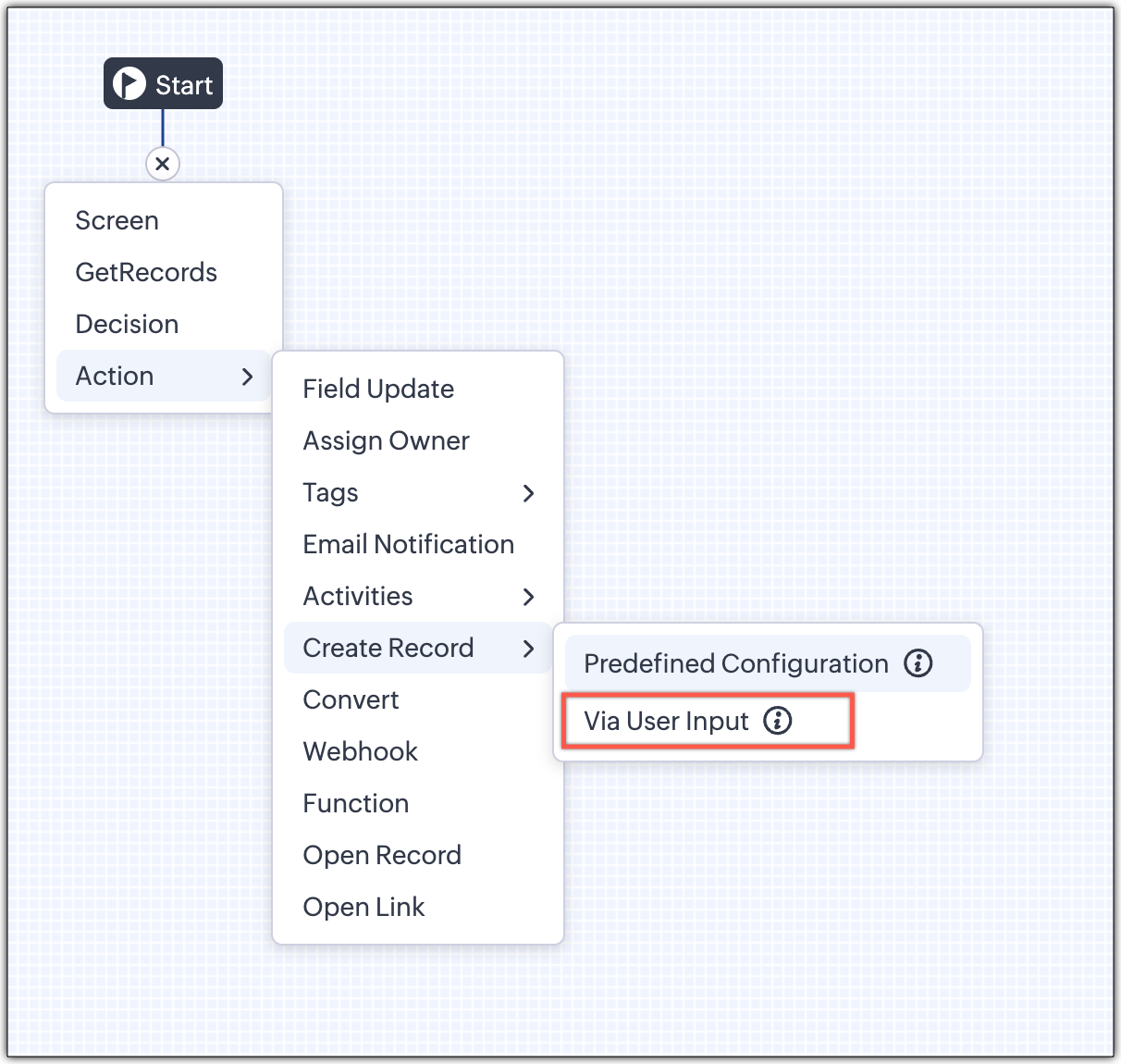
1 - Predefined Configuration (Existing Action)

The current create record action will be retained and renamed as 'Predefined Configuration'.

Records will be created automatically during the execution of a Kiosk. They require you to add pre-defined values either as static values or data from previous screens. This is ideal for predefined updates or recurring tasks where information is known in advance.

2 - Via User Input (New Action)

The key advantage of this update is that it simplifies how admins configure record creation in Kiosk Studio. Earlier, admins had to manually create a separate screen replicating all the fields of a module and then map them in the Create Record action. Moreover, if there were changes made to the fields in the module, the admin would have to edit the Kiosk and add/map the new field. All this was time-consuming and complex to setup.

Now, admins can choose to allow records to be created during the Kiosk's execution and eliminate the need to replicate, map and merge fields to save time and effort through the use of Quick Create pop-up.

Through this enhancement, real-time record creation is possible during live Kiosk execution. Users can input values in the Quick create layout that would pop-up during execution to create new records in a module. Perfect for real-world scenarios, the exact information needed to create a record only becomes available during the live execution of the Kiosk.   
Real-time scenarios

Let's say you run a Kiosk for your sales team. During a call, a customer requests a product demo and shares their availability Or, your support team receives a call and has to log the customer’s issue details or updated contact info.

With this enhancement, the sales rep or support executive can create records instantly while the Kiosk is running, to input the information they get during their call to provide a smooth customer experience.

How does it work?

  1. While setting up the Kiosk, select Create Record > Via User Input.
  2. Enter Action Name, then choose the Module and Layout.
  3. During execution, the Quick Create layout for the selected module appears.
  4. There is an option to pre-fill frequently used field values during configuration.
  5. Now, users can enter details directly while the Kiosk is being executed.
  6. Note: If a user lacks Create permission for a module, this step is skipped, and related values will show as null.

Take a look at the GIF below to understand how this action can be setup and executed.
 

GetRecords just got smarter with these new enhancements

Fetch All Records from a module to your GetRecords Screen

You can now choose to fetch all records from a module to be displayed in your GetRecords Screen.

Previously, you could select a single record or multiple records based on the limit set for record preferences. Now, we've given you a choice to be able to select Some Records or All records. This is useful in scenarios when users need to view or act on a complete set of records in a module rather than on a limited number of them.

New pagination making easier to navigate records

We’ve added pagination to the GetRecords screen, making it easier to navigate and locate specific records quickly, even when dealing with large data sets.

Search or filter records in GetRecord screen s

Quickly find records in GetRecords screens with this new addition to Kiosk.

Increased selection limit to select more records

We have increased the GetRecord selection limit from 10 to 100.

GetRecords First-Screen Loads Instantly - No Refresh Needed

Currently, only Kiosks opened through user actions (like Blueprint or Custom Buttons) loaded records directly, while others showed a 'Refresh to load' button. 


Now, every Kiosk auto-loads the first-screen of GetRecords without the need to manually refresh. When a Kiosk opens with GetRecords on the first screen, records now load instantly, regardless of whether it’s on the Home Page, Canvas, Record Detail View, Blueprint, or a Custom Button.

Kiosk Studio Added to the Standard Edition

We have extended the ability to create Kiosks to all paid editions in Zoho CRM including the Standard Edition. We aim to allow more users to create and manage Kiosks for their business processes. Take a look at the table below to know Kiosk creation limits for each Zoho CRM edition.


Standard
Professional
Enterprise
Ultimate / CRMPlus / ZohoOne
Number of Kiosks
2
7
25
50


Info
Release Plan :

- These enhancements is available for all users in all data centers. 


Start exploring these new features today and experience a faster, smarter, and easier way to capture data with Kiosk Studio.

Stay tuned for even more exciting enhancements coming your way!


Regards,
Serena Woolridge


        • Recent Topics

        • Can receive but not send messages in Zoho Mail

          Hello! I was able to configure my email client successfully in that I can receive messages just fine. However, when I send messages out, they seem to go out fine (I don't receive any errors or anything), but the recipient does NOT receive those messages.
        • Email is not being delivered.

          I was always able to send my emails normally but in the last two weeks I noticed that my emails are not being received by one company. Before this two weeks everything was ok we were sending messages and emails without a problem, but then they stopped receiving my email. I tried adding other email addresses to see if other users can get the mail and indeed they do but the most important company is not receiving it.  We already asked to see the Spam and Not wanted email, but it was not there either.
        • Emails are not sent to Hotmail emails.

          Hi, We are getting this message when we send email to any of Microsoft email service. This message was created automatically by mail delivery software.  A message that you sent could not be delivered to one or more of its recipients. This is a permanent error. qasims@live.se, ERROR_CODE :550, ERROR_CODE :5.7.1 Unfortunately, messages from [31.186.226.248] weren't sent. Please contact your Internet service provider since part of their network is on our block list (S3150). You can also refer your provider
        • Hotmail is blocking the zoho mail IP

          Greetings, Since last Tuesday (5 days ago today) I wrote to Zoho support and I still haven't received a single response (Ticket ID: 2056917). Is this how you treat people who pay for your email service? I am making this public so that those who want to
        • Zoho Desk View Open Tickets and Open Shared Tickets

          Hi, I would like to create a custom view so that an agent can view all the open tickets he has access to, including the shared tickets created by a different department. Currently my team has to swich between two views (Open Tickets and Shared Open Tickets).
        • Survey isn't Sending

          I have published my survey and uploaded my distribution list, which is within the limits of the plan I have. I cannot get it to send, despite repeated attempts. I'm beyond frustrated. Has anyone encountered this problem and how did you fix it?
        • Contacts are imported successfully but ignored when I send a campaign (due to non-marketing type)

          Can someone please help, When we sent a campaign yesterday, we received the following message: "The number of contacts from the selected mailing lists are 161. We have ignored 11 contacts due to its non-marketing type." So only 150 people got the message.
        • Problem: New Email Consistently Failing to Sync/Display in Inbox

          Recently, I have noticed that my Zoho Email inbox does not indicate I've received a new email, until I go to *another* folder and then return to the inbox. Only then will new emails be displayed. This has happened 100% of the time, during the past few
        • Campaing on hold for more than a week

          As someone with an existing site, I use Brevo to send newsletters to my users. Decided to tryout Zoho only for my first campaign to be placed on hold. Tried reaching out to support, but no response. Zoho Campaigns claims that my domain is new and the
        • Stop by and explore our six updates in ABM for Zoho CRM

          Dear Customers, We hope you're well! ABM for Zoho CRM is built to sharpen your database so that you engage with the right set of customer accounts. To fine-tune it further, we have six new updates: New access location for ABM Refined account entry criteria
        • CRM gets location smart with the all new Map View: visualize records, locate records within any radius, and more

          Hello all, We've introduced a new way to work with location data in Zoho CRM: the Map View. Instead of scrolling through endless lists, your records now appear as pins on a map. Built on top of the all-new address field and powered by Mappls (MapMyIndia),
        • Possible to connect Zoho CRM's Sandbox with Zoho Creator's Sandbox?

          We are making some big changes on our CRM so we are testing it out in CRM's Sandbox. We also have a Zoho Creator app that we need to test. Is it possible to connect Zoho CRM's Sandbox to Zoho Creator's Sandbox so that I can perform those tests?
        • Zoho CRM Community Digest - March 2026 | Part 2

          Hello Everyone! The second half of March 2026 arrived with a wave of announcements, from AI becoming more intuitive to security authorization protocols getting tighter, and a few community threads that quietly solved problems a lot of you have likely
        • Cross-Project Resource Capacity Planning View for All Users

          Zoho Projects has a workload and resource utilization view, but it is scoped per project. There is no native way for a manager to see a single view of how a team member is allocated across ALL active projects simultaneously. This means that when assigning
        • SMTP and API

          I cannot acess my account as its says "Access Denied". I have contacted on support@zeptomail.com. But no response.
        • Free Webinar Alert! Zoho Mail: An admin’s guide to email security reports and monitoring

          Hello Zoho Community! Are you struggling to keep track of your organization’s email activity? Wondering how to stay ahead of potential security threats? We’ve got a session you won’t want to miss. In our Zoho Mail: An admin’s guide to email security reports
        • Pinned important comments and threads in tickets

          Hello everyone, We are happy to announce that users can now pin important comments and threads in a ticket. This feature helps agents quickly access the customer's requirements and stay updated on the latest developments to ensure they have up-to-date
        • How we reduced manual ops using Zoho One (real use case)

          Hey community 👋 Sharing a quick use case - A growing business had disconnected systems across CRM, inventory, and storefront, leading to manual data entry, no real-time stock visibility, and limited reporting. What we did: Centralized data with Zoho
        • Introducing SlyteUI : From Idea to a Working Interface in Minutes

          SlyteUI is now live across all DCs as of 4th May 2026! Hello everyone! Are you spending hours building basic UIs? Does even the smallest customization feel like a major task? CRM customization should feel intuitive and straightforward, not time consuming
        • How to install Widget in inventory module

          Hi, I am trying to install a app into Sales Order Module related list, however there is no button allow me to do that. May I ask how to install widget to inventory module related list?
        • Inbuilt Telephony

          How do I replace InBuilt telephony with a custom PhoneBridge widget that's privately published in the Developer Console? I want to gain the usage of the telephone icon on the leads module in ZOHO CRM.
        • Zia flags the deal as at risk - but leaves my customers figuring out the rest themselves

          I implement Zoho for many businesses. Team sizes vary, some clients have 3 reps, some have 40. But I keep hearing the same complaint across all of them and I figured it's worth raising here. Zia's deal scoring has genuinely improved over the past year.
        • Calculate Hours Minutes Sec in Zoho Creator Using Deluge

          check_In = "8-Aug-2023 10:00:00".toDateTime().toLong(); checkout = "8-Aug-2023 18:00:00".toDateTime().toLong(); //difference = start.timeBetween(end); check_In = "8-Aug-2023 17:56:50".toDateTime().toLong(); checkout = "8-Aug-2023 18:00:00".toDateTime().toLong();
        • Customizing Global Search Settings for All Users

          Hi Our team use the brilliant global search functionality within CRM many many times daily. But, we struggle with the out-of-the box columns that CRM gives you. We are always telling users to customize this look to more suit our business, to show the
        • favorites no longer listed

          Hello, I can no longer navigate to my Favorites from the pulldown at the top of my grid view (see attached screenshot). I wasn't able to find it anywhere! Please help me display my Favorites. Thank you!
        • Super Admin Logging in as another User

          How can a Super Admin login as another user. For example, I have a sales rep that is having issues with their Accounts and I want to view their Zoho Account with out having to do a GTM and sharing screens. Latest Update (27th April 2026): With the early
        • Cross Module Filtering – Use Fields from Lookup modules in Custom Views criteria and Advanced Filters

          Hello everyone, Zoho CRM now enables you to achieve deeper filtering of records in a module, using fields of a lookup, thereby enhancing your data management experience manifold. This filtering based on lookup module fields is now available in advanced
        • The Zoho Books client portal is good but it stops just short of being genuinely useful

          I set up Zoho Books for quite a few Companies. And honestly the client portal is one of the features I always demo because it looks great on the surface. Clients love the idea of it. But then a few months into going live, I start getting the same feedback.
        • How can I remove a Partner!?

          Hi Im trying to remove a partner. He added himself the CRM. He's now no part of the project and Im trying to remove him asap, but the screen wont let me as I dont know what the Partner ID is! Moderation Update: The request to untag/remove a partner from
        • Zoho CRM Sales Targets for Individual Salespeople

          Our organistion has salespeople that are allocated to different regions and have different annual sales targets as a result. I am building an CRM analytics dashboard for the sales team, which will display a target meter for the logged in salesperson.
        • Cadence not stopping on reply (in some cases) – anyone else?

          Hi everyone, we’ve noticed that in a few cases, Cadences don’t stop even though the contact replied (setting “stop on reply” is active). It works fine most of the time, but occasionally the reply is visible in CRM without stopping the Cadence. Our assumption
        • Is it possible to create cross-module rules without code?

          Before requesting this as a request, I want to be sure that there isn't a way to do it that I'm not aware of. What I mean by cross-module rule is: like a rule, but the trigger is in one record and the action is another, related record. Easy example: when
        • Standardize your booking forms with Centralized Customer Form

          We’re excited to introduce Centralized Customer Form, a new way to manage and standardize how customer information is collected across your event types. With this feature, you can define a common set of booking form fields once and apply them across your
        • Cannot edit articles in Zoho Learn

          Our users have recently noticed that there are certain manuals where we cannot edit any of the articles. Even the user who created the article cannot edit. I have an admin profile and I am also unable to edit the articles. Is this an ongoing bug? Kindly
        • Emails to Hotmail not being delivered

          For the last 2 days, every hotmail and MSN email have not been delivered. Anyone else having this issue?
        • Translation from Chinese (Simplified) to Chinese (Traditional) is not working. It randomly translated. Google Translate accurately but zoho translate is not working at all

          Hi friends, The newly added language for translation. https://www.zoho.com/deluge/help/ai-tasks/translate.html "zh" - Chinese "zh-CN" - Chinese (Simplified) "zh-TW" - Chinese (Traditional) my original text: 郑这钻 (and it is zh-CN) translated traditional
        • Pricing Query - Zoho Contracts

          Query about pricing: I am wondering if we need users from the organization to sign, do they need to be registered as users? And thus consume a license? They will literally not use the system for anything else. Just to read the contract once completed
        • Agent Ticket awareness

          I am trying to develop a system in desk that posts a comment every time a new ticket is opened. The goal is to alert agents of other open tickets. And make them aware of recently closed tickets. I have tried flow and work flow. I can get a comment to
        • Automation #7 - Auto-update Email Content to a Ticket

          This is a monthly series where we pick some common use cases that have been either discussed or most asked about in our community and explain how they can be achieved using one of the automation capabilities in Zoho Desk. Email is one of the most commonly
        • Add bulk ticket merge functionality in Zoho Desk

          Hi Zoho Team, We would like to request a feature that allows agents to merge multiple tickets in bulk instead of merging them one by one. Current Limitation At the moment, tickets can only be merged individually. This becomes very time-consuming when
        • Next Page