Power up your Kiosk Studio with Real-Time Data Capture, Client Scripts & More!

Power up your Kiosk Studio with Real-Time Data Capture, Client Scripts & More!

Hello Everyone,

We’re thrilled to announce a powerful set of enhancements to Kiosk Studio in Zoho CRM. These new updates give you more flexibility, faster record handling, and real-time data capture, making your Kiosk flows smarter and more efficient than ever.

What's New? 

  1. Launch Kiosks Anywhere with Client Script Support (Phase 1) 
  2. Capture data live during Kiosk execution
  3. GetRecords Screen Enhancements :
    1. Fetch all records from a module 
    2. View more records with pagination
    3. Find records faster with the new Search & Filters
    4. Select more records at a time with increased selection limits
    5. GetRecords first screen loads Instantly with no refresh needed 
  4. Kiosk Studio now available in the Standard Edition 
 
Let's dive into the details below:

Launch Kiosks anywhere with Client Script Support 

The first phase of Client Script support for Kiosk is here.

Now users can open a Kiosk directly through scripts anywhere within Zoho CRM.

As part of this update, there’s an important change to note. We’ve introduced a Unified API Name which is a unique identifier that stays consistent across all versions of the Kiosk. While creating Kiosks, users must now also add this API name so it will be easier to manage and track Kiosks while ensuring smooth integration with scripts.

Kiosks can be opened using Client Scripts in both Modules and Commands.

To open Kiosks using client scripts in Modules : Navigate to Settings < Developer hub < Client Script < Module. Then select where the Kiosk should open from (while creation or editing or cloning, etc), the layout and choose the event. 

To open Kiosks using client script in Commands: First create the command to open kiosks from anywhere in the CRM by navigating to Settings < Developer hub < Client Script < Command. Next you can open the command from the Command Palette or use keyboard shortcuts from any module in your CRM account to open Kiosks.


Kiosks can open in three ways either as Pop-up, Flyout or a Callout.

Given below are some sample codes to open Kiosk for the above ways.

openPopup() : This will open a Kiosk as a modal popup. Learn more

Sample Code :

ZDK.Client.openPopup(

  { api_name: 'test',        // Required: Unified Kiosk API name

    type: 'kiosk',           // Required

    header: 'Kiosk Header',  // Optional

    height: '500px',         // Optional

    width: '200px',          // Optional

    animation_type: 4        // Optional

  },

  {

    data: 'sample data'      // Optional: Passed to PageLoad event

  }

);


openFlyout() : This will open a Kiosk in a flyout panel. Learn more

var flyout;

try {

  flyout = ZDK.Client.getFlyout('newFlyout');

} catch (error) {

  flyout = ZDK.Client.createFlyout(

    'newFlyout',

    {

      type: 'kiosk',           // Required to execute Kiosk

      animation_type: 4,       // Optional

      header: 'Sample Kiosk'   // Optional

    }

  );

}

flyout.open({

  api_name: 'testNew',        // Required: Unified Kiosk API name

  type: 'kiosk',              // Required

  data: 'Sample data'         // Optional

});


openCallout() : This will open a Kiosk as a callout anchored to a field on the record details page.  Learn more

ZDK.Client.openCallout(

  {

    api_name: 'test',        // Required: Unified Kiosk API name

    type: 'kiosk',           // Required

    header: 'Sample Kiosk',  // Optional

    height: '450px',         // Optional

    width: '450px'           // Optional

  },

  {

    type: 'field',           // Required

    api_name: fieldApiName   // Required: Field API name

  },

  {

    data: fieldApiName       // Optional

  }

);


This is just the beginning! Phase 1 lays the foundation for deeper client script integrations coming soon.

Some of the upcoming client script support enhancements include :
  1. Allow users to add clients scripts for a screen from both a screen in Kiosk or from a command in Client Script.
  2. Add multiple client scripts for a Kiosk screen,
  3. Invoke responses from a Kiosk for a call back function from Client Script.
Notes
Note :
  1. Learn more about Client Scripts from our developer guides.
  2. Learn how to create commands in Client Scripts.

Capture data live during Kiosk Execution with new create record actions  

1 - Predefined Configuration (Existing Action)

The current create record action will be retained and renamed as 'Predefined Configuration'.

Records will be created automatically during the execution of a Kiosk. They require you to add pre-defined values either as static values or data from previous screens. This is ideal for predefined updates or recurring tasks where information is known in advance.

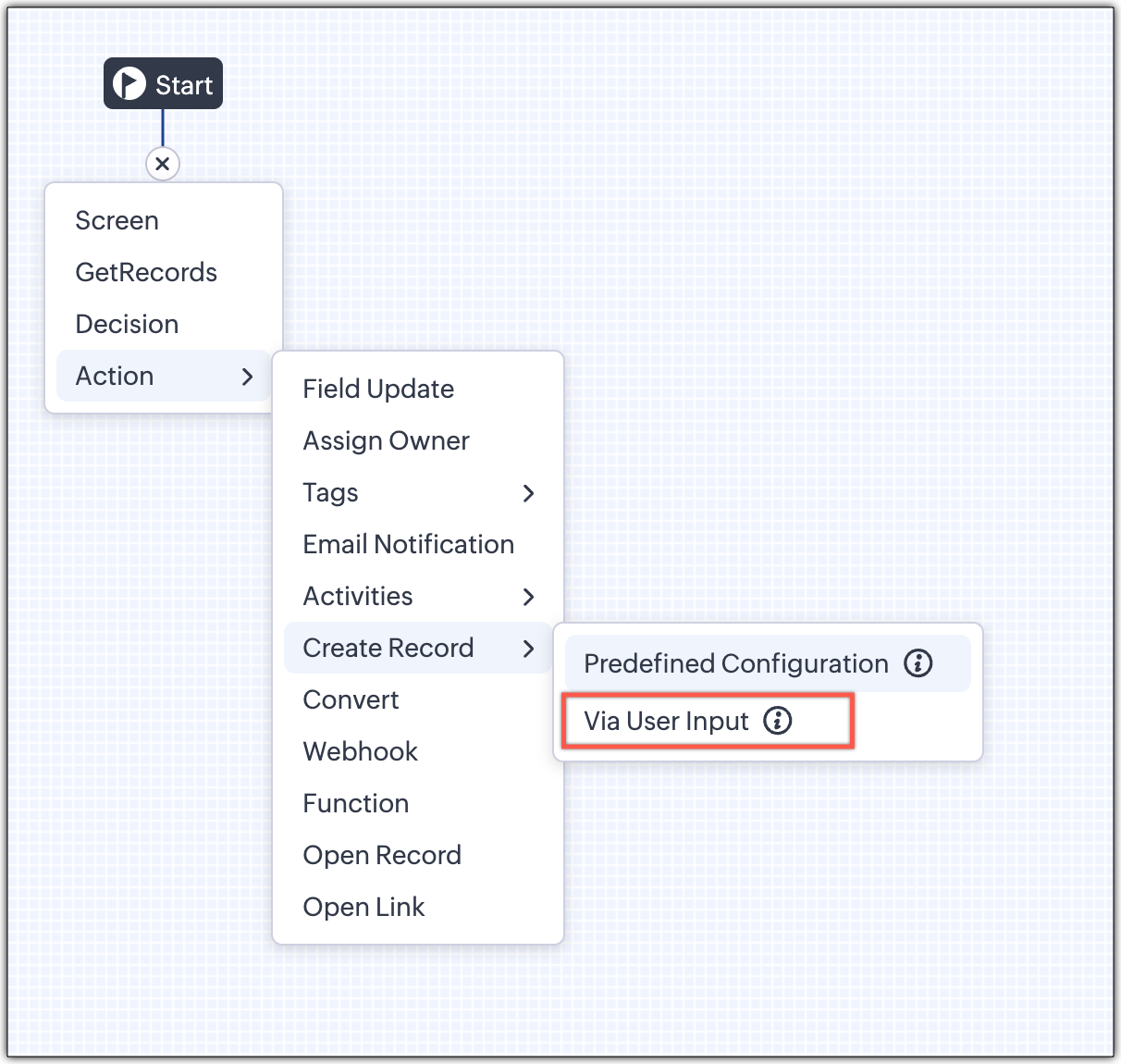
2 - Via User Input (New Action)

The key advantage of this update is that it simplifies how admins configure record creation in Kiosk Studio. Earlier, admins had to manually create a separate screen replicating all the fields of a module and then map them in the Create Record action. Moreover, if there were changes made to the fields in the module, the admin would have to edit the Kiosk and add/map the new field. All this was time-consuming and complex to setup.

Now, admins can choose to allow records to be created during the Kiosk's execution and eliminate the need to replicate, map and merge fields to save time and effort through the use of Quick Create pop-up.

Through this enhancement, real-time record creation is possible during live Kiosk execution. Users can input values in the Quick create layout that would pop-up during execution to create new records in a module. Perfect for real-world scenarios, the exact information needed to create a record only becomes available during the live execution of the Kiosk.   
Real-time scenarios

Let's say you run a Kiosk for your sales team. During a call, a customer requests a product demo and shares their availability Or, your support team receives a call and has to log the customer’s issue details or updated contact info.

With this enhancement, the sales rep or support executive can create records instantly while the Kiosk is running, to input the information they get during their call to provide a smooth customer experience.

How does it work?

  1. While setting up the Kiosk, select Create Record > Via User Input.
  2. Enter Action Name, then choose the Module and Layout.
  3. During execution, the Quick Create layout for the selected module appears.
  4. There is an option to pre-fill frequently used field values during configuration.
  5. Now, users can enter details directly while the Kiosk is being executed.
  6. Note: If a user lacks Create permission for a module, this step is skipped, and related values will show as null.

Take a look at the GIF below to understand how this action can be setup and executed.
 

GetRecords just got smarter with these new enhancements

Fetch All Records from a module to your GetRecords Screen

You can now choose to fetch all records from a module to be displayed in your GetRecords Screen.

Previously, you could select a single record or multiple records based on the limit set for record preferences. Now, we've given you a choice to be able to select Some Records or All records. This is useful in scenarios when users need to view or act on a complete set of records in a module rather than on a limited number of them.

New pagination making easier to navigate records

We’ve added pagination to the GetRecords screen, making it easier to navigate and locate specific records quickly, even when dealing with large data sets.

Search or filter records in GetRecord screen s

Quickly find records in GetRecords screens with this new addition to Kiosk.

Increased selection limit to select more records

We have increased the GetRecord selection limit from 10 to 100.

GetRecords First-Screen Loads Instantly - No Refresh Needed

Currently, only Kiosks opened through user actions (like Blueprint or Custom Buttons) loaded records directly, while others showed a 'Refresh to load' button. 


Now, every Kiosk auto-loads the first-screen of GetRecords without the need to manually refresh. When a Kiosk opens with GetRecords on the first screen, records now load instantly, regardless of whether it’s on the Home Page, Canvas, Record Detail View, Blueprint, or a Custom Button.

Kiosk Studio Added to the Standard Edition

We have extended the ability to create Kiosks to all paid editions in Zoho CRM including the Standard Edition. We aim to allow more users to create and manage Kiosks for their business processes. Take a look at the table below to know Kiosk creation limits for each Zoho CRM edition.


Standard
Professional
Enterprise
Ultimate / CRMPlus / ZohoOne
Number of Kiosks
2
7
25
50


Info
Release Plan :

- These enhancements is available for all users in all data centers. 


Start exploring these new features today and experience a faster, smarter, and easier way to capture data with Kiosk Studio.

Stay tuned for even more exciting enhancements coming your way!


Regards,
Serena Woolridge


        • Recent Topics

        • Marketer's Space: Re-engage your Audience with WhatsApp Journeys

          Hello Marketers, Welcome back to another post in Marketers' Space! We’re continuing our WhatsApp Journeys series, diving into strategies that ensure your marketing efforts don’t go unnoticed. So, you drafted an email with personalization, a compelling
        • Using assigned value from a dropdown list to populate a field

          Hello, I use a dropdown with a global list that has assigned values. The value is a name, the assigned value is the corresponding email. When selecting my name from the drop down, I want the "Save for later" template to use the assigned email as recipient.
        • Inventory Barcode Creation - Add Picture of Item

          Hi I am trying to set up bar code labels and include a picture of the item on the label - any idea on how to add that field to the barcode generator?
        • Form in ticket reply

          Good day, I know I can use Snip to reply, but is there a way to create a web form to request specific additional information for a ticket? e.g., When a ticket is resolved for a telephone or printer issue, is there a way to reply via a web form to request
        • SalesIQ operators do not receive any messages or see any chat from customers if the customers do not answer the form field questions in Flow Controls.

          Hi Zoho SalesIQ Team, I am reaching out to report a issue regarding the Brands > Flow Controls When a customer continues typing messages without answering the form field questions, operators do not receive any of the customer’s messages in SalesIQ. (before
        • Price Managment

          I have been in discussions with Zoho for some time and not getting what I need. Maybe someone can help explain the logic behind this for me as I fail to understand. When creating an item, you input a sales rate and purchase rate. These rates are just
        • Zoho Inventory Feature Roadmap Visible To All

          Hello, please consider making your feature roadmap visible to us users so that we know what to expect in future. This may appease current users who are seeking clarification on feature implementation dates, so that they can make an informed decision whether
        • Cannot Access Subform Display Order in Deluge

          As highlighted in this community post, we still have to deal with the significant limitation of not being able to access the user-sorted order of subform rows through Deluge. This creates a major disconnect between the UI capabilities and backend automation,
        • Delete Tags - Maximum for Module

          Hello, I have just received the message that I have reached the maximum tags for a module. We'd like to consolidate tags so some deletion is required. Can you please advise how we can do this? Thanks / Stephanie
        • I need targets and actuals achieved data to be visible in zoho. It might be calls revenue emails or whatever how do i make it visible in analytics?

          I need targets and actuals achieved data to be visible in zoho. It might be calls revenue emails or whatever how do i make it visible in analytics?
        • Reporting phishing emails to Zoho?

          I came across a few threads after searching for info about reporting phishing emails to Zoho. From what I read, it appears that Zoho doesn't want to hear about phishing. You suggest marking such messages as Spam. Phishing and spam are separate issues, and I believe that phishing is the more dangerous. A user who is not paying close attention is in danger of giving away important data - usernames, passwords, email addresses, SSNs, etc. - to people who are happy to misuse such data and victimize email
        • How do I create an update to the Cost Price from landed costs?

          Hi fellow Zoho Inventory battlers, I am new to Zoho inventory and was completely baffled to find that the cost price of products does not update when a new purchase order is received. The cost price is just made up numbers I start with when the product
        • Deploy or update Zoho CRM custom functions via curl

          How can I deploy/modify/update my custom deluge functions using curl? Can't find related API endpoints in CRM documentation Provide me with examples I need it for making autodeploy process from git repo Thank you
        • SEO recommendation of H1 tag for website tittle

          The exact words are “ It is good practice to place the page title inside the H1tag.” Now I already have one H1 tag on my website but it is not website tittle. In the SEO recommendation that is clear too that I have h1 tag on my page. Now I don’t know
        • Store WorkDrive Recordings Locally Until Upload Completes

          Hi, Hope you are doing well. We would like to submit a feature request regarding the video recording functionality in Zoho WorkDrive. Currently, when a user records a video through WorkDrive and the upload process fails or gets stuck, the recording may
        • Functional URLs and Environments

          I am developing my creator application with my application in an environment. I have a Page that has two buttons and an embedded section. When I first developed this page, each of the buttons had functional URLs to export the page as a PDF and one to
        • Zoho Analytics Filter Bug

          I encountered a bug where typing the letter "A" in the drop-down filter of a table or query table causes the drop-down to close unexpectedly. For example, when typing "Today", the drop-down list closes as soon as "a" is entered. I tested this on another
        • Zoho CRM to Google Calendar time synchronization

          Hello Enterprise Support Community, Our developers have identified an ongoing issue with the Zoho CRM and Google Meeting sync. Currently, there is a delay in syncing meetings/events between the two applications. Additionally, when a meeting is created
        • Allow Zia Agents using Zoho One Account

          When I went to try Zia Agents, it forced the creation of a new, separate account. This seems counter-intuitive to me. I don't want to manage a separate account. Plus, aren't Zoho One users the ones most likely to adopt Zia Agents most quickly? It seems
        • Zoho Flow needs a comprehensive public API — the foundation for agentic flow building, self-healing flows, and MCP

          Zoho is going all-in on agentic AI: Zia LLM, 25+ prebuilt Zia Agents, the no-code Zia Agent Studio, and an MCP server that opens up the action libraries of 15+ Zoho apps to any MCP client. That direction is exactly right. But there is a structural gap
        • The 3.1 biggest problems with Kiosk right now

          I can see a lot of promise in Kiosk, but it currently has limited functionality that makes it a bit of an ugly duckling. It's great at some things, but woeful at others, meaning people must rely on multiple tools within CRM for their business processes.
        • Does Zoho Learn integrate with Zoho Connect,People,Workdrive,Project,Desk?

          Can we propose Zoho LEarn as a centralised Knowledge Portal tool that can get synched with the other Zoho products and serve as a central Knowledge repository?
        • Zoho Desk : How to Filter Tickets by @Domain or Email Address

          Hi Zoho Desk Support Team, I would like to know how to filter tickets by a specific @domain or email address in Zoho Desk — not by Contact Name. For example, is it possible to search or create a view that shows all tickets from a particular domain (e.g.,
        • Zoho Desk: Quick Filter/Quick Search InputBox in Ticket View

          Hi Zoho Desk Developer Team, I would like to suggest adding a “Quick Filter” search box in the Ticket View page. It would be very helpful, We can search for it immediately by ticket title, email, sender name, or ticket ID directly from the view. This
        • Zoho Analytics UI Bug

          Hello, all, The Aggregate Formulas in Zoho Analytics' list of fields have a 3-dot menu: If the formula has a long name, the name is not fully visible in the list, and a 3-dot menu is not accessible from it: This is not convenient, especially when the
        • [Free Webinar] Learning Table Series June 2026 - Mobile-first field operations with Zoho Creator

          Hello everyone, We’re excited to announce the next session in Learning Table Series 2026, where we will continue with our purpose-driven approach—focusing on how Zoho Creator’s features help solve real-world business challenges. Each session in this series
        • How to handle email attachments >5MB from Zoho Mail to Zoho Creator via Zoho Flow?

          Hi Zoho Community, I'm building an email management system that automatically captures incoming emails from Zoho Mail into Zoho Creator records via Zoho Flow. Everything works fine except for one major blocker — email attachments larger than 5MB. Current
        • Facturation électronique 2026 - obligation dès le 1er septembre 2026

          Bonjour, Je me permets de réagir à divers posts publiés ici et là concernant le projet de E-Invoicing, dans le cadre de la facturation électronique prévue très prochainement. Dans le cadre du passage à la facturation électronique pour les entreprises,
        • Is there a way to add custom fields to Company Details?

          Hi Zoho community, I'd like to store a bunch of custom related values (eg registration date, paid up capital etc) in CRM. Please note I'm talking about my own company not clients. I dont want to pollute Account module with irrelevant fields since i want
        • Zoho Analytics "Esc" key problem

          I frequently use the Escape (Esc) key while building dashboards, reports, and writing SQL queries. Since the recent updates to Zoho Analytics, the Esc key no longer behaves as expected. When writing SQL queries, pressing Esc to dismiss a suggestion now
        • Spotlight Series #28: Power up your Mac presentations with Apple Intelligence

          Hello, Mac users! This month's spotlight is for you. Zoho Show's desktop app for Mac just got a whole lot smarter, and we think you're going to love what's inside. Apple Intelligence is now built directly into Zoho Show for Mac, not as a sidebar, not
        • Reach us through our official support channels

          Dear Customers, Thanks a lot for choosing Zoho! Our applications are built to help achieve your day-to-day business goals. We are committed to engaging with you, to understand and develop solutions that enhance your productivity. We are happy and ready
        • Zoho Desk / Assist Integration

          Good day, We use both Zoho Desk and Assit, and were wondering if there is a way to schedule a remote session from within Desk. I know Desk has the "Remote Assist" option, but even that is not the most user-friendly process. Or even if there is a way to
        • Can you sell Subscriptions using Zoho Commerce?

          In addition to physical products and the apparently coming soon 'Digital Products', it is possible to sell Subscriptions using Zoho Commerce?
        • 5 dashboards no Zoho Analytics que transformaram a gestão dos nossos clientes

          Nos últimos anos, implementamos o Zoho Analytics em empresas dos mais variados segmentos: varejo, saúde, jurídico, logística, SaaS. E uma coisa é certa: os CEOs que passam a ter dashboards em tempo real tomam decisões de uma forma completamente diferente.
        • #8 Your First Invoice for Real This Time

          Imagine standing at the edge of a journey you have carefully prepared for. Every setting configured, every detail arranged, every piece of your invoicing workflow thoughtfully put into place. What began as less than 30 minutes of setup has now transformed
        • Resolved (11:52am CDT): Uploading Files into Zoho CRM (US DC)

          Hello, Enterprise Support Community, We have begun receiving reports of issues with uploading files into Zoho CRM in our US DC, with file uploads failing during the upload process. Our teams are currently actively engaged in diagnosing and troubleshooting
        • Introducing the new Zoho Announcements Hub

          Hello, Enterprise Support Community! We are excited to announce a new way to keep up to date with recent product releases and announcements for the Zoho apps you use on a regular basis. Introducing our new centralized location to bring together all Zoho
        • GLM 5 not available

          Hello, I am trying to setup a Zia Agent using agents.zoho.com. The settings says that GLM5 is among the list of free zoho hosted models available. However, when I try to setup an agent and pick a model from the list only GLM 4.7 Flash is available. How
        • Zia Agent built in ChatKit UI does not render markdown

          Hi, You have a major shortcoming in the Zia Agent UI. The test UI that is embedded in agents.zoho.com allows you to test the agent has full support for rendering markdown, but your ChatKit UI does not have support for rendering markdown. If I embed it
        • Next Page