The Social Playbook - February edition: Why moment marketing works (and how brands use it)
Imagine the final season of your favorite series is about to drop. Your entire feed is talking about it. Trailers everywhere. Fan theories. Hype at 100%.
Now your go-to burger place launches a limited-edition meal box themed around that series—custom packaging, a collectible character inside, and a menu inspired by the show.
Be honest… you’re not just hungry anymore. You want it. You need it. That feeling? That’s not random. That’s "moment marketing."
What's happening here?
Moment marketing is when you start creating content around what’s actually happening in the world. It’s about tapping into real-time moments like a new series drop, a big match, or even a pop culture wave, and using that excitement to connect with your audience in a way that feels natural, fun, and timely. When a brand launches a limited-edition product, a themed post, or even just a clever content during a big moment, it’s not just marketing. It’s joining the conversation.
In the February edition of The Social Playbook, we break down what moment marketing is, how brands use real-time moments to create buzz, iconic examples that worked, and how you can apply it to your own content.
Why moment marketing works
When you connect your content or product to something people already care about, you stop feeling like an ad and start feeling like part of their world.
Here’s how using moments elevates your marketing:
- It builds brand recall and trust
When your audience sees your brand talking about something that’s happening right now, it feels relatable. Over time, this builds both brand recall and trust.
- It increases reach and shares
If your post taps into a moment in a clever way, your audience is more likely to send it to friends, post it on stories, or talk about it. That’s how your reach grows.
- It drives fast sales with FOMO (Limited-edition products)
When brands launch something exclusive around a hyped-up event (a series finale, a tournament, a festival) like limited-edition products, fans don’t want to miss out on something tied to what they love. It’s no longer just a product. It’s part of their passion. And that’s how brands build emotional connections.
Now let's take a look at an example;
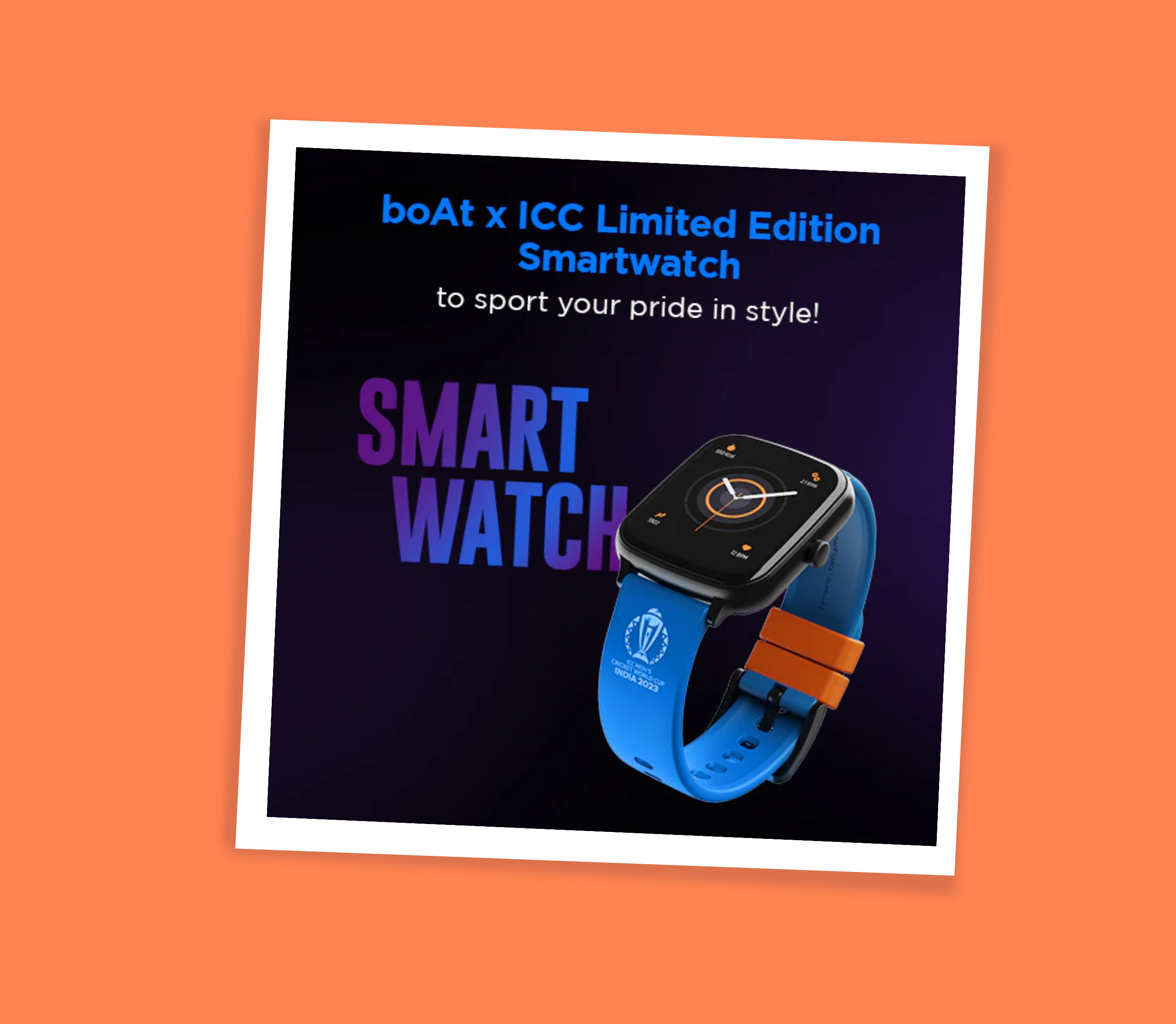
During the Cricket World Cup, boAt launched a World Cup–themed edition watch.
It worked because:
- It showed up during a moment cricket fans truly cared about -> built recall and trust
- Fans shared it because it felt cool and personal -> boosted reach
- It was a limited-edition product at the right time -> created FOMO and quick sales
That’s moment marketing done right: right time, right idea, right emotion.
How brands use moment marketing (with real examples)
Brands adapt to moments based on what fits their brand voice, audience, and product. Some go big with campaigns, some keep it simple with packaging or social posts, but the goal stays the same: stay relevant and memorable.
Let’s look at a few popular ways brands have done this really well.
- Limited-edition products and themed packaging
When a big show, movie, or cultural moment drops, some brands create products and packaging inspired by it. When Bridgerton released a new season, several brands jumped in creatively. Brands like Kimirica, Dove, Nykaa, and others launched Bridgerton-inspired packaging and limited-edition products. The designs, colors, and themes matched the vibe of the series This makes fans feel like they were owning a piece of the moment. The launch of Nykaa’s Bridgerton collection resulted in a significant and record-setting boost in sales.

Similarly, when Stranger Things dropped a new season, brands like KFC, Burger King, Kinder Joy, and Miniso introduced themed meal boxes, collectibles, and special products. These weren’t just products, they were experiences fans wanted to be part of.

- Timely and relatable social media content
Some brands use the moments just by showing up at the right time with the right content. Whether it's creating posts, visuals, or captions linked to trending shows, events, or pop culture moments, brands insert themselves into conversations audiences are already having. This makes the content feel less like advertising and more like participation.

The most iconic moment marketing move in history
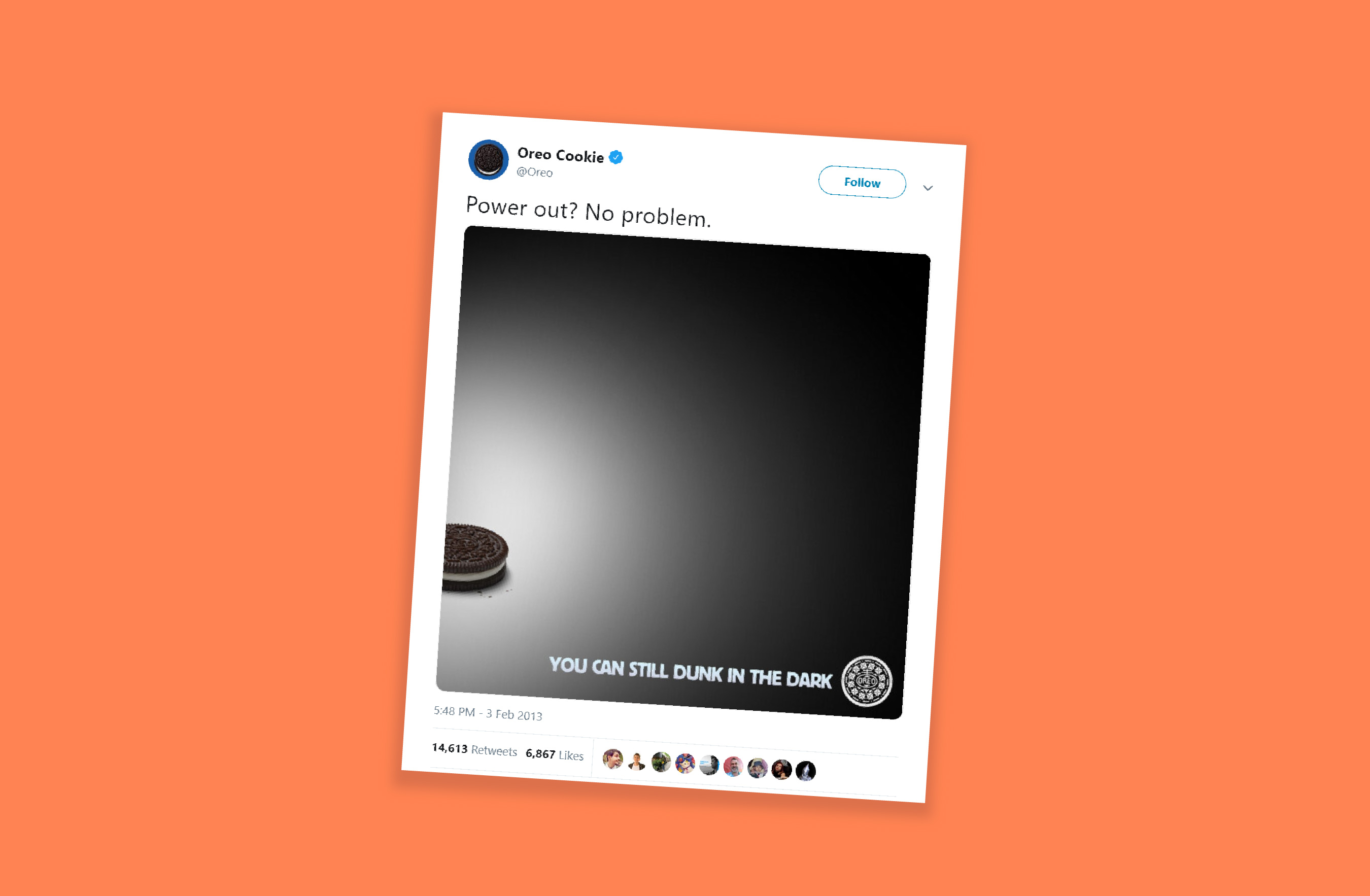
If there’s one example that perfectly defines moment marketing, it’s Oreo’s “Dunk in the Dark” moment during the 2013 Super Bowl.
During the Super Bowl, the stadium suddenly went dark due to a power outage. The game paused. The audience waited. And within minutes, Oreo’s social team posted a simple Tweet: “You can still dunk in the dark.” That’s it. No long copy. Just perfect timing and creativity.
The Tweet went viral, won multiple marketing awards, and is still talked about today as the most iconic moment marketing example ever.
- The Impact: The post received nearly 15,000 retweets and over 20,000 likes on Facebook within the first night.
- Social Growth: Oreo's Twitter following increased by 8,000, and Instagram followers grew from 2,000 to over 36,000 (reaching over 85,000 later that month).
- Media Value: The campaign generated approximately USD 525 million in earned media impressions.
How to use moment marketing the right way
Moment marketing works best when three things come together:
Perfect timing -> smart idea -> creative execution
- Get the timing right
- Keep an eye on what’s trending using tools like Google Trends, X, and social media analytics
- Watch for events, shows, matches, and cultural moments
- React fast, because the earlier you join the moment, the more attention you get
- Build a smart idea
- Your idea should connect naturally to the trend
- It should match your brand’s tone and personality
- Don’t force-fit yourself into a moment that doesn’t fit
- Add creative execution
- Use crisp copy
- Keep visuals clean and simple
- Add a witty or relatable twist
- Make people smile and think
For example, during the Women’s Premier League, Amul used the cricket buzz at the right time and created a fun post in their usual style. Even though they sell dairy products, the content felt natural and not forced. It worked because the timing was right, the idea made sense, and the creativity matched their brand.

Common mistakes in moment marketing
- Jumping on every trend without checking if it fits your brand
- Posting too late and missing the moment
- Using sensitive, political, or emotional topics for humor
- Being unclear or confusing in your message
- Trying to fit into trends that don’t suit your brand style
In moment marketing, you’re not chasing attention—you’re meeting your audience where their attention already is. When brands show up at the right moment, people notice and remember.
Stay tuned for the March edition of The Social Playbook.
Topic Participants
Stephania Beverly
Sticky Posts
The Social Playbook - February edition: Why moment marketing works (and how brands use it)
Imagine the final season of your favorite series is about to drop. Your entire feed is talking about it. Trailers everywhere. Fan theories. Hype at 100%. Now your go-to burger place launches a limited-edition meal box themed around that series—customThe Social Playbook - January edition: Getting started with content creation
Social media isn’t just about posting some random content. It’s about why certain content works, how brands stand out, and what makes people pause mid-scroll. The Social Playbook is a monthly community series where we break all of that down. Through real
Recent Topics
Auto tagging
Some of the articles I enter into Notebook get there when I enter them in Raindrop.io and IFTTT copies the articles in Notebook. When this happens the notes are tagged but instead of useful one word tags with topic the tag pertains to the specific articleWebDAV support
I need WebDAV support so that I can upload/download (and modify) documents from my local file system. Is anything planned in his direction?Constant refresh required in lots of Zoho tabs
"Hey Zoho, if you can sync my notification bell across 15 tabs using a BroadcastChannel, why can't you send a 'Data Refresh' signal the same way? We don't need a browser reload—we just need the data to sync without us clicking F5 like it's 1999." "PS:What's New in Zoho Billing | January 2026
Excited about the latest enhancements in Zoho Billing? Our January updates bring an intelligent AI assistant, smarter subscription management, and improved tax compliance, saving you time and reducing manual work. Dive into the details below to see howCliq iOS can't see shared screen
Hello, I had this morning a video call with a colleague. She is using Cliq Desktop MacOS and wanted to share her screen with me. I'm on iPad. I noticed, while she shared her screen, I could only see her video, but not the shared screen... Does Cliq iOS is able to display shared screen, or is it somewhere else to be found ? RegardsInserting images into Articles or Knowledgebase
Hi, Are there any plans in improving the Knowledgebase text editor so it would allow inserting images through Windows clipboard via copy-paste? Say for example I took a screenshot using the snipping tool in Windows and I'd like to insert that image toLinks not functioning in Zoho mail
Links that are included in emails I receive are not activating. Nothing at all happens when I click on them. I have researched FAQs and this forum to no avail. Any suggestions?Zoho Mail iOS app update: Manage folders and tags
Hello everyone! In the most recent version of the Zoho Mail iOS app, we have brought in support to manage(create, edit and delete) the folders and tags. Create folders Create Tags Edit/ Delete folder In addition to this, we have also brought in support[Important announcement] Zoho Writer will mandate DKIM configuration for automation users
Hi all, Effective Dec. 31, 2024, configuring DKIM for From addresses will be mandatory to send emails via Zoho Writer. DKIM configuration allows recipient email servers to identify your emails as valid and not spam. Emails sent from domains without DKIMOur Review Of Zoho CRM after 60 Days
The purpose of this is to just share with Zoho why I love their product, but ultimately why I could not choose Zoho CRM for our next CRM. About two months ago we begun a CRM exploration process for our financial planning firm, based in Texas. We alreadyLink Purchase Order to Deal
Zoho Books directly syncs with contacts, vendors and products in Zoho CRM including field mapping. Is there any way to associate vendor purchase orders with deals, so that we can calculate our profit margin for each deal with connected sales invoicesExtend the Image Choice Field
Hi, The New Yes/No field is great for what it does, and the Image Choice Field is good but could be better with some functions from the Yes/No field. Take an example, rather than just Yes/No you want Yes/No/Maybe (Or more than 3 choices), but unlike theZoho Desk: Macro to assign Ticket to self
Hello, We are using macros in Zoho Desk to set some fields and send a response. I would also like to assign the ticket to myself (or whoever applies the macro). I can only set a fixed agent in the macro, so I would have to create one for every agent.Turn off Knowlege Base Follow options and Follower lists
Is there a way to hide or turn off the option in the Knowledge Base for users to follow specific departments/categories/sections/articles? If not, is there a way to turn off the public list of followers for each of those things? Otherwise, customer namesNew Feature: Audit Log in Zoho Bookings
Greetings from the Zoho Bookings team! We’re excited to introduce Audit Log, a new feature designed to help you track all key actions related to your appointments. With Audit Log, you can maintain transparency, strengthen security, and ensure accountability.Automated Task reminder
First question: If a task does not have a reminder set, will it still send an email notification that the task is due today? If not, how can I set up an automated reminder to send the task owner an email that it is due on a certain date?Zoho Support - contract notifications
Hi, I have a few questions about using Zoho support. Is there a way to add custom contract notifications like (90 days before expiry send notification e-mail to agent and customer, then another 60 days before expiry and another 30 days.). And is it possibleKaizen #230 - Smart Discount-Based Quote Approvals Using CRM Functions and Approval Process
Hello everyone! Welcome back to the Kaizen series! Discount approvals are a standard part of sales governance. Most organizations need something like this: Discount % Required Action < 10% Auto-approve 10–19.99% Sales Manager approval ≥ 20% VP Sales approvalHow to create a new Batch and update Stock via Inventory?
Hi everyone, We are building an automation where a user enters batch details (Batch Number, Mfg Date, Expiry, and Quantity) into a Custom Module. I need this to trigger an API call to Zoho Inventory to: Create the new batch for the item. Increase theOAuth2 Scope Error - Incorrectly defaulting to CRM instead of Analytics.
Hello Zoho Team, I am trying to connect n8n to Zoho Analytics API V2 for a simple automation project. Despite using the correct Analytics-specific scopes, my OAuth handshake is failing with a CRM-related error. The Problem: The authorization screen shows:Archive Option in Conversation View
Hello, I have a suggestion\request to add an "Archive Thread" button in conversation view of Zoho Mail. The best suggestion I have is to put an "Archive Thread" button next to the "Label Entire Thread" button in conversation view. Most users don't justIs it possible to create a meeting in Zoho Crm which automatically creates a Google Meet link?
We are using Google's own "Zoho CRM for Google" integration and also Zoho's "Google Apps Sync" tools, but none of them provide us with the ability to create a meeting in Zoho CRM that then adds a Google Meet link into the meeting. Is this something thatTrigger a Workflow Function if an Attachment (Related List) has been added
Hello, I have a Case Module with a related list which is Attachment. I want to trigger a workflow if I added an attachment. I've seen some topics about this in zoho community that was posted few months ago and based on the answers, there is no triggerHow can I link Products in a Deal Subform to the Products Module
Hello, I have a pricing subform on our Deals page and use a lookup field to associate a product with each line. I want to be able to look at a product page within the Products module and see a list of the deals connected to that product. I have this workingEmail Field Validation Incorrectly Rejects RFC-Compliant Addresses (Forward Slashes)
I've encountered a validation issue with Zoho Creator's Email field that rejects RFC-compliant email addresses containing forward slashes, and I'm hoping the Zoho team can address this in a future update. The Issue When entering an email address containingCall result pop up on call when call ends
I’d like to be able to create a pop up that appears after a call has finished that allows me to select the Call Result. I'm using RingCentral. I have seen from a previous, now locked, thread on Zoho Cares that this capability has been implemented, butZOHO.CRM.UI.Record.open not working properly
I have a Zoho CRM Widget and in it I have a block where it will open the blocks Meeting like below block.addEventListener("click", () => { ZOHO.CRM.UI.Record.open({ Entity: "Events", RecordID: meeting.id }).catch(err => { console.error("Open record failed:",Payment system for donations management
I manage an organization where we receive donations from payers. Hence, there is no need to first create invoices and then create payments received against the invoices. What are the recommended best practices to do this in ZohoBooks?Recording the deducted TDS on advance received from Customer (Zoho Books India)
Hi, How can we record the tds that has been deducted by my customer for the advance that he has paid to me. 1) My customer has paid Rs 10000 to me as advance (Rs 9800 as cash and deducted Rs 200 as TDS). I am not able to record the tds that has been deductedChanging Account Type in Chart of Accounts
Does anyone know how to change/edit the account type for an Account name in Chart of Accounts. Zoho will not let me do this for some reasonBulk bank rule creatioin
Hi team, I am exploring Option to create a multiple bank rule. Could please suggest the option to implement this?Zoho books aide
Bonjour, je rencontre un problème avec Zoho Books. J’ai effectué une demande de support via l’interface prévue à cet effet, mais je n’ai jamais de retour. Je ne reçois ni email de confirmation, ni information concernant la prise en charge de ma demande,Smart Data, Smarter Contracts — Ensuring Consistency Between Metadata and Documents
In contract management, data accuracy is not just a nice-to-have—it is essential. A single mismatch between what your system shows and what is written in the contract can ripple into approval delays, compliance risks, and broken trust in your data. ImagineJoin Zoho Meeting only via Web browser and not with Zoho Meeting App
Dear Zoho team, according to the documentation [1], Zoho Meeting only offers web view for Chrome and Firefox on a desktop. For other browsers and devices, participants can only join a Zoho Meaning with the Zoho Meeting App installed. This is a big hurdleCRM gets location smart with the all new Map View: visualize records, locate records within any radius, and more
Hello all, We've introduced a new way to work with location data in Zoho CRM: the Map View. Instead of scrolling through endless lists, your records now appear as pins on a map. Built on top of the all-new address field and powered by Mappls (MapMyIndia),Manage control over Microsoft Office 365 integrations with profile-based sync permissions
Greetings all, Previously, all users in Zoho CRM had access to enable Microsoft integrations (Calendar, Contacts, and Tasks) in their accounts, regardless of their profile type. Users with administrator profiles can now manage profile-based permissionsinability to use different primary address on invoice per location
my company operates in two different locations with different email address. The problems then is the inability to edit the primary to suite the invoice for the second location.AI Search and Record Retrieval Inside Zoho Creator – Is This Possible?
Is it possible to integrate an AI assistant into Zoho Creator that can intelligently search, retrieve, and analyze records within the application’s forms and reports? Can AI access and query existing Creator data securely using Deluge or APIs to provideI have a requirement to integrate Zoho Books with Zoho Projects at both project and task levels.
Currently, when i create transactions in Zoho Books (Expenses, Invoices, Bills), we can only map them at the project level. However, our requirement is to: Map records at both project and task levels Sync these transactions back to Zoho Projects underScheduled AU Data Center Database Version Upgrade for Zoho Forms
Dear Zoho Forms' users, We would like to update you on a scheduled AU Data Center database version upgrade for Zoho Forms. Find the schedule below: Migration window: Sunday, 22nd February 2026 12.00 AM to 12.30 AM AEDT This migration is a part of ourNext Page