Tip #13: Identify where your bookings come from with Source Tracking
Source tracking is the practice of identifying where your bookings originated. This is important, because online bookings come from a wide variety of sources like social media platforms, your website, email and ad campaigns, partner websites, organic traffic from search engines, and recommendations from previous clients. Understanding where your bookings come from enables you to make better decisions about where to focus your marketing efforts. If you can identify which channels are generating the most bookings, you can adjust your strategy accordingly and make more informed choices about pricing and promotions.
Use case
For example, if a hotel discovers that the majority of their bookings come from a certain online travel agency, they can engage in negotiations to secure better terms and discounts for their customers. This strategic move could result in more bookings from that channel, contributing to overall revenue growth.
Steps to implement source tracking:
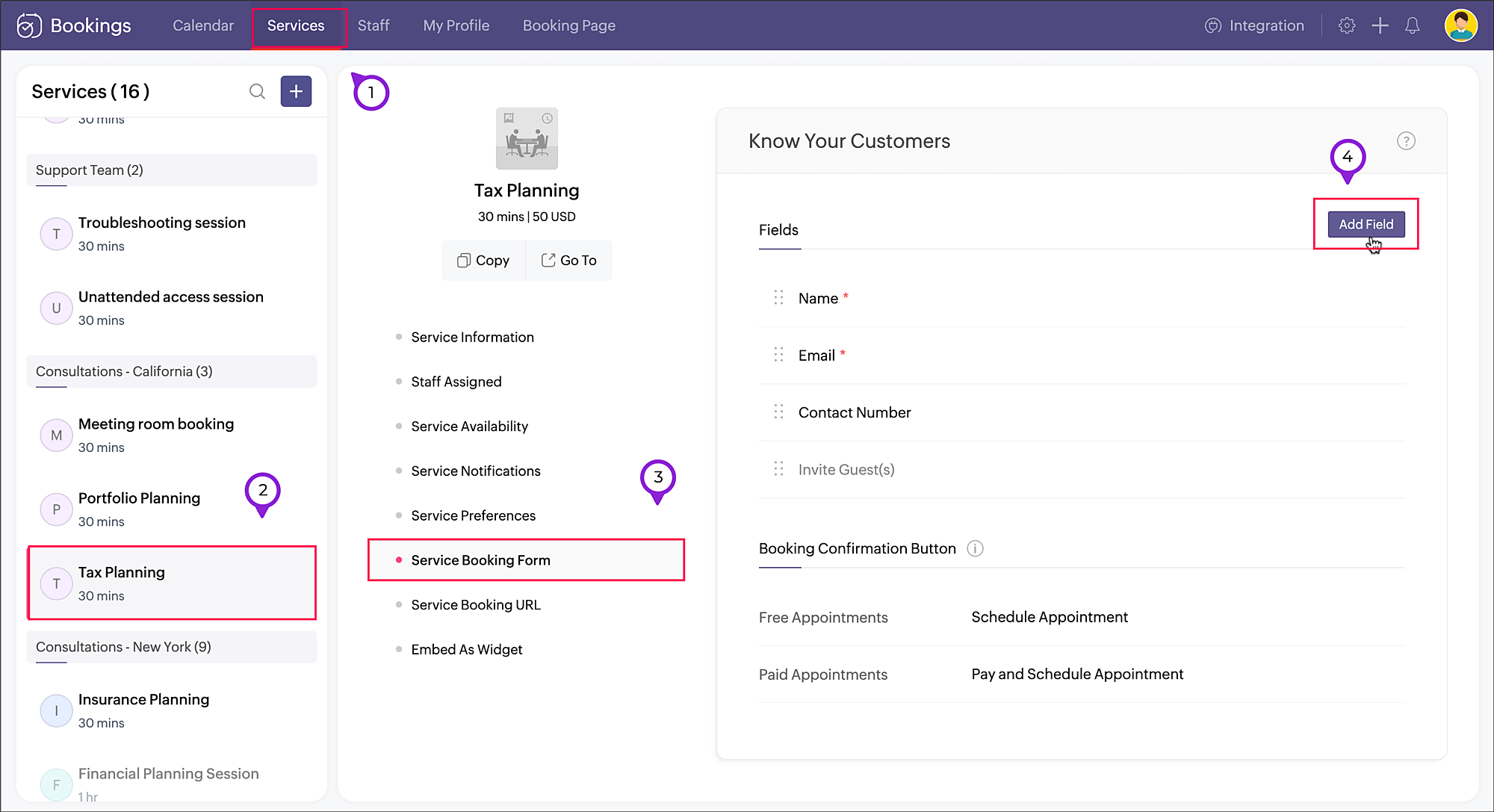
- Navigate to Services, select the required service, and click Service Booking Form.
- Click Add Field in the right corner of the Fields section.
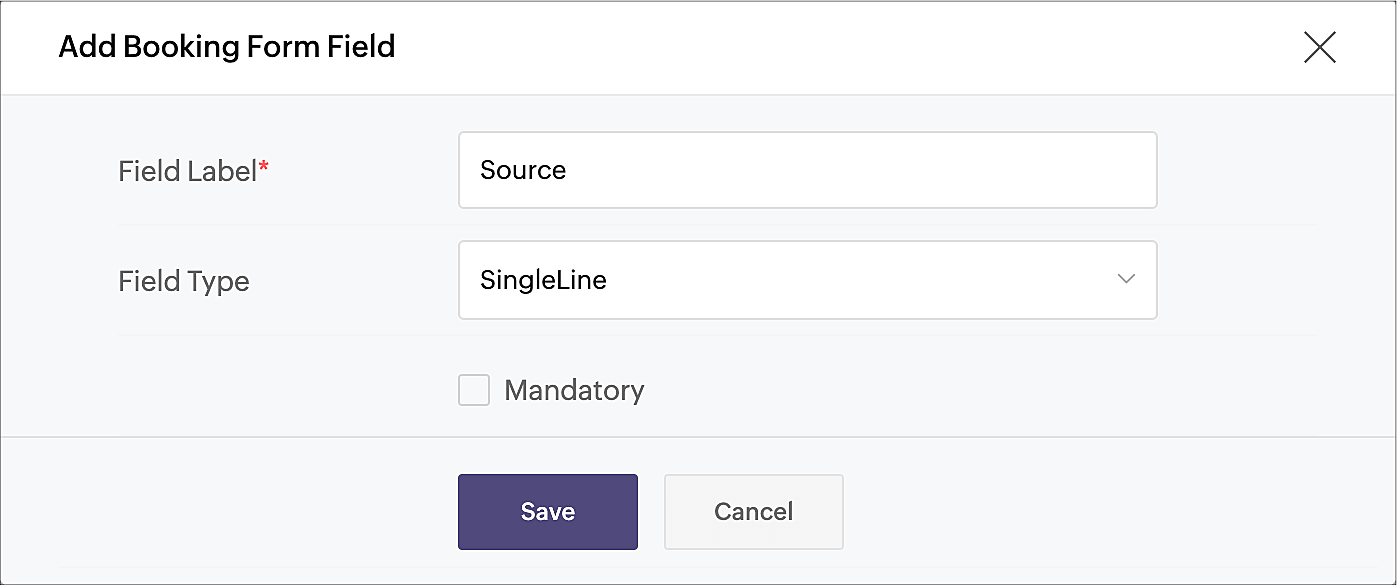
- A pop-up window will appear. Enter the Field Label as "Source" (or use any name of your choice). Choose SingleLine in Field Type, as we'll be using a limited amount of text in this field. Click Save.
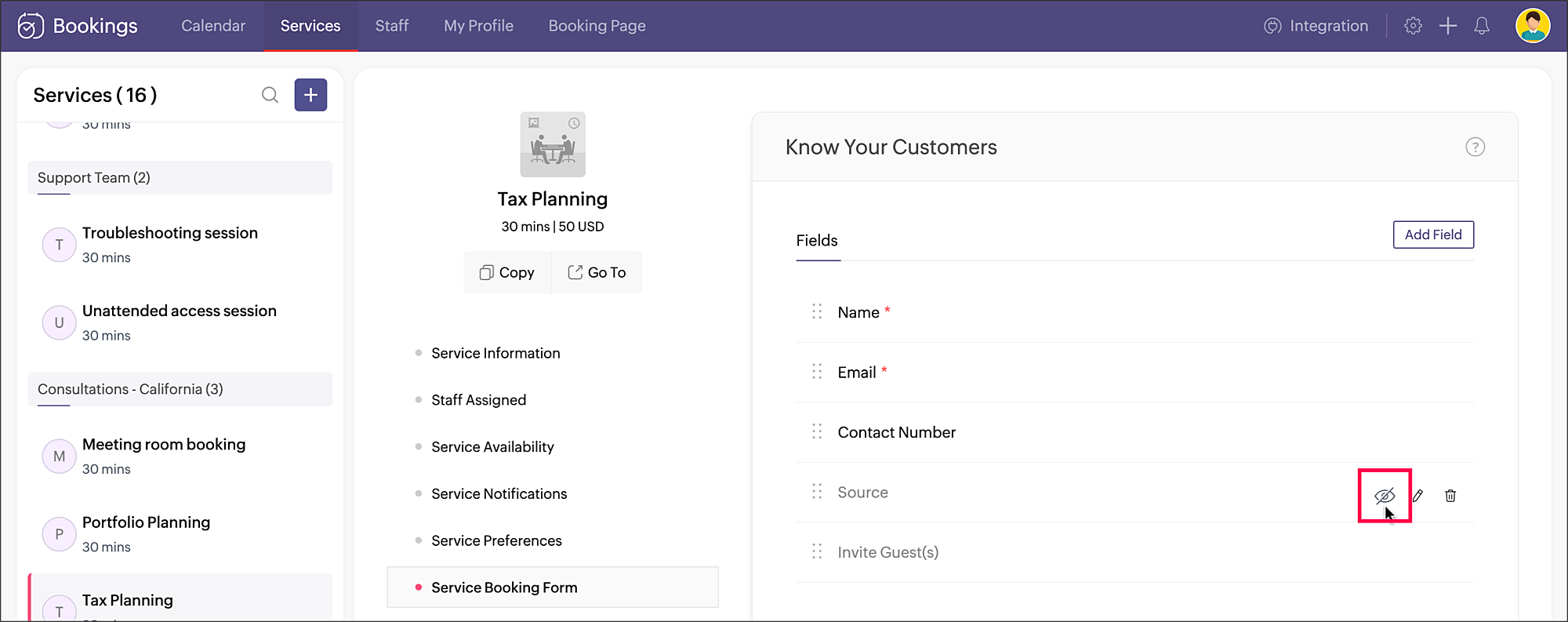
- Click the eye icon next to the Source field that you just created and make the field hidden in the booking form.
 Your source tracking is all set. When you share the service booking page link, add the source name accordingly. You can include the source value as a query parameter to the booking URL in the below format:
 <service_booking_page_URL>?source=<source_name>For example, lets say the above service Tax planning has the booking page link: https://business.zohobookings.com/#/customer/4050029000003367030.When this link is shared on Facebook, the source name can be added at the end: https://business.zohobookings.com/#/customer/4050029000003367030?source=facebook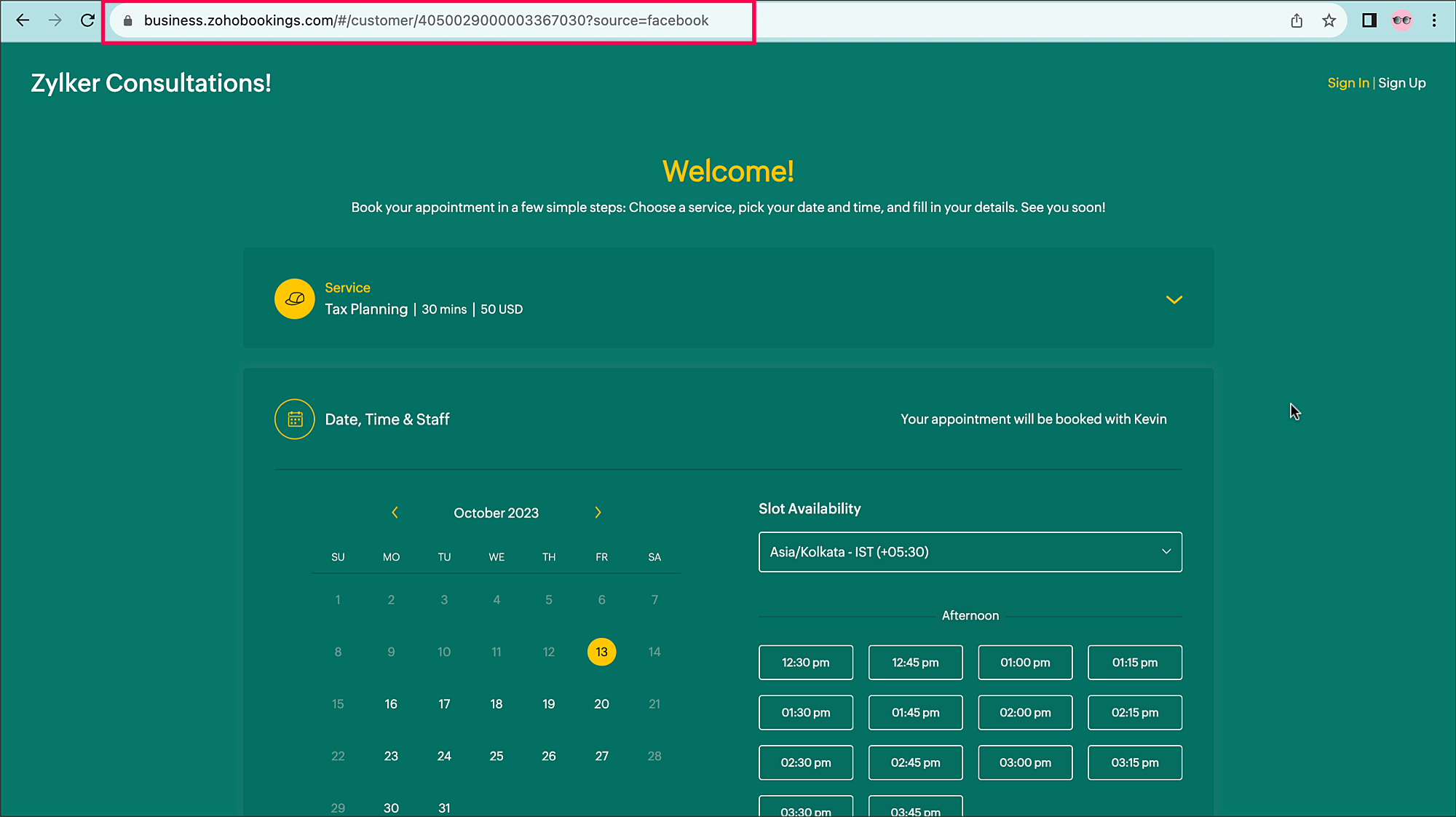
You can easily add additional sources, such as:
?source=official_website
?source=partner
?source=email_campaign
When an appointment is booked, the source name can be seen in the Appointment Summary under Additional Info.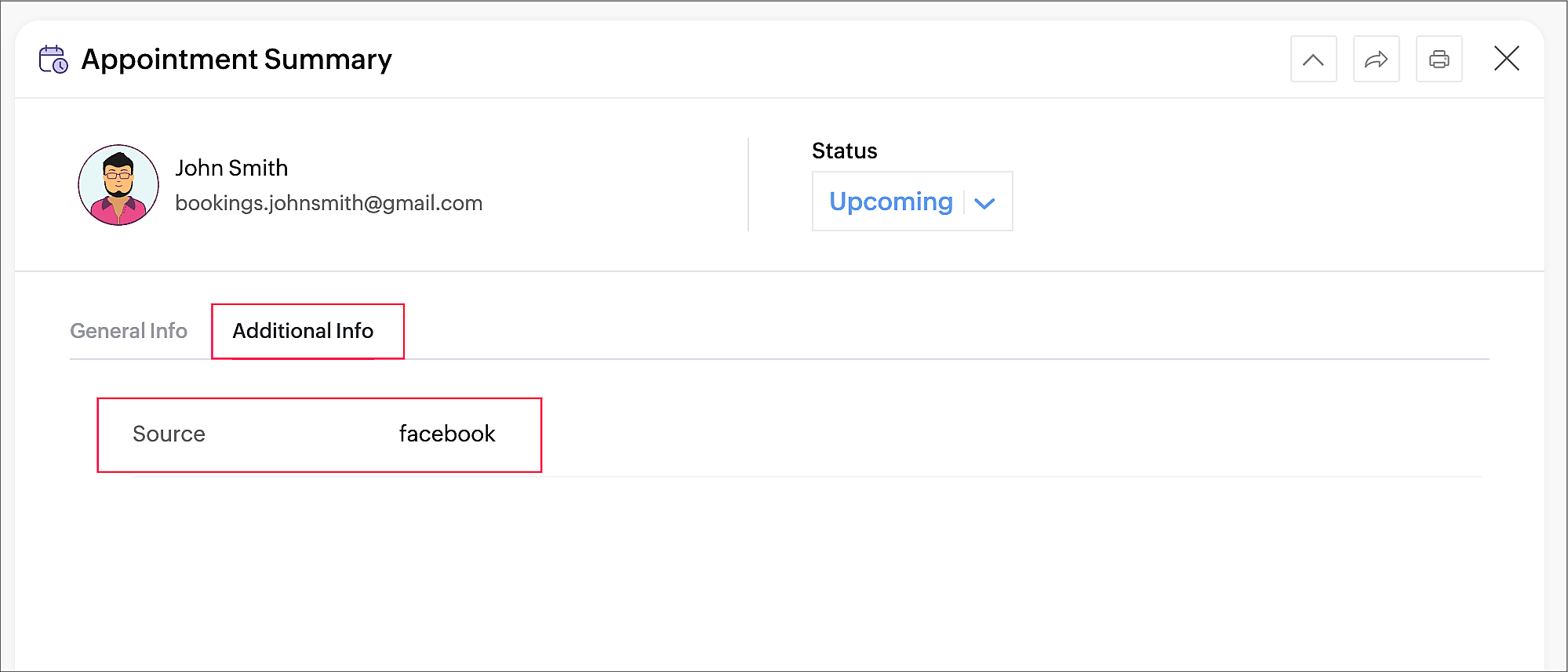
Tracking the sources of your bookings can help you identify which channels are effective for acquiring new customers and contribute the most to your revenue, so you can implement more targeted marketing and customer engagement strategies.
Thanks for reading! Please watch this space for more tips about online appointment scheduling.
Related Topics
Service Booking FormTopic Participants
Praveena Chandran
Yaali Bizappln Solutions
Akshara Amarnath
Lydia
IK
Sticky Posts
Tip #13: Identify where your bookings come from with Source Tracking
Source tracking is the practice of identifying where your bookings originated. This is important, because online bookings come from a wide variety of sources like social media platforms, your website, email and ad campaigns, partner websites, organicTip #17: How to mandate partial payment for your appointments
When you require partial payments during the booking process, customers can only schedule with you after paying a certain amount in advance. This deposit acts as a commitment between both parties. Apart from that, it has many more advantages. BenefitsTip #18: Organize a group workshop in a few steps
It's the season for workshops—they're everywhere, catering to diverse interests and needs. Whether for more professional goals like leadership development or creative endeavors like painting, there's an abundance of workshops offered every day. A schedulerTip #16: Custom labels for staff, service, and resources
Every industry uses its own jargon. Take healthcare, for example; when you visit a doctor, it's not just an appointment, it's a consultation. The people who provide consultations are the providers. Similarly, in the tranquil world of a spa, a massageTip #15: Customize service prices for each staff member
It's common practice for a service to be priced differently based on the staff member providing it. For example, an experienced hair stylist may charge more for a haircut compared to the other stylists. This pricing strategy allows businesses to charge
Recent Topics
Getting Date from PostgreSQL error
I am pulling data from PostgreSQL table into a CRM record via FLOW but the field is coming out empty. Need some suggestions: Field Type in CRM: Date/Time Field value in PostgreSQL: 2024-12-05 21:06:32.479 Field value in FLOW "Fetch Row": created : "2024-12-05T21:06:32.479382000",Zoho Flow to SendOwl API error
SendOwl is listed in the apps list of Zoho Flow. When trying to connect through the API with valid key and secret, the error given is: SendOwl says "HTTP Basic: Access denied" It seems Zoho doesn't connect via HTTPS. I've already tried using webhooks,decisions based on content of a ticket
Hi, I need to create a flow that sends automated email based on the content of a ticket in zoho desk. I have certain tickets that are formatted in a particular way, and contain certain keywords. How can I filter (based on decisions) the tickets basedNewline Character "\n" parsing problem in webhooks
Hi there, I am facing an issue in Zoho Flow (maybe a general issue or maybe only in Zoho Flow): I have this function: void sendListWebhook(string url, list array) { for each arrayElement in array { result = invokeurl [ url :url type :POST parameters:arrayElement.toString()One Company, multi branches, multi warehouses and I need to manage this in one organization
Dears, I'm a new user to zoho solutions, however I found a lot of persons giving a nice feedback about it also a lot of good reviews. I though why we try to move to it in our company. I'm not sure if Zoho could give me all what I need or not that's why I'm going to post in this topic most of the things I know about managing our business to let you ,as zoho experts, tell me if Zoho will meet my business requirements or not. First of all we are a flowers and landscaping company we have like 6 toMigration Evernote
Bonjour Apres plus d'une dizaine d'année passer avec evernote j'ai décidé de franchir le pas . J'ai débuté par migrer mes notes vers zoho et depuis la migration est bloquée. Impossible d'avoir un retour du support malgré plusieurs mails et tentative d'appelPushing GCLID info from Gravity Forms to ZohoCRM
We are switching to Gravity Forms from Zoho Forms and I cannot find any good info on how to make sure my GCLID tracking info is pushed through to the CRM through my new forms. There was an article in the documentation about placing something within theOn Zoho Flow, Record deleted trigger from Zoho Creator
On creating flow in Zoho Flow, when we select app Zoho created, it provides 3 trigger options - Record created, Record updated and Record created or updated We need trigger on "Record Delete" as well, We have a use case to fire our system api if recordZoho Flow Switch On Not Working
I have created a flow which is when the mailbox address received the email that meet the condition will auto fetch the contact, account and finally create the ticket by using Zoho Desk. When I do a test and debug on my flow it work well as what I expectMS Teams Flow Integration Question
Where can I find the chat ID for the "Post message to chat" target?Zoho Flow - Access denied to recover recording from call module - OpenAI
Hi, I am trying to build a Flow to recover recoding when a new call is saved in my CRM. I have integrated my CRM with ringcentral and the recordings are saved in the event. Trigger: When new module entry Step 2: Fetch module entry (Zoho CRM says "permissionUnable to send price in big commerce from zoho flow.
I am creating a flow from zoho flow to create a product in zoho inventory and sending this to big commerce. But the problem is like when ever i send the price its getting error. it require decimal format value if i am sending ${trigger.sales_rate} theNot sending mail to new lead in zoho flow
I have created a flow in zoho flow and triggered an action to send email notification when the new lead is created but even after user entering the mail id the email is not going to themAccess query string from incoming webhook URL in Zoho Flow
I have a fairly straightforward use case, but cannot find anything conclusive on this subject. How can I simply access the query string of the incoming webhook request in Zoho Flow? I am attaching the Deal ID to the end of the request like: https://flow.zoho.com/762439902/flow/webhook/incoming?zapikey=1001.0dec2d7dd15080c464a13925275f0129.448c23ee219c545c89f5a178456cfc8b&isdebug=false&dealID=${Deals.DealUnable to access my Zoho forms account
For some days now, I haven't had access to my Zoho Forms account. I keep getting an error that says, "You are an inactive user in your organization" via the mobile app and "You don't have permission to access this organization" via the web. I was removedIdentify Unused Deluge Functions in Zoho CRM
Hello Zoho Support Team, I would like to request a feature that helps administrators identify unused or rarely used Deluge functions in Zoho CRM. Currently, Deluge functions are distributed across different areas, and there is no centralized overviewUser Automation: User based workflow rules & webhooks
User management is an undeniable part of project management and requires adequate monitoring. As teams grow and projects multiply, manual coordination for updating users & permissions becomes difficult and can give way to errors. User automation in ZohoUpdate on V2 API End-of-Life Timeline
Dear Users, Earlier this year, we shared the launch of the V3 APIs and requested users to migrate from the older V2 APIs by December 2025. We have received valuable feedback from our users and partners regarding their migration timelines. We are happyRun a workflow after record merge
Hello, We are wondering if there is a way to trigger a workflow after two records are merged? We have a sms service that use to text back and forth with Prospects and Contacts. To make it easy for our users, we automatically create them in this otherLive webinar | The Evolution of Zoho Show: 2025 Feature Recap
2025 has been a year of exciting updates and features for Zoho Show. From advanced design and formatting tools to smarter presentation delivery, enhanced collaboration, and AI-powered features—along with the launch of our desktop apps, Show has continuedBatch Tracking custom function
Hi fellow zoho users, We have our ecommerce site setup to shopify. I have some products I want to add batch tracking too, my only issue is that it breaks our shopify workflow (create sales order, invoice, payment, package) because it requires us to manuallyInclude Suggested Articles in New Ticket Email
When someone creates a new ticket, is there any way to include recommended knowledge base articles (like the ones Zia Suggests) in the email notification to the user? When they're waiting for a reply, it would be nice to have sent them some recommendedItem Bulk Edit - Allow for Reorder Level
We're implementing a process for using the Reorder Level field for Items, and I have to go through and add this value to a huge chunk of our Items. It's driving me bonkers that I have to do this individually through the UI rather than bulk updating. ItSharing my portal URL with clients outside the project
Hi I need help making my project public for anyone to check on my task. I'm a freelance artist and I use trello to keep track on my client's projects however I wanted to do an upgrade. Went on here and so far I'm loving it. However, I'm having an issue sharing my url to those to see progress. They said they needed an account to access my project. How do I fix this? Without them needing an account.Zoho Flow + QuickBooks Estimates – Line items not created from CRM subform
Hi everyone, I’m trying to create QuickBooks Estimates from Zoho CRM Quotes using Zoho Flow. I’m aware that Zoho Flow’s native “Create Estimate” action does not support multiple line items, so I followed the community guidance for Invoices using a customSAP S/4 HANA Integration via ZOHO Flow
Hi How do I change the SAP Client ID while creating a new connection ? MY client ID is 421. I believe the client id should be an input field for length 3 numbers rather then a drop down to select from a fixed set of values. ThanksVLOOKUP FUNCTION PROBLEM
Hello, i have a problem with the VLOOKUP function in my sheet http://public.sheet.zoho.com/public/tonimoreno/indicemasacorporal2 in cell D2. This function doesn't work correctly and always returns the last content of the range. Can you help me?Zoho Flow Completely Broken?
Since December 13th, 100% of our flows have stopped working completely. Nothing is working or triggering??? I called support & sat on the line with them for 2 HOURS until they finally concluded it was a back-end problem on their end?? Now i'm callingPrint / Export full Dashboard page
Hello Zoho team, It is currently only possible to print/export one component of a dashboard at a time. Requesting the option to print/export a full dashboard page with all components to a pdf or picture. Doing through the browser doesn't give good results.emails duplicated in my outlook client
Hello I am just new here and I have a litle problem that I do not find how to solve. I sumarise here after. Your help would be very appreciated. I have just recently contracted this zoho mail servicesservices as an initial evaluation yesterday night. I then: - opened a free account - created 1 initial email address ..........@domain.com - created a second email address ..........@domain.com - proceeded with the config instructions (checking the ownership of my domain, changing MX etc... ) asHow to check task starting time in zoho mobile app?
I am using the Zoho mobile app on my iPhone, and I am not able to see the task's starting and finishing times. When opening the Task information / Details, I can only see the Task start date and due date, but not the time. Is there any way to check aCreating an extension in Sigma: Zoho CRM isn't selectable as a service
I have 2 Zoho accounts which are part of 2 different workplaces. One workplace is able to select 'Zoho CRM' as a service option when creating a new extension, the other one is not. I'm not sure what the exact differences are between them. What do I needList of packaged components and if they are upgradable
Hello, In reference to the article Components and Packaging in Zoho Vertical Studio, can you provide an overview of what these are. Can you also please provide a list of of components that are considered Packaged and also whether they are Upgradable?How to track a list of ALL the items that ONE customer bought?
Hello, I am interested in getting a list of all the items that only ONE of my customers bought, and the invoices are what show up instead. It's very tedious to go through every single invoice when we sell a lot of items to this customer. Surely thereRouteIQ for Zoho FSM
Beste, Zou wel top zijn dat we een RouteIQ hebben voor FSM aangezien we constant moeten zien wat de beste route is voor onze monteurs. Nu moeten we een speciale aparte programma hebben om de beste route te berrekenen voor onze monteurs aangezien de planningExport Tickets from the Help Center
Hello everyone! We are now allowing end users to export tickets directly from the help center. The ticket export allows users to: Filter tickets by Department, Priority, and Account before exporting. Download files from Export History (Setup > Data administrationIs it possible to remove filtering options?
My CRM has a lot of custom fields that should not be used in filters or views. Fields that are automated and exist only to store temporary values that get used in functions. These create a lot of noise in the list of fields to filter. Isn't there anyFunction #18: Associate invoice templates automatically based on customer language
For businesses dealing with a diverse linguistic clientele, it becomes crucial to send out invoices in the customer's preferred language to ensure effective communication. This requirement can be handled in Zoho Books by creating invoice templates inChanging field types
Question im a Zoho CRM user and curious, if I change a flied type from single or multi line text to a URL field type will i lose the data in the field or will it be converted to website link automatically. ThanksQuote PDF – Header image stopped rendering suddenly
Hello Zoho Support Team, We are facing an issue with Quote PDF templates in Zoho Books. Previously, images added inside the Quote header HTML were rendering correctly. However, recently the header image is no longer appearing, while header text stillNext Page