Tips & Tricks #09 Automatiseren met Zoho Desk Deel 1

Tips & Tricks #09 Automatiseren met Zoho Desk Deel 1


Beste Community leden,

Zoals jullie weten hebben we in Nederland een woningtekort. Een oplossing hiervoor is de hoogbouw. Echter, om de de hoogte in te gaan moet er ook voor de juiste faciliteiten in flats worden gezorgd. Problemen kunnen we allemaal wel bedenken: de afvoer raakt verstopt, de lift is defect of het warme water werkt niet. Om dit op te lossen hebben we verschillende mensen nodig: een elektricien, loodgieter, rioolservice.

We willen natuurlijk dat onze problemen zo snel mogelijk kunnen worden opgelost. Dit kan gemakkelijk gedaan worden door het proces uit te schrijven en dit te automatiseren. Aan de hand van een voorbeeld zullen we jullie uitleggen om het proces te automatiseren met Zoho Desk.

De Zalmhaventoren, het hoogste gebouw van Nederland, bevat maar liefst 256 appartementen. Stel dat de verlichting van verdieping 49 ineens niet meer werkt, je wilt dit zo snel mogelijk melden, zodat het gerepareerd kan worden. Dit kan door bijvoorbeeld op elke verdieping en elke kamer een specifieke QR code op te hangen. Door de QR code te scannen kun je je probleem melden en zal de desbetreffende partij een melding ontvangen, in dit geval de elektricien. De elektricien zal binnen 24 uur langskomen om het probleem op te lossen.

Hoe ziet dit er nou uit in Zoho Desk?
  1. Binnenkomst van probleem en toewijzing naar de juiste afdeling
  2. Melding naar de juiste persoon
  3. 24 uur de tijd om het probleem op te lossen anders een escalatie.
Zoho App Mapping


Vereisten


Aanbevolen applicatie van Zoho

Klacht invoer

Zoho Forms


Toewijzen van agenten en probleem escalatie


Zoho Desk


Deze use case kan worden opgelost door gebruik te maken van Zoho Forms en Zoho Desk, waarbij Zoho Forms kan worden gebruikt om het klachtenformulier te maken en Zoho Desk de verzamelplaats is voor alle klachten als tickets.
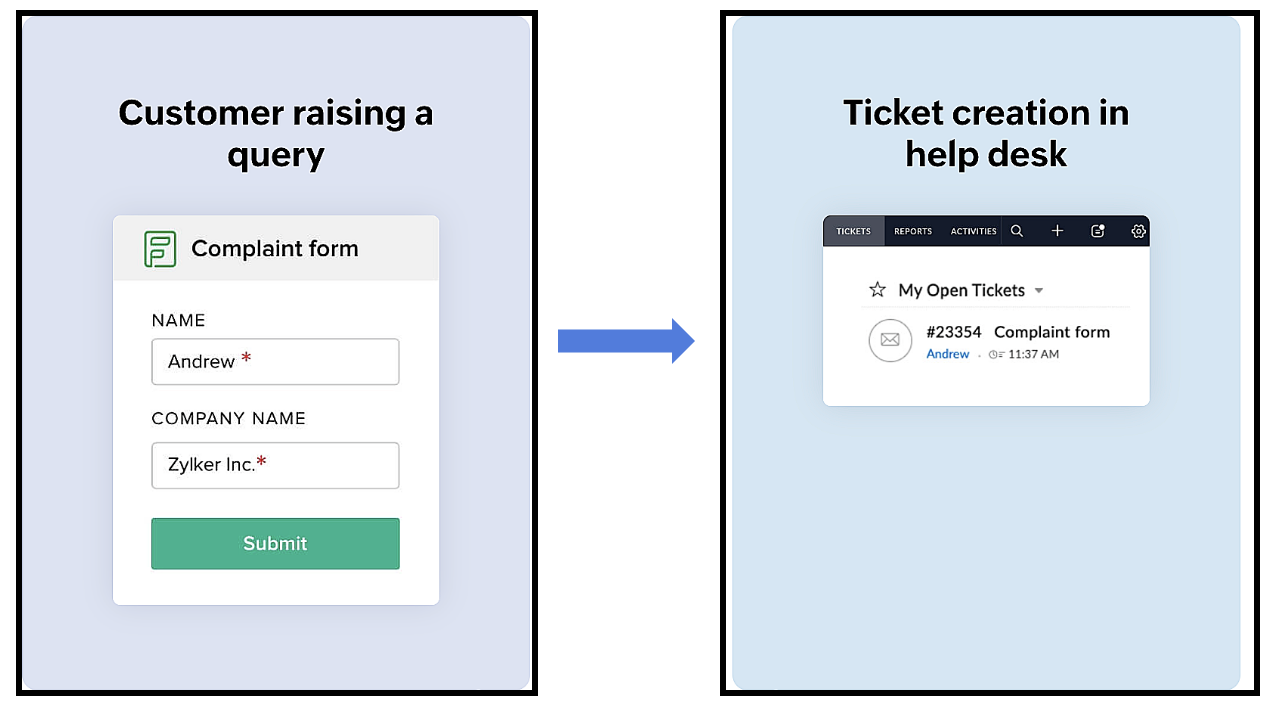


Het proces verloopt als volgt:
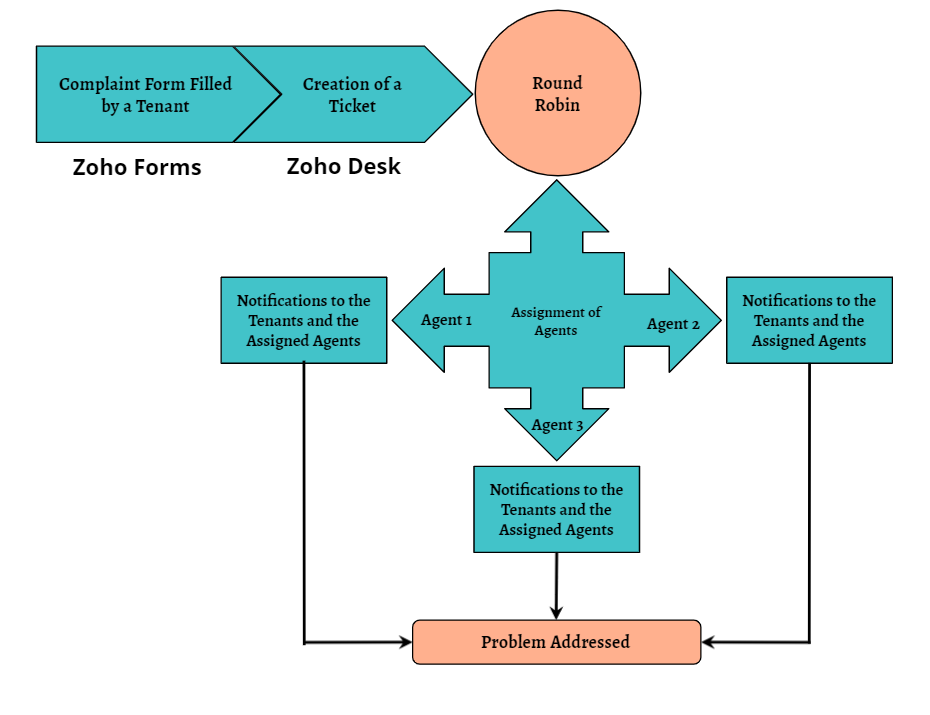
Een huurder scant de QR-code die beschikbaar is op elke verdieping van het gebouw om toegang te krijgen tot het klachtenformulier (dat is aangemaakt in Zoho Forms), om een klacht in te dienen. Zodra de huurder het formulier indient, wordt een ticket aangemaakt (in Zoho Desk) voor de klacht. Het aangemaakte ticket wordt toegewezen aan één van de medewerkers met behulp van de Round Robin toewijzingsregel. Zodra het ticket is toegewezen, ontvangen zowel de huurder als de medewerker aan wie het ticket is toegewezen een notificatie met relevante details. Vervolgens zal de medewerker het probleem aanpakken door de geschikte technici te sturen om het gemelde probleem op te lossen.
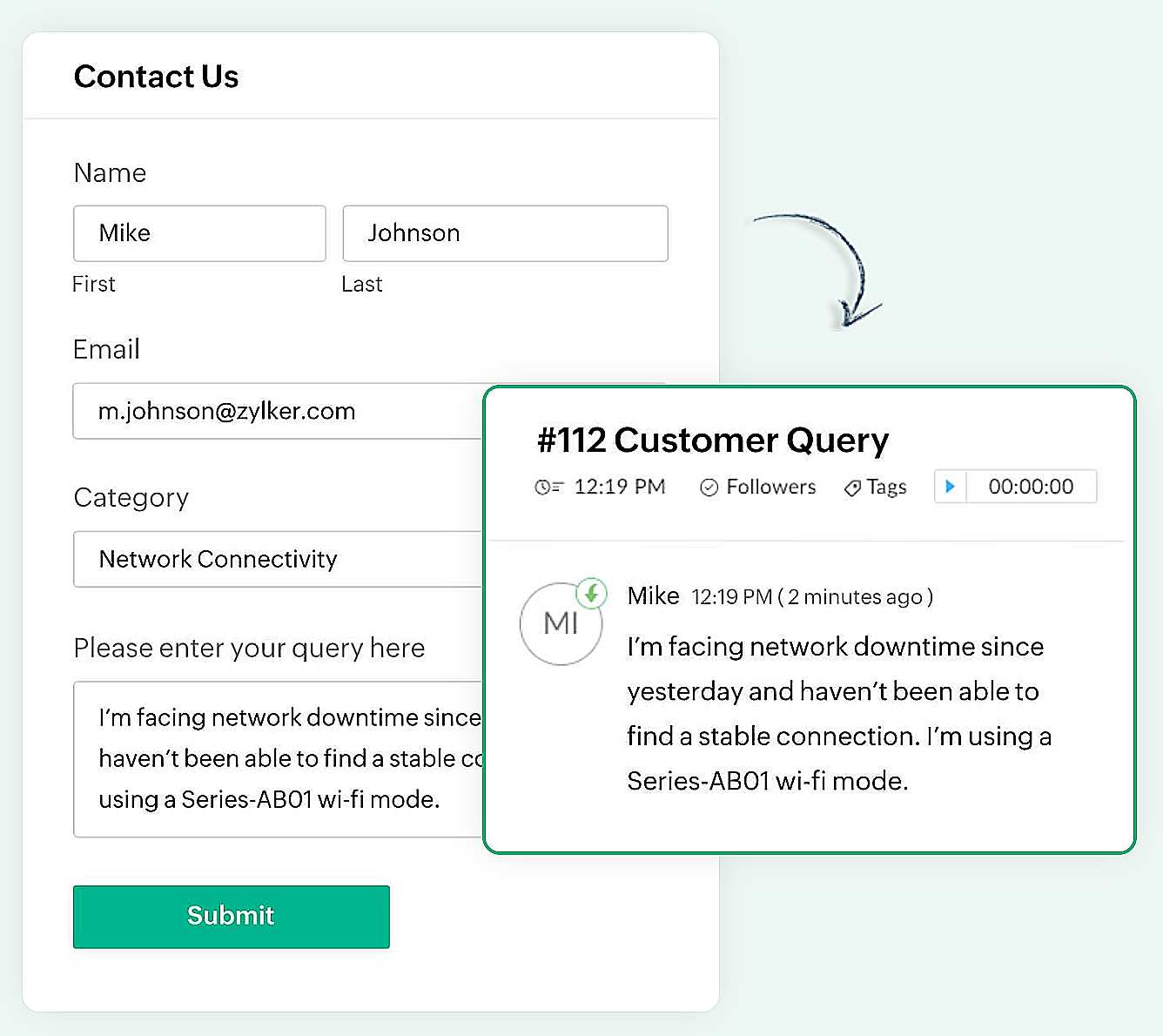

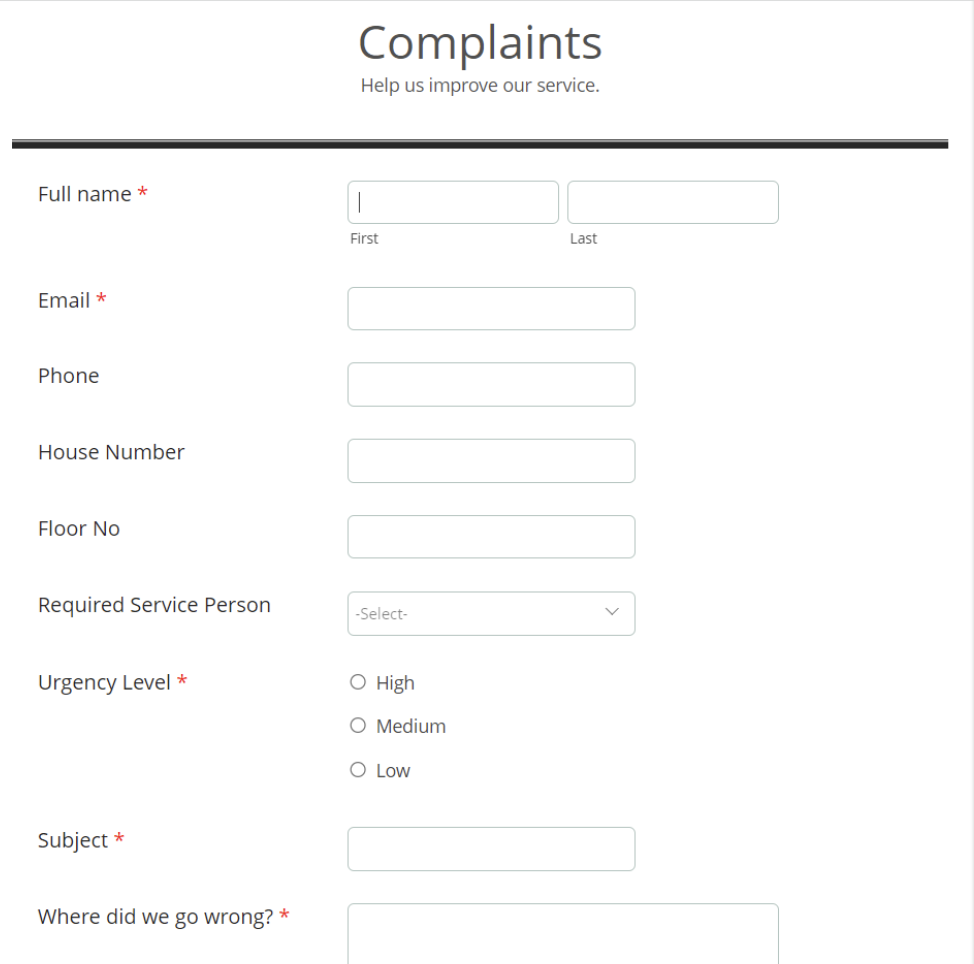
Er kan een eenvoudig formulier met alleen een naam en e-mailadres worden gemaakt of een complex formulier dat meerdere velden bevat om gedetailleerde informatie vast te leggen, zoals de problemen waarmee de huurder wordt geconfronteerd, de prioriteit van het probleem en enkele andere redenen kunnen ook gemakkelijk in Zoho Forms worden gemaakt.

Zoho Forms
Zoho Forms is een eenvoudig te gebruiken tool om formulieren te maken, zonder dat er downloads of installaties nodig zijn. Je kunt een formulier maken, delen en beginnen met het verzamelen van gegevens in slechts enkele minuten. Zoho Forms is toegankelijk vanaf laptops, tablets en mobiele telefoons.

Klachtenformulier maken in Zoho Forms
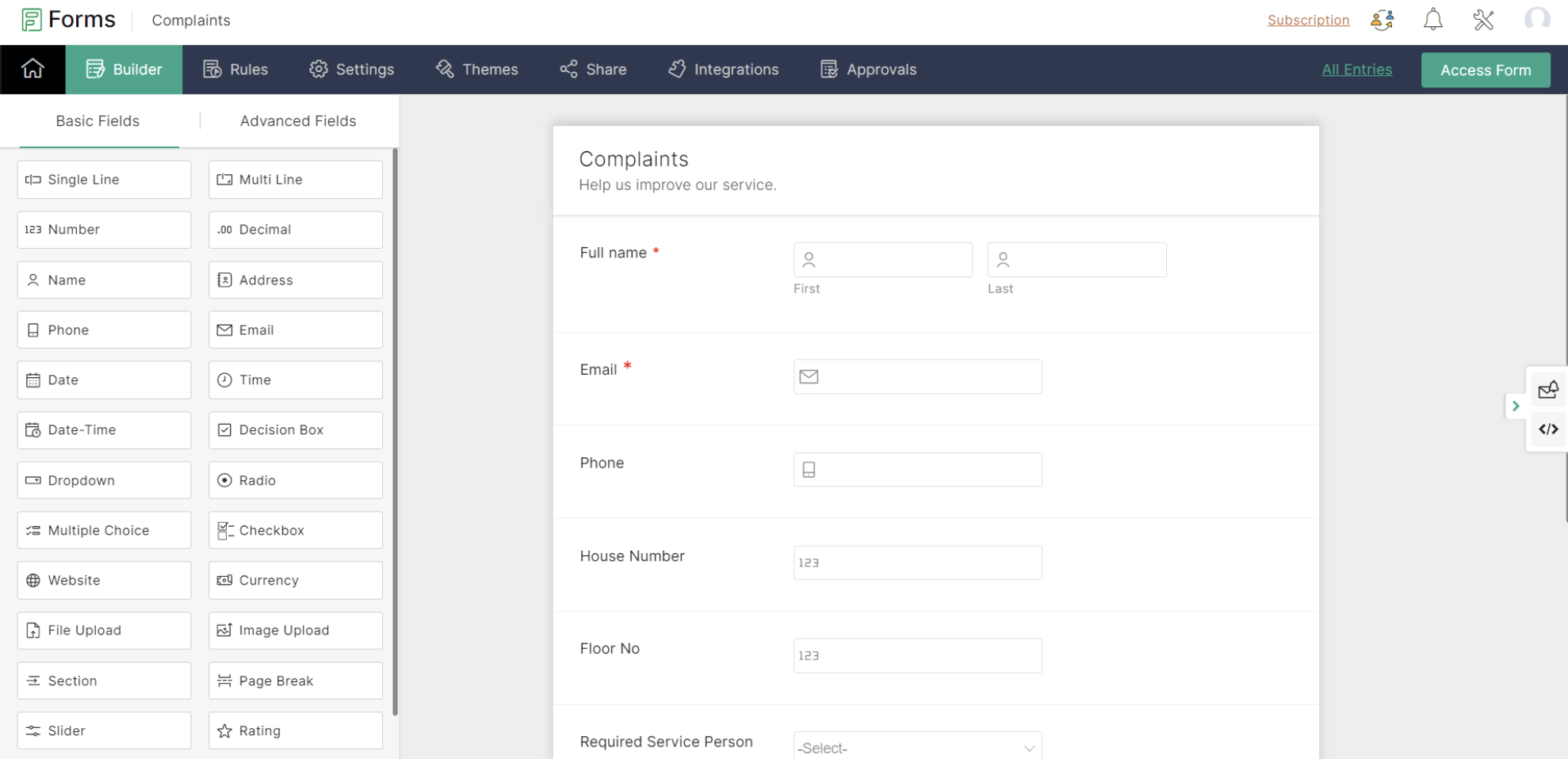


Met Zoho Forms kun je formulieren maken met een eenvoudige drag-and-drop optie.

- Begin met het geven van een formuliernaam (de gebruiker wordt doorgestuurd naar een formulierbouwpagina).
- Voeg de nodige velden toe om informatie van je huurders te verzamelen.
- Sla het formulier op.

Zoho Forms biedt kant-en-klare formulieren die geschikt zijn voor verschillende gelegenheden. Een nieuw formulier kan binnen enkele seconden worden gemaakt met behulp van deze sjablonen.

Klachtenformulier

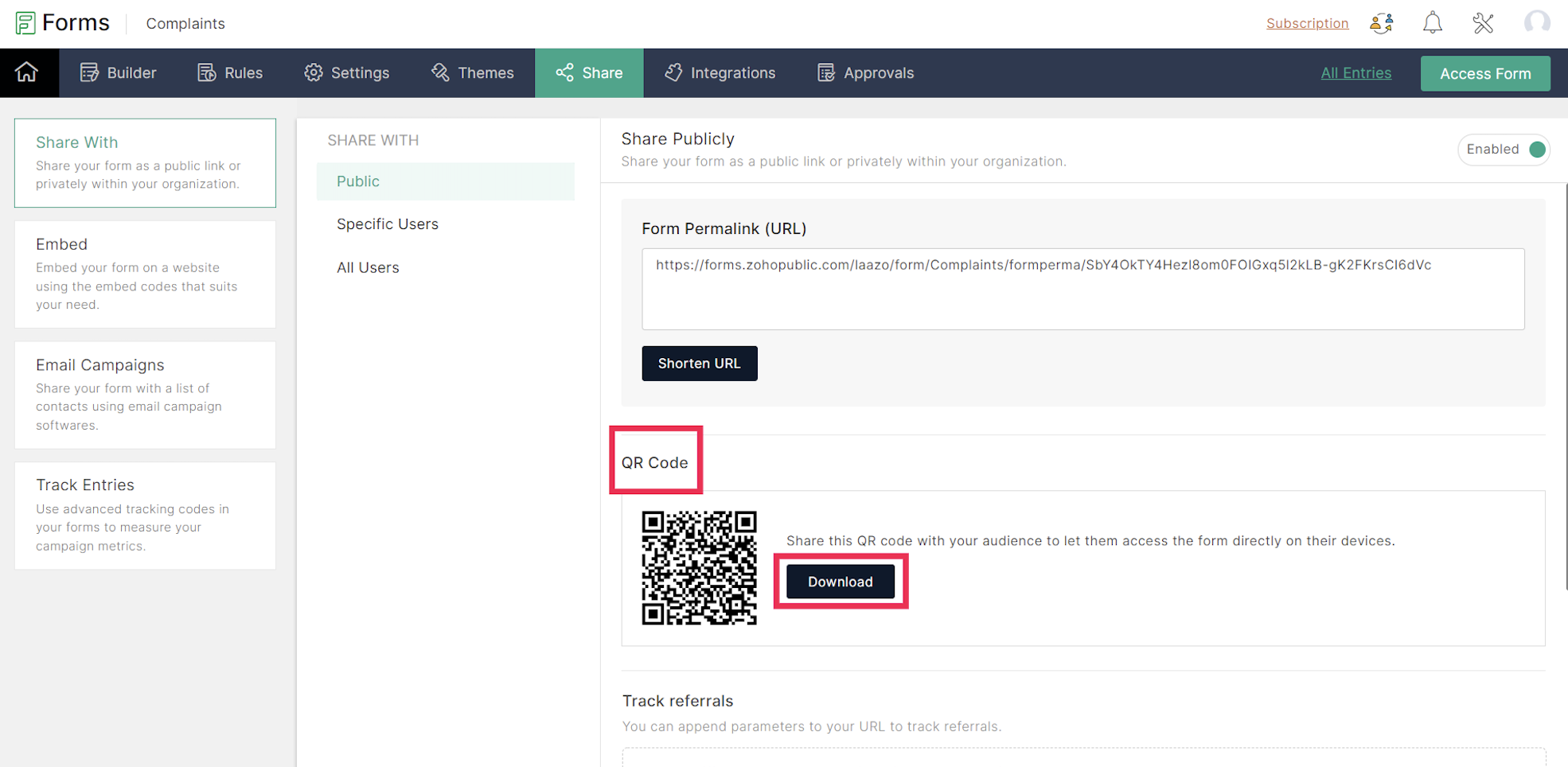
Een URL en een QR-code worden gegenereerd voor het aangemaakte formulier onder het tabblad Delen, dat in een png-vorm kan worden gedownload. De gedownloade QR-code kan worden afgedrukt en op alle muren van elke verdieping van het appartement worden geplakt voor de huurders.

De volgende stap is het integreren van Zoho Forms met Zoho Desk. Dit lees je in de volgende Tips & Tricks van Zoho Desk.


      • Sticky Posts

      • Doe mee aan de Zoho Desk Meetup op 7 maart in Antwerpen

        Beste Community leden, Wij nodigen jullie graag uit voor de Community Meetup van Zoho Desk! Op 7 maart komen we bij elkaar in Antwerpen, samen met een klant en de Zoho Experts van Brainsolutions. Onze experts zullen een live demo presenteren en jouw vragen
      • Doe mee aan de Zoho Desk Meetup op 16 Februari in Utrecht

        Beste Community leden, Wij nodigen jullie graag uit voor de Community Meetup voor Zoho Desk! Op 16 februari komen we bij elkaar in Utrecht, samen met Fleetkennis en de Zoho Expert van Mobile XL. Onze experts zullen een live demo presenteren en jouw vragen
      • Wat is er nieuw in Zoho Desk 2023

        Beste Community leden, Hoeveel je ook van je klanten en je werk houdt, als klantenservice medewerker zul je zeker een aantal zware dagen tegenkomen. We hebben het dan over de dagen dat je een paar keer op de snooze-knop drukt, koffie morst op je favoriete
      • Tips & Tricks #10 Automatiseren met Zoho Desk Deel 2

        In deel 1 van het automatiseren met Zoho Desk las je een use case over een probleem in een appartementencomplex en hoe dit door gebruik te maken van Zoho Forms en Zoho Desk kan worden opgelost. In deel 2 lees je meer over het integreren van Zoho Forms
      • Tips & Tricks #09 Automatiseren met Zoho Desk Deel 1

        Beste Community leden, Zoals jullie weten hebben we in Nederland een woningtekort. Een oplossing hiervoor is de hoogbouw. Echter, om de de hoogte in te gaan moet er ook voor de juiste faciliteiten in flats worden gezorgd. Problemen kunnen we allemaal

        • Recent Topics

        • Payment Card or Identity form-fill from Vault?

          Hello! I'm working on replacing Bitwarden with Vault and one issue I've run into is that I can't find any option to fill address and payment forms from Payment Card or Identity info that has been saved in Vault. Is there a way to do this? Is it a planned
        • Ability to add VAT to Retainer Invoices

          Hello, I've had a telephone conversation a month ago with Dinesh on this topic and my request to allow for the addition of VAT on Retainer Invoices.  It's currently not possible to add VAT to Retainer Invoices and it was mutually agreed that there is absolutely no reason why there shouldn't be, especially as TAX LAW makes VAT mandatory on each invoice in Europe!   So basically, what i'm saying is that if you don't allow us to add VAT to Retainer Invoices, than the whole Retainer Invoices becomes
        • Time Log Reminder

          Tracking the time spent on tasks and issues is one of the most important functions of a timesheet. However, users may forget to update the time logs because they have their own goals to achieve. But, time logs must be updated at regular intervals to keep
        • [Early-access] Introducing Zoho's CommandCenter - Cross-Zoho business process automation

            Resources to help Webinar recording | Documentation  Feature Restrictions Currently available on early-access only for US data center accounts Features Role CommandCenter as a Service uses signals across Zoho services to propel the movement of records
        • Tip #58- Accessibility Controls in Zoho Assist: Learning- 'Insider Insights'

          Learning should be clear and interruption-free for everyone. Timely feedback plays an important role in helping users understand actions as they happen, without breaking their focus. In this post, we’ll explore the final section of Accessibility: Learning.
        • ZIA "Generate Content" action doesn't have contexual data from the ticket

          "Generate Content" action doesn't have contexual data from the ticket. I try to get AI to help me with this ticket but it doesn't seem to have any ticket information as context. Although the ticket has a lot of information in it.
        • Zoho Desk - Zoho FSM Integration issue on Mobile and iPad

          Hello Team, I am trying to create a Work Order (WO) using the Zoho FSM integration (Add-on Service) that is integrated with Zoho Desk. The issue is that the integration is not working on mobile devices and iPads. While I am able to create the WO, Request,
        • E-File Form 1099 Directly With the IRS From Zoho Books

          The Form 1099 filing season has begun, and businesses are required to e-file certain forms with the IRS to report payments made to vendors and contractors. If your business made qualifying payments during the year, you must e-file the appropriate Form
        • Can I hide empty Contact fields from view?

          Some contacts have a lot of empty fields, others are mostly filled. Is there a way I can hide/show empty fields without changing the actual Layout? I would like to de-clutter my view, and also be able to add information later as I am able. I would be willing to learn to code a button, but I am highly confused about it and thus worried it would be beyond me.  I've looked at a lot of the developer documents and I'm not able to make a lot of sense of them.  Thank you in advance to anyone who knows the
        • Suggestions for showing subscribed Topics in CRM (contact record)

          We have several Topics set up in ZMA. We also have a sync set up between ZMA and CRM. I'd like to display the subscribed topics on the CRM Contact record. This will allow the Sales team (who uses CRM) to see at a glance what topics a Contact is subscribed
        • Replies sometimes creating separate ticket

          Sometimes when a customer responds to an email coming from Zoho Desk, instead of adding a reply to the original ticket, a separate ticket is created. This happens even though the response subject line contained the ticket number, and the person responding
        • Re-hide fields when option is unselected

          Hi all Can anyone help me with this - when I create a 'show' field rule for when a dropdown option is selected, how to I make it so the 'show' option re-hides if that option is no longer selected?
        • Allow Attaching Quartz Recordings to Existing Zoho Support Tickets

          Hi Zoho Team, We would like to request an enhancement to how Zoho Quartz recordings integrate with Zoho Support tickets. Current Behavior: At the moment, each Quartz recording automatically creates a new support ticket. However, in many real-world scenarios:
        • I'm getting this error when I try to link an email to a deal inside the Zohomail Zoho CRM extension.

          When I click "Yes, associate," the system displays an "Oops!! Something went wrong" error message. I have attached a screenshot of the issue for reference.
        • Custom Fields

          There is no way to add a custom field in the "Timesheet" module. Honestly, the ability to add a custom field should be available in every module.
        • Remove the “One Migration Per User” Limitation in Zoho WorkDrive

          Hi Zoho WorkDrive Team, Hope you are doing well. We would like to raise a critical feature request regarding the Google Drive → Zoho WorkDrive migration process. Current Limitation: Zoho WorkDrive currently enforces a hard limitation: A Zoho WorkDrive
        • Translation from Chinese (Simplified) to Chinese (Traditional) is not working. It randomly translated. Google Translate accurately but zoho translate is not working at all

          Hi friends, The newly added language for translation. https://www.zoho.com/deluge/help/ai-tasks/translate.html "zh" - Chinese "zh-CN" - Chinese (Simplified) "zh-TW" - Chinese (Traditional) my original text: 郑这钻 (and it is zh-CN) translated traditional
        • Consultant-Only Booking Page

          Zoho Bookings does not allow for Meeting Type OR Workspace-Wide booking pages to be turned off. This is detrimental to organizations that have territory-based or assigned accounts, because if prospects can go to these booking pages and either select the
        • All new Address Field in Zoho CRM: maintain structured and accurate address inputs

          The address field will be available exclusively for IN DC users. We'll keep you updated on the DC-specific rollout soon. It's currently available for all new sign-ups and for existing Zoho CRM orgs which are in the Professional edition. Latest update
        • Call result pop up on call when call ends

          I’d like to be able to create a pop up that appears after a call has finished that allows me to select the Call Result. I'm using RingCentral. I have seen from a previous, now locked, thread on Zoho Cares that this capability has been implemented, but
        • Custom Sorting based on other columns in table

          I need the ability to apply custom sorting to a text-based dimension in the X axis where the sorting is based on another column in the table. For example, I have a chart report where the X axis is a text label. I would like to be able to sort those text
        • Feature Request: Enable Custom PDF Layout Editor for All Modules (Including Package Slips)

          Hello Zoho Community and Product Team, I am writing to share a suggestion that would significantly enhance the customization capabilities within Zoho Books. We all appreciate the power of the Custom PDF Layouts (the "New" template engine) that allows
        • Is there a way to invoke deluge function from within a widget?

          Hi! I have custom functions in deluge and I was wondering whether there is any way to call this function through a widget? Something like on click of a button inside a widget, run the deluge custom function. Would this be possible?
        • Can a default task Priority be set?

          The "Priority" field in the Task layout does not allow a default to be set. Is there another way of doing it? Because the current default is "None" and the Zoho Kanban board design has selected this field as critical information to surface by including
        • Adding a threshold to a line chart based on date range

          I have a line chart that is tracking a percentage over time. It also has a filter for 50 different clients. I would like to create a threshold that is based on a portion of the date range. As I understand it, this would be done by adding a column to the
        • Resize Signature field dynamically

          On the tablet, it is perfect. But on smaller mobile devices and PCs, both web and application, it is too small for people to sign. Is there any plan to make the signature field size dynamically in the future update?
        • Super Admin Logging in as another User

          How can a Super Admin login as another user. For example, I have a sales rep that is having issues with their Accounts and I want to view their Zoho Account with out having to do a GTM and sharing screens. Moderation Update (8th Aug 2025): We are working
        • Zoho Creator Application - New User Not able to access the application

          In Zoho Creator, The newly added user not able to access the " Added Application" - User has received the Invitation Email, but while clicking "confirm Account" in the invitation Email, the following error message has appeared. "Sorry! you cannot accept
        • Deleting Salutation Field

          We have updated our lead input screen and 'Salutation' has appeared. This is not visible in the 'Edit Pgae Layout' screen so cannot be moved to 'List of Removed Fields'  Salutation is visible in the list in 'Customization - Fields' however I can only 'Edit' or 'Replace' I cannot delete and I do not need this field on my lead input screen.  Please can you advise how to get rid of this.  Screen shots can be provided if needed.  Thank you Tasha
        • Auto-Generate & Update Asset Serial Numbers using a custom function (Assets Module)

          Hello Team, I’ve been working on a script to automate one of our processes in Zoho FSM, and the core functionality has been successfully implemented. However, I’m encountering an issue related to serial number allocation, which is not working as expected.
        • Partner with HDFC And Sbi Bank.

          Hdfc and sbi both are very popular bank if zoho books become partner with this banks then many of the zoho books users will benefit premium features of partnered banks.
        • Zoho Mail iOS app update: Access Delegated Mailbox.

          Hello everyone! You can now access the delegated mailbox from within the iOS version of the Zoho Mail app. To access the delegated mailbox: Open the Zoho Mail app. Go on to the 'Email' module. Tap the profile picture. Choose the delegated mailbox Please
        • How to convert Lead's country field from Text to Pick List

          Hi, I would like to change the default country field in ZCRM from text to pick list. It looks like not I can't delete default country field and recreate it as pick list nor can i create an new custom field country because such a label belong to default field. So what do I have to do? Any ideas? L
        • How create a draft via workflow?

          I wish to create a workflow rule for specific emails that creates a draft response - not an automatic email reply, but just a draft with a set response ready to be verified by an agent who can then manually select recipients. Alternatively, the workflow
        • New feature: Invite additional guests for your bookings

          Hello everyone, Greetings from Zoho Bookings! We are happy to announce the much-awaited feature Guest Invite, which enhances your booking experience like never before. This feature allows additional participants to be invited for the bookings to make
        • Improved Contact Sync flow in Google Integration with Zoho CRM

          Hello Everyone, Your contact sync in Google integration just got revamped! We have redesigned the sync process to give users more control over what data flows into Google and ensure that this data flows effortlessly between Zoho CRM and Google. With this
        • Image field in custom module

          Hi guy, Is there any hope of adding a custom image field in the custom module? We created a custom module to keep track of assets, and it would be helpful if we could attach an image to the record. Thanks Rudy
        • الخصم على مستوى فاتورة المبيعات

          السلام عليكم ورحمة الله وبركاته مطلوب في إنشاء خصم على مستوى فاتورة المبيعات وليس على مستوى البند أريد معرفة الطريقة؟
        • VAT and Taxes option not available

          Dear ZOHO Team , The VAT and Taxes options in my ZOHO books account not available,I tried to find how to enable or check the way to use this option but unfortunately couldn't find it anywhere ,I'm in UAE ,kindly let me know what to do to solve this issue
        • Default Tagging on API-generated Transactions

          If one assigns tags to an Item or Customer, those tags get auto-populated in each line item of an Invoice or Sales Order when one creates those documents. However, if one creates the Sales Order or Invoice via the API (either directly coding or using
        • Next Page