Zoho Desk : le service client en 2022

Zoho Desk : le service client en 2022

Bonjour à tous,

L'année 2021 n'a pas été facile, mais nous sommes fiers de savoir que nos clients ont été en mesure d'offrir des expériences uniques à leurs clients dans différents secteurs.
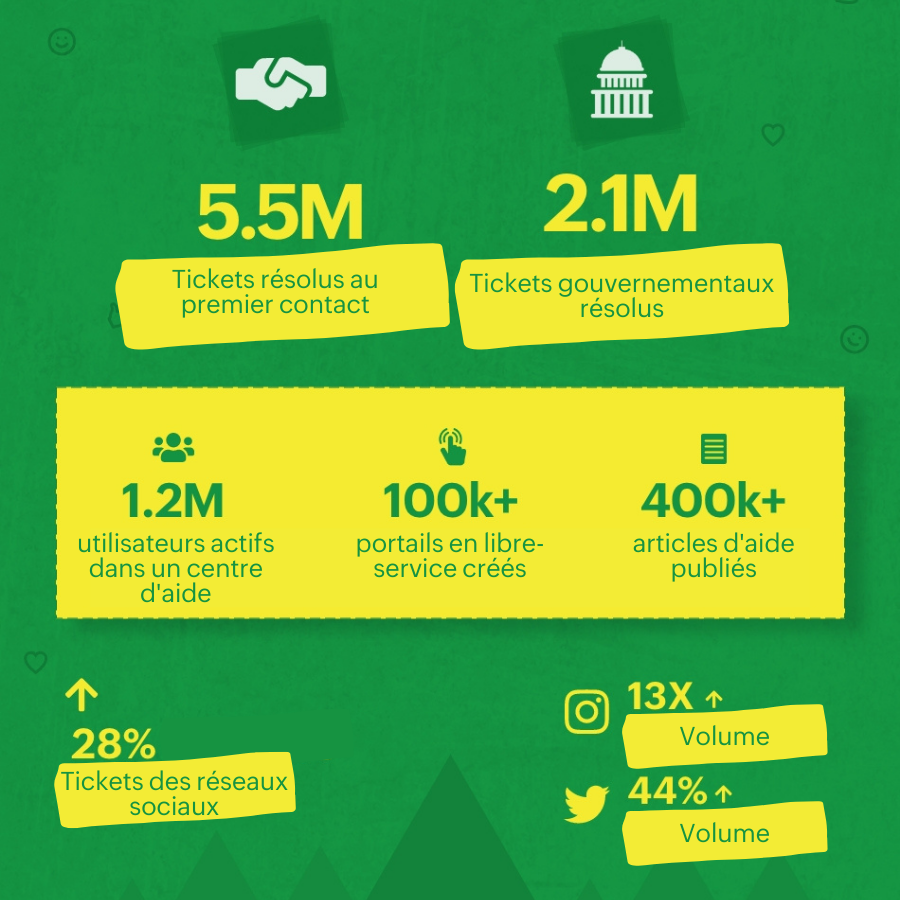


Tout comme l'année dernière, nous nous attendons en 2022, à ce que l'assistance à distance et le libre-service soient des priorités pour les équipes de service client du monde entier. S'il est vrai qu'offrir une assistance rapide et cohérente est essentiel pour le succès d'une entreprise, l'expérience des employés est devenue tout aussi importante. C'est pour cela que nous lançons des fonctionnalités de libre-service et d'amélioration de l'UX, pour vous aider à offrir des expériences exceptionnelles.
 
Voici quelques fonctions qui seront bientôt disponibles.

Conversations guidées

Les conversations guidées font partie d'une plateforme de self-service low-code permettant d'engager le dialogue avec les clients de manière systématique, avec des réponses appropriées et intuitives. Grâce à elles, vous pouvez créer des agents virtuels pour guider vos clients, en configurant des flux prédéfinis vers des FAQ pertinentes. Les conversations sont également pilotées de manière contextuelle par des webhooks et des informations pré-chargées, pour que les clients puissent trouver une réponse à sa question. Vous pouvez déjà demander un accès anticipé.

Intégration des canaux de messagerie instantanée

Vous pouvez maintenant intégrer Zoho Desk avec les 4 principaux canaux de messagerie instantanée : WhatsApp, Telegram, LINE et WeChat. Ces intégrations vous permettent de recevoir et de répondre aux demandes en temps réel des clients via ces plateformes populaires. Nous pensons que l'expérience client est améliorée si vos clients peuvent créer et suivre des demandes d'assistance à partir d'applications qu'ils connaissent et utilisent déjà au quotidien. Testez-le en avant première.

Une interface utilisateur remaniée 

Une bonne expérience pour l'agent contribue à améliorer la qualité du service client. C'est pourquoi nous avons remanié l'interface utilisateur en utilisant notre philosophie de conception exclusive, appelée DOT-Design Optimization Thinking. Elle repose sur une approche à plusieurs volets qui permet une communication et une navigation supérieures pour les agents, sans limiter la flexibilité de la gestion. Il s'agit également d'un pas en avant pour faire de Zoho Desk une plateforme totalement inclusive pour les personnes handicapées.
 
Le DOT est notre point d'ancrage. Qu'il s'agisse de la police, d'une image ou de la mise en page d'une application, tout évolue à partir de ce point. Nous voulions créer un nouveau design basé sur cette même philosophie, et ceci marque le début de l'évolution de Zoho Desk. Découvrez DOT dès maintenant.
 
Comment nous avons terminé 2021 :
 
Nous avons publié quelques fonctionnalités et mises à jour pour une expérience utilisateur améliorée :
  • Base de connaissances multilingue : il est essentiel de parler la langue de votre client. Grâce aux nouvelles fonctionnalités multilingues de Zoho Desk, les équipes d'assistance peuvent désormais passer à l'étape supérieur en traduisant et en publiant des articles de base de connaissances dans plus de 40 langues !
  • iOS 15 pour Zoho Desk : pour offrir aux utilisateurs des améliorations qui leur permettent de mieux contrôler leur application sur leurs appareils. L'objectif est d'améliorer l'expérience utilisateur et de rendre l'assistance en déplacement plus pratique, avec de meilleures fonctions multitâches, des notifications améliorées...
  • Plus de 200 extensions pour Desk sur Zoho Marketplace : transformez l'expérience de vos clients grâce à des extensions plug and play sans code qui répondent aux besoins spécifiques de votre entreprise. Il vous suffit d'intégrer ces extensions à votre compte Desk et le tour est joué !
 
Commencez donc l'année 2022 avec tous les outils en main pour vous aider à créer des expériences client exceptionnelles.
 
Nous vous souhaitons à tous une excellente année à venir !
L'équipe Zoho France


      • Sticky Posts

      • Desk - Astuce #5 : Déplacer les tickets entre les départements

        Bonjour à tous, Il n'est pas rare que vos clients créent des tickets dans un département qui n'a pas l'expertise requise pour les traiter. Vous devez transférer ces tickets vers le département concerné, afin qu'ils ne passent pas à travers les mailles
      • Zoho Desk - Nouveautés 2023

        Bonjour à tous,  Comme vous le savez, Zoho cherche en permanence à vous proposer des logiciels complets et au plus proche de vos attentes. C'est pourquoi toute l'équipe Zoho Desk est fière de vous présenter la nouvelle version de votre logiciel de service
      • Desk : Le cycle de vie d'un ticket - Introduction

        Voici une nouvelle série en 3 chapitres, dans laquelle nous allons vous dévoiler comment Zoho gère l'intégralité de son service client sur Zoho Desk.   Zoho compte plus de 60 millions d'utilisateurs à travers le monde et offre plus de 50 différentes solutions.
      • Zoho Desk - Chapitre 1 : Anticipez vos besoins

        Bonjour à tous, Continuons notre série de la rentrée et découvrons comment Zoho gère 60 millions de clients grâce à Zoho Desk. Contrairement à ce que l'on peut penser le cycle de vie d'un ticket commence bien avant qu'il arrive dans notre logiciel client.
      • Desk Astuce #6 : Ajouter plusieurs comptes réseaux sociaux

        Bonjour à tous, Découvrons dans cet article comment vous pouvez ajouter plusieurs pages d'un meme réseau social dans Zoho Desk. Pour cela suivez les étapes suivantes : Connectez-vous à Zoho Desk avec les privilèges d'administrateur. Cliquez sur les paramètres

        • Recent Topics

        • SMS to customers from within Bigin

          Hi All, Is there anyone else crying out for Bigin SMS capability to send an SMS to customers directly from the Bigin interface? We have inbuilt telephony already with call recordings which works well. What's lacking is the ability to send and receive
        • Zoho Survey reminder settings are extremely confusing

          Hi, I just want to set 3 reminders, one week apart from the first email out. Your form is too confusing and I don't understand. Can you simplify and be more specific regarding the language used on the form ?
        • Add deluge function to shorten URLs

          Zoho Social contains a nice feature to shorten URLs using zurl.co. It would be really helpful to have similar functionality in a Deluge call please, either as an inbuilt function or a standard integration. My Creator app sends an email with a personalised
        • Add specific field value to URL

          Hi Everyone. I have the following code which is set to run from a subform when the user selects a value from a lookup field "Plant_Key" the URL opens a report but i want the report to be filtered on the matching field/value. so in the report there is
        • form data load issue when saving as duplicate record is made

          Hello. I have a form with a lookup when a value is selected the data from the corresponding record is filled into all of the fields in the form. But the form is loaded in such a state that if any value is changed it will take all of the values pre loaded
        • Unable to remove the “Automatically Assigned” territory from existing records

          Hello Zoho Community Team, We are currently using Territory Management in Zoho CRM and have encountered an issue with automatically assigned territories on Account records. Once any account is created the territory is assigned automatically, the Automatically
        • Track online, in-office, and client location meetings separately with the new meeting venue option

          Hello everyone! We’re excited to announce meeting enhancements in Zoho CRM that bring more clarity and structure to how meetings are categorized. You can now specify the meeting venue to clearly indicate whether a meeting is being held online, at the
        • Google Fonts Integration in Pagesense Popup Editor

          Hello Zoho Pagesense Team, We hope you're doing well. We’d like to submit a feature request to enhance Zoho Pagesense’s popup editor with Google Fonts support. Current Limitation: Currently, Pagesense offers a limited set of default fonts. Google Fonts
        • Improved Contact Sync flow in Google Integration with Zoho CRM

          Hello Everyone, Your contact sync in Google integration just got revamped! We have redesigned the sync process to give users more control over what data flows into Google and ensure that this data flows effortlessly between Zoho CRM and Google. With this
        • Pro Lite Upgrade - Quick Access Tray

          Hello, I was going to upgrade to Pro Lite but the Quick Access Tray feature isn't available for Windows. Of the four features not available for Windows, the QAT is what I'm most interested in. Are there plans to add this feature for Windows anytime soon?
        • Custom Fonts in Zoho CRM Template Builder

          Hi, I am currently creating a new template for our quotes using the Zoho CRM template builder. However, I noticed that there is no option to add custom fonts to the template builder. It would greatly enhance the flexibility and branding capabilities if
        • Improved Functionality PO Bill SO Invoice

          Hello, I need to enter over 100 items, it's frustrating to scroll a few item rows and wait for more to load, then scroll again. It would be nice to have buttons that scroll to the top or bottom with one click. Furthermore, these items I'm adding are VAT
        • Wishes for 2026

          Hello, and a happy new year 2026! Let's hope it's better for everyone. I'd like to share some thoughts on Zoho One and what could be useful in the short, medium, and long term. Some things are already there, but not applied to Zoho One. Others seem like
        • How to Integrate Zoho Books with Xero (No Native Connection Available)

          Hi everyone, I’m currently facing an issue with integrating Zoho Books invoices with Xero, as I’ve noticed Zoho does not provide a native integration with Xero at this time. I would like to ask: What are the common or recommended solutions for syncing
        • How to install Widget in inventory module

          Hi, I am trying to install a app into Sales Order Module related list, however there is no button allow me to do that. May I ask how to install widget to inventory module related list?
        • error while listing mails

          I can't access email in any of my folders: Oops, an error occurred - retry produces the second error response: error while listing mails (cannot parse null string). I've signed in and out of Zoho, restarted my iMac.
        • Unlocking New Levels: Zoho Payroll's Journey in 2025

          Every year brings its own set of challenges and opportunities to rethink how payroll works across regulations and teams. In 2025, Zoho Payroll continued to evolve with one clear focus: giving businesses more flexibility, clarity, and control as they grow.
        • Introducing Connected Records to bring business context to every aspect of your work in Zoho CRM for Everyone

          Hello Everyone, We are excited to unveil phase one of a powerful enhancement to CRM for Everyone - Connected Records, available only in CRM's Nextgen UI. With CRM for Everyone, businesses can onboard all customer-facing teams onto the CRM platform to
        • Send Supervisor Rule Emails Within Ticket Context in Zoho Desk

          Dear Zoho Desk Team, I hope this message finds you well. Currently, emails sent via Supervisor Rules in Zoho Desk are sent outside of the ticket context. As a result, if a client replies to such emails, their response creates a new ticket instead of appending
        • CRM project association via deluge

          I have created a workflow in my Zoho CRM for closing a deal. Part of this workflow leverages a deluge script to create a project for our delivery team. Creating the project works great however, after or during the project creation, I would like to associate
        • Zoho Browser??

          hai guys, this sounds awkward but can v get a ZOHO BROWSER same as zoho writer, etc. where i can browse websites @ home and continue browsing the same websites @ my office, as v have the option in Firefox, once i save and close the browser and again when i open it i will be getting the same sites. If u people r not clear with my explanation, plz let me know. Thanks, Sandeep  
        • Where can we specify custom CSS in Zoho Forms custom theme ?

          I'm using a form with a dark theme. The OTP popup window is unreadable, because for some reason, the OTP popup background fixes color to white, but still takes the font color specified in the custom theme. This ends up as white on white for me, rendering
        • MCP no longer works with Claude

          Anyone else notice Zoho MCP no longer works with Claude? I'm unable to turn this on in the claude chat. When I try to toggle it on, it just does nothing at all. I've tried in incognito, new browsers, etc. - nothing seems to work.
        • Enable History Tracking for Picklist Values Not Available

          When I create a custom picklist field in Deals, the "Enable History Tracking for Picklist Values" option is not available in the Edit Properties area of the picklist. When I create a picklist in any other Module, that option is available. Is there a specific reason why this isn't available for fields in the Deals Module?
        • The reason I switched away from Zoho Notebook

          My main reason for switching to Zoho was driven by three core principles: moving away from US-based products, keeping my data within India as much as possible, and supporting Indian companies. With that intent, I’ve been actively de-Googling my digital
        • Add RTL and Hebrew Support for Candidate Portal (and Other Zoho Recruit Portals)

          Dear Zoho Recruit Team, I hope you're doing well. We would like to request the ability to set the Candidate Portal to be Right-to-Left (RTL) and in Hebrew, similar to the existing functionality for the Career Site. Currently, when we set the Career Site
        • Ability to Edit YouTube Video Title, Description & Thumbnail After Publishing

          Hi Zoho Social Team, How are you? We would like to request an enhancement to Zoho Social that enables users to edit YouTube video details after the video has already been published. Your team confirmed that while Zoho Social currently allows editing the
        • Free Webinar : Unlock AI driven business insights with Zoho Inventory + Zoho Analytics

          Are you tired of switching between apps and exporting data to build customized reports? Say hello to smarter & streamlined insights! Join us for this exclusive webinar where we explore the power of the Zoho Inventory–Zoho Analytics integration. Learn
        • Critical Issue: Tickets Opened for Zoho Support via the Zoho Help Portal Were Not Processed

          Hi everyone, We want to bring to your attention a serious issue we’ve experienced with the Zoho support Help Portal. For more than a week, tickets submitted directly via the Help Portal were not being handled at all. At the same time no alert was posted
        • Hide/Show Subform Fields On User Input

          Hello, Are there any future updates in Hide/Show Subform Fields "On User Input"?
        • Cloning Item With Images Or The Option With Images

          Hello, when I clone an item, I expect the images to carry over to the cloned item, however this is not the case in Inventory. Please make it possible for the images to get cloned or at least can we get a pop up asking if we want to clone the images as
        • Archiving Contacts

          How do I archive a list of contacts, or individual contacts?
        • WorkDrive and CRM not in sync

          1/ There is a CRM file upload field with WorkDrive file set as the source: 2/ Then the file is renamed in WorkDrive (outside CRM): 3/ The File in CRM is not synced after the change in WorkDrive; the file name (reference) in CRM record is not updated (here
        • Custom validation in CRM schema

          Validation rules in CRM layouts work nicely, good docs by @Kiran Karthik P https://help.zoho.com/portal/en/kb/crm/customize-crm-account/validation-rules/articles/create-validation-rules I'd prefer validating data input 'closer to the schema'
        • Adding Default Module Image into mail merge field

          As with most people finding their way to these forums i have a specific requirement that doesn't seem to be supported by Zoho I have created 2 custom modules to suit my purpose 1 is an inventory type module that lists aluminium extrusions, and all relevant
        • Sync Data from MA to CRM

          Currently, it's a one-way sync of data from the CRM to MA. I believe we should have the ability to select fields to sync from MA to the CRM. The lead score is a perfect example of this. In an ideal world we would be able to impact the lead score of a
        • Is it possible to roll up all Contact emails to the Account view?

          Is there a way to track all emails associated with an Account in one single view? Currently, email history is visible when opening an individual Contact record. However, since multiple Contacts are often associated with a single Account, it would be beneficial
        • Update CRM record action

          Currently, MA only offers a "Push Data" action to push data to a CRM module. This action is built to cover the need to both create a new record and update an existing record. Because it has been implemented this way all required fields on the CRM module
        • Notes badge as a quick action in the list view

          Hello all, We are introducing the Notes badge in the list view of all modules as a quick action you can perform for each record, in addition to the existing Activity badge. With this enhancement, users will have quick visibility into the notes associated
        • What's new in Zoho One 2025

          Greetings! We hope you have all had a chance by now to get hands-on with the new features and updates released as part of ZO25. Yes, we understand that you may have questions and feedback. To ensure you gain a comprehensive understanding of these updates,
        • Next Page