【Zoho CRM】キャンバス機能のアップデート
ユーザーの皆さま、こんにちは。コミュニティチームの藤澤です。
今回は「Zoho CRM アップデート情報」の中からキャンバス機能のアップデートをご紹介します。
新たに追加された「可変式ボックス」では、データの表示方法を柔軟にカスタマイズ可能です。画面サイズやデバイスに応じてレイアウトが自動調整されるため、より快適なユーザー体験が実現します。
【目次】
可変式ボックスとは
主要機能の詳細
より高度な可変式ツール
1.可変式ボックスとは
- レスポンシブ対応:さまざまな画面サイズに柔軟に適応
柔軟な配置調整:アイテムのサイズ変更や整列が自在
中央揃え:縦・横方向の中央配置に対応
均等な間隔:要素間のスペースをバランスよく調整
行・列レイアウト:要素を縦横どちらにも簡単に配置可能
2. 主要機能の詳細
レイアウト変更
可変ボックスでキャンバスのレイアウトを作成する際は、以下の3つから要件に応じてタイプを選択できます。
①縦 ②横 ③折り返し
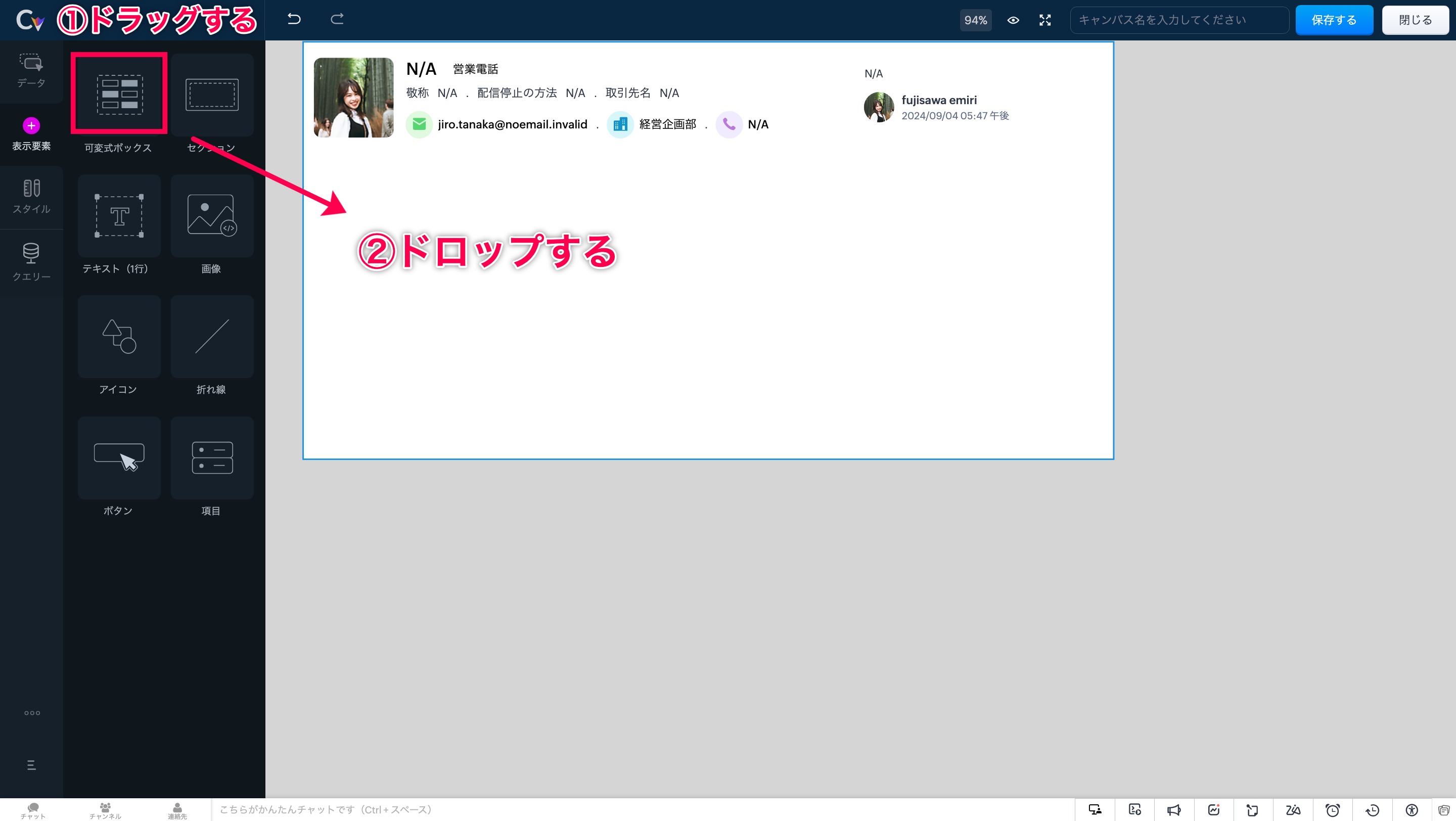
手順ですが、まずは画面左側の「表示形式」を開きます。次に「可変式ボックス」の選択肢が表示されます。
「可変式ボックス」エリアをドラッグ&ドロップすることで、任意の場所にボックスを設置できます。
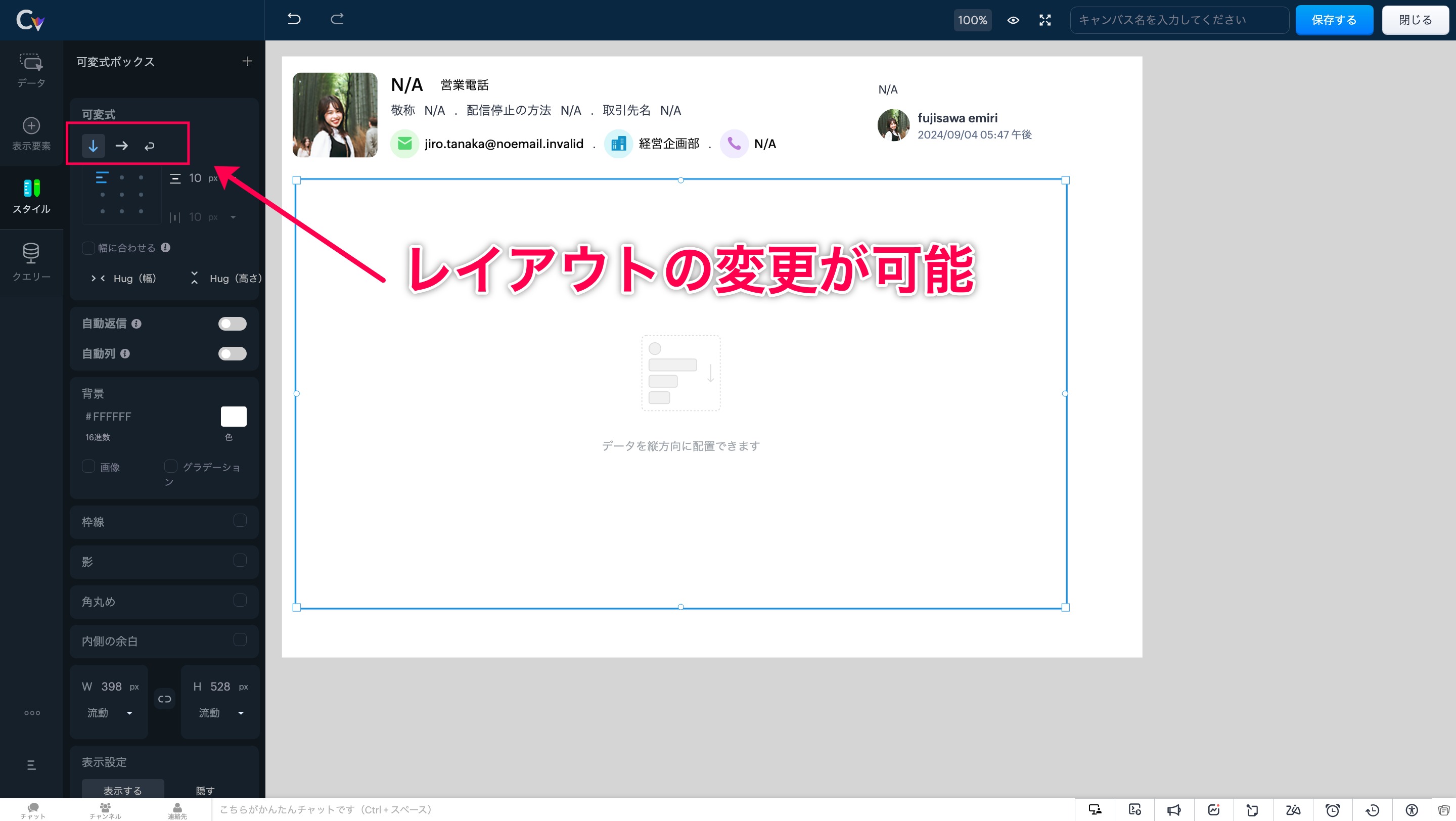
このツールを使うと、ボックスのサイズが内部要素に応じて自動的に調整され、最適なレイアウトが維持されます。
自動調整 適応前
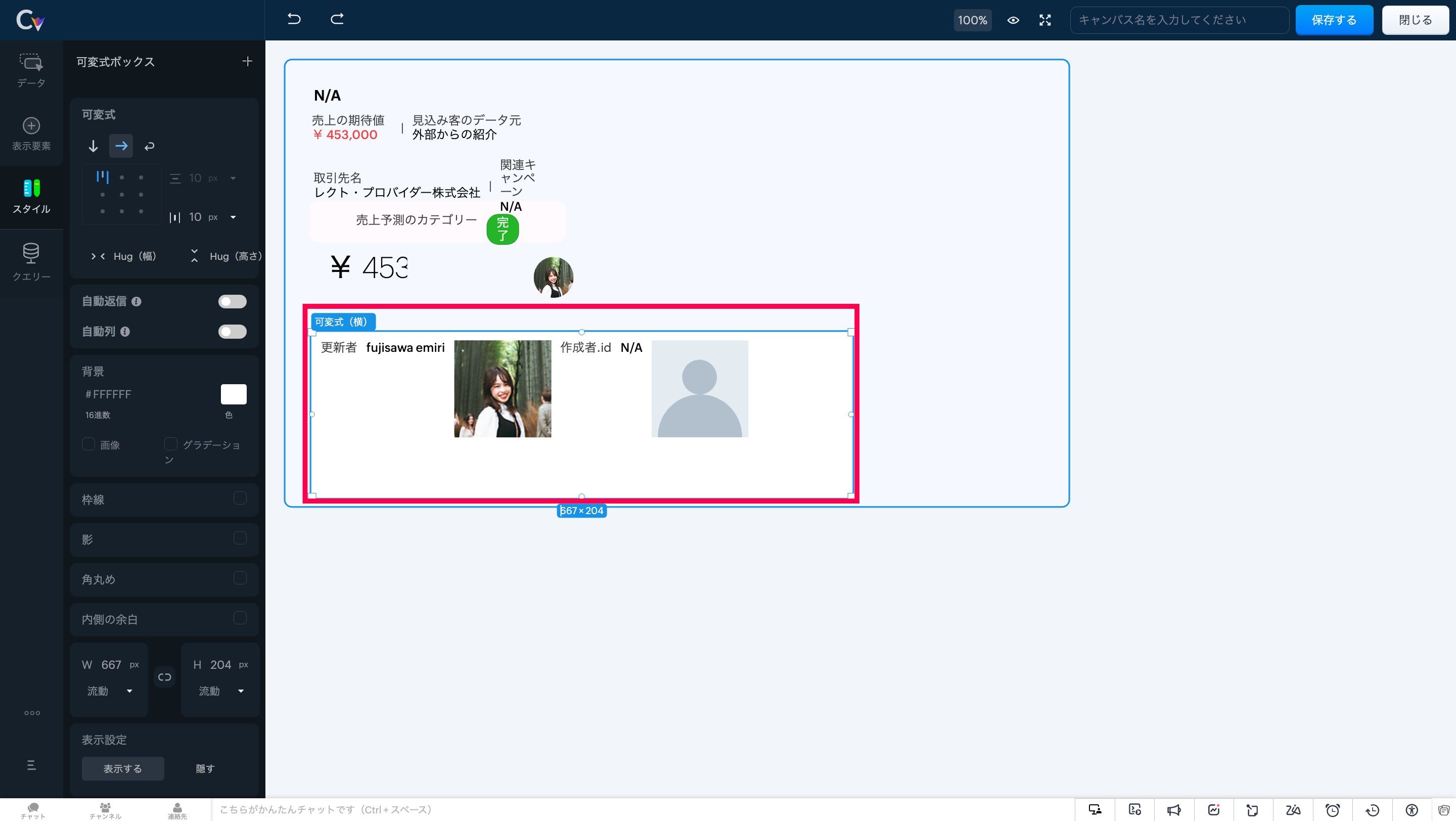
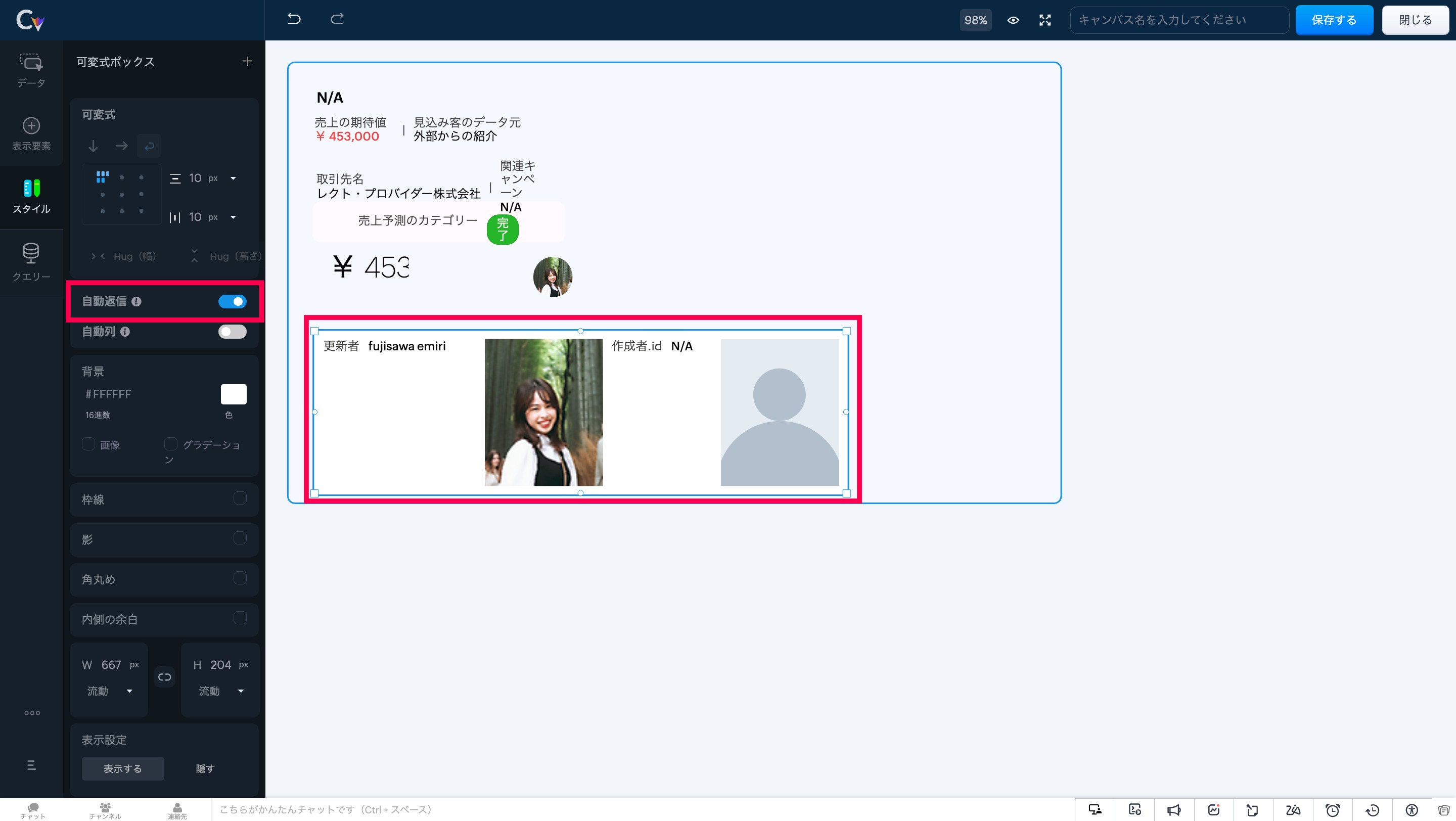
自動調整 適応後
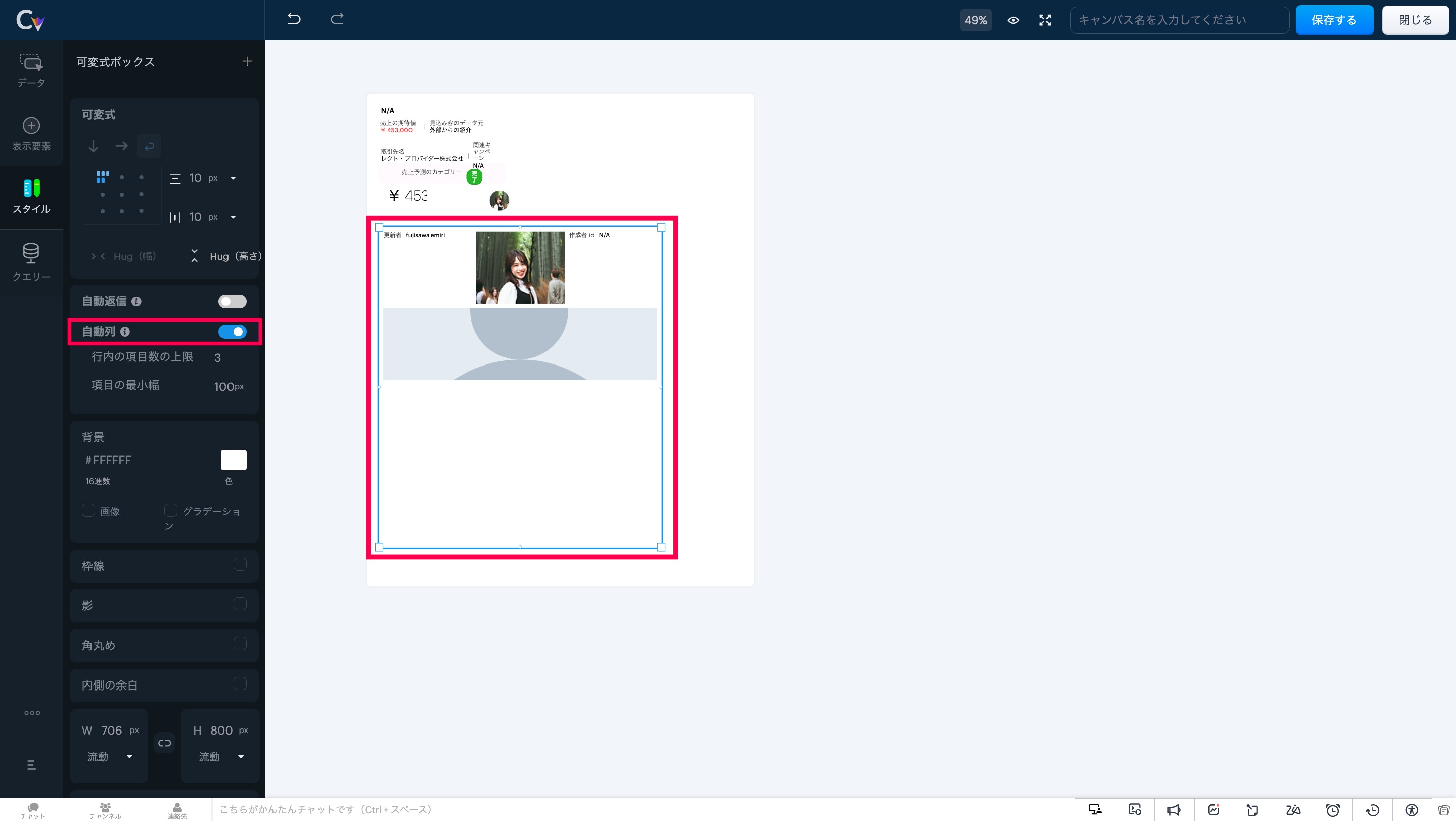
画面左にある「自動返信」 にカーソルを合わせ、設定をオンにしてください。
このツールを使用すると、可変式ボックスは列数に応じてアイテムを自動で配置し、重複を防ぎます。
要素のスケーリングを制御することで、レイアウト内の重要な情報が表示領域に最適に収まり、ユーザーが常に必要な情報にアクセスできる状態を維持します。
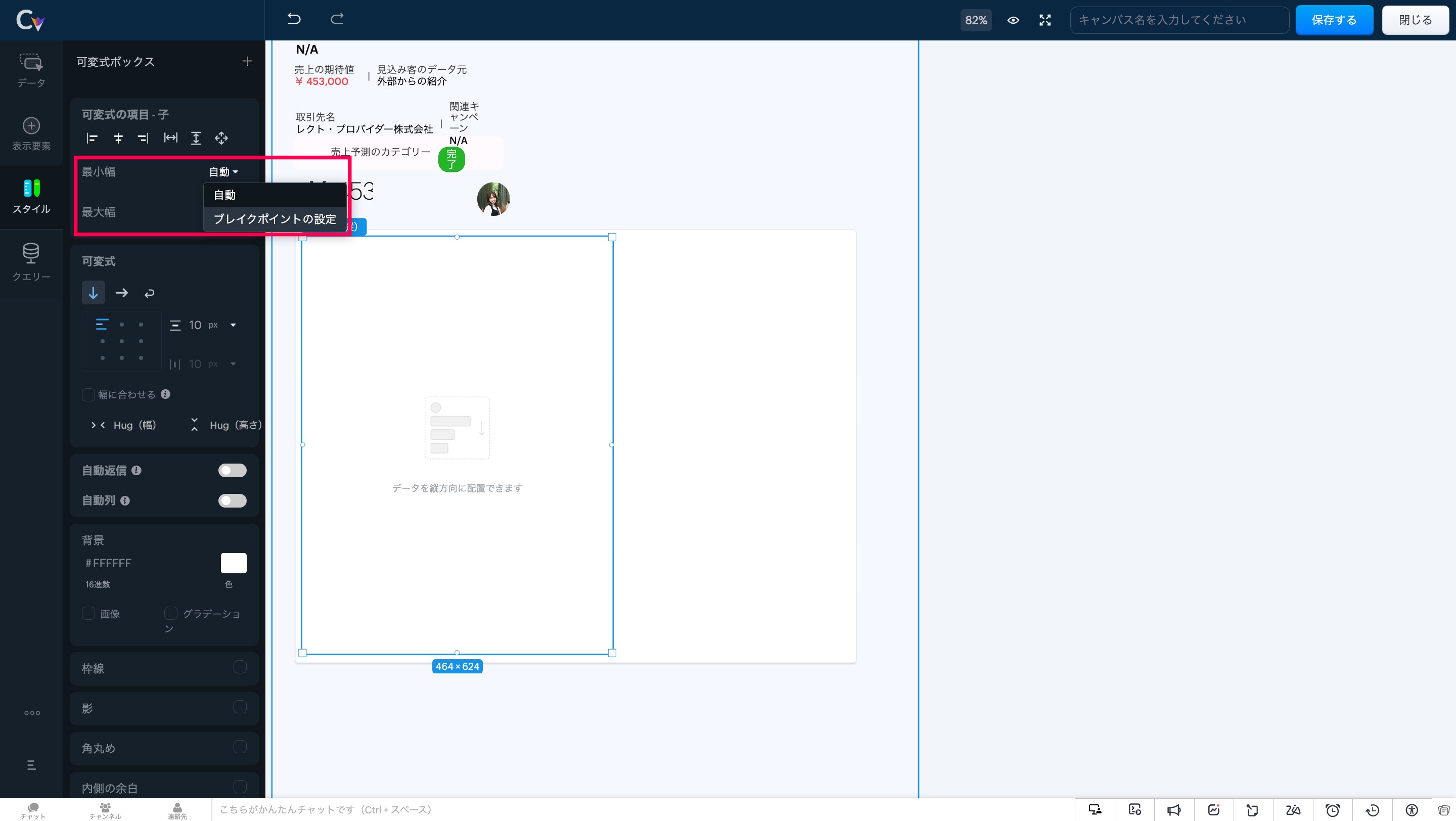
注意事項:可変式ボックスでは、「自動調整」と「自動段組み」の両オプションを同時に有効にすることはできません。両方を選択しようとすると、一方の設定が自動的に無効化されます。
3. より高度な可変式ツール
- アイテムの配置:要素を正確に整列し、統一感のあるプロフェッショナルなレイアウトを実現。
アイテム間の余白調整:フレックスアイテム間に均等な間隔を追加し、視認性と一貫性を向上。
アイテムハグ:コンテンツサイズに応じて要素を自動で拡縮し、スペース効率を最適化。
子アイテム:可変式ボックス内の要素の動作を制御し、柔軟なレイアウト調整を可能に。
最大幅:縦方向のボックス幅に合わせて要素を拡張し、シームレスなデザインを実現。
可変式に変換:複数の要素をワンクリックで可変式ボックスに変換し、構築の手間を軽減。
セクション/可変式への置き換え:デザインを崩さず、セクションと可変式ボックスの相互変換が可能。
いかがでしょうか。キャンバス機能を利用中のユーザーさんはぜひ試してみてください!
……………………………………………………………………………………………………………………
++Zoho オンラインフォーラムに投稿された情報を、いち早くGETしませんか?++
Zoho Japan Community フォーラムの右側「フォローする」ボタンをクリックいただくと、最新の新着投稿やコメントをメールでお送りします。興味のあるサブフォーラムの投稿のみ通知を受け取ることも可能です。
※フォーラムトップから興味のあるサブフォーラムを選択し、「フォローする」をクリックしてください。
コミュニティのイベント情報も当フォーラムでお知らせ予定ですので、ぜひフォローをお願いします!
Topic Participants
Emiri Fujisawa
Recent Topics
What's New in Zoho POS - January 2026
Hello everyone, Welcome to Zoho POS’s monthly updates, where we share our latest feature updates, enhancements, events, and more. Let’s take a look at how January went. Sort and resolve conflicts Conflicts are issues that may arise when registers andOutlook is blocking incoming mail
Outlook is blocking all emails sent from the Zoho server. ERROR CODE :550 - 5.7.1 Unfortunately, messages from [136.143.169.51] weren't sent. Please contact your Internet service provider since part of their network is on our block list (S3150). It looksNot receiving email from customers and suppliers
I am getting error . most of the customers tell me not able to send me email please check i have attached screenshotCreate user
Hello I want to create user, but i get this error Unusual activity detected from this IP. Please try again after some time.File emails in Shared email folder
Hi, I am unable to allow users to collaborate in Shared email folders: User 1 shares a folder let's say "SharedTopic" with full permissions Users 2 and 3 can see this folder but are unable to add emails to this folder or search in this folder. For example,Consolidated report for multi-organisation
I'm hoping to see this feature to be available but couldn't locate in anywhere in the trial version. Is this supported? The main aim to go to ERP is to have visibility of the multi-organisation in once place. I'm hopeful for this.How to Switch from Outlook for Mac to Outlook for Windows
The most often used file formats for users to manage crucial data are OLM and PST files. PST files keep a copy of data on the configured system from Outlook, while the OLM file contains the Mac Outlook data items, which are only accessible with OutlookName autocomplete
Hi, During searching emails the web tool does not always propose the auto-completion of the saved emails. As a result I either have to go to contacts and look up the exact email, or the exact full name including the middle name and any dots, which isAre custom portals accessible on the Zoho learn smartphone app?
In other words, can users external to my organisation, once signed up, use the app in the same way as internal users? ThanksHow to increase my Zoho sign limit.
I cannot send a document/contract for signature. Zoho sign says I reached my monthly limit. May I know how to fix this please? Thanks!Can not add m365 outlook account to zohomail.
I am attempting to use zoho mail as an imap client to add my outlook.com m365 account. In the m365 exchange admin center i have made sure the imap is enabled. In zoho mail i go to settings, mail accounts, add account, add imap account, i select "outlook",Unable to attach Work Order / Service Appointment PDF to Email Notifications (Zoho FSM)
I’m trying to include the Work Order PDF or Service Appointment PDF as an attachment in Email Notifications (automation/notification templates), but I don’t see any option to attach these generated PDFs. Is this currently supported in Zoho FSM? If not,local file csv import problem
The issue occurs when I upload a CSV file via Databridge. In the preview, everything looks correct — the values are in the proper columns. However, after clicking Import, the first column becomes empty, and the values from that column appear in a newFunción Deshacer y Rehacer
Hola. Soy un reciente usuario de Zoho Notebook que he migrado desde Evernote. He encontrado en falta una función que considero muy importante: un botón para "deshacer". Es frustrante cuando se borra un parte del texto o un archivo de una nota, generalmenteTip #59- Technician Console: Exploring View option- 'Insider Insights'
Hello Zoho Assist Community! Ever wondered how technicians adapt quickly during a live support session? Imagine a customer reaching out with an issue that’s disrupting their work. The technician starts a remote session and begins troubleshooting rightMRP or Manufacturing Module for Zoho
We have been searching for options for a production planning or MRP that will integrate with Zoho. Zoho Creator is pushed as a platform that can have an MRP built from scratch but we would like to find more of an out of the box solution and modify it to fit our needs. Are there any recommendations? Would Zoho consider creating a custom solution in Creator to support this need?encountering an error when attempting to associate an email with a Deal using the Zoho CRM extension in Zoho Mail.
When I click "Yes, associate," the system displays an "Oops!! Something went wrong" error message. I have attached a screenshot of the issue for reference.Can 1 Zoho CRM instance sync with 2 Zoho Marketing Automation instances?
Can 1 Zoho CRM instance sync with 2 Zoho Marketing Automation instances?Can I add Conditional merge tags on my Templates?
Hi I was wondering if I can use Conditional Mail Merge tags inside my Email templates/Quotes etc within the CRM? In spanish and in our business we use gender and academic degree salutations , ie: Dr., Dra., Sr., Srta., so the beginning of an email / letterZoho mail account ownership transfer
We recently took over another company and have assumed responsibility for its Zoho account, including Zoho Mail and all related services. We would like to formally transfer ownership of this account to our organization. Could you please outline the completeEmail Authentication is Failing
I'm trying to setup gitlab with email authentication. I used the following configs picked up from: https://docs.gitlab.com/omnibus/settings/smtp/ gitlab_rails['smtp_enable'] = true gitlab_rails['smtp_address'] = "smtp.zoho.com" gitlab_rails['smtp_port']DMARC reports for mail I didn't send: how to deal with?
I know the enthusiastic amateur's bare minimum about e-mail; am able to set up a Thunderbird account and know the basic acronyms. I have a Zoho Mail account connected to my domain, and have set up SPF, DMARC and DKIM successfully according to Zoho's instructionms
Email set up for communicationFix the speed
It takes ages to load on every step even though my dataset is quite small.Capture Bank Charges for Invoice Payments
We've added the Bank Charges field in the "Add Payments" page both in Zoho Invoice & Zoho Books. So all you need to do is to enter the bank charges when you record a payment for the invoices. This bank charge will be included to the amount paid for that invoice. Steps to add the bank charges while you record the payment: 1. Click the "Invoices" sub-tab under the "Money-In" tab. 2. Click the 'add payment' link for the invoice that you wish to record the payment for. 3. On the addImage field in custom module
Hi guy, Is there any hope of adding a custom image field in the custom module? We created a custom module to keep track of assets, and it would be helpful if we could attach an image to the record. Thanks RudyDeluge Function to Update Custom Field
I'm trying to get a Deluge function (which will run as part of a Schedule in Desk) that retrieves all tickets with the status "Recurring" and updates the custom field checkbox "cf_recurring" to "true". Here's what I have, which doesn't work: searchValue"View ticket" link is broken
The "View ticket" link in our Zoho ticketing system confirmation emails is broken (please see attached). Impacts ability to update/review details, and, refresh recollection at a later date. Any help would be much appreciated.import data from Apollo.ai into zoho crm via zoho flow
I might be asking this question in the wrong forum. We use Apollo.ai to find potential new leads for our business, there are around 10000 leads that we have initially found. We have an Apollo.ai account but just to do searches, we dont use it as a crm.Woocommerce Line Item Information
I'd like to add each line item from a Woocommerce order to a zoho creator form record. The line items are found within the line items array, but I'm not sure how to get each item out of the array? Any help would be much appreciated.Synching changes to Stripe when changes are made in Zoho Billing
We have a situation where we have merged customers in Zoho BIlling and then found out later that the payment in Stripe was not updated and still associated with the old customer record. The card gets updated and billed, but that payment is still associatedHow do I fix this? Unable to send message; Reason:554 5.1.8 Email Outgoing Blocked.
How do I fix this? Unable to send message; Reason:554 5.1.8 Email Outgoing Blocked.Disable Smart Filters By Default
The smart filters "feature" is causing confusion for Zoho Mail users. New emails should be delivered to the inbox unless they have specifically opted to redirect them somewhere else. People don't understand that new emails might be waiting in a randomME SALE ESTE ERROR: No fue posible enviar el mensaje;Motivo:554 5.1.8 Email Outgoing Blocked
Ayuda!! Me sale este error al intentar enviar mensajes desde mi correo electronico de Zoho! Tampoco recibo correos pues cuando me envia rebotan. Ayuda, Me urge enviar unos correo importantes!! Quedo atenta MAGDA HERNANDEZ +5731120888408Client Script | Update - Client Script Support For Custom Buttons
Hello everyone! We are excited to announce one of the most requested features - Client Script support for Custom Buttons. This enhancement lets you run custom logic on button actions, giving you greater flexibility and control over your user interactions.Zoho Mail not working
Zoho Mail not workingI can't add a new customer in Zoho invoice? Anyone had this issue before?
Ive been using Zoho invoice for over 6 years. Today I wanted to add a new customer to send an invoice to but it doesn't save when I try to access it from the pulldown menu when you go to send a new invoice.Spreadsheet View click & focus issue in Arabic (RTL) localization
Hello Zoho Support Team, I am facing an issue in Zoho Creator Spreadsheet View when using Arabic localization (RTL). Scenario: My app supports English (LTR) and Arabic (RTL). I created a Spreadsheet View for a form. In English, everything works correctly.Customer address in Zoho Bookings
Hello, Is it possible to add customer address information to the Zoho bookings appointment screen? Or have it pull that information automatically from the CRM? We are wanting to use this as a field management software but it is difficult to pull the address from multiple sources when it would be ideal to have a clickable address on the appointment screen that opens up the user's maps. It would also be advantageous for the "list view" to show appointment times instead of just duration and bookingGhost email notification on a form
Hello, We have recently encountered an error where I can not see a email notification set up for a form which I am currently the owner, although neither the form nor the notification were created by me. However, neither can the Super Admin access theNext Page