Action Required: Update Microsoft SQL Server Security Settings Before February 2026

This guidance has been superseded - please do not follow the steps below.
The cipher suite configuration approach described in this post is no longer supported. We have replaced it with an updated migration path.
What to do instead: Follow the current guidance in our new post - Action Required: Migrate Your SQL Server Connection.
You must complete one of the migration paths in the new post (Database upgrade or Zoho Databridge migration).
The original content is retained below for reference only.
We recently deployed security updates in Zoho Analytics that inadvertently caused connection failures for a few customers using Microsoft (MS) SQL Server hosted on older Windows versions (Windows Server 2012, 2012 R2, and 2014).
To restore connectivity, we have temporarily reverted these updates. However, these security changes are mandatory for long-term protection and compliance, and they will be permanently enforced by the end of February 2026.
If you are using MS SQL Server on the affected Windows versions, action is required to ensure uninterrupted connectivity once the security standards are re-applied.
Who Is Affected
This applies only to customers who:
- Use MS SQL Server as a data source in Zoho Analytics, and
- Host MS SQL Server on:
- Windows Server 2012
- Windows Server 2012 R2
- Windows Server 2014
If you are not using these operating systems, no action is required.
 Note: This update applies only to SQL Server Cloud DB imports.
It does not affect local database imports configured using Zoho Databridge.
Issue Description
When modern security standards are enforced, applications connecting to MS SQL Server hosted on older Operating Systems (Windows Server 2012 / 2012 R2 / 2014) will fail with the following error:

Root Cause
- Upcoming Security Standard:
Modern security protocols require Forward Secrecy. Legacy TLS_RSA cipher suites are being deprecated industry-wide. - OS Limitation:
Older Windows Servers rely on these deprecated ciphers by default. They do not offer modern Elliptic Curve (ECDHE) ciphers unless explicitly configured. - The Impact:
Without the configuration below, your database will reject secure connections once we re-enable the security update.
Required Configuration: Enabling Modern Cipher Suites
To maintain connectivity, you must configure your Windows Server to support modern cipher suites.
To prepare your server, you must add the following modern cipher suites to the TOP of your Windows Server's configuration.
Implementation Methods
You can use one of the following methods.
Option A: GUI Method (Recommended)
Step 1: Download the Tool
Download IIS Crypto (GUI) from Nartac Software.
Note: This is a portable utility and does not require installation.Step 2: Launch the Tool
- Copy IISCrypto.exe to the database server.
- Right-click the executable and select Run as Administrator.
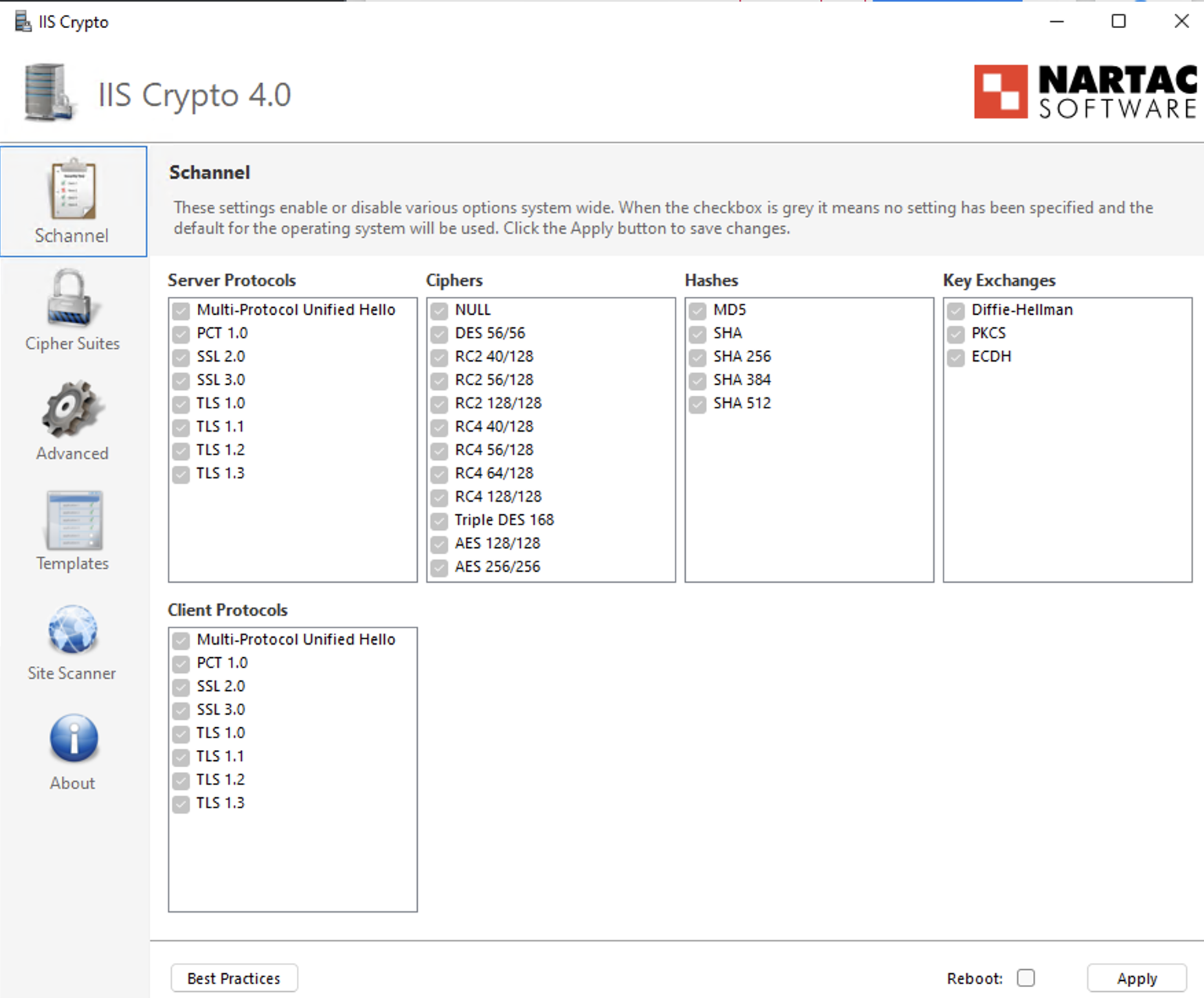
Step 3: Configure TLS Protocols
- Open the Schannel tab.
- Ensure TLS 1.2 is enabled (checked).
- Verify that deprecated protocols (SSL, TLS 1.0, TLS 1.1) remain disabled in accordance with security policy.
Step 4: Prioritize Cipher Suites
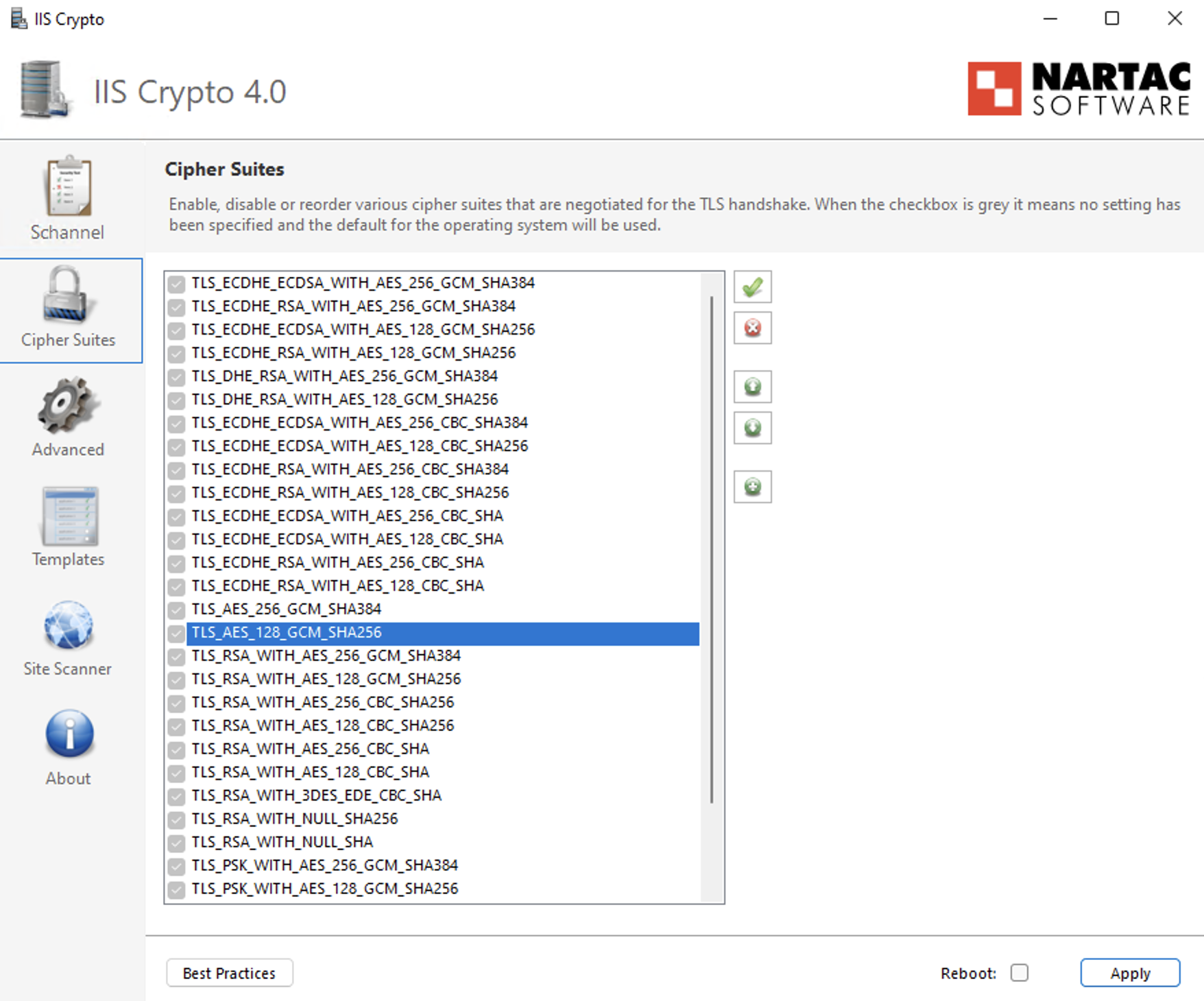
- Navigate to the Cipher Suites list in the left-hand panel.
- Identify the following ECDHE cipher suites:
- TLS_ECDHE_RSA_WITH_AES_256_GCM_SHA384
- TLS_ECDHE_RSA_WITH_AES_128_GCM_SHA256
- TLS_ECDHE_RSA_WITH_AES_256_CBC_SHA384_P384
- TLS_ECDHE_RSA_WITH_AES_128_CBC_SHA256_P256
- TLS_ECDHE_RSA_WITH_AES_256_CBC_SHA_P384
- TLS_ECDHE_RSA_WITH_AES_128_CBC_SHA_P256
- Use the Up Arrow control to move these ECDHE cipher suites to the top of the list to ensure they are prioritized during TLS negotiation.
- Ensure that older TLS_RSA_* cipher suites remain enabled only for backward compatibility and are positioned below the ECDHE cipher suites with the lowest priority.
Step 5: Apply Configuration
- Click Apply to save the changes.
Step 6: Reboot
- Restart the Windows Server to ensure the changes take effect.
Option B: Group Policy Method (Native Windows)
Step 1: Open Group Policy Editor
- Press Win + R, type gpedit.msc, and press Enter.
Step 2: Navigate to SSL Configuration Settings
Go to: Computer Configuration→ Administrative Templates→ Network→ SSL Configuration Settings
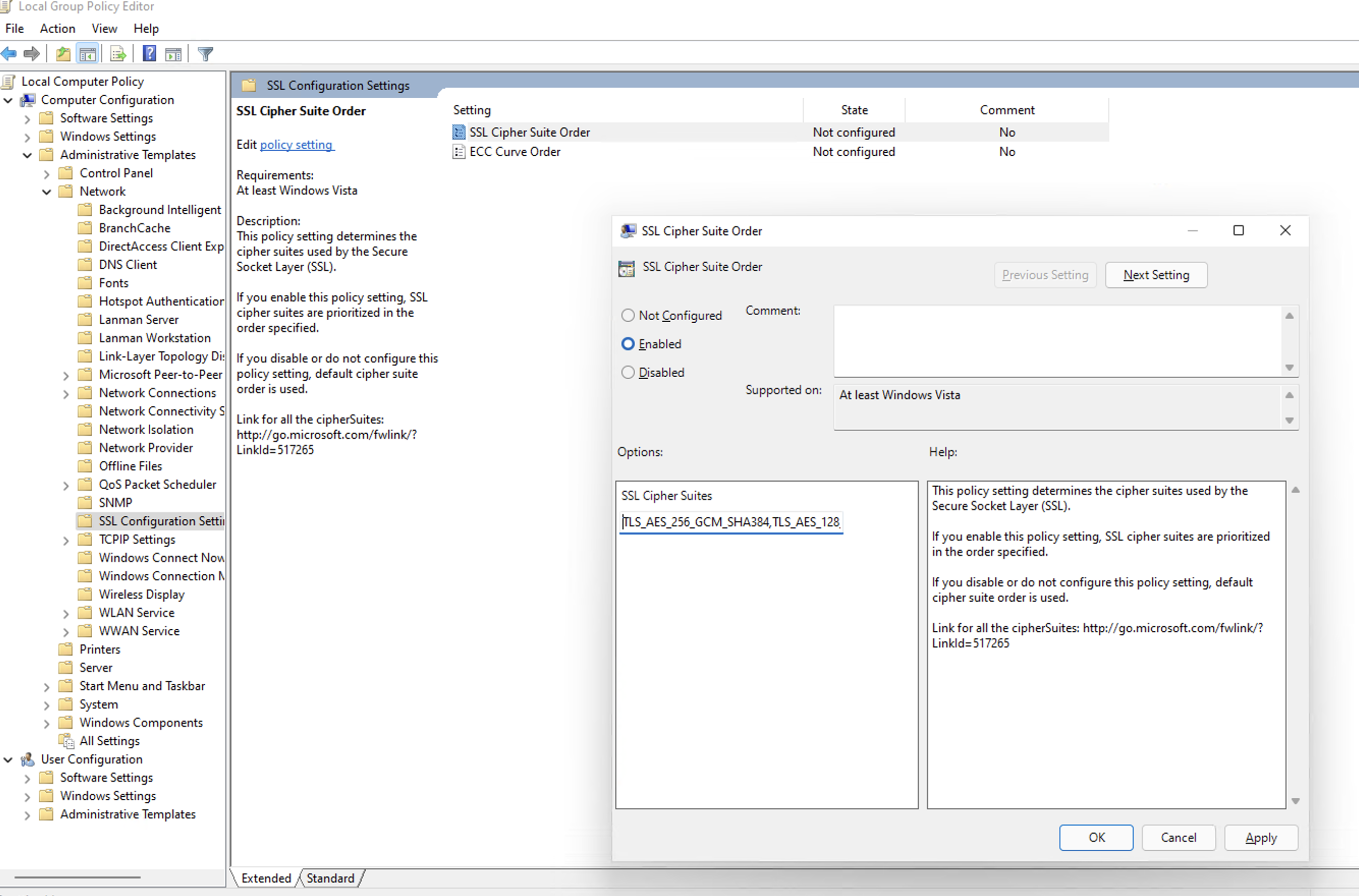
Step 3: Edit Cipher Suite Order
- Double-click SSL Cipher Suite Order.
- Select Enabled.
Step 4: Prepend Secure Cipher Suites (Critical Step)
- Locate the SSL Cipher Suites text box.
- Do not delete the existing cipher list, as this may impact legacy application compatibility.
- Place the cursor at the very beginning (far left) of the text box.
- Paste the following cipher list before the existing entries:TLS_ECDHE_RSA_WITH_AES_256_GCM_SHA384,TLS_ECDHE_RSA_WITH_AES_128_GCM_SHA256,TLS_ECDHE_RSA_WITH_AES_256_CBC_SHA384_P384,TLS_ECDHE_RSA_WITH_AES_128_CBC_SHA256_P256,TLS_ECDHE_RSA_WITH_AES_256_CBC_SHA_P384,TLS_ECDHE_RSA_WITH_AES_128_CBC_SHA_P256,
- Ensure there is a comma separating the newly added cipher block from the existing cipher list.
Step 5: Apply Configuration
Click OK to save the policy changes.
Step 6: Reboot
Restart the Windows Server for the Group Policy changes to take effect.
Verification: How to Install & Run Nmap
To confirm the server is ready for the future update, use the network scanning tool Nmap.
Step 1: Install Nmap
For Windows Users:
- Download the Latest Stable Installer (.exe) from the Official Nmap Download Page.
- Run the installer.
- Critical Step: During installation, check the box for Install Npcap. This driver is required for the scan to work.
- Finish the installation.
For Linux Users:
- Ubuntu/Debian: Run "sudo apt-get install nmap -y"
- RHEL/CentOS: Run "sudo yum install nmap -y"
Step 2: Run the Scan
Open your Command Prompt (Windows) or Terminal (Linux) and run:
nmap --script ssl-enum-ciphers -p 1433 <YOUR_DB_IP_ADDRESS>(Replace 1433 with your specific SQL port if different).
Step 3: Interpret Results
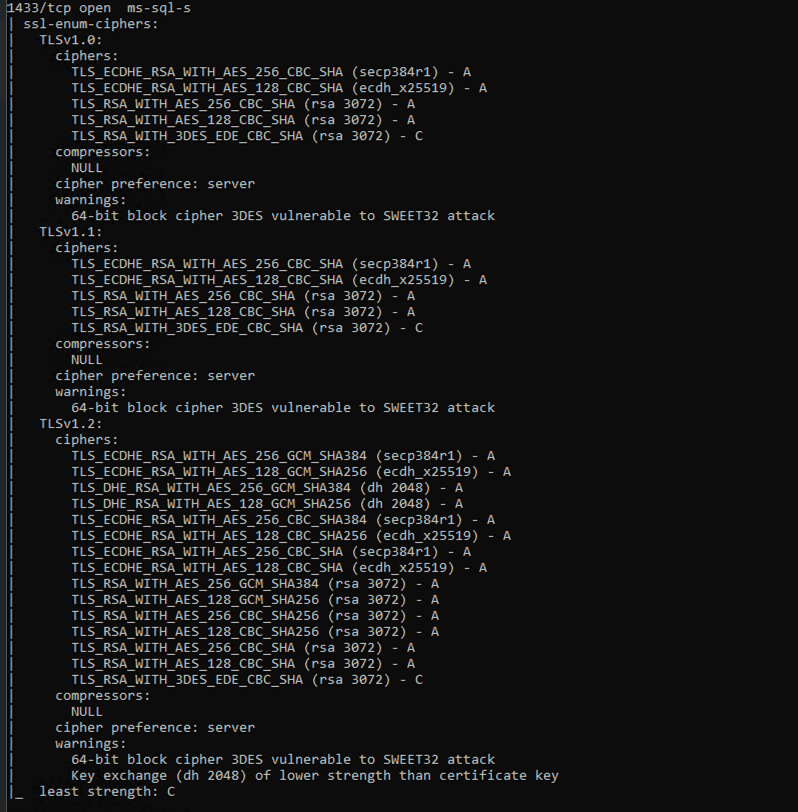
- Look for the TLSv1.2 section in the output. Ensure TLS_ECDHE_... cipher suites appear at the top of the cipher list with Grade A.
- TLS_RSA_... cipher suites must not be removed, but should be kept only as fallback and configured with the lowest priority to avoid regression after re-applying the update.
Example of Successful Output:
What Happens If You Skip This Configuration?
If modern ciphers are not enabled before the security update is permanently enforced:
- Scheduled syncs will fail.
- You won't be able to add or manage existing connections/sources/tables.
Enforcement Timeline
These security standards will be permanently enforced by the end of February 2026.
Servers that do not meet the required cipher configuration will experience connection failures once enforcement begins.
Need Assistance?
If you need help with the configuration, contact us at support@zohoanalytics.com.
To help us resolve your issue faster, include the following details in your email:
- Windows Server version
- SQL Server version
- SQL port number
- Nmap scan output (if available)
- Screenshot of your cipher configuration (if applicable)
Providing this information upfront will help us diagnose and assist you more efficiently.
Topic Participants
Pradeepkumar R
Sticky Posts
Meet the new Zoho Analytics: The Agentic Analytics platform
Every major release of Zoho Analytics has changed what you can do with data. This one changes who does the work. For years, analytics meant a chain of hands. The engineer shaped the data, the analyst wrote the query, the designer built the dashboard,[Virtual launch event] Experience the agentic analytics platform | A sneak peek into Zoho Analytics 7.0
AI and agents are reshaping how businesses operate, and teams that can act on contextual, real-time intelligence are the ones best placed to adapt. Analytics platforms are evolving fast to meet that need. Join us for a live walkthrough of Zoho AnalyticsWhat's New in Zoho Analytics - August 2026
Hello Users! This month puts you in control of how your analytics moves: promote content safely between workspaces with Deployment Management, govern data access and sign-in more precisely, and make your forecasts smarter with external drivers. There'sWhat's New in Zoho Analytics - June 2026
Hello Users! This month is about meeting your data wherever it lives: reaching it from AI assistants, bringing it in from more sources, and keeping it flowing with less manual effort. Here's what's new across Ask Zia and AI, data import, integrations,What's New in Zoho Analytics - February 2026
Hello Users! We're back with another round of updates for Zoho Analytics. This month's release focuses on giving you greater flexibility in how you visualize, manage, and act on your data - with new features like custom visualizations, remote MCP server,
Recent Topics
Sharedmail box access via an api
Hi, I am trying to access a sharedmailbox via an API. I am the moderator and creator of this shared mailbox. I have created a self client but when when i try to get list of all emails, it does not list the sharedmailbox. Help me to resolve this or provideCC'd User Receiving Both Regular Email Chain Response & Reply Notification
Hi, I am trying to set up the notifications for users and I'm a bit confused. I'm testing with personal accounts and my Desk agent, and I'm noticing that CC'd users are receiving both the regular email chain that the requester (contact) receives, butAdd Comprehensive Accessibility Features to Zoho Writer
Hello Zoho Writer Team, We hope you are doing well. We would like to submit a feature request to enhance Zoho Writer with a full set of accessibility tools, similar to the accessibility options already available in the Zoho Desk agent interface. 🚧 CurrentProblem with currency field in Zoho CRM
Hi Guys Zoho Books has a feature in currency fields that automatically converts decimal numbers with commas ( , ) to period format ( . ) when pasting them. For example: R$ 2,50 --> R$ 2.50 Is this behavior available in Zoho CRM? I couldn't find any configurationAbility to Attach Images When Reporting Issues to Zoho Projects from Zoho Desk
Hi Zoho Desk Team, Hope you’re doing well. We’re using the Zoho Desk–Zoho Projects integration to report bugs directly from support tickets into the Zoho Projects issue tracker. This integration is extremely useful and helps us maintain smooth coordinationMake Camera Overlay & Recording Controls Visible in All Screen-Sharing Options
Hi Zoho WorkDrive Team, Hope you are doing well. We would like to request an improvement to the screen-recording experience in Zoho WorkDrive. Current Limitation: At the moment the recording controls are visible only inside the Zoho WorkDrive tab. WhenVENDORS ARE NOT SYNCHED WITH CONTACTS IN CRM
Hello, While the ACCOUNTS and CONTACTS (Including the primary contact) are synced with the CONTACTS module in CRM, the vendor's CONTACTS are not synced with CRM - which basically forces the users to re-enter all vendor's contacts twice and then updateEnable Screen Recording in Zoho WorkDrive Mobile Apps (Android & iOS)
Hi Zoho WorkDrive Team, How are you? We are enthusiastic Zoho One users and rely heavily on Zoho WorkDrive for internal collaboration and content sharing. The screen-recording feature in the WorkDrive web app (similar to Loom) is extremely useful- however,Properly Capture Dropdowns & Hover Elements When Recording a Window/Tab
Hi Zoho WorkDrive Team, Hope you are doing great. We encountered a limitation when recording a selected window or browser tab: Certain UI elements, such as dropdown lists, hover menus, and overlays, are not captured unless we record the entire screen.Add Camera Background Blur During Recording
Hi Zoho WorkDrive Team, Hope everything is well. We would like to request an enhancement to the video recording feature in Zoho WorkDrive. Currently, the camera preview displayed during a recording does not support background blur. This is an essentialWorkDrive Desktop Sync Is Being Deprecated: Move to WorkDrive TrueSync for a Smarter Experience
Hi everyone, We are excited to share a better, smarter way to access and manage your files directly from your computer! We’re transitioning from our legacy Desktop Sync app to WorkDrive TrueSync, designed to give you faster performance,greater flexibility,Support Uploading YouTube Videos Longer Than 60 Minutes
Hi Zoho Social Team, How are you? We would like to request support for uploading YouTube videos longer than 60 minutes directly through Zoho Social. Your support team informed us that Zoho Social currently cannot upload videos over 60 minutes due to “APICaso de Éxito: ACKstorm transforma la gestión de personas con Zoho People
"Con Zoho People hemos centralizado la gestión de personas y facilitado la autonomía de la plantilla." Equipo de ACKstorm ACKstorm es una empresa especializada en consultoría y servicios cloud que trabaja con el ecosistema de Zoho para optimizar sus procesosDuplicate Record Creation
Hello Team, I would like to check whether there are any options available in Zoho FSM to prevent duplicate record creation in the following modules: Assets Companies Contacts Ideally, we would like the system to check for existing records before allowingZoho Books Sandbox environment
Hello. Is there a free sandbox environment for the developers using Zoho Books API? I am working on the Zoho Books add-on and currently not ready to buy a premium service - maybe later when my add-on will start to bring money. Right now I just need aAction required: Authenticate your sender domain in Zoho Marketing Automation before December 14, 2026
Starting December 14, 2026, Zoho Marketing Automation will enforce a daily sending cap for unauthenticated custom sender domains. If you're sending email campaigns from your own domain but haven't authenticated it yet, you'll only be able to send up toAsk the Expert: Unlock the Power of AI and Zia Agents in Zoho CRM
Are you using Zoho CRM to manage your sales processes and customer relationships, and wondering how AI can help you work smarter, automate more, and take your CRM capabilities to the next level? We have great news: the “Ask the Expert” session is comingWhat's new in Zoho Desk 2026 - A decade of ideas brought to life
Hello everyone, 2026 marks a special milestone for us as we celebrate 10 years of Zoho Desk. A decade into business, there is always something new to keep up with, new expectations to meet, and new ways to make customer support better. Zoho Desk continuesManual categorisation of bank transactions
Good Day I am hoping someone here can assist me. I have a lot of catching up to do with some bank transactions. I imported all my bank statements manually. Where possible i created a rule to have the transactions auto categorised. However there are someIdea: Upload your own letterhead and design PDF templates freely (like Lexware Office and sevDesk)
Your own letterhead on every invoice and quote, uploaded in two clicks, no HTML, no public image links. Tools like Lexware Office (formerly lexoffice) and sevDesk already offer this. Zoho Books is more powerful in almost every other way, so let's closeFeature Request: Add Sort by Cell Color and Text Color functionality
Hello Zoho Sheet Development Team, I am writing to suggest a feature enhancement for Zoho Sheet. Currently, the platform supports "Filter by Color," which is incredibly useful. However, there is no native option to "Sort by Color" (by cell fill or textMulti-Day Installations
We schedule technicians on multi-day installations. A single appointment from Monday 8 AM through Friday 5 PM counts as 105 working hours, causing false overbooking. We need one appointment spanning five days but only 40 hours counted toward technicianRebrand your CRM with the all-new custom domain mapping setup
UPDATES TO THIS FEATURE! 19th Jan, 2024 — Custom domain mapping has been made available for portal users in Zoho One and CRM Plus. 23rd June, 2023 — Custom domain mapping has been made available for all users, in all DCs. Hello everyone! We are elatedHow to manage additional required address information for Customers and Vendors.
Has anybody figured out a way to incorporate relevant delivery information in the limited address fields for customers and vendors? For example, most carriers have an additional 'delivery instructions' field to add important information like deliveryAction required: Authenticate your sender domain before December 14, 2026
Starting December 14, 2026, Zoho Campaigns will enforce a daily sending cap for unauthenticated custom sender domains. If you're sending email campaigns from your own domain but haven't authenticated it yet, you'll only be able to send up to 5,000 emailsChange default "Sort by"
Is there a way to change the default "sort by" when searching across modules?" in Zoho CRM? Currently the default sort method is "Modified time" but i would like to utilize the second option of "relevance" as the sort by default and not have to changeEnhanced access controls and smoother authentication for organization emails
Available to customers in all DCs. Hello everyone, We've improved how organization emails work in Zoho CRM, which are used when multiple users need to send emails from a common address, like sales@company.com or support@company.com. Admins can set upNew Search Function
Hey Team, The search function updated in our CRM about a week ago, so I assume it was an automated update across Zoho. It no longer displays leads/deals etc in Chronological order so that the most recently created or updated is the first to display whichError AS101 when adding new email alias
Hi, I am trying to add apple@(mydomain).com The error AS101 is shown while I try to add the alias.Transaction rules for "Owner's Contribution" ?
I have a bank account where a lot of the deposits are "Owner's Contributions" (i.e., the business owner investing money in the company). Is it possible to create a Transaction Rule to automatically recognize these? They all have the same verbiage fromPrint a price list or price book
Hi Community. Am I right in concluding that Zoho has no functionality to print a price list from either Zoho CRM, Zoho Inventory or Zoho Books? I won't get stuck on the fact that Zoho doesn't sync price books between Zoho CRM and Books/Inventory (moreThe Social Wall: October 2026
Hello everyone This month, we're making it easier to organize your monitoring workspace with Monitor Groups in Zoho Social. Organize your monitor columns into groups You can now organize your monitor columns into custom groups based on your preferences.Field of Lookup - 5 Field Association Limit.
This query relates to the post at: https://help.zoho.com/portal/en/community/topic/introducing-the-field-of-lookup-in-crm-public-early-access-2023 My simple (and common) scenario: I select an account / customer lookup and want their address pulled intoFeature Request - Electronic submission of tax returns in Canada
Allow the user to submit Canada Revenue Agency GST/HST returns with NETFILE. Provide the same functionality for provincial revenue agencies for PST/RST remittances. Today Zoho Books only provides the math required to calculate each line, requiring theAbility to translate Zoho CRM Kiosks
Hi team, Is support for translating kiosk text and screen names in the Zoho CRM translation tool planned on the roadmap? Thanks,Files in Teamspaces: keep your team's documents where the work happens
Release Note: This feature is available for all accounts across all DCs Hello Everyone, A Teamspace is built around a specific team and a shared objective, and it holds the modules and projects that team works with every day. The document that team dependsHow to download multiple files in Creator?
I'm trying to download multiple files from a creator report using a for loop but it only seems to be downloading one file. It seems like no more code can be run after downloading this one file. Is there a way to download multiple files? I'm currentlyRequest for Zoho Desk Version and Module Details
Kindly help us confirm the version of Zoho Desk currently being used in our portal, along with the module/edition name. We require this information urgently for our internal documentation.ZohoMail_get_mail_attachment corrupts binary attachments (PDFs) over MCP
Hi all, The Zoho Mail MCP tool ZohoMail_get_mail_attachment returns binary attachments as UTF-8 text, so PDFs come back corrupted and an AI client can't read or save them. What we see: - The response header is content-type: application/octet-stream;charset=UTF-8.Request: Custom CSS Theme
I would really like a custom CSS theme that enables me to completely customize the look and feel of the survey page based on the typography of my company brand. Unfortunately, there does not appear to be complete customization with existing themes. ThisNext Page