Aperçu des modules de Zoho Projects
Dans cet article nous découvrirons les différents modules dans Zoho Projects qui vont vous permettre de gérer vos projets en stimulant la productivité, en améliorant la transparence du projet et en fournissant une vision claire à l'équipe.
ACCUEIL
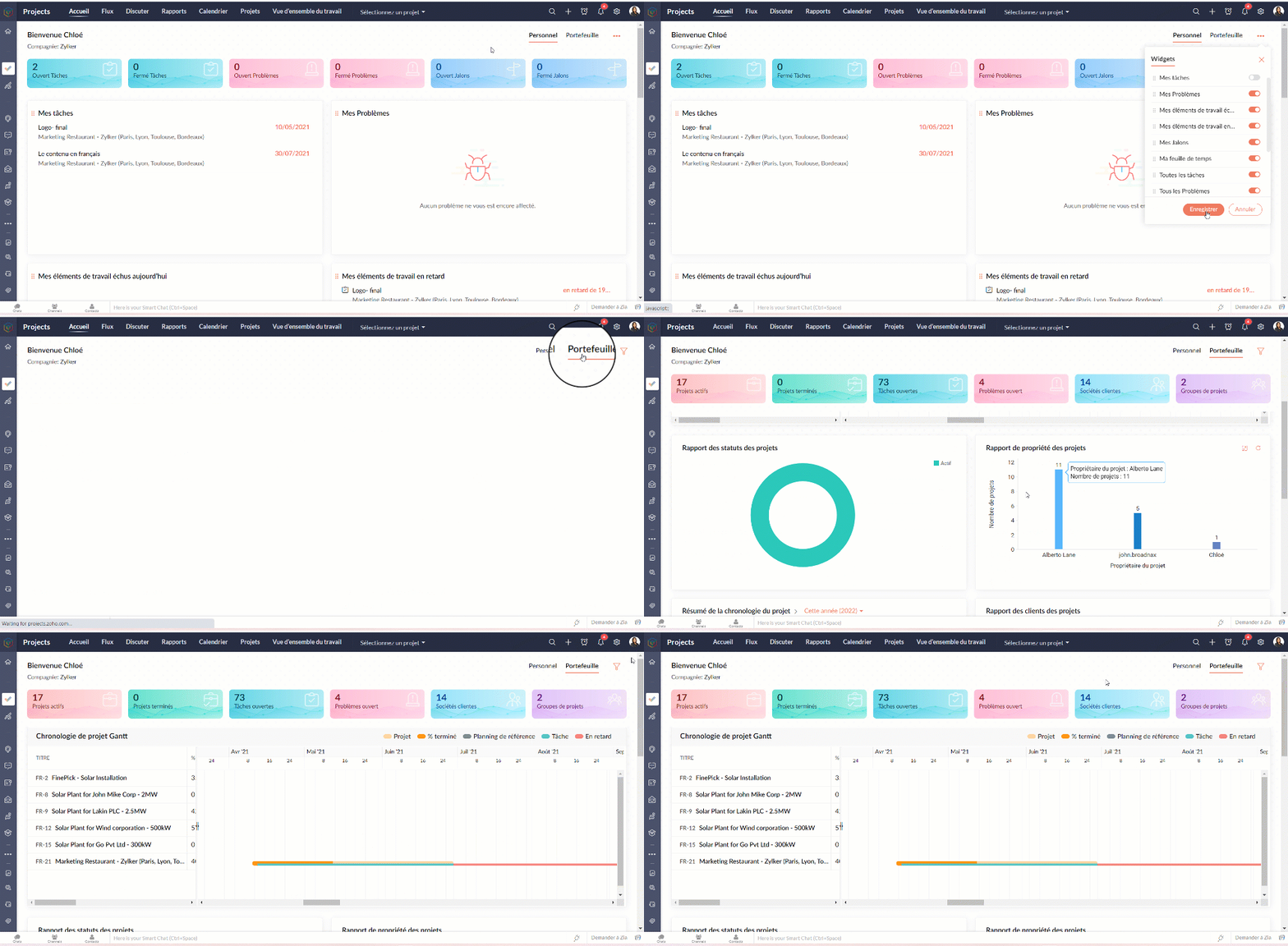
L'accueil ou le tableau de bord de Zoho Projects vous donne deux vues;
- La vue personnelle où vous allez trouver les détails sur l'ensemble des projets dont vous faites partie. Cette vue peut être personnalisée.
- La vue portefeuille où vous avez un aperçu des détails de l'ensemble des projets du portail de votre organisation. Un compteur affiche les statistiques relatives à vos projets, tâches, problèmes, clients et groupes de projets. Le time line du projet Gantt donne un indicateur visuel du calendrier du projet et de son état d'avancement.
FLUX
Par défaut, les flux sont affichés pour tous les projets. Sous le module "Flux", il y a trois onglets :
- Flux - Flux est un système automatisé qui enregistre les activités dans vos projets. Chaque fois que des utilisateurs effectuent des activités dans les projets auxquels vous êtes associé, vous recevrez des mises à jour. Vous pouvez également partager vos avis sur ces flux en les commenter et même ajouter des pièces si nécessaire.
- Statut - Sous l'onglet "Statut", vous trouverez les mises à jour du statut d'activité de tous les utilisateurs de tous les projets desquels vous faites partie. Il vous permet de connaître les statuts récemment publiés par vos collaborateurs.
- Flux d'activités - Les activités de tous les utilisateurs dans les projets sont affichées dans une vue chronologique, ce qui vous permet d'être informé sur les activités des membres de votre projet au quotidien et de savoir qui fait quoi. Vous pouvez également accéder à une chronologie spécifique pour vérifier l'activité particulière exécutée par votre membre du projet.
Vérifier les flux pour un projet spécifique
- Depuis la liste déroulante de "Sélectionner un projet", choisissez un projet. Le flux s'affiche pour ce projet spécifique.
DISCUTER
Il s'agit d'une fonction de collaboration interne qui vous permet de mener des discussions par chat ou par les réunions audio-vidéo avec les personnes associées à vos projets.
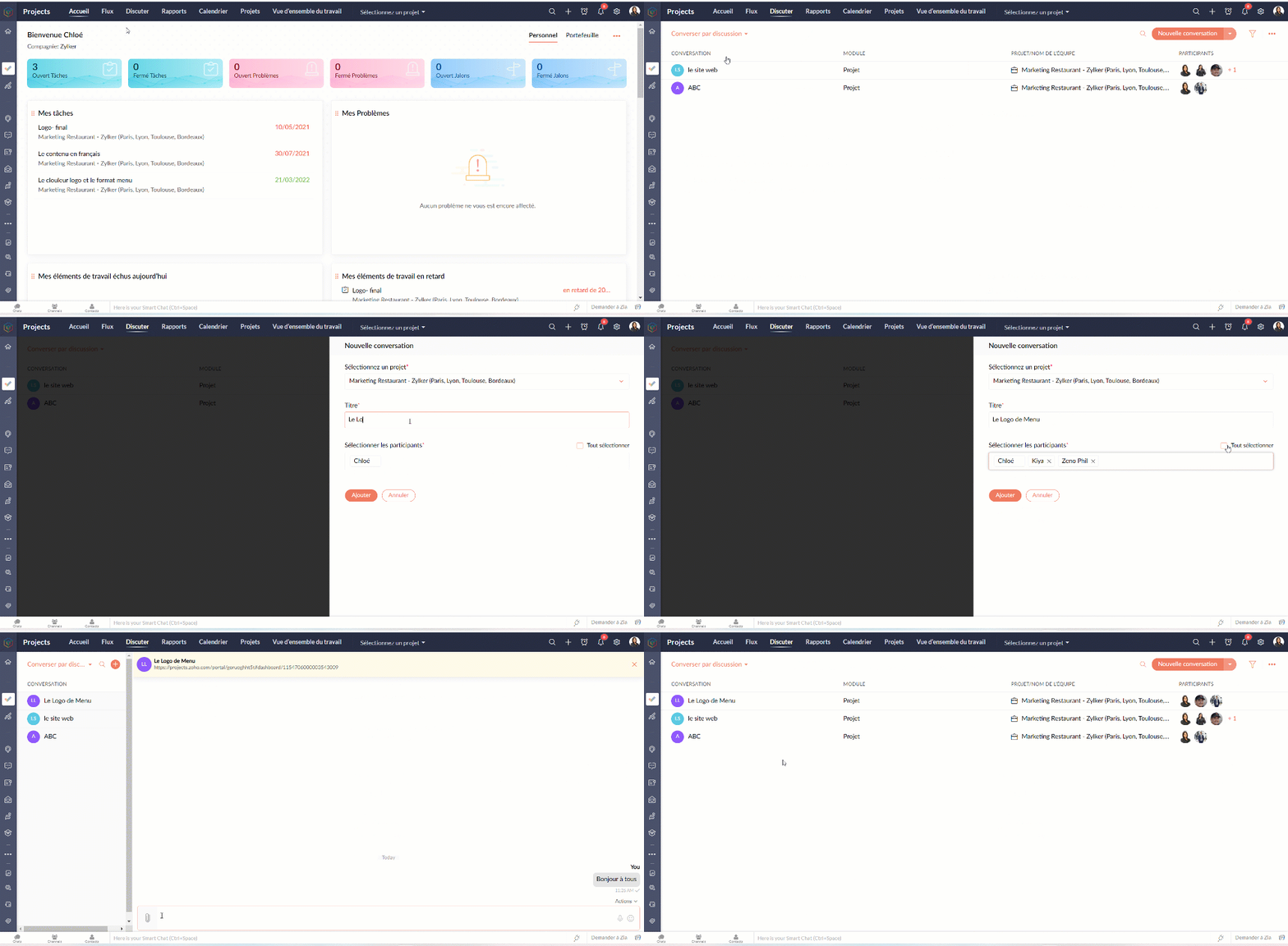
Entamer une conversation
- Sélectionnez "Converser par discussion" depuis la liste déroulante.
- Cliquez sur "La nouvelle conversation".
- Sélectionnez le nom du projet, ajoutez le titre de la discussion.
- Ajoutez les participants parmi les collaborateurs du projet sélectionné.
- Cliquez sur "Ajouter".
- Une nouvelle fenêtre de chat s'affiche et est prête à entamer la discussion.
- Les participants peuvent toujours revenir à "Discuter" et cliquer sur le chat pour communiquer.
- Les participants peuvent accéder aux anciens chats à partir de l'onglet " Anciens salons de discussion"
Entamer une réunion
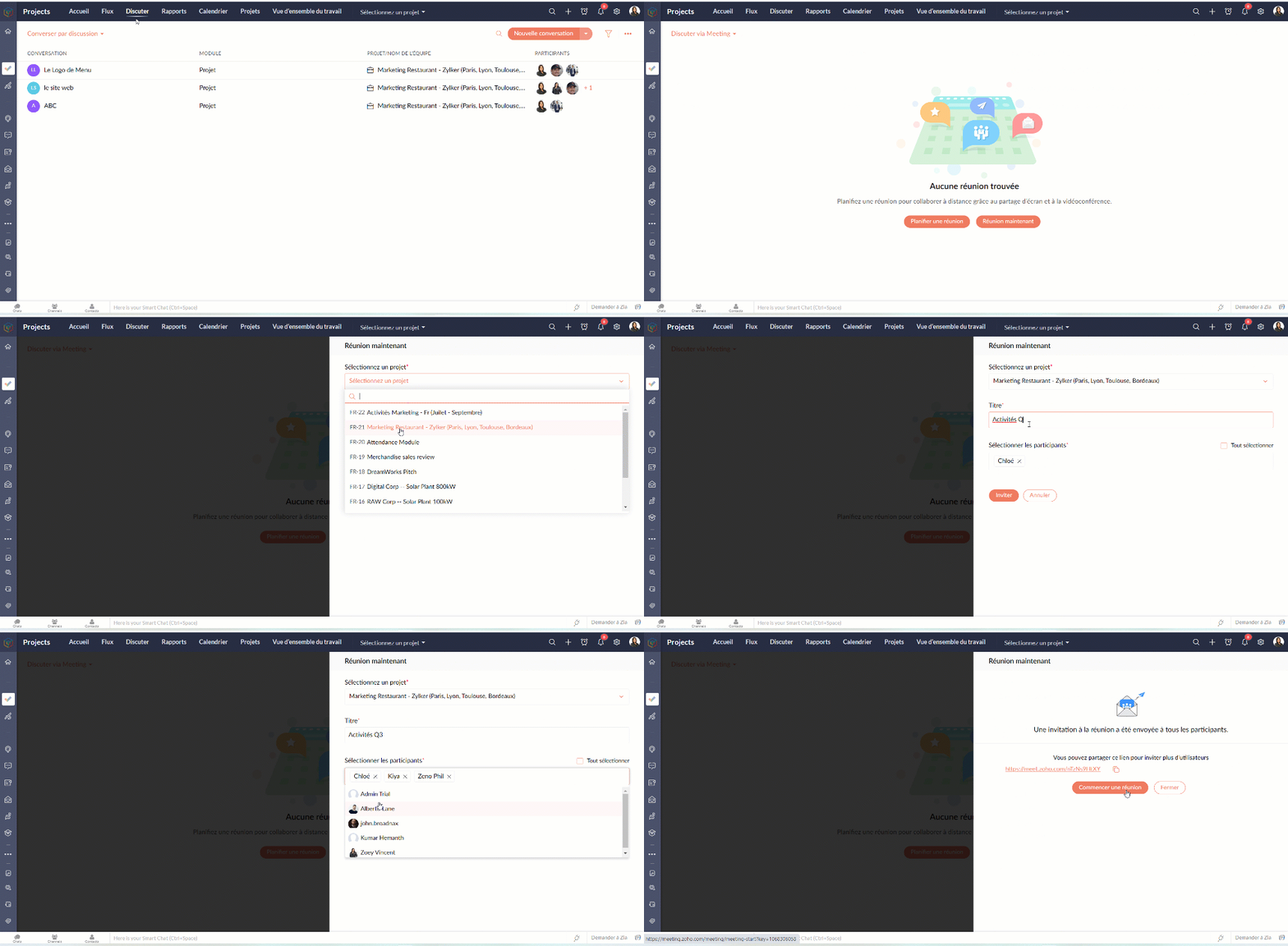
- Sélectionnez "Discuter via Meeting" depuis la liste déroulante.
- Vous pouvez suivre les indications à l'écran pour programmer la réunion.
CALENDRIER
Suivez toutes les activités de votre projet à l'aide du module Calendrier. Le calendrier vous permet d'organiser rapidement des réunions, des événements, de planifier des rendez-vous et de gérer des tâches et des problèmes. Il aide l'équipe à rester au top du planning. Il aide également l'équipe à identifier facilement les dates auxquelles elle est engagée afin qu'elle puisse planifier à l'avance et terminer son travail à temps.
Ajouter les activités dans le calendrier
Gérez les échéances de vos projets et les principaux éléments livrables avec vos modules de calendrier. Vous pouvez créer des jalons, des tâches, des événements, des étapes et des problèmes dans le calendrier. Vous pouvez également afficher toutes les activités de projet prévues pour des dates particulières dans votre calendrier.
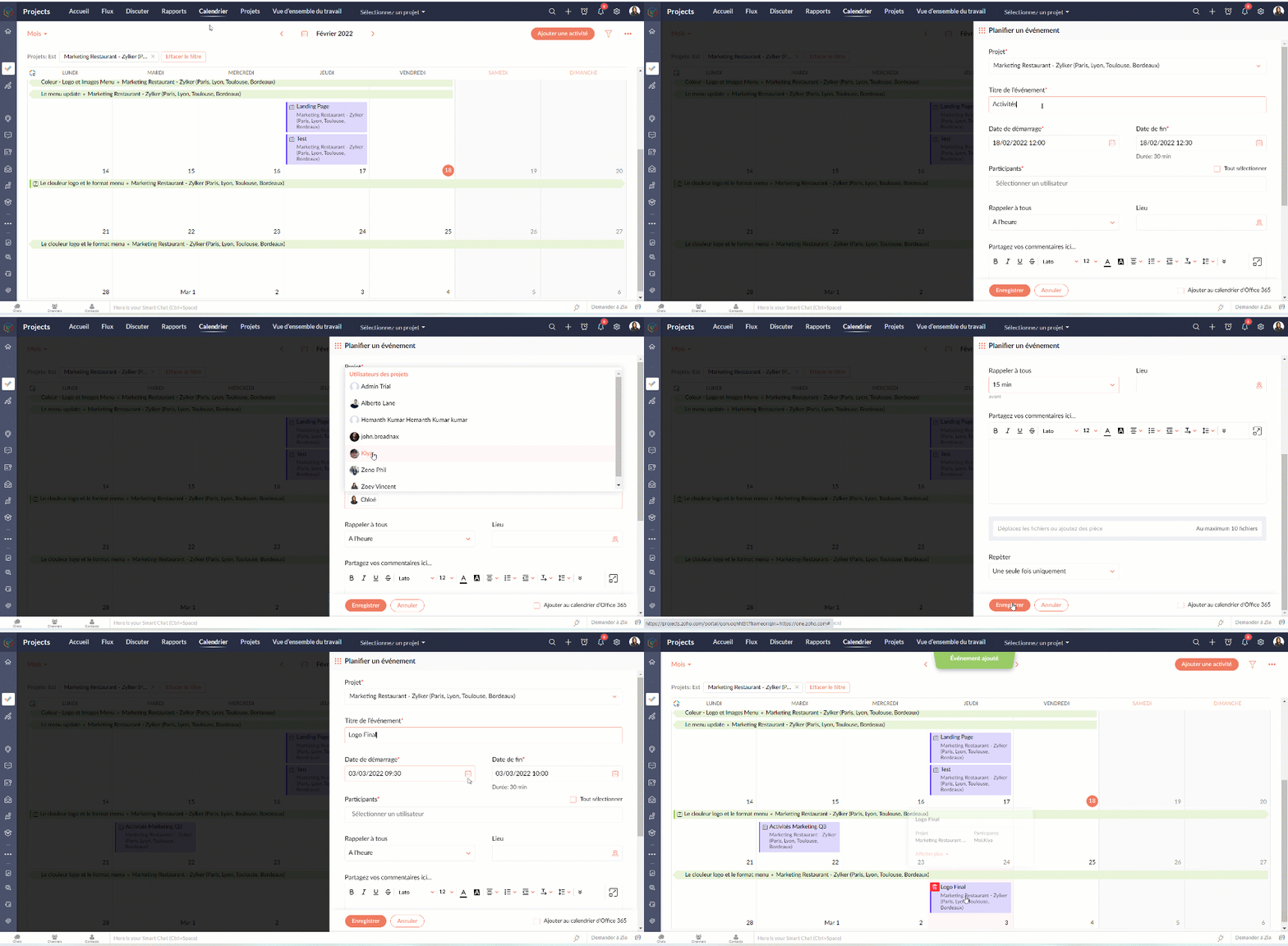
Programmer un événement dans votre calendrier
- Cliquez sur "Ajouter une activité"
- Sélectionnez le projet, ajoutez le nom de l'événement
- Remplissez les autres détails demandés et enregistrez
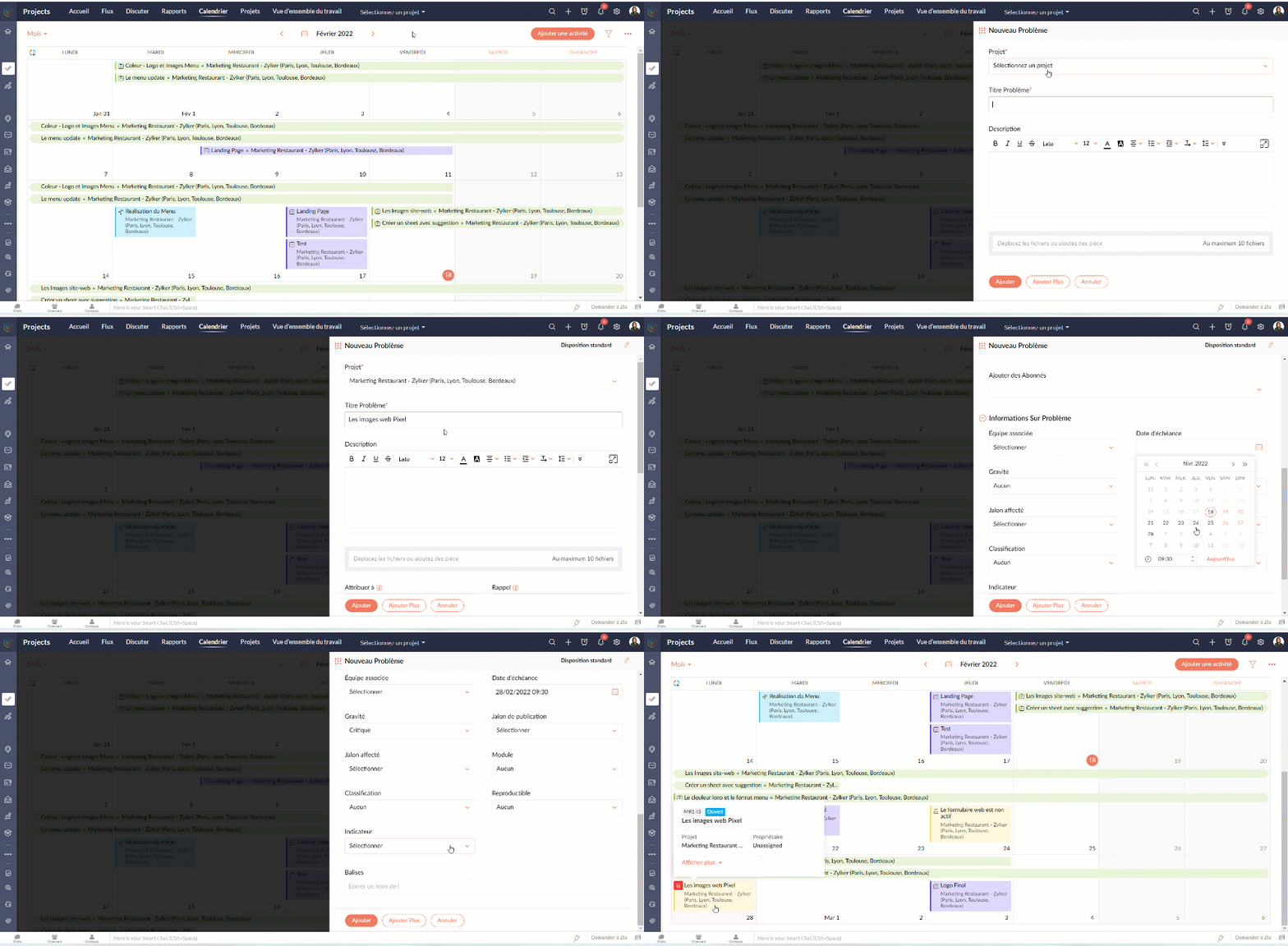
Programmer une tâche/ un problème / un jalon
- Cliquez sur "Ajouter une activité"
- Survolez sur l'icône des options complémentaires
- Choisissez parmi les options disponibles
- Suivez les indications s'affichant sur l'écran.
- Voilà : la tâche, le problème ou le jalon sont créés dans votre calendrier.
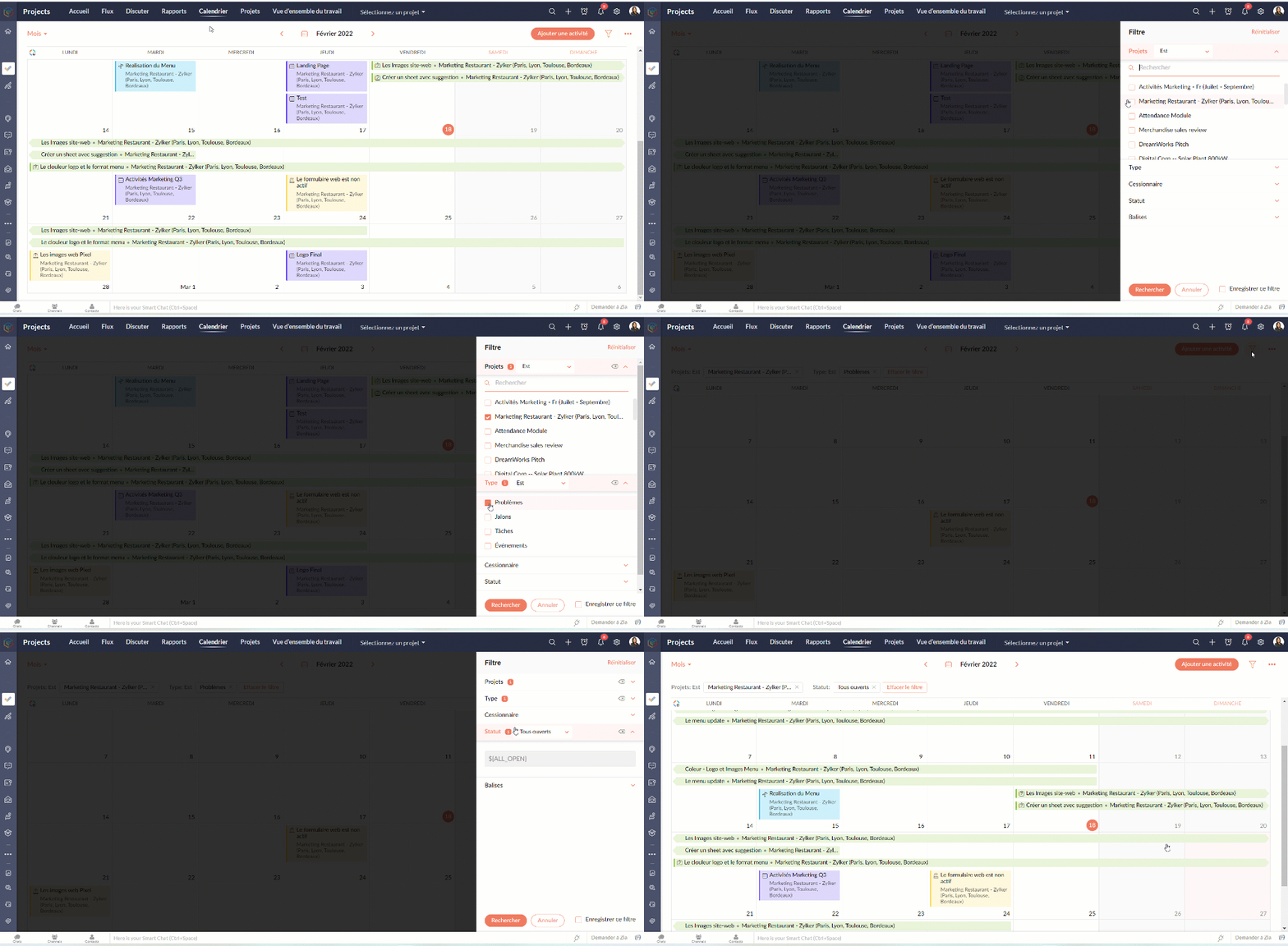
Avec l'option filtre, vous pouvez paramétrer les vues selon les projets, le statut, le type, les balises, etc.
PROJETS
L'onglet projets donne un aperçu rapide de tous les projets auxquels vous participez. Les utilisateurs peuvent voir le statut du projet, le nombre de tâches accomplies, la date de début et de fin, les coûts prévus et réels, les détails du budget et bien plus encore. Les champs affichés peuvent être personnalisés pour afficher vos propres champs ou même désactiver des champs.
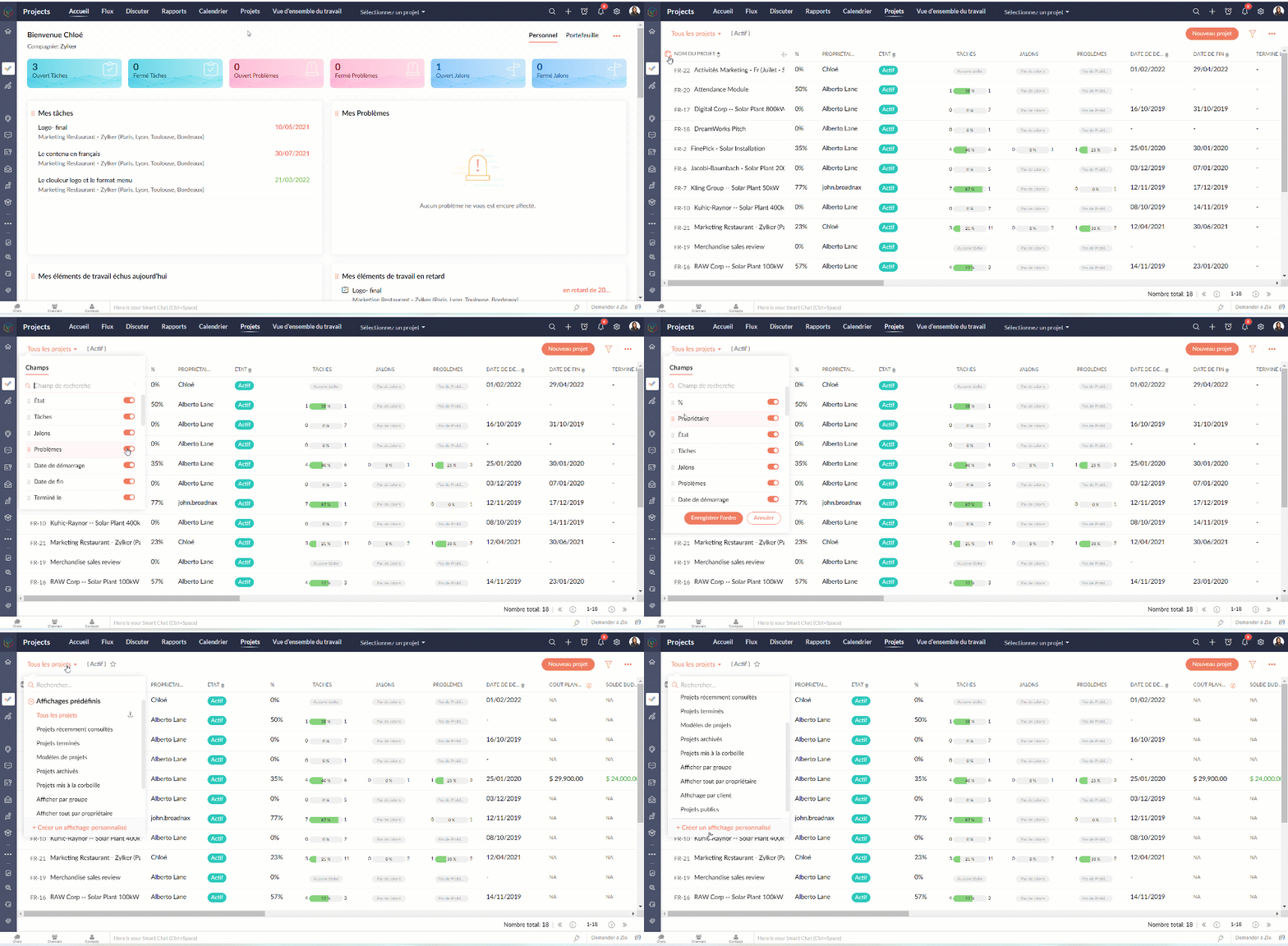
Personnaliser l'aperçu
- Allez sur l'onglet "Projets"
- Sélectionnez l'onglet " Personnaliser colonne".
- Choisissez les colonnes que vous voulez activer ou désactiver.
- Réorganisez les colonnes en glisser-déposer.
- Depuis les affichages prédéfinis vous pouvez choisir les projets que voulez afficher ou même créer une vue personnalisée.
Modifier / supprimer un projet
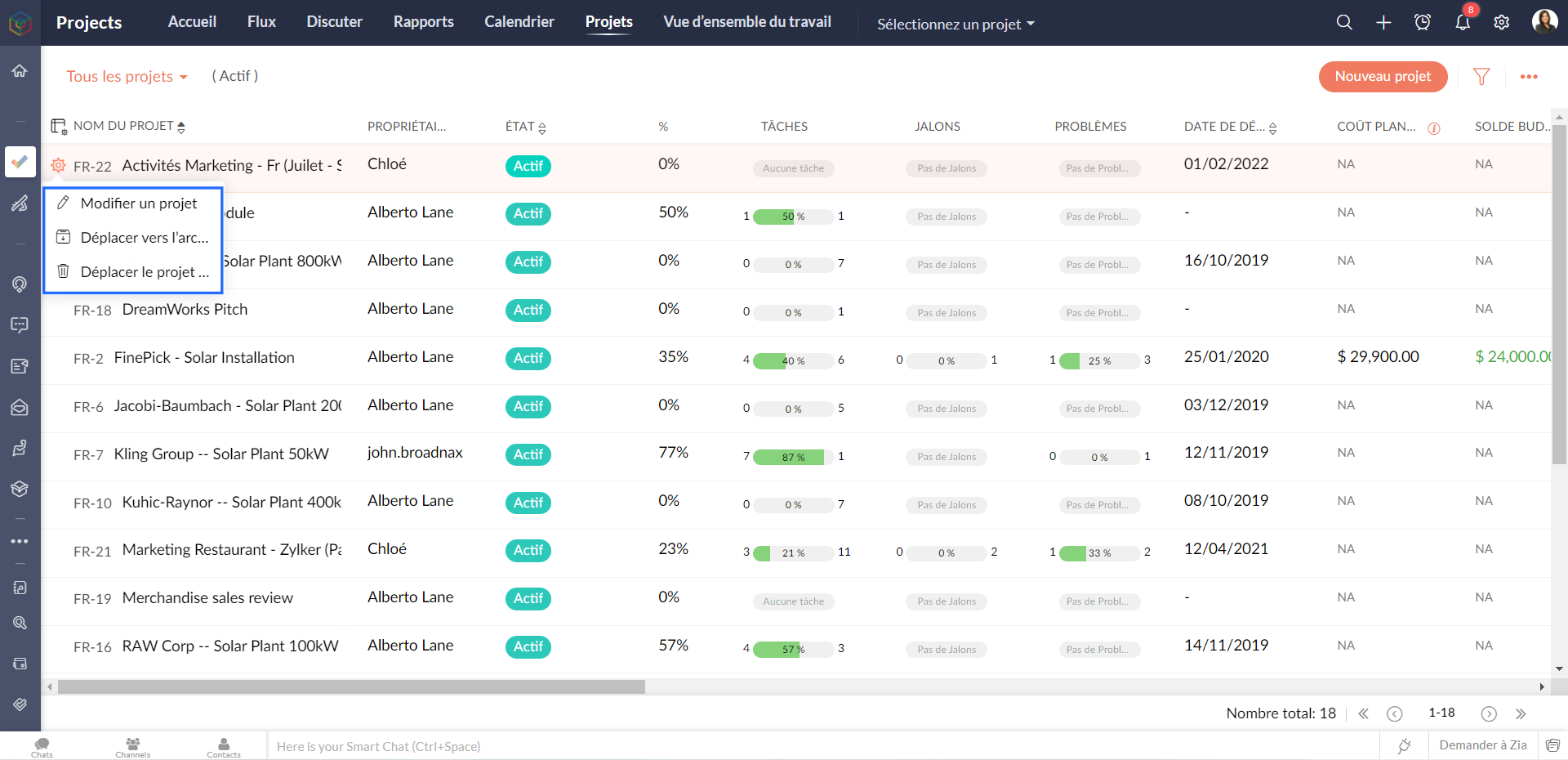
- Survolez sur le projet que vous voulez modifier/ supprimer
- Depuis l'onglet paramètres à coté, vous pouvez soit modifier, supprimer ou archiver un projet
Les modèles de projet
Les modèles de projet peuvent vous aider à gérer votre travail plus efficacement. Vous n'avez pas à saisir les mêmes tâches à plusieurs reprises, ce qui vous permet de gagner du temps et d'être plus productif. Les modèles de projet sont accessibles à partir de la vue de la liste des projets.
Créer un modèle de projet
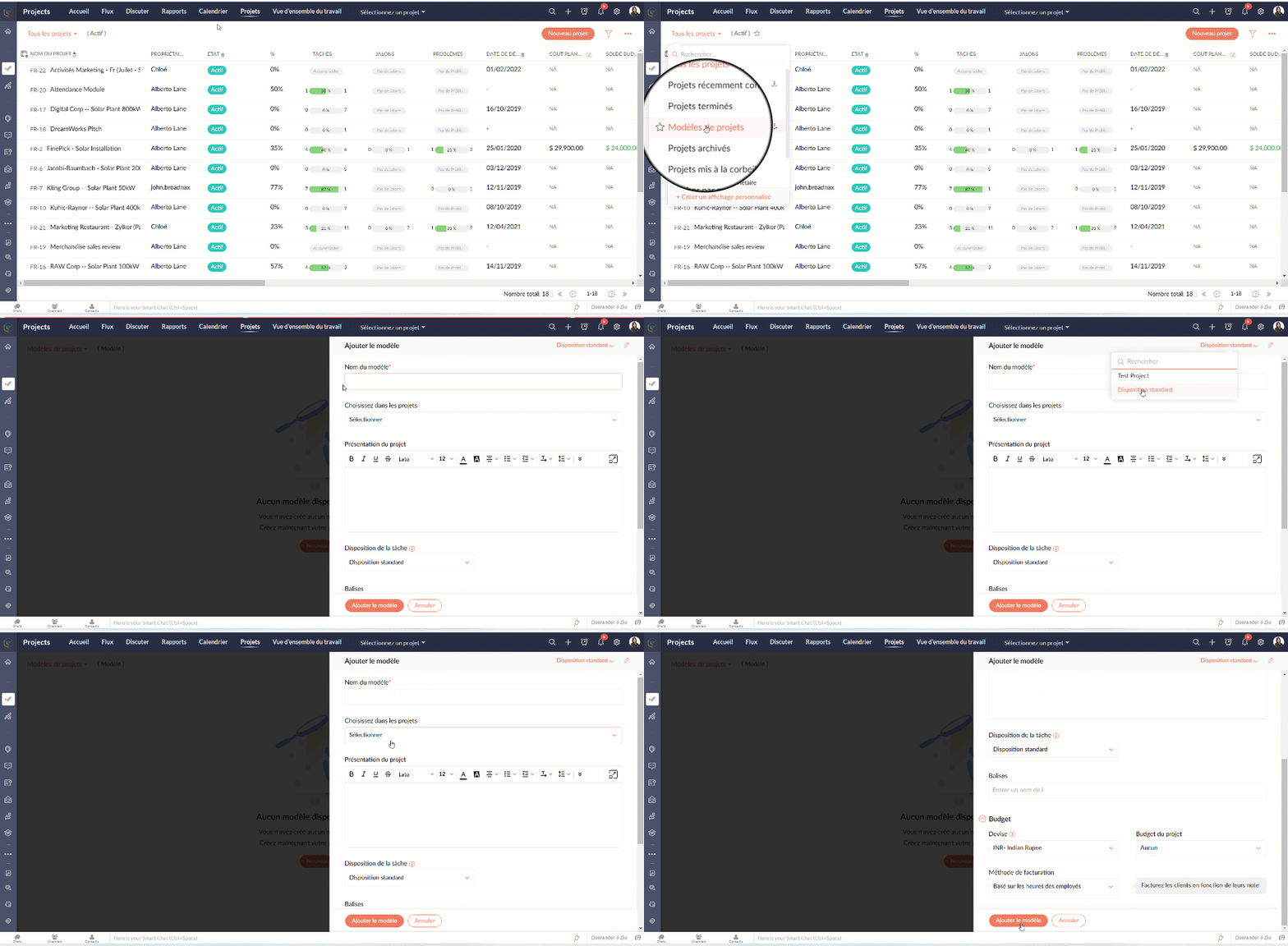
- Allez sur l'onglet "Projets"
- Depuis la liste déroulante à gauche, sélectionnez " Modèles de projets"
- Cliquez sur "Nouveau modèle"Sélectionnez la mise en page du projet que vous souhaitez appliquer au modèle. Si vous n'avez pas créé de mise en page de projet, la mise en page standard sera affichée dans la liste déroulante.
- Remplissez les détails demandés.
- Cliquez sur "Ajouter le modèle" et voilà : un modèle projet est créé.
Dans l'article suivant nous verrons le module "Rapports" de Zoho Projects.
N'hésitez pas à poser vos questions en commentaire.
L'équipe Zoho France
Topic Participants
Kinjal Lodaya
Sticky Posts
Collaboration sans faille avec Zoho One
Bonjour à tous, Dans cet article nous allons voir comment Zoho One permet une collaboration à différents niveaux . La façon dont nous travaillons évolue. À mesure que les entreprises se mondialisent, la plupart des activités sont menées en équipe.
Recent Topics
Community Digest — Noviembre y Diciembre 2025
¡Hola, Comunidad de Zoho en Español! Cerramos el año de la mejor forma con nuestro último Community Digest de 2025, donde podrás encontrar las últimas novedades de nuestros productos. ¿Todo listo para empezar 2026 con el mejor pie? ¡Vamos a ello! ZohoPassing the CRM
Hi, I am hoping someone can help. I have a zoho form that has a CRM lookup field. I was hoping to send this to my publicly to clients via a text message and the form then attaches the signed form back to the custom module. This work absolutely fine whenZoho Projects Plus’ 2025- the year we launched
We’ve been building project management tools for the past 19 years, and a question we often hear is: Different teams in our organization prefer different project management methods; while the development team prefers agile, the marketing and sales teamsWhy can't we change the Account type from an Expense to an Asset?
Like the question. Why in QuickBooks for example if I mistakenly created an account as an expenses and I already captured information in those accounts, I can just change the account type from expense to assetMove email between inboxes?
Is it possible to move emails from one team inbox to another? We would like to be able to have a single "catch-all" inbox for incoming requests, and then move the email to the appropriate department inbox. I was hoping we would be able to accomplish thisZoho Books emails suddenly going to Spam since 11 Nov 2025 (Gmail + now Outlook) — anyone else?
Hi everyone, We migrated to Zoho Books in July 2025 and everything worked fine until 11 Nov 2025. Since then, Zoho Books system emails are landing in customers’ Spam (first Gmail, and now we’re seeing Outlook/Office 365 also starting to spam them). ImpactedHow do you print a refund check to customer?
Maybe this is a dumb question, but how does anyone print a refund check to a customer? We cant find anywhere to either just print a check and pick a customer, or where to do so from a credit note.Data Import | Zoho Analytics Custom Query Window Size
Please increase the window size for the Custom Query Data Import. It's impossible to work with such a small query window.Company Multiple Branch/ Location Accounting
Hi All, anyone know whether company can maintain their multiple Branch Accounting in Zoho Books. It will be chart of Accounts & Master Data will be same but different report available as per per Branch. Thanks & regards, Vivek +91 9766906737Zoho Books Invoices Templates
It would be really helpful to have more advanced features to customise the invoice templates in Zoho Books. Especially I´m thinking of the spacing of the different parts of the invoice (Address line etc.). If you have a sender and receiver address inSupport for Developing Zoho Recruit Extensions via Zoho Sigma
Hi, I’m interested in building an extension for Zoho Recruit using Zoho Sigma. However, when I navigate to Sigma and attempt to create a new extension (via the "New Extension" option), Zoho Recruit does not appear as a listed service—only options likeEmail Administrators! Join our tips & troubleshooting series
Greetings to all the admins out there! This announcement is exclusively for you. As we step into the New Year, we’re excited to start a dedicated series of admin-specific tips curated to support you. These posts will help you overcome everyday challengesNotes badge as a quick action in the list view
Hello all, We are introducing the Notes badge in the list view of all modules as a quick action you can perform for each record, in addition to the existing Activity badge. With this enhancement, users will have quick visibility into the notes associatedDeprecation of the Zoho OAuth connector
Hello everyone, At Zoho, we continuously evaluate our integrations to ensure they meet the highest standards of security, reliability, and compliance. As part of these ongoing efforts, we've made the decision to deprecate the Zoho OAuth default connectorPersonalize your booking pages with Custom CSS
Greetings from the Zoho Bookings team! We’re introducing Custom CSS for Zoho Bookings, designed to give you complete control over the look and feel of your booking pages. With this new feature, you can upload your own CSS file to customize colors, fonts,Free Webinar : Unlock AI driven business insights with Zoho Inventory + Zoho Analytics
Are you tired of switching between apps and exporting data to build customized reports? Say hello to smarter & streamlined insights! Join us for this exclusive webinar where we explore the power of the Zoho Inventory–Zoho Analytics integration. LearnNo OR Filter for Views with a Related Modules Criteria
We would like to create a Deal View where the User can see all their deals. For that, we would need an OR to connect the criteria. One of the Fields is a "multiselect User", these (Related Modules Criteria) can only be Filter with an AND. Even betweenImport Function: ONLY update empty fields
When setting up an import from a spreadsheet to CRM, there is a checkbox "Don't update empty values for existing contacts" (see screenshot below). While I see some limited benefit from this functionality, I think there should also be an "ONLY update emptySales IQ Chat Widget is Only Displaying Last Name
Can anyone suggest why the widget is only displaying "last name"?! We have the latest version of the wordpress plugin installed. Thanks Thanks!Free Webinar: Zoho Sign for Zoho Projects: Automate tasks and approvals with e-signatures
Hi there! Handling multiple projects at once? Zoho Projects is your solution for automated and streamlined project management, and with the Zoho Sign extension, you can sign, send, and manage digital paperwork directly from your project workspace. JoinBegin the year with best practices in the Zoho Desk mobile app : Part 2
In focus: Optimizing collaboration and supervision Let's begin 2026 with Part 2 of our tips series on driving your ticketing operations at your fingertips. In Part 1, we explored streamlining operations within tickets. This helped individuals at OmniserveProcess checklist in CRM
Hi We've created a new sales process that I'm mapping into the CRM - issue I have is that some of the tasks / milestones I would like to capture require very simple tick box responses but there are quite a few under a variety of sub categories so I don'tCan we disable add to cart in Zoho Commerce?
Hello, Our sales happen on the phone. During the call the customer is directed to our website to inspect the products together with the sales rep. So we need a way to present our inventory. I figured Zoho Commerce is a good fit for this use case. However we would have to disable the possibility to purchase products in the shop. Is that possible? Sunny regards, ArtjomHow to update "Lead Status" to more than 100 records
Hello Zoho CRM, How do I update "Lead Status" to more than 100 records at once? To give you a background, these leads were uploaded or Imported at once but the lead status record was incorrectly chosen. So since there was a way to quickly add records in the system no matter how many they are, we are also wondering if there is a quicker way to update these records to the correct "Lead Status". I hope our concern makes sense and that there will be a fix for it. All the best, JonathanZoho DataPrep and File Pattern configuration
I'm using Zoho data prep to ingest data from One Drive into Zoho Analytics... The pipeline is super simple but I can't any way to get all the files that I need. Basically I need to bring all the files with a certain pattern and for that I'm using a regexJWT Token authentication problem that sometimes generates infinite redirect loops
Description : Nous proposons un bouton sur notre plateforme permettant de rediriger l'utilisateur vers le portail ZohoDesk via un jeton JWT pour une authentification transparente. Cependant, il arrive que certains utilisateurs soient pris dans une boucleZoho desk desktop application
does zoho desk has a destop applicaion?How do I bulk archive my projects in ZOHO projects
Hi, I want to archive 50 Projects in one go. Can you please help me out , How can I do this? Thanks kapilZOHO Work Drive Back Up
I am looking for a ZOHO Work Drive backup solution. Something that is cloud based. There's lots of these kinds of options for Google Drive and other providers, but I have not seen anything for WorkDrive. Any suggestions?ZOHO Reports - Filter Logic?
Hi, I need a way to apply filter logics such as ((1 AND 2) OR 3). All I can see as of now is a way to enter different AND filters in the respective filter column. But how can I add an OR filter? Any advice would be highly appreciated. MarkScanned Doc - selecting Item overwrites Rate
I have a Vendor Invoice which was uploaded to Documents. I select Add To > New Bill. The OCR is actually quite good, but it is reading an Item Description instead of an Item Number. I remove the description and select the correct Item Number... and itRecruit API search
Hi all, Attempting to call the search api endpoint from Postman using the word element as mentioned in api docs Search Records - APIs | Online Help - Zoho Recruit When making the call to /v2/Candidates/search?word=Saudi receive response of { "code": "MANDATORY_NOT_FOUND",Manage control over Microsoft Office 365 integrations with profile-based sync permissions
Greetings all, Previously, all users in Zoho CRM had access to enable Microsoft integrations (Calendar, Contacts, and Tasks) in their accounts, regardless of their profile type. Users with administrator profiles can now manage profile-based permissionsSaving reading position + Keep screen on
While Zoho Notebook is excellent for saving and annotating articles, its utility is severely limited by the lack of reading progress synchronization. On the Android app, if a user exits a long note after reading 50%, the app fails to save the position.Multiple Vendor SKUs
One of the big concerns we have with ZOHO Inventory is lack of Vendor Skus like many other inventory software packages offer. Being able to have multiple vendor skus for the same product would be HUGE! It would populate the appropriate vendor Sku forZoho LandingPage is integrated with Zoho One!
Greetings to the Zoho One users out there! We're delighted to let you know that Zoho LandingPage is available in Zoho One too! With Zoho LandingPage, you can host custom-made landing pages, and persuade the visitors to dive deeper by making further clicks,Android app sync problem - multiple devices have same problem
Hello, I am having a problem with synchronization in the Android app. When I create a drawing, the data does not sync correctly—only a blank note is created without the drawing. I tested this on multiple devices, including phones and tablets, and theHow can i resend a campaign to only one of the recipients on the original campaign
How can i resend a campaign to only one of the recipients on the original campaign ? Sincererly, MikeHow to show branch instead of org name on invoice template?
Not sure why invoices are showing the org name not the branch name? I can insert the branch name using the ${ORGANIZATION.BRANCHNAME} placeholder, but then it isn't bold text anymore. Any other ideas?Create CRM Deal from Books Quote and Auto Update Deal Stage
I want to set up an automation where, whenever a Quote is created in Zoho Books, a Deal is automatically created in Zoho CRM with the Quote amount, customer details, and some custom fields from Zoho Books. Additionally, when the Sales Order is convertedNext Page