Bulk user onboarding for Cliq Channels in a jiffy
As developers, we frequently switch between coding, debugging, and optimizing tasks. The last thing we want is to be burdened by manual user management. Adding users one by one to a channel is tedious and prone to errors, taking up more time than we could devote to actual development.

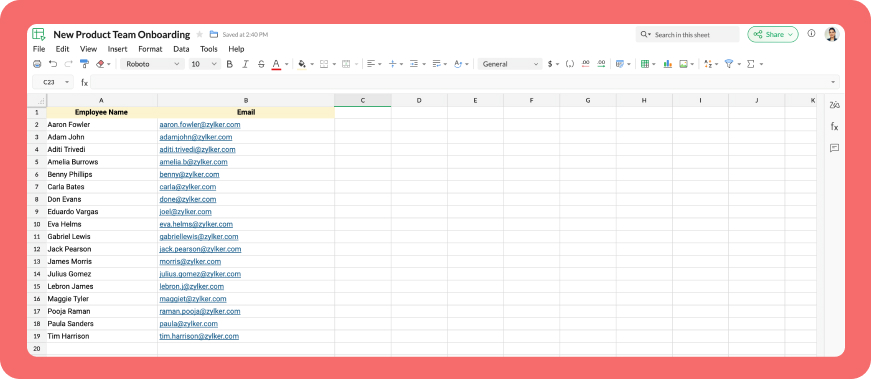
Let's explore how to create a custom workflow using Cliq's platform components to streamline the process of bulk-adding users to a channel via a Zoho Sheet or CSV file. This approach facilitates a smooth onboarding experience without the need for manual effort.
Pre-requisite :
Before beginning to script the code below, we must create a connection with Zoho Cliq. Once a connection is created and connected, you can use it in Deluge integration tasks and invoke URL scripts to access data from the required service.
Create a Zoho Oauth default connection with any unique name and the scopes - ZohoCliq.Channels.All and ZohoSheet.dataApi.ALL
Refer to the below links to learn more :
Step 1 : Creation of slash command
- After a successful login in Cliq, hover to the top right corner and click your profile. Post clicking, navigate to Bots & Tools > Commands.
- At your right, click the button - Create Command.
- To know more about slash commands and their purposes, refer to Introduction to slash commands.
- Create a slash command using your preferred name. Specify the following details: the command name, a hint (to give users an idea of what the command is for), and the access level.
- Finally, click "Save & edit code".

- inputs = List();
- inputs.add({"name":"channels","label":"Pick a channel","placeholder":"Choose a channel where you need to add members","max_selections":"1","multiple":false,"mandatory":true,"type":"native_select","data_source":"channels"});
- inputs.add({"name":"headername","label":"Header name","placeholder":"Email ID","hint":"In which the Email ID is present","min_length":"0","max_length":"25","mandatory":true,"type":"text"});
- inputs.add({"type":"radio","label":"Import type","name":"import_Type","hint":"Choose a type that you need to import users","options":[{"label":"CSV","value":"csv"},{"label":"Zoho sheet","value":"zohosheet"}],"trigger_on_change":"true"});
- return {"name":"addbulkuser","type":"form","title":"Add bulk users","hint":"To add maximum of upto 1000 users in a channel.","button_label":"Add Users","inputs":inputs,"action":{"type":"invoke.function","name":"addbulkusers"};
Step 2 : Scripting form function
- We need to create a function for the form that manages submission responses, including the Zoho Sheet link or CSV file, the name of the column containing the email addresses, and the channel details where users should be added in bulk.
- Hover to the top right corner and click your profile. After clicking, navigate to Bots & Tools > Functions.
- To your right, click the Create Function button.
- Name the function "addbulkusers," provide a description as desired, and select "form" as the function type. Then, click "Save and edit code," and paste the following code.
- emailIdList = list();
- successlist = list();
- failedlist = list();
- try
- {
- info form;
- formValues = form.get("values");
- columnName = formValues.get("headername");
- headerName = formValues.get("headername");
- if(formValues.get("import_Type").get("value") == "zohosheet")
- {
- url = formValues.get("url");
- spreadSheetId = url.getPrefix("?").getSuffix("open/");
- sheetName = url.getSuffix("?").getPrefix("&").getSuffix("=");
- worksheetname = sheetName.replaceAll(" ","%20");
- columnName = columnName.replaceAll(" ","%20");
- allDatas = list();
- params = Map();
- params.put("column_names",columnName);
- params.put("method","worksheet.records.fetch");
- params.put("worksheet_id",sheetName + "#");
- sheetDetails = invokeurl
- [
- url :"https://sheet.zoho"+environment.get("tld")+"/api/v2/" + spreadSheetId
- type :GET
- parameters:params
- connection:"addbulkusers"
- ];
- info sheetDetails;
- if(sheetDetails.get("status") == "success" && sheetDetails.get("records").size() <= 1000)
- {
- allDatas.addAll(sheetDetails.get("records"));
- }
- else if(sheetDetails.get("status") == "success" && sheetDetails.get("records").size() > 1000)
- {
- return {"type":"form_error","text":"I can only able to add 1000 user. Kindly try passing with 1000 records in the sheet!!!"};
- }
- else
- {
- return {"type":"form_error","text":"I can't find any email ids. Kindly re-check the column name and header row!!!"};
- }
- info "allData: " + allDatas.size();
- if(allDatas.size() > 1000)
- {
- return {"type":"form_error","text":"I can only able to add 1000 user. Kindly try passing with 1000 records in the sheet!!!"};
- }
- for each data in allDatas
- {
- if(data.get(formValues.get("headername")) == null)
- {
- return {"type":"form_error","text":"I can't find any email ids. Kindly re-check the column name and header row!!!"};
- }
- emailIdList.add(data.get(formValues.get("headername")));
- if(emailIdList.size() == 100)
- {
- channelID = formValues.get("channels").get("id");
- params = {"email_ids":emailIdList};
- info "Params: " + params;
- addUsers = invokeurl
- [
- url :environment.get("base_url") + "/api/v2/channels/" + channelID + "/members"
- type :POST
- parameters:params.toString()
- detailed:true
- connection:"addbulkusers"
- ];
- info "Adduser: " + addUsers;
- if(addUsers.get("responseCode") == "204")
- {
- successlist.addAll(emailIdList);
- }
- else
- {
- failedlist.addAll(emailIdList);
- }
- info "100: " + emailIdList.size();
- emailIdList = list();
- }
- }
- if(emailIdList.size() > 0)
- {
- channelID = formValues.get("channels").get("id");
- params = {"email_ids":emailIdList};
- info "Params: " + params;
- addUsers = invokeurl
- [
- url :environment.get("base_url") + "/api/v2/channels/" + channelID + "/members"
- type :POST
- parameters:params.toString()
- detailed:true
- connection:"addbulkusers"
- ];
- info "Adduser: " + addUsers;
- if(addUsers.get("responseCode") == "204")
- {
- successlist.addAll(emailIdList);
- }
- else
- {
- failedlist.addAll(emailIdList);
- }
- info "Email id: " + emailIdList;
- }
- info "Successlist: " + successlist;
- info "Failedlist: " + failedlist;
- if(successlist.size() > 0 && failedlist.size() > 0)
- {
- postMessage = {"text":"Successfully added " + successlist.size() + " member(s) and failed for " + failedlist.size() + " Member(s)"};
- }
- else if(successlist.size() > 0 && !failedlist.size() > 0)
- {
- postMessage = {"text":"Successfully added " + successlist.size() + " member(s)"};
- }
- else if(!successlist.size() > 0 && failedlist.size() > 0)
- {
- postMessage = {"text":"Adding members in channel failed for " + failedlist.size() + " member(s)"};
- }
- info zoho.cliq.postToChat(chat.get("id"),postMessage);
- }
- else
- {
- csvFile = formValues.get("csvFile");
- csvFile = csvFile.getfilecontent();
- allDatas = csvFile.toList("\n");
- i = 0;
- indexValue = 0;
- indexBoolean = false;
- for each data in allDatas
- {
- if(i == 0)
- {
- headers = data.toList(",");
- for each header in headers
- {
- info header;
- if(headerName == header)
- {
- indexBoolean = true;
- indexValue = headers.indexOf(headerName);
- }
- }
- if(indexBoolean == false)
- {
- return {"type":"form_error","text":"I can't find any email ids. Kindly re-check the column name and header row!!!"};
- }
- }
- else
- {
- emailIdList.add(data.get(indexValue));
- }
- i = i + 1;
- if(emailIdList.size() == 100)
- {
- channelID = formValues.get("channels").get("id");
- params = {"email_ids":emailIdList};
- info "Params: " + params;
- addUsers = invokeurl
- [
- url :environment.get("base_url") + "/api/v2/channels/" + channelID + "/members"
- type :POST
- parameters:params.toString()
- detailed:true
- connection:"addbulkusers"
- ];
- info "Adduser: " + addUsers;
- if(addUsers.get("responseCode") == "204")
- {
- successlist.addAll(emailIdList);
- }
- else
- {
- failedlist.addAll(emailIdList);
- }
- info "100: " + emailIdList.size();
- emailIdList = list();
- }
- }
- if(emailIdList.size() > 0)
- {
- channelID = formValues.get("channels").get("id");
- params = {"email_ids":emailIdList};
- info "Params: " + params;
- addUsers = invokeurl
- [
- url :environment.get("base_url") + "/api/v2/channels/" + channelID + "/members"
- type :POST
- parameters:params.toString()
- detailed:true
- connection:"addbulkusers"
- ];
- info "Adduser: " + addUsers;
- if(addUsers.get("responseCode") == "204")
- {
- successlist.addAll(emailIdList);
- }
- else
- {
- failedlist.addAll(emailIdList);
- }
- }
- info "Successlist: " + successlist;
- info "Failedlist: " + failedlist;
- if(successlist.size() > 0 && failedlist.size() > 0)
- {
- postMessage = {"text":"Successfully added " + successlist.size() + " member(s) and failed for " + failedlist.size() + " Member(s)"};
- }
- else if(successlist.size() > 0 && !failedlist.size() > 0)
- {
- postMessage = {"text":"Successfully added " + successlist.size() + " member(s)"};
- }
- else if(!successlist.size() > 0 && failedlist.size() > 0)
- {
- postMessage = {"text":"Adding members in channel failed for " + failedlist.size() + " member(s)"};
- }
- info zoho.cliq.postToChat(chat.get("id"),postMessage);
- }
- }
- catch (e)
- {
- info e;
- return {"type":"form_error","text":"I can't find any email ids. Kindly re-check the column name and header row!!!"};
- }
- return Map();
Step 3 : Configuring form change handler
- After copying and pasting the code into the form submission handler, navigate to the form change handler for the created form function.
- You can find this in the top left corner of the editor, where you will see an arrow next to the form submission handler. Clicking on this arrow will display the form change handler in a dropdown menu.
- Click it to edit the code in the form change handler, which is necessary for real-time modifications to a form's structure or behaviour based on user input in a specific field.
- targetName = target.get("name");
- info targetName;
- inputValues = form.get("values");
- info inputValues;
- actions = list();
- if(targetName.containsIgnoreCase("import_Type"))
- {
- fieldValue = inputValues.get("import_Type").get("value");
- info fieldValue;
- if(fieldValue == "csv")
- {
- actions.add({"type":"add_after","name":"import_Type","input":{"label":"CSV File","name":"csvFile","placeholder":"Please upload a zCSV File","mandatory":true,"type":"file"}});
- actions.add({"type":"remove","name":"url"});
- }
- else if(fieldValue == "zohosheet")
- {
- actions.add({"type":"add_after","name":"import_Type","input":{"name":"url","label":"Enter the sheet url","placeholder":"https://sheet.zoho.com/sheet/open/6xhgb324f142e91d845e5b4b472f7422379c9","min_length":"0","max_length":"400","mandatory":true,"type":"text","format":"url"}});
- actions.add({"type":"remove","name":"csvFile"});
- }
- }
- return {"type":"form_modification","actions":actions};
Business use cases:
- HR onboarding: Seamlessly add new employees to internal communication channels.
- Event management: Quickly invite attendees to event-specific channels.
- Education platforms: Enroll students in course groups in one go.
- Community building: Grow large communities by importing member lists effortlessly.
Bottom line
Bulk user addition in Cliq channels through Zoho Sheet or CSV files allows us to eliminate tedious tasks, reduce errors, and manage large-scale data effortlessly. Is onboarding consuming too much of your valuable development time? If so, it might be time to shake things up with a customized workflow!
Topic Participants
Harsha SS
Sticky Posts
Cliq Bots - Post message to a bot using the command line!
If you had read our post on how to post a message to a channel in a simple one-line command, then this sure is a piece of cake for you guys! For those of you, who are reading this for the first time, don't worry! Just read on. This post is all about howAdd Claude in Zoho Cliq
Let’s add a real AI assistant powered by Claude to your workspace this week, that your team can chat with, ask questions, and act on conversations to run AI actions on. This guide walks you through exactly how to do it, step by step, with all the codeAutomating Employee Birthday Notifications in Zoho Cliq
Have you ever missed a birthday and felt like the office Grinch? Fear not, the Cliq Developer Platform has got your back! With Zoho Cliq's Schedulers, you can be the office party-cipant who never forgets a single cake, balloon, or awkward rendition ofAutomate attendance tracking with Zoho Cliq Developer Platform
I wish remote work were permanently mandated so we could join work calls from a movie theatre or even while skydiving! But wait, it's time to wake up! The alarm has snoozed twice, and your team has already logged on for the day. Keeping tabs on attendanceCustomer payment alerts in Zoho Cliq
For businesses that depend on cash flow, payment updates are essential for operational decision-making and go beyond simple accounting entries. The sales team needs to be notified when invoices are cleared so that upcoming orders can be released. In contrast,
Recent Topics
How to I get checkboxes on a subform to update via deluge
Hello, would someone be able to tell me what I'm doing wrong here? I am trying to take the contents of a Deals subform and add them to an invoice then update the checkbox on each row so that 'add to invoice' is unticked and 'invoiced' is ticked. The outputUnified customer portal login
As I'm a Zoho One subscriber I can provide my customers with portal access to many of the Zoho apps. However, the customer must have a separate login for each app, which may be difficult for them to manage and frustrating as all they understand is thatZoho Projects - Task Owner filter at Project level
Hi Projects Team, The feature requests I would like to raise is the ability to create a custom view at the project level for projects with tasks owned by a user or users. For example "Ashley's Projects" custom view might contain a list of project in whichCadences
I have just started using Cadences for follow-up up email pipeline. Is it just me or do you find the functionality very basic? For example, it will tell me (if I go looking for it) if someone has replied to a follow-up and been unenrolled; but it won'tWould be really awesome to have Created Time and Modified Time showing for custom functions list
It would be SO HELPFUL to be able to sort custom functions by created time/ modified time. Also seeing a created by/ modified by with the little profile picture would be supremely helpful as well. Just really hard sometimes to find a function you wereTicket Export Does Not Include Ticket Threads
Dear Zoho Desk Support Team, I hope you’re doing well. I would like to report an issue regarding the ticket export functionality in Zoho Desk. Currently, when exporting tickets, the ticket threads or conversation history are not included — only the ticketPayments made notification
This is a really wonderful feature but we can only use it for about 50% of payments made & have to revert to sending statements which is a real chore. Credits applied to the bills paid in the notification aren't included & this causes great confusion in the accounts receivable departments. Please, please add this required feature asap ! .....ZOHO DESK link with Power BI
HI, I am using ZOHO Desk for last two years and now my client is asking to integrate ZOHO desk data to Power BI so that they can use Data for reporting. Kindly guide in details so that i can give access to ZOHO desk export data for more visibility.URLs being masked despite disabling tracking
Hey, We had disabled click tracking from an email update we are sharing with our users. Despite this, the URL the end user is receiving is masked, and looks like "https://qksyl-cmpzourl.maillist-manage.net/click/1d8e72714515cda6/1d8e72714515ca70" insteadDashboard Autorefesh
Good day, I am a dashboard that displays the number of tickets based on "Product Name". This dashboard is displayed on a big TV for the team to monitor. Can the dashboard auto-refresh every few minutes to display the new values? Currently, we have closedDeferred/ Unearned revenue
Dear Zoho Team, Just in case you have missed out my query posted few days ago: We issue invoices relating to 12-month web hosting service. When we issue the invoice, we should record the entire amount of the invoice as DEFERRED/UNEARNED REVENUE (ie. $10Bigin Android app update: Zoho Books integration
Hello everyone! We’re excited to introduce Zoho Books integration on the latest version(v1.8.5) Bigin Android app. Once the integration is completed in the web(bigin.zoho.com), the Zoho Books tab will be visible in detail View of Contacts, Companies,Audit Log enhancements: Increased retention period, better user visibility, and more
Hello everyone, The Audit Log brings in the following enhancements which improve the overall ability to manage data. Why did we make these updates? Extended Data Retention: Audit data can now be filtered and exported for a 60-day period, doubling theQuestion Regarding Managing Sale Items in Zoho Books
Good day, I was wondering about something. Right now, Zoho Books doesn’t seem to have a way to flag certain items as being on sale. For example, if I want a list of specific items to be on sale from October 1 to October 12, the user would have to exportSystem flaws and lack of response from Zoho
I have had to go on here as no-one is replying to my emails regarding my problem (been 10 days and no email reply) and your chat facility online through your Zoho Books software opens and closes immediately, so not functioning properly. I actually calledCustomer Grouping
Hi, how can I group multiple customers into single group. So that I can have idea of accounts receivables of all the customers in single group. Like if there are multiple subsidiaries of same company we have having a business with, and want to view theTwo currencies
More and more I am finding that internattional payments' fees are unpredictable. I would like, on my invoices that are in a foreign currency (eg. USD$ or EUR€) for there to be a GBP£ TOTAL display alongside the invoice's currency total. This would makeGST Slabs Redefined: Stay Compliant Using Zoho Books!
Hello Everyone! The Government of India is rolling out new GST rates, a major reform aimed at simplifying the current tax structure starting 22 September 2025. GST will move from four slabs (5%, 12%, 18%, 28%) to two main slabs (5% and 18%), plus a specialEdit item custom fields
Getting this error : Transactions have been created with the custom field. Hence it cannot be deleted. Not trying to delete it, just trying to change which modules to show in or to not show at all in transactions !Use Zoho Books to bill for work done in Zoho Desk??
I'm trying to see if something is possible (and if yes, how). We use Zoho One to manage our business. We have a lot of clients that will put in a ticket (via portal) to have work done. Out techs will pick up the ticket, do the work, and then log the timeZoho Finance Suite - Customer Custom Tabs - Dynamic Link
Hi Finance Suite team, When creating a Custom Tab for a Client Portal, there is no option to add dynamic parameters. This would be very helpful for adding Zoho Analytics dashboards which can be dynamically filtered through the URL to only show informationBank Receipt Catagorization
Hi, how can I match a bank deposit to multiple customer's invoices ? For e.g. A single person paid to us on behalf of different five customers. I need to keep the separated invoices for each customerPayment on a past due balance
Scenario: Customer is past due on their account for 4 months. We suspend their billing in Zoho books. Customer finally logs into the portal and enters a new credit card. We associate that cardwith their subscription, which will permit the card to be usedHow to export all line-item descriptions for a specific item in Zoho Books?
I am trying to audit a specific item (“Item X”) that has been invoiced multiple times with different line-level descriptions. Here’s the situation: I am using Zoho Books (Professional). Each invoice may contain the same item but with different descriptionsList of hidden features
Hi Friends, I had another support chat today and low and behold the feature that I wanted just simply needed to be "enabled". I thought I'd share, and maybe see if others had some similar experiences. 1. This one is from 5 ish years ago. I asked if thereHow to change a BAS that has been filed
I have discovered that a group of expense transactions were accidentally placed in a asset account rather than an expense account. As a result I need to adjust the transaction and consequently most of my BAS to correct the error. Because the BAS haveHow to Export PDF with a custom Template
I need to export Sales Order with a Custom Template I have created How can I do it? I see an API to export the PDF but how can I choose which template to choose to generate the PDFAssociate email with a potential or project.
I have a pivotal requirement to associate emails from various suppliers (contacts) with different potentials or projects, on an email by email basis as they come in. This question appears to have been raised before but I cannot find a definitive yes "it can be done". Could anyone please tell me, yes or no. If the later I can stop wasting time and look at alternative crm systems. I would love not to have to do this. Thanks in advance.Function with Search Records was working until a few weeks ago, around when "Connected Records" was released
I have a custom function that has been running for nearly a year now, which suddenly stopped working around the time Zoho released the "Connected Records" update. The function is no longer finding the record using the searchRecords function. I've changedIs CRM On Premise available
Hi Zoho team, Can you please let me know that CRM Zoho is available for On Premise as well? Thanks, DevashishHow to sync from Zoho Projects into an existing Sprint in Zoho Sprints?
Hi I have managed to integrate Zoho Projects with Zoho Sprints and I can see that the integration works as a project was created in Zoho Sprints. But, what I would like to do is to sync into an existing Zoho Sprints project. Is there a way to make thatOnline Assessment or any aptitude test
This video is really helpful! I have one question — if I share an assessment form link (through email or with the application form on my career page), how does Zoho Recruit evaluate it? Can a candidate use Google or external help while taking the test,Has anyone built a custom AI support agent inside Zoho (SalesIQ/Zobot)?
Hi all, I’ve been experimenting with building my own AI support assistant and wanted to see if anyone here has tackled something similar within Zoho. Right now, I’ve set up a Retrieval-Augmented Generation (RAG) pipeline outside of Zoho using FAISS. ItIncoming Threads Report
From data to decisions: A deep dive into ticketing system reports Customers raise questions and issues through multiple channels, such as email, chat, or tickets. To monitor the number of queries received on a specific day from each channel, leads canConditional layouts - support for multi-select picklists
Hi, The documentation for conditional layouts says the following: "Layout Rules cannot be used on the following field types: Auto Number Lookup Multi Select Lookup User Lookup Formula File Upload Multi Line" I have a custom module with a multi-pick listCloudflare Turnstile is now available in Zoho Forms!
Hello form builders! We have added a new layer of protection to help you keep your forms free from bots. Instead of forcing users to prove they are human, Cloudflare Turnstile quietly checks browser signals in the background. Your real users glide through,Power of Automation :: Unique Task & Issue Prefix Format and Sequencing Rule
Hello Everyone, A custom function is a software code that can be used to automate a process and this allows you to automate a notification, call a webhook, or perform logic immediately after a workflow rule is triggered. This feature helps to automate【Zoho CRM】キャンバス機能のアップデート
ユーザーの皆さま、こんにちは。コミュニティチームの藤澤です。 今回は「Zoho CRM アップデート情報」の中から、キャンバス機能のアップデートをご紹介します。 目次 グリッドについて フォーム表示のタブについて 1. グリッドについて ビジュアルデザインは細部の調整に手間がかかりますが、キャンバスのグリッドを使えば要素を整理し、バランスよく配置できます。 画像やデータなどの要素をグループ化せずに簡単に配置できます。 余白を調整することで、要素間の視覚的なバランスを保つのに役立ちます。 「表示切り替え基準の幅」を設定すると、デザインをレスポンシブに調整できます。スマホでキャンペンメールを見ると正しく表示されない
キャンペーンのメール(HTML)を作成しましたが、スマホ表示に切り替えると正しく表示されません(添付参照)過去に作成したキャンペーンでは特に意識してませんでしたが、問題なく表示されていたようです。うまく表示される場合とされない場合の違いは何でしょうか?Zoho Calendar Integrated Into CRM?
I've searched around the forums but couldn't find anything addressing this . . . Is there a plan to integrate Zoho's stand alone calendar solution into Zoho CRM? The CRM calendar does an OK job but is very basic and the Zoho calendar is great, but I've only figured out to subscribe to my CRM calendar within ZCalendar - there is no 2-way sync. My preferred solution would be for ZCal to become the default calendar/event solution within Z CRM. Is this on the roadmap? ThanksNext Page