Hello everyone,
We are introducing conditional branching that will allow businesses to manage complex, multi-condition workflows for customer service processes using Automation Studio.
The primary goal is to create multi-branched logic in a single rule.
We are opening Automation Studio on a request basis for Professional and Enterprise edition users across all DCs.
What is conditional branching?
Branched logic or conditional branching allows an automation rule to follow different execution paths according to data, events, business rules, or earlier outcomes. In branched logic the system evaluates a condition - such as amount > 10,000, country = "India", or approval_status = "rejected" and when either both or one of the conditions are met, it routes the work to the appropriate sequence of actions.
Businesses that require multi-step workflows with stricter logic-based rules to govern their processes would benefit from Zoho Desk's Automation Studio.
What is Automation Studio?
Automation Studio helps organizations build and manage complex workflows by connecting multiple conditions and actions in a single rule. Instead of creating several standalone rules, a single workflow can be triggered by an event and move ticket to subsequent steps such as assigning it, updating its status, automating notifications, and follow-ups at specific intervals.
Components in the Automation Studio Builder
An easy-to-use drag and drop builder makes the interface intuitive and user friendly. Building and customizing the rule requires the following components:
1. Triggers
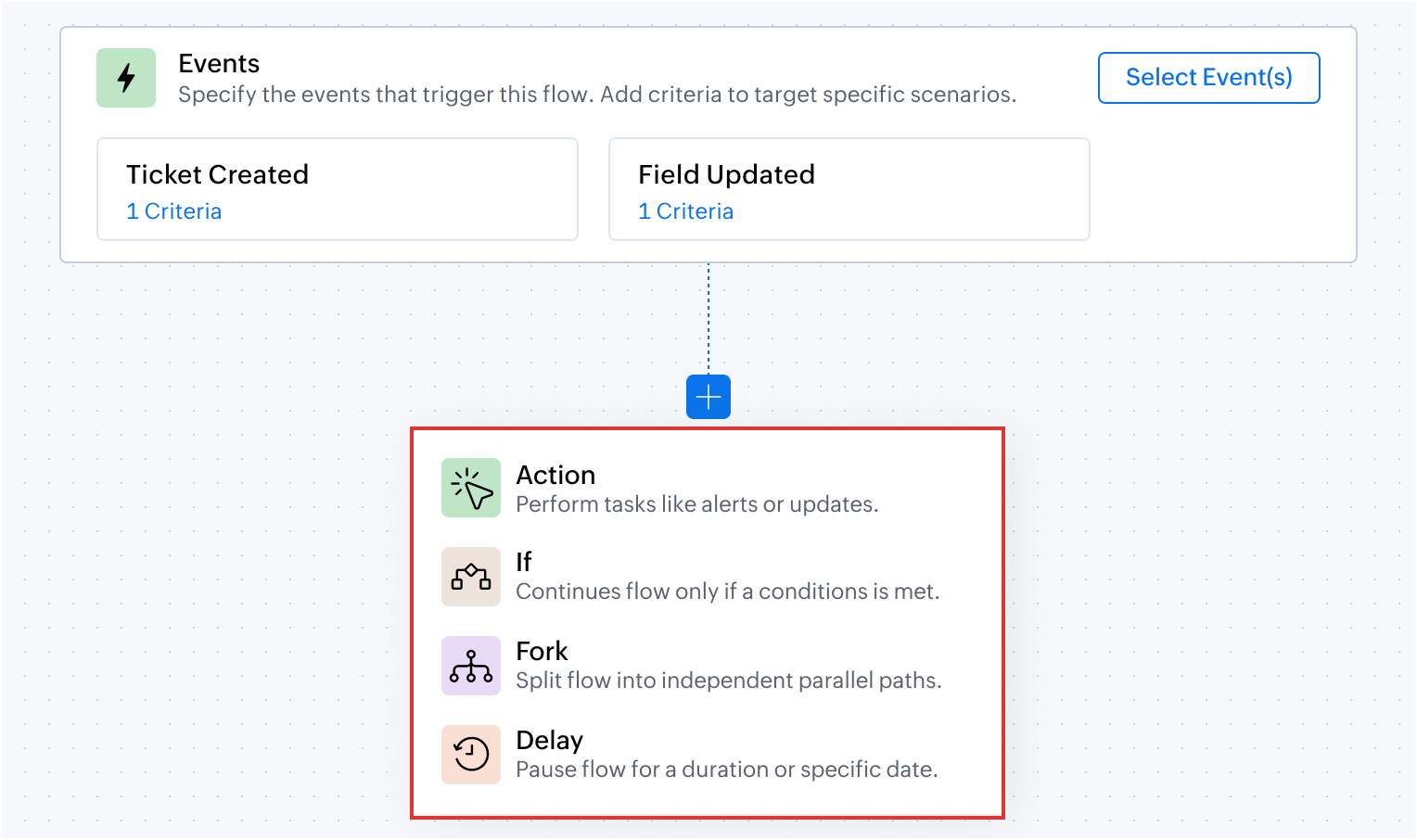
Defines the event that initiates a workflow, such as ticket creation, task created, field updated, calls created, accounts created, or comments updated based on the module selected.
On selecting Field Updated, a criteria must be provided on when the rule must be triggered. For example, the rule must be triggered only when the Ticket Status is updated from Open to Escalated, this will prevent action from triggering whenever the status is updated. It will happen only when the status changes from open to escalated.
2. Criteria
Controls the flow and determines when specific actions should be executed. For example, when the trigger is set to Ticket Created, the rule is triggered every time a ticket is created.
However, if the rule must be triggered only when the Priority is High or Classification is Problem, these conditions can be specified as criteria. This ensures that the rule is not triggered for every ticket that is created, but only when either of the specified conditions is met.
3. Blocks
Defines conditional logic using one or a combination of pre-built blocks.
- Action block: Performs a specific action such as updating a field, assigning a ticket, sending an alert, sending an email, generate content using Zia, adding tags and followers, or notifying via IM. For example, when a ticket is created, the Assign ticket action will assign it to a team or a support representative based on the product type and send a WhatsApp message to the customer that the ticket is assigned to person 'X'
- If block: Defines conditions to determine which path the workflow should follow. Actions are executed only when the specified condition is met. For example, a ticket related to zPad is assigned to the zPad support team.
- Fork block: Creates multiple paths in a workflow to handle different conditions or outcomes. For example, when the customer requests for onboarding, they are assigned to the respective team based on their subscription plan: Standard, Advanced or Ultimate. Using the Fork block, separate paths with specific actions and conditions can be created for each plan.
- Delay block: Pauses the workflow for a specified duration before proceeding to the next step. For example, a support representative sends an email to the customer for additional information. But if there is no response for 3 days, a Delay block can automatically send a reminder email to follow-up with the customer on the 4th day. If there is no response for another 3 days, another reminder along with a WhatsApp message can be sent. Finally the ticket can be closed without manual decision-making, if there is no response from the customer after the 3rd reminder email.
4. Action chaining
Action chaining is the process of using one action's output as the next action's input. For example, if the first action generates a summary of a ticket conversation. The next Action can then use this generated summary (input) and add it as a comment to the ticket (output).
Output:
5. Dot walking
Dot walking allows to access and fetch fields from related modules while creating a rule, without requiring additional custom functions or actions.
For example, from a Ticket record, contact details such as the email address can be accessed during the configuration. This makes it easier to use related data in conditions, actions, and notifications without manually fetching records from another module.
Automation Studio in action: Use cases
Managing conditional requests in order returns and refunds
An e-commerce platform manages order returns through a dedicated Returns and Refunds module. Upon receiving a customer's email request for a return, a ticket is generated in the tickets module. If the email's subject or description includes an Order ID, the system automatically links this ticket to the relevant existing record in the Returns and Refunds module.
In the Returns and Refunds module, each request type is categorized differently for each ticket. For example, after validating the return request, the quality assurance team may approve the refund, reject it after inspection, or may need additional information from the customer on why they want to return the product.
Also, for the approved return requests, the organization waits for 3 days before closing the ticket, giving the customer time to respond if there are any issues with the refund.
The entire process of what happens next after approving or rejecting the return requests can be configured in Automation Studio.
Flow configuration
Dot walking: Using the Dot walking method, the associated record from the Tickets module is accessed and updated when changes occur in the Return Requests custom module, without using any custom function or query.
Action chaining: Using the Action Chaining method, once when the ticket status is changed to Refund Processing, the delay is added for three days.
Deliver personalized campaigns and onboarding plan based on Contact attributes
Businesses can send relevant campaigns and onboarding materials based on a contact's subscription plan, business vertical, and number of user licenses. For example, free and paid users can receive different communications, while larger teams can receive onboarding resources and session reminders based on their requirements. A prospect from financial institution can be sent specific use cases and case studies to impact lead conversion.
Another advantage of setting up multiple conditions in a single workflow, is that the system will pick the criteria and dynamically change the operation to suit the existing contact property. For example, if the free plan user moves to a paid plan the marketing collaterals sent henceforth will automatically pitch for the paid user without manual decision-making.
Likewise, onboarding journey for a team of 20 user licenses can be sent implementation guidelines and supporting materials along with weekly remote session reminders pre-designed to suit their business use case.
Flow configuration
AI-driven summarization and automated ticket routing based on product type
An e-commerce company can use Zia's Generate Content to summarize customer requests, send an acknowledgement based on the generated summary, and automatically route tickets to the appropriate support team based on the product involved.
Flow configuration
Prevent SLA breach with time sensitive escalations
An IT helpdesk team can identify unresolved tickets that are closer to the SLA due time and automatically escalate them by updating the ticket priority and notifying the appropriate team.
Flow configuration
The above use cases are some of the possibilities that you can get started with. We encourage you to try Automation Studio and share your use cases with us.
Here are the resources you would need to setup and understand the use cases where Automation Studio would be useful.
- Automation Studio - An Overview
- Building Blocks Using Automation Studio
- Creating a Rule using Automation Studio
PM: @Akhil Vijayakumar
Thanks and regards,
B. Akshaya | Zoho Desk - User Education
Recent Topics
Support Plan: Recuring Issue
Hi Zoho Team, Could you please look into this recurring alert and provide clarification on why this restriction is still in place? This issue has become a bottleneck in our workflow, significantly limiting our automation capabilities. We are unable to
Introducing PRM: Build, manage, and scale your partner ecosystem
Growing a partner ecosystem is a good problem to have. What starts as a handful of partners can quickly turn into a maze of spreadsheets, emails, and disconnected processes. More partners mean more opportunities, greater reach, and new ways to grow
Tags on individual ticket comments and replies, with color coding and a filter
In Zoho Desk you can tag a ticket, but you can’t tag the individual comments and replies inside it. For teams with long, structured ticket threads, that’s a big gap. The problem Our tickets can easily reach 50+ comments and replies. Many of them are specific,
Sharing View Only Portal
Im looking at Youtube videos on how to share a view only link to my projects. Everyone has the screen with Manage Users. I don't have it. Is that an old version or new version? I can't see how to send a view only link to clients. There is a Profiles and
Allow widgets to be placed between native sections in the Ticket Properties panel
One of our biggest frustrations with the Tickets module is how rigid the Ticket Properties panel is. Every section there is built only from native Zoho Desk fields. We can add sections, rearrange fields, and pick layouts, but we can’t put anything custom
How Do I Refund a Customer Directly to Their Credit Card?
Hi, I use books to auto-charge my customers credit card. But when I create a credit note there doesn't seem to be a way to directly refund the amount back to their credit card. Is the only way to refund a credit note by doing it "offline" - or manually-
Merge Tickets Directly from Contact Page in Zoho Desk
Dear Zoho Desk Support Team, We are writing to request a new feature that would allow users to easily merge tickets directly from the contact page in Zoho Desk. Currently, the only option to merge tickets is from the Tickets list view page, which can
Enhancement Request – Allow cashiers to collect payments and partial payments for outstanding credit invoices directly from Zoho POS Billing App
We are testing Zoho POS for a retail business with multiple physical stores and have identified an important limitation in the cashier workflow. When a sale is completed using Credit Sale, Zoho POS correctly creates an unpaid invoice and the outstanding
How Can I Collect Payments for Credit Sales Directly from Zoho POS Billing App?
We are currently testing Zoho POS for a retail business and have encountered an issue with collecting payments on outstanding invoices from customers who purchase on credit. When we process a Credit Sale, Zoho POS correctly creates an Unpaid Invoice.
Zoho POS Mobile Sales Price Conflicts & Pricing Discrepancies
We are seeing recurring Zoho POS Mobile conflicts tied to the Sales Price field, even though drivers are not manually changing item pricing. We have also noticed small price differences between POS transactions and Books, sometimes only a few cents. Devices
GrassHopper VOIP Integration
Does Zoho Plan to integrate with Grasshopper to allow the Telephony hookup in Zoho Desk? If not, Can this be passed along for consideration
Creator -Dynamic addition of Customer Portal User Licenses
Hi, We have a Creator App for B2C about to get released. We are experiencing the Portal User license challenge. Unable to predict the number of users who will download and Subscribe. When a User is about Subscribe and the portal licenses does not exists,
Reminder Settings - Time Tracker
On the time tracker in Reminder Settings I created a reminder according to the Zoho manual. But a manager asked me to change the message that goes in the email. Is it possible to change the message? I didn't find that in the Zoho manual. Another question: I configured to receive the reminder everyone who logged in less than 40 hours. Does Zoho consider less than 40 hours of the current week or the whole month? Another situation, I put it so that I and another specific user would receive the notification,
New in Cadences: WhatsApp follow-ups, upgraded limits, and options for add-ons
Hello everyone, We're rolling out two key updates to help you engage better and scale smarter with Cadences in Zoho CRM. Reach customers on WhatsApp, directly from Cadences Previously, Cadences have enabled you to automate follow-ups through emails, calls,
Specific ListView Canvas on Canvas Home Page Always Loads Most Recent ListView, Not the One Specified
I had mentioned this to ZOHO, but I mainly wanted to see if others in the Community are also facing this problem. I created a Canvas ListView for a Custom Module, and then created a Canvas Home page (technically on a tab item, but I'm not sure if that
This user is not allowed to add in Zoho. Please contact support-as@zohocorp.com for further details
Hello, I am the Super Administrator of the Zoho Mail organization for carrytrail.com. The domain has already been verified, but when I try to create the user. I receive the following error: “This user is not allowed to add in Zoho. Please contact support-as@zohocorp.com
Tip #92 – Organize your support operations with Departments – ‘Insider Insights’
Hello Zoho Assist Community! As a support team grows, so does the complexity. Different customers, different products, technicians spread across regions, and each group needing its own way of working. When everyone operates from a single shared space,
Introducing Zoho Office Desktop
Hi users, We are excited to announce Zoho Office Desktop, a single app to install, update, and open Zoho Writer, Sheet, Show, and PDF Editor on Windows and macOS. It includes: One home for every app: Choose the apps you want, and a guided installation
How Can You Find Broken Internal Links Without Checking Every Page Manually?
Broken internal links are a common technical SEO issue. They can send visitors to missing pages, interrupt navigation, and make website maintenance more difficult. On a large website, checking every link manually is simply not practical. So, how can you
Zoho Writer for Android: Q2 2026 updates
Hi users, We are excited to announce the Q2 2026 updates for Zoho Writer for Android. This includes: Formatting parity with the web app: Choose from multiple ordered and unordered list styles, adjust line spacing, apply your custom paragraph styles, change
Zeptomail in the blacklists
Hello, I noticed some hard bounces while sending emails, and upon checking the details, I see that we have been added to the blacklists of certain spam lists: Bounce category: Policy failure Reason: ip-issues Message: 5.7.1 Service unavailable; client
ZohoBooks - "Account transactions" report doesn't have any "Desciptions"
Hi, I'd like to push for this to be included in ZohoBooks: In a "account transactions" report all the numbers are right, but I'd really like to see the "Description" as part of this report, i.e. the line-item-description as I would see it in the bank statement. Essentially all you see is a list of numbers adding up to the total. It is very difficult to see if things are right without being able to see what exactly each transaction refers to. Going into each transaction one-by-one is not a workable
Zoho Projects | Q3 Updates
Hello everyone, Here's a roundup of everything we released from July to September. We have added some new features as well as improved some of the existing ones. Project Financials Finance Integration Integrate your Project with Zoho Books, Zoho Invoice,
Meet your customers on Arattai, from inside Zoho CRM
Hello everyone, Your customers reach you on the apps they already use. Zoho CRM now supports one more: our very own Arattai! When someone messages your Arattai Business number, the conversation arrives in the Messages module in CRM, right beside your
Running Balance
Please add automatically Running balance in ledger view. Taking lot of time, every time to add manually
MAKING ENTRY TIME MORE USER FRIENDLY AND FASTER O PREVENT TAB TIME
I AM CURIOUS TO KNOW IF WE CAN MAKE IT MORE USER FRIENDLY WHILE MAKING BILLS , I MAJORLY USE OVER DESKTOP SO I AM SUGGESTING TO REMOVE TAB TIME WHILE ENTERING BILL OR MAKING INVOICE DIRECT JUMP TO ONLY REGULAR PARTS OF THE BILL . YOURS RAKESH 782866
Unable to export reports despite enabled report export permissions
Hi Zoho Community, We are unable to export reports in Zoho CRM. When attempting an export, we receive the following error: “Cannot Export Report — You do not have permission to export one or more modules used in this report. Please contact your administrator.”
Add Payment Information (like Bank details)
I am using the Free plan of Zoho Books. I need to add the bank details/ UPI details on the invoice. How can I do that. I have added the details in the Bank Section.
Keep Sensitive Customer Data Private with Field Masking in Zoho CRM
Hello CRM community, Customer records in your CRM are often accessible across multiple teams, but not every team needs visibility into every field. A non-sales team, for instance, has no real need to see a contact's mobile number, and a support agent
Generate a Zoho Sign link
From time to time I get a response "I never received your you e-document for electronic signature" is there a way to generate a Zoho Sign link to share.
Notes - Reaction Buttons
Using the native notes option within CRM is fine, it works and the RTF features are great, however, would it be possible - if there isnt already something in place, where we can add a reactions button, similar to teams/whatsapp to show that its been read
Generate a link for Zoho Sign we can copy and use in a separate email
Please consider adding functionality that would all a user to copy a reminder link so that we can include it in a personalized email instead of sending a Zoho reminder. Or, allow us to customize the reminder email. Use Case: We have clients we need to
Need help with importing expenses
I'm using the template downloaded from the application. When I try to import my expenses, I get the message: Duplicate entry in the Expense Date column. Ensure it contains unique values. None of the rows will import. There are duplicate dates, but they
#12 Bringing In A Second Pair Of Hands
Meera's studio became a two-person business in month five. Adding the second person took ten minutes. Working out why Meera herself was showing up as Staff took considerably longer. The Usual Way To Do This Covered in our published General FAQ, with the
How can I add a Custom Field (or Customer_name) to a picklist?
Our workflow is Shopify-->SO -->Picklist-->Package-->Shipment. We would like to have the Picklist template to include a custom field "Customer_Notes" (we have created this field already). This way we get alerted when a customer has notes on their account.
Header Line in Quote product rows
I believe this is an essential feature that Zoho should provide us, when adding products we want the ability to add titles for our product, in quotes: The Solution/Category Title Product1 Product2..... and then it would show the sub-total of that title
Widget Height were destroyed
All widget heights in the Details Canvas view are broken. Moderation Update: This issue with widget heights in Client Script popups and flyouts has been resolved. Widgets should now display at their expected heights.
How to Fix the Corrupted Outlook 2019 .pst file on Windows safely?
There are multiple reasons to get corrupted PST files (due to a power failure, system crash, or forced shutdown) and several other reasons. If You are using this ScanePST.EXE Microsoft inbuilt recovery tool, it only supports the minor corruption issue
👍 Zoho CRM's Notes now gets Reactions and a new look
Moderation update: Currently available in the following DC's CA, AU, CN, UAE, JP, SA - All Editions EU - Free, Standard and Professional Hello everyone, Notes help users capture important updates, collaborate with teammates, and maintain context for records.
Zoho Extensions 101: Building extensions for Zoho People
Hello developers! Welcome to our new video series on building extensions for Zoho People! If you're new to extension development or looking for guidance on building extensions for Zoho People, you're in the right place. We've curated a series of videos
Next Page