Customize your SalesIQ live chat with Custom CSS and blend it with your website design

Customize your SalesIQ live chat with Custom CSS and blend it with your website design

Hi everyone. Hope you all are having a great day!

SalesIQ offers various inbuilt customization choices for your chat widget and window like changes in colour, theme, font etc. Although these choices are many, sometimes they may not match with the design of your website. For such cases, we offer the Custom CSS feature which will allow you to customize, modify and change the appearance and feel of every aspect of your SalesIQ live chat widget and window on your website.
In this post, we will be talking about some necessary pointers on how you can write and implement Custom CSS for your requirements. We have also included a few tips and sample CSS for frequently asked queries.

Building your CSS

For ease of understanding, we have broken down all of the structural modules of the chat window and given the field names and their basic CSS in our detailed user guide here. Using this, you will be able to build your CSS code for individual parts of the module and then apply it, according to your specific requirements.

Where do I place the CSS code? 

There are 2 methods to carry out Custom CSS on SalesIQ. Both methods are used for varying circumstances. 

  1. Brand Personalization - The first method is by uploading the Custom CSS file in the Personalization area of the chat widget. This method is to be used when changes/modifications are to be made on the elements within the chat window. For example, changes in the messaging area, font used within the chat window, colour changes for the header or minimize button etc.

For this,

  • Navigate to Settings > Brands > Personalization > Appearance tab.
  • Scroll down to Upload custom CSS and click on Upload.
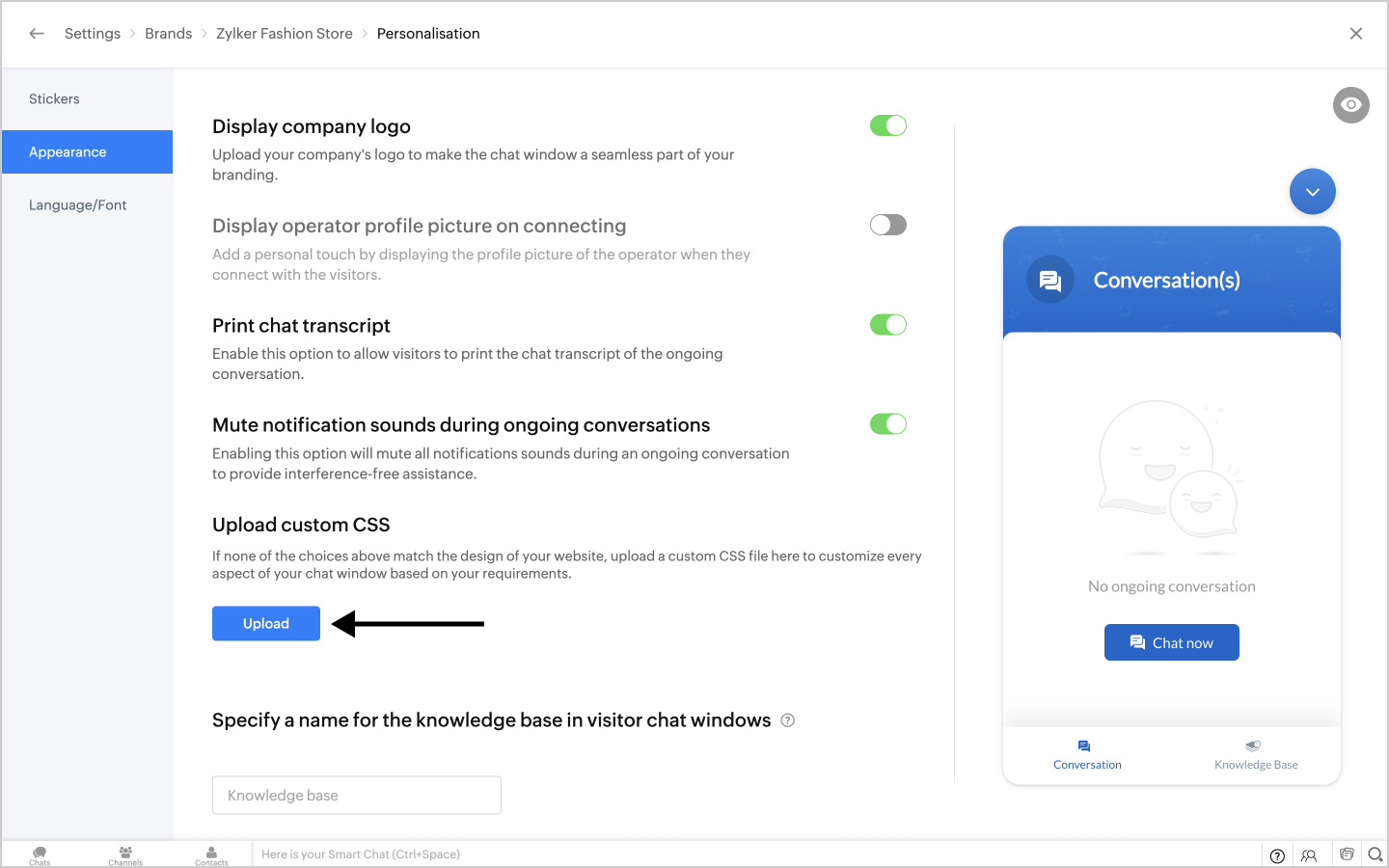

  • Choose the required CSS file from the list.
  • The preview window on the right will immediately display the result of adding your Custom CSS code to SalesIQ.
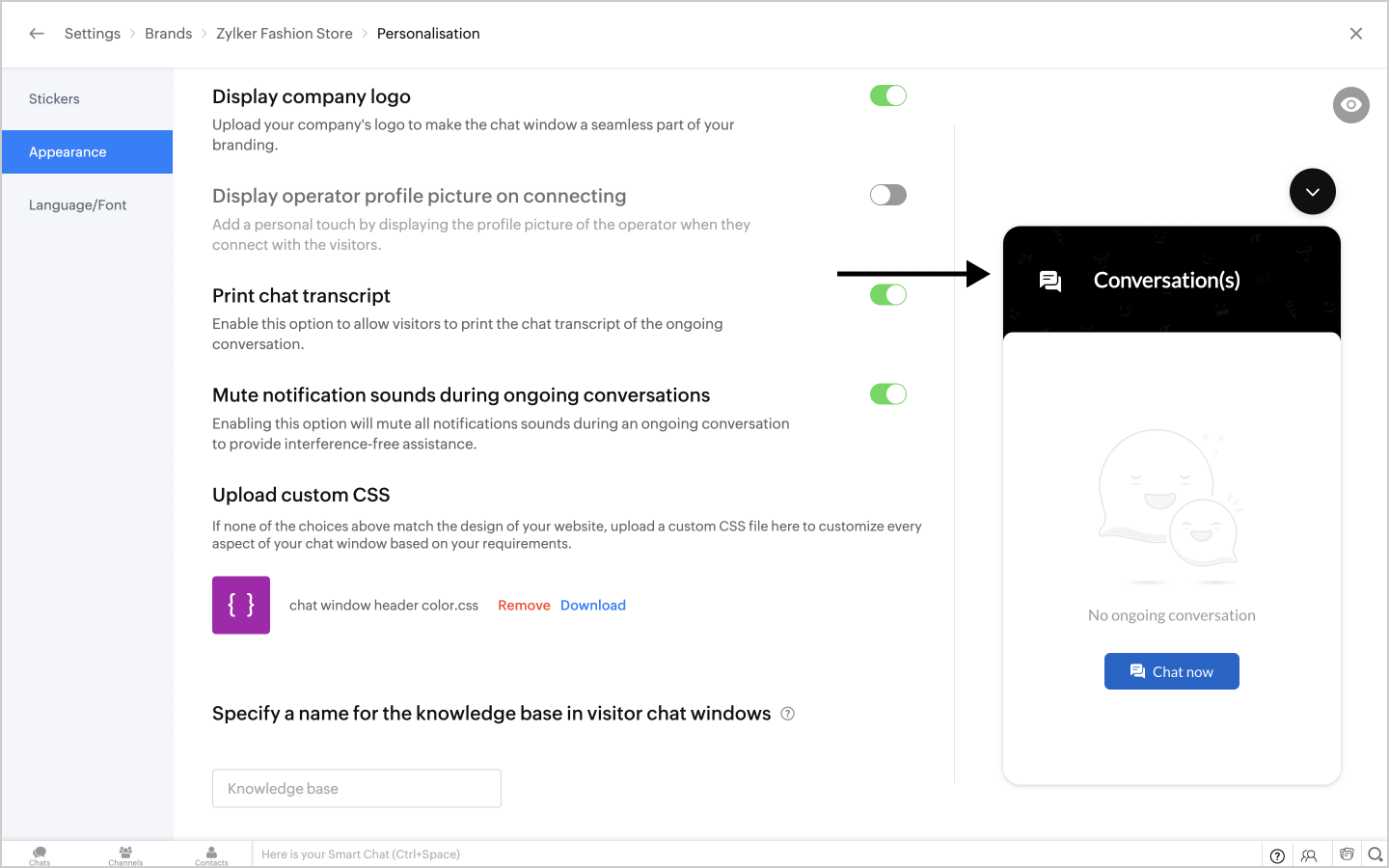
In this case, CSS for changing the header colour was added.
  1. Website Style sheet

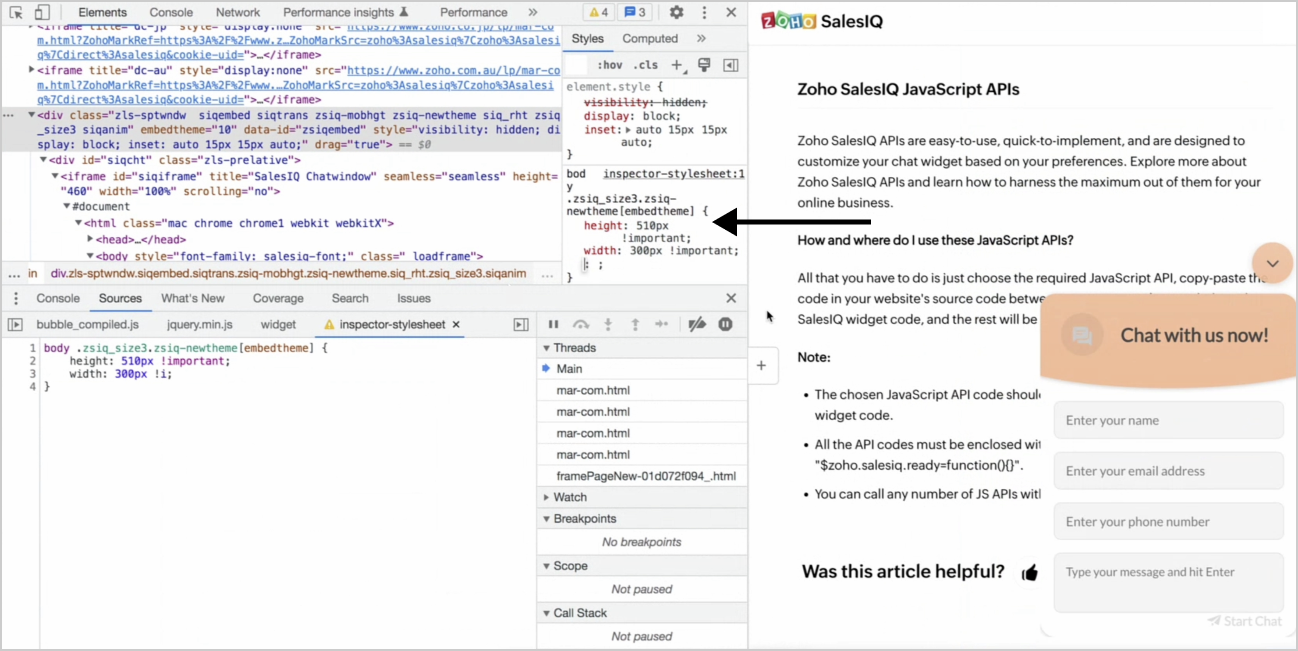
In this method, the CSS needs to be uploaded directly to a website's style sheet. This method is used when changes are required outside of the chat window. For example, sizing changes of the chat window, position and colour changes of the chat widget etc.


In this case, a Custom CSS for changing the height and width of the chat window has been added to the style sheet.

Tips for writing Custom CSS

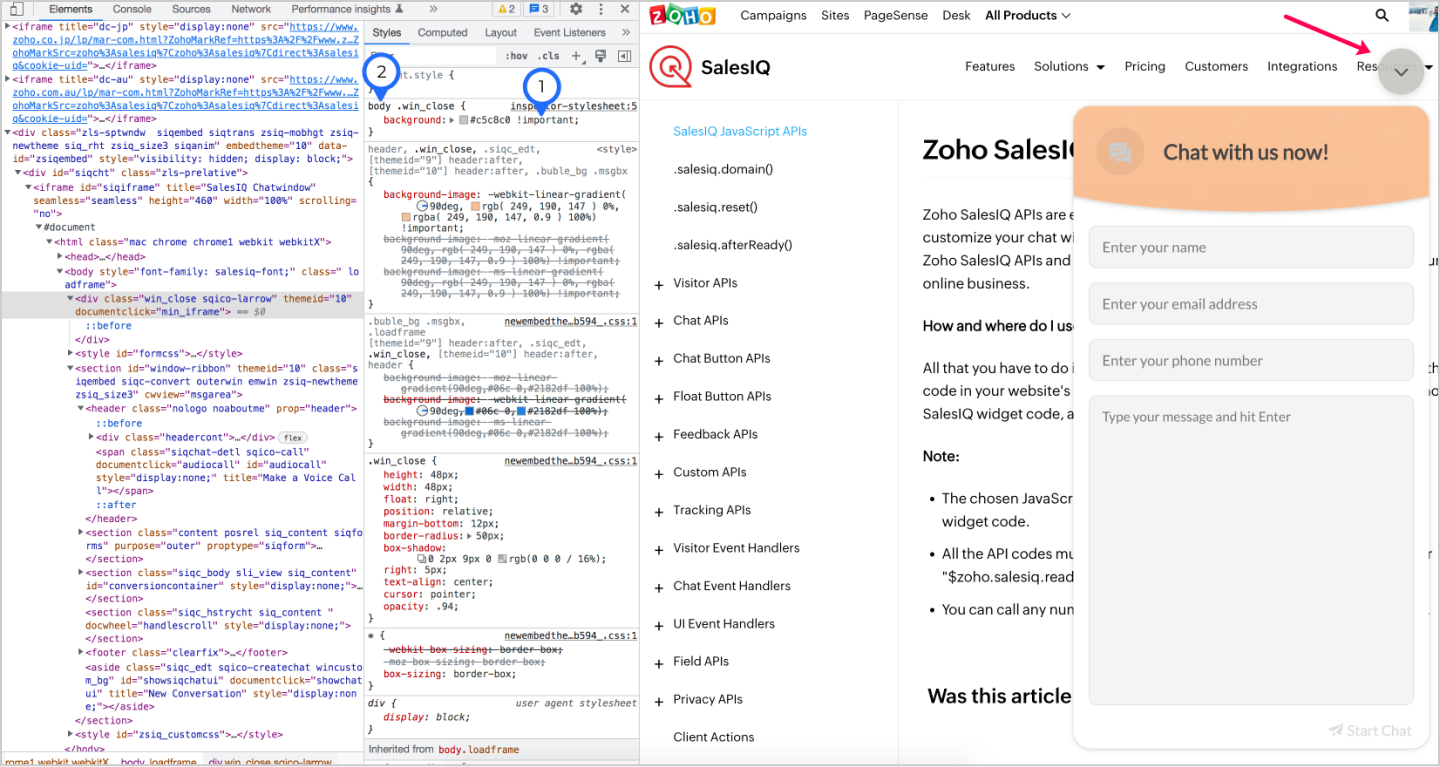
  1. The !important rule in CSS can be used to add more weightage to a property and override other previously added styling rules.

  2. Extra CSS weightage can be added with a body tag, which will be another way to override all previous styling rules for the element.

Frequently asked CSS formats 

We have taken note of some of the frequently asked queries and provided the custom CSS code here for your reference.

  • To change the header colour of the chat window.

  1. body header {
  2.     background: #e2bb3c !important;
  3. }
  • To change the chat window dimensions on website.

  1. body .zsiq-newtheme.siqembed.zls-sptwndw {
  2. height: 500px !important;
  3. width: 400px !important;
  4. }
  • To change the chat widget colour.

  1. body .zsiq_flt_rel {
  2. background-color: #e2bb3c !important;
  3. }

  • To change the chat window dimensions on mobile alone.

  1. @media only screen and (min-width: 100px) and (max-width: 555px)
  2. {
  3. body .zsiq-newtheme.zsiq-mobhgt.siqembed {
  4. height: 80% !important;
  5. width: 80% !important;
  6. }
  7. }

  • To move the position of the chat widget.

  1. body .zsiq_floatmain {
  2. right: 40px !important;
  3. bottom: 40px !important;
  4. }
Thank you for reading through. We hope you found this post helpful. If you have any questions, please drop a comment and our team will be happy to help you.

    • Recent Topics

    • Announcing the new SKILL.md for Zoho CRM and the updated OAS repository!

      We are introducing a new zoho-crm skill to make working with Zoho CRM Developer tools (like APIs, functions, widgets, client scripts, queries etc) easier and faster, with the help of AI in your preferred AI harness like Claude Code, Codex, Cursor, VSCode
    • Connect ZOHO social with Google Data Studio and download data from ZOHO social

      Dear ZOHO team, I am writing this message to enquire about how to connect ZOHO social with Google data studio since our company would like to use Google data studio to generate reports. Is it a way to download data from ZOHO social? Best regards, Chris
    • Best way to setup Inventory bin tracking for products with multiple boxes/crates

      Hi - we need some advice from the community on setting up Items in the Inventory for products with multiple crates. We have large products in our warehouse where the product is delivered as two large (double pallet) crates. We've setup the Items for these
    • how to differentiate if whatsapp comes from certain landing page?

      I create a Zobot in SalesIQ to create a Whatsapp bot to capture the lead. I have 2 landing pages, one is SEO optimized and the other want is optimized for leads comes from Google Ads. I want to know from which landing page this lead came through WhatsApp
    • Zoho Sign / Prefill By You - Editable by Them!

      Zoho Sign seems to have two field options available - an empty field for signer(s) to complete or a field that has been prefilled by you, that becomes read only once sent.  What I would like is an option on the pre-filled by you fields, to leave them
    • Out of Stock items showing in Commerce

      I have over 6000 items and most are not in stock, but all items are showing up in Commerce whether they are inventory or not. What option or feature can you use to hide items in Commerce at zero or negative quantities? I currently am using Commerce for
    • Facturation électronique 2026 - obligation dès le 1er septembre 2026

      Bonjour, Je me permets de réagir à divers posts publiés ici et là concernant le projet de E-Invoicing, dans le cadre de la facturation électronique prévue très prochainement. Dans le cadre du passage à la facturation électronique pour les entreprises,
    • Need complete Zoho Commerce theme ZIP example and safe staging workflow

      I want to build a complete custom Zoho Commerce storefront through Edit Code, including: • Global header and footer • Responsive homepage • Category, search and filter pages • Product cards and product-detail pages • Cart and checkout wrapper • Mobile
    • CRM wants to access other apps and services on this device (Documents area)

      Did anyone else see this today? It only seemed to popup in the Documents area. Blocking it did not stop the ability to upload files there... Why is this coming up and what apps/services is it requesting in the background? Also, is it applicable elsewhere
    • Date Field & Date Picker Problem

      The Date Fields in Fillable Fields are not working properly. The Date Picker is putting out the incorrect values.
    • What's New in Zoho Inventory | June 2026

      Hello users, June 2026 introduces a range of exciting enhancements to Zoho Inventory. With the full rollout of the Zoho Inventory Windows application, the launch of Terminal Payments, and new tracking combinations in Advanced Inventory Tracking, you can
    • Automate customer follow-ups with Sequences in Bigin

      Greetings, We hope you're all doing well! We're happy to announce a new feature that we've added to Bigin. Following up with every lead at the right time can be challenging, especially when your team is managing multiple conversations across emails, calls,
    • How do I set the value of a Lookup field in SlyteUI?

      I am using the "crm-field" component in a SlyteUI project (code attached) https://www.zohocrm.dev/explore/slyteui/ui-components/crm-field/api#Properties The client would like to have this field pre-populated with a value. When I try to input the record
    • OpenAI Is Moving to the Responses API: Here's What It Means for SalesIQ

      OpenAI has deprecated its Assistants API and is moving to the Responses API. If you're using OpenAI Assistants with SalesIQ, you may be wondering if you need to make any changes to your existing setup. You don't. SalesIQ has already taken care of the
    • Items (products) Export to PDF Feature as a Catalog Generator

      Would like to request a product catalog feature where the admin can export "items" along with selected attributes (e.g.: product name, size, price, etc) in a professional template as a PDF document.  Since product pictures and the product attributes are already saved in our system DB, it would be a natural extension to just export it out as a catalog for customers.  I've been duplicating this feature in other apps to make a product catalog.  Having a central repository of "items" makes good sense,
    • DYK 11: Blueprint Import

      Did you know you can import task blueprint into Zoho Projects instead of building it from scratch? Tasks can sometimes have multiple stages and move through several stakeholders before completion. Without a defined process, task changes can happen without
    • Tip #87 – Stop Describing, Start Showing with Annotation – 'Insider Insights'

      Hello Zoho Assist Community! A new employee needs help getting set up on the internal tools their team uses. The IT technician jumps on a remote session, but walking through an unfamiliar interface verbally only goes so far. "The icon at the top, no,
    • Building extensions #7: Storing and managing module-specific data in Zoho Sprints extensions

      Storing and handling data related to Zoho Sprints modules is a key necessity when managing an extension. In this post, we'll look at the advantages of data storage and how it can be used with an example demonstration. Data storage An introduction In general,
    • sending a Daily nag reminder email?

      I'm wondering if it's possible to set up nag reminders, if a task/case/deal is overdue then i want send a daily email until it's either closed, or the due date is updated. A date based workflow automation looks like it will only trigger once, and not
    • Can I hide some products from a particular customer

      HI I want ot give a customer access to the portal but I need to hide some products from them that are not available for them to buy- is this possible ?
    • CNIL - Suivi de Pixel

      Bonjour à tous, À la suite de la nouvelle recommandation de la CNIL sur les pixels de suivi dans les e-mails, savez-vous si Zoho Campaigns permet : de conditionner le suivi des ouvertures au consentement de chaque contact ; de proposer un lien permettant
    • Master Zoho Desk through the Virtual Classroom Training (VCRT)

      Hello Everyone, This month's Virtual Classroom Training (VCRT) is for Zoho Desk users in APAC and India. Zoho Desk offers an expert-led 4-day Virtual Classroom Training (VCRT). The training covers configurations, automations, and ways to streamline Zoho
    • Discount Per Item / Option Removed

      Hi, I was using Zoho Books for three years now and very saticfied. Now, as we try to add an invoice, we founds that the discount option per item was takn away, and a discount from total was implemented. However, we have cases when we add a diffrent discount to each item. Was this option removed permanently? Thanks, 
    • What is a realistic turnaround time for account review for ZeptoMail?

      On signing up it said 2-3 business days. I am on business-day 6 and have had zero contact of any kind. No follow-up questions, no approval or decline. Attempts to "leave a message" or use the "Contact Us" form have just vanished without a trace. It still
    • UI for requestor

      can you assist me on how to access as reque
    • Bank Transaction Rules Link Under Each Bank Account

      Hello, can you'll move the "transaction rules" button or link back under each bank account? It is now on Bank Overview, if I am working on a specific bank account, I don't want to go out to overview to check the rules. That button displays rules for all
    • Zoho ERP | Product updates | August 2026

      Hello users, What’s new in Zoho ERP this month? From Account Registers to new reports, we’ve packed this release with updates worth checking out. Take a look at what’s new and see what’s in store for your business. Introducing Account Registers Account
    • WhatsApp Coexistence

      Hello, please implement WhatsApp Coexistence, we need to track staff whatsapp chats on their PC and they need to be able to use WhatsApp on their mobile in around the office and warehouse, as we video call customers and send them product pictures. Thank
    • Custom Validation for On Duty

      Hi Team, We would like to have custom validation support for the On Duty form in the Attendance module. We need to apply some restrictions, such as: Limit the number of On Duty requests per month. Restrict On Duty requests on selected days. Allow employees
    • Moving from Zoho standalone to Zoho One

      Hi, I am a bit disappointed with this. We have been using Zoho CRM, Zoho Books, Zoho Forms, and Zoho Flow for a couple of years. While they have their own compatibility issues, we’ve been able to navigate them thanks to Zoho Flow—not the support from
    • Mass Update of Lookup Fields not possible

      Hello List I've created a custom field for Leads and Contacts 'Current Campaign'. This is very Handy as I can filter leads and then related them to a campaign. Everything ready, but then I realized that mass update doesn't work for lookup fields... a
    • Showing more options in lookup field in COQL

      When using the COQL query with just the lookup field directly (e.g. using "Account_Name" alone), the response json is "unflattened" but only includes the "Account_Name" and "id" fields. Is there a way to specify which columns are wanted in this "unflattened"
    • Allow Email Attachments to Be Opened Directly in Zoho CRM

      Hi all, It would be very helpful if attachments linked to an email in Zoho CRM could be clicked and opened directly from the email preview. Currently, the attachment names are displayed, but the experience of viewing them is unnecessarily limited. Users
    • Group accounts that are branchs of the same company

      Hi all! This is a zoho books question. many of the companies we work with have several branches. Each branch has it's own tax number. I'd like to be able to relate these branches so I can treat all the translations as if they were made with the parent
    • Migration from zoho global to zoho Mexcio

      When will the migration be available and not create another entitie. We have years of information and integration and is not possible for us to create a new entitie
    • I have a problem. I use Zoho invoice

      I have a problem. I use Zoho invoice, which is that when I create an invoice for a customer with specific items, let's say the value of these items is 2100, but my customers are not the type who pay the entire invoice amount at once, as they divide the
    • Zoho Mail outgoing webhooks stopped delivering events to my domain from Aug 28 to Sep 1, 2026 — temporary suppression by destination domain/IP?

      Dear Zoho Mail support team, I run an application that receives email notifications from several Zoho Mail accounts via outgoing webhooks (Settings → Developer Space → Outgoing Webhooks), with REST API polling as a backup. What happened: between August
    • Do you have software like Windows software?

      We want swadeshi software
    • Mise à jour de Zoho Books – France

      Chers clients, Merci pour votre patience et votre soutien continu. Avec les évolutions réglementaires à venir en France nous introduisons de nouvelles fonctionnalités dans Zoho Books pour les clients français. Ces mises à jour ont été conçues pour répondre
    • Introducing spam detection for webforms: An additional layer of protection to keep your Zoho CRM clean and secure

      Greetings all, One of the most highly anticipated feature launches—Spam Detection in webforms—has finally arrived! Webforms are a vital tool for record generation, but they're also vulnerable to submissions from unauthenticated or malicious sources, which
    • Next Page