[Early Access] Voice of the Customer (VoC) for Zoho CRM
Happy new year, everyone!
We have an exciting addition to our suite of features and would like to introduce you to VoC (Voice of the Customer) for Zoho CRM, powered by Zia.
2023 is definitely the best time to be a customer with rapid innovations and advancements in the field of CX. Brands these days lose customers within minutes if they refuse to pay attention to what they're saying. The right VoC tool can help you stay on top of your CX game!
VoC for Zoho CRM offers insights into your customers' needs and sentiments which can translate into effective problem redressal, better planning and increased revenue.It also provides context from your CRM data and helps you get a clear picture of what your customers feel or expect from the product/service. While the end goal of VoC may look like just running customer satisfaction polls, it's not merely the act of putting out these surveys. Launching and carrying out customer satisfaction polls won't help a business truly understand their customers. The end goal of VoC is much deeper— it is about listening to your customers and valuing their thoughts, and using these insights for your business to thrive.
| Early Access | Interest form |
| Resources | Help documentation |
| VoC overview video |
Use case
For example, an electronics store that sells laptops and mobiles also provides servicing of these products. The customer and product details are stored in CRM. They regularly send out surveys to gather customer feedback on the products and services. Additionally, they have a separate customer support team to help resolve challenges with products. The company notices a drop in their revenue in spite of the offers and discounts they've rolled out. Manually studying customer purchase patterns and collating feedback from multiple communication channels will cost a business valuable time that can be invested to develop the business further. The answer to this problem lies in automating such processes with better visualization of data within a centralized platform. VoC for Zoho CRM aims to digest customer information and make these results available for users in a single place to grasp information quickly and make goal-oriented as well as contextually-rich modifications to business plans and processes.
How to use VoC?
VoC for Zoho CRM can be activated under "Zia", located on the settings page within CRM.
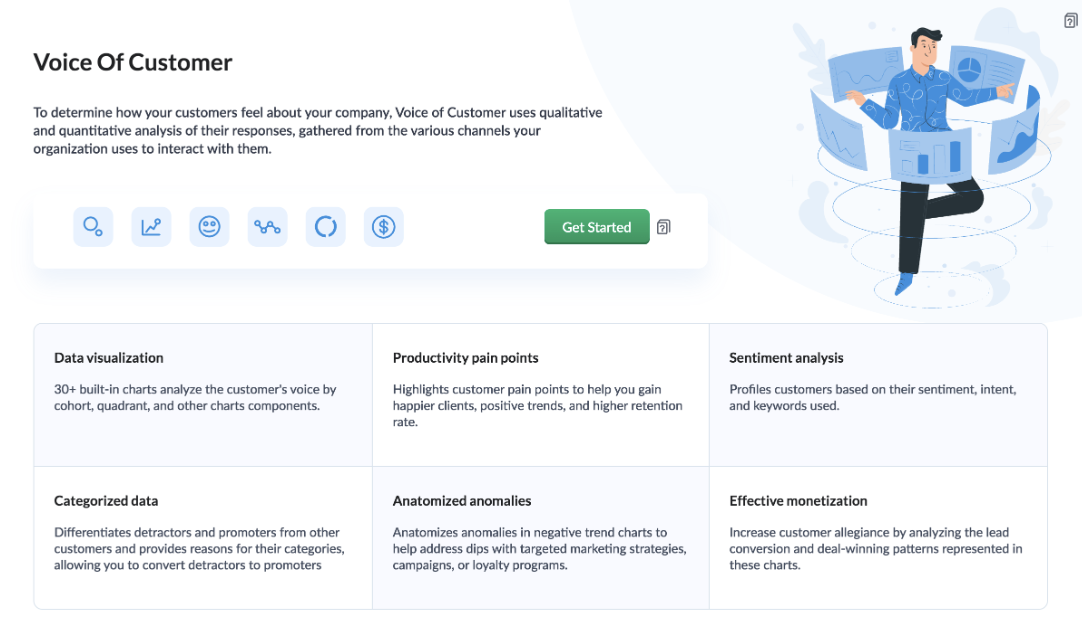
Once you click the 'Get Started' button, the activation page opens. Click 'Activate'.
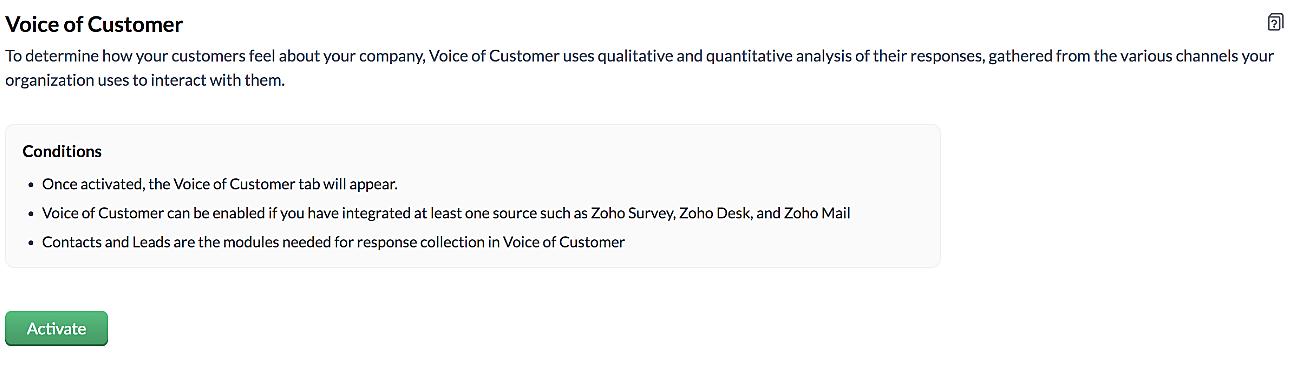
VoC for Zoho CRM is trained to conduct sentiment and intent analysis, keyword extraction, emotion & root cause analysis, customer trend analysis and predictions. It presents several accurate dashboards within your CRM account that showcase customer opinions on your business, competitor activity and sentiment, as well as the customer emotion behind emails, surveys and customer feedback.
Let us take a look at different dashboards that can help the management identify the root cause of inconsistencies in results and chalk out next steps to resolve them quickly.
The Sentiment-based Profile Analysis
The Sentiment Dial Analysis chart provides you with an overall picture of the customer sentiment shared across multiple communication channels such as surveys, emails, and customer ratings.
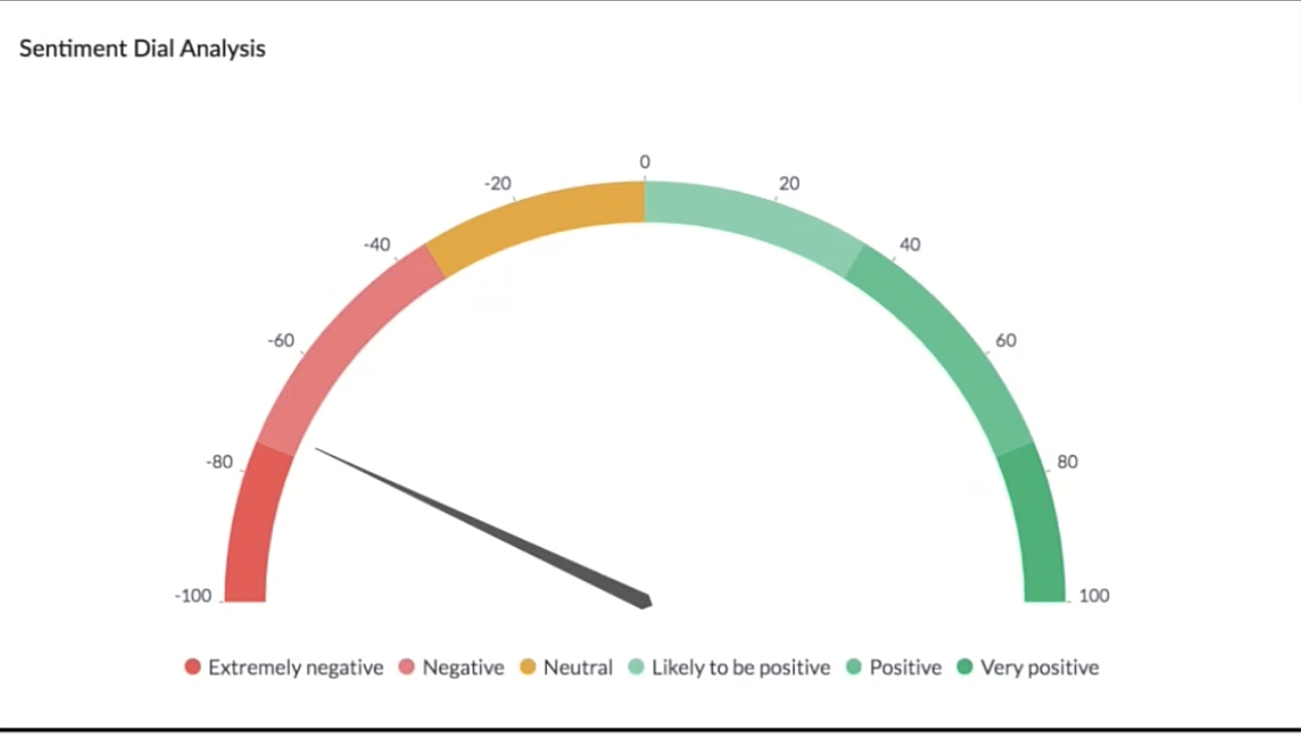
The dial chart shows that the overall sentiment expressed by the customers is on the negative end. This analysis incorporates the feedback from Desk, Survey and CRM emails. With a conservative approach that doesn't incorporate VoC, this requires a separate team to gather the feedback, digest it and incorporate it into business activities.
Even though this dial chart gives you a fair idea of the customers' views, the management needs more clarity on where the problem lies to increase customer satisfaction.
The frequently occurring keywords by sentiment narrow down the customer views expressed.
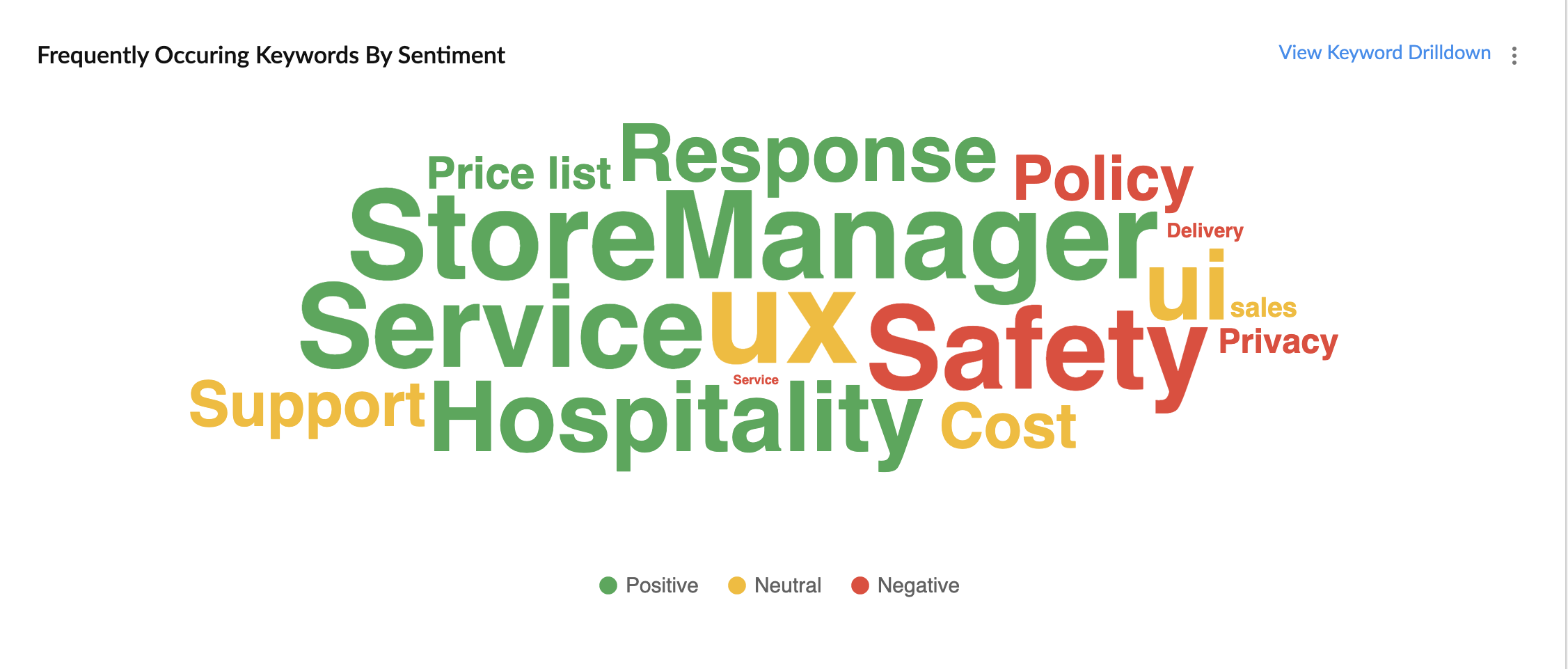
In the image above, the words in green have been used in a positive connotation by the customers. We can infer that customers are happy with the service, hospitality and price list. Whereas, delivery, policy and safety haven't been our strongholds. Therefore, we can now focus on improving our delivery, safety and privacy policies.
A drill down of the number of customers and channels from where their feedback has been gathered can also be viewed a table.
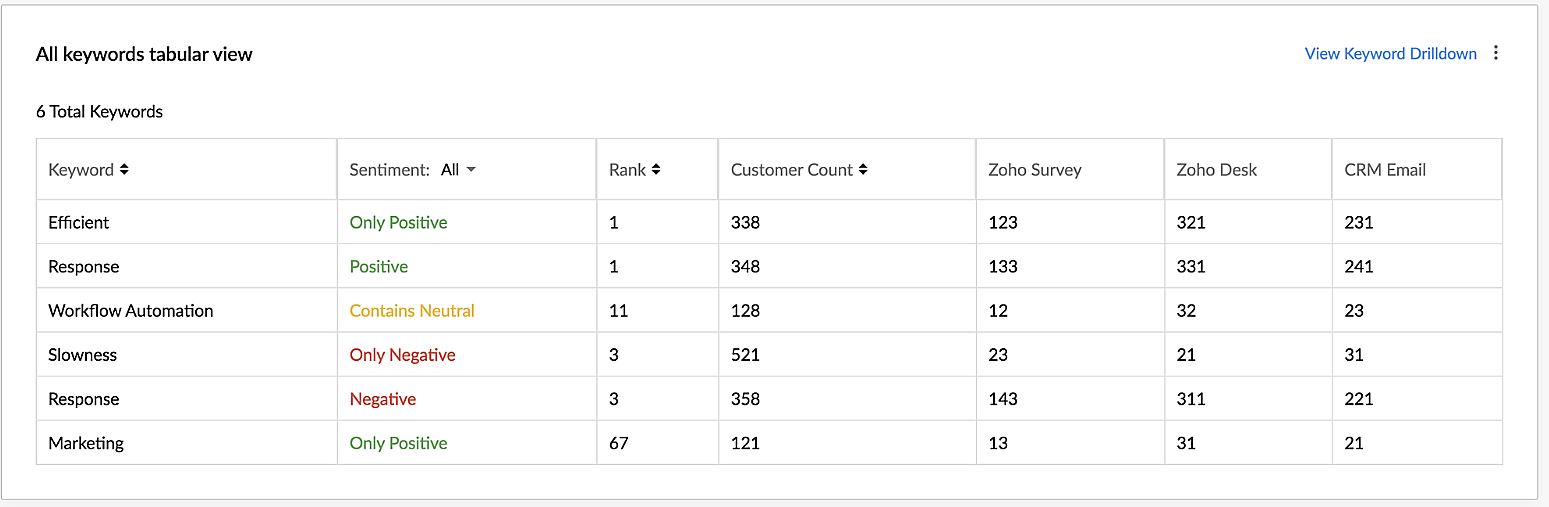
VoC for Zoho CRM helps you derive powerful insights on customer opinions and sentiment by processing data in minutes from several communication channels without burdening your team.
Response-based sentiment analysis
VoC for Zoho CRM captures the underlying emotion and intent behind customer responses and categorizes them by sentiment, intent, medium and revenue based on a particular timeframe.
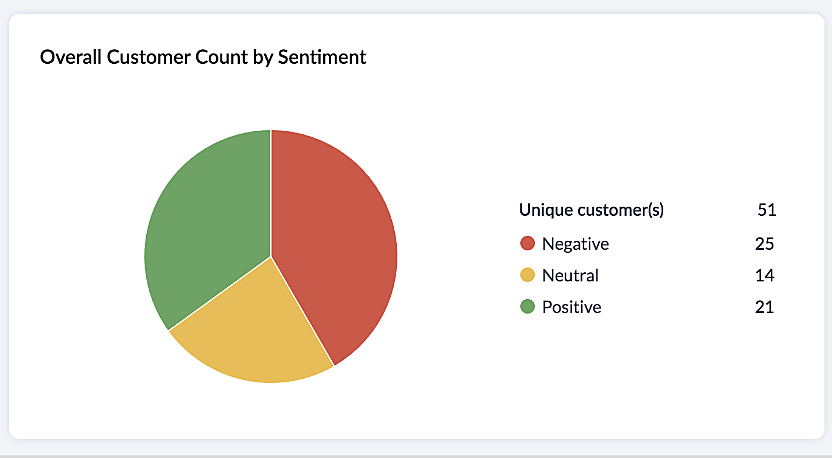
This chart paints an overall picture of the positive, neutral, and negative feedback count based on the responses gathered via surveys and customer rating.
The Sentiment Cohort chart, a variation of the above, showcases the customer feedback with respect to the timeframe.
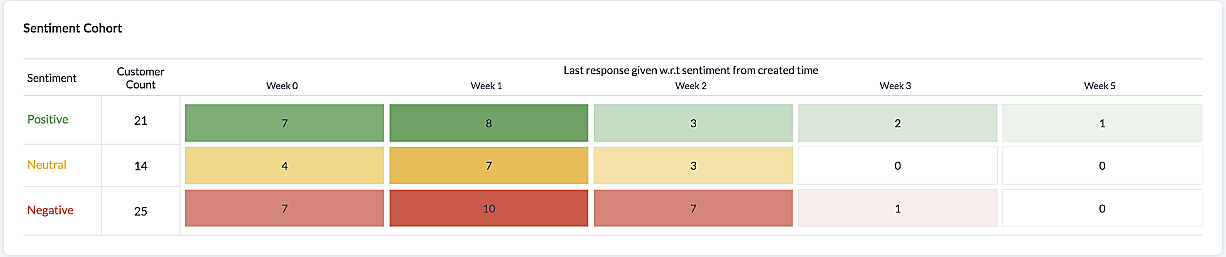
There are a few more dashboards that VoC offers to extract insights from - Competitor analysis, Cross-sell Analytics and Survey comparison.
Competitor Analysis
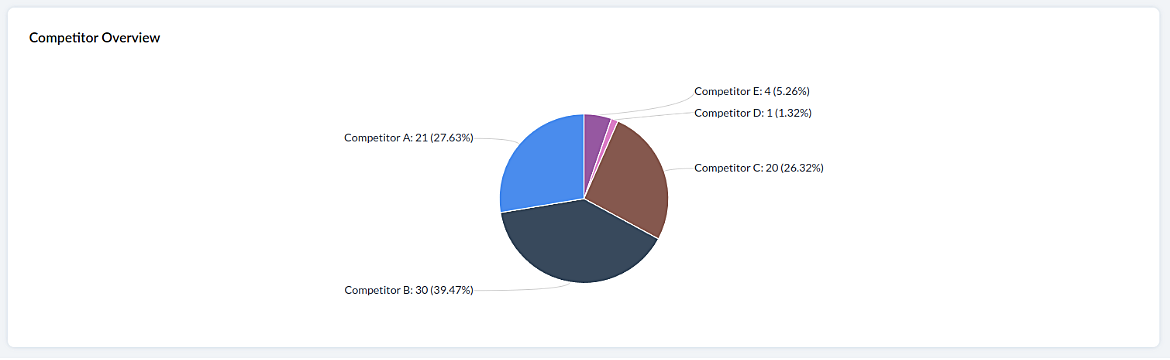
Staying on par with our competitors is an important aspect of customer satisfaction and retention. VoC helps in this regard by offering prominent insights. If the deal closure rate has come down after the mention of the competitor, we can focus on our offerings against our competitors'.
Staying on par with our competitors is an important aspect of customer satisfaction and retention. VoC helps in this regard by offering prominent insights. If the deal closure rate has come down after the mention of the competitor, we can focus on our offerings against our competitors'.
Cross-sell Analytics
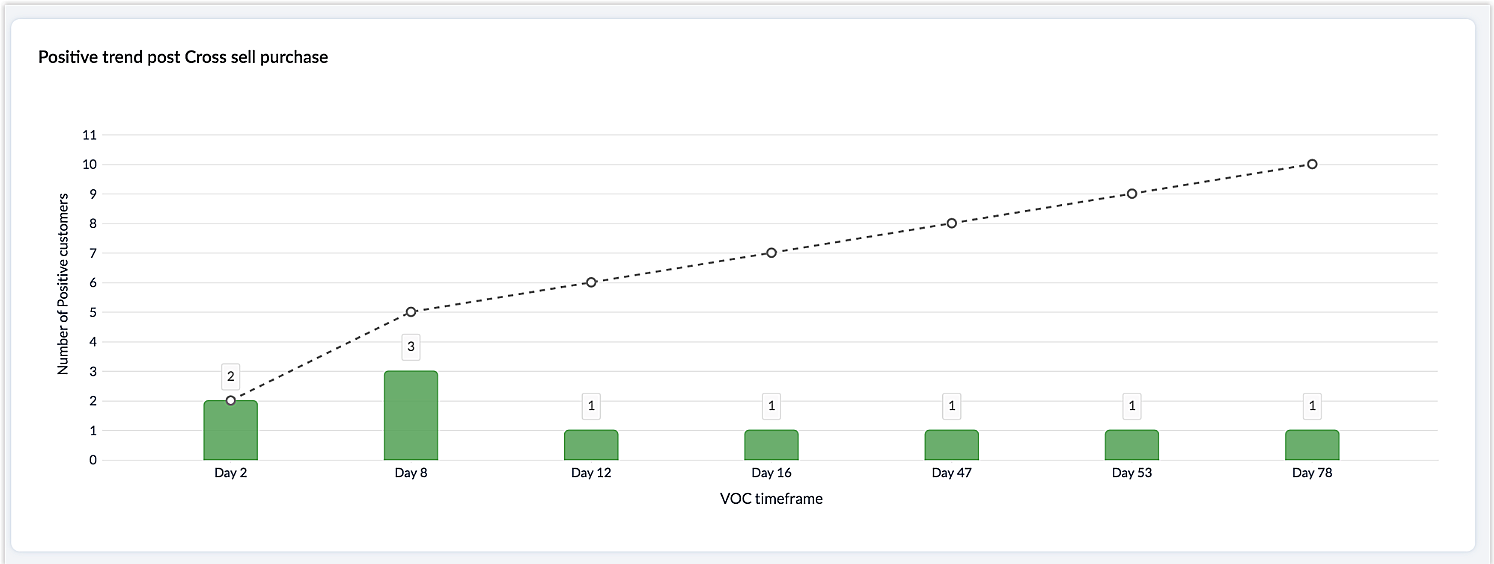
Cross-sell Analytics in VoC is designed to measure the effectiveness of cross-selling efforts. Zia studies the feedback after a cross-sell initiative is made and whether it is positive or negative. Depending on the feedback collected, it predicts the right product/service.
Cross-sell Analytics in VoC is designed to measure the effectiveness of cross-selling efforts. Zia studies the feedback after a cross-sell initiative is made and whether it is positive or negative. Depending on the feedback collected, it predicts the right product/service.
Survey comparison
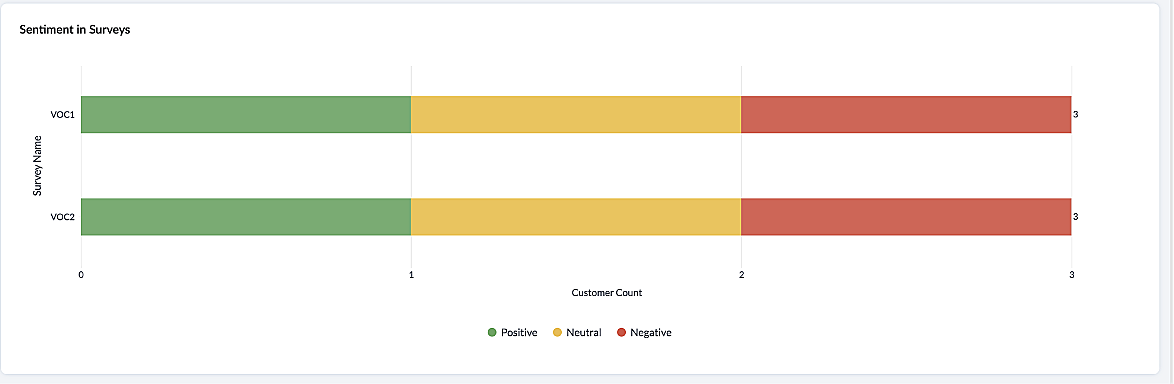
These dashboards come in handy when you want to evaluate your marketing efforts. If the customer feedback for an email offer is positive, you can plan your marketing strategies based on it. You can also improve your product/services based on survey responses.
Listed below are the different charts that VoC supports -
1. Pie chart and donut chart
1. Pie chart and donut chart
2. Line graph
3. Bar graph—single, multi, stacked
4. Cohort
5. Quadrant
6. Waterfall
7. Gauge chart/ Dial chart
8. Anomaly dashboards
9. Word-cloud and Table
Please click here to watch a video about VoC for Zoho CRM to gain a deeper understanding of the feature.
Prerequisites/Notes:
- VoC insights are available for surveys, customer rating and emails, using Zoho Survey, Zoho Desk and Email integration (IMAP) respectively.
- Zia Competitor Alert should be configured for the competitor analysis dashboard. Additionally, Zia Recommendation needs to be configured for the cross-sell analytics dashboard.
- All insights are a result of processing historical data. Collection of relevant data will be initiated upon activation of VoC and we will be processing this data over a period of three months.
- Currently only admin profile users can view the VoC tab.
Pricing
VoC will be available for Zoho CRM to begin with. This will be a priced offering. The final pricing and editions supported will be announced during the time of public release.
VoC will be available for Zoho CRM to begin with. This will be a priced offering. The final pricing and editions supported will be announced during the time of public release.
What's in the roadmap
a) Option to customize dashboards and charts
b) Identify our vanishing customers and declining products
c) Evaluating strategies to attain a target
b) Identify our vanishing customers and declining products
c) Evaluating strategies to attain a target
d) Feedback Summaries, and much more.
Please click here to get early access to VoC for Zoho CRM. We would love to hear your feedback and can't wait for you all to try this.
Note:
Early Access for customers: The Early Access to VoC is provided only for organizations with a license count greater than or equal to 20.
Topic Participants
Ishwarya SG
Priyanka Satish
chandlerb
Aayisha Siddiqua H
Sticky Posts
Announcing Early Access to "Zoho CRM for Everyone" — A new and exciting update to Zoho CRM
Update : Zoho CRM For Everyone's Nextgen Interface gets an upgrade! Hello everyone, We’ve updated the Zoho CRM for Everyone Nextgen interface based on your feedback. The UI is now simpler with a unified sidebar, a more visible global search and features[Early Access] Voice of the Customer (VoC) for Zoho CRM
Happy new year, everyone! We have an exciting addition to our suite of features and would like to introduce you to VoC (Voice of the Customer) for Zoho CRM, powered by Zia. 2023 is definitely the best time to be a customer with rapid innovations and advancementsAdding calls as a channel in Voice of the Customer
Dear All, We hope you're well! It's been almost a year since we opened Zoho CRM's Voice of the Customer solution up for early access. We are grateful for the reception and support you have been showing us with regards to its adoption and feedback. Since
Recent Topics
CRM Related list table in Zoho analytics
In Zoho Analytics, where can I view the tables created from zoho crm related lists? For example, in my Zoho CRM setup, I have added the Product module as a related list in the Lead module, and also the Lead module as a related list in the Product module.Zoho Flow Credits
Hi , I would like to ask the reason why every time I added plus credit but few days later I will return back to default? (as below I add credit to 3000 but today It change back to 1000) Most important is, when the credit fully used, not any reminder toZoho learn Custom portal - networkurl & CustomPortalId
I want to get my individual account’s networkurl and customportalId to use in this API: https://learn.zoho.com/learn/api/v1/portal/<networkurl>/customportal/<customportalId>/manual How can I retrieve the networkurl and customportalId using the API? IConnecting zoho creator to zoho writer to send prefilled documents
i will paste the worflow below // Get user's submitted data from the form userSalary = input.Current_Salary; userCIBIL = input.CIBIL_Score; userEmail = input.Email; userName = input.Name; // You need to get the Document ID from the URL of your Zoho WriterZoho Creator to Zoho Writer for prefilled documents...
In response to the question about connecting Zoho Creator to Zoho Writer for prefilled documents, I wanted to share a working implementation that demonstrates how to use the record_id parameter with the Zoho Writer Merge API. This allows Writer to automaticallyWebDAV / FTP / SFTP protocols for syncing
I believe the Zoho for Desktop app is built using a proprietary protocol. For the growing number of people using services such as odrive to sync multiple accounts from various providers (Google, Dropbox, Box, OneDrive, etc.) it would be really helpfulManaging functions
Can someone let me know if there are any plans to improve the features for managing functions in CRM? I have lots of functions and finding them is hard. The search only works on the function name and the filter only works on function type. I have createdIntroducing our latest privacy enhancement - Hiding email IDs in Zoho Cliq Networks
Hello everyone, Zoho Cliq Networks offers a powerful collaboration platform that allows businesses to create dedicated digital workspaces for external vendors, partners, or individuals you want to communicate with professionally without adding them tozoho performance
OVERALL CONFIGURATION OF ZOHO PERFORMANCE Quarterly performance review Self rating and scoring Manager rating and scoringZoho Social API for generating draft posts from a third-party app ?
Hello everyone, I hope you are all well. I have a question regarding Zoho Social. I am developing an application that generates social media posts, and I would like to be able to incorporate a feature that allows saving these posts as drafts in Zoho Social.When will it be possible to edit Subform records via either views or tabular reports?
Hey there, data maintenance often requires mass update of quite a lot of records. While this is a piece of cake via either List view or Zoho sheet view, the same cannot be carried out for subform records yet. When one of the two options will be made available?Onboarding
Hello Team, Im yuktha working as HR at Ossisto Technologies. We are currently utilizing zoho for onboarding candidate. right now facing issue with onboarding Attaching the screenshots for your referenceArchiving Contacts
How do I archive a list of contacts, or individual contacts?How do I change a form's name? Why isn't this more intuitive?
Can someone please let me know how to change a form's name?Control Over Zia Generative AI Reply Assistance Behavior
Hello, I would like to request an enhancement to the Zia Generative AI feature, specifically concerning the Reply Assistance within Zoho Desk. Current Issue: When replying to a ticket, the Ticket Properties section is automatically replaced by the ZiaZia now integrated with Open AI in Zoho Desk
The powerful integration of Zia with OpenAI, has empowered Zoho Desk reach a new level of efficiency and performance. With contextual self-service capabilities, Zia enables agents to boost their productivity and delivers superior customer experiences.Zoho Desk Partners with Microsoft's M365 Copilot for seamless customer service experiences
Hello Zoho Desk users, We are happy to announce that Zoho Desk has partnered with Microsoft's M365 to empower customer service teams with enhanced capabilities and seamless experiences for agents. Microsoft announced their partnership during their keynoteEmployee self-service portal: Onboarding and continuous learning platform for support reps
Hello everyone, In any organization, employees must go through multiple courses to learn about the product, their organization's standards, and how to respond to customer queries using the knowledge base articles available. This typically requires completing2024 Email Authentication Standards: Elevating Security with Google and Yahoo
In contemporary email communication, email authentication plays a pivotal role in mitigating email fraud, spam, and phishing attacks. Brace yourself for a new level of security. Starting February 2024, Gmail and Yahoo will be implementing robust emailContact custom field in layout
Good day, all, I have an "Extension" custom field in contacts, and would like to display the contact extension in the ticket layout, but I don't seem to be able to. What am I missing? Thanks RudyExact match in name when searching workdrive
Hello, I am wondering how to search workdrive files/folders with an exact match in the name. For example, when I search across folder with the url param search[name]=someName, I get multiple results such as "someName", "someNameAndMore", or "someNameMeeting impossible to use when sharing screen
he Meeting tool in Brazil is practically unusable when sharing anything, whether it’s a presentation or simple navigation. When accessed via Cliq, the situation gets even worse: even basic calls fail to work properly, constantly freezing. And as you areChanging the Default Search Criteria for Finding Duplicates
Hey everyone, is it possible to adjust the default search criteria for finding and merging duplicate records? Right now, CRM uses some (in my opinion nonsensical) fields as search criteria for duplicate records which do nothing except dilute the results.Is there a way to create a desktop shortcut for a website course portal?
Hello everyone, I recently got a laptop and bought an online course from a website, Skillwint.com, which I visit regularly. I open that site many times a day and want to create a desktop shortcut so I can open it directly instead of searching in the browserSalesIQ Tip for Admins: Your Safety Net for Data Recovery
Ever clicked 'Delete' in your SalesIQ and then realized it was the wrong item? Maybe it was a prospect's chat that held important context you needed to refer to later on. Or, maybe you deleted an elaborate Zobot that you were still testing or planningDepreciated mergeAndStore Function Help!
Hello, I have a function designed to create a PDF containing information from the fields in a Deals record. There is a Writer Mail Merge template in WorkDrive that is populated via Deluge code, and a copy of the resulting PDF is then attached to the record.Can I execute two 'functions' when completing a mail merge from CRM?
Hi, I have set up a mail merge from CRM Deals to a template. I want a copy of this to be saved in Workdrive, and then a copy also saved back into the deal record from which the merge occurred. I can do both independent of each other, and managed to getExternal Share > Edit: Cannot Create Zoho Files
Hi Zoho, When we create an external share link with Edit permission, our external users are unable to create a Zoho file (Zoho Writer, Zoho Sheet and Zoho Show). They can only upload files. They can edit the Zoho files if we create them internally andthe custom domain forwards by default to the old career site / how to switch it off??
dear friends, how to switch off the old version of the career site?? The set up custom domain forwards directly to the old site, so that I cant publish it... Any ideas? Thank you! KR, VictoriaZoho Mail iOS app update - RTL languages support and access emails using permalink and universal link, image upload resolution
Hello everyone! In the most recent version of the Zoho Mail iOS app update, we have brought in support for RTL languages(Arabic and Urudu), providing a seamless reading experience with proper text alignment and layout throughout the app. We have alsoPresenting ABM for Zoho CRM: Expand and retain your customers with precision
Picture this scenario: You're a growing SaaS company ready to launch a powerful business suite, and are looking to gain traction and momentum. But as a business with a tight budget, you know acquiring new customers is slow, expensive, and often deliversWhy are emails sending with @viazohocrm.com ?
I just sent out mass emails from CRM. They are sending from the email below and people cannot reply, and they are getting this message: Address not found Your message wasn't delivered to sales.XXXXXXXX.com.au@viazohocrm.com because the address couldn'tDuplicating and referencing datasets
I am moving from PowerBI to Zoho Analytics and while I find Zoho easier to use in many ways, there is one function that I use in PowerBI that I have not been able to find in Zoho. I have several data sets that I need to modify in different ways to getFrom Zoho CRM to Paper : Design & Print Data Directly using Canvas Print View
Hello Everyone, We are excited to announce a new addition to your Canvas in Zoho CRM - Print View. Canvas print view helps you transform your custom CRM layouts into print-ready documents, so you can bring your digital data to the physical world withZoho Inventory Now Supports VeriFactu for Businesses in Spain
Starting from January 1, 2026, Spain requires real-time invoice reporting for all B2B transactions. From July 2026, this requirement will extend to B2C transactions as well. All reporting must be carried out through the VeriFactu to AEAT (Agencia EstatalWhy am I seeing deleted records in Zoho Analytics syncing with Zoho CRM?
I have done a data sync between Zoho CRM and Zoho Analytics, and the recycle bin is empty. Why do I see deleted leads/deals/contacts in Zoho Analytics if it doesn't exist in Zoho CRM? How can I solve this problem? ThanksEnhancements to Zoho Map integration tasks
Hello everyone, We're excited to announce enhancements to the Zoho Map integration tasks in Deluge, which will boost its performance. This post will walk you through the upcoming changes, explain why we're making them, and detail the steps you need toLet’s Talk Recruit: Meet Zia, your all-in-one AI assistant (Part-3)
Welcome back to the Let’s Talk Recruit series. In the part 2 post, we explored how Zia has evolved with smarter summaries and seamless AI-assisted content creation. This time, we’re diving into the latest upgrades that take productivity even further —Announcing Early Access to "Zoho CRM for Everyone" — A new and exciting update to Zoho CRM
Update : Zoho CRM For Everyone's Nextgen Interface gets an upgrade! Hello everyone, We’ve updated the Zoho CRM for Everyone Nextgen interface based on your feedback. The UI is now simpler with a unified sidebar, a more visible global search and featuresUnable to verify domain for Zoho People
I have added TXT records in my DNS (GoDaddy) [screenshot attached], but unable to verify even after 12 hours after adding. On checking the console, it shows some errors [screenshot attached]. It appears that the verification flow is broken - please provideNext Page