Hello folks,
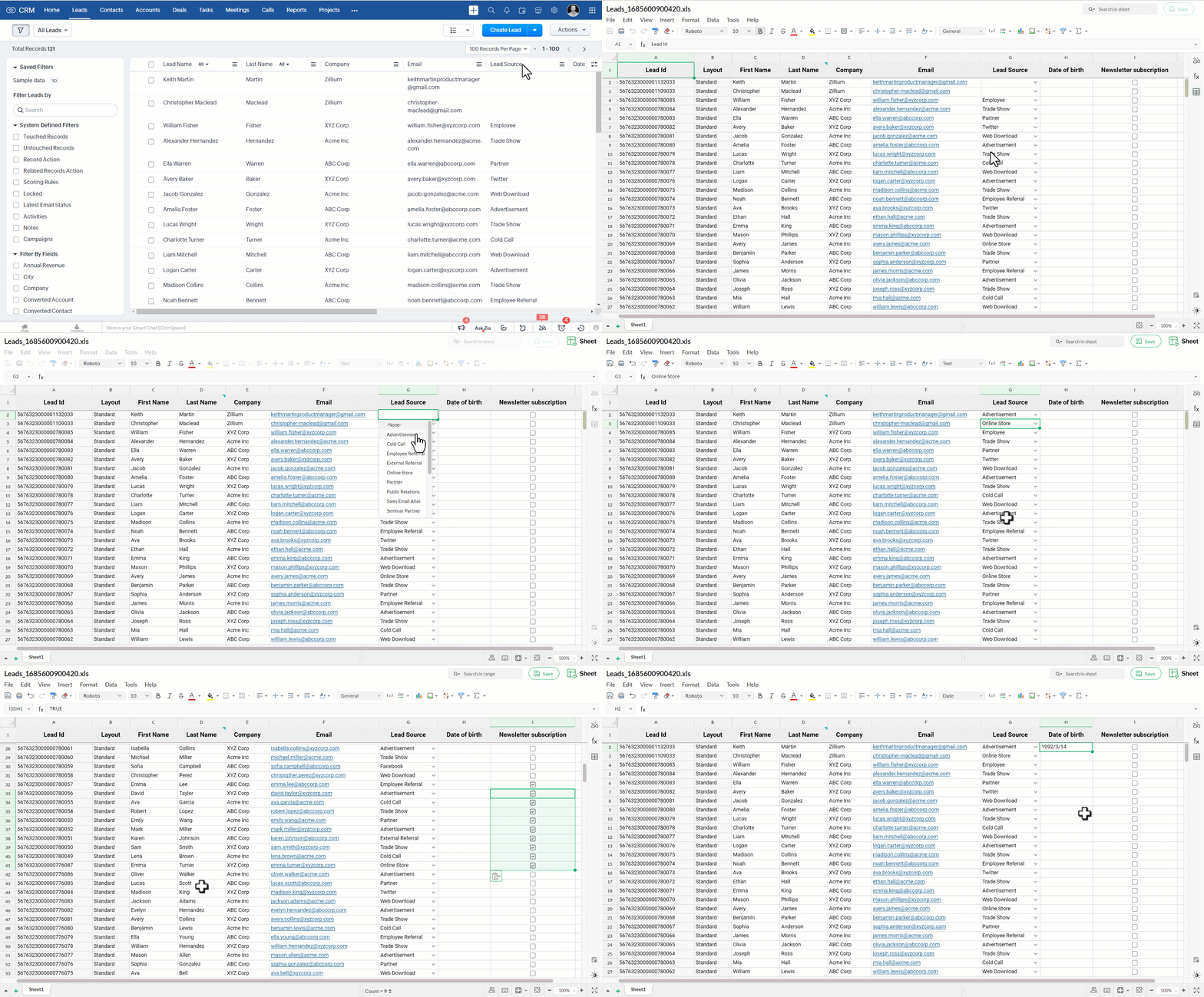
For some time now, you've been able to use the Zoho Sheet View to quickly edit multiple records or to insert a batch of new records. Its tabular interface allows users to engage in these tasks productively. Despite this, the existing Sheet View has its flaws: increased risk of entering invalid data, missing entries in the audit log, the ability to tinker with system-defined fields, and more.
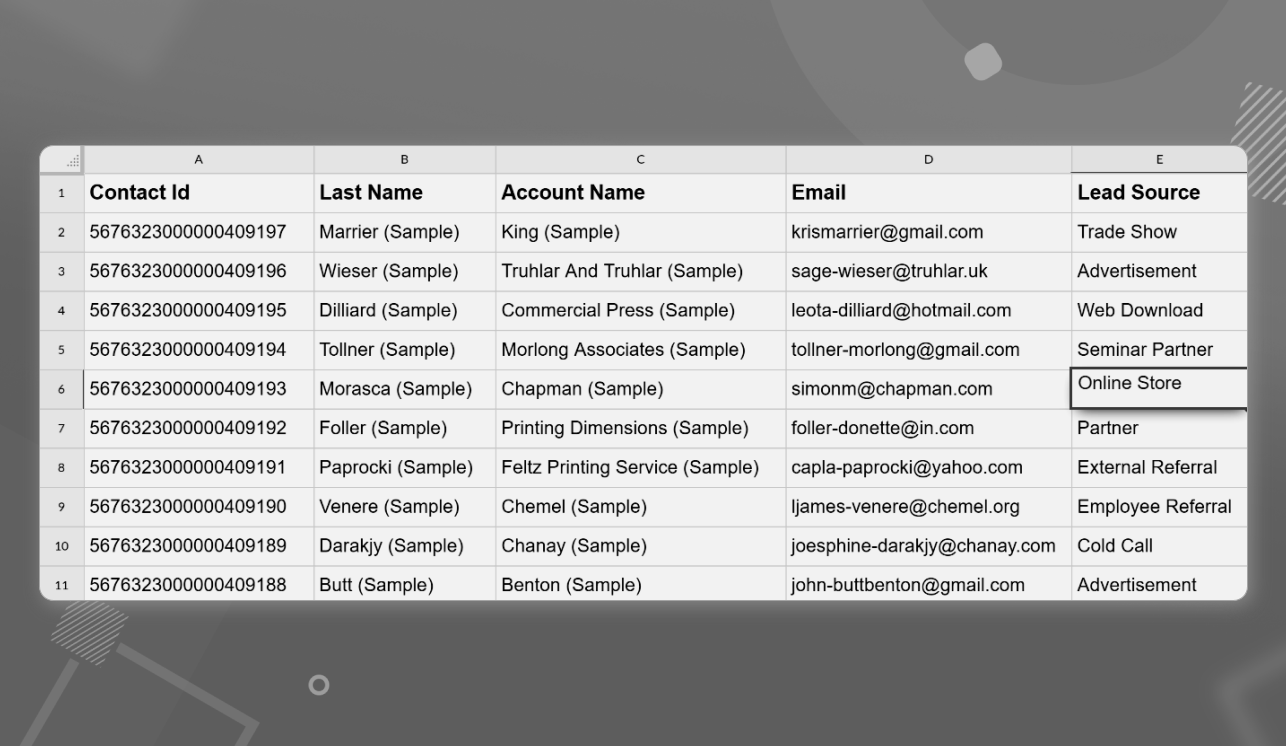
Now, we'd like to present an improved version of Zoho Sheet View, which is more user-friendly and quite powerful. It includes support for field validation and error messages, and most importantly, it can trigger automations. That means you'll be able to do your manual tasks in Zoho Sheet View quickly and without errors. Once you save your sheet, you can initiate workflows that will take care of automated tasks.
Notable improvements include:
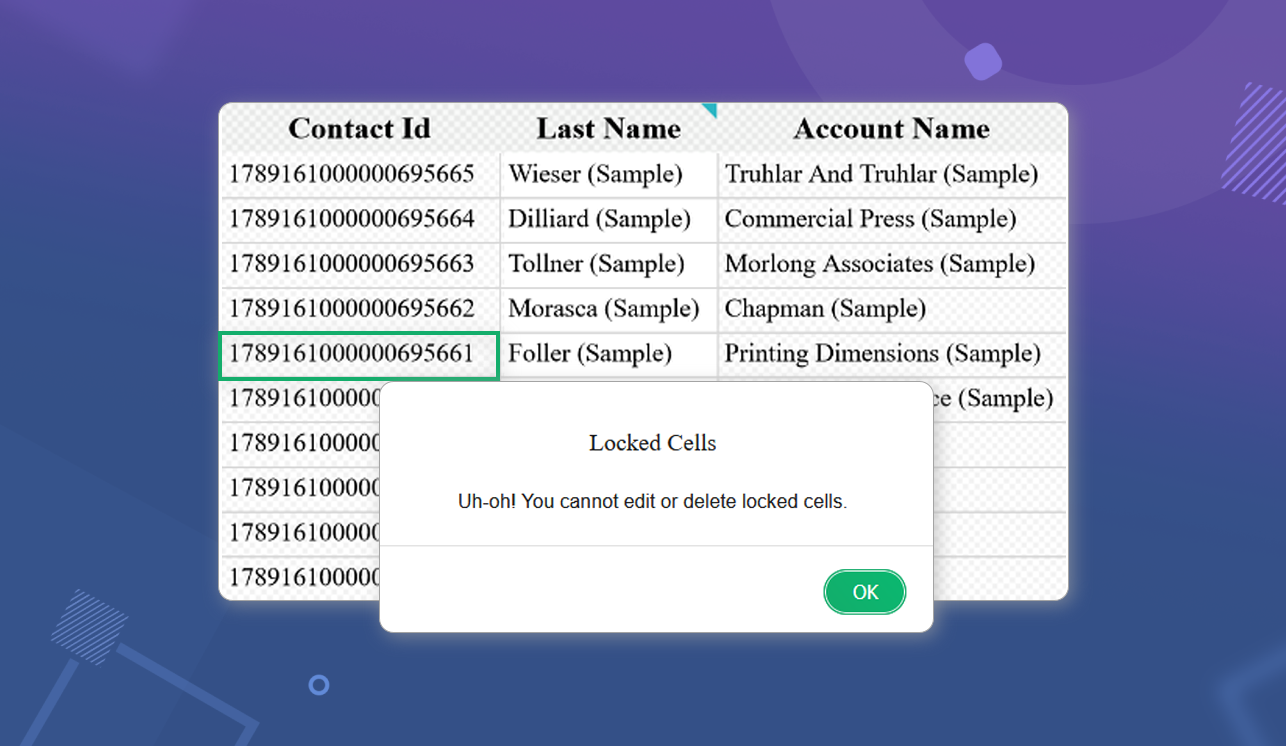
- Some fields and records will be locked to avoid mishaps. For example, read-only fields will be locked, as will records for which you don't have editing permissions.
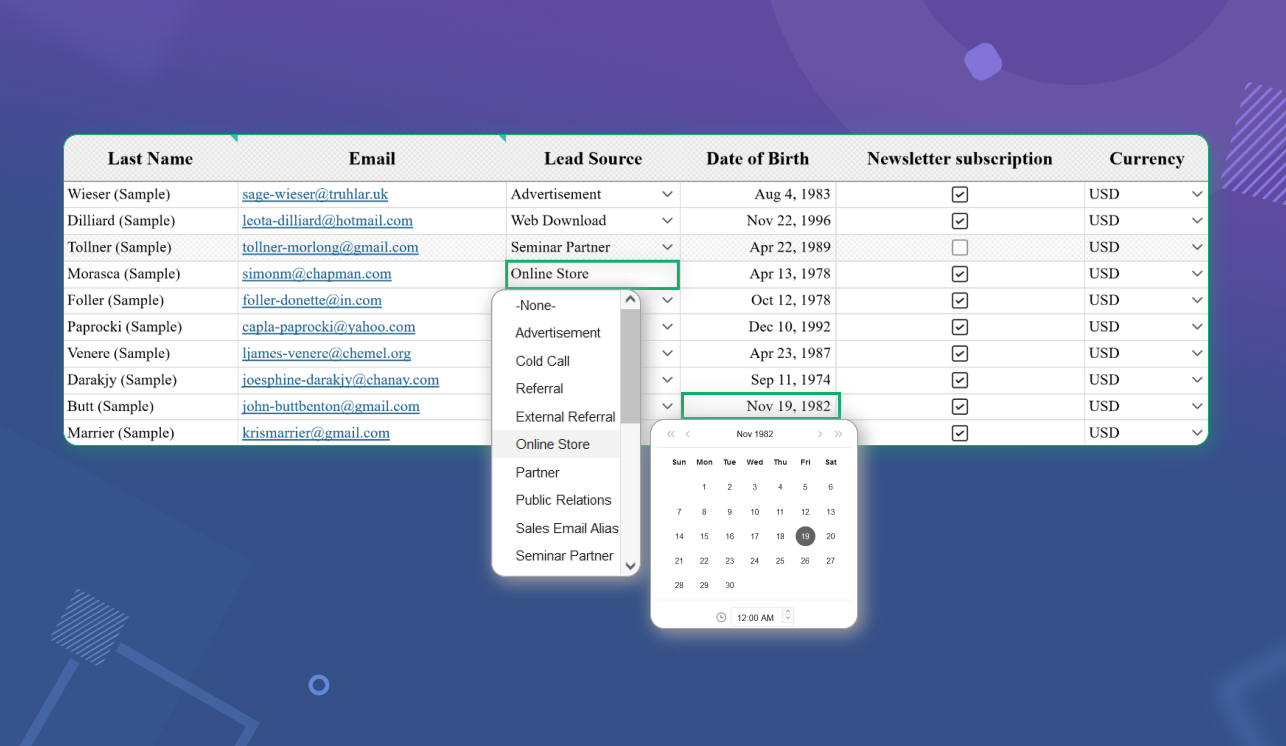
- Working with picklists, date-related fields, and checkboxes will be easier and quicker. Instead of typing in values by hand, you can pick values or toggle checkboxes.
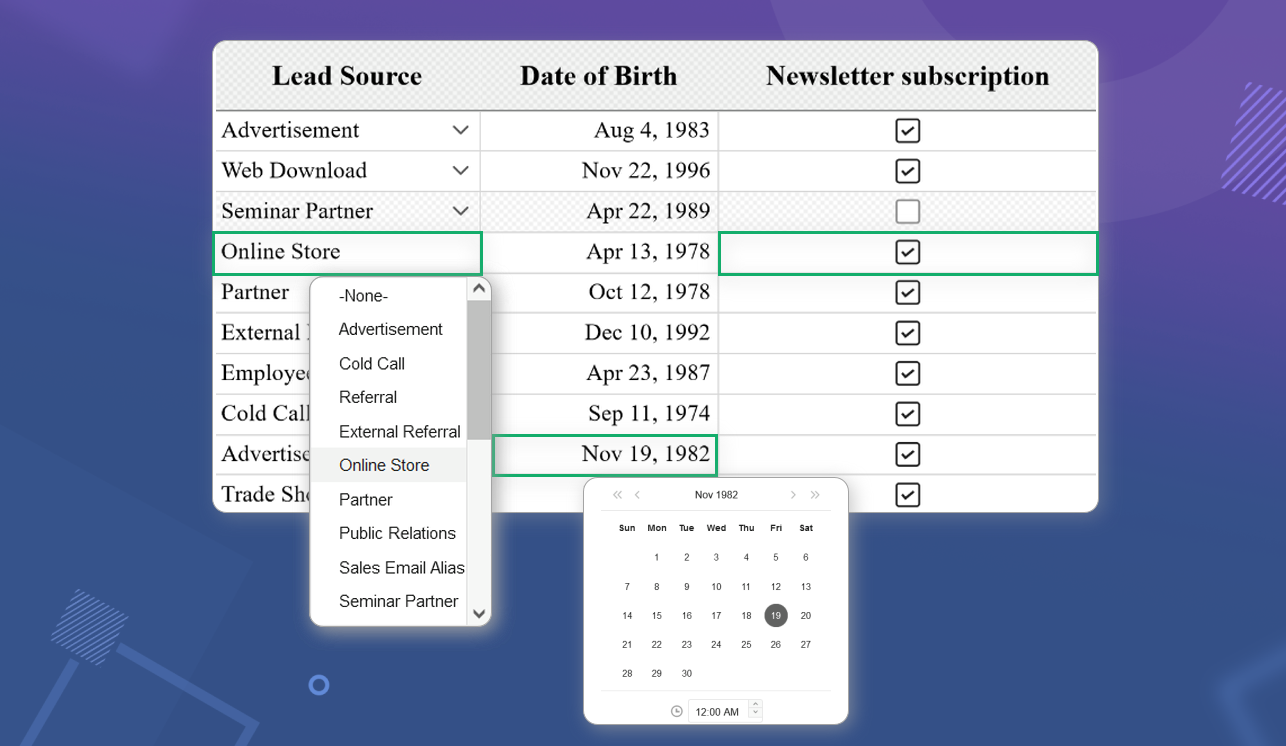
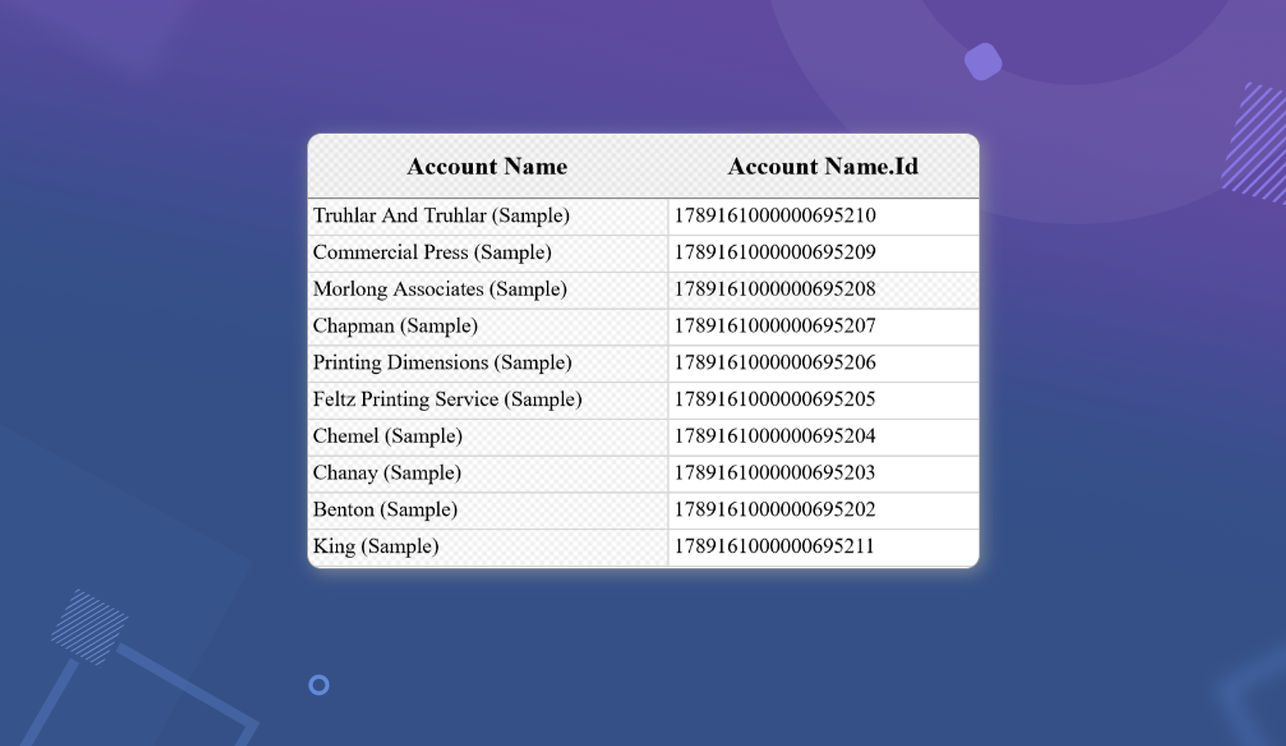
- You can safely update lookup fields by making changes in the lookup ID field. To change the owner of a record, enter the email address of any active user in the record owner column.
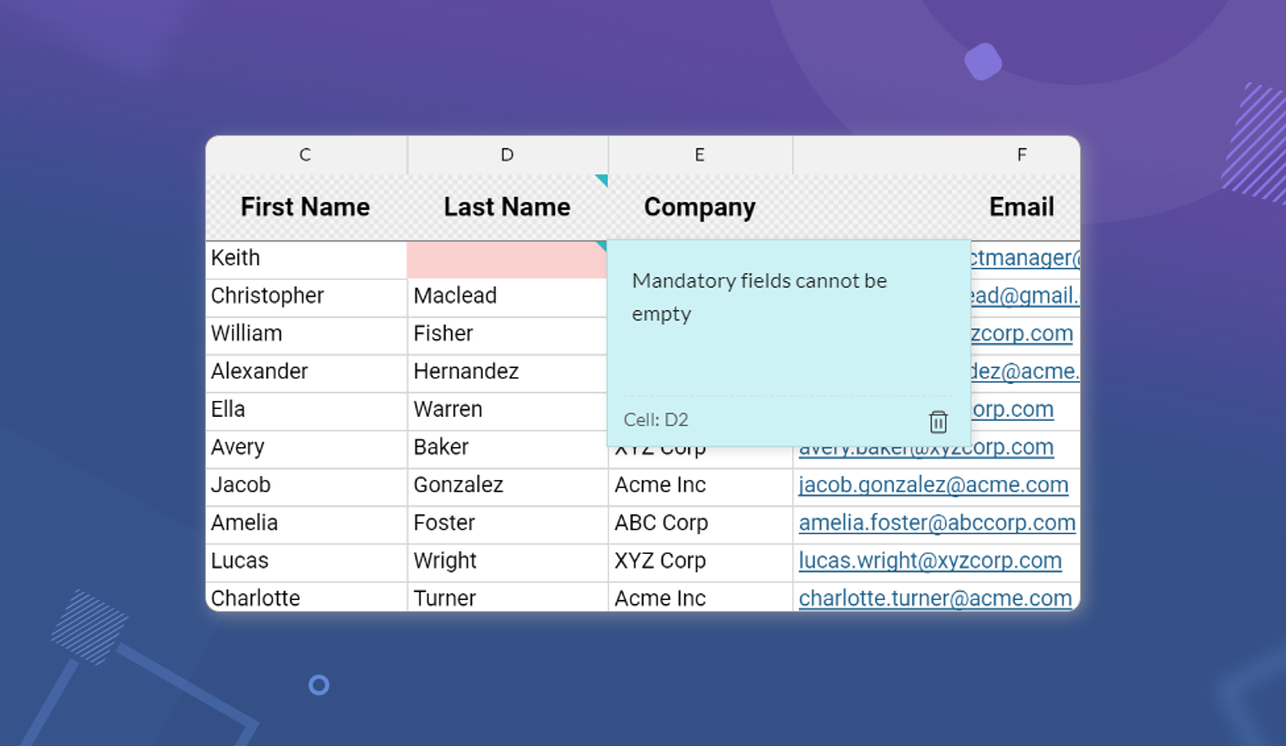
- The new view supports field validations like unique fields, maximum character length, and more. This helps avoid mistakes when entering data.
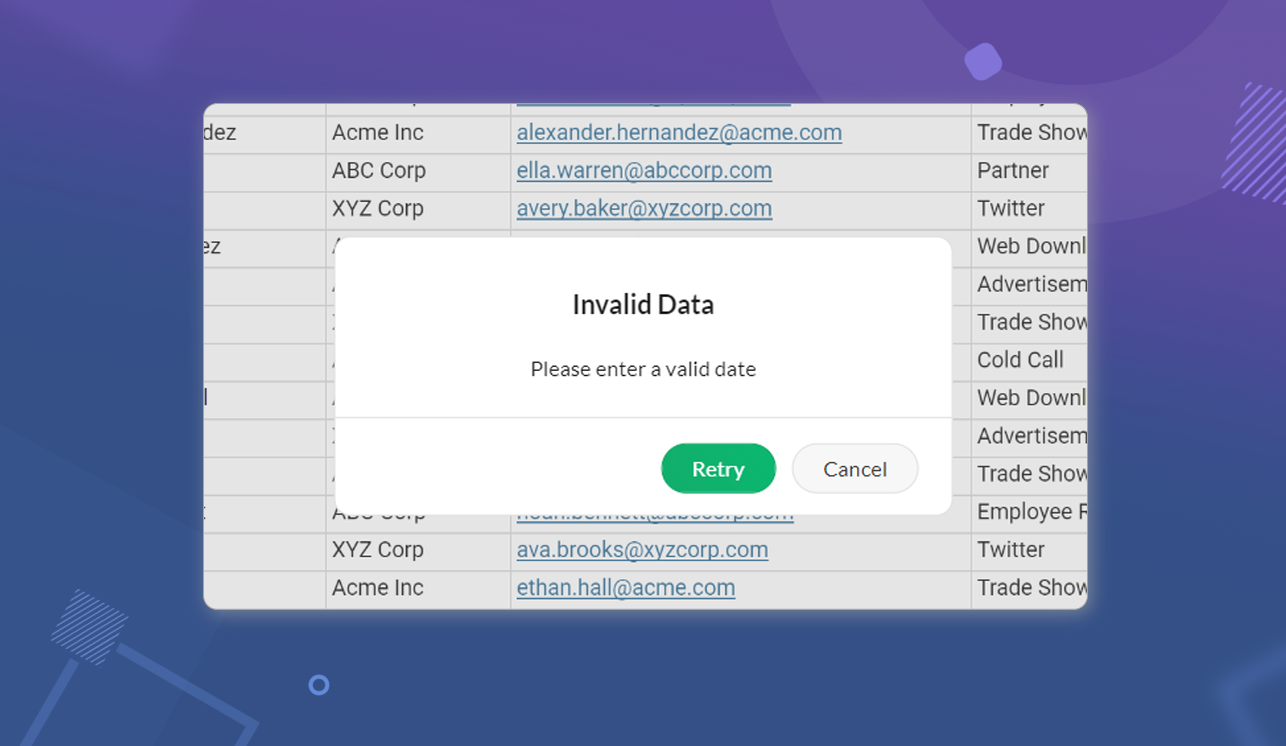
- Error messages will be displayed in the Sheet View itself.
- All automations will be triggered for changes made in Zoho Sheet View.
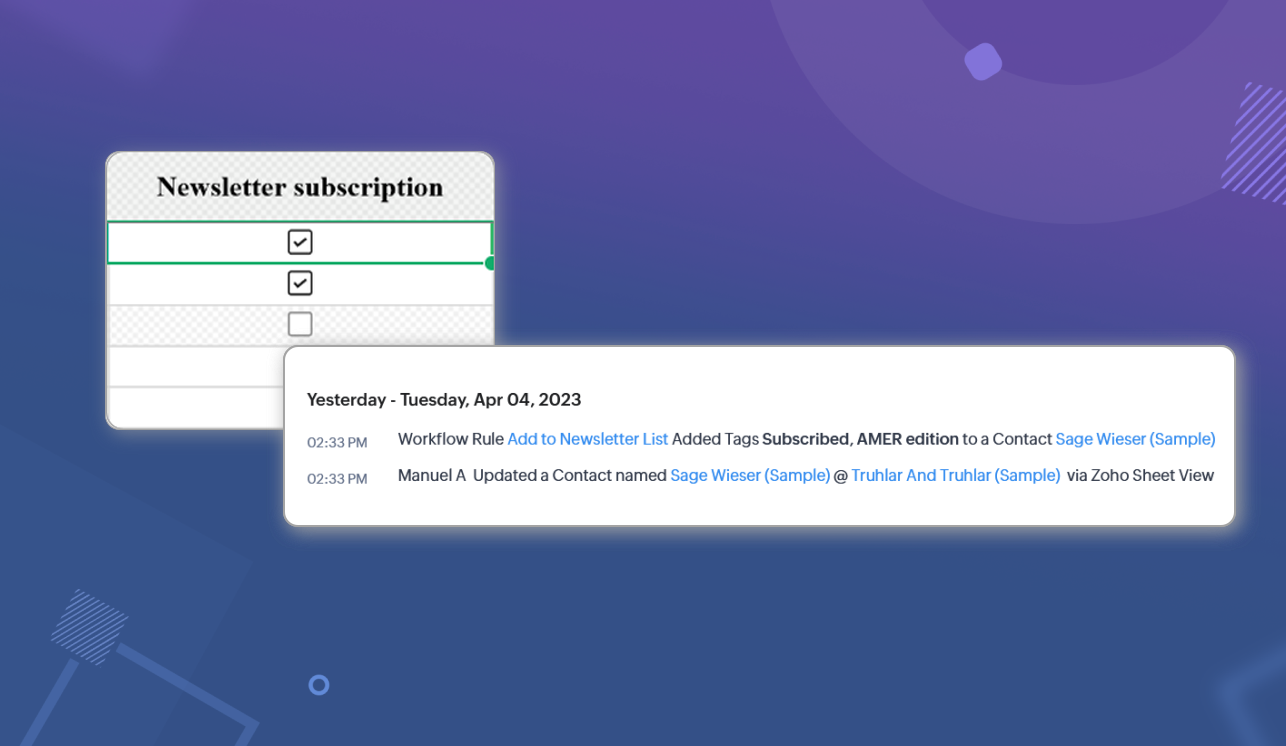
- Changes made using the Zoho Sheet View will appear as entries in the modified records' timelines and in the audit log.
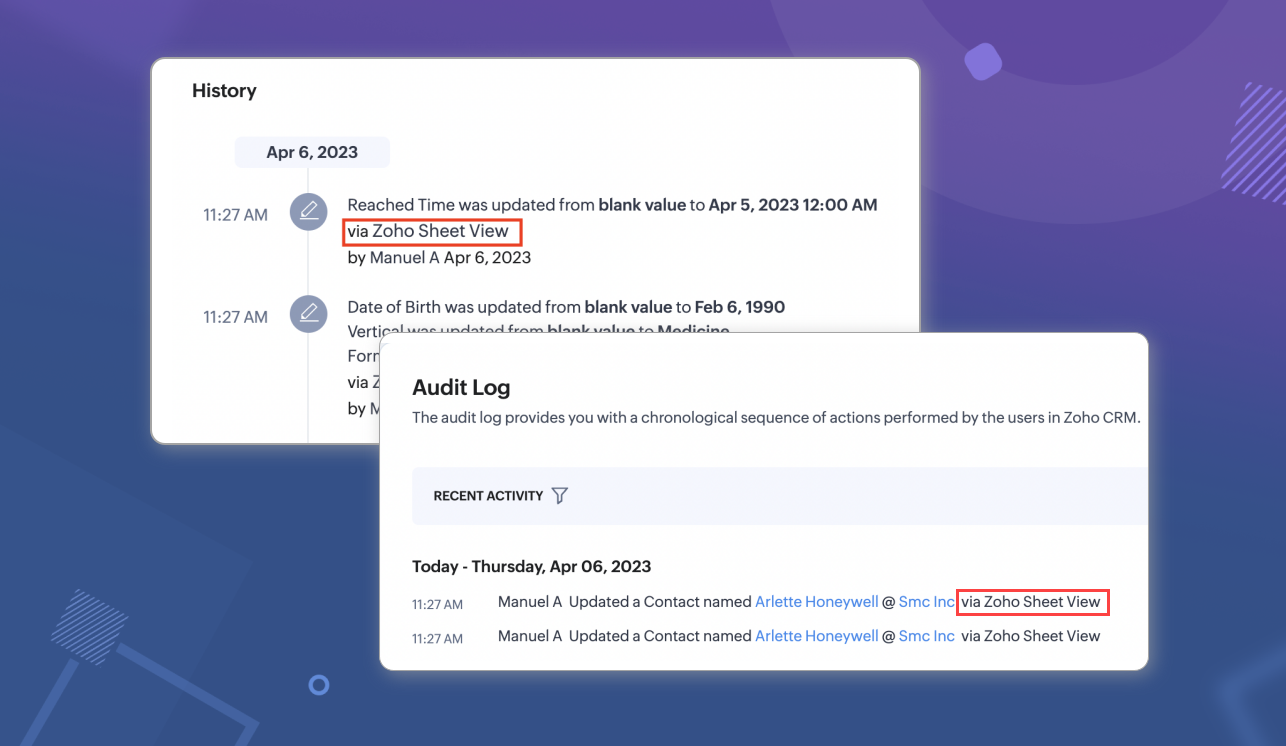
Aside from these improvements, you'll be able to save your sheet directly to your Zoho Sheet account, add tags, use your multi-select picklists, and more.
To learn more about this feature, please refer to our help document:
Using Zoho Sheet View
Availability
Editions: All editions
DC: All DCs
Limits
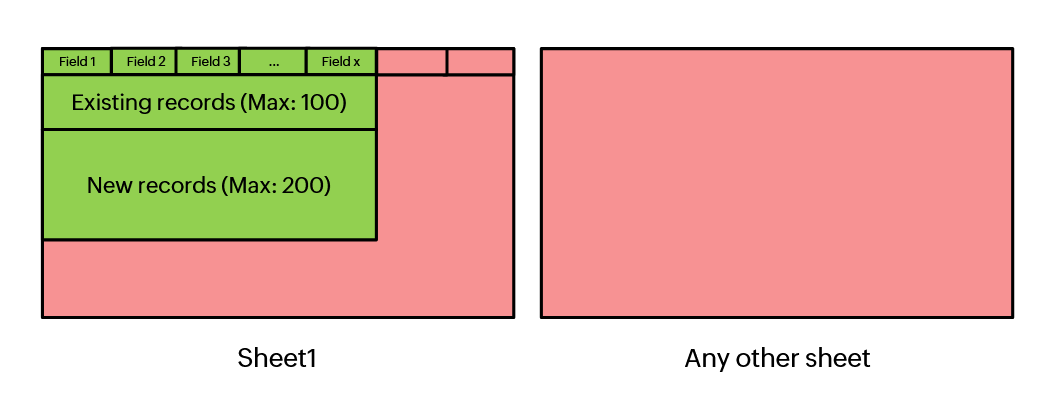
- You can add a maximum of 200 new records at once.
- The timeout for the sheet is 6 hours.
- The maximum number of records and fields available in Zoho Sheet View will remain the same.
- If data is entered outside the pre-defined columns and/or beyond the maximum number of rows, it will not be saved. In the diagram below, data entered in the region marked in green will be saved, while those entered anyplace else (marked in red) will be ignored.
Do try out this revamped version of Zoho Sheet View and let us know what you think!
Recent Topics
日本語フォントの選択肢拡充についての要望
日本語フォントの選択肢がとても少ないと感じたことはありませんか? 多くのアプリ(たとえば Invoice)ではフォントが1種類しかなく、正直あまり使いやすい・見た目が良いとも言えません。 そろそろ、もっと多くの日本語フォントを追加してほしい、そしてすべてのアプリで同じフォント選択肢を使えるようにしてほしいと、私たちユーザーが声を上げる時期だと思います。 ご存じのとおり、現状ではアプリごとにフォント周りの仕様にほとんど一貫性がありません。 みなさん、一緒に要望を出していきましょう!
Ask the Experts 26: Brighten every customer interaction with Zoho Desk all year long
Hello everyone, Greetings and welcome to Ask the Experts 26. As we wrap up 2025, we are excited to invite you to the 26th episode of our Ask the Expert series. 🎄The Merry Metrics Edition = Best of Zoho Desk [Best Practices + Holiday Automation + Year-End
Painfully Slow Zoho mail
Since yesterday Zoho Mail seems to have starting functioning very slowly and having a few bugs. It's slow to open mails, slow to send, slow to change between email accounts. Sometimes clicking on a particular folder (eg Sent folder) stops working and
Emails sent through Bigin are not posting in IMAP Sent folder
I have set up my email to work from within Bigin using IMAP. I am using IMAP so I can sync my email across multiple devices - phone / laptop / desktop / iPad / etc. I want all my emails to populate my email client (outlook & iphone email) whether or
GPS tracking only or Check out facility
Dear Team, Zoho CRM is quite robust CRM but till date i was waiting for the feature of having GPS tracking of Sales employees which is a common demand by all customers for thier field sales executives. We cover them by saying that CRM provides Checkin
Can I use a Standalone CRM Function as the Callback URL For Async Export Data API?
I am creating an export job using this API https://www.zoho.com/analytics/api/v2/bulk-api/export-data-async/create-export/view-id.html There is a "callbackUrl" key in the CONFIG object. I tried copying the URL for a standalone function in CRM which can
Discount on the transaction level in POS
"Is it possible to apply a discount on the total bill before tax in Zoho POS?" I want to apply a discount on the total transaction amount in Zoho POS, but the discount should be calculated before the taxes are applied. Is there an option to do this in
Zoho DataPrep switching Date Format
When using a pipeline that is importing Zoho Analytics data into Zoho DataPrep, the month and day of date fields are switched for some columns. For example, a Zoho Analytics record of "Nov. 8, 2025" will appear in Zoho DataPrep as "2025/08/11" in "yyyy/MM/dd"
Create Tasklist with Tasklist Template using API v3
In the old API, we could mention the parameter 'task_template_id' when creating a tasklist via API to apply a tasklist template: https://www.zoho.com/projects/help/rest-api/tasklists-api.html#create-tasklist In API v3 there does not seem to be a way to
Introducing Dedicated Modules for Plans, Addons, and Coupons in Zoho Billing
We’ve enhanced the way you manage Plans, Addons, and Coupons in Zoho Billing. Previously, all three grouped together under Subscription Items. Now, each one has its own dedicated module, giving you a cleaner and more intuitive experience. This update
Send Automated WhatsApp Messages and Leverage the Improved WhatsApp Templates
Greetings, I hope all of you are doing well. We're excited to announce a major upgrade to Bigin's WhatsApp integration that brings more flexibility, interactivity, and automation to your customer messaging. WhatsApp message automation You can now use
Converting Sales Order to Purchase Order
Hi All, Firstly, this code works to convert a sales order(SO) to a purchase order (PO) via a button, however I am running into an issue when I convert the SO where the values from the line items are not pulled across from the SO to the PO. The ones in
Gain control over record sharing with portal users through our new enhancement: criteria-based data exposure
Dear Customers, We hope you're well! Portals is a self-service avenue through which your clients can access and manage their direct and related data in Zoho CRM. This empowers them to be more independent and enables them to experience a sense of transparency
Jobs at multiple locations
Hi A lot of times we have same job open at multiple locations. So I would like an option where we can create a job and choose multiple locations. Currently we have to create individual jobs for each location. If we can create one job and mention multiple
From Zoho CRM to Paper : Design & Print Data Directly using Canvas Print View
Hello Everyone, We are excited to announce a new addition to your Canvas in Zoho CRM - Print View. Canvas print view helps you transform your custom CRM layouts into print-ready documents, so you can bring your digital data to the physical world with
Passing the CRM
Hi, I am hoping someone can help. I have a zoho form that has a CRM lookup field. I was hoping to send this to my publicly to clients via a text message and the form then attaches the signed form back to the custom module. This work absolutely fine when
Tag Adding Option in Kanban Card Customization Bigin CRM Mobile App
I would like to request an option to add and display tags on Kanban cards in the Bigin CRM mobile app. This feature would make it easier to categorize deals and quickly identify priorities while working on the go.
Empowered Custom Views: Cross-Module Criteria Now Supported in Zoho CRM
Hello everyone, We’re excited to introduce cross-module criteria support in custom views! Custom views provide personalized perspectives on your data and that you can save for future use. You can share these views with all users or specific individuals
Canva Integration
Hello! As many marketing departments are streamlining their teams, many have begun utilizing Canva for all design mockups and approvals prior to its integration into Marketing automation software. While Zoho Social has this integration already accomplished,
Ticket Status email
Good day, This was discussed in the past, but it would be helpful if we could have the system assign a custom response to a status. We have various statuses for tickets, e.g. "closed due to no response", or "Pending Status", it would be helpful for the
WhatsApp Voice Message Sending Option in Bigin CRM
I would like to request a feature that allows users to send WhatsApp voice messages directly from Bigin CRM. This would help improve communication efficiency and make it easier for teams to respond quickly to customer inquiries.
CRM: hosting a single html file in Zoho and displaying it as a widget
I have seen that CRM offers the option of uploading a web project to Zoho itself and displaying it as a widget in CRM. The instructions then talk about setting a development environment with Node and developing an application to upload to Zoho. But I
Synchronise item image between Zoho Commerce and Zoho Books/Inventory/CRM
Here is a blindingly simple idea to tie several Zoho products together. Zoho - please include a method to synchronise the item image (or images) from one Zoho application to another. For example, if you upload an item image in Zoho Inventory, a user should
How to change position button transtition of Blueprint?
Hi Everyone, Look at my screenshoot, it is possible move the reject button to the right? I couldn't find that setting in the blueprint. Thank you.
Marketer’s Space - WhatsApp Pricing Update: What Marketers Need to Know and Do
Hello Marketers, Welcome back to Marketer’s Space! WhatsApp made changes to their pricing model on July 1, 2025, moving from conversation-based pricing to a per-message pricing model. This week’s post focuses on what these changes mean for your WhatsApp
Zoho Desk Limitations
Good day, all, I would like to know whether others share my frustration with some of Zoho's limitations. Don't get me wrong, I like Desk (and I also have a subscription for Analytics), I have been with them for close to 10 years, and unfortunately, I
Multi file upload
Hi, I just wonder if one could upload multiple files in one shot, say between one and three files, without adding multiple File Upload fields? Thanks, Alalbany
Sorting Descending in a lookup
I have a case number lookup on multiple forms. I need the most recent added to appear at the top of the lookup or as the list of cases grom it's too much to scroll. Is there a way to have a look up sort descending?
Can we add custom fields to portal community profiles?
How do we add custom fields to our profile pages in our portal community? If we have the ability to add custom fields, will we be able to access those fields via API? We want to use our Desk community in our help portal as our primary community and would
Auto-upload Creator Files to WorkDrive
Hi everyone, I’m working on a workflow that uploads files from Zoho Creator to specific subfolders in Zoho WorkDrive, as illustrated in the attached diagram. My Creator application form has two multi-file upload fields, and I want—on successful form submission—to
Asap Widget 2.0
Where's the documentation for the new ASAP widget? https://www.zoho.com/desk/developers/asap/#introduction this one is outdated How can we dynamically navigate between different views? How can we prefill ticket forms using ASAP 2.0?
Update date & time when a cell is edited
Hi All, I am desiring to have a cell update with the current date and time when another cell is edited. Any ideas? Thank you
CRM x WorkDrive: File storage for new CRM signups is now powered by WorkDrive
Availability Editions: All DCs: All Release plan: Released for new signups in all DCs. It will be enabled for existing users in a phased manner in the upcoming months. Help documentation: Documents in Zoho CRM Manage folders in Documents tab Manage files
Can the Trigger be changed?
I'm afraid I already know the answer, but here goes... After activating a workflow (under Campaigns > Automations), Then later choosing to Edit the workflow, Can the Workflow's Trigger be changed? Currently the entire Trigger section + options are gone
Marketer's Space: Proven tips to improve open rates – I
Hello Marketers! Welcome back to another post in Marketer's Space! In this week's post, we'll discuss the ever-important concept of open rates. This will be a multi-part series, as we have a range of topics to cover. Open rates—which measure the percentage
Holidays
Hi; For defining Holidays, you need to add logic to handle the year as well as the month & day. We need to be able to enter Holidays for the next year. I need to add a holiday for January 2, 2017, but I can't until January 1st, which is a Sunday and we
Creating Custom PDF Template from Form
I am trying to create a custom PDF from form submissions. I have the standard subscription and it indicates that PDF forms are included. I cannot find anywhere to create PDF forms. I try to follow the instructions from here: https://help.zoho.com/portal/en/kb/forms/form-settings/pdf-settings/pdf-editor/articles/creating-your-own-pdf-template#Creating_your_template_from_the_scratch
Important Update: Facebook Metrics Deprecation & Impact on Zoho Analytics
Dear Zoho Analytics users, Facebook has deprecated a set of metrics from the Facebook Pages Insights API, effective November 15, 2025. As a result, these changes will affect any reports and dashboards in Zoho Analytics that rely on Facebook Pages data.
Quick Copy Column Name
Please add the ability to quickly copy the name of a column in a Table or Query View. When you right-click the column there should be an option to copy the name, or if you left-click the column and use the Ctrl+C keyboard shortcut it should copy the
Conditional Field Visibility in Bigin CRM
I would like to request support for conditional field visibility within Bigin CRM. This feature should allow administrators to configure show/hide rules for fields based on predefined criteria (e.g., field values, picklist selections, stage changes,
Next Page