Dear Customers,
We hope you're well!
Portals is a self-service avenue through which your clients can access and manage their direct and related data in Zoho CRM. This empowers them to be more independent and enables them to experience a sense of transparency with your business.
Here, the key term to notice is
direct and related data. The current portal setup serves clients only with their own primary and related data via a lookup field. Here's a pictorial representation of the current setup:
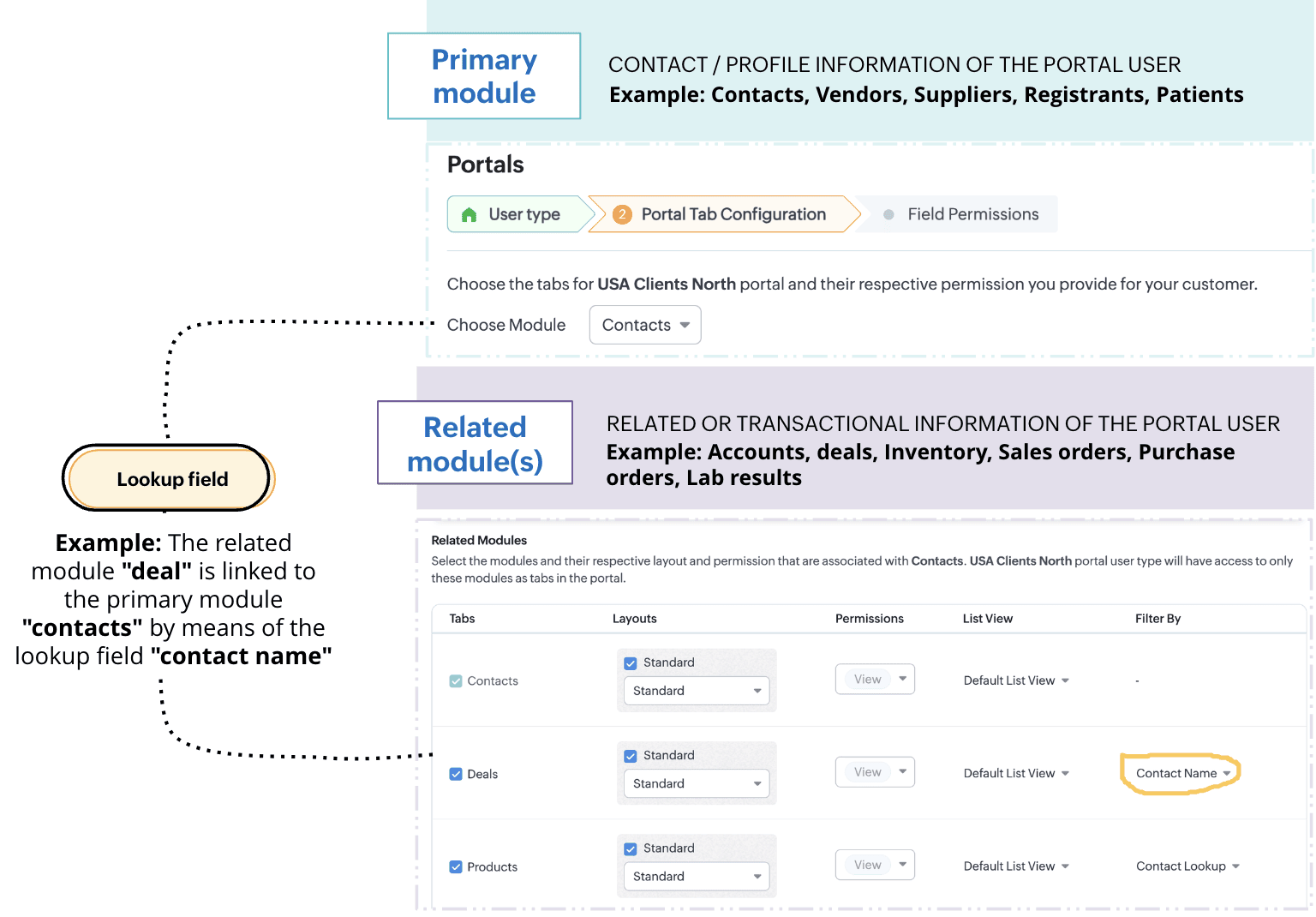
While having access only to their records gives customers authority over their information, it presents some notable challenges.
Challenge #1: Lack of control
A record undergoes two types of processes: customer-driven processes like conversion, negotiation, winning a deal, and more, and internal processes like approvals, discussions, and rejections. While the former keeps customers informed about the progress of their deals, the latter reveals the business' internal decision-making process. Administrative information isn't necessarily meant to be seen, but the current portal setup exposes each stage a record goes through, unconditionally. This poses a problem: The business lacks control over the kind of information that's shared.
Imagine this scenario: Patricia is your customer. She has access to her profile, deals, and quotes. She can manage data all by herself and track records as they progress. While having access to her own records empower her with independence, witnessing all the process changes—including approvals and rejections of discounts that aren't yet final—might cause her some anxiety. It also violates the business's privacy policies.
Challenge #2: Lack of flexibility
The portals you have now only enable you to share clients' personal and transactional records. Clients can only see their own data. But what if they want to access information other than their own? Or what if they want to view records with a particular trait?
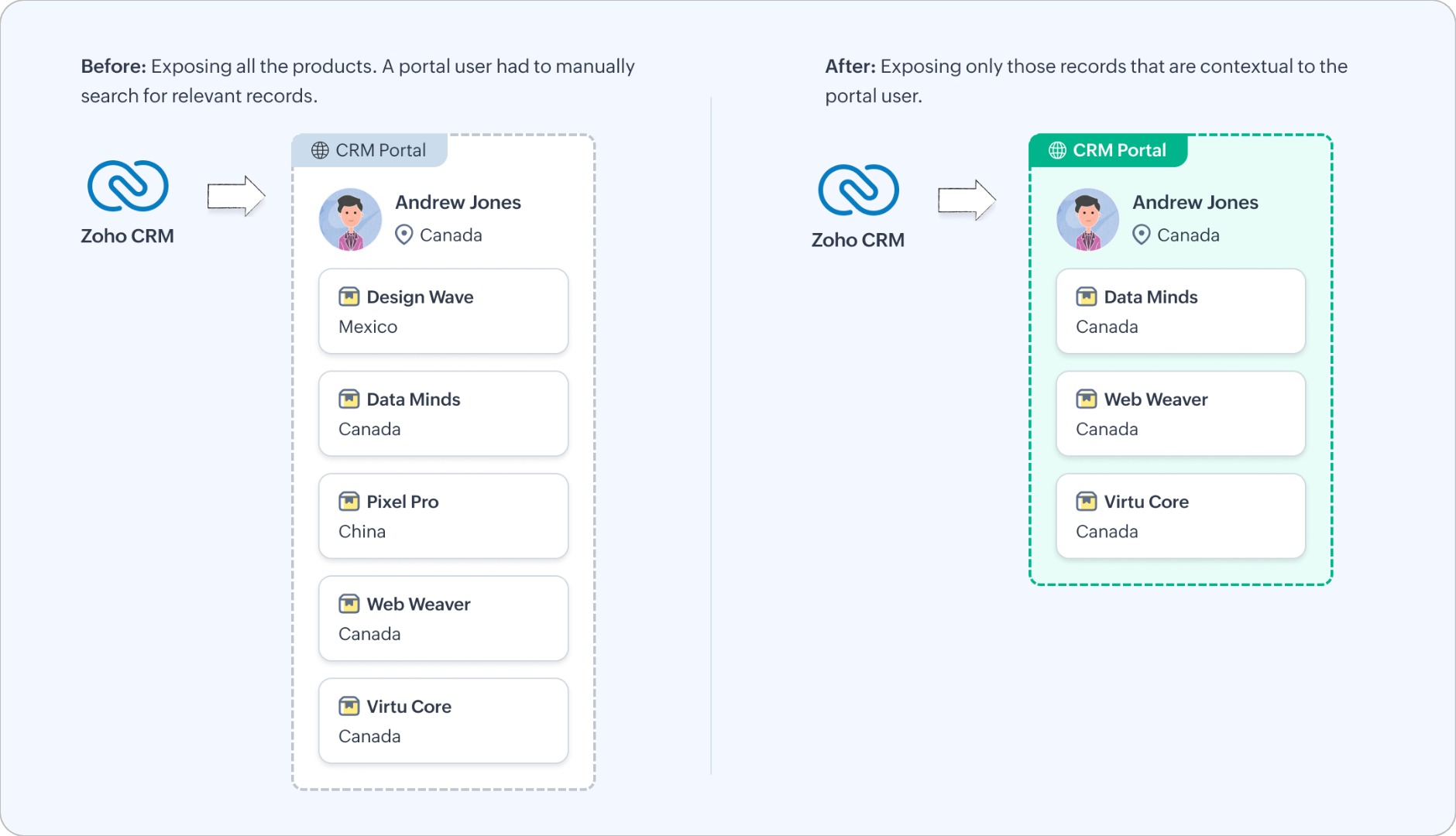
Say, for example, your business sells multiple products across Canada, and you want your portal users to see only the products available in their regions. This is a specific request that's based on the location of the customer. The current setup limits this requirement and fails to preserve context for the customer.
Thus, to give the admins control over any exposed information and simultaneously provide portal users with both flexibility and independence, we've developed an exciting addition to portals' data-sharing functionality: criteria-based data exposure.
Introducing criteria-based data exposure
Criteria-based data exposure is the ability to expose modules and data based on conditions that you use to control what data should be exposed and when, or to render contextual results for portal users.
Technically speaking, in addition to linking a primary module and a related module using lookup fields, admins can now define two types of criteria to expose other records with a particular trait in the module: match with fields and match with values.
Match with value: This criterion should be familiar to you as a seasoned Zoho CRM user. You can determine record eligibility by defining a field, operator, and qualifying value.
Example: Deal type is new business. All those deals that are new businesses will be displayed to the portal user.
Match with field: Here, the relationship between the related module and the primary module is established by mapping their fields. That is, the relationships between records in primary and related modules are established by fields with the same values.
Example: Implementation agent servicing area is the client's billing city.
Let's understand these criteria by addressing our initial challenges:
Solution for challenge #1 (lack of control)
By matching with value, we can allow Patricia to view her quote only after it reaches the approved stage. This way, your business's internal correspondence stays internal, and Patricia can track her quotes without any impact on her experience.
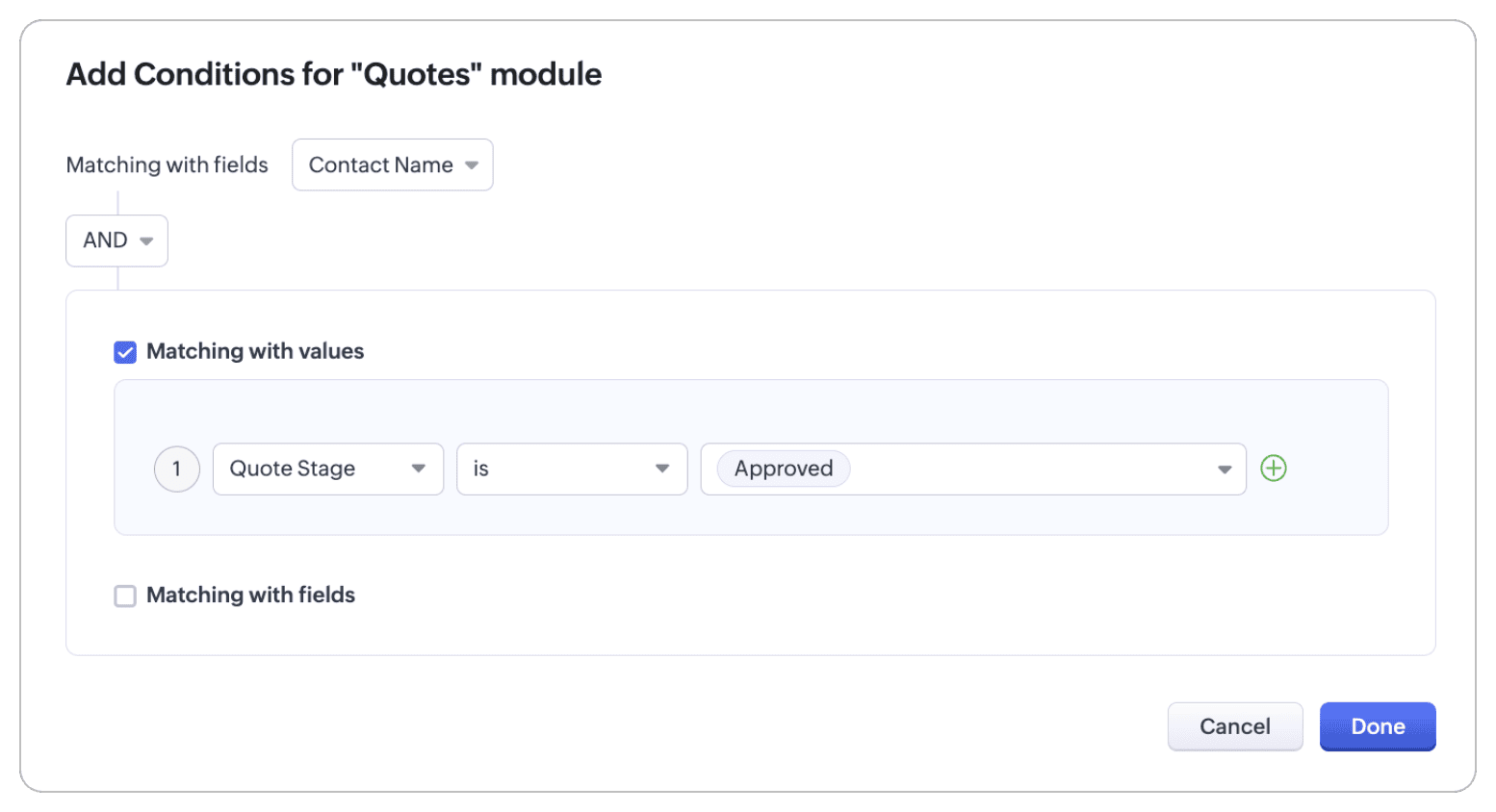
Below is how you can configure this feature. Again, let's suppose Patricia is your customer and that you want her to have access to her transactional data:
- Create a mutual lookup field called "Contact name" between the Contacts and Quotes modules.
- To control who can access this information, use the match by value criterion and add two conditions:
- Quote stage is approved
- Quote stage is not negotiating
This way, Patricia's quote is visible only when it reaches the approved stage.
Solution for challenge #2 (lack of flexibility)
With the match with field criterion, your portal user can view all products that are available in Canada.
Let's look at how you can configure this functionality.
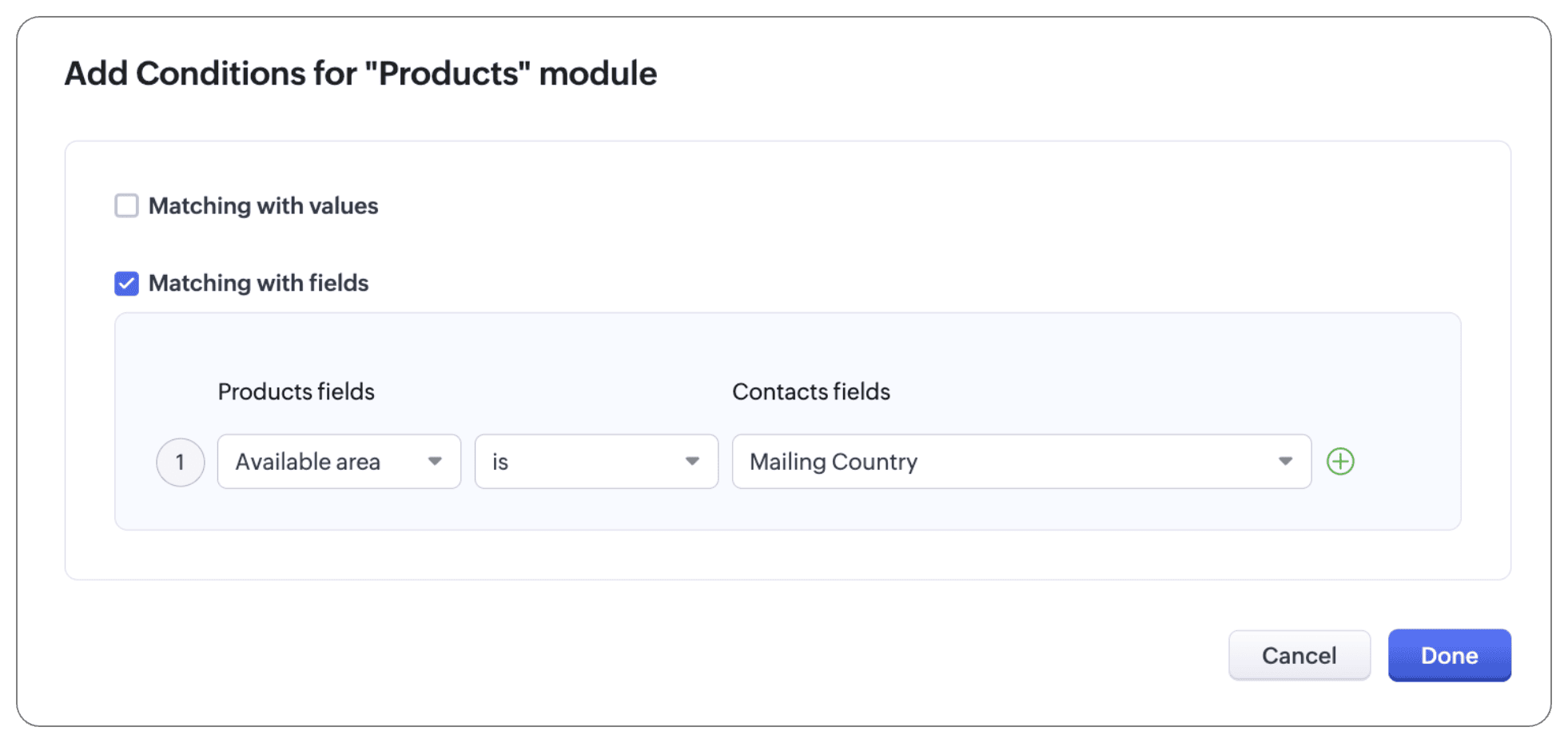
The Products module is a public module, accessible to all portal users, irrespective of their relationship to that module. To bring context to this setup, add a condition using the match by field criterion:
- Available area is mailing country
Note:
In addition to configuring criteria, you can also use an "and/or" conditional to follow these criteria. That is, you can use both criteria and lookup, or either of the three (criteria, or match with values, or match with fields), or one of the criteria and lookup.
For example, let's say your Implementation Specialist module has an exhaustive list of agents that implement servers in different areas, with varying levels and types of expertise. To display the agents the user hired as well as other agents for reference, we can configure conditions, as shown below:
- The primary module and the related module can be linked using the native lookup field to bring up agent records that users have hired directly.
- To display other agents in the location, let's use conditions:
- If the record matches with values, the customer can see all agents who belong to Michigan, Ohio, Chicago, Washington, and Indianapolis will be displayed.
- If the record matches with fields, the customer can see all agents whose service region matches the contact's mailing state.
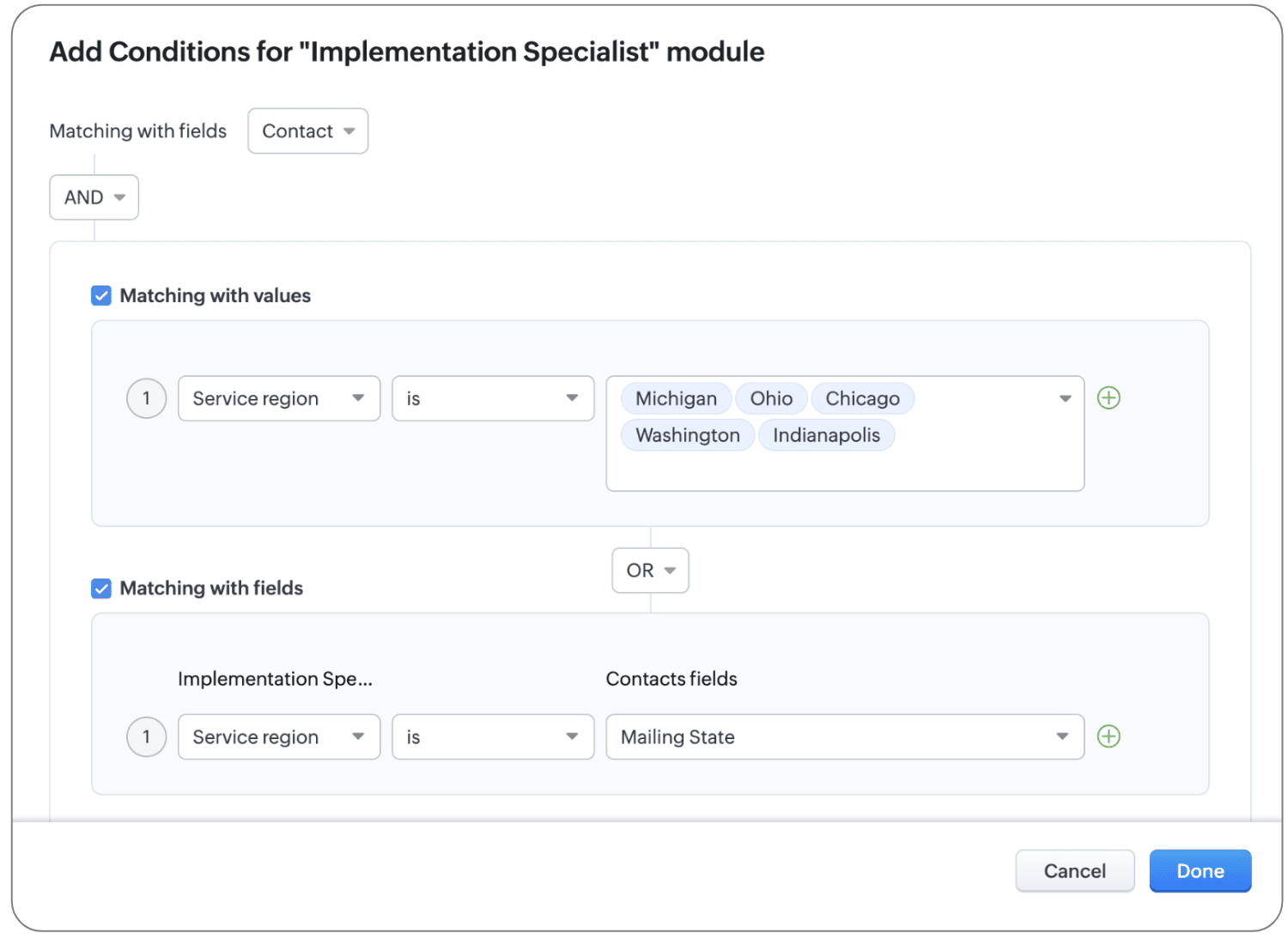
This way, both the agents directly hired by the contact and those agents that are from a desired location are displayed for portal users' reference.
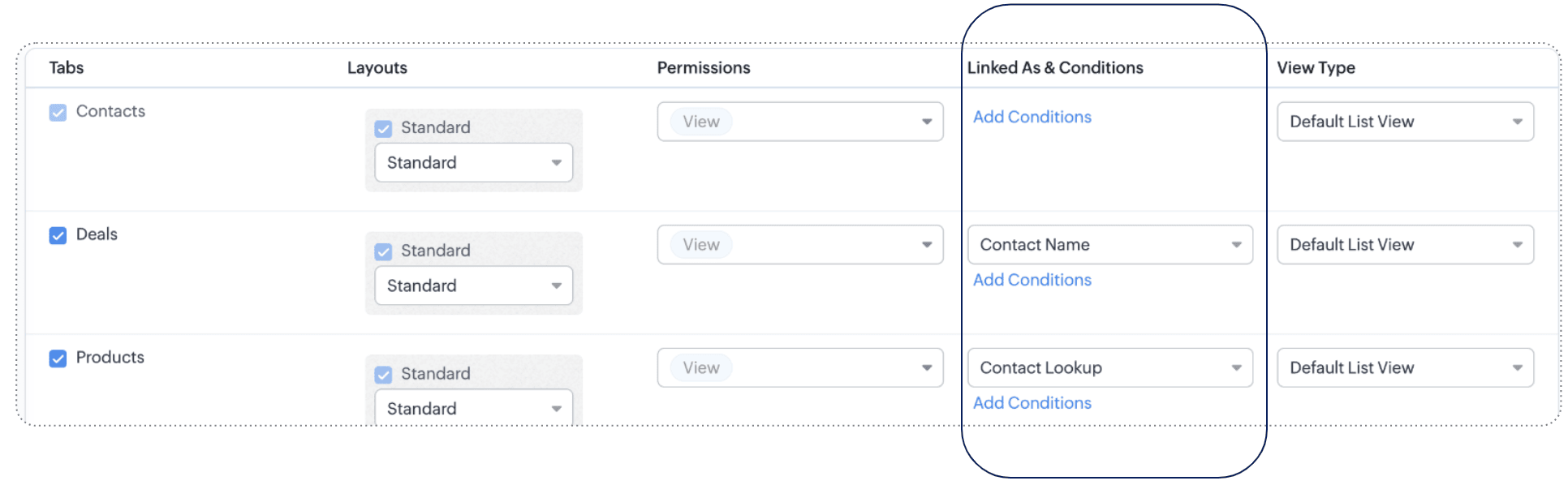
Thanks to these new criteria, we've updated the UI of the configuration page as well. What used to be called
Filter by column (where the lookup value is selected) has been renamed to
Linked as and conditions.
To understand the scope and impact of this enhancement, let's look at a couple more examples.
Example 1: Match with value
Let's say you sell electronics and accessories in bulk for large enterprise organizations. You've extended the following modules in portals for enterprise customers:
- Primary module: Contacts
- Related modules: Products, Invoices, Cases, Appointments
- Public module: Channel partners
So that customers can look at all the products applicable for enterprise customers, you've formulated some criteria: Lookup and Match by value. Customer type is Enterprise.
Now clients can see their contact records, their products (thanks to the lookup connection), and products for enterprise customers (thanks to the match by value criterion), as well as invoices, cases, and appointments related to them, and, finally, all channel partners.
Example 2: Match by field
Saint Laurent Hospital is a multi-specialty hospital in Iowa. They let their patients manage their profiles, view their prescriptions, order medicines from the pharmacy, view lab results, and book appointments with doctors using a dedicated portal.
This is their setup:
- Primary module: Patient's profile
- Related modules: The Prescriptions module, Lab Results module, and Appointments module are related with the primary module via lookup fields, and the Doctors module via the Match by field criterion.
- Public modules: Medicines
As you can see, records with personal data (prescriptions, lab results, appointments) are directly linked to the patient's profile using lookup fields, and to map the doctors to the patients' ailments, the complaint field from the patient's profile is linked to doctors whose specialization is also the same as the ailment. This means that the patient can see all the doctors whose specialization matches their complaint.
(i.e.) Specialization contains Complaint. IBS specialist contains IBS
That's all for this enhancement to the Portals configuration.
We hope these criteria will enhance your clients' experiences with your business. If you have any questions or concerns, please drop a comment. Let's connect!
Release plan: This enhancement is available for users in all DCs.
Resources: Portals in Zoho CRM
Thanks and kind regards,
Saranya Balasubramanian
Recent Topics
Exporting All Custom Functions in ZohoCRM
Hello, All I've been looking for a way to keep about 30 functions that I have written in Zoho CRM updated in my own repository to use elsewhere in other instances. A github integration would be great, but a way to export all custom functions or any way
filter on sheets mobile (iOS, iPadOS) does not work
I have this issue on every spreadsheet, whether imported or created natively in Zoho Sheets. I can use on desktop without issue: desktop screenshot on iOS the filter dropdowns are not there and there is no way to add them mobile iPadOS looks the same
【Zoho CRM】商談タブへのデータインポート
Zoho使用前にエクセルで管理していた商談情報を、Zoho一括管理のため、商談タブにインポートしたいのですが、お客さまの氏名だけが紐づけられませんでした。 「Zoho CRMにインポートする項目を関連付ける」のところが画像のようになっています。 (弊社では、「姓」を「★個人データ名」という項目名に変更し、フルネームを入れて使用しています。) どのようにしたら氏名をインポートできるかご存じの方がいらっしゃいましたら、ご教示いただきたく、よろしくお願いいたします。 (投稿先が間違っていましたらご指
Zoho Often Lag
Desk Team, We've noticed that Desk, Creator & other apps seems to lag more these days. We often refresh multiple times.
Canva Integration
Hello! As many marketing departments are streamlining their teams, many have begun utilizing Canva for all design mockups and approvals prior to its integration into Marketing automation software. While Zoho Social has this integration already accomplished,
Can't edit Segments
Happening with 2 different Zoho One environments, in different browsers. Please fix.
Zoho Sheet for Desktop
Does Zoho plans to develop a Desktop version of Sheet that installs on the computer like was done with Writer?
From Zoho CRM to Paper : Design & Print Data Directly using Canvas Print View
Hello Everyone, We are excited to announce a new addition to your Canvas in Zoho CRM - Print View. Canvas print view helps you transform your custom CRM layouts into print-ready documents, so you can bring your digital data to the physical world with
Transfer ownership of files and folders in My Folders
People work together as a team to achieve organizational goals and objectives. In an organization, there may be situations when someone leaves unexpectedly or is no longer available. This can put their team in a difficult position, especially if there
Consumer Financing
Does Zoho currently have a payment gateway (such as Stripe, Square, etc) which offers financing for customers? So, let's say the estimate we give the customer is greater than what they can afford at the time, but we can sell the service now, letting them
How can Data Enrichment be automatically triggered when a new Lead is created in Zoho CRM?
Hi, I have a pipeline where a Lead is created automatically through the Zoho API and I've been trying to look for a way to automatically apply Data Enrichment on this created lead. 1) I did not find any way to do this through the Zoho API; it seems like
validation rules doesn't work in Blueprint when it is validated using function?
I have tried to create a validation rule in the deal module. it works if I try to create a deal manually or if I try to update the empty field inside a deal. but when I try to update the field via the blueprint mandatory field, it seems the validation
Subform edits don't appear in parent record timeline?
Is it possible to have subform edits (like add row/delete row) appear in the Timeline for parent records? A user can edit a record, only edit the subform, and it doesn't appear in the timeline. Is there a workaround or way that we can show when a user
Zoho CRM - Option to create Follow-Up Task
When completing a Zoho CRM Task, it would be very helpful if there was an option to "Complete and Create Follow-Up Task" in the pop-up which appears. It could clone the task you are closing and then show it on the screen in edit mode, all the user would
Mandatory Field - but only at conversion
Hello! We use Zoho CRM and there are times where the "Lead Created Date & Time" field isn't populated into a "Contractor" (Account is the default phrase i believe). Most of my lead tracking is based on reading the Lead Created field above, so it's important
Zoho CRM for Everyone's NextGen UI Gets an Upgrade
Hello Everyone We've made improvements to Zoho CRM for Everyone's Nextgen UI. These changes are the result of valuable feedback from you where we’ve focused on improving usability, providing wider screen space, and making navigation smoother so everything
File Upload field automatically replaces spaces with underscores – support experience
Hi everyone, I want to share my recent experience regarding the File Upload field behavior in Zoho Creator and my interaction with the Zoho support team. When a user uploads a file, the system automatically renames the document by replacing spaces in
Deluge function to copy parent record file upload field to child record file upload field
I'm stuck trying to write a deluge function that is triggered via automation in child record "Appointments," confirms if a file is in file upload "Report" field of parent "Contacts" record via Contacts lookup field "Contact_Name". If no file is in parent
Zoho Books Sandbox environment
Hello. Is there a free sandbox environment for the developers using Zoho Books API? I am working on the Zoho Books add-on and currently not ready to buy a premium service - maybe later when my add-on will start to bring money. Right now I just need a
Make panel configuration interface wider
Hi there, The same way you changed the custom function editor's interface wider, it would be nice to be able to edit panels in pages using the full width of the screen rather than the currently max-width: 1368px. Is there a reason for having the configuration panel not taking the full width? Its impossible at this width to edit panels that have a lot of elements. Please change it to 100% so we can better edit the layouts. Thanks! B.
Image Compression Options
Much better if we have level of options to compress the image [20%, 40%...] We are dealing with service reports daily that has before and after photos (image field)- the file size too large and one thing, the current limit is 10mb or 15mb for report
Cannot get code to work with v2.mergeAndStore!
Please can someone help me pass subform items into a repeating mail merge table row using v2.mergeAndStore? I have a mail merge template created in Writer and stored in Workdrive. This template is referenced by a custom CRM function which merges all of
How to hide or archive a blog post temporarily in Zoho commerce website builder?
I would like to temporarily hide or archive a blog post in zoho commerce website builder so that it doesnt appear on my website till I enable it again. I tried to look for this option but could not find it. It only allows me to permanently delete a blog
Founders using Zoho — are you leveraging Zoho Campaigns + Zoho Social for thought leadership… or just sending emails?
I’ve noticed something interesting in the Zoho ecosystem. Many founders use Zoho Campaigns and Zoho Social for basic marketing—newsletters, scheduled posts, and announcements. But very few are using these tools strategically to: • Position themselves
WATERFALL CHART IN ZOHO ANALYTICS
Hi Team, I would like to know whether Zoho Analytics currently supports a Waterfall Chart as a built-in visualization type. If yes, could you please share the steps to create one? If not, is there any workaround or recommended method to build a Waterfall
How to mix different types of inputs (such as dropdown list and textbox)
Hi, I'm creating a form called "Room Reservations" for a company. I created a "table" using "Matrix Choice". I created "Room 1", "Room 2" and "Room 3" with the "Questions". I would then like to create two columns with the "Answers", one called "Department"
Full Context of Zoho CRM Records for Zia in Zoho Desk for efficient AI Usage
Hello everyone, I have a question regarding the use of Zia in Zoho Desk in combination with CRM data. Is it possible to automatically feed the complete context of a CRM record into Zia, so that it can generate automated and highly accurate responses for
Ability to assign Invoice Ownership through Deluge in FSM
Hi, As part of our process, when a service appointment is completed, we automated the creation of the invoice based on a specific business logic using Deluge. When we do that, the "Owner" of the invoice in Zoho FSM is defaulted to the SuperAdmin. This
Reply to Email for SO/PO
Hello, We are new to Zoho Books and running into an issue. Our support@ email is our integration user. When our team is sending out PO/SO's we are updating the sender email, but for some reason many of our responses are coming back to our support@ email
How to Convert NSF to PST Format Effortlessly? - SYSessential
It is highly recommended to obtain the error-free solution of the SYSessential NSF to PST converter to convert NSF files from Lotus Notes. Using this professional software, it becomes easier to convert all NSF database items, including emails, journals,
Zoho Commerce - Poor Features Set for Blogging
Hi Zoho Commerce team, I'm sure you will have noticed that I have been asking many questions about the Blogs feature in Commerce. I thought that it would be useful if I share my feedback in a constructive way, to highlight the areas which I feel need
Pass shipping info to payment gateway Zoho Books to Authorize.net
For some reason the integration from Zoho books to Authorize.net does not pass the shipping address. Authorize.net is ready to receive it, but zoho books does not send it
Massive Zoho Books failure
We have not received any communication or notification from Zoho, but we have detected that Zoho Books is not working for all our users. We cannot access or use Zoho Books. This is critical. We are trying to contact Zoho on the Spain telephone number,
Does the Customer “Company Name” field appear anywhere in the Zoho Books UI outside of PDFs?
Hi everyone, I’m trying to understand how the Company Name field is actually used in Zoho Books. There is a Company Name field on the customer record, but when viewing transactions like a Sales Order in the normal UI (non-PDF view), that field doesn’t
Email outbox is now available in the sandbox
Hello all! Testing emails without visibility has always been a blind spot in the sandbox. With the new Outbox, that gap is closed. You can now view and verify every email triggered from your sandbox, whether it’s through workflows, approvals, or mass
Zoho Desk blank screen
opened a ticket from my email, zoho desk comes up blank, nothing loads. our receptionist also gets the same thing under her login on her computer. our sales rep also gets same thing on zoho desk at his home on a different computer. I tried clearing cache/history/cookies,
Looking For Recruit Developer
Hi everyone, I am looking for a Zoho Certified Developer to assist with a development project for MetalXpert. We are building a software system designed to bridge the gap between a candidate mobile app and an employer web portal using Zoho Recruit as
sales IQ issue on website
i integrated the zoho sales IQ code on the website but it is comming in distroted form i am sharing the screenshot below the website is bulit in wix platform
Multi-currency and Products
One of the main reasons I have gone down the Zoho route is because I need multi-currency support. However, I find that products can only be priced in the home currency, We sell to the US and UK. However, we maintain different price lists for each. There
Deprecation of the Zoho OAuth connector
Hello everyone, At Zoho, we continuously evaluate our integrations to ensure they meet the highest standards of security, reliability, and compliance. As part of these ongoing efforts, we've made the decision to deprecate the Zoho OAuth default connector
Next Page