Kaizen #161: Global Sets using Zoho CRM APIs
Hello all!
In this week, we will see how to work on the Global Sets using our Zoho CRM APIs. Global Picklist APIs were introduced in Zoho CRM API version 6.
In this post, we will cover the following
- Global Sets in Zoho CRM
- Advantages of the Global Sets
- Use case
- Create a Global Set using the POST Global Picklist API
- Use the Global Set with a Picklist Field in the Required Modules
- Update the Global Set Values Using the PATCH Global Picklist Field API
- Conclusion
Global Sets in Zoho CRM
Zoho CRM offers an efficient way to maintain a set of data that will be used commonly across the modules to maintain accuracy via the Global Sets or Global Picklists.
Global Sets or Global Picklists are collections of picklist values that can be associated with multiple picklists across modules. When you create Global Sets, you define a set of values that can be associated with fields in different CRM modules, ensuring uniformity in data input across your organization. Refer to this link to know more about Global Sets.
Advantages of Global Sets
- Consistency: The same list of values is available across multiple modules, reducing errors and inconsistencies in data entry.
- Time-saving: You do not have to update picklist values in each module manually. Once updated centrally, changes reflect across all associated fields in all modules.
- Scalability: Easily expand your picklist when your business grows, adding new values (e.g., Adding new showroom location for franchises) without repetitive work.
- Easy Management: Centralized management of picklist values means less administrative work.
Use case
Global Picklist for Showroom Locations at Zylker Electronic Franchise
Zylker, an electronics business franchise, operates several showrooms across multiple cities, all managed in Zoho CRM. As the franchise expands, they need to add new showrooms to various modules such as Leads, Deals, and Services frequently. Whenever a new showroom opens, they can update the Global Picklist, ensuring that all modules are updated instantly and preventing inconsistencies.
In these situations, different teams manually entering showroom locations in the picklist field can lead to mistakes like typos or different spellings of the same location.
By implementing a Global Picklist for "Showroom Location," Zylker ensures that all teams select from the same list of showroom locations.
Create a Global Set using the POST Global Picklist API
Create a Global Set with the desired values.
Request URL: {api-domain}/crm/{version}/settings/global_picklists
Request Method: POST
Request Body:
{ "global_picklists": [ { "display_label": "Showroom Location", "description": "Use this picklist option to manage showroom locations across all modules in your CRM.", "pick_list_values": [ { "display_value": "New York Showroom", "sequence_number": 1, "actual_value": "New York Showroom" }, { "display_value": "Los Angeles Showroom", "sequence_number": 2, "actual_value": "Los Angeles Showroom" }, { "display_value": "Chicago Showroom", "sequence_number": 3, "actual_value": "Chicago Showroom" }, { "display_value": "Houston Showroom", "sequence_number": 4, "actual_value": "Houston Showroom" } ] } ] } |
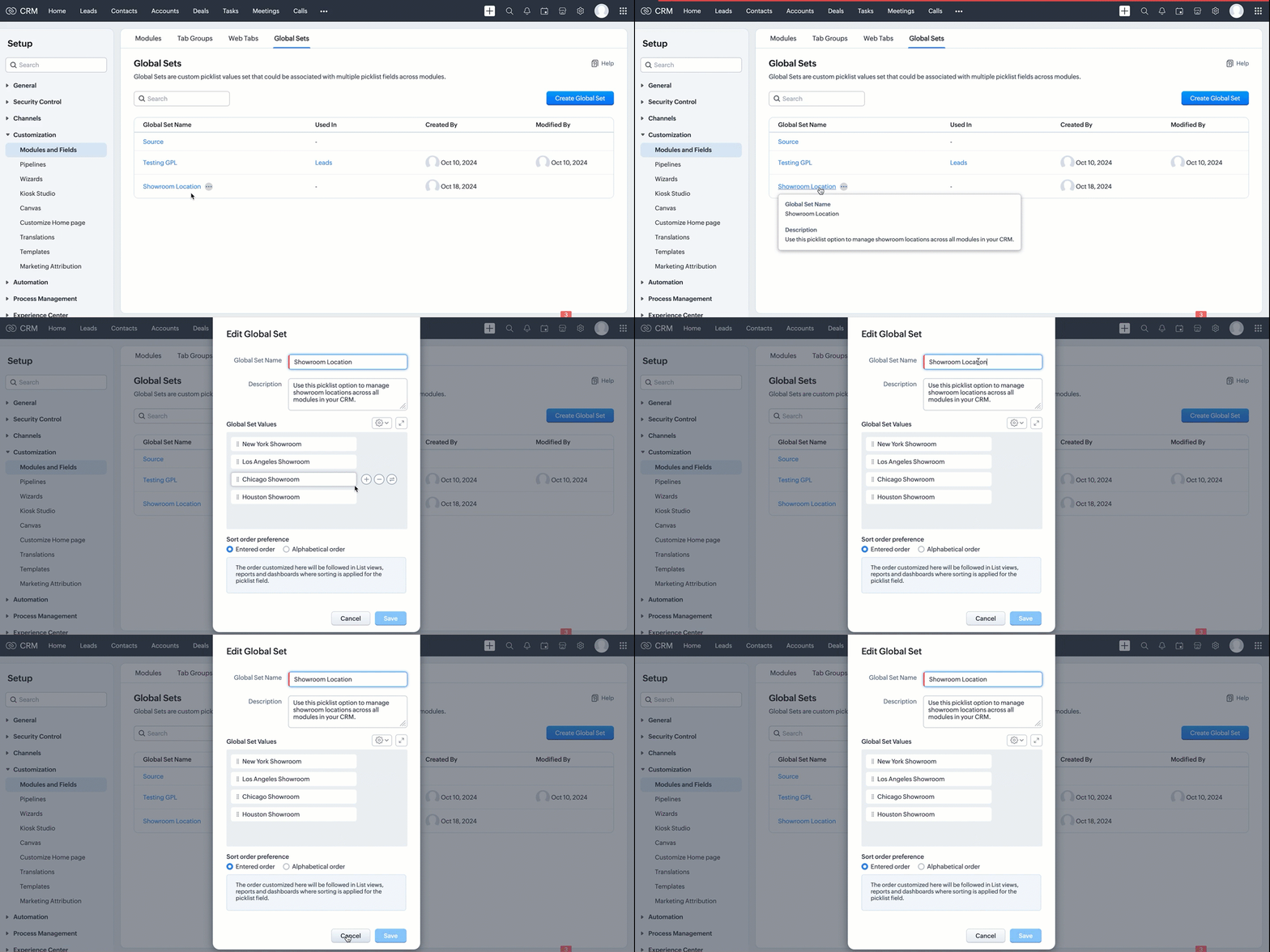
If the API call is successful, a global picklist will be created with the specified options. The following GIF demonstrates the newly created global picklist in the UI.
Use the Global Set with a Picklist Field in the Required Modules
Create picklist fields in the required modules, such as Leads and Contacts, and link the created Global Set with a picklist field in modules using the Create Custom Field API.
Follow the below steps to link the created Global Set with a picklist field in a module.
Step 1: Retrieve the unique ID of the Global Set
Retrieve the unique ID of the created Global Set using the GET - Global Picklists API to link it with a picklist field. The below URL retrieves all Global Sets in your org.
Request URL: {api-domain}/crm/{version}/settings/global_picklists
Request Method: GET
Response:

The API retrieves all available Global Sets in the organization.
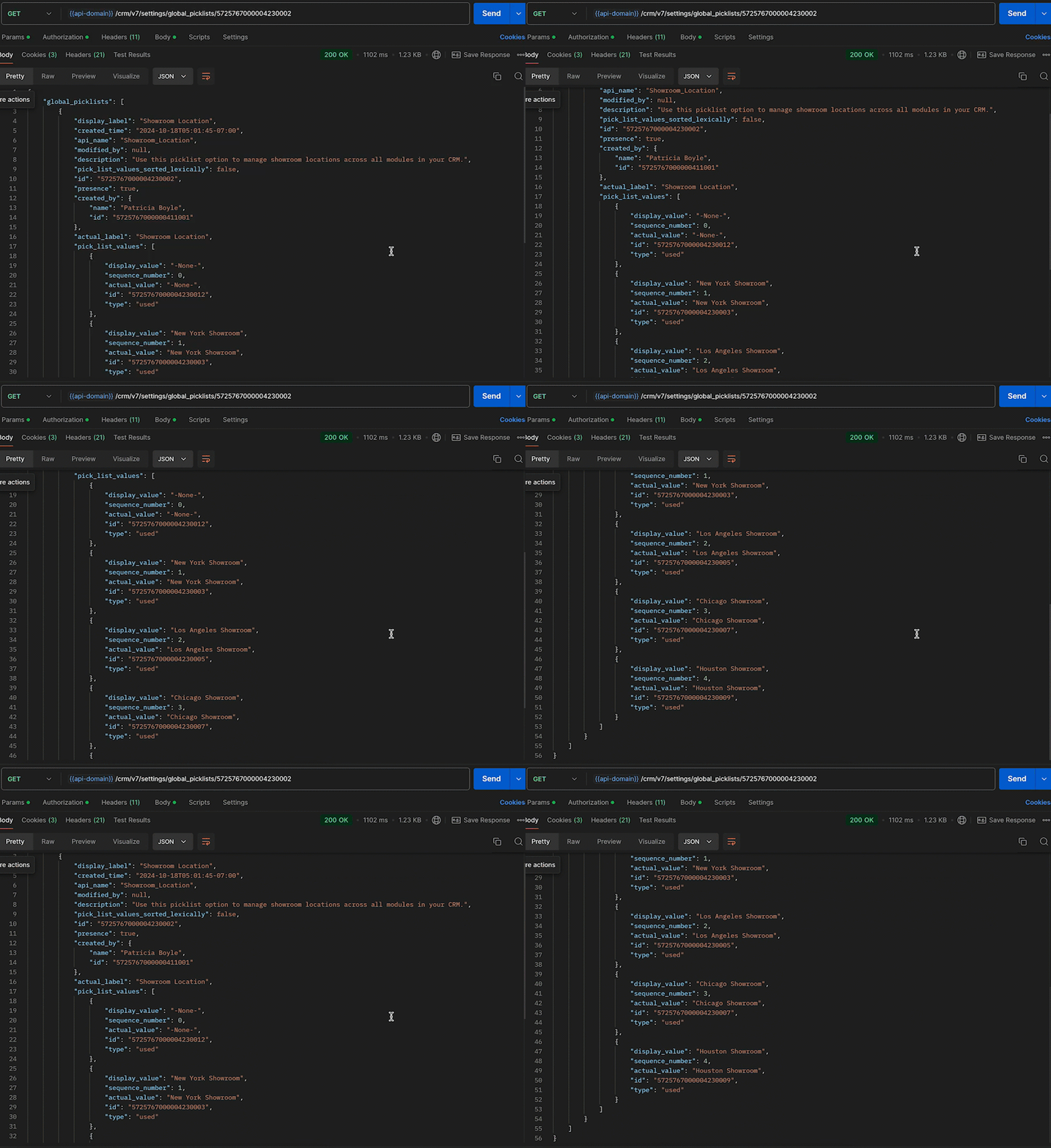
In this case, the "Showroom Location" field needs to be associated with the modules, and its unique ID is 5725767000004230002. Use the following request URL to view the specific global picklist field along with its options.
Request URL: {api-domain}/crm/{version}/settings/global_picklists/5725767000004230002
Request Method: GET
Response:
Step 2: Use the Global Set in the desired module
Create a new picklist field in the required modules and associate the "Showroom Location" Global Set with the picklist field.
- Leads - To track customer inquiries by showroom location.
- Deals - To monitor sales by showroom location.
- Sales Orders - To process orders based on showroom location.
- Service Requests - To handle customer service tickets by showroom location.
This post uses the "Leads" module as an example. Use the Create Custom Field API to associate the Global Set with the Leads module.
Request URL: {api-domain}/crm/{version}/settings/fields?module=Leads
Note: The module parameter is mandatory to create a field in a module.
Request Method: POST
Request Body:
{ "fields": [ //Associating the Showroom Location Global Set with the Leads module { "field_label": "Showroom", //The Showroom field in the Leads module, where the "Showroom Location" Global Set is associated "data_type": "picklist", //To associate a global picklist, use the data type "picklist" "global_picklist": { "id": "5725767000004230002" //ID of the global picklist } } ] } |
Response in the UI:
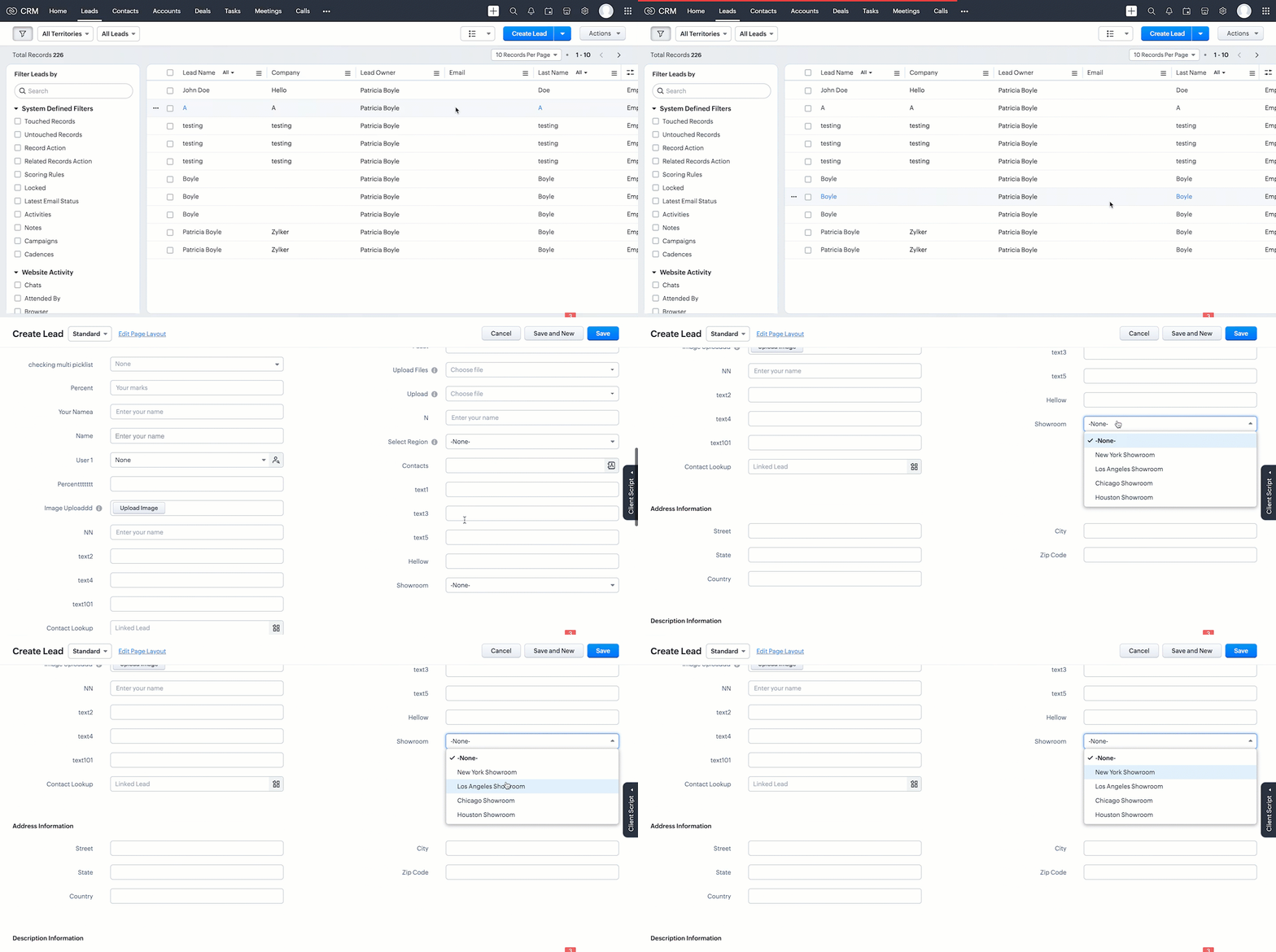
Use the above process to create the Global Set across modules using the Create Custom Field API.
Below are the request URLs to associate the field with other modules as per our use case:
|
Update the Global Set Values Using the PATCH Global Picklist Field API
Any changes made to the Global Set will automatically reflect across all modules associated with it. Use the PATCH - Global Picklist Field API to update the values in a Global Set.
Request URL:
{api-domain}/crm/{version}/settings/global_picklists/5725767000004230002
Request Method: PATCH
Request Body:
{ "global_picklists": [ { "pick_list_values": [ { //"display_value": "New York Showroom", "id": "5725767000004230003", "type": "unused" // to move the option to the unused state }, { "display_value": "Chicago Showroom", "sequence_number": 3, "actual_value": "Chicago Showroom", "id": "5725767000004230007", "type": "unused", "_delete": null // deleting the option from the global Field }, // Creating a new option or adding a new showroom location to the Global Set { "display_value": "San Francisco Showroom", "actual_value": "San Francisco Showroom" }, { "display_value": "Boston Showroom", "actual_value": "Boston Showroom" } ] } ] } |
Using the PATCH Global Picklist API, you can easily manage and perform various operations. In the above request, Zylker performed the following operations:
- Moving an Option to Unused State: The "New York Showroom" option is marked with "type": "unused", meaning the showroom is moved to the "unused" state, indicating the option is no longer active but has not been deleted from the system.
- Deleting an Option: The "Chicago Showroom" option is deleted from the picklist field using the "_delete": null, meaning the option is removed or deleted from the system and is no longer valid.
- Adding New Options: In addition to the above operations, two new showrooms namely "San Francisco Showroom" and "Boston Showroom", are added to the field using the "display_value"(mandatory) and "actual_value" (optional), as Zylker expands its franchise to new cities and manages them across the modules.
Note: The updated value will replace its old value in areas such as Records, Criteria, Workflow Actions, and Field Dependency.
Conclusion
Hence, the Global Sets help Zylker keep the showroom location list up-to-date and consistent across modules, making it easier to manage showroom locations in their CRM system.
We trust that this post meets your needs and is helpful. Let us know your thoughts in the comment section or reach out to us at support@zohocrm.com
Stay tuned for more insights in our upcoming Kaizen posts!
Cheers!!!

Previous Kaizen Post: Kaizen #160 - Automating ZDK CLI commands using shell scripting | Kaizen Directory | Kaizen Collection
Topic Participants
Subramanian K
Vitor
Jeganprabhu S
Anamika Prasanth
Sticky Posts
Kaizen #198: Using Client Script for Custom Validation in Blueprint
Nearing 200th Kaizen Post – 1 More to the Big Two-Oh-Oh! Do you have any questions, suggestions, or topics you would like us to cover in future posts? Your insights and suggestions help us shape future content and make this series better for everyone.Kaizen #226: Using ZRC in Client Script
Hello everyone! Welcome to another week of Kaizen. In today's post, lets see what is ZRC (Zoho Request Client) and how we can use ZRC methods in Client Script to get inputs from a Salesperson and update the Lead status with a single button click. In thisKaizen #222 - Client Script Support for Notes Related List
Hello everyone! Welcome to another week of Kaizen. The final Kaizen post of the year 2025 is here! With the new Client Script support for the Notes Related List, you can validate, enrich, and manage notes across modules. In this post, we’ll explore howKaizen #217 - Actions APIs : Tasks
Welcome to another week of Kaizen! In last week's post we discussed Email Notifications APIs which act as the link between your Workflow automations and you. We have discussed how Zylker Cloud Services uses Email Notifications API in their custom dashboard.Kaizen #216 - Actions APIs : Email Notifications
Welcome to another week of Kaizen! For the last three weeks, we have been discussing Zylker's workflows. We successfully updated a dormant workflow, built a new one from the ground up and more. But our work is not finished—these automated processes are
Recent Topics
Anchor Links in Dashboards
Hello, Our dashboards frequently have multiple sections that would be more easily skipped between using anchor links. Please consider adding an anchor link feature to the text widget? This could be done by adding an anchor link option to the text widget next to the "remove" option (see screenshot). The option would assign an ID to the <div> containing the text widget in the live dashboard. Then, the chosen ID could be linked using a traditional <a href="#link_id"> in the html section of the textIntroducing Auto-trigger for Screening Bot
Still manually sending screening tests after every application? Not anymore. With Auto-trigger for Screening Bot, screening now begins automatically. When a candidate applies for a job that has an attached assessment, Recruit checks whether the test hasSEO for your Zoho Sites Website
Join our live webinar to learn how to use Zoho Sites' SEO tools to boost your website's ranking. Our product specialist will demonstrate everything you need to know about optimizing your web pages to make them search engine friendly. Register here for free: https://www.zoho.com/sites/webinars/Importing into Multiselect Picklist
Hi, We just completed a trade show and one of the bits of information we collect is tool style. The application supplied by the show set this up as individual questions. For example, if the customer used Thick Turret and Trumpf style but not Thin Turret,New 2026 Application Themes
Love the new themes - shame you can't get a little more granular with the colours, ie 3 different colours so one for the dropdown menu background. Also, I did have our logo above the application name but it appears you can't change logo placement positionAdd line item numbers to sales order/invoice creation page
It would be really helpful if there were line numbers visible as we are creating a sales order and/or invoice. There are line numbers visible in the PDF once the sales order is created. I would like to be able to see the line numbers as I am buildingAPI to Apply Retainer invoice payment to Invoice
Hi Team, I could not find API to apply the Retainer invoice payment to existing Invoice. Can you please help ? Attaching the screenshotReconciling a month with no transactions
I'm treasurer for a small non profit cemetery association and I'm trying to reconcile a bank statement for a month that did not have any transactions. Do I skip the month entirely and go a month with transactions?push notification to Cliq when user is @mentioned in CRM notes
push notification to Cliq when user is @mentioned in CRM notes. Currently users that is @mentioned gets an email to be notified. User/s that is @mentioned should get a Cliq notification.Customize your Booking page using Zia
We’re excited to introduce an AI-based enhancement that automatically customizes your booking page effortlessly. By simply providing your business website URL, Zoho Bookings can automatically design a booking page that matches or complements your brandMultiple header in the quote table???
Hello, Is it possible in Zoho CRM to add multiple headers or sections within the Quote product table, so that when the quote is printed it shows separate sections (for example “Products” and “Services”)? To clarify, I’m asking because: This does not appearFeature Request: Render Markdown (.md) files in Zoho Cliq
Hi, We regularly share Markdown (.md) files in Zoho Cliq. However, when we open these files in Cliq, the content does not render as Markdown—it displays as plain text. This forces us to copy/paste the content into an external Markdown viewer to read itZoho Workdrive download was block by security software
Hi Team, Recently workdrive download was blocked by huorong security. Could you please advise how to put zoho workdrive as white list? every time we put "*.zohoexternal.com" or "workdrive.zohoexternal.com", the warning msg will still pop in next dowZoho mail to contacts and leads, but not to accounts?
We use the accounts tab a lot for our business because they can be linked to the sales orders. Now we want to use the mail add on to link communication of our emails to our accounts. However this is only possible for contacts and leads? It would be convenientAPI keys not showing in ZeptoMail dashboard
Hi there, I'm hoping someone can provide some assistance as support isn't replying. I am trying to configure my transactional emails, but the dashboard doesn't show any of my API details - the `div` is there but it's emtpy. Every time I click "GenerateDoes Zoho Learn integrate with Zoho Connect,People,Workdrive,Project,Desk?
Can we propose Zoho LEarn as a centralised Knowledge Portal tool that can get synched with the other Zoho products and serve as a central Knowledge repository?Reading from and writing to Zoho Projects Custom Module with Deluge
Does anyone know if there is a way to read from and write to the Custom Modules that Zoho now supports. I would love to be able to loop through a set of data and create the entities I need to for this new custom module I'm looking to put together.How Does Knowledge Base Search and Article Recommendation Work?
Hello, I would like to understand how the Knowledge Base search engine works. Specifically, does it search based on: The article title only? The full article content? Both, the article and the content? Keywords? Tags? Also, how does the system determineZoho Books/Inventory - Restrict Items With Pricebook
Hi Zoho Team, I'm trying to address as use case where a client needs to restrict which products certain customers can purchase. I have been able to find a way to do this based on the current Zoho Books or Zoho Inventory configuation. My feature requestBest Way to Integrate Zoho Campaigns with Amazon SES Without Third-Party Tools
I am looking for the most seamless and efficient method to integrate Zoho Campaigns with Amazon SES. My goal is to avoid using any third-party automation tools like Zapier, Make, or Pabbly, and instead, leverage Zoho's native capabilities for this integration.Release Notes | January 2026
We have rolled out a set of powerful new enhancements across Zoho Vertical Studio that bring several long-awaited capabilities to your applications. These updates focus on deeper customization, smarter automation, better reporting, and improved usabilityscope for phonebridge in CRM and phonebridge API documentation
Hi I cannot find the scope to be used for phonebridge in CRM API V2 calls. I am getting OAUTH_SCOPE_MISMATCH for scope group ZohoCRM.modules.ALL,ZohoCRM.setttings.ALL Also I am not able to locate the documentation for the same, All I have is phonebridge API documentation for desk and url [ https://www.zohoapis.com/crm/v2/phonebridge/ ] from a web forum. It makes a reply and error in case of missing arguments, but scope error is returned when all arguments are provided. Regards Devel DevHow to charge Convenience fee OR payment gateway charges to the end client who is paying the invoice?
Hello, I am creating this topic after having discussions with various sets of users and have understood that with people moving more and more to digital payments, it is important for the client to enable the "Convenience fee" kind of scenario. I haveCard payment surcharge?
Hi, I would like to offer my customers the ability to pay invoices by card (using the PayPal integration). However, PayPal charges me around 5% to receive a card payment, and I would like to pass on this cost to my customer by way of a card payment surcharge. Is there any way for Zoho Invoice to be set up to automatically add a defined "card processing fee", say 5% of the invoice total, if the customer elects to pay by card? I don't want to add this on to invoice manually, since most of my clientsAutomate Credit Card Surcharge
Is there a way to create an automation that will add a 3.0% credit card surcharge to a subscription whenever a customer pays via credit card?Zoho Books | Product updates | January 2026
Hello users, We’ve rolled out new features and enhancements in Zoho Books. From e-filing Form 1099 directly with the IRS to corporation tax support, explore the updates designed to enhance your bookkeeping experience. E-File Form 1099 Directly With theZoho POS App Hanging Issue – Sales Becoming Difficult
The Zoho POS app frequently hangs and becomes unresponsive during billing, making it very difficult to complete sales smoothly. This commonly happens while adding items, during checkout, or at payment time, especially during peak hours. These issues causeTip #62- Exploring Technician Console: Send Ctrl + Alt + Del- 'Insider Insights'
Hello Zoho Assist Community! This week, we’ll be exploring the Send Ctrl + Alt + Del option in the Technician Console. Let’s jump right in. System administrators often rely on Ctrl + Alt + Del when managing remote devices that have unresponsive applicationsSKUs for Invoices, POs, etc.
It doesn't appear that one can enable SKU display on invoices, POs, etc. This is problematic, and I don't see a good reason why this shouldn't be an option. Some of our vendors and customers use this in their system. Every other identifier code is availablehow to avoid duplicate customer
How can i avoid to create a duplicate customer. I charged a same customer with two different plans and it showed up twice in my customer list and subsequently in Zoho books contacts. It creates confusion to have a same customer appears multiple times in customer or contact list. How can i avoid it.RSC Connectivity Linkedin Recruiter RPS
It seems there's a bit of a push from Linkedin Talent Solutions to keep integrations moving. My Account Manager confirmed that Zoho Recruit is a Certified Linkedin Linkedin Partner but does not have RSC as of yet., (we knew that :-) She encouraged meim facing issue on generate the Estimate price
i couldn't understand what is the issue , i cant generate Estimate price where is the issuecannot be able to add user
Dear team I tried to add a new user for sales team, but after entering the OTP its showing error message cannot add nowChanging an existing item to different accounts & inventory-tracked
Hi everyone, I have an item in Zoho Books that was originally set up as a non-inventory item. Over time, I associated it with different sales and purchase accounts, and I now have many invoices, bills, and reports that use this item. My business processHow do I edit the Calendar Invite notifications for Interviews in Recruit?
I'm setting up the Zoho Recruit Interview Calendar system but there's some notifications I don't have any control over. I've turned off all Workflows and Automations related to the Calendar Scheduling and it seems that it's the notification that is sentBookings duration - days
Hi team, Is there any way to setup services/bookings that span multiple days? I am using Zoho Bookings for meeting room bookings. Clients may wish to book a room for more than one day, for up to a month. If not, is there a plan to allow services to be setup with durations of Days as well as hours and minutes? Many thanks, Anna.big 5 accounts
how do you find what accounts are listed as Big 5 ?Zoho recruit's blueprint configuration is not functioning as mapped
Current Status: Zoho Blueprint is not functioning as configured. Issue: We are moving a Candidate status in Zoho Recruit "for active file" but we encountered: "Status cannot be changed for records involved in Blueprint." This happens to various clientActual vs Minimum
Hi all, I am sure I am not the only one having this need. We are implementing billing on a 30-minute increment, with a minimum of 30 minutes per ticket. My question is, is there a way to create a formula or function to track both the minimum bill vs theDelay in rendering Zoho Recruit - Careers in the ZappyWorks
I click on the Careers link (https://zappyworks.zohorecruit.com/jobs/Careers) on the ZappyWorks website expecting to see the job openings. The site redirects me to Zoho Recruit, but after the redirect, the page just stays blank for several seconds. I'mNext Page