Kaizen #161: Global Sets using Zoho CRM APIs
Hello all!
In this week, we will see how to work on the Global Sets using our Zoho CRM APIs. Global Picklist APIs were introduced in Zoho CRM API version 6.
In this post, we will cover the following
- Global Sets in Zoho CRM
- Advantages of the Global Sets
- Use case
- Create a Global Set using the POST Global Picklist API
- Use the Global Set with a Picklist Field in the Required Modules
- Update the Global Set Values Using the PATCH Global Picklist Field API
- Conclusion
Global Sets in Zoho CRM
Zoho CRM offers an efficient way to maintain a set of data that will be used commonly across the modules to maintain accuracy via the Global Sets or Global Picklists.
Global Sets or Global Picklists are collections of picklist values that can be associated with multiple picklists across modules. When you create Global Sets, you define a set of values that can be associated with fields in different CRM modules, ensuring uniformity in data input across your organization. Refer to this link to know more about Global Sets.
Advantages of Global Sets
- Consistency: The same list of values is available across multiple modules, reducing errors and inconsistencies in data entry.
- Time-saving: You do not have to update picklist values in each module manually. Once updated centrally, changes reflect across all associated fields in all modules.
- Scalability: Easily expand your picklist when your business grows, adding new values (e.g., Adding new showroom location for franchises) without repetitive work.
- Easy Management: Centralized management of picklist values means less administrative work.
Use case
Global Picklist for Showroom Locations at Zylker Electronic Franchise
Zylker, an electronics business franchise, operates several showrooms across multiple cities, all managed in Zoho CRM. As the franchise expands, they need to add new showrooms to various modules such as Leads, Deals, and Services frequently. Whenever a new showroom opens, they can update the Global Picklist, ensuring that all modules are updated instantly and preventing inconsistencies.
In these situations, different teams manually entering showroom locations in the picklist field can lead to mistakes like typos or different spellings of the same location.
By implementing a Global Picklist for "Showroom Location," Zylker ensures that all teams select from the same list of showroom locations.
Create a Global Set using the POST Global Picklist API
Create a Global Set with the desired values.
Request URL: {api-domain}/crm/{version}/settings/global_picklists
Request Method: POST
Request Body:
{ "global_picklists": [ { "display_label": "Showroom Location", "description": "Use this picklist option to manage showroom locations across all modules in your CRM.", "pick_list_values": [ { "display_value": "New York Showroom", "sequence_number": 1, "actual_value": "New York Showroom" }, { "display_value": "Los Angeles Showroom", "sequence_number": 2, "actual_value": "Los Angeles Showroom" }, { "display_value": "Chicago Showroom", "sequence_number": 3, "actual_value": "Chicago Showroom" }, { "display_value": "Houston Showroom", "sequence_number": 4, "actual_value": "Houston Showroom" } ] } ] } |
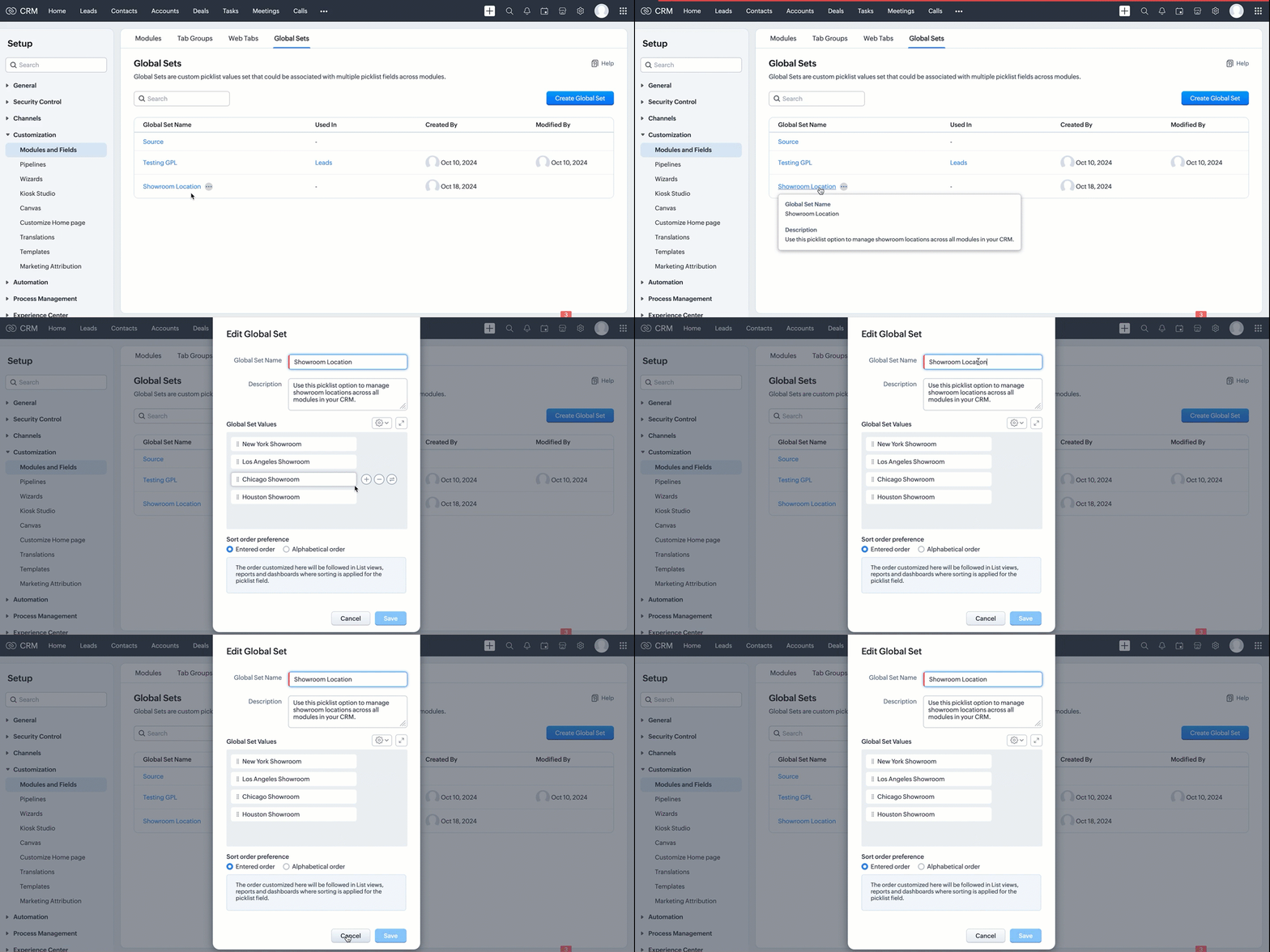
If the API call is successful, a global picklist will be created with the specified options. The following GIF demonstrates the newly created global picklist in the UI.
Use the Global Set with a Picklist Field in the Required Modules
Create picklist fields in the required modules, such as Leads and Contacts, and link the created Global Set with a picklist field in modules using the Create Custom Field API.
Follow the below steps to link the created Global Set with a picklist field in a module.
Step 1: Retrieve the unique ID of the Global Set
Retrieve the unique ID of the created Global Set using the GET - Global Picklists API to link it with a picklist field. The below URL retrieves all Global Sets in your org.
Request URL: {api-domain}/crm/{version}/settings/global_picklists
Request Method: GET
Response:

The API retrieves all available Global Sets in the organization.
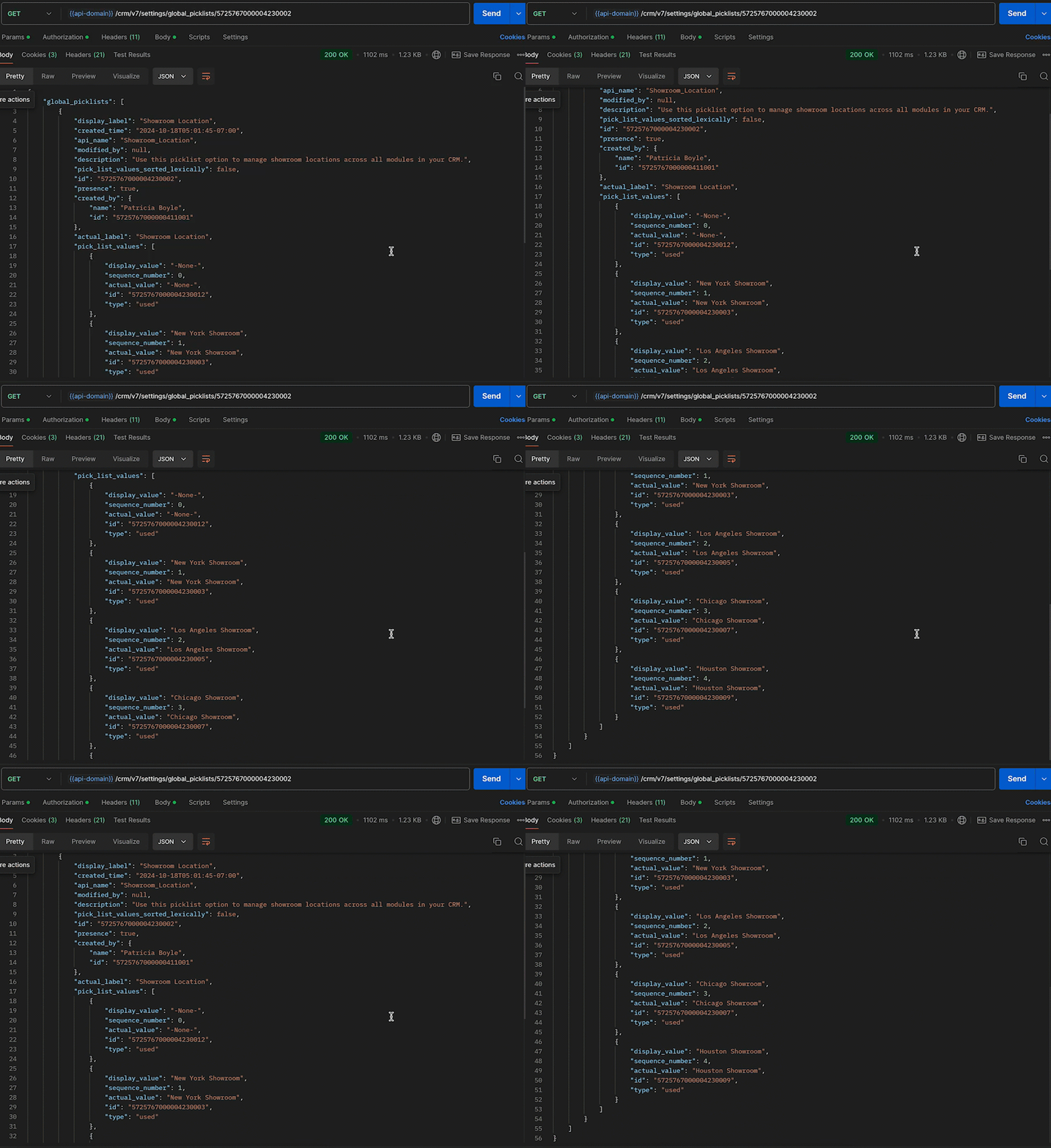
In this case, the "Showroom Location" field needs to be associated with the modules, and its unique ID is 5725767000004230002. Use the following request URL to view the specific global picklist field along with its options.
Request URL: {api-domain}/crm/{version}/settings/global_picklists/5725767000004230002
Request Method: GET
Response:
Step 2: Use the Global Set in the desired module
Create a new picklist field in the required modules and associate the "Showroom Location" Global Set with the picklist field.
- Leads - To track customer inquiries by showroom location.
- Deals - To monitor sales by showroom location.
- Sales Orders - To process orders based on showroom location.
- Service Requests - To handle customer service tickets by showroom location.
This post uses the "Leads" module as an example. Use the Create Custom Field API to associate the Global Set with the Leads module.
Request URL: {api-domain}/crm/{version}/settings/fields?module=Leads
Note: The module parameter is mandatory to create a field in a module.
Request Method: POST
Request Body:
{ "fields": [ //Associating the Showroom Location Global Set with the Leads module { "field_label": "Showroom", //The Showroom field in the Leads module, where the "Showroom Location" Global Set is associated "data_type": "picklist", //To associate a global picklist, use the data type "picklist" "global_picklist": { "id": "5725767000004230002" //ID of the global picklist } } ] } |
Response in the UI:
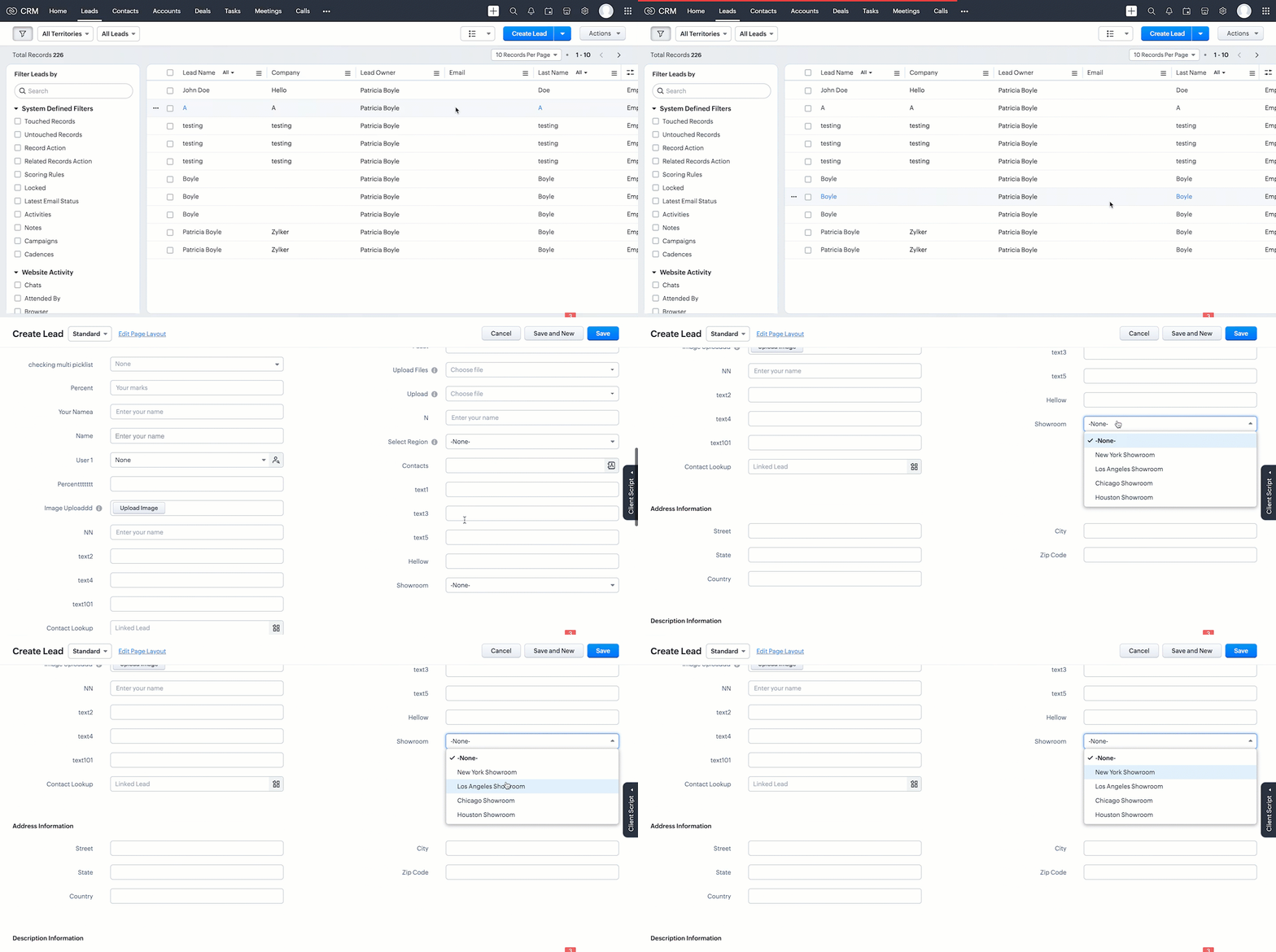
Use the above process to create the Global Set across modules using the Create Custom Field API.
Below are the request URLs to associate the field with other modules as per our use case:
|
Update the Global Set Values Using the PATCH Global Picklist Field API
Any changes made to the Global Set will automatically reflect across all modules associated with it. Use the PATCH - Global Picklist Field API to update the values in a Global Set.
Request URL:
{api-domain}/crm/{version}/settings/global_picklists/5725767000004230002
Request Method: PATCH
Request Body:
{ "global_picklists": [ { "pick_list_values": [ { //"display_value": "New York Showroom", "id": "5725767000004230003", "type": "unused" // to move the option to the unused state }, { "display_value": "Chicago Showroom", "sequence_number": 3, "actual_value": "Chicago Showroom", "id": "5725767000004230007", "type": "unused", "_delete": null // deleting the option from the global Field }, // Creating a new option or adding a new showroom location to the Global Set { "display_value": "San Francisco Showroom", "actual_value": "San Francisco Showroom" }, { "display_value": "Boston Showroom", "actual_value": "Boston Showroom" } ] } ] } |
Using the PATCH Global Picklist API, you can easily manage and perform various operations. In the above request, Zylker performed the following operations:
- Moving an Option to Unused State: The "New York Showroom" option is marked with "type": "unused", meaning the showroom is moved to the "unused" state, indicating the option is no longer active but has not been deleted from the system.
- Deleting an Option: The "Chicago Showroom" option is deleted from the picklist field using the "_delete": null, meaning the option is removed or deleted from the system and is no longer valid.
- Adding New Options: In addition to the above operations, two new showrooms namely "San Francisco Showroom" and "Boston Showroom", are added to the field using the "display_value"(mandatory) and "actual_value" (optional), as Zylker expands its franchise to new cities and manages them across the modules.
Note: The updated value will replace its old value in areas such as Records, Criteria, Workflow Actions, and Field Dependency.
Conclusion
Hence, the Global Sets help Zylker keep the showroom location list up-to-date and consistent across modules, making it easier to manage showroom locations in their CRM system.
We trust that this post meets your needs and is helpful. Let us know your thoughts in the comment section or reach out to us at support@zohocrm.com
Stay tuned for more insights in our upcoming Kaizen posts!
Cheers!!!

Previous Kaizen Post: Kaizen #160 - Automating ZDK CLI commands using shell scripting | Kaizen Directory | Kaizen Collection
Topic Participants
Subramanian K
Vitor
Jeganprabhu S
Anamika Prasanth
Sticky Posts
Kaizen #198: Using Client Script for Custom Validation in Blueprint
Nearing 200th Kaizen Post – 1 More to the Big Two-Oh-Oh! Do you have any questions, suggestions, or topics you would like us to cover in future posts? Your insights and suggestions help us shape future content and make this series better for everyone.Kaizen #226: Using ZRC in Client Script
Hello everyone! Welcome to another week of Kaizen. In today's post, lets see what is ZRC (Zoho Request Client) and how we can use ZRC methods in Client Script to get inputs from a Salesperson and update the Lead status with a single button click. In thisKaizen #222 - Client Script Support for Notes Related List
Hello everyone! Welcome to another week of Kaizen. The final Kaizen post of the year 2025 is here! With the new Client Script support for the Notes Related List, you can validate, enrich, and manage notes across modules. In this post, we’ll explore howKaizen #217 - Actions APIs : Tasks
Welcome to another week of Kaizen! In last week's post we discussed Email Notifications APIs which act as the link between your Workflow automations and you. We have discussed how Zylker Cloud Services uses Email Notifications API in their custom dashboard.Kaizen #216 - Actions APIs : Email Notifications
Welcome to another week of Kaizen! For the last three weeks, we have been discussing Zylker's workflows. We successfully updated a dormant workflow, built a new one from the ground up and more. But our work is not finished—these automated processes are
Recent Topics
Assessment Answered - Automation (Related List)
Hello everyone, We have linked a candidate assessment to our job posting. When someone applies, they are required to answer all the assessment questions. However, some candidates submit their applications without completing the questions. In such cases,Paid Support Plans with Automated Billing
We (like many others, I'm sure) are designing or have paid support plans. Our design involves a given number of support hours in each plan. Here are my questions: 1) Are there any plans to add time-based plans in the Zoho Desk Support Plans feature? TheCan't change form's original name in URL
Hi all, I have been duplicating + editing forms for jobs regarding the same department to maintain formatting + styling. The issue I've not run into is because I've duplicated it from an existing form, the URL doesn't seem to want to update with the newCalendar report with order options and more quick view templates
I think many of us regularly work with calendar-style reports. It would be great to be able to customize the quick view with new templates and have options to sort the entries for each day of the calendar by different criteria. I think this is an interestingShared Views
Hello, is there a way to prevent an agent from changing a shared table view? I have no issues with agents being able to create and customize their own view, but when I create a view and share it to my team -- the expectation is that they are viewing itUsing Zoho answer bot across departments (help center articles from another department)
Hi Zoho Community, I’ve run into a major issue and hope someone here has experience with this setup. We currently have a Help Center in the department A where all of our knowledge base articles are maintained. However, we would like to use a Zoho AnswerZoho Desk Partners with Microsoft's M365 Copilot for seamless customer service experiences
Hello Zoho Desk users, We are happy to announce that Zoho Desk has partnered with Microsoft's M365 to empower customer service teams with enhanced capabilities and seamless experiences for agents. Microsoft announced their partnership during their keynoteThe Social Wall: January 2026
Hello everyone, We’re back with the first edition of The Social Wall of 2026. There’s a lot planned for the year ahead, and we’re starting with a few useful features and improvements released in January to help you get started. Create a GBP in SocialPipeline: Copying rulesets from one data source to another
When creating and editing data pipelines, it would be really helpful to be able to copy the ruleset from one data source and 'paste' it to another. This would save time and reduce manual mistakes.Doubt about maximum email reach
Good morning, greetings. This is Bramdon García from EDULABS S.A.S ESP, located in Colombia. I'm writing to inquire about the possibility of sending an email to 35,000 people simultaneously. Our company has a Zoho account, but we'd like to know if there'sZoho calendar not working in browser
Hello, I am new to Zoho. I have two accounts for two separate businesses. In one of them, calendar loads in a browser no problem. However, if I use this account (sairfeetmusic.co.uk) calendar does not load. I also cannot add it to my Thunderbird LighteningAuthentication Failure when adding POP3 accounts
Hi everyone, I am a new user currently migrating from Gmail to Zoho Mail. I decided to make the switch following Google's decision to discontinue POP3 fetching. I previously used Gmail as my primary mail hub, and Zoho seems like the perfect alternativeTrident Application Folder
Hi, How to choose installation folder for Trident, by default it gets installed in C drive. How to change drive?Email disappeared to specific contact
Good afternoon, this morning I emailed somebody. This email isn’t showing up in my sent folder. They sent me a response which I clicked on and it disappeared immediately. Why could this be?Create an Eye-Catching Announcement Widget for Your Help Center
Hello Everyone! In this week’s edition, let’s explore how to keep your customers updated with exciting news in the Help Center. See how ZylkerMobile wowed their customers by bringing updates right to their portal. ZylkerMobile, the renowned brand forEnable Free External Collaboration on Notecards in Zoho Notebook
Hi Zoho Notebook Team, I would like to suggest a feature enhancement regarding external collaboration in Zoho Notebook. Currently, we can share notes with external users, and they are able to view the content without any issue. However, when these externalUpdating records through Zoho Sheets View doesn't update timeline or trigger workflow rules
I have noticed that when i update a series of record with the zoho sheets view (see here http://d.pr/i/ahnR) it doesn't update timeline history or trigger workflow rules. I am using it in the Deals module. Looking forward for some more info. DenisHow do I change the account bank charges are charged to?
I want bank charges charged to my Credit Card Fees account. Is there a way to do this?Mail Search should allow grouping by conversation like Gmail.
Having switched from gmail I have found the search function hard to use. Mostly because mail is not grouped by conversation in search. If I search for a word when looking for a conversation had with someone then sometimes 10 emails will come up from theAbility to CC on a mass email
Ability to CC someone on a mass email.Updation of Old Browsers Versions for Zoho CRM
We have upgraded the default browser version for CRM to facilitate features like widgets and scripts that are often implemented aside from advanced functionalities for various business requirements. The latest version is aimed to provide better performanceProject-Based Inventory Consumption and Proforma Invoice in Zoho ERP
While working with customers across different industries, we have identified a few functional questions and gaps that commonly arise—especially for project-based and service-oriented businesses. Many organizations, such as those in shipping, construction,Zoho Desk domain Mapping not Working Showing CNAME Error
I have created the subdomain and created the Cname as well as its instracted on the Zoho website but when i try add the domain on help desk its showing error msg : Make sure you've mapped the CNAME entry and linked it to desk.cs.zohohost.com.au on yourFounders using Zoho — are you leveraging Zoho Campaigns + Zoho Social for thought leadership… or just sending emails?
I’ve noticed something interesting in the Zoho ecosystem. Many founders use Zoho Campaigns and Zoho Social for basic marketing—newsletters, scheduled posts, and announcements. But very few are using these tools strategically to: • Position themselvesI have the item field and Quantity field in the sub form , on the submit of the form if the quantity is grater than inventory means show alert on submit validation only for item type goods ,
I have the item field and Quantity field in the sub form , on the submit of the form if the quantity is grater than inventory means show alert on submit validation . Stock Check Validation only for item type goods , not for item type service . For theIMAP stopped working after enabling 2 factor authentication
IMAP stopped working after enabling 2 factor authentication. Is there any solution for this?Rename Service Report
Some of our customers are requesting the name of the service report PDF to be in a specific format, for example, instead of REP-001.PDF some are requesting to include their name like customername.pdf. is that possible?Outgoing emails rejected due to SpamCop RBL listing (IP 136.143.188.12)
Hi All, I am writing to report a deliverability issue affecting outgoing emails from my Zoho Mail account. Recently, several messages sent from my domain (example.com) to external recipients have been rejected with the following error message (redactedShare Record Ownership in Zoho Recruit
We’re introducing User Fields in Zoho Recruit designed to make collaboration easier when multiple team members need to work on the same record. With User Fields, you can extend record ownership beyond a single user and enable smoother teamwork acrossRecherche d'un développeur
Bonjour, j'ai un projet de SAAS sur une base de zoho créator et zoho CRM et je recherche un développeur qualifié français pour créer l'application créator (fonctionnel et graphique) et les workflow et blueprint de CRMDisplay actual mileage on an invoice
My users are creating expenses in Zoho expense. For example, they expense 10 miles and get paid 7 dollars (10 miles * IRS rate of .70). If I look at the expenses in Zoho Books, it does show them at 10 miles at .70 cent When I add these expense to an invoiceCustomer Parent Account or Sub-Customer Account
Some of clients as they have 50 to 300 branches, they required separate account statement with outlet name and number; which means we have to open new account for each branch individually. However, the main issue is that, when they make a payment, theyCloning a Pick List
I have an existing Pick List in my Contacts that I want to drop into my Leads. Is there a way to copy or clone the field with it's accompanying Pick List? Thanks for your time.How do I link my invoice to an estimate?
There has been instances where I have created estimates, however, invoices for the same estimate were created independently. The status of these estimates hasn't converted to 'invoiced'.I wish to upload 40000 Resumes in Zoho Recruit Database. Can I do this in batch of 1000 Resumes ?
I would like to upload thousand or few hundred of resumes in Zoho Recruit in one go. Please let me know how can I do this Or migrate my 40000 resumes from previous ATS to Zoho Recruit.Zoho Writer for Proposals
Hi, one of the things we've struggled with since moving to Zoho ecosystem is our proposal software Qwilr does not integrate well. It surprises me Zoho doesn't have proposal software but given all the capabilities of Zoho Writer, I'm wonder if anyone isCustom Fonts in Zoho CRM Template Builder
Hi, I am currently creating a new template for our quotes using the Zoho CRM template builder. However, I noticed that there is no option to add custom fonts to the template builder. It would greatly enhance the flexibility and branding capabilities ifFoutmelding bij uitvoering/opslaan functie 'Left expression is of type TEXT and right expression is of type NUMBER'
Hoi! Ik heb een workflow (zie bijlage) die wordt getriggerd zodra de verwachte weekomzet van een bedrijf wordt aangepast naar een bedrag hoger dan 0. Op dat moment moet een functie (zie bijlage) gaan berekenen wat het benodigde kredietlimiet moet zijn.Hoe kun je Nederlandse loonstroken boek in Zoho Books?
Beste Community, Heeft er iemand een idee hoe je standaard loonstroken kunt inboeken in Zoho Books? Ik ben benieuwd hoe jullie dit doen en wat de mogelijkheden zijn.Unable to Filter Retail Sales Orders & Need Paid/Unpaid Filter – Zoho Books
Hi Zoho Team, Recently you introduced Retail – Standard and Retail – Premium templates for Sales Orders. However, in the Sales Order module we still cannot filter or segregate Retail Sales Orders separately from normal B2B sales orders. Because of this,Next Page