Subscription Information & Storage Management in Zoho Recruit
Subscription Information & Storage Management in Zoho Recruit


We’re excited to roll out two new enhancements in Zoho Recruit, Subscription Information and Storage Management — designed to give admins complete visibility into subscription details, feature limits, and storage consumption — all from one place inside Setup.

What's New

 1. Subscription Information   

A dedicated section to view and manage your organization’s subscription details, feature limits, and usage in one glance. Refer to our help documentation to know more 

How to Access  

Go to Setup → Users and Control → Subscriptions
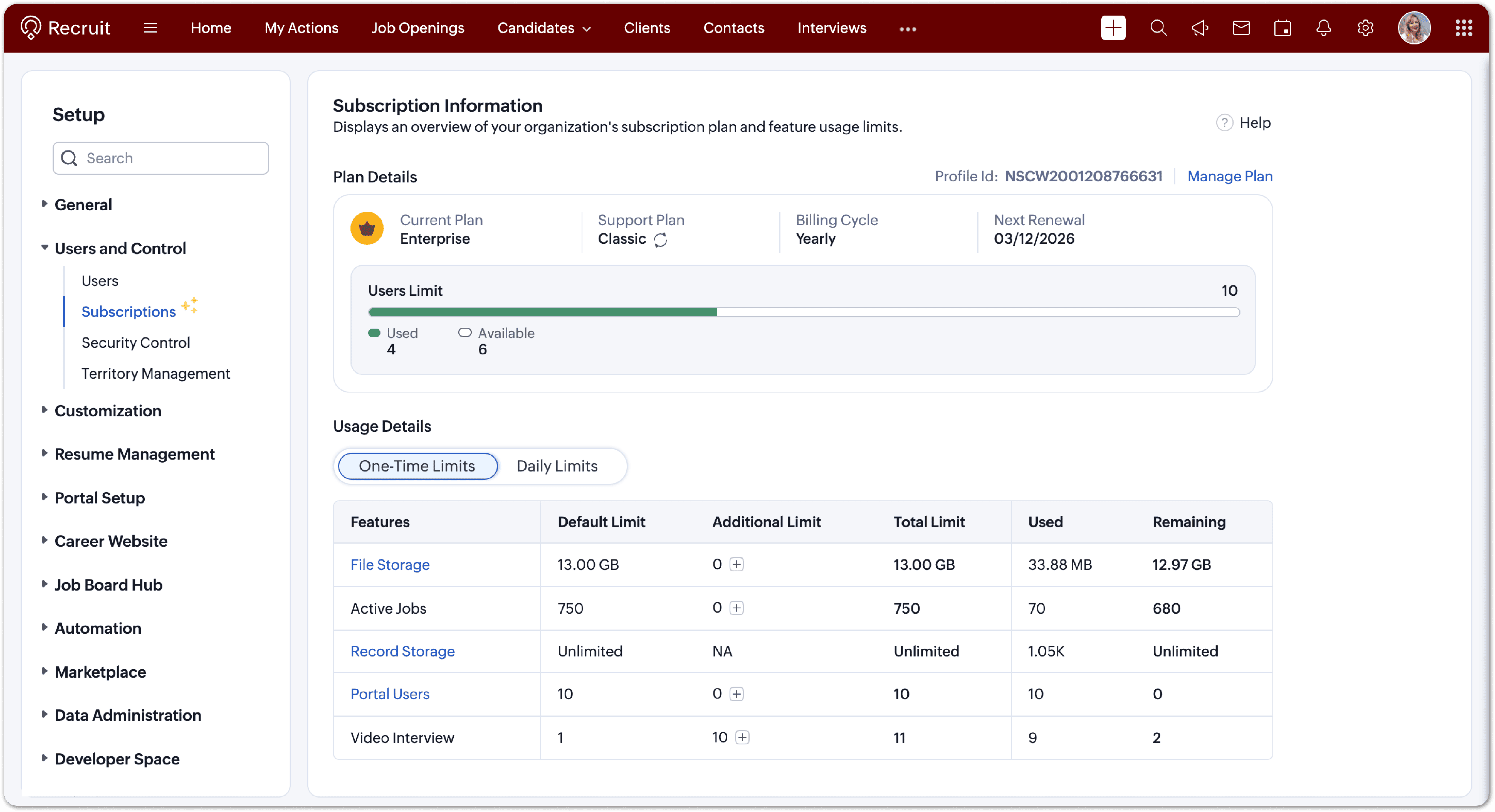


You can now:
  1. View your current plan (edition, billing cycle, renewal date, support level).
  2. Check user and employee limits with a clear used vs. available indicator.
  3. Monitor feature usage under one-time and daily limits.
  4. Upgrade limits or renew your plan directly when needed.
  5. Each limit is displayed with intuitive bars and usage data, helping you keep your account optimized and compliant with your plan’s capacity. 

 2. Storage Management   

Track how your storage space is used across files and records and manage it efficiently.

How to Access  

Go to Setup → Data Administration → Storage
You’ll find two tabs:
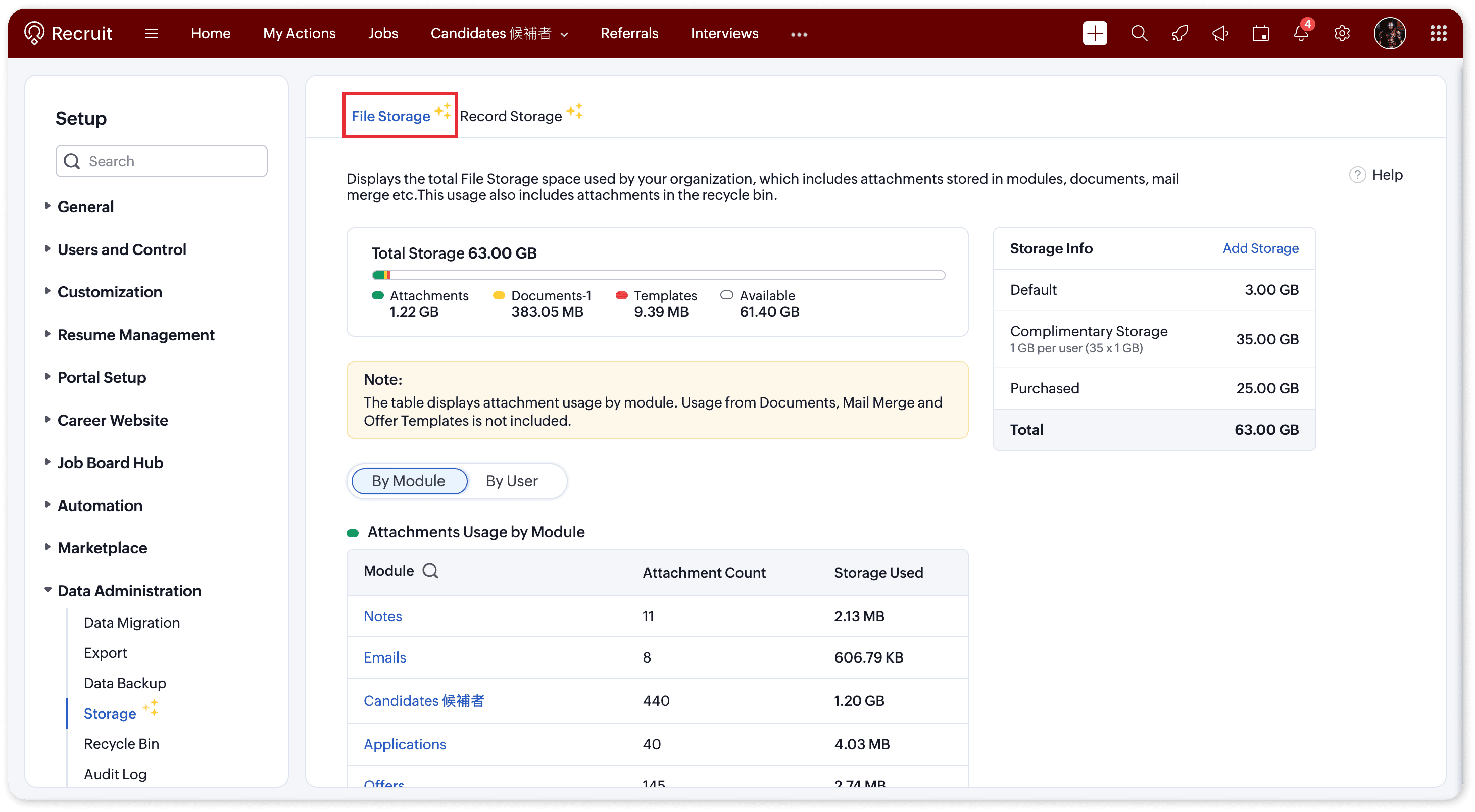
  1. File Storage – For attachments, documents, and templates
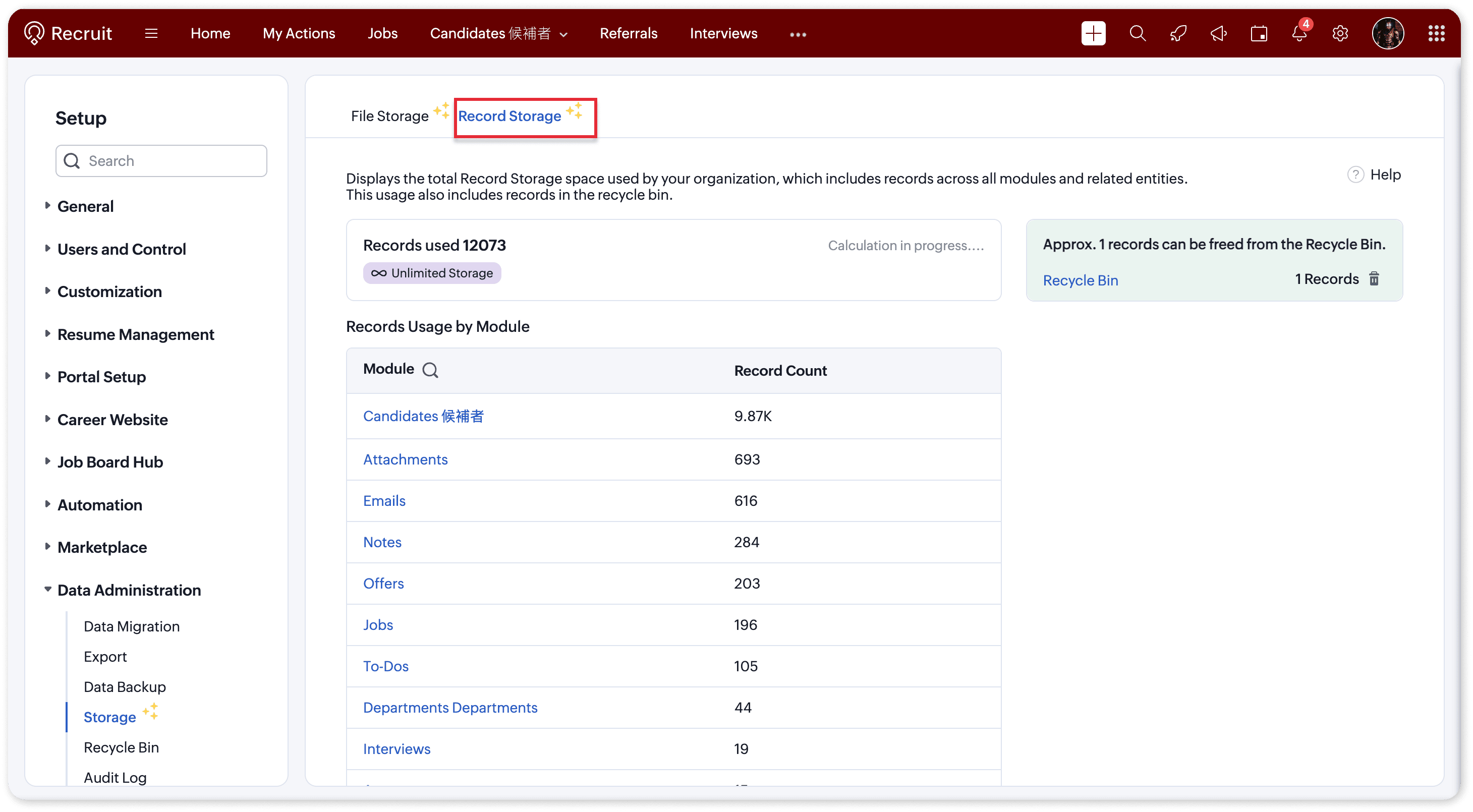
  2. Record Storage – For records created across all modules

File Storage   

Monitor all file attachments, templates, and documents uploaded across Recruit.

You can now:
  1. View total storage (default + complimentary + purchased).
  2. Check space used vs. available.
  3. Track storage by module (Candidates, Jobs, Applications, Offers, Emails, Notes, etc.) or by user.
Each plan also includes complimentary storage per user 
  1. Enterprise: 1 GB per user
  2. Professional: 512 MB per user
  3. Standard: 256 MB per user


Need more? Simply click “Add Storage” to purchase extra capacity and ensure uninterrupted usage to all attachments.

 Record Storage   

Understand how many records your organization has created across modules like Candidates, Jobs, Emails, Notes, and more. Refer to our help documentation to know more
 
You can now:
  1. View total records used vs. available.
  2. See a module-wise breakdown of record usage.
  3. Identify and clear Recycle Bin items to free up space.
Each edition comes with its own record limits:
  1. Free: 5,000 records
  2. Standard: 100,000 records
  3. Professional: 500,000 records
  4. Enterprise: Unlimited 


Why this matters

Running out of storage can interrupt your team’s ability to upload attachments or create new records. With these insights, admins can:
  1. Proactively monitor storage usage
  2. Identify high-usage modules or users
  3. Purchase or allocate additional storage with ease
This ensures smooth operations and uninterrupted hiring workflows, even as your data grows.
Idea
Pro Tip:
  1. Before purchasing additional space, try clearing out Recycle Bin records,  it’s a quick way to reclaim storage instantly.
  2. When sending bulk/mass emails to candidates, if the email body and attachments are frequently reused (for example, an onboarding email sent to multiple candidates), it’s more efficient to create an email template and add the required attachments to it. Using this template for mass emails helps reduce storage usage and avoids uploading the same attachments repeatedly.

Need Help?  

If you have any queries please reach out to support@zohorecruit.com for assistance.

Regards,
Team Zoho Recruit

    • Sticky Posts

    • An update to improve email delivery | Email Authentication & Relay

      Update Rollout Latest Update: Enterprise users (8th July, 2025) This update is now live for Enterprise plan users in all regions. This includes People Plus, but not Zoho One, which will be covered in an upcoming update. Professional users (31st May 2025)
    • Zoho Recruit User Group Meet-up | INDIA 2025 (Venue Finalised)

      Hello Zoho Recruit users from India, We’re pleased and excited to announce our 2025 edition of Zoho user group meet-up in India in five cities! In this meet-up, our team of experts will help you understand the intricate nuances to use Zoho Recruit better,
    • Zoho Recruit is coming to the UK | Zoho Community Learning Series

      Customers from the United Kingdom, Exciting news: We will be in London for the Zoho Recruit user meet up. Our team will help you better understand the intricate nuances of Zoho Recruit to help you hire faster, inform about new and upcoming features, and
    • Ask the experts - A live Q & A discussion on Zoho Recruit

      We are delighted to come back with another edition of Ask the Experts community series. This edition, we'll be focusing on everything about Zoho Recruit. The topics will focus on the features that are used/asked by the majority of users and also based
    • Restriction on 'From' addresses with a public domain

      Dear Zoho Recruit Community, We hope this message finds you well. This post is to inform you about some important updates regarding email restrictions within Zoho Recruit. Effective post 31st March 2025, we will be implementing changes to the use of email
    • Recent Topics

    • Unable to attach Work Order / Service Appointment PDF to Email Notifications (Zoho FSM)

      I’m trying to include the Work Order PDF or Service Appointment PDF as an attachment in Email Notifications (automation/notification templates), but I don’t see any option to attach these generated PDFs. Is this currently supported in Zoho FSM? If not,
    • Cisco Webex Calling Intergration

      Hi Guys, Our organisation is looking at a move from Salesforce to Zoho. We have found there is no support for Cisco Webex Calling however? Is there a way to enable this or are there any apps which can provide this? Thanks!
    • Designing a practical Zoho setup for a small business: lessons from a real implementation

      I recently finished setting up a Zoho-based operating system for a small but growing consumer beauty business (GlowAtHomeBeauty), and I wanted to share a practical takeaway for other founders and implementers. The business wasn’t failing because of lack
    • DKIM (Marketing emails) UNVERIFIED (Zoho One)

      I'm having a problem with Zoho One verifying my Marketing Email DKIM Record for MYFINISHERPHOTOS.COM. I have removed and re-entered the ownership, DKIM (Transactional emails), SPF and Marketing DKIM and all of them come back verified except the DKIM (Marketing
    • Zoho Recruit Community Meet-up - India

      Namaste, India. 🙏🏼 The Zoho Recruit team is hitting the road—and we 're absolutely excited behind the scenes. Join us for the Zoho Recruit India Meet-up 2026, a morning designed to make your recruiting life easier (and a lot more effective). Date City
    • Generate a Zoho Sign link

      From time to time I get a response "I never received your you e-document for electronic signature" is there a way to generate a Zoho Sign link to share.
    • CRM x WorkDrive: File storage for new CRM signups is now powered by WorkDrive

      Availability Editions: All DCs: All Release plan: Released for new signups in all DCs. It will be enabled for existing users in a phased manner in the upcoming months. Help documentation: Documents in Zoho CRM Manage folders in Documents tab Manage files
    • CRM gets location smart with the all new Map View: visualize records, locate records within any radius, and more

      Hello all, We've introduced a new way to work with location data in Zoho CRM: the Map View. Instead of scrolling through endless lists, your records now appear as pins on a map. Built on top of the all-new address field and powered by Mappls (MapMyIndia),
    • Is it possible to create a word cloud chart in ZoHo Analystics?

      Hi there, I have a volume of transaction text that I would like to analyse using word cloud (or other approcah to detect and present word frequency in a dataset). For example, I have 50,000 records describing menu items in restaurants. I want to be able
    • WhatsApp IM in Zoho Desk always routes to Admin instead of assigned agent

      Hello Zoho Experts, I connected WhatsApp IM to my Zoho Desk account. I only assigned my Customer Service (CS) agent to the WhatsApp channel, and I did NOT include Admin in this channel. However, every new WhatsApp conversation automatically gets assigned
    • Kaizen #198: Using Client Script for Custom Validation in Blueprint

      Nearing 200th Kaizen Post – 1 More to the Big Two-Oh-Oh! Do you have any questions, suggestions, or topics you would like us to cover in future posts? Your insights and suggestions help us shape future content and make this series better for everyone.
    • How to Fix the Corrupted Outlook 2019 .pst file on Windows safely?

      There are multiple reasons to get corrupted PST files (due to a power failure, system crash, or forced shutdown) and several other reasons. If You are using this ScanePST.EXE Microsoft inbuilt recovery tool, it only supports the minor corruption issue
    • Introducing Record Category in CRM: Group options to see record status at a glance.

      Release update: Currently available for CN, JP, and AU DCs (all paid editions). It will be made available to other DCs by mid-March. Hello everyone, We are pleased to introduce Record Category in Zoho CRM - a new capability where the user can get an overview
    • [Webinar] A recap of Zoho Writer in 2025

      Hi Zoho Writer users, We're excited to announce Zoho Writer's webinar for January 2026: A recap of Zoho Writer in 2025. This webinar will provide a recap of the features and enhancements we added in 2025 to enhance your productivity. Choose your preferred
    • How to drag row(s) or column(s)?

      Hi. Selecting a row or column and then dragging it to a new position does not seem to work. Am i missing something or this is just not possible in Zoho Sheet? Cheers, Jay
    • Building Toppings #5 - Creating and configuring custom service connections in Bigin Toppings

      Hello Biginners, Integrating Bigin with external applications extends its capabilities and enables customized functionalities. In our last post, we saw how to create a default service connection. Today, we'll see how to create a custom service connection
    • Admin asked me for Backend Details when I wanted to verify my ZeptoMail Account

      Please provide the backend details where you will be adding the SMTP/API information of ZeptoMail Who knows what this means?
    • Optimising CRM-Projects workflows to manage requests, using Forms as an intermediary

      Is it possible to create a workflow between three apps with traceability between them all? We send information from Zoho CRM Deals over to Zoho Projects for project management and execution. We have used a lookup of sorts to create tasks in the past,
    • Introducing real-time document commenting and collaboration in Zoho Sign

      Hi, there! We are delighted to introduce Document commenting, a feature that helps you communicate with your recipients more efficiently for a streamlined document signing process. Some key benefits include: Collaborate with your recipients easily without
    • Can I add Conditional merge tags on my Templates?

      Hi I was wondering if I can use Conditional Mail Merge tags inside my Email templates/Quotes etc within the CRM? In spanish and in our business we use gender and academic degree salutations , ie: Dr., Dra., Sr., Srta., so the beginning of an email / letter
    • Conditional fields when converting a Lead and creating a Deal

      Hi, On my Deal page I have a field which has a rule against it. Depending on the value entered, depends on which further fields are displayed. When I convert a Lead and select for a Deal to be created as well, all fields are shown, regardless of the value
    • Cliq iOS can't see shared screen

      Hello, I had this morning a video call with a colleague. She is using Cliq Desktop MacOS and wanted to share her screen with me. I'm on iPad. I noticed, while she shared her screen, I could only see her video, but not the shared screen... Does Cliq iOS is able to display shared screen, or is it somewhere else to be found ? Regards
    • Introducing Radio Buttons and Numeric Range Sliders in Zoho CRM

      Release update: Currently out for CN, JP, AU and CA DCs (Free and standard editions). For other DCs, this will be released by mid-March. Hello everyone, We are pleased to share with you that Zoho CRM's Layout Editor now includes two new field formats—
    • How do I get complete email addresses to show?

      I opened a free personal Zoho email account and am concerned that when I enter an email address in the "To", "CC", fields, it changes to a simple first name. This might work well for most people however I do need to see the actual email addresses showing before I can send my messages. Is there something I can do to fix this "feature"? Thanks, JB
    • Upload data deleted all Zoho form data that we manage

      Good morning. Let me introduce myself, I'm Iky from Indonesia. I'm experiencing an error or problem using Zoho Forms. I manage Zoho Forms, but I previously encountered an error when I misclicked the delete button in the upload format. It apparently deleted
    • ZOHO FORMにURL表示ができない

      初心者です。 ZOHO FORM で宿泊者名簿を作っています。 ゲストが、URLをクリックするとStripeで支払いができるようにURLを表示をしたいのですが、 上手くできません。 やり方が分かる方、ぜひ教えてください。
    • Custom module - change from autonumber to name

      I fear I know the answer to this already, but thought I'd ask the question. I created a custom module and instead of having a name as being the primary field, I changed it to an auto-number. I didn't realise that all searches would only show this reference.
    • No Automatic Spacing on the Notebook App?

      When I'm adding to notes on the app, I have to add spaces between words myself, rather than it automatically doing it. All my other apps add spacing, so it must be something with Zoho. Is there a setting I need to change, or something else I can do so
    • How to increase my Zoho sign limit.

      I cannot send a document/contract for signature. Zoho sign says I reached my monthly limit. May I know how to fix this please? Thanks! 
    • Holidays - Cannot Enter Two Holidays on Same Day

      I have a fairly common setup, where part-time employees receive 1/2 day's pay on a holiday and full-time employees receive a full day's pay. Historically, I've been able to accommodate this by entering two separate holidays, one that covers full-time
    • Zoho Bookings and Survey Integration through Flow

      I am trying to set up flows where once an appointment is marked as completed in Zoho Bookings, the applicable survey form would be sent to the customer. Problem is, I cannot customise flows wherein if Consultation A is completed, Survey Form A would be
    • Deluge Function to Update Custom Field

      I'm trying to get a Deluge function (which will run as part of a Schedule in Desk) that retrieves all tickets with the status "Recurring" and updates the custom field checkbox "cf_recurring" to "true". Here's what I have, which doesn't work: searchValue
    • Campaigns set up and execution assistance

      Hello Community, Can someone recommend a professional who can assist with the completion of my set up and deployment of Campaigns? Looking for a person or company that is not going to ask for big dollars up-front without a guarantee of performance to
    • Card Location in Zobot

      Hello, when using the “Location” card in a codeless builder Zobot, the behavior in WhatsApp is inconsistent. When asking the user to share their location, they can type a message, which will return the message “Sorry, the entered location is invalid.
    • Zobot with Plugs

      Hello, I am having a problem with Zobot using Plugs. Here is my current flow: When I run the flow, I should immediately see the messages from the initial cards (Send Message cards), then after running the plug, and finally, see the messages after the
    • Kaizen #223 - File Manager in CRM Widget Using ZRC Methods

      Hello, CRM Wizards! Here is what we are improving this week with Kaizen. we will explore the new ZRC (Zoho Request Client) introduced in Widget SDK v1.5, and learn how to use it to build a Related List Widget that integrates with Zoho WorkDrive. It helps
    • Remove Powered by Zoho at the footer

      Hi, I've read two past tickets regarding this but it seems that the instructions given are outdated. I assume the layout keeps on changing, which makes it frustrating for me to search high and low. Please let me know how exactly do I do this now? Th
    • Error AS101 when adding new email alias

      Hi, I am trying to add apple@(mydomain).com The error AS101 is shown while I try to add the alias.
    • I can't add a new customer in Zoho invoice? Anyone had this issue before?

      Ive been using Zoho invoice for over 6 years. Today I wanted to add a new customer to send an invoice to but it doesn't save when I try to access it from the pulldown menu when you go to send a new invoice.
    • No Need To Fix Something That Is Working

      Zoho Books is a great financial tool which helps businesses to become more efficient and productive with day-to-day operations. As such, every change, upgrade, improvement needs to be carefully thought before implemented in the software and I'm sure Zoho
    • Next Page