Introducing Zia GenAI: Zoho's Native Generative AI for Zoho Desk
Hello everyone,

Note: We have updated this announcement on 13th March 2025.
As of 7th March 2025, the following name changes are made with respect to Zia.
- Zia GenAI is updated as Zia
- Zia Powered by GPT is updated as Generative AI
- Native Generative AI is updated as Open Source Models
 Zia is available on Early Access for Zoho Desk Enterprise subscribers. Kindly fill out this Registration Form to request early access.
We are excited to announce the Beta release of Zia Native Generative AI in Zoho Desk, now available through our Early Access program. This model is designed to enhance the efficiency and quality of customer support, and we are inviting you to experience it firsthand.

Important notes
- Zia is currently available in AU, EU, US, and India data centers.
- Zia currently supports 13 languages - English, Spanish, German, Russian, French, Portuguese, Italian, Dutch, Danish, Swedish, Hindi, Arabic, Hebrew. We are actively working on expanding language support even further.
In the fast-paced world of customer support, efficiency, accuracy, and personalization are crucial. With this in mind, we're introducing Zia GenAI in Zoho Desk. While AI is already a key player in the service industry, Zia stands out by leveraging native genAI models to address specific challenges, such as:
- High response times
- Repetitive nature of routine queries
- Inconsistent responses across agents
- Limited contextual understanding of customer issues
- Difficulty of extracting actionable insights from vast amounts of customer data
By tackling these challenges, Zia helps support teams deliver faster, accurate, and personalized customer experiences.
Zia's advanced AI capabilities
Building on the foundation of Zia’s earlier tools—such as sentiment analysis for understanding customer emotions, keyword tagging for better ticket organization, and anomaly prediction for identifying irregular patterns—Zia takes these capabilities to the next level. It offers a more sophisticated contextual grasp of customer interactions, enabling it to provide highly relevant and actionable responses. By streamlining routine tasks and enhancing response quality, Zia empowers agents to focus on more complex customer needs and elevate the overall support experience.
Zia's generative skills
- Contextual ticket summaries
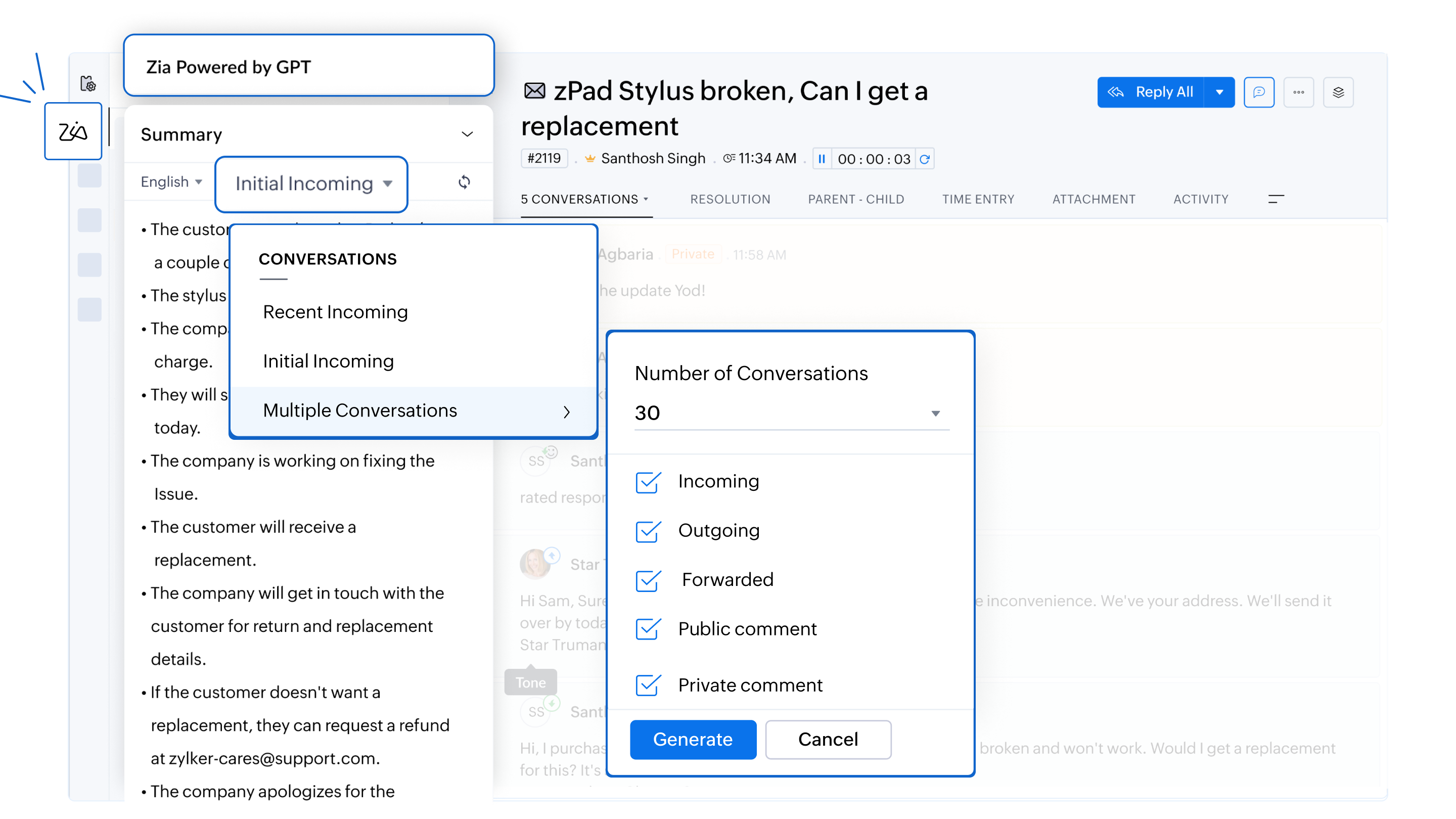
Zia provides concise summaries of incoming inquiries and previous conversations within a ticket. Agents can choose from different options, including recent, initial, or multiple ticket conversations (up to five), which cover all types of interactions—such as incoming, outgoing, forwarded, and public comments. This enables agents to quickly grasp the context and history of complex tickets, which ensures they can deliver informed, relevant, and efficient responses without having to read through lengthy ticket histories.
For example, if an agent is handling a long-running issue, Zia can generate a summary of the latest ticket conversations or earlier interactions within the same ticket, helping the agent provide a more precise response while saving time.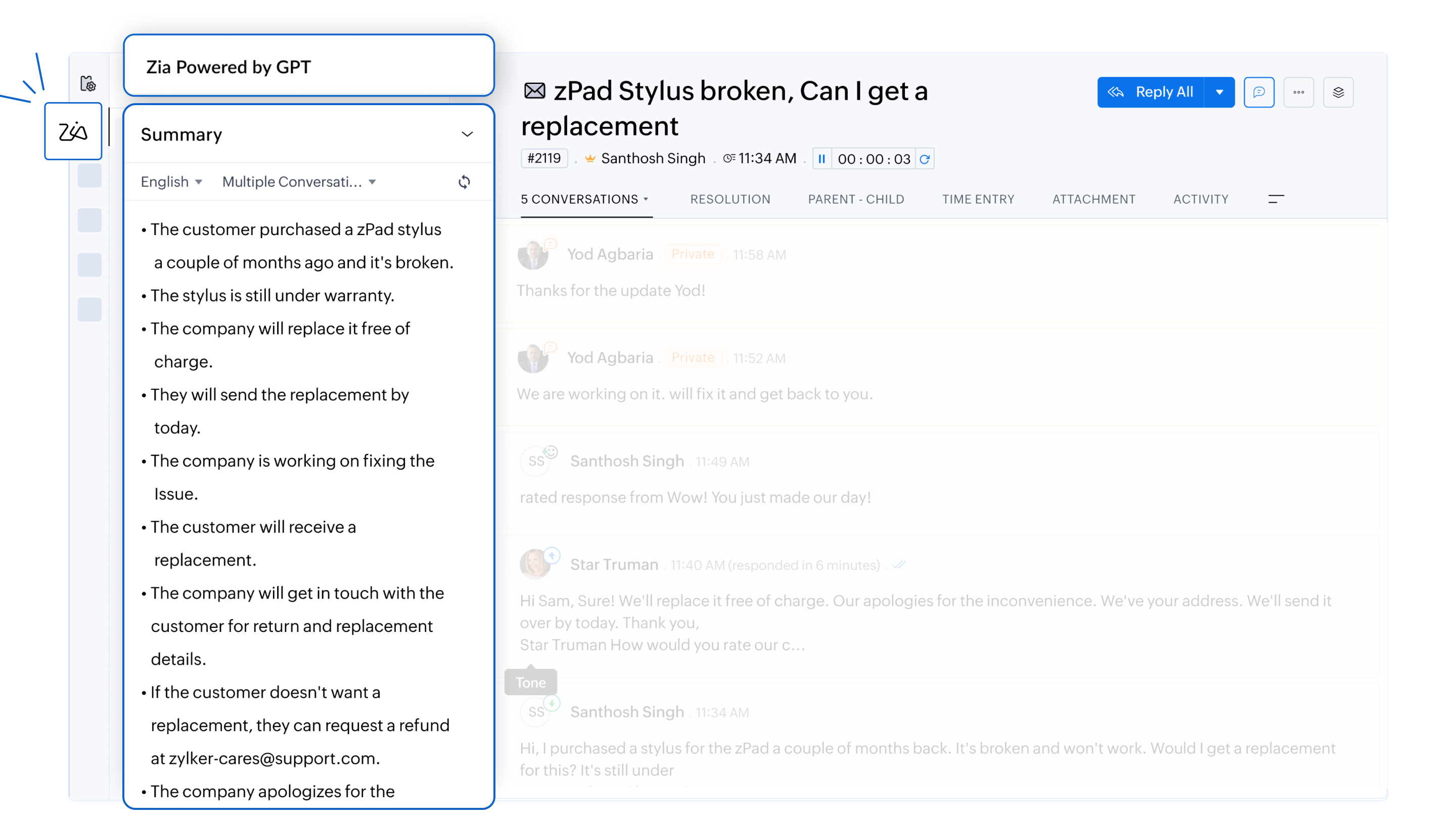
- Efficient responses with AI assistance
Zia analyzes customer inquiries and drafts responses based on the information available in the knowledge base articles. Whether it’s addressing policy-related questions or providing troubleshooting guides, agents can resolve issues faster.
For example, a ticket enquiring about a refund for a recently purchased item can be answered without an agent's intervention. Zia can analyze the tone of the email and draft a formal response with details on how to go about with the refund based on its analysis of the KB articles. It can also include the links to the company's refund policy and commonly asked questions related to the customer's request.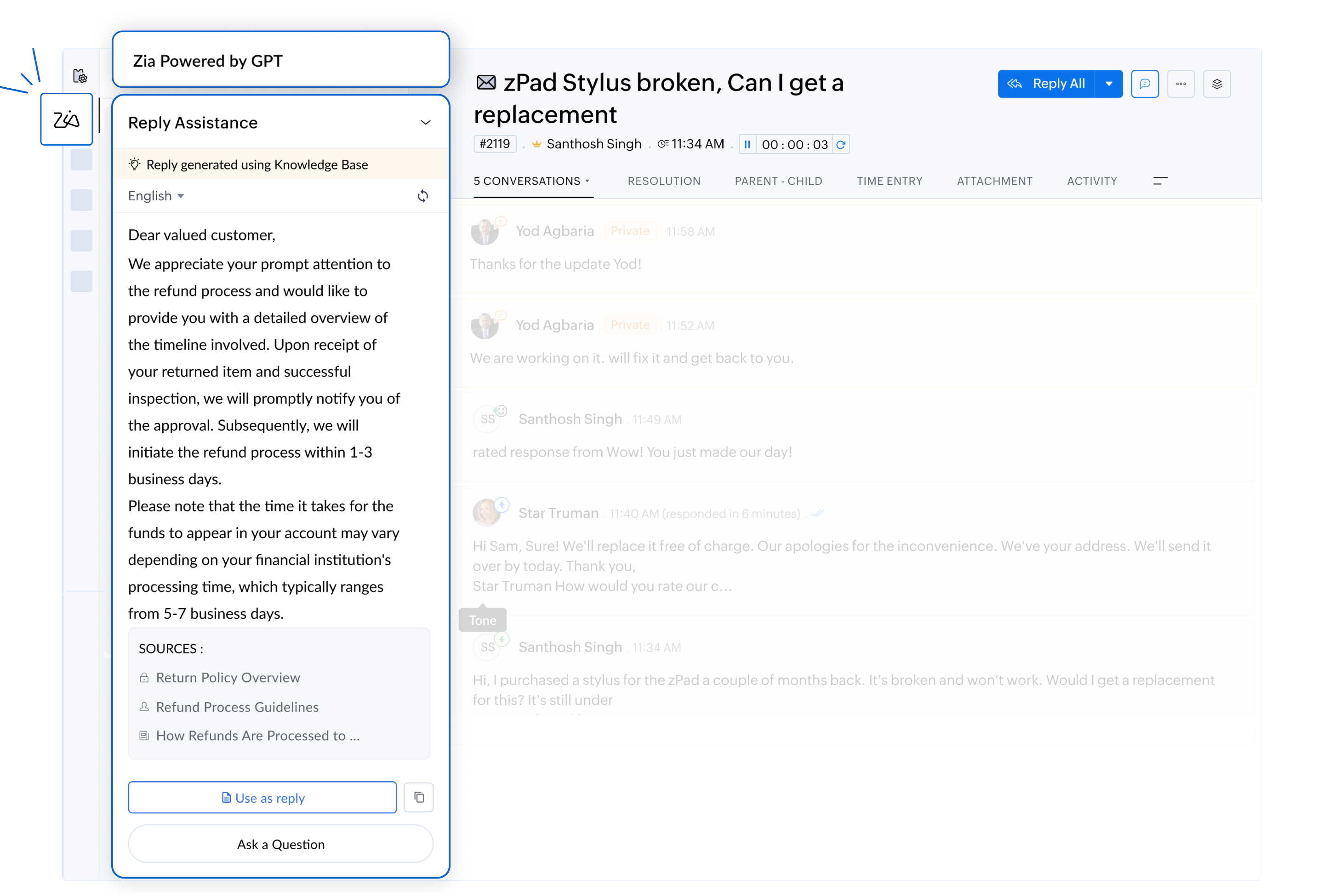
- Personalized and empathetic interactions
By analyzing the tone and sentiment, Zia helps agents draft responses that align with the emotional context of the conversation. Whether the situation requires an apology for a delay or a friendly response to a simple query, Zia ensures every interaction feels personalized.
For example, a customer reporting a delayed refund should receive an empathetic and prompt response. For routine inquiries, Zia will be more likely to suggest a friendly, concise reply.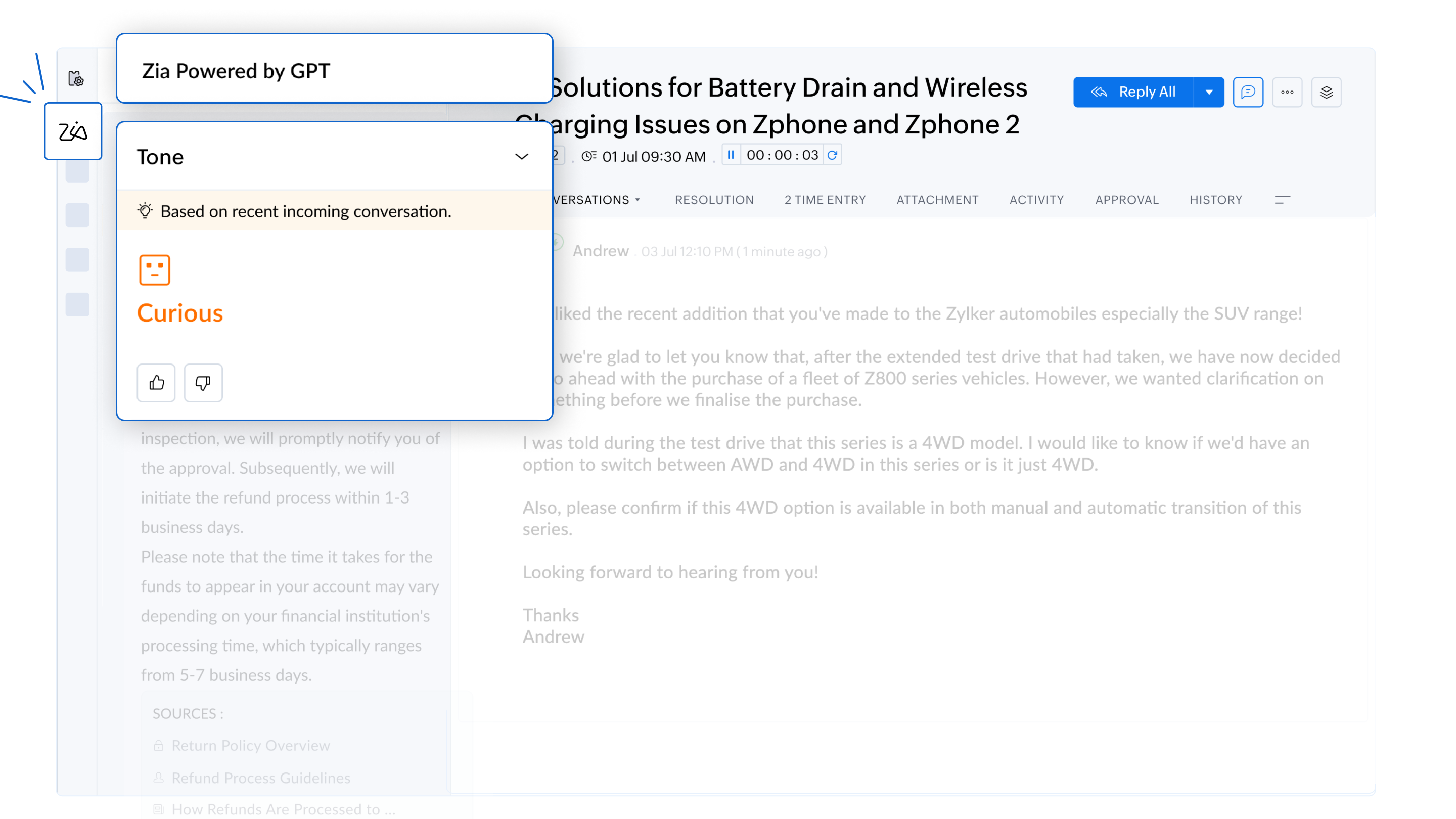
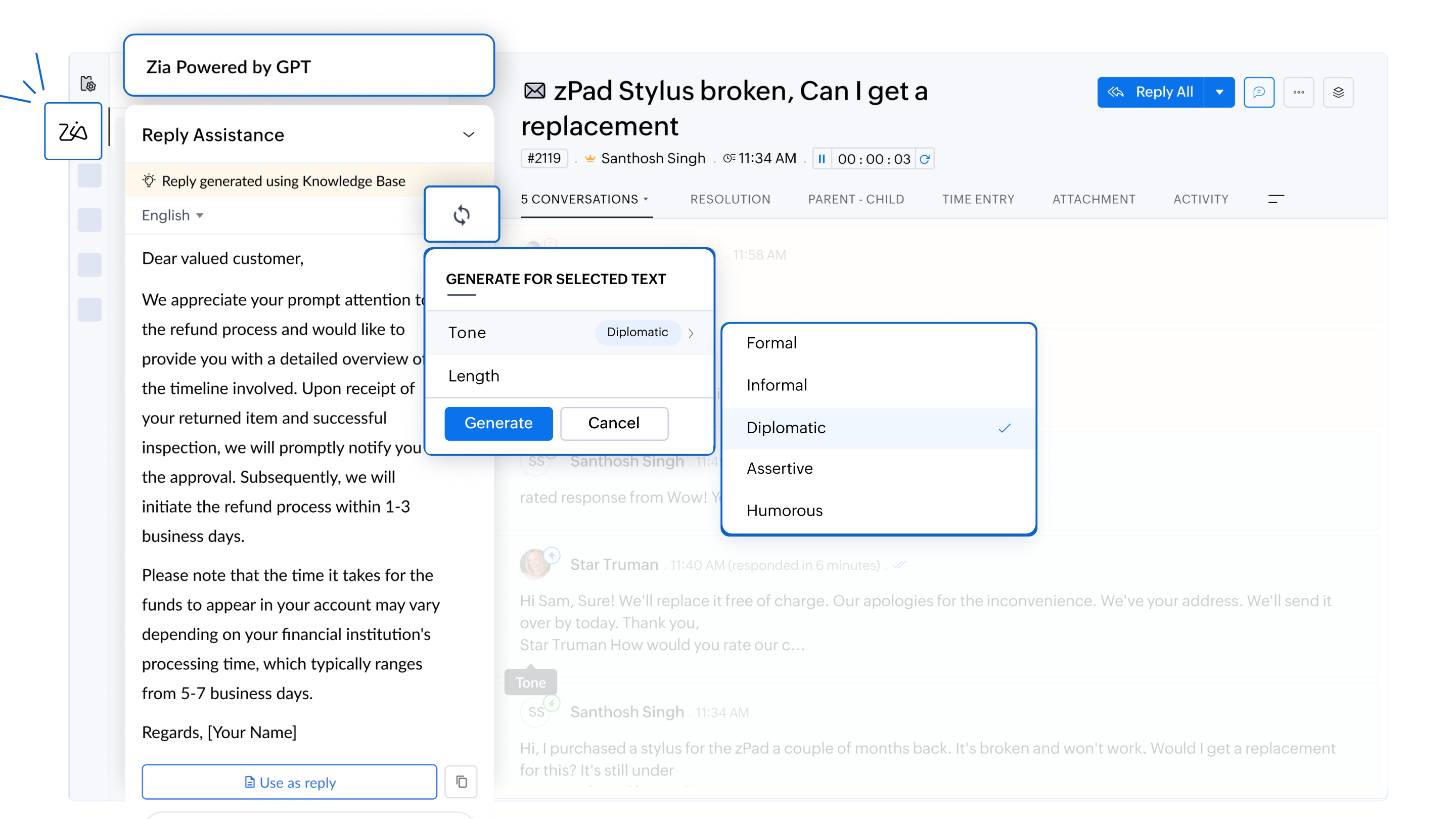
- Customizable response lengths
Zia enable agents to tailor the length of responses to suit customer needs. Whether a customer requires an in-depth explanation or a brief summary, agents can choose the most appropriate format to ensure clarity and efficiency.
For example, when a customer reports a technical error in the software, Zia can generate a detailed explanation to help resolve the issue or provide a concise troubleshooting guide based on the severity of the problem.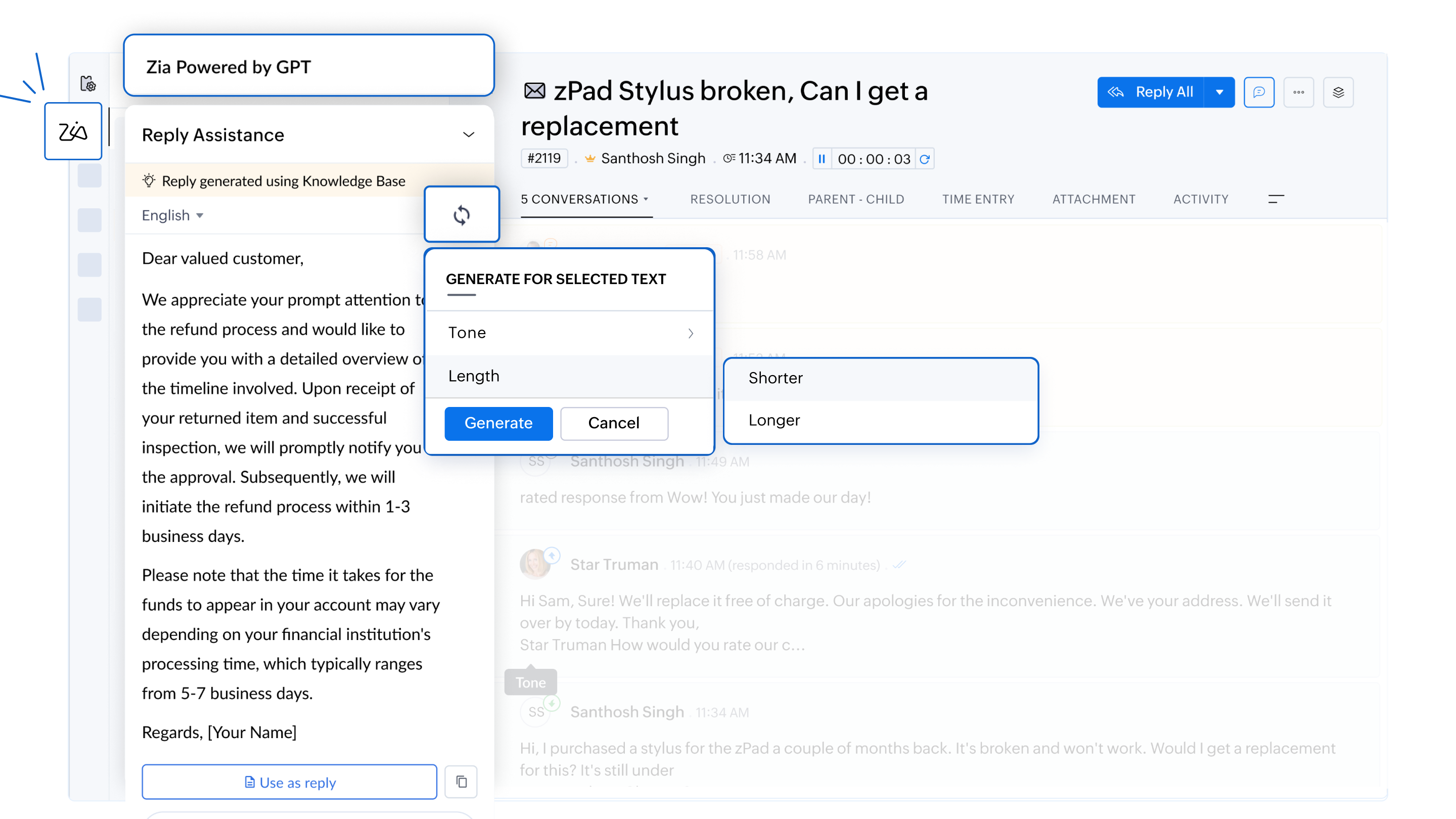
- Proactive knowledge base growth
Zia flags gaps in the knowledge base by identifying customer issues without documented solutions. This helps organizations continuously improve their knowledge repository, equipping teams to address similar issues more effectively in the future.
For example, if an agent encounters a unique issue without an existing solution, Zia notifies the team to create a new knowledge base article, helping future agents resolve similar problems more effectively.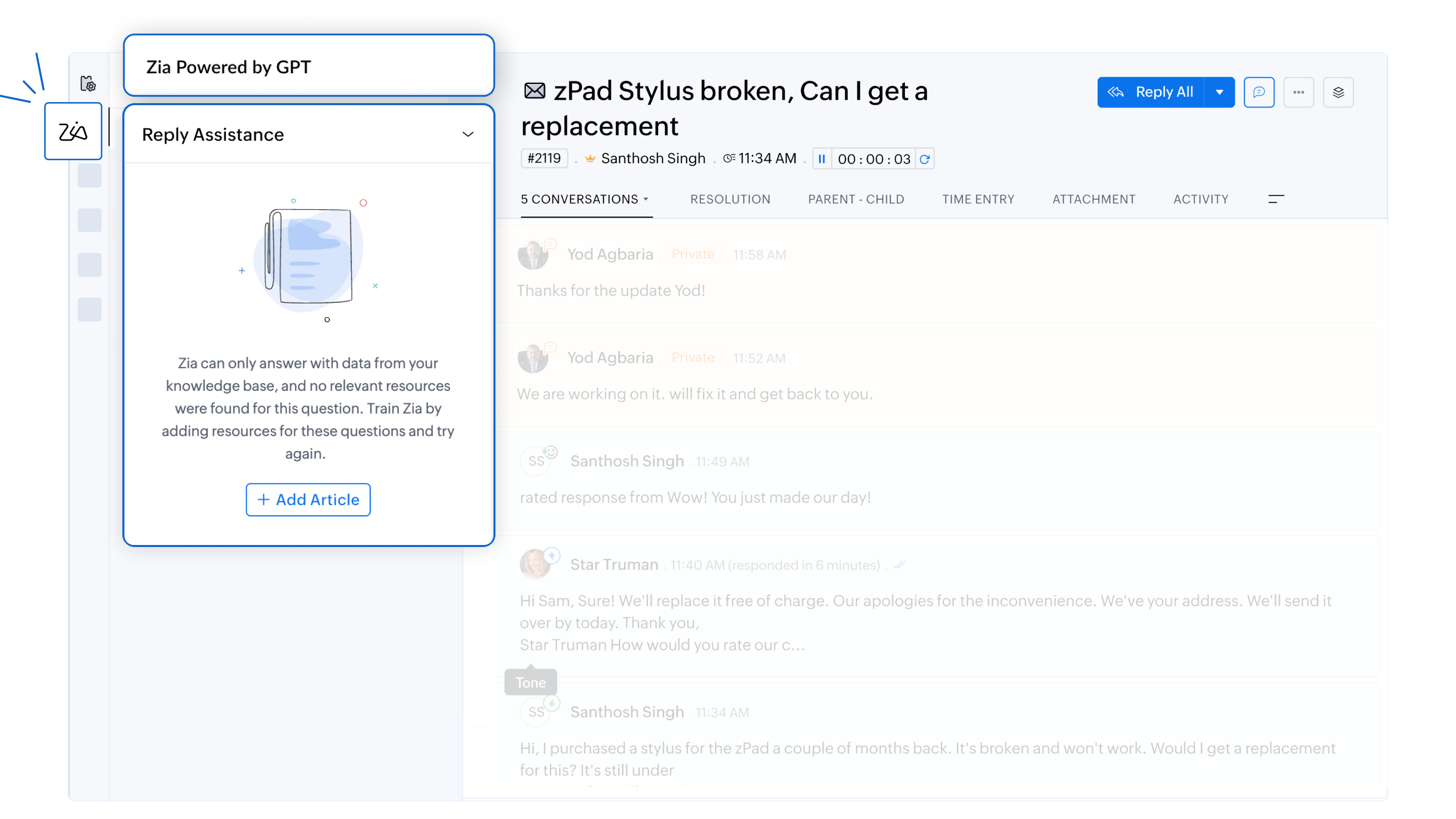
- Data privacy and security
Zia adheres to strict GDPR guidelines to ensure customer information remains secure. All responses are generated solely from the company’s knowledge base, and ticket data is not used for training purposes.
For more information on Zia and how to configure them, please refer to the detailed help documentation on
To enable this feature in your Zoho Desk account, please don't forget to fill out the registration form to request access. We look forward to empowering your support team with the power of AI.
For any questions or assistance, the support team is available via email at support@zohodesk.com, or queries and feedback can be left in the comment section below.
Thank you, and have a great day!
Regards,
Varsha P
Zoho Desk - User Education
Topic Participants
Varsha P
Zohoboy
Shivani | Zoho Desk
as
Alhatab Admin
Sticky Posts
2024 Email Authentication Standards: Elevating Security with Google and Yahoo
In contemporary email communication, email authentication plays a pivotal role in mitigating email fraud, spam, and phishing attacks. Brace yourself for a new level of security. Starting February 2024, Gmail and Yahoo will be implementing robust emailUsing Agent Email Address as From Address
Currently, while replying to a ticket, it is possible for agents to choose their own email addresses as 'from' addresses. Although we built this just for that little extra flexibility, in hindsight, it hasn't figured much in conventional usage. Almost all businesses prefer that responses to their customers' tickets be sent from the common support/service email address and NOT from those of individual agents. During personal interactions at events, some of you have even made passing mentions aboutEdit and Delete options in Comments
A lot of teams have been using ticket comments extensively to collaborate everyday. Notification Center further improved this experience by bringing real-time updates. As we continue to build more improvements to this experience, we've shipped a small-yet-importantWebinar 2: Supercharged customer support for growing business
Join us for this webinar and learn how to step up your support game using a real-time communication platform to generate happier, more successful customers. In this live webinar, we will will discuss the importance of SalesIQ for your support team and how it can help you: Understand your customers better and their journeys to proactively support and engage them even before they ask for help. Integrating real time conversations into Zoho Desk’s Support, providing a conversational customer serviceCustomize Colors of your Customer Self Service Portal
You asked for it. We heard you. We're happy to roll out the most sought after feature request, Customizing the Colors of your Customer Self-service Portal. Now you can set the color of your customer portal to mimic your company's web site, so that your customers visiting the portal will not feel alienated by the default theme. Go ahead and configure the color of the header, tabs, fonts and background according to your needs. You can either choose between default color themes like Blue, Grey, Green
Recent Topics
Change Last Name to not required in Leads
I would like to upload 500 target companies as leads but I don't yet have contact people for them. Can you enable the option for me to turn this requirement off to need a Second Name? Moderation update (10-Jun-23): As we explore potential solutions forcreating an alias
your instructions for creating an alias are wrong. there is no add alias in my mail account. also i dont have a control panel link just a settings link how do i really make an aliasReply to Email for SO/PO
Hello, We are new to Zoho Books and running into an issue. Our support@ email is our integration user. When our team is sending out PO/SO's we are updating the sender email, but for some reason many of our responses are coming back to our support@ emailZOHO Payroll Canada
Any plans on the roadmap for Canada?Zoho Books Sandbox environment
Hello. Is there a free sandbox environment for the developers using Zoho Books API? I am working on the Zoho Books add-on and currently not ready to buy a premium service - maybe later when my add-on will start to bring money. Right now I just need aMulti-currency and Products
One of the main reasons I have gone down the Zoho route is because I need multi-currency support. However, I find that products can only be priced in the home currency, We sell to the US and UK. However, we maintain different price lists for each. ThereCustom Module Missing from Roles & Permissions List
Hi Zoho Community, I created a new Custom Module in Zoho Expense. The module is fully built and I can see it in the Module Builder (Settings > Customization > Modules). However, I am unable to deploy this to my users because the module does not appearZOHO Writer Folders
Hi We would love to have ability to create folders on the left hand side. We would then be able create and store our documents within each folder Hope you can provide this feature soon ! dux.centraHow can Data Enrichment be automatically triggered when a new Lead is created in Zoho CRM?
Hi, I have a pipeline where a Lead is created automatically through the Zoho API and I've been trying to look for a way to automatically apply Data Enrichment on this created lead. 1) I did not find any way to do this through the Zoho API; it seems likeEscalation request: organization merge and data export (Ticket [154609577])
Hello Zoho Team, I am posting here because my support ticket has not received substantive responses through the usual channels. Summary of the issue (ongoing for three weeks): I requested assistance with a data migration and a merge of two Zoho organizations.Different form submission results for submitter and internal users
I'm looking for suggestions on how to show an external submitter a few results while sending internal users all the results from the answers provided by the external user. The final page of our form has a section with detailed results and a section withFormatting and slow
Creating campaigns are difficult. I'm fairly computer literate but some of the way Zoho Campaigns formatting works is painful. Images fail to upload or are very slow. To top it off, syncing the contacts is a pain as well as temperamental links to create Segments. At this rate I'm afraid we might need to migrate back to Mailchimp.Boost your Zoho Desk's performance by archiving tickets!
The longer your help desk operations are, the more likely it is to accumulate tickets that are no longer relevant. For example, ticket records from a year ago are typically less relevant than currently open tickets. Such old tickets may eventually leadPaste emails to create segment
We are moving over from Mailchimp to ZOHO. However Mailchimp allows me to create a segment by pasting in emails from excel (or importing a .csv) can I do the same in Mailchimp?Getting the Record ID of a form once it is submitted - so that form can be edited later
In Zoho Forms, where can I access the record ID of a form once the form is submitted? - Record ID is not available in webhook payloads - It is not available to form fields, including in formulas - It is not available as a parameter in a thankyou pageAuto-Generate Line Numbers in Item Table Using HTML & CSS Counters (Zoho Books & Zoho Inventory Custom Templates)
<div> <style> /* Start counter from 0 inside tbody */ tbody#lineitem { counter-reset: rowNumber; } /* Increment counter for each row */ tbody#lineitem tr { counter-increment: rowNumber; } /* Show counter value in first column */ tbody#lineitem tr td:first-child::beforePossible to define default font and size in Zoho Campaigns?
Is it possible to define a default font (font, size and colour) for the text, H1 and H2 in Zoho Campaigns? For example: In a campaign, I add a text block, and the text is automatically century gothic, size 11, grey (6f6f6e) by default? Thank you!Zoho Sites - General Feedback
Hi Everyone-- Quick question for discussion: is it me or is working with Zoho Sites like entering the Twilight Zone? I've built many sites over the years, but this platform seems impossible. I've spent an entire day and a half trying to get a simple one-colorZoho People & Zoho CRM Calendar
Hi, Does anyone know if it is possible to link Zoho People and the calendar in CRM? I would like when holidays are approved they automatically appear in the calendar on CRM. ThanksFile Upload field not showing in workflow
Hi, I have added a field on Zoho CRM. I want to use it in a workflow where that particular field is updated based on another field, however it is not showing up in the field list to select it in the workflow. Why is this please?You cannot send this email campaign as it doesn't have any eligible contacts in the selected mailing list. You can try adding contacts or choose other mailing lists.
please helpStrengthening the capabilities of CommandCenter in Zoho CRM Plus
When you look at the prospect-to-customer journey in most businesses 10 to 15 years ago, it was relatively straightforward. Many of us remember walking into a store, sharing our requirements with a sales associate, reviewing a few options, and makingWorld date & time format
Hello, Is there a timeline to get the worldwide used date and time format ? I mean not the american one... I mean day month year, and 24 hours clock. RegardsAnnouncing Kiosk 1.1 - Customize screen titles, configure new fields & actions, use values from your Kiosk to update fields, and more.
Hello all We are back again with more enhancements to Kiosk. So what's new? Enhancements made to the Components Add titles for your Kiosk screens and adjust its width to suit your viewing preferences. Three new fields can be added to your screen: Percentage,Any recommendations for Australian Telephony Integration providers?
HI, I am looking for some advice on phone providers as we are looking to upgrade our phone system, does anybody have experience with any of the Australian providers that integrate with CRM Telephony? So far we are looking at RingCentral and Amazon Connect, and would love to hear feedback on any of the other providers you might have tried. Thank youZoho Campaigns Workspaces
Hi, I’m currently working on a Zoho CRM + Zoho Campaigns setup for a franchisee-based organization, where each franchise must only see and use its own contacts. At the moment, franchisees cannot properly access their contact lists in Zoho Campaigns unlessLimited System because of Limited Number of Fields for Car Dealership
Dear Zoho Support, we want to have all the information about a car inside of a car record. We want to have Zoho CRM as our single source of truth for our data, but the limited number of fields are not allowing that. The data consist of: technical dataNewsletter in multiple languages
Hi We are planning on starting to use Zoho Campaigns for our newsletters. Since we send our newsletters in three languages, I would need the "unsubscribe page" and other pages related to the NL (Thank you page and so on) to be available in different languagesFixed assets in Zoho One?
Hi, We use Zoho Books and have the fixed asset option in it. I started a trial for Zoho One and I do not see that as an option. Is the books that is part of zoho one equivalent to Zoho Books Elite subscription or is it a lesser version? Thanks, MattSet Default Status of Assembly to "Assembled" When Entered in UI
I've just discovered the new "confirmed" status of Assemblies within Inventory. While I understand the intent of this (allowing for manufacturing planning and raw material stock allocation), it was initially confusing to me when manually entering someI need to Record Vatable amount and non vatable amount separately in zoho books in a single line
I need to Record Vatable amount and non vatable amount separately in zoho books in a single line give me the customisation option and in invoice copy to customer the total amount should be inclusive 5%vat and no need to show the vatable and non vatableSort Legend & stacked bar chart by value
I'd love to see an option added to sort the legend of graphs by the value that is being represented. This way the items with the largest value in the graph are displayed top down in the legend. For example, let's say I have a large sales team and I createScanned Doc - selecting Item overwrites Rate
I have a Vendor Invoice which was uploaded to Documents. I select Add To > New Bill. The OCR is actually quite good, but it is reading an Item Description instead of an Item Number. I remove the description and select the correct Item Number... and itTimesheet invalid data error
Getting the "Invalid Date" error when trying to add a time sheet to an appointment in a work order. I initially though the work order was corrupt or something so I deleted the work order and recreated it. I added the first time sheet to the AP and savedConvert invoice from zoho to xml with all details
How to convert an Invoice to XML format with all detailsAny update on adding New Customer Payment Providers who support in store terminal devices?
Currently there is only one Customer payment provider listed for terminal devices in USA- Everyware. They charge a monthly fee of almost $149 minimum. Will you add other providers - like Zoho Payments or Stripe or Worldpay that would allow integratedDealing With One-Time Customers on Zoho Books
Hello there! I am trying to figure out a way to handle One-Time customers without having to create multiple accounts for every single one on Zoho Books. I understand that I can create a placeholder account called "Walk-In Customer", for example, but I"Temporary" Field Value?
I have a custom action in Form A report Detail View that passes the Rec ID and updates a Temp Record ID lookup field in the Form B record via openURL (and opens the Form B report in popup) . The updated Temp Record ID field value in Form B is then usedFile Upload field automatically replaces spaces with underscores – support experience
Hi everyone, I want to share my recent experience regarding the File Upload field behavior in Zoho Creator and my interaction with the Zoho support team. When a user uploads a file, the system automatically renames the document by replacing spaces inWe Asked, Zoho Delivered: The New Early Access Program is Here
For years, the Zoho Creator community has requested a more transparent and participatory approach to beta testing and feature previews. Today, I'm thrilled to highlight that Zoho has delivered exactly what we asked for with the launch of the Early AccessNext Page