Kaizen #125 Manipulating Multi-Select Lookup fields (MxN) using Zoho CRM APIs
Hello everyone!
Welcome back to another week of Kaizen. In last week's post in the Kaizen series, we discussed how subforms work in Zoho CRM and how to manipulate subform data using Zoho CRM APIs.
In this post, we will discuss how to manipulate a multi-select lookup fields using Zoho CRM APIs.
Multi-select lookup field
The Multi-Select Lookup Field enables you to establish a many-to-many relationship between two different modules in CRM. It allows you to associate multiple records with each other, from two different modules.
These associations are stored in an individual module called "Linking Module". Consider there are two modules, Employees and Skills. The Employees module contains details regarding Zylker's workforce, and the Skills module contains details regarding various skills like Social Media Marketing and Content Marketing.
We want to associate multiple skills to an employee. So, a multi-select lookup can be created in the Employees module. When doing so, similar multi-select lookup field will be automatically created in the Skills module, along with the EmpXSkills linking module by Zoho CRM. The underlying data model is described in the below image.
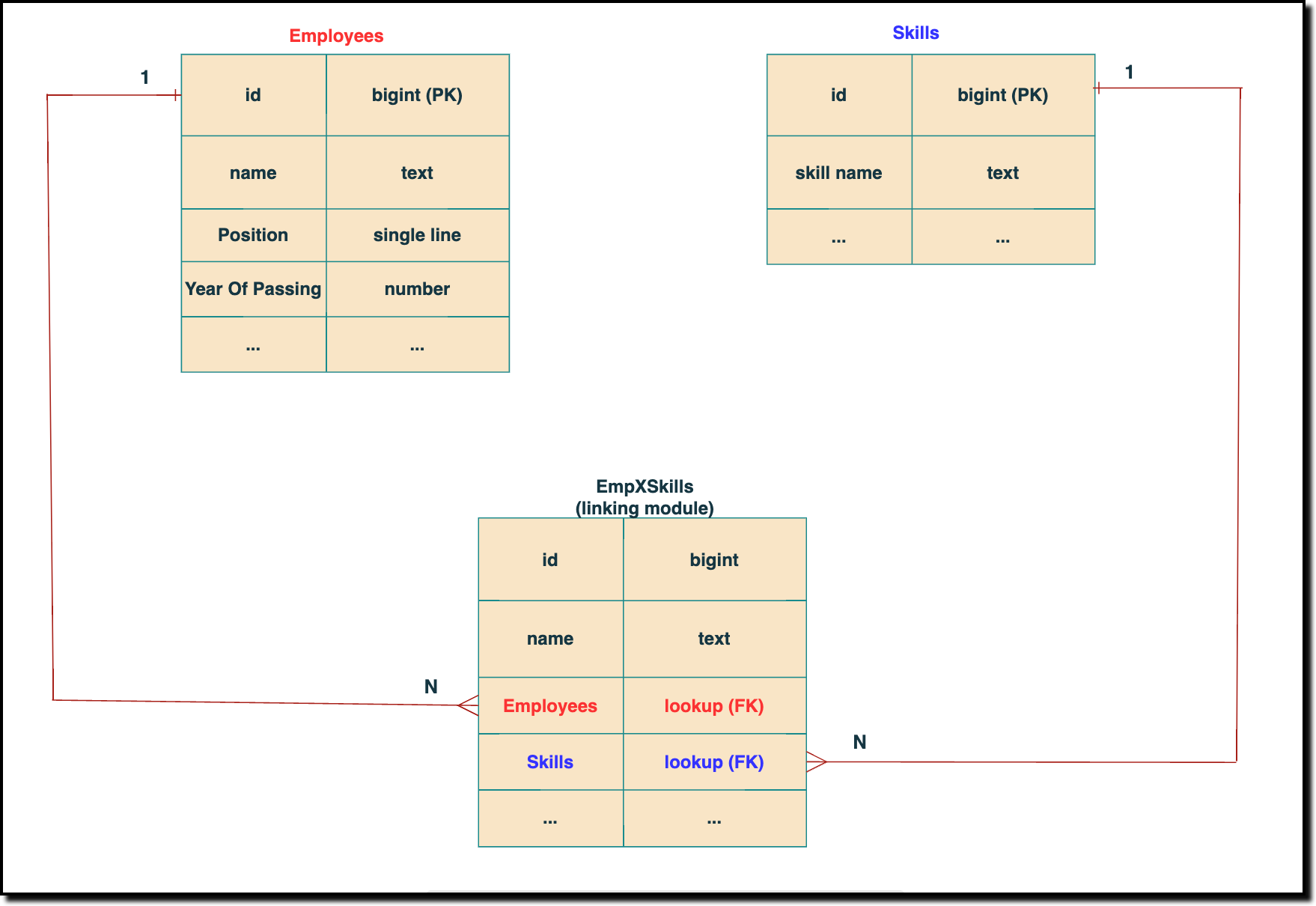 The above chart shows the data model representation when you create a multi-select lookup field in a module. Here, there are two lookup fields—one pointing to the Employees module and the other pointing to the Skills module.
 In the linking module, two lookup fields (lookup fields with api names - Employees and Skills) will be created. The lookup fields, one pointing to Employees and the other pointing to Skills from the linking module, establish a connection between the linking module and its associated module.
How to associate an employee's skills while creating an Employee record through the Insert Records API
API names you need before invoking the API
- The API name of the multi-select lookup field in the modules you want to insert data.
- API names of the lookup fields in the linking module. Eg: here the API Name of the linking module is "EmpXSkills" and the corresponding lookup field api names are "Employees" & "Skills". You can use the Fields Metadata API for Employees and Skills to get these details.
Step 1
Know the API name of the multi-select lookup field in the module (In our case, Skills is the multi-select lookup field in the Employees module)
To know the API names of the multi-select lookup fields, make a GET - Fields Metadata API call. Among all the Employee's fields, multi-select lookup field can be identified by the json key data_type with the value multiselectlookup. The corresponding connected module can be found from the json connected_module. Below is the API call & response for such a multi-select lookup field.
Request URL : {api-domain}/crm/v6/settings/fields?module=Employees
Request Method: GET
Sample Response:
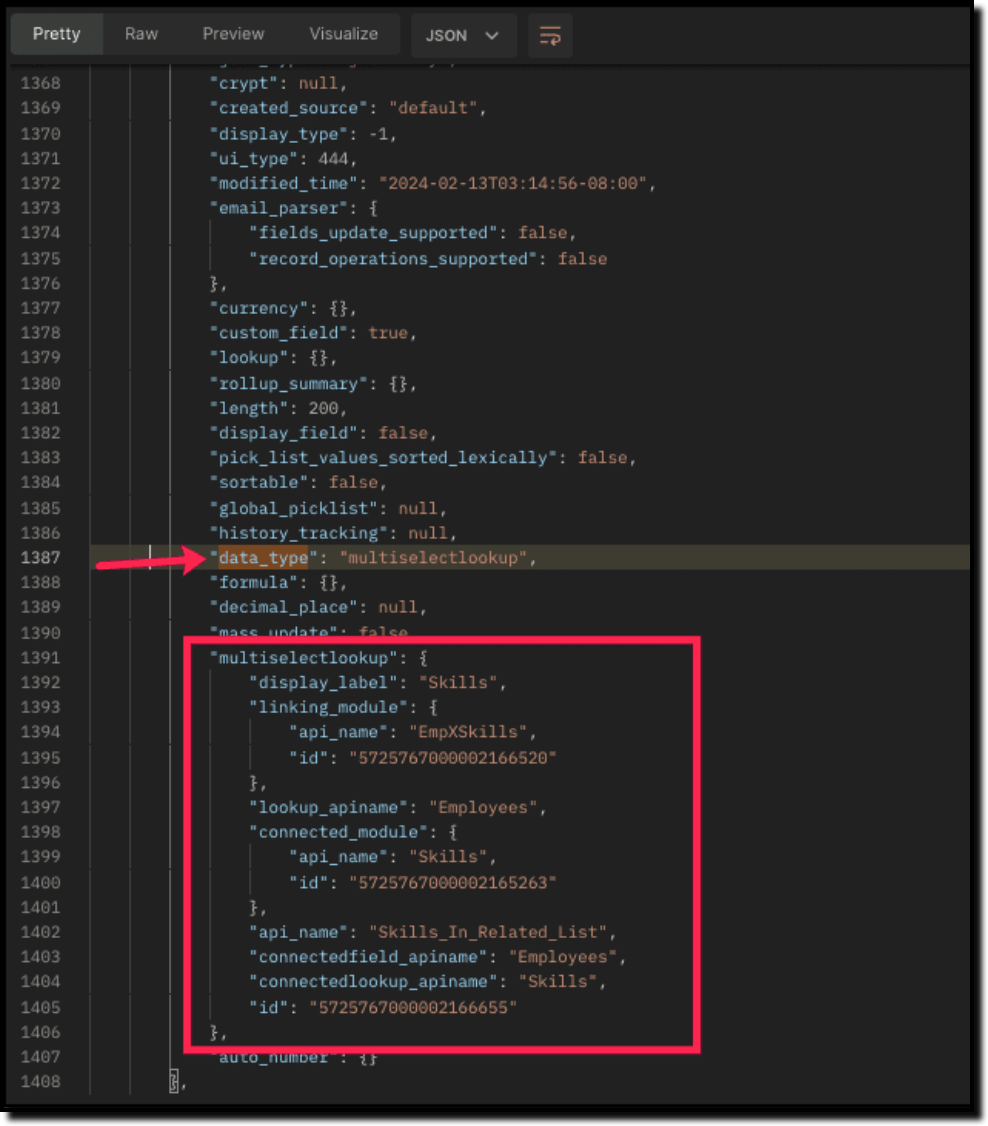
The above highlighted keys are the details of the Multi select lookup field. The corresponding keys are explained below:
"multiselectlookup": { "display_label": "Skills", //Display label of the MxN field in the Employees module "linking_module": { "api_name": "EmpXSkills", //API name of the linking module "id": "5725767000002166520" ... "lookup_apiname": "Employees", //API name of the Employee lookup field in the linking module "connected_module": { "api_name": "Skills", //API name of the connected module "id": "5725767000002165263" }, "api_name": "Skills_In_Related_List", //API of the related list of the connected module Skills in the Employees module. "connectedfield_apiname": "Employees", //API Name of the multi-select lookup field in the connected module (Skills) "connectedlookup_apiname": "Skills", //API name of the Skills module lookup field in the linking module. "id": "5725767000002166655" //Related List ID }, ... |
Step 2
Using the api_name of the linking module, make a GET Fields metadata API call to get the list of fields (along with their api_name) present in it. It lists all fields of the linking module in the response.
Sample Request and Response
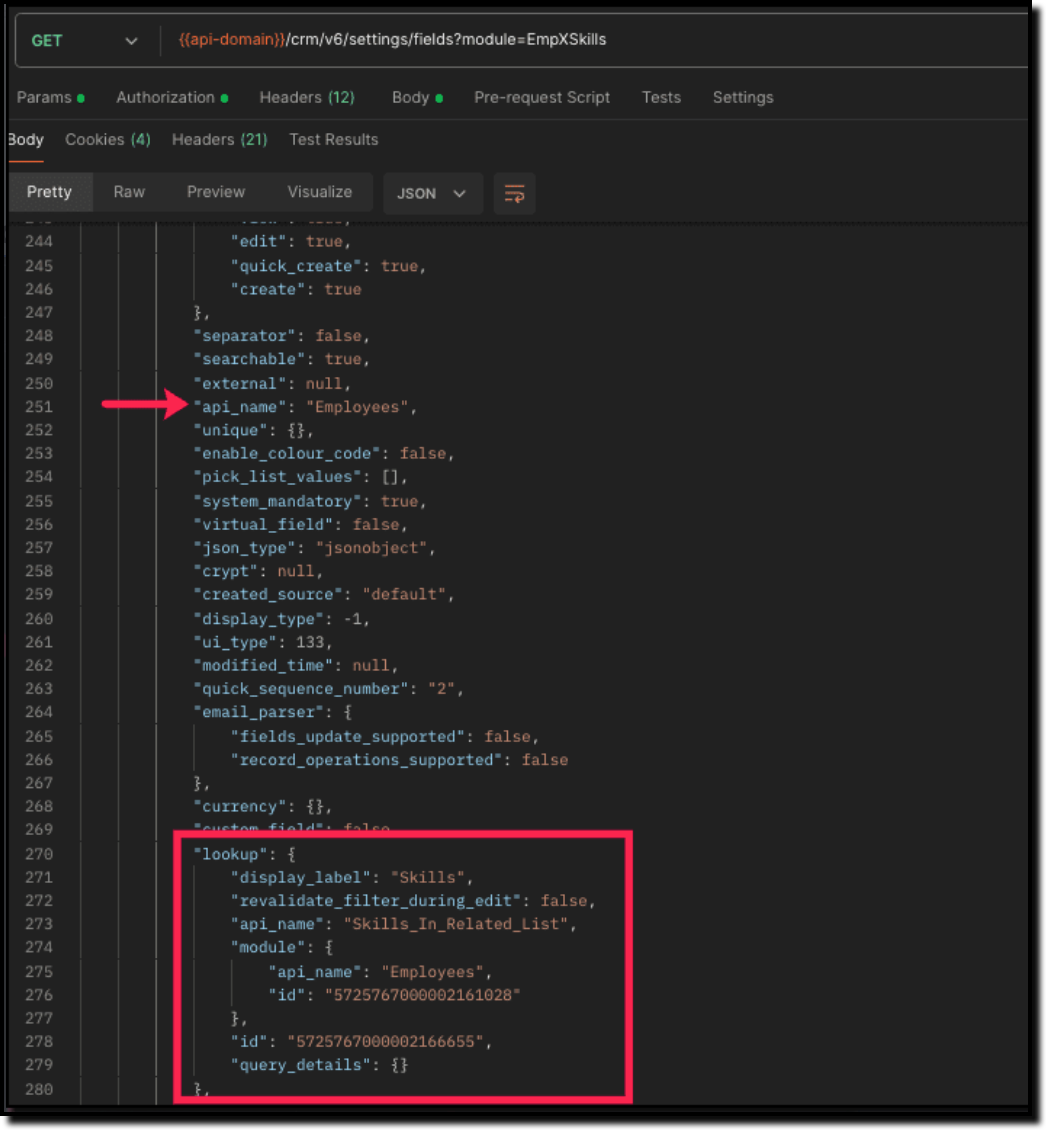
Search for the "data_type": "lookup" in the response. The lookup fields represent the connected modules in association with the linking module.
For example, in our case, the response will have two lookup fields. One of the lookup fields (with api name Employees) points to the Employees module, and the other one (with api name Skills) points to the Skills module.
Step 3
Associate records via the Multi-select lookup field using the Insert Records API
To associate records via the MxN field, you need to know the IDs of the records in the Skills module. Here is the input body to insert the skills in the Employee module with the multi-select lookup field Skills.
Here is the input body to insert a new Employee record and associate a Skills record to it using the MxN field.
Request URL: {{api-domain}}/crm/v6/Employees
Request Method: POST
Sample Input:
{ "data": [ { "Name": "Patricia", "Email": "patricia@mail.com", "Position": "Marketing Specialist", "Year_of_Experience": 5, "Skills": [ //API name of the multi-select lookup field in Employee module { "Skills": { //API Name of the lookup field pointing to the Skills module in the linking module "name": "Marketing", "id": "5725767000002149427" //Record ID in the Skills module } }, { "Skills": { "name": "Social Media Marketing", "id": "5725767000002149476" } } ] } ] } |
How to disassociate an employee & skills relation while updating an Employee record through the Update Records API
Request URL: {{api-domain}}/crm/v6/Employees
Request Method: PUT
Sample Input:
{ "data": [ { "id": "7890710000097291", "Name": "Patricia", "Email": "patricia@mail.com", "Position": "Marketing Specialist", "Year_of_Experience": 5, "Skills": [ { "_delete": null, //This association in the linking module will be deleted "id": "5725767000008126002" //Record created in the linking module } ] } ] } |
Sending _delete:null will cause delinking of the association.
How to associate an employee's skills via "Linking Module"
You can associate the relationship between Employees and Skills module by creating records in the Linking module (EmpXSkills). Use the API names for the corresponding lookup fields, Employee (API Name: Employees) and Skills (API Name: Skills) in the input body.
Request URL: {{api-domain}}/crm/v6/EmpXSkills
Request Method: POST
Sample Response
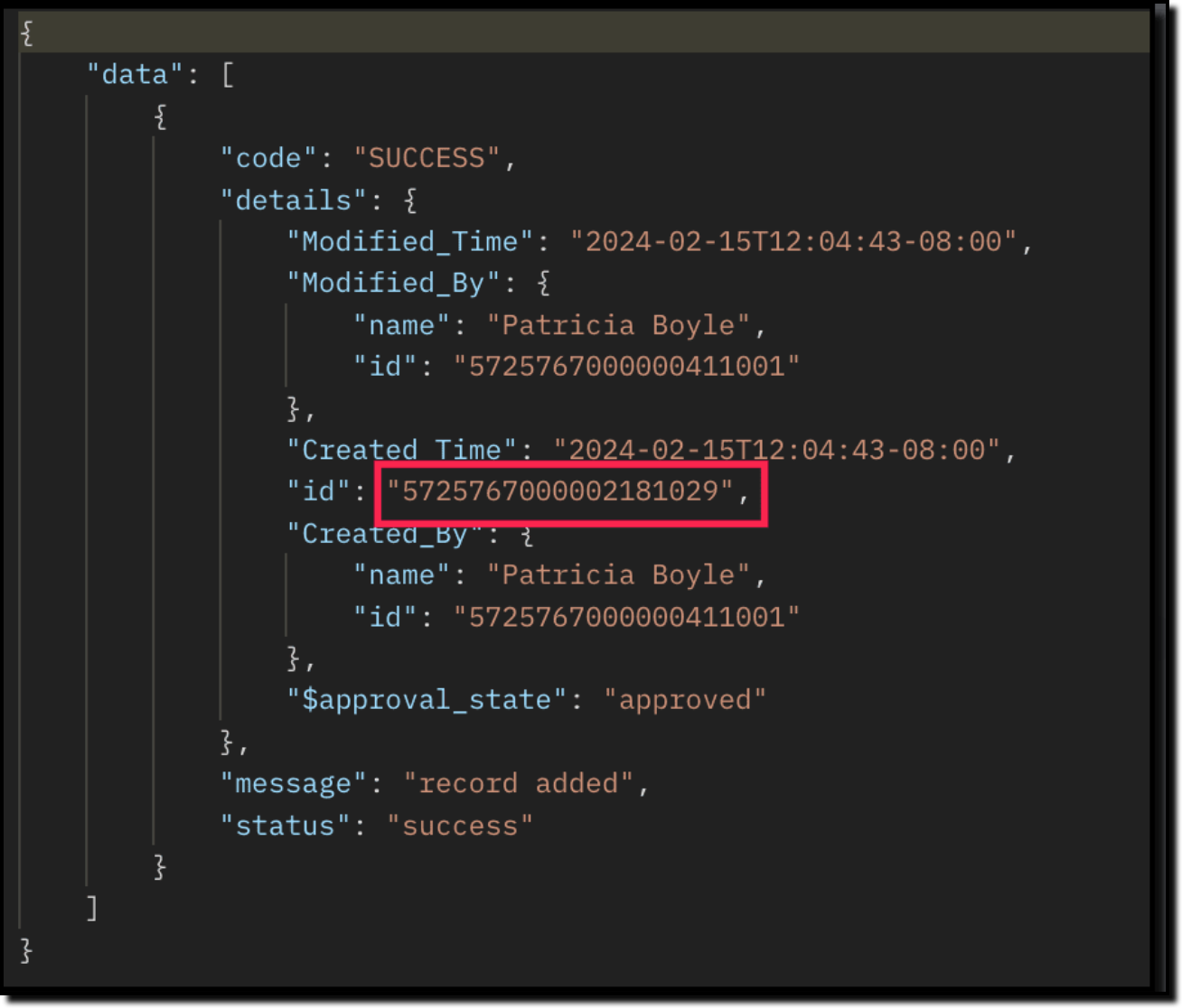
The id in the above response is the Primary Key ID of an Employee-Skill association record in the linking module. This ID can later be used to do specific operations like association update or deletion via API.
How to disassociate an employee & skills relationship via "Linking Module"
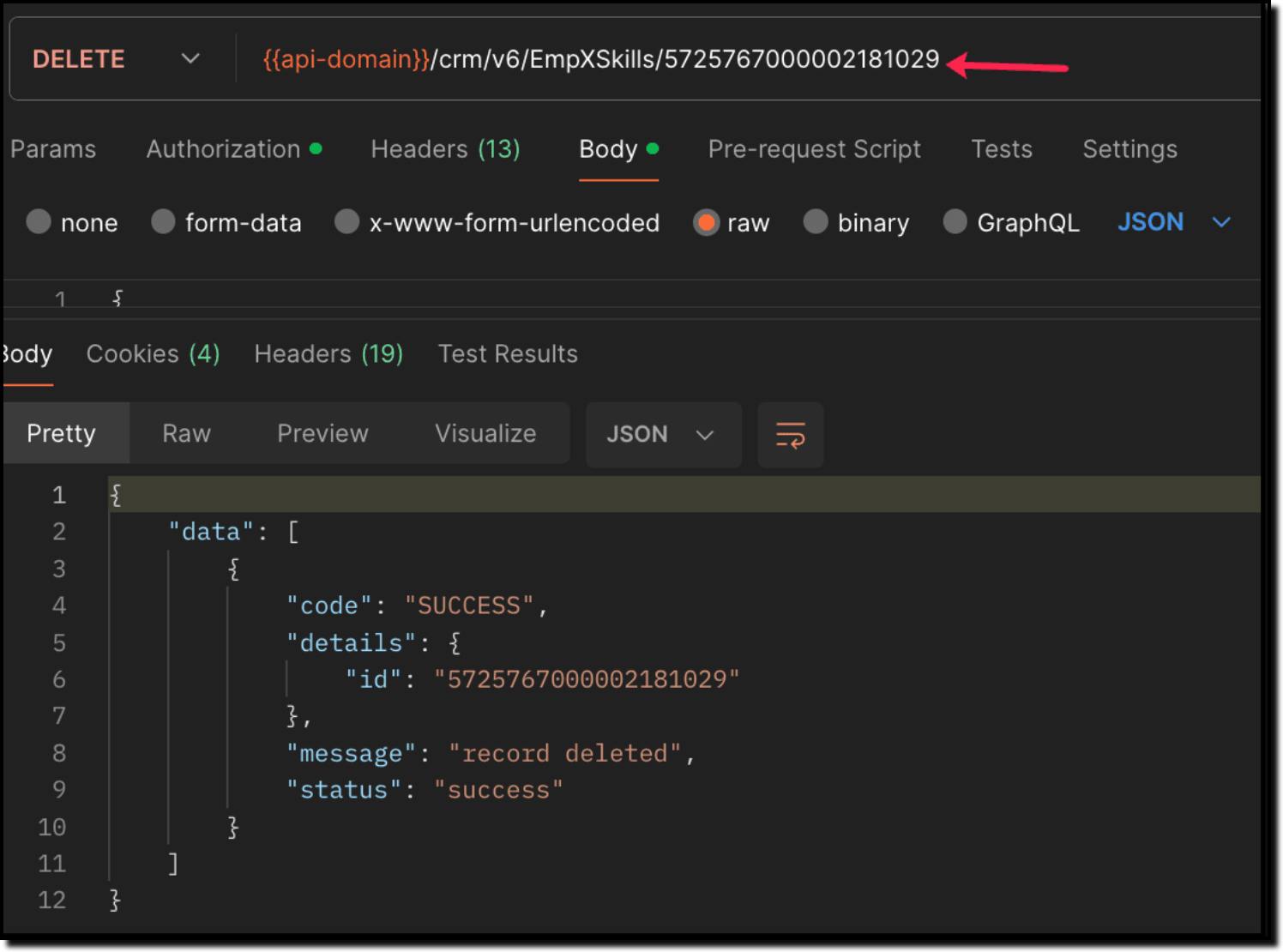
Use the Delete Records API to delete the record which corresponds to the specific relation between Employee and Skills module in the EmpXSkills module. You can get the record ID for the specific association using the Get Records API for the linking module.
Use the Delete Record API to delete the specific record, thereby deleting the specific association between the Employee and Skills record. Please note that only the association is removed, and not the individual records.
Sample Request and Response
When to use create/update operation in Employees/EmpXSkills module?
Use "Employees" module: When you want to create/update records in the Employees module, and associate the record with a Skills record in a single API call.
Use "EmpXSkills" module: When you want to associate/disassociate the relationship between existing Employees and Skills records.
Retrieve data via COQL API and Bulk Read API
There may be situations where you need to fetch records based upon certain conditions.
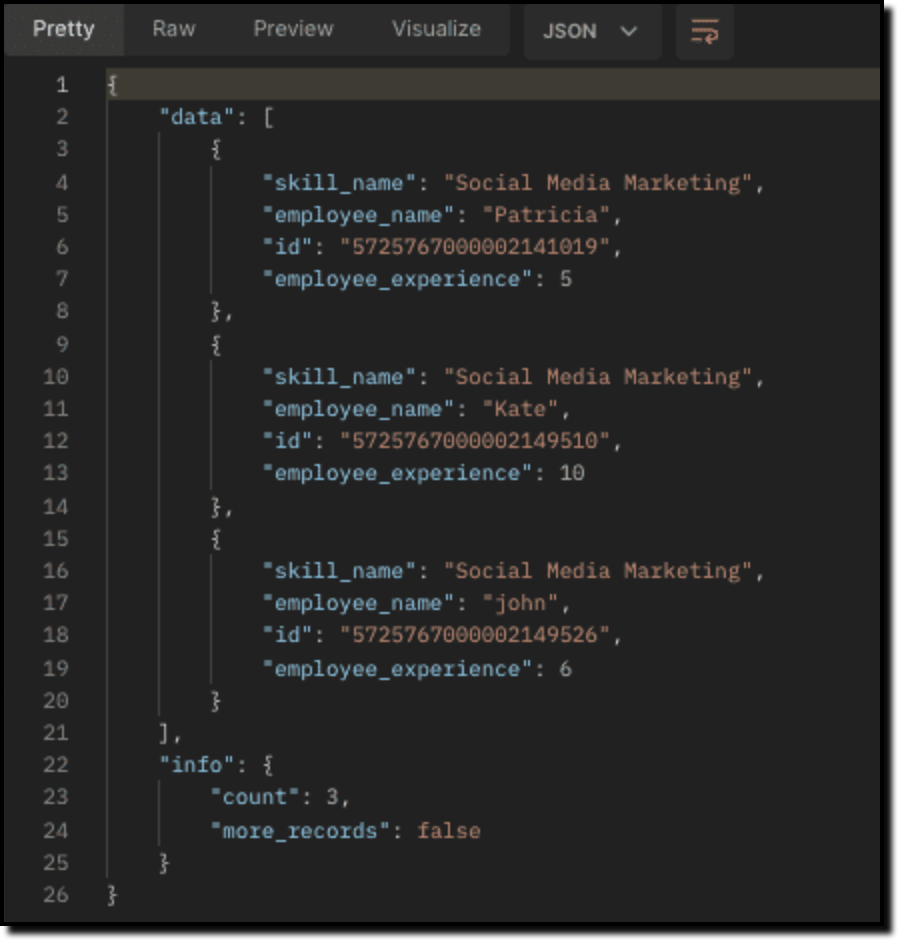
For example, Zylker's HR team wants to retrieve the list of employees having more than 4 years of experience and are experts in Social media marketing. In this case, they can use Zoho CRM's COQL API or Bulk Read API. Let's see how to achieve this.
Retrieving MxN data via COQL API
We know that both the Employees and Skills modules' association data is maintained in the linking module. In order to retrieve data from the linking module, query using the API name of the lookup fields in the linking module.
Request URL: {{api-domain}}/crm/v6/coql
Request Method: POST
Sample Input:
{ "select_query" : "select Employees.Name as employee_name, Employees.Year_of_Experience as employee_experience, Skills.Name as skill_name from EmpXSkills where Employees.Year_of_Experience > 4 and Skills.Name like '%Social%'" } |
From the SQL perspective, above COQL can be interpreted as
select emp.Name as employee_name, emp.Year_of_Experience as employee_experience, skill.Name as skill_name from EmpXSkills left join Employees as emp on EmpXSkills.Employees = emp.id left join Skills as ski on EmpXSkills.Skills = ski.id where emp.Year_of_Experience > 4 and ski.Name like '%Social%' |
Sample Response
Retrieving MxN data via Bulk Read API
Bulk Read API allows you to fetch a large set of data i.e., you can fetch a maximum of 200,000 records in a single API call.
To export linking module records, use its API name.
Request URL: https://www.zohoapis.com/crm/bulk/v6/read
Request Method: POST
Sample input to export linking module's records:
{ "callback": { "method": "post" }, "query": { "module": { "api_name": "EmpXSkills" //API name of the linking module }, "file_type": "csv" } } |
Export linking module records that meet the specified criteria
To export linking module's records based on the given criteria above (similar to the COQL API).
{ "callback": { "method": "post" }, "query": { "module": { "api_name": "EmpXSkills" }, "fields": [ "Employees.Name", "Employees.Year_of_Experience", "Skills.Name" ], "criteria": { "group": [ { "field": { "api_name": "Employees.Year_of_Experience" }, "comparator": "greater_than", "value": "4" }, { "field": { "api_name": "Skills.Name" }, "comparator": "contains", "value": "Social" } ], "group_operator": "AND" } } } |
As the API is an asynchronous API, the response will not be available instantly; the bulk read job is scheduled, and the status can be checked. Once the job is completed, you will be notified in the callback URL. The records are available in a downloadable CSV file or ICS file (for events). See the Bulk Read API document to know how to view the status of the scheduled job and download the file, along with more sample requests and responses.
We trust that this post meets your needs and is helpful. Let us know your thoughts in the comment section or reach out to us at support@zohocrm.com
Stay tuned for more insights in our upcoming Kaizen posts!
------------------------------------------------------------------------------------------------------------------------------
Previous Kaizen Post : Kaizen #124 - Manipulating Subform using Zoho CRM APIs
-------------------------------------------------------------------------------------------------------------------------------
Cheers!
Additional Reading:
Kaizen Posts:
- Kaizen #26 - Linking module and Multi-select Lookup fields
- Kaizen #77 - Multi-select Lookup Fields in API V4
- Kaizen #80 - COQL API - Part I
- Kaizen #81 - COQL API - Part II
API Documentation - Linking Module APIs