Kaizen #129 : Client Script Support for Blueprints

Kaizen #129 : Client Script Support for Blueprints

Hello everyone!

Welcome to another week of Kaizen. Today, let us discuss about how you can use Client Script during a Blueprint transtion to meet your requirements. This Kaizen post will provide solution for the post - Need non-mandatory fields in blueprint pop-up using Client Script.


In this Kaizen post,
  1. What is a Blueprint?
  2. Blueprint event in Client Script
  3. ZDKs and methods available in Client Script related to Blueprint
  4. Use Case - During a blueprint transition, show a pop up with fields that are not mandatory
  5. Solution
  6. Summary
  7. Related Links
  8. Kaizen Collection


1. What is a Blueprint?

Blueprint is an online replica of a business process. For instance, leads generation and follow-up, deals closure and order management. Each of these processes has several stages, and different teams may be responsible to complete each stage. At this point, one needs to take a moment to see if the CRM dictates how these processes should be executed. It captures every detail of your entire offline process within the software. Click here to know more about Blueprint in Zoho CRM.

Moving from one stage of a blueprint to the next stage  is called as Blueprint transition.

2. Blueprint event in Client Script

Whenever you want to meet your custom requirements in Zoho CRM before a Blueprint transition happens, you can use the beforeTransition event type available in Client Script. This event occurs before the transitions occur, as per the process flow designed in the Blueprint. You can add the "return false" statement at the end of the script to prevent the blueprint transition. Click here to know more about the events in Client Script.

3. ZDKs and methods available in Client Script related to Blueprint

Here is the list of ZDKs and methods using which you can code in Client Script.

ZDK.Page.getBlueprintTransitionByID()    -       You can get the blueprint transition by id.

ZDK.Page.getBlueprintTransitions().          -       You can get all the blueprint transitions in page.

getId()                                                            -       You can get the id of transition using Blueprint transition object.

getName()                                                     -        Get the name of transition using Blueprint transition object.

initiate()                                                         -        Initiate the transition using Blueprint transition object.


Click here to view the detailed documentation of ZDKs and methods related to Blueprint in Client Script.

4. Use Case

Zylker is a manufacturing organisation which uses Blueprint to manage the various updates in the status of Leads. Below is the blueprint configuration. For the transition "Gather details", the field  "Alternate Number" will be prompted as mandatory. Without entering this detail, the transition cannot proceed.
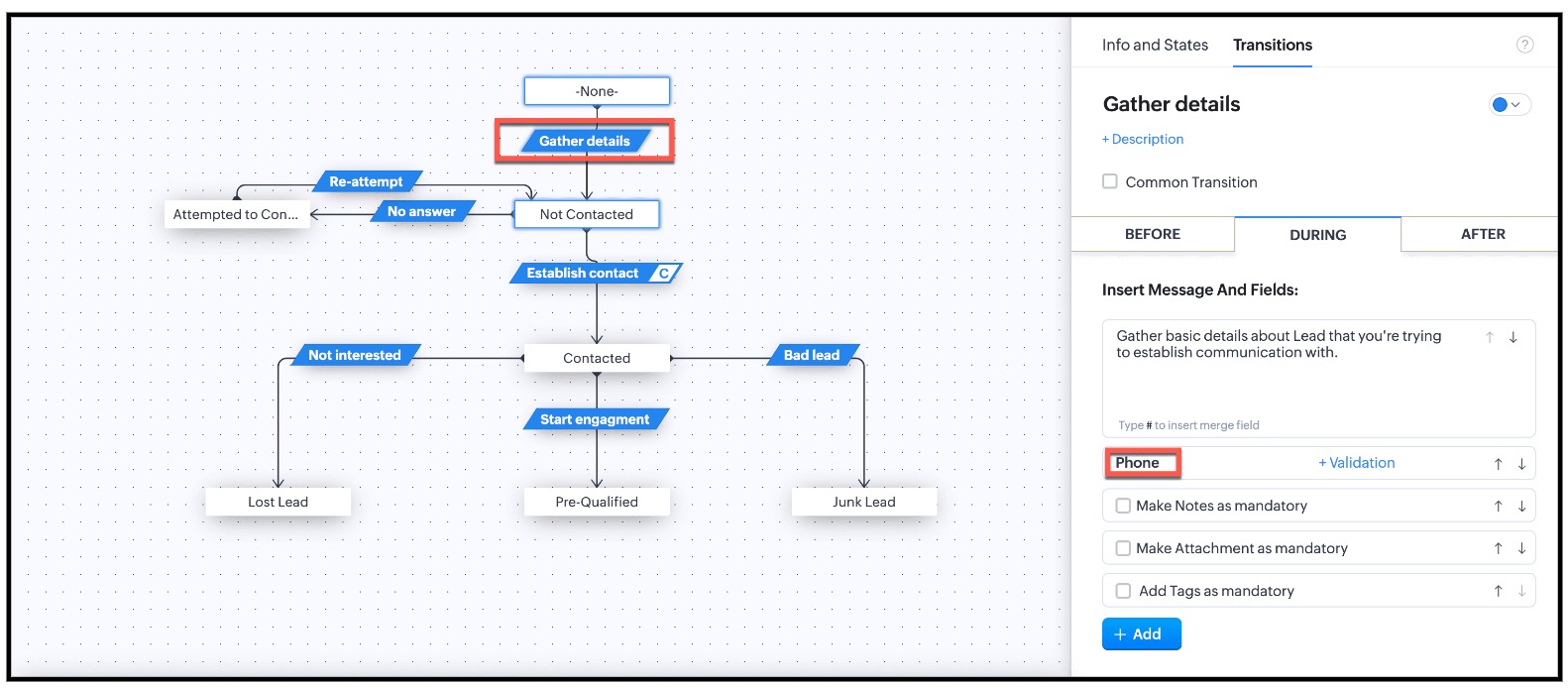


This is the existing Blueprint.
Now, the Admin wants to prompt the user to enter a value for the Alternate Number, but it should not be mandatory for the transition "Gather Details".

4. Solution

Currently in Blueprint the fields in the pop-up are mandatory. You can achieve non-mandatory fields in a pop-up using Client Script and update the values to that record. However you should not add the fields in the "During" phase of the "Gather Details" transition in Blueprint, to achieve this non-mandatory pop-up using Client Script. This solution will work for the requirement raised in this post.

For this,  you need to create a Client Script and use the "Before Transition" type of "Blueprint" Event.  
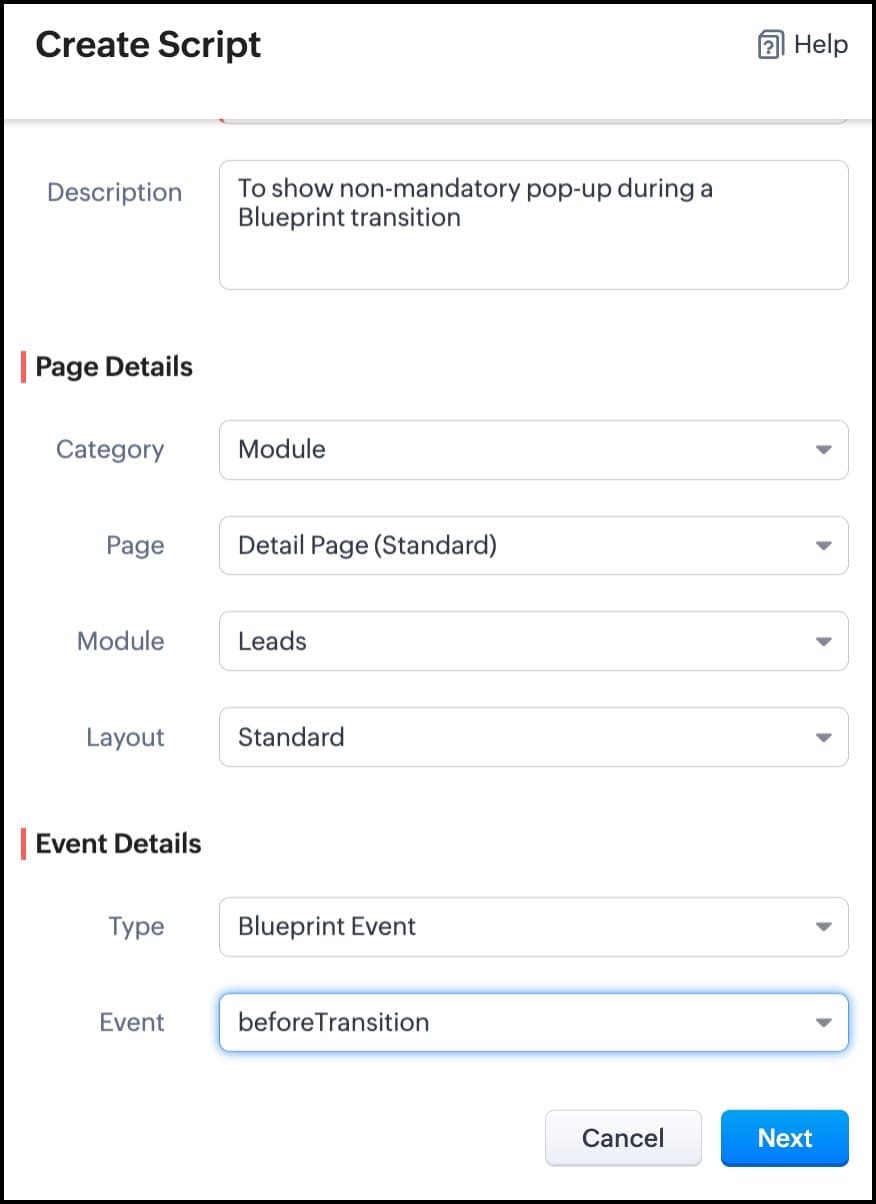


For more details on how to configure a Client Script, click here. Once you give the module and event details, you can see the Client Script IDE's Editor.
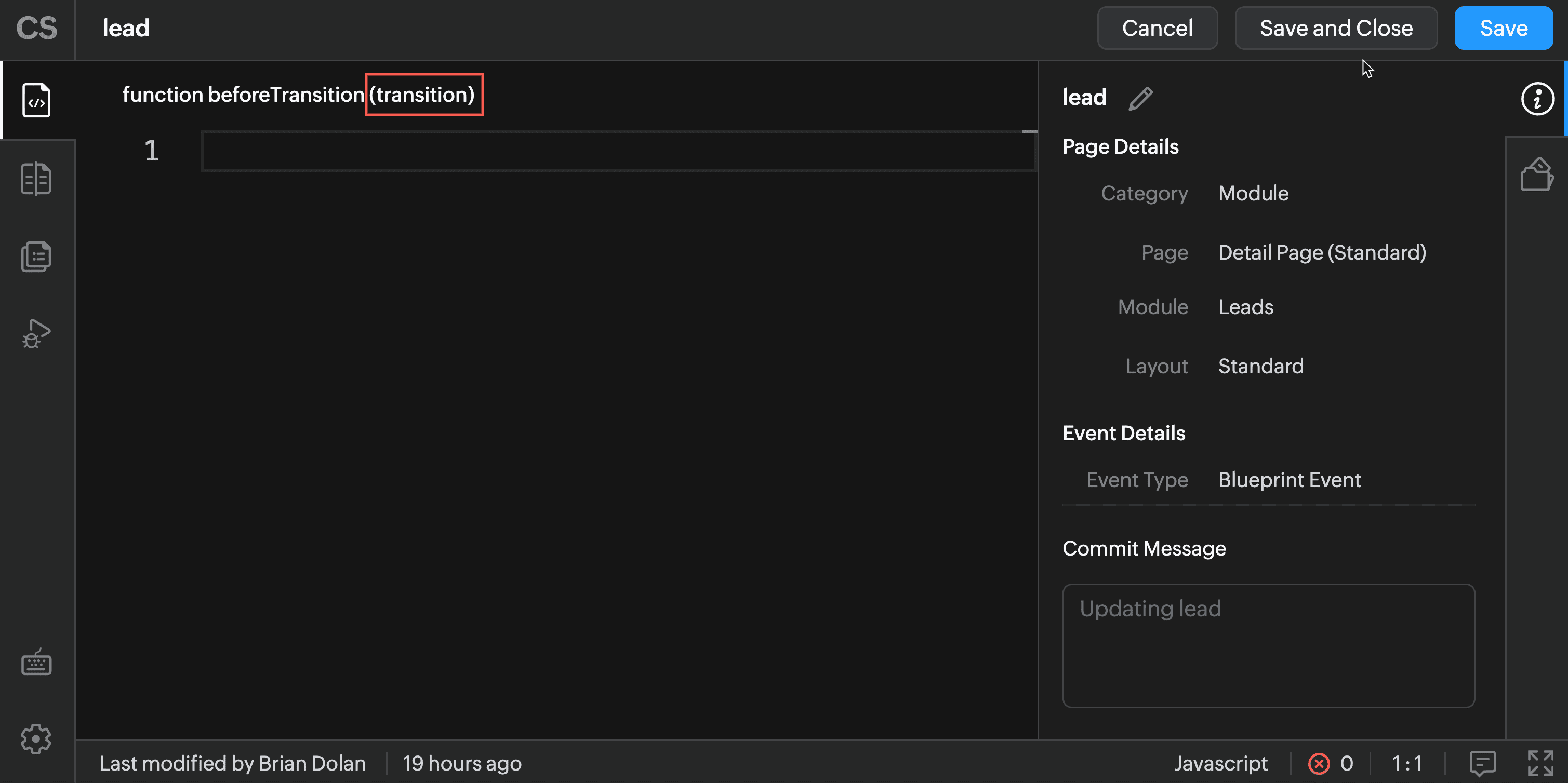


The argument "transition" will hold the the details of current Blueprint transition.

In the Client Script IDE, type the below script and click Save.

 if (transition.name == 'Gather details') {
// To show pop up and get the Alternate Number and update the 
//record's Alternate Number 
var var_alt = ZDK.Client.getInput([{ type: 'text', label: Alternate Number}], 'Give these details', 'OK', 'Cancel');

    if (var_alt != null) {

        var lead = ZDK.Apps.CRM.Leads.fetchById($Page.record_id);
        lead.alternate_number = var_phone.toString();
        var response = lead.__update();
    }

    else {

        ZDK.Client.showMessage('Details have been gathered successfully' });

    }

 
   $Client.refresh();// to refresh the page

}

The above script will get executed before every transition happens in the Blueprint. So, in the script, the code is added based on the transition name. As per the requirement, when the transition name is "Gather details" , you can show the pop-up through Client Script's getInput() function. Once you capture this value you can update the alternate number using the CRM API ZDKs. $Page.record_id will return the id of the current Lead record.

Here is how the Client Script works.
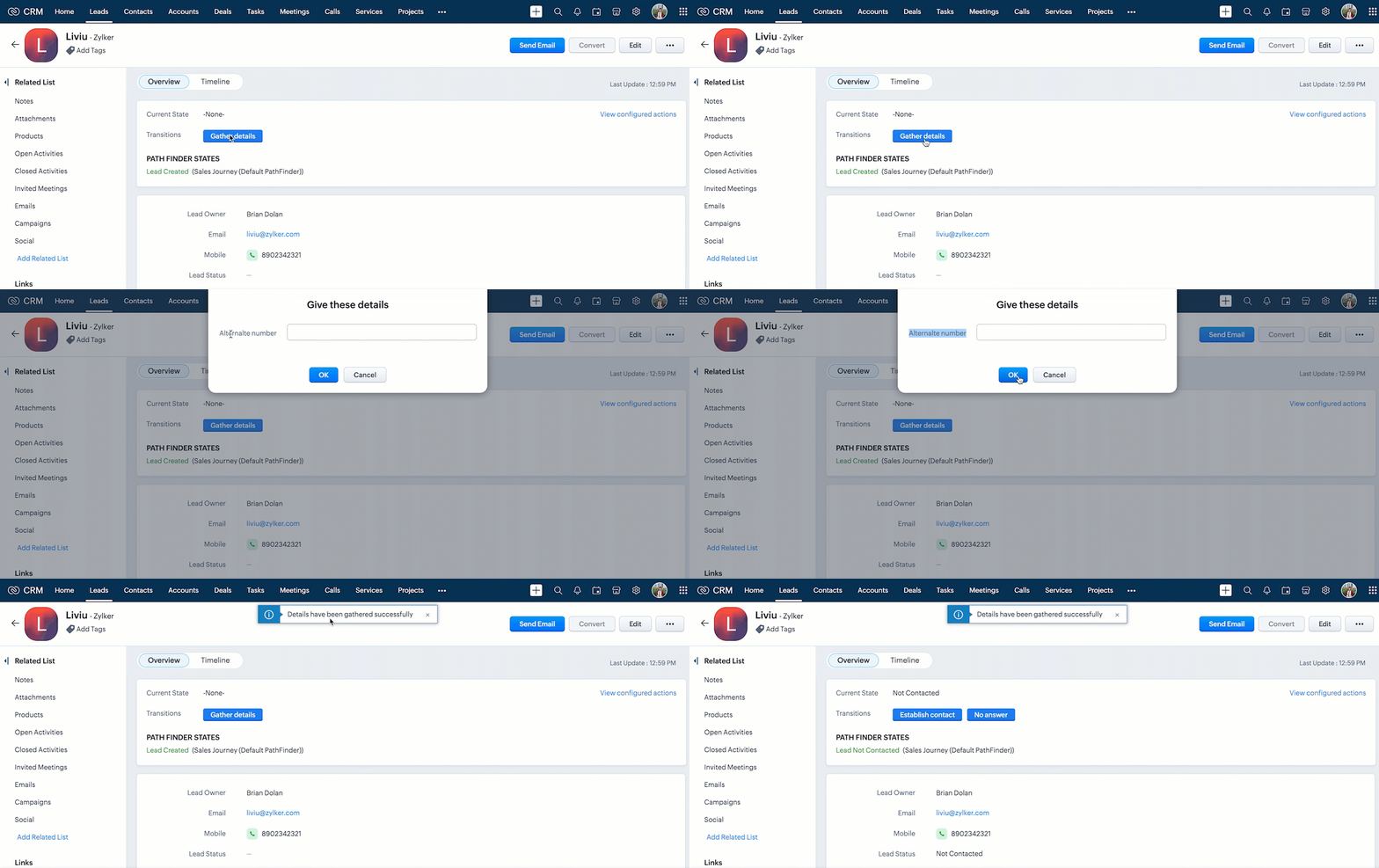


You can see that the transition happens even after the "Alternate Number" field is not filled by the user.


Note : 

1.  If you want to prevent a Blueprint Transition you need to add "return false" statement in the Script.      

2.  The blueprint event and the related ZDKs are  available only for Detail(Standard) Page and Detail(Canvas) Page
5. Summary

In this post, we have discussed,
  • About Blueprint events in Client Script.
  • The ZDKs and methods related to Blueprint.
  • How to configure a Client Script to trigger before a Blueprint transition
  • How to open a non - mandatory fields pop up before a blueprint transition
  • How to update current record using Update Records API through Client Script
  • How to refresh a page using Client Script
  • How to prevent a Blueprint Transition
6. Related Links
Kaizen Collection : 


Cheers!
Maadhari M


    • Sticky Posts

    • Kaizen #198: Using Client Script for Custom Validation in Blueprint

      Nearing 200th Kaizen Post – 1 More to the Big Two-Oh-Oh! Do you have any questions, suggestions, or topics you would like us to cover in future posts? Your insights and suggestions help us shape future content and make this series better for everyone.
    • Kaizen #226: Using ZRC in Client Script

      Hello everyone! Welcome to another week of Kaizen. In today's post, lets see what is ZRC (Zoho Request Client) and how we can use ZRC methods in Client Script to get inputs from a Salesperson and update the Lead status with a single button click. In this
    • Kaizen #222 - Client Script Support for Notes Related List

      Hello everyone! Welcome to another week of Kaizen. The final Kaizen post of the year 2025 is here! With the new Client Script support for the Notes Related List, you can validate, enrich, and manage notes across modules. In this post, we’ll explore how
    • Kaizen #217 - Actions APIs : Tasks

      Welcome to another week of Kaizen! In last week's post we discussed Email Notifications APIs which act as the link between your Workflow automations and you. We have discussed how Zylker Cloud Services uses Email Notifications API in their custom dashboard.
    • Kaizen #216 - Actions APIs : Email Notifications

      Welcome to another week of Kaizen! For the last three weeks, we have been discussing Zylker's workflows. We successfully updated a dormant workflow, built a new one from the ground up and more. But our work is not finished—these automated processes are
    • Recent Topics

    • Zoho CRM Community Digest - July 2026 | Part 1

      Hello everyone, July is here! The first two weeks brought six CRM updates ranging from privacy-ready webforms to a significantly more powerful Layout Rules engine, two community wins worth a look (a dashboard workaround for spotting leads with no activities,
    • New Ways to Personalize, Organize, and Share Your Notes

      We're excited to introduce a new set of enhancements in Zoho Notebook that make your note-taking experience cleaner, more flexible, and easier to share. With this update, you can create notes that automatically adapt to your device theme, browse your
    • SPAM (and some other) folders missing on three of my Zoho Mail accounts

      I have four email accounts with Zoho Mail. Three days ago, the Spam folder on three of these accounts vanished. It is gone on the Windows and Linux desktops as well as the web-based and Android versions, and I have tried it on multiple machines. The only
    • Zoho Commerce B2B

      Hello, I have signed up for a Zoho Commerce B2B product demo but it's not clear to me how the B2B experience would look for my customers, in a couple of ways. 1) Some of my customers are on terms and some pay upfront with credit card. How do I hide/show
    • Introducing spam detection for webforms: An additional layer of protection to keep your Zoho CRM clean and secure

      Greetings all, One of the most highly anticipated feature launches—Spam Detection in webforms—has finally arrived! Webforms are a vital tool for record generation, but they're also vulnerable to submissions from unauthenticated or malicious sources, which
    • Rich-text fields in Zoho CRM

      Moderation Update: During the initial release of Rich Text fields, it was supported only in the Enterprise and Ultimate editions. We have gradually extended Rich Text fields to all the paid editions of Zoho CRM. Hello everyone, We're thrilled to announce
    • Add Large Lists to Choice-Based Field Rules

      Hi, The new Large List is good, but you can't then use the Choice-Based Field Rules with it to limit the Group Choices or Choices? Thanks Dan
    • Email-Data Synchronization with Zoho Analytics

      Hello, Enterprise Support Community! We're excited to announce the availability of Email Data Synchronization with Zoho Analytics! This highly requested enhancement allows you to sync email data from Zoho CRM into Zoho Analytics, making it easier to analyze
    • Zoho - shopify sales order - invoicing

      we have integrated zoho with shopify. so now , when an order comes through shopify-it raises a sales order in zoho. And at this time- the inventory goes down in shopify, according to the sale. Then we manually convert the sales order to an invoice, and
    • Enable Replenishments Option not Available

      I'm looking to turn on the replenishment option in Zoho Inventory and I'm not finding settings for it in Zoho Books or Zoho Inventory. This is the tutorial I was following from Zoho. Is there a step I'm missing to have Replenishments be available in Zoho
    • Kiosk Page Refresh

      We have a Kiosk running from a button in contacts to update values and also add related lists, which works great, but when the kiosk is finished the page does not refresh to show the changes. Is there a way to force the contact to refresh/update when
    • [Solution] Analyze, Act and Automate with Drill Actions

      Insights create value only when they lead to action. Traditional dashboards excel at helping you understand what is happening, but acting on those insights often requires manual intervention leaving the dashboard, opening another application, finding
    • Building extensions #6: Handling modal boxes to enhance user experience

      In our previous post, we explored creating custom graphical user interfaces using widgets. In this post, we'll learn about enhancing user experience through modal boxes. What is a modal box, and where is it used? A modal box is essentially a widget interface
    • Improve User Onboarding in Zoho Projects with Zoho DAP

      Rolling out new processes or onboarding new users in the tool comes with a familiar challenge: the employees need guidance at the moment they are doing the work. Traditional training sessions and knowledge sharing often require users to leave the application.
    • Zoho Social API for generating draft posts from a third-party app ?

      Hello everyone, I hope you are all well. I have a question regarding Zoho Social. I am developing an application that generates social media posts, and I would like to be able to incorporate a feature that allows saving these posts as drafts in Zoho Social.
    • Your CRO data is now on your AI Assistant: PageSense is live on Zoho MCP

      Hello Everyone, We are excited to announce Zoho PageSense is now live on Zoho MCP servers. Here is what that means for you. Every answer about your website lives behind tons of data across different modules. Which test is winning. Where visitors bail.
    • Feature Enhancement Request – Bulk Download of Signed Documents in Zoho Sign

      Hi Team, We would like to request a Bulk Download feature for signed documents in Zoho Sign. Currently, Zoho Sign allows users to send documents in bulk using an Excel sheet, but there is no option to download the completed signed documents in bulk. Users
    • delete a user on Zoho Desk

      Kindly I Need help to delete a user on Zoho Desk but I deactivated but not deactivated with licenses so what can I Do?
    • Unable to open Attendance Regularization request, reason?

      Unable to open Attendance Regularization request.
    • What's New in Zoho Inventory | June 2026

      Hello users, June 2026 introduces a range of exciting enhancements to Zoho Inventory. With the full rollout of the Zoho Inventory Windows application, the launch of Terminal Payments, and new tracking combinations in Advanced Inventory Tracking, you can
    • Tax/Vat Number Field As Standard - Customer & Vendor

      Hello, when are you'll going to have the customer & vendor tax/vat number as a standard field under the relevant profile pages? I find it strange that after 6 years of using Zoho Inventory that I still have to use a custom field for a tax/vat number,
    • Zoho CRM - Feature Request - Conditional Lead Conversion

      Hi CRM team, My feature request is to allow admins to create some conversion logic in the Lead Conversion settings. It is a common case where we want to convert a Lead to a Commercial or Residential Deal layout. Layout rules are not ideal because the
    • Zoho CRM Approval Process based on Field Update

      Hello, In current structure, Zoho CRM send records to approval based on record creation and edit.  I think, it should be to set approval process trigger based on any field update in record. When the user update any field, the record can assign to approval
    • Free webinar: Automate signature workflows with Zoho Sign and Zoho WorkDrive

      Hi there! Are you still storing and managing physical paperwork before and after signing? This traditional method is bulky, costly, and impractical at scale. Attend our free webinar to learn how you can connect Zoho Sign, our digital signature app, with
    • Global Sets for Multi-Select pick lists

      When is this feature coming to Zoho CRM? It would be very useful now we have got used to having it for the normal pick lists.
    • Introducing the Zoho Projects Learning Space

      Every product has its learning curve, and sometimes having a guided path makes the learning experience smoother. With that goal, we introduce a dedicated learning space for Zoho Projects, a platform where you can explore lessons, learn at your own pace,
    • Leave request problem on mobile phones

      Hello, When any employee attempts to submit a leave request on an Android or iOS phone, the error shown in the attachment appears. How can we solve this problem?
    • [Webinar] Digitizing forms and form-based workflows

      Live webinar on August 13, 2026 | Time: 2 PM IST | 2 PM EDT Hi, Struggling with paper forms, manual data entry, disconnected approvals, and form data that never reaches the apps that need it? Join our live webinar to learn how Zoho Writer's fillable templates
    • Multi-currency and Products

      One of the main reasons I have gone down the Zoho route is because I need multi-currency support. However, I find that products can only be priced in the home currency, We sell to the US and UK. However, we maintain different price lists for each. There
    • Price Book in foreign currency

      We have many customers who buy in foreign currency (USD), where our base currency is our local currency (AUD). It would be normal (it is in Zoho Books, Zoho Inventory etc.) to assign a currency to a price book, but I cannot find this option in Zoho CRM
    • Assign Price Book to Accounts (again!)

      I can see this topic has been bumping about for over 10 years and unfortunately Zoho hasn't seen the need (or use case) in CRM to be able to assign an account to a price book to automate quoting (amongst other things). Strange given they DO assign price
    • Remove "Subject" as a required field on quotations

      Not sure why, but Zoho has made 'Subject' a system defined required field. I'm not entirely sure why subject would be required as a key field (i.e. you cannot deactivate it or change it from required). It doesn't make much sense on many product quotations,
    • Approve records efficiently: Useful enhancements to My Jobs module and Approval process in Zoho CRM

      Dear Customers, As you might know, approval process is a process automation tool that allows you to automate approvals in your organization and My Jobs is where you approve requests from a single point of view. Here's how you'd go about it: You’d add
    • Text/SMS With Zoho Desk

      Hi Guys- Considering using SMS to get faster responses from customers that we are helping.  Have a bunch of questions; 1) Which provider is better ClickaTell or Screen Magic.  Screen Magic seems easier to setup, but appears to be 2x as expensive for United States.  I cannot find the sender id for Clickatell to even complete the configuration. 2) Can customer's reply to text messages?  If so are responses linked back to the zoho ticket?  If not, how are you handling this, a simple "DO NOT REPLY" as
    • Need complete Zoho Commerce theme ZIP example and safe staging workflow

      I want to build a complete custom Zoho Commerce storefront through Edit Code, including: • Global header and footer • Responsive homepage • Category, search and filter pages • Product cards and product-detail pages • Cart and checkout wrapper • Mobile
    • Add Support to Upload Inventory Items with Categories or Enable Separate Upload for Inventory Categories

      Currently, Zoho Inventory does not support uploading new items along with their parent and sub inventory categories using the item import feature. This creates challenges for businesses with structured inventory hierarchies when trying to upload items
    • i need active of my whatsapp business number in zoho

      i am waiting from 3 days for active of my whatsapp business account in crm ,its too late to configure.its just showing account details i can't able to know its connected or not anything else
    • Sub-Form Padding in CSV Export

      Hi, When you use the Sub-Form, and for example you have a Date Field on the Main Page, then Option 1 and Option 2 fields on the Subform, when you export this to CSV the Date column will only have the Date in 1 row, the first row, it would be nice to pad
    • Integrate your Outlook/ Office 365 inbox with Zoho CRM via Graph API

      Hello folks, In addition to the existing IMAP and POP options, you can now integrate your Outlook/Office 365 inbox with Zoho CRM via Graph API. Why did we add this option? Microsoft Graph API offers a single endpoint to access data from across Microsoft’s
    • Analytics Dashboard User Filters Default Value

      User Filters on Dashboard do not allow Unknown to be set as a default filter value. I have to include NULL values in my dashboard among other values but I can't include NULL/Unknown by default in Dashboard User Filters.
    • Next Page