Kaizen #172 - Leveraging the 'crmAPIResponse' Object in Queries

Hello everyone!
Welcome back to another week of Kaizen!
We released the Queries feature sometime back and hope you have tried it out.
A little gist about this feature before we move on to our post.
Zoho CRM's Queries feature enables dynamic data retrieval from both CRM modules and external services, facilitating seamless integration and informed decision-making.
Key Components
- Sources: Pre-configured sources like Modules and COQL are available, with the option to add custom sources via REST APIs.
- Queries: Fetch data by selecting modules, writing COQL statements, or specifying REST API endpoints, headers, and parameters.
- Variables: Incorporate variables in criteria, COQL statements, and endpoints to pass dynamic values during execution.
- Schema: Auto-generated schemas define the structure of query responses, with editable paths, field types, and labels for customization.
- Serializer: Utilize JavaScript to manipulate and customize query responses, ensuring data is in the desired format for further processing.
Types of Queries
- Modules: Retrieve records by selecting specific modules and fields, applying conditions to filter data as needed.
- COQL (CRM Object Query Language): Write SQL-like queries to fetch data, supporting complex operations like joins and aggregations.
- REST API: Fetch data from external services by specifying endpoints, headers, parameters, and connections.
With the Queries feature, you can efficiently access and display relevant data within Zoho CRM, enhancing workflow efficiency and decision-making capabilities.
A little insight into Functions before we dive into today's Kaizen!
Functions, Queries, you get the connection, right? Read on!
Many of us use Functions in Zoho CRM extensively to perform our business logic and customize the way things work in Zoho CRM. You can use Functions in blueprints, workflows, Circuits etc.
Let's say you have a function that gets the employee records from the Employees module. Technically, the function executes an API call or an integration task, and gives a response.
The response can be a string or map(JSON), depending on how the function is written and where it is used. Since functions can be used in many places, the same response format may not be the right one to be used in a circuit or a workflow.
This is where the genie 'crmAPIResponse' object comes into picture!
The power of the 'crmAPIResponse' object
The crmAPIResponse object to be returned in the CRM function should encapsulate the response in a way that it can be used in Queries, Circuit, workflow etc. The details needed are encapsulated as a map. It should include details like crmStatusCode, status, message, body in order to construct the desired format for handling data and customizing the error handling logic.
Let's consider the following example function where we use the getRecordByID integration task.
The response of the integration task contains all the fields in that module, but we want only certain parts of the response JSON and also add custom error messages, to be used in other components like Queries, Circuits, etc,.
Here is the code.
{ leadId = "3652397000018025772"; // Replace with a valid Lead ID // Initialize customAPIResponse map customAPIResponse = map(); // Fetch lead details crmResponse = zoho.crm.getRecordById("Leads", leadId); // Log the raw response for debugging info "CRM API Raw Response: " + crmResponse; // Validate and process the response to include only the required fields if (crmResponse != null && crmResponse.containsKey("id")) { // Extract required fields filteredData = map(); filteredData.put("id", crmResponse.get("id")); filteredData.put("Last_Name", crmResponse.get("Last_Name")); filteredData.put("Email", crmResponse.get("Email")); customAPIResponse.put("crmStatusCode", 200); customAPIResponse.put("status", "success"); customAPIResponse.put("message", "Lead data retrieved successfully."); customAPIResponse.put("body", filteredData); // Include only filtered data } else { customAPIResponse.put("crmStatusCode", null); customAPIResponse.put("status", "error"); customAPIResponse.put("message", "Invalid or null response from Zoho CRM API."); customAPIResponse.put("body", null); } // Return the customAPIResponse return {"crmAPIResponse": customAPIResponse}; } |
Here, you can see that we have parsed the response of the integration task to get the Last_Name, Email, and record ID using the crmResponse.get("field_API_name") statement and constructed the customAPIresponse object using the customAPIResponse.put("key", "value") statement.
The statement return {"crmAPIResponse": customAPIResponse}; returns the response body as depicted in the previous statements.
Response to the info "CRM API Raw Response: " + crmResponse; statement
"CRM API Raw Response: {"Owner":{"name":"Patricia Boyle","id":"3652397000000186017","email":"p.boyle@zylker.com"},"$field_states":null,..}}} |
Response of the return {"crmAPIResponse": customAPIResponse}; statement
{ "crmAPIResponse": { "crmStatusCode": 200, "status": "success", "message": "Lead data retrieved successfully.", "body": { "id": "3652397000018025772", "Last_Name": "Math", "Email": "math@gmail.com" } } } |
Error response
{ "crmAPIResponse": { "crmStatusCode": null, "status": "error", "message": "Invalid or null response from Zoho CRM API.", "body": null } } |
You can see that we have used the crmAPIResponse object to get only the required keys from the response and constructed a much simpler response.
Refer to our help page on Response Object for more details.
Finally, to today's Kaizen!
We've established that you can use the crmAPIResponse object to construct responses in a way that's suitable to be consumed at another place like a circuit or a workflow.
We also know that Queries allows you to have sources of the REST API type to fetch data from various sources. This means that you can have a standalone function that is enabled as a REST API as a source in Queries.
Let's see an example.
There is a simple function that uses the getRecords integration task to get the records from the Employees module.
I have used the crmAPIresponse object to construct a response as shown in the following code.
string standalone.getRecords() { result = zoho.crm.getRecords("Employees"); response = Map(); response.put("status_code",200); response.put("body",{"code":"success","details":result,"message":"function executed successfully"}); return {"crmAPIResponse":response}; } |
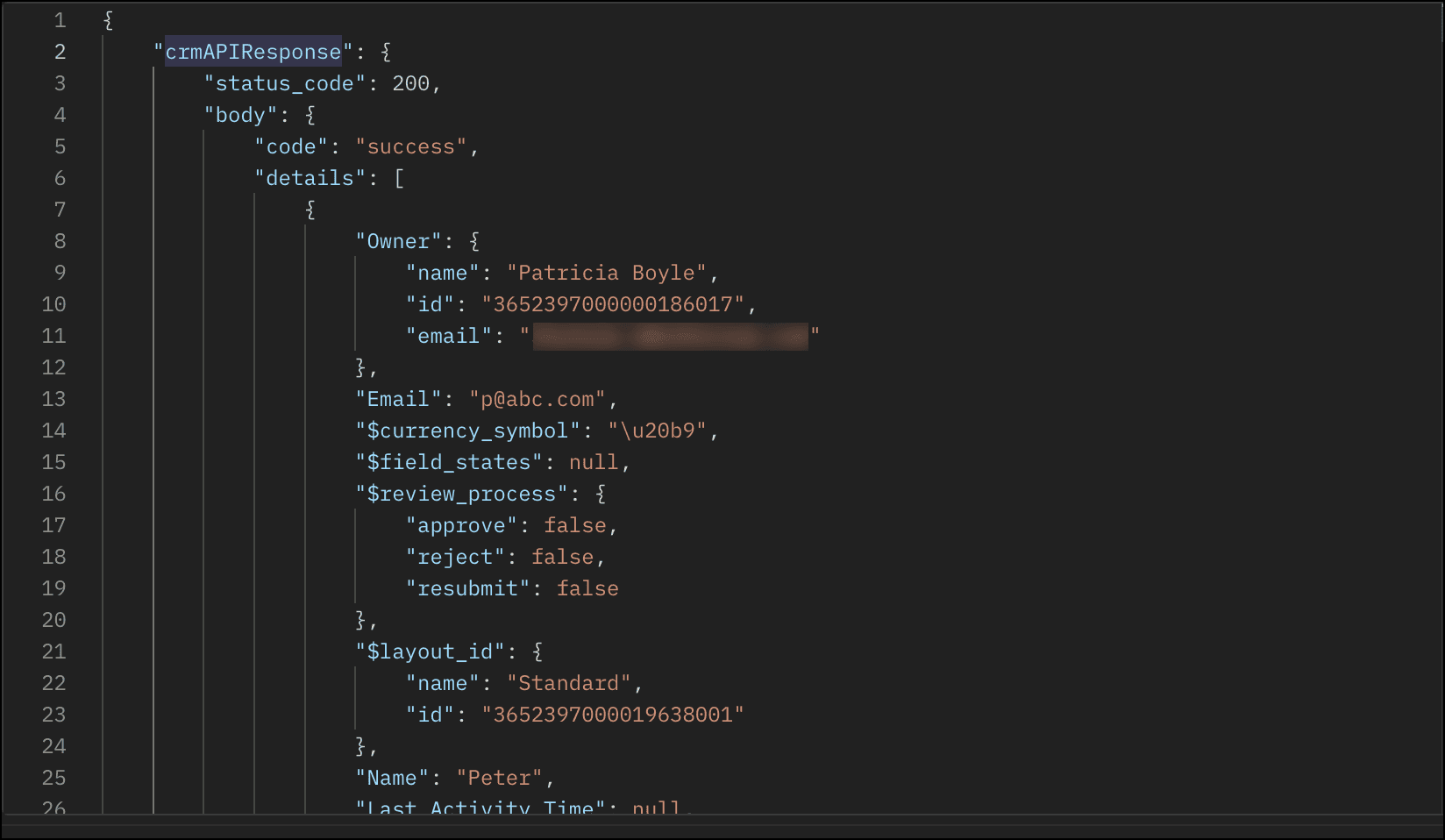
The response of this function is a string in the crmAPIResponse object as shown in this image.
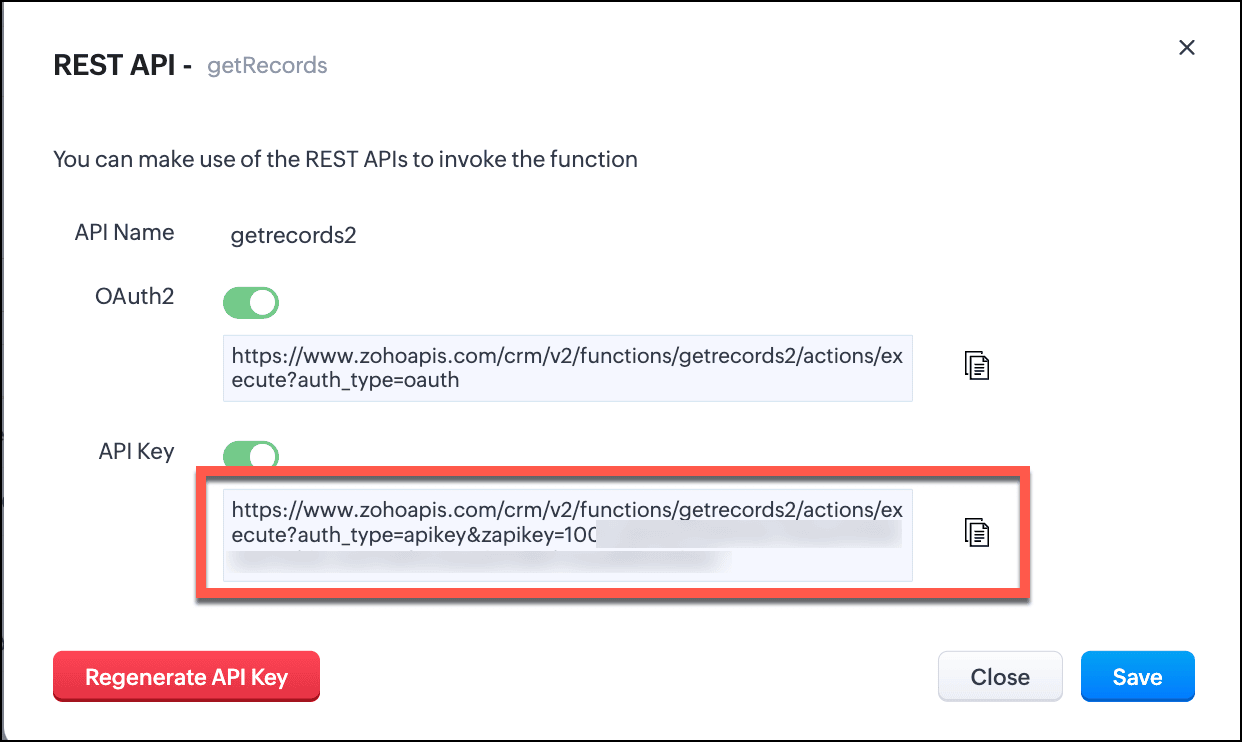
- Save this function and enable REST API.
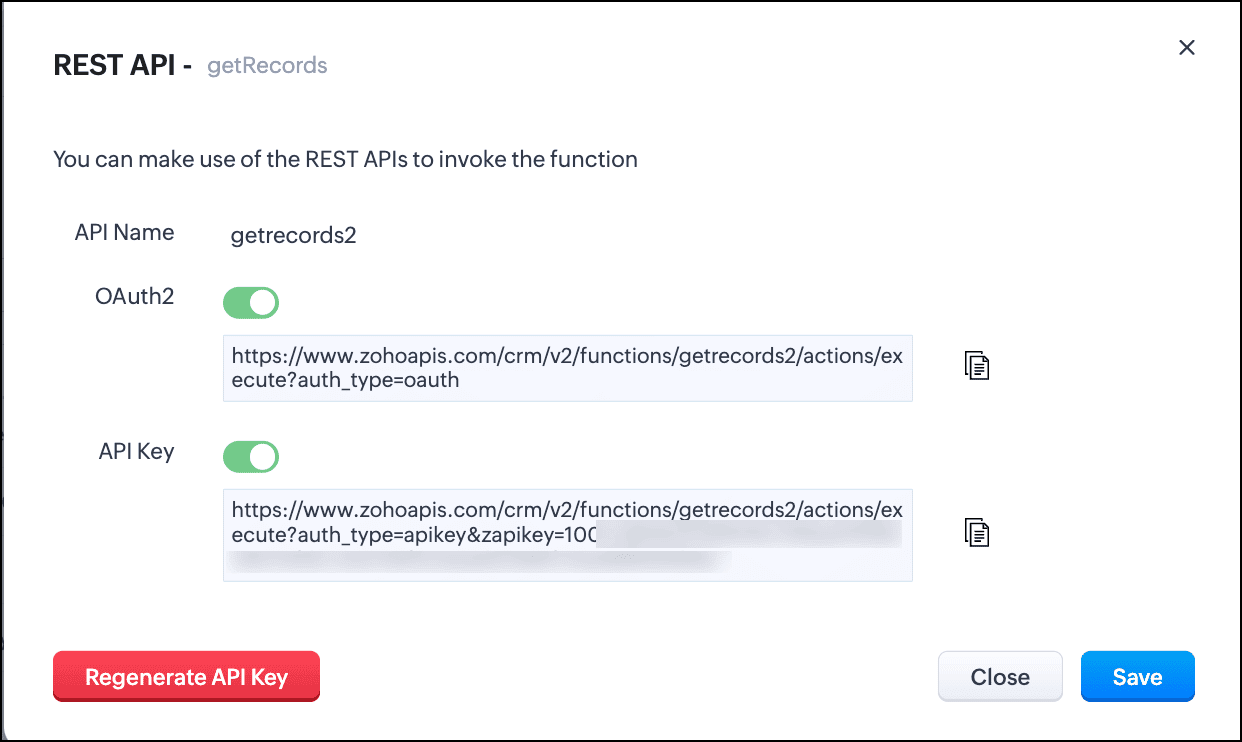
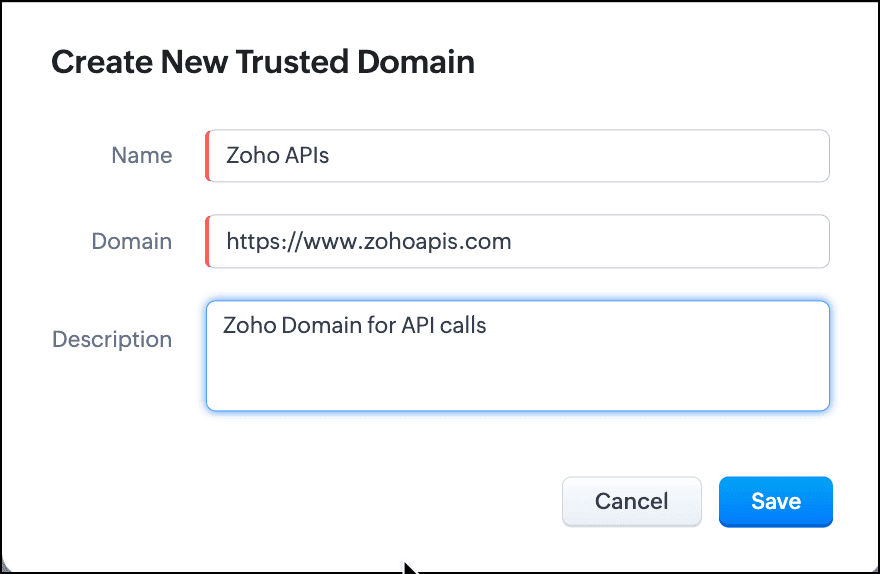
- You can see that the domain is https://www.zohoapis.com. To be able to use this in a Query, register this domain in Trusted Domain.
- To create a REST API type source, you must add the source. Go to Setup > Developer Hub > Queries > Sources tab.
- Click Add Source and give the details like the name, base URL, headers, and parameters under the Information section.
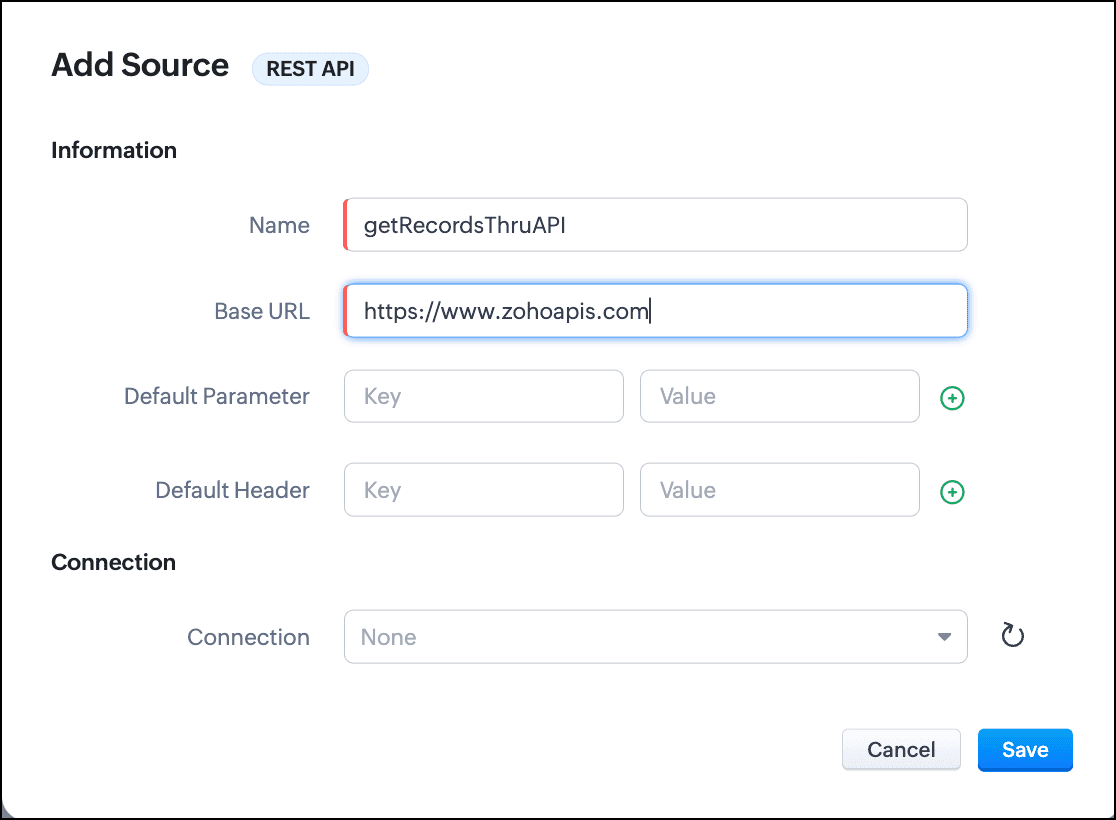
- Click Save.
- Go to the Queries tab and click Add Query.
- For Source, choose the source you just added.
- Under Information, enter the name, API name of the query.
- For the endpoint, enter the API Key URL of the function.
- Enter the parameter name and values in the Parameter field.
- Click Add Serializer if you want to serialize the response. In this example, I have serialized the response to include only the Name, Email, and Position fields in the output. The result contains the 'body' object that we returned in the crmAPIResponse object of the function.

- Click Save to save the serialization.
- Click Next to view the schema of the query. Make changes as required.
- Save the query.
You can now use this query in Canvas or associate it with Kiosk to solve your business needs.
Let us see how the crmAPIResponse object in the function affects the response of the query.
Query with the function without crmAPIResponse:
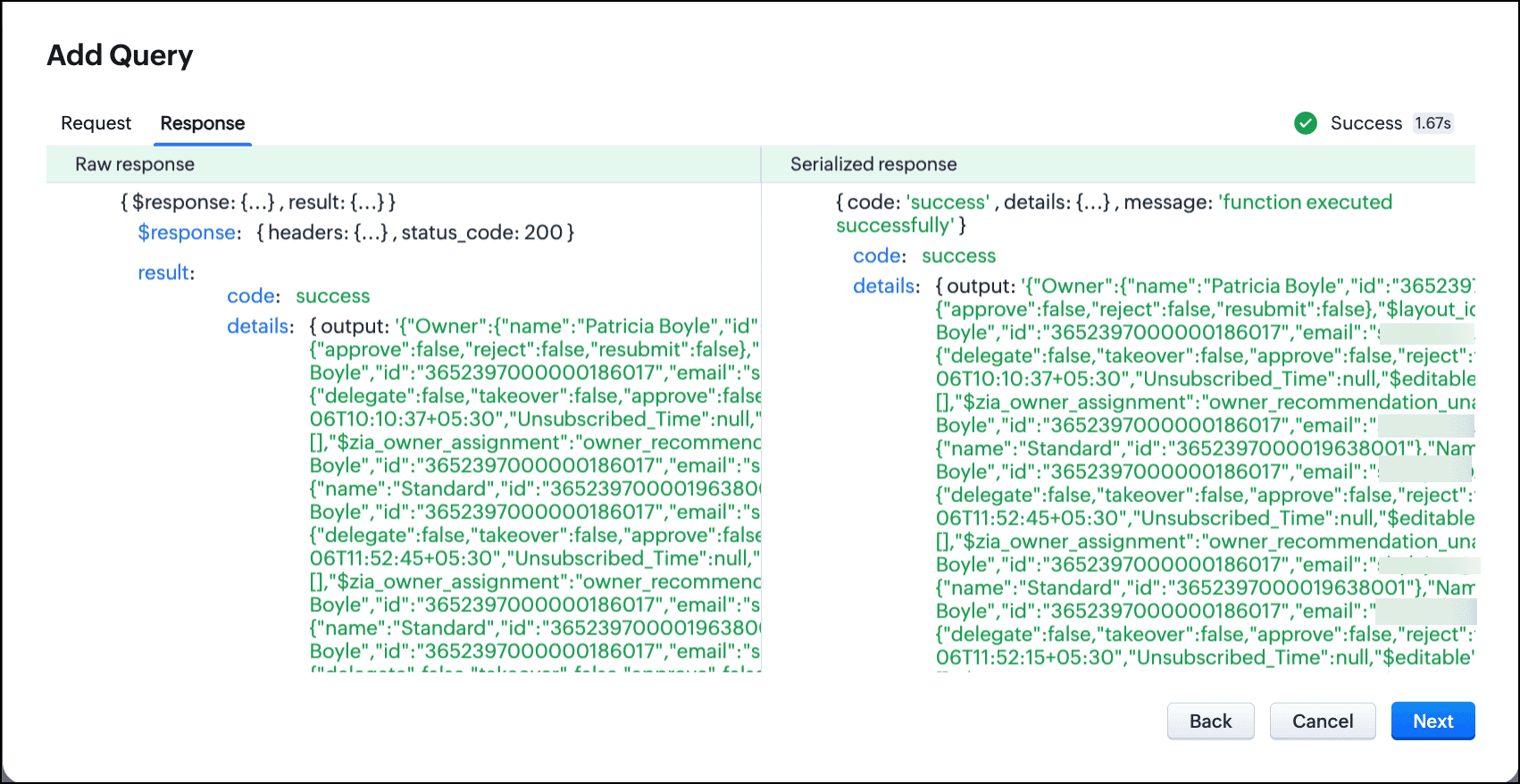
Let's consider that the function getRecords() does not use the crmAPIResponse object. In that case, the function returns a response that is a string. This response string cannot be serialized or used elsewhere.
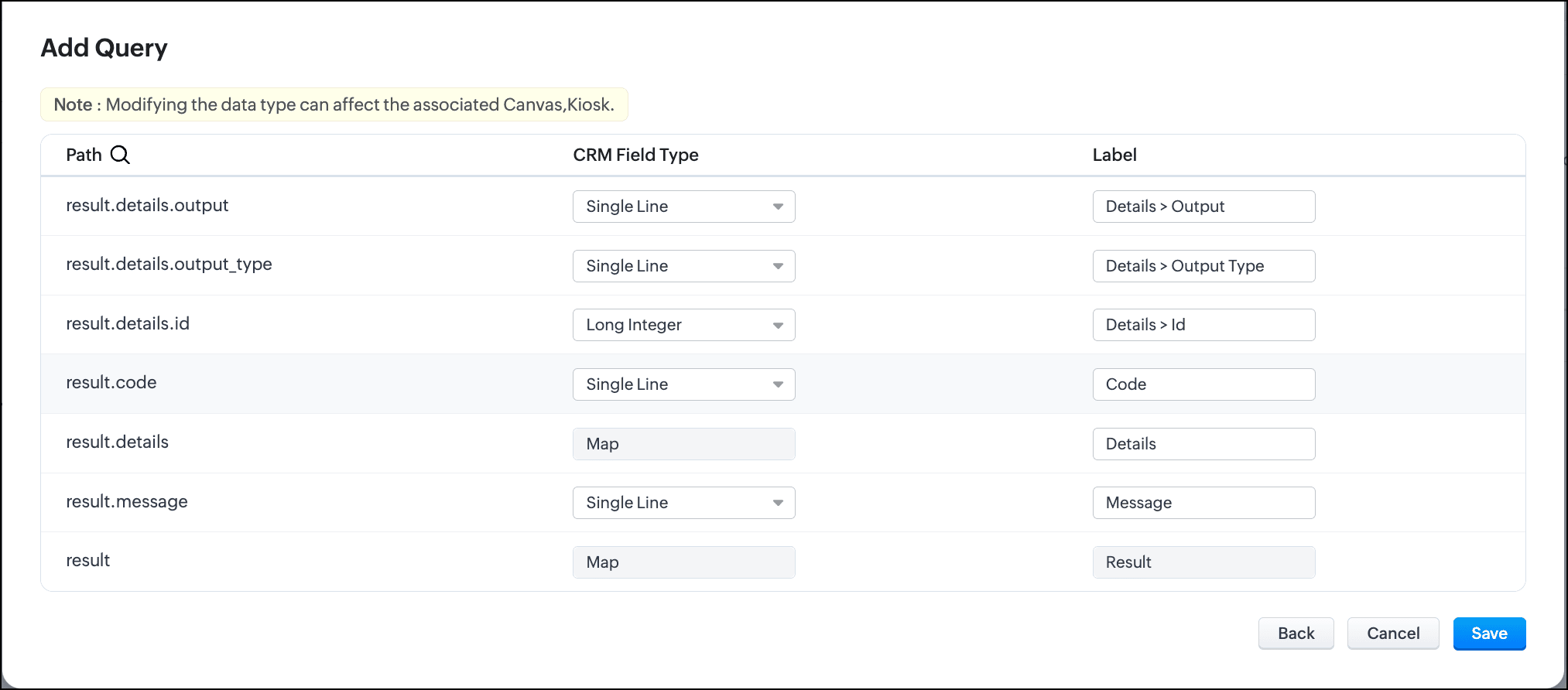
Schema of the query without crmAPIResponse:
Query with the function with crmAPIResponse and serialization:
The same getRecords() function that uses the crmAPIResponse object allows you to construct the response as JSON. You can serialize this response easily and use it in a circuit, query, workflow etc.

You can see here that the response is now a JSON.
Schema of the query with crmAPIResponse:

In conclusion, you can use the crmAPIResponse object in Functions to construct the desired response and use the REST API-enabled function as a source in Queries.
Leveraging the advantage of the crmAPIResponse object in functions and using it in Queries increases the prospect of solving many more business cases easily and customize more efficiently.
We hope you liked this post and found it useful. Let us know your thoughts in the comments.
If you'd like us to cover any other topic in this series, feel free to comment or reach us at support@zohocrm.com.
Cheers!
------------------------------------------------------------------------------------------------------------------------------------------------

More enhancements in the COQL API are now live in Zoho CRM API Version 7. Check out the V7 Changelog for detailed information on these updates.

See Also
Topic Participants
Shylaja S
Zsolt Simon self-employed
Sticky Posts
Kaizen #198: Using Client Script for Custom Validation in Blueprint
Nearing 200th Kaizen Post – 1 More to the Big Two-Oh-Oh! Do you have any questions, suggestions, or topics you would like us to cover in future posts? Your insights and suggestions help us shape future content and make this series better for everyone.Kaizen #226: Using ZRC in Client Script
Hello everyone! Welcome to another week of Kaizen. In today's post, lets see what is ZRC (Zoho Request Client) and how we can use ZRC methods in Client Script to get inputs from a Salesperson and update the Lead status with a single button click. In thisKaizen #222 - Client Script Support for Notes Related List
Hello everyone! Welcome to another week of Kaizen. The final Kaizen post of the year 2025 is here! With the new Client Script support for the Notes Related List, you can validate, enrich, and manage notes across modules. In this post, we’ll explore howKaizen #217 - Actions APIs : Tasks
Welcome to another week of Kaizen! In last week's post we discussed Email Notifications APIs which act as the link between your Workflow automations and you. We have discussed how Zylker Cloud Services uses Email Notifications API in their custom dashboard.Kaizen #216 - Actions APIs : Email Notifications
Welcome to another week of Kaizen! For the last three weeks, we have been discussing Zylker's workflows. We successfully updated a dormant workflow, built a new one from the ground up and more. But our work is not finished—these automated processes are
Recent Topics
What are the create bill API line item requiered fields
While the following documentation says that the line items array is requiered it doesn't say what if any files are requiered in the array. Does anyone know? API documentation: https://www.zoho.com/inventory/api/v1/bills/#create-a-bill I'm trying to addWorkDrive issues with Windows Explorer Not Responding
We are using WorkDrive to collaborate on editing video content. We have a lot of files and quite a few are a few gigs. Recently anytime I try and work with the files Explorer freezes for a couple minutes whether it's dragging the files into Premiere orConnecting Zoho Inventory to ShipStation
we are looking for someone to help connect via API shipStation with Zoho inventory. Any ideas? Thanks. UriWhere is the settings option in zoho writer?
hi, my zoho writer on windows has menu fonts too large. where do i find the settings to change this option? my screen resolution is correct and other apps/softwares in windows have no issues. regardsUsing IMAP configuration for shared email inboxes
Our customer service team utilizes shared email boxes to allow multiple people to view and handle incoming customer requests. For example, the customer sends an email to info@xxxx.com and multiple people can view it and handle the request. How can I configureWhen Does WorkDrive integrate with Books?
When Does WorkDrive integrate with Books?Introducing Radio Buttons and Numeric Range Sliders in Zoho CRM
Release update: Currently out for CN, JP, AU and CA DCs (Free and standard editions). For other DCs, this will be released by mid-March. Hello everyone, We are pleased to share with you that Zoho CRM's Layout Editor now includes two new field formats—POP mailbox limits
If I am accessing a remote POP mail server using Zoho Mail is there a mailbox quota for the account or is it all related to my mail account storage limits?Warranty Service and Repair in Zoho FSM
Hi There, We are a retail store that sells products and also performs installations and repairs. Our field technicians handle this work. Some repairs are covered by manufacturers, who reimburse us for both parts and labour. In these cases, we performZoho Sheet for Desktop
Does Zoho plans to develop a Desktop version of Sheet that installs on the computer like was done with Writer?WhatsApp phone number migration
Hi @Gowri V and @Pheranda Nongpiur, Thanks for implementing the promised enhancements to the integration between Zoho CRM and WhatsApp. The previous discussion has been locked, so I'm opening this new one. I am copying below a specificWebDAV support
I need WebDAV support so that I can upload/download (and modify) documents from my local file system. Is anything planned in his direction?Suggestions for Improved Table Management and Dashboard Filter Controls in Zoho Analytics
Dear Zoho Analytics Community, I hope you are doing well. I would like to share a few suggestions based on issues I am currently experiencing while working with visualizations and dashboards. Firstly, when I create a new visualization using the Sales-OrderSPF: HELO does not publish an SPF Record
I am using Zoho mail. Completed all of the required prerequisites from the dashboard to avoid any issues with mail delivery. But when checking on mail-tester.com getting the following error. Can anyone help me solve this?How do I create an update to the Cost Price from landed costs?
Hi fellow Zoho Inventory battlers, I am new to Zoho inventory and was completely baffled to find that the cost price of products does not update when a new purchase order is received. The cost price is just made up numbers I start with when the productPrice Managment
I have been in discussions with Zoho for some time and not getting what I need. Maybe someone can help explain the logic behind this for me as I fail to understand. When creating an item, you input a sales rate and purchase rate. These rates are justActual vs Minimum
Hi all, I am sure I am not the only one having this need. We are implementing billing on a 30-minute increment, with a minimum of 30 minutes per ticket. My question is, is there a way to create a formula or function to track both the minimum bill vs theGenerate leads from instagram
hello i have question. If connect instagram using zoho social, it is possible to get lead from instagram? example if someone send me direct message or comment on my post and then they generate to leadKaizen #234 - Automating Deal Handoff with Zia Assistant API, Workflow, Deluge, and Widget in Zoho CRM
Hello all! Welcome back to a fresh Kaizen week. In this post, we will explore how to automate the deal handoff process in Zoho CRM using Zia Assistant API + Workflow + Deluge + Widgets. Here’s how the final output looks when a deal is reassigned 1. DealHow do you print a refund check to customer?
Maybe this is a dumb question, but how does anyone print a refund check to a customer? We cant find anywhere to either just print a check and pick a customer, or where to do so from a credit note.Ability to assign Invoice Ownership through Deluge in FSM
Hi, As part of our process, when a service appointment is completed, we automated the creation of the invoice based on a specific business logic using Deluge. When we do that, the "Owner" of the invoice in Zoho FSM is defaulted to the SuperAdmin. ThisAll new Address Field in Zoho CRM: maintain structured and accurate address inputs
Availability Update: 29 September 2025: It's currently available for all new sign-ups and for existing Zoho CRM orgs which are in the Professional edition exclusively for IN DC users. 2 March 2026: Available to users in all DCs except US and EU DC. LatestEnhancement to ICR’s field prompting: Preferred data extraction using advanced field prompting
Dear Customers, We hope you’re well A quick background Intelligent Character Recognition (ICR) comes as part of Zia’s optical recognition capability called Zia Vision. When we introduced it last April, the data extraction was training-based and was applicableSee a list of all records enrolled in a cadence?
I am looking for a way to see a list of all leads or contact currently enrolled in a cadence. I do not see any way to do this through the cadence UI.Limitation in chart of accounts
There is a limitation of 4000 accounts in chart of accounts Zoho needs to remove this limitHow do I change the account bank charges are charged to?
I want bank charges charged to my Credit Card Fees account. Is there a way to do this?Real signature in Zoho Expense PDF report ?
Hello ! Is there a way to put a real signature on the signature line when a PDF report is generated in Zoho Expense? Through Zoho Sign or another way? Can't seem to make it work.Copy paste settings
Hello all i have 2 organizations running in ZOHO books in one organization i have customised Tax rates, codes and customized templates instead of manually doing again in org 2 can i have some shortcut to copy paste or export and import??Custom TDS on Vendor Credits via API
Hi, We are using Zoho Books APIs for posting Bills and vendor credits. We are unable to post custom TDS amount posting vendor credits. Can you please share the API spec and Payload that need to be sent for Custom TDS for Vendor Credits."Unlink" Advance from Bill without Deleting the Payment Record
I am writing to highlight a significant workflow issue in Zoho Books (India Edition) regarding Vendor Advances and Bills. The Scenario: I recorded an Advance Payment to a vendor. I matched/reconciled this payment in the Banking module. I received a BillAdvance Payment Record Removed When Deleting Applied Credit from Bill
Hello, So while working with vendor advance payments, I noticed that removing the applied credit from a bill also removes the corresponding entry from the Payments Made section. What I did : Recorded an advance payment to a vendor through Payments Made.What is the best way to convert MSG file to Word format?
The best way to convert MSG files to Word format is by using a reliable and professional tool Aryson MSG file Converter. Manual methods are often time-consuming and may not preserve email formatting, attachments, or metadata accurately. In contrast, ArysonAddress Typeahead Extension for Zoho Books
I installed the Address Typeahead extension for zoho books but when I went to configure it, it said that that version was deprecated. Is there a newer version somewhere?Zoho Projects : Task should auto-update to 'In Progress' if timer started
Namaskaram. Right now, if a Task's timer is started, the Task stays in 'Not Started' status. One has to manually update it to 'In Progress'. From a #uxdesign standpoint, it is an unnecessarily two step process to start working on a task. It would be better that, if I start the timer on a task, it should automatically change to 'In Progress' status. Crafted with ❤️ Zoho Gurus | Zoho One Practice Team @ CubeYogi Zoho Authorised Partner | 7+ Yrs | 200+ Projects | 100+ CustomersInvoice template with sales tax totals
Hi everyone, I am trying to edit my invoice template so that only the total sales tax collected for my tax group shows up. Right now, under by sub total, each individual tax shows up and that takes up a lot of unnessary space, so I just want the oneZoho Delayed Posting & Loss of Article Thumbnails on BlueSky
Hello! I am wondering if anyone else has had the either of the following issues when posting to socials via Zoho and if there is a fix? 1. Post says it is scheduled or it is live when sent off via Zoho but it doesn't show up on socials till some timeConnection Not Secure (Certificate Mismatch) Error
Hi, Just a fyi, when you go to https://bigin.zohocloud.ca/bigin/Home you get a "Your Connection Is Not private" error. (Certificate mismatch to domain.) I get to that page after I have signed up and signed in as a customer and select the Access BiginRecording the Investment
Hello, - One Investor Invested to our company, So how do we record investment which we received in our bank in the Zoho books ? - How do we record if we provide shares to the investor in the Zoho books? ThanksExport Invoices to XML file
Namaste! ZOHO suite of Apps is awesome and we as Partner, would like to use and implement the app´s from the Financial suite like ZOHO Invoice, but, in Portugal, we can only use certified Invoice Software and for this reason, we need to develop/customize on top of ZOHO Invoice to create an XML file with specific information and after this, go to the government and certified the software. As soon as we have for example, ZOHO CRM integrated with ZOHO Invoice up and running, our business opportunitiesClient and Vendor portal at the same time
We have companies that serve both as clients and vendors and they are linked. However, we have a problem giving them access to the vendor/client portal. If they accept the invitation from the client portal, when we try to invite them to the vendor portalNext Page