Kaizen #182 - Queries in Canvas List View

Hello everyone!
Welcome to another week of Kaizen!
We're back with another post in this series on Queries in Canvas List View.
Queries in Zoho CRM allow you to dynamically retrieve data from CRM as well as third-party services directly within the CRM platform.
You can construct a query of one of the following types:
- CRM Module type query to retrieve data from CRM modules.
- COQL type query to construct a query using the COQL API.
- REST API type query to fetch data from an external service and use it in Zoho CRM.
You can associate a query with the 'Decision' component of Kiosk, Canvas Detail View, or Canvas List View.
In this post, we will take up a use case and see how you can associate a query with Canvas List View.
Use case
Sales and support teams often need quick access to Zoho Desk tickets related to a contact in Zoho CRM. To avoid switching between apps to check ticket statuses, we can use the Queries feature to fetch the latest Zoho Desk ticket's details of a contact dynamically and display them on the Canvas List View page of the Contacts module.
This ensures that CRM users can instantly view the most recent ticket linked to a contact without leaving Zoho CRM.
Follow along to see how you can achieve this!
Step 1 - Add a Source
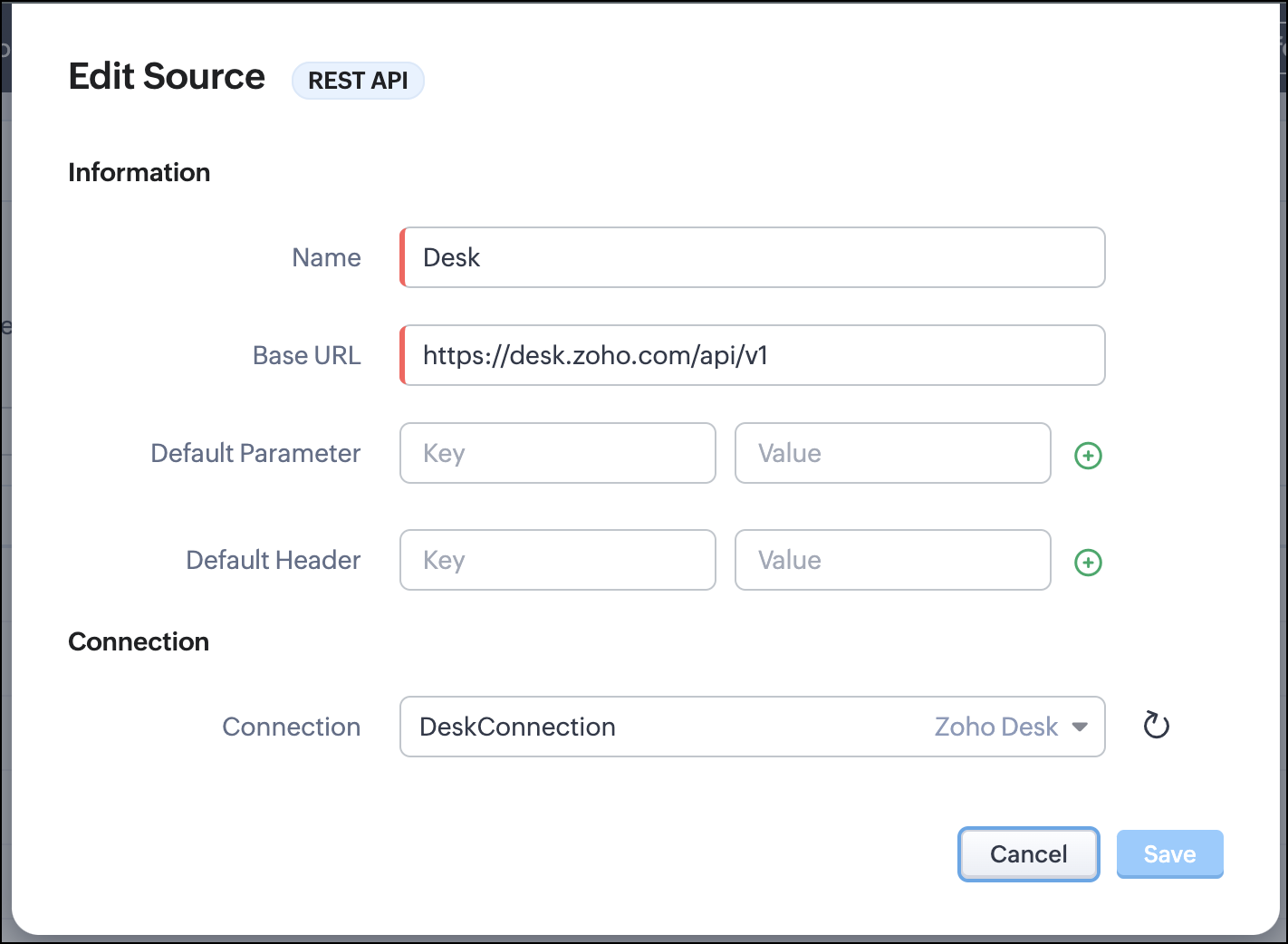
- Go to Setup > Developer Hub > Queries > Sources > Add Source.
- Under Information,
- Give a name for the source and its Base URL. Queries will make API calls to this URL to fetch data. Ensure to add this to Trusted Domain.
- Specify any default parameters and headers for this base URL.
- Under Connection, choose the connection you have created with Zoho Desk with the necessary scopes. If you haven't, create one.
- Click Save.

Note
Queries will make API calls to the URL you add in the Source and consume credits that are applicable in that service. Ensure you monitor your API usage in your source provider.
Step 2 - Create a REST API Query
- Go to Setup > Developer Hub > Queries > Add Query.
- Under Source, choose the source you created in step 1.
- Under Information,
- Enter the Name, API Name, and the Endpoint of the query.
- Specify the parameter email that takes the dynamic variable {{Contact_Email}} as its value. This is to fetch the latest ticket from Zoho Desk for a contact with the email in this variable during runtime. Refer to our Kaizen post on Handling Query Variables in Zoho CRM for additional details.
- Specify Headers, if any.
- You can serialize the output to fit your needs using JavaScript in the Serializer.
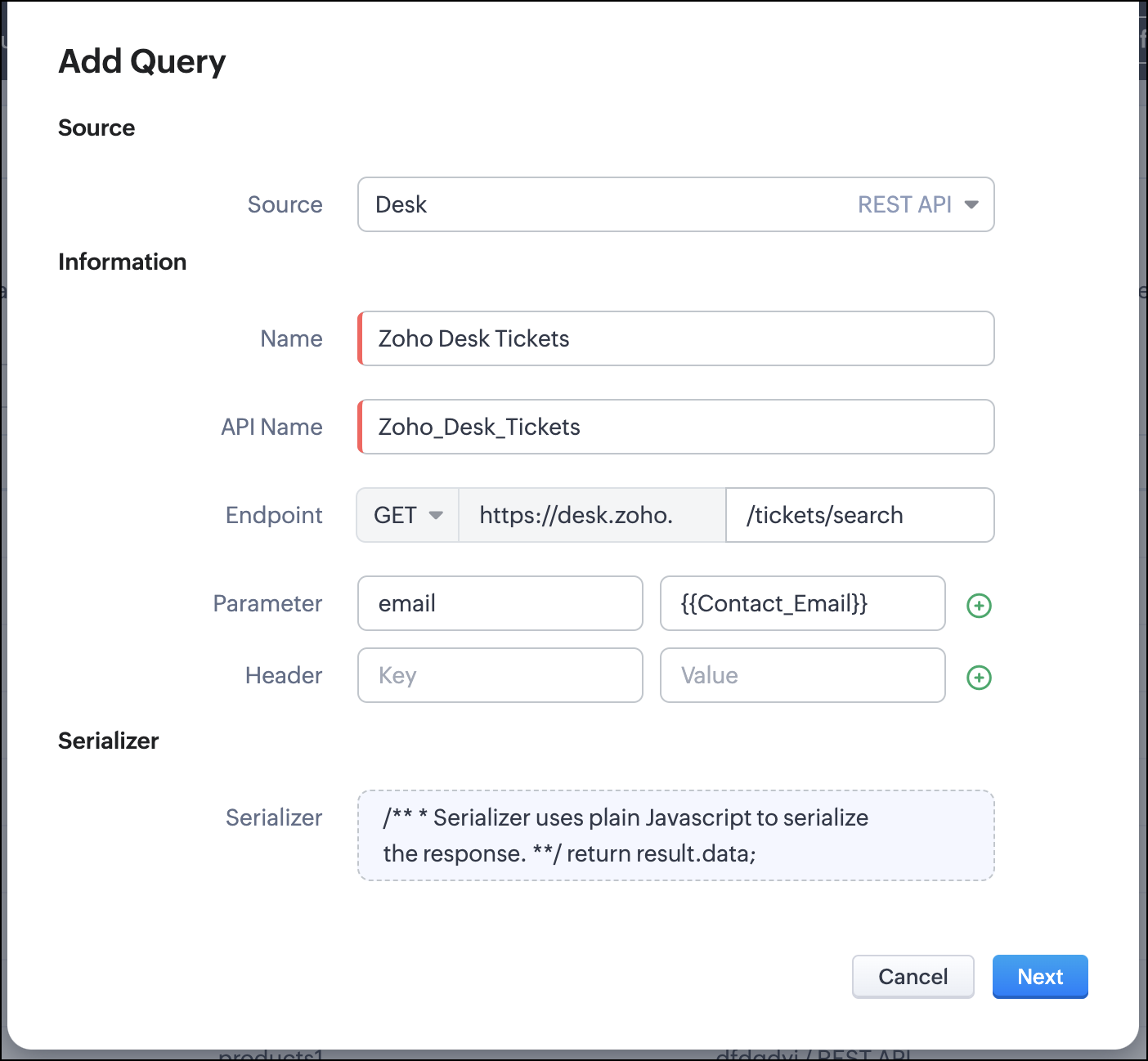
- Click Next.
- Enter an email address in the box to test the query.
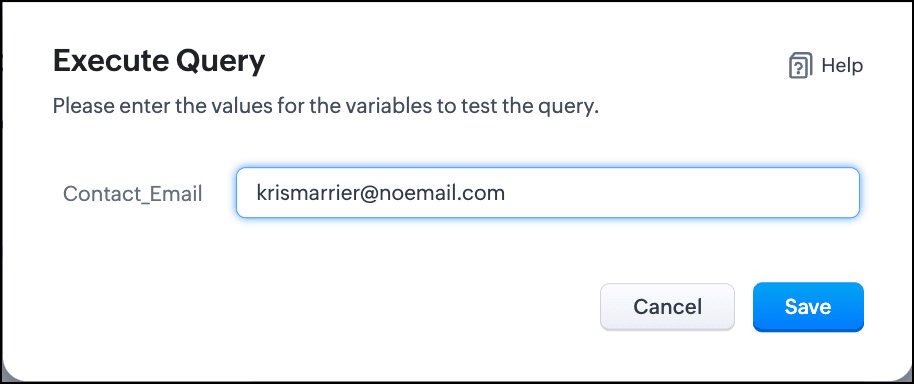
- Click Save. You can see the response of the query and the serialized response if you had serialized the output.
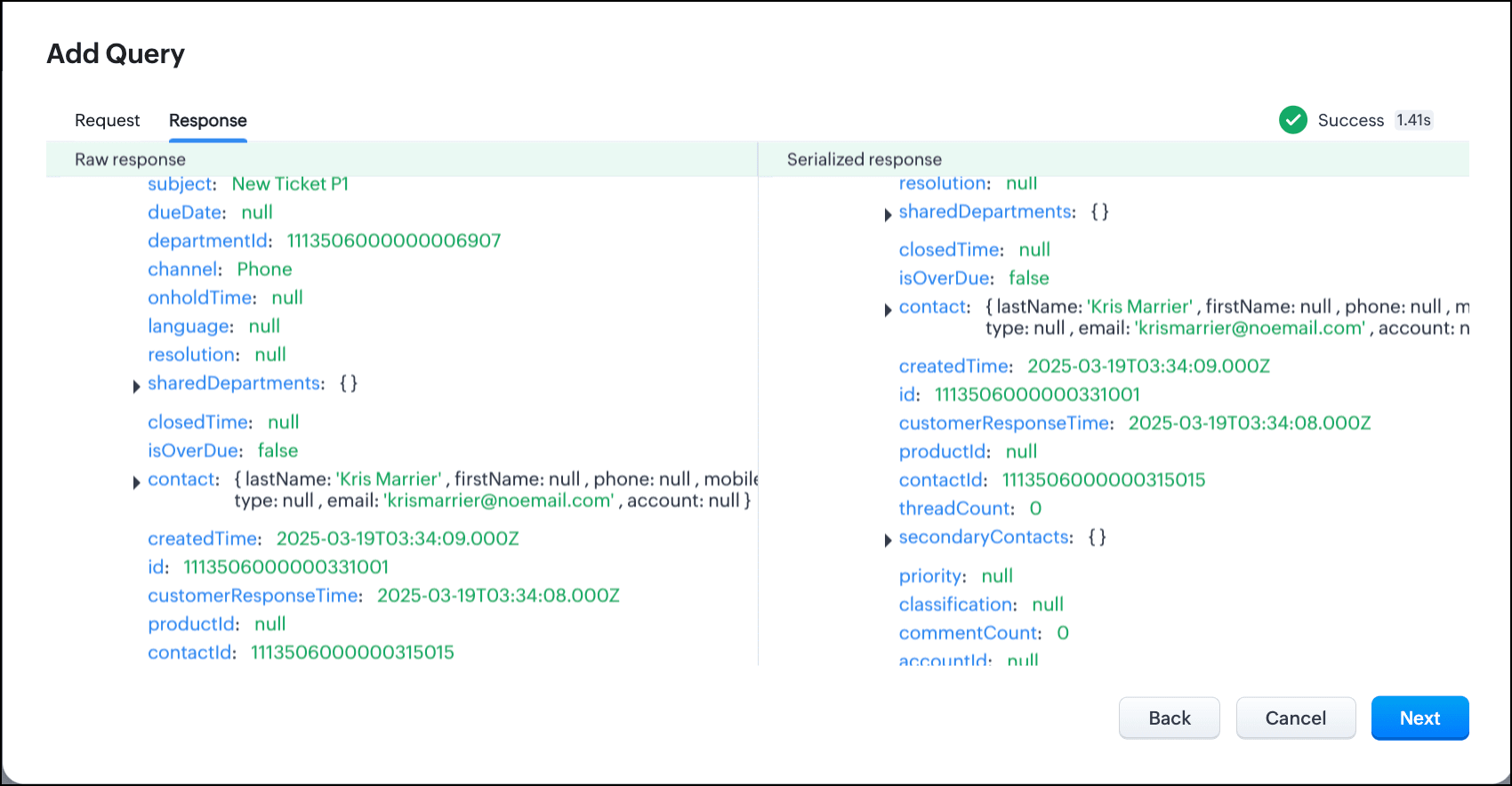
- Click Next.
- You can see the Schema of the query. The Schema acts as a bridge/mapping layer between external API responses and Zoho CRM's internal data structure. For example, the response of the Desk API returns result[].assignee.firstName, which is mapped to CRM as Assignee > FirstName. Schema ensures that the CRM UI knows how to display the field correctly.
With the right mapping in the schema, you can avoid manual data entry or syncing, and use the API data in workflows, reports, and dashboards.
You can change the CRM Field Type and Label to suit your needs. Refer to our Kaizen post on Serialization and Schema Management for more details. - Click Save to save the query.
Now that our query and fetching data from Zoho Desk is sorted, let's move on to the Canvas.
The Custom List view in Canvas enables you to stack records horizontally, one above the other.
Follow the steps in the How to Work with Canvas? guide to create a Custom List View Canvas for the Contacts module.
- On the Canvas, click the database icon for the Queries component.
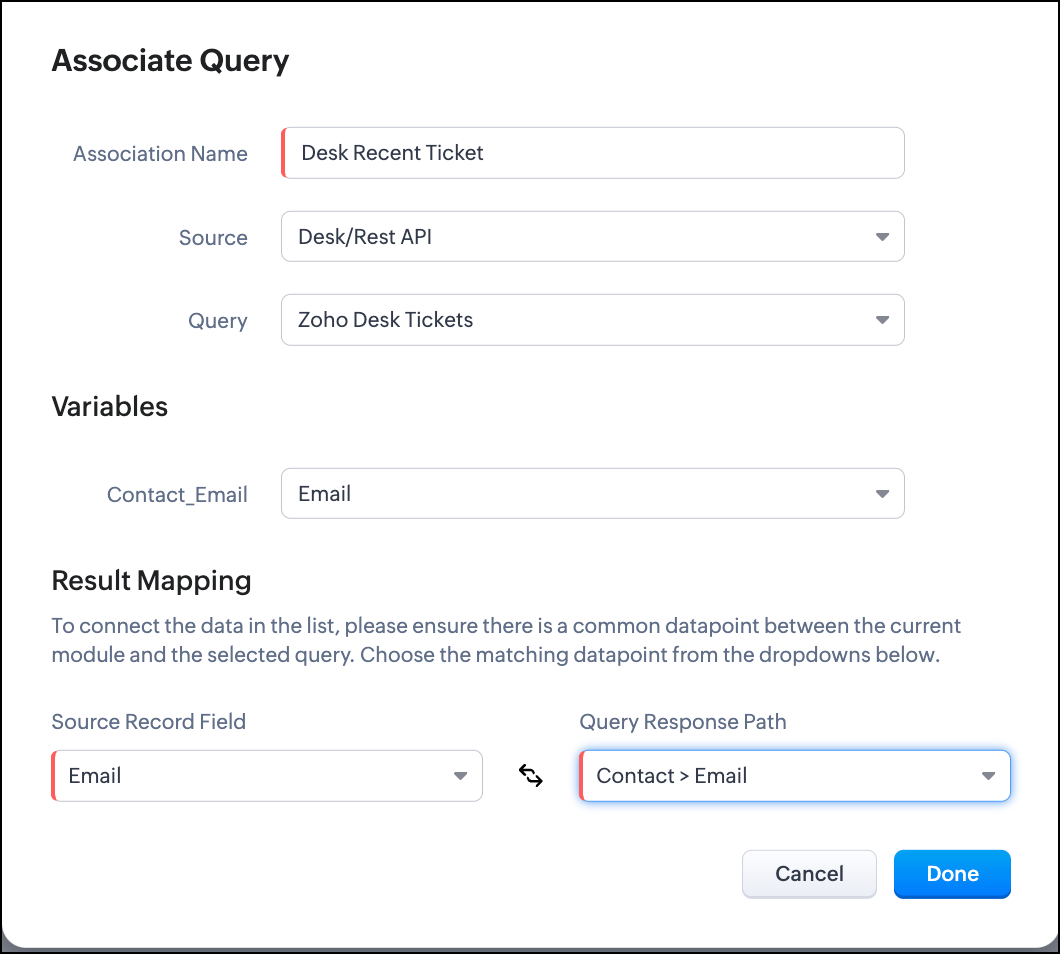
- Click Associate Query.
- Give an Association Name and select the Source(added in step 1) for the query.
- Under Query, select the query you created.
- The Variables section will contain the variables in the query. The drop-down displays all fields in the Contacts module. Select the Email field.
- Under Result Mapping, choose Email as the Source Record Field and Contact > Email as the Query Response Path. The Query Response Path is populated from the schema of the query.
- Click Done to associate the query with the canvas.
- You can see all the fields of the query on the left. Drag and drop the required fields on the canvas.
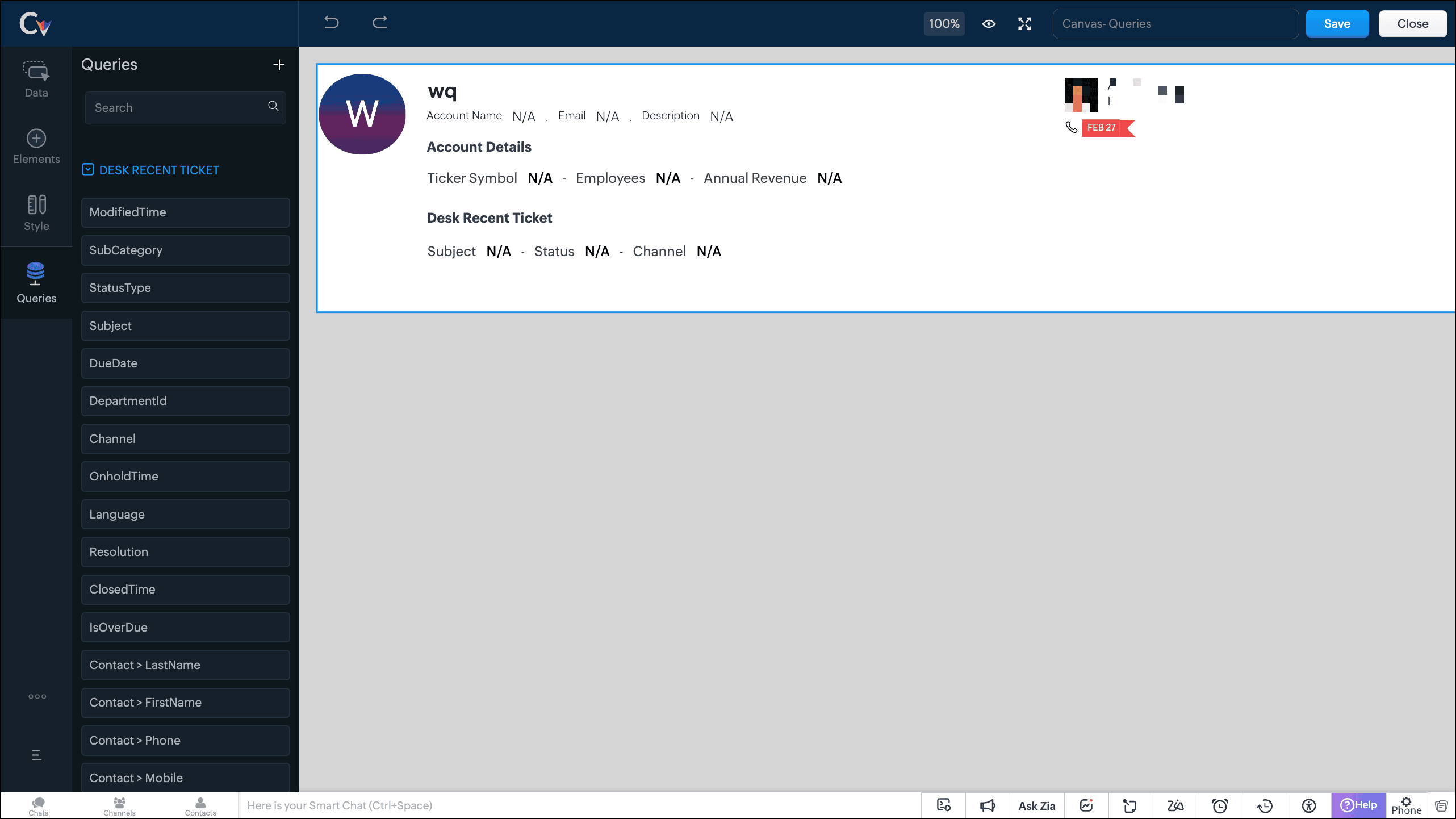
- Save the canvas.
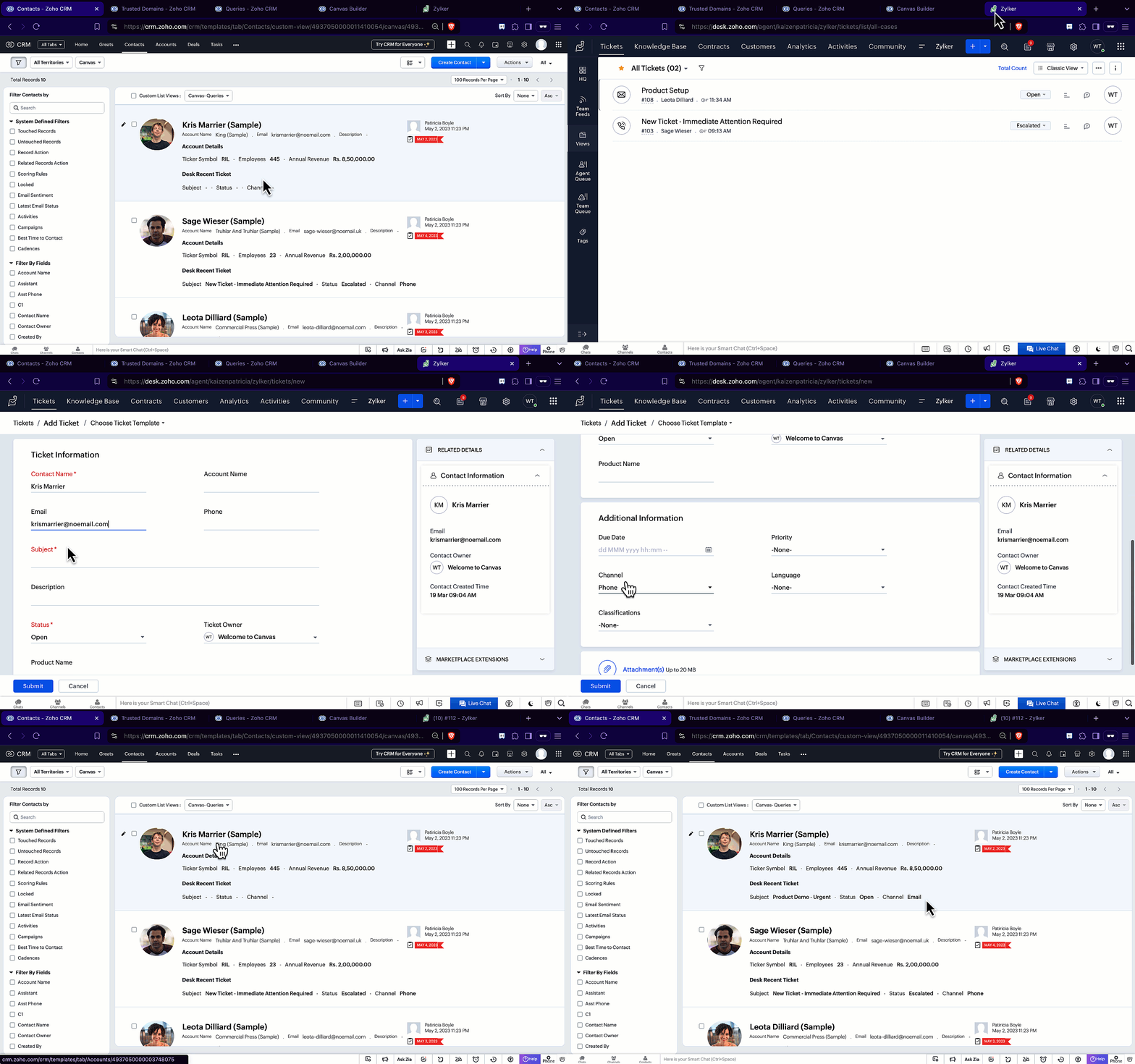
Time for the big reveal!
The following GIF shows how the ticket details from Zoho Desk are populated on the Canvas List View of the Contacts module.

Note that every time you reload the canvas, the query underneath makes an API call to the source provider to fetch data for the contacts in Zoho CRM. Ensure your API calls are monitored to avoid exhasuting your credits.
We hope you liked this post.
Topic suggestions are welcome! See you all next week!
Cheers!
----------------------------------------------------------------------------------------------------------------------------------------

See Also
Topic Participants
Shylaja S
Sticky Posts
Kaizen #217 - Actions APIs : Tasks
Welcome to another week of Kaizen! In last week's post we discussed Email Notifications APIs which act as the link between your Workflow automations and you. We have discussed how Zylker Cloud Services uses Email Notifications API in their custom dashboard.Kaizen #216 - Actions APIs : Email Notifications
Welcome to another week of Kaizen! For the last three weeks, we have been discussing Zylker's workflows. We successfully updated a dormant workflow, built a new one from the ground up and more. But our work is not finished—these automated processes areKaizen #152 - Client Script Support for the new Canvas Record Forms
Hello everyone! Have you ever wanted to trigger actions on click of a canvas button, icon, or text mandatory forms in Create/Edit and Clone Pages? Have you ever wanted to control how elements behave on the new Canvas Record Forms? This can be achievedKaizen #142: How to Navigate to Another Page in Zoho CRM using Client Script
Hello everyone! Welcome back to another exciting Kaizen post. In this post, let us see how you can you navigate to different Pages using Client Script. In this Kaizen post, Need to Navigate to different Pages Client Script ZDKs related to navigation A.Kaizen #210 - Answering your Questions | Event Management System using ZDK CLI
Hello Everyone, Welcome back to yet another post in the Kaizen Series! As you already may know, for the Kaizen #200 milestone, we asked for your feedback and many of you suggested topics for us to discuss. We have been writing on these topics over the
Recent Topics
Search Feature Now Broken
I have many hundreds of notes on Zoho Notebook but now when I search for a keyword, I only get 30 results maximum. This is unacceptable and yet another feature that has become broken on this quickly deteriorating software. Please fix immediately.Restrict Zoho One Account Notifications to Admins
Hi Zoho One Team, I hope you're doing well. We recently noticed that end users are receiving administrative pop-ups in Zoho One, such as the DKIM configuration notice (screenshot attached). This type of notification is only relevant to administratorsAutomated Checkout
Hi Team, I’m trying to create an automated checkout function in Zoho People. My requirement is that if an employee forgets to check out, the system should automatically check them out after 10 hours. However, I'm encountering an error while updating theZoho CRM Community Digest - June 2025 | Part 1
**We offer both video and written formats, take your pick and jump in.** CRM FOMO is real. You could be doing everything right and still miss the beat. That’s where we come in. Zoho CRM Community Digest! Every two weeks, we bring you the insider scoopIntroducing Video Tutorials for the Zoho FSM Mobile App
We’re excited to announce the launch of our brand-new video tutorials for the Zoho FSM Mobile App—designed painstakingly to help your field agents get up to speed in no time! Whether you're brand new to the Zoho FSM mobile app or just need a quick refresher,Zoho People > Managed People > User Access Control
Hello All I need your recommendation on how should i go about setting the User Access Control in my Zoho PeopleWhat happened to the tabs in the ribbon on the top in my CRM?
Hi, This morning all of the tabs (modules) in the ribbon on top are no longer showing up. I had the modules in the ribbon in a specific order for easy, one-click access. Now it's only showing the active tab and the rest are hiding under the three dotsConnect to Australian bank
How do I connect to an Australian bank. No Australian bank shows up in my list. I think its because the service provider is Token and not Yodlee. How do I change this?Searching for content within courses
Hello, I have been testing out Zoho One for my company have been exploring Learn. I've noticed that you cannot search for content within a course. You can only locate the title of the course. Example: Course: How to Make Your Bed Chapter: Pillows Lesson:Citations Problem
I'm having an odd problem with the "Add Citations" feature of Zoho Writer. When I add a citation using the "Fetch website details online" feature it works the first time I use it but if I try it a second time by clicking that link nothing at all happensZoho People Leave Balance Show as Negative
Hi All I have the Portugal material Leave that policy allows up to 120 days or 150days for employee to apply within 365 days and employees is able to take minimum of 1 days or up to 120 days In my Leave Grant I have set as the setting.Zoho People > Performance > Appraisal > Mismatch between the template-configured module and the currently enabled module.
Hello There When we enable the performance module there a prompt Mismatch between the template-configured module and the currently enabled module. How do we resolve thisZoho People Leave Application Module Error: Leave balance has exceeded as on 09-07-2025.
Dear All I need to check how do i resolve the issue of Error: Leave balance has exceeded as on 09-07-2025. All my leave have this issuePower of Automation:: Daily Time log summary broadcast to Zoho Cliq using Schedule Custom Functions
Hello Everyone, A Custom function is a user-written set of code to achieve a specific requirement. Set the required conditions needed as when to trigger using the Workflow rules (be it Tasks / Project) and associate the custom function to it. Requirement:When Calls Ends, Creating Note with the call description by deluge code
Hi, i need help with writing deluge code function, to scenario is like this - i want to create a workflow thats after 10 that the call ends the deluge function will create a new note in module calls that link the note in module calls to the his lead ticketDefault Memo from Custom Field (from Bill) when Paying with Check
Hi, we are using "Pay via Check" option to pay for our Bills in Zoho Books. I would like the memo on the check to pull directly from one of the custom field values within the Bill. Is there any way I can do this? The memo that I need is already on theWouldn't it be great to have an option to schedule sending emails in Zoho mail? Schedule send feature request
The subject says it all - but just to clarify: This is to request a new feature that would allow users to schedule the delivery of an email for a given date & time. In small companies it is quite common to work unsocial hours on customer emails. But someStatic vs Standard Subforms - New Feature; But how does it work?
I've just noticed that we now have the option of static or standard subforms, but I can't find any posts on the new feature. So, how does the new subform type work?【Zoho CRM】翻訳機能のアップデート
ユーザーの皆さま、こんにちは。コミュニティチームの藤澤です。 今回は「Zoho CRM アップデート情報」の中から、翻訳機能のアップデートをご紹介します。 翻訳機能が拡張され、Webタブ、レイアウト、セクション、ウィザード、ウィザード画面、セグメントも翻訳できるようになりました。 翻訳をエクスポートする際に、これらの要素に対応する用語もエクスポート先の言語で追加されます。 ※過去の関連記事はこちらから まず、翻訳の設定画面から「エクスポート」を選択してください。すると、TXT形式のファイルがローカル環境に出力されます。Trying to make zoho invoice have a button
Hello I am getting this error with the code below. Anyone know how to fix? Check and update the code in line 5 as there is a Exception : Variable 'invoice_id' is not defined // Define Organization ID (Replace with your actual Zoho Invoice organizationDuplicate Contacts - how to get merge or delete
I have noticed that our list of contacts in Zoho Desk duplicates contacts periodically. I have yet to identify when or why. How do I merge or delete them? I see there is a "Deduplicate" but I am unable to find anything that explains this feature.Another nightmare experience with a "Zoho Partner": Cloud Z Technologies
I found "CloudZTech" on fiverr and I hired them to do a simple $300-$500 task. They did not deliver on time and I was forced to fire them. You guys must watch out for these fake ZOHO PARTNERS, 99% of them don't have the expertise necessary to help. IPickup and delivery
Some of our products are pickup only and some delivery. Is there a way of doing this in commerce. Plus we give volume discount to all customers. We handle this in Books using pricelist and range pricing. Is there a way of doing this within commerce.Unable to change the "credentials of login user" option when creating a connection
I want to create a new Desk connection where the parameter to use 'credentials of login user' is set to YES. I'm able to create a new connection but am never given the option to change this parameter. Is this a restriction of my user profile, and if so,How can you train the Zia Bot for Desk
I added the Zia bot to my portal, but it's rarely able to answer questions, even when I have dedicated articles for the question. How can I best train it? Should I change the title of my articles, add more information inthe body copy?Direct Download Link
I saw how to share off a document to the public, which is great, but I was also wondering if there is a way to get a direct download link for a zoho doc. I would like to be able to simply send people my documents without them having to find download on the zoho page (not hard, but just for convenience)Form responses to quote process
Hello, so I am new to Zoho One. I'm fairly confident what I want to do can be done I just need guidance on how to accomplish it. I have a Zoho Form. When a customer fills out the form I want to generate a quote (that I will email to them, I do NOT wantIPv6 MX Support in 2025
There are multiple discussion on this community on IPv6 adjacent issues though the most pressing issue for IPv6 support is not solved yet the support team seems to not understand what is the issue and is steering the conversation to the wrong and misleadingZoho Books Quote - Client cannot accept quote
We are using the Zoho One plan and some of our clients have reported that they cannot accept the quote when we select their email at the bottom to send the quote to. When trying to accept, the quote prompts a message saying "You are not allowed to acceptReckon Accounts Hosted to Zoho Finance
Hi Everyone I want to transition from Reckon Accounts Hosted to Zoho Finance, as I have numerous other tasks in Zoho One, and it seems logical to make the move. (Reckon has a QuickBooks back end & is hosted on Assure now, think) I would really like toFlex Your Creativity – A New component to Canvas in Zoho CRM
Hello Everyone We’re excited to introduce Flex, a new component for Canvas in Zoho CRM! Flex is here to give you greater control over how your data is displayed in your layouts. This component enables responsive layouts that adapt across different screenVendor Assignment issue for staff in User Roales
there is a limitation in software that we can't assing Vendors to our staff - we can only assign Customers on staff wise!! There is a limitation of this software that in case i want to assign limited vendors to my staff - it's not possible. Either i willZoho Desk Community Portal Not Displaying Custom Styling Correctly
Hi Zoho Community, I’m struggling to get a custom community portal in Zoho Desk to display my branding and styling correctly, and I’d love some help troubleshooting this for a client’s support portal. Details: Setup: Zoho Desk (Professional plan, latestRemove or hide default views
I'm looking to only have the views pertinent to my organization. Is there a way to show only my custom views (or separate them to a different area or something)? If not, this should be a feature as switching from Zendesk we had this option...Wie kann ich einen Nutzer löschen?
Wir haben Zoho one. Es handelt sich um einen ehemaligen Mitarbeiter.Function #46: Auto generate list of lapsed customers using Custom Button
Hello everyone, and welcome back to our series! Customer retention is one of the key factors that impact the long-term success and sustainability of a business. High customer retention rates indicate satisfied customers, quality products or services,Before Going To The Qc stage , site ready ness file upload mandtoty how to achive this in the blue print transition
Before Going To The Qc stage , site ready ness file upload mandtoty how to achive this in the blue print transition Is it possible on click of the predelivery Transition show the alert message if site ready ness file upload empty also not move the stageAnnouncing new features in Trident for Windows (v.1.28.5.0)
Hello Community, Trident for Windows is here with exciting new features to help you stay productive and make collaboration simpler. Let’s dive into what’s new! Slash commands are now supported in the Cliq module. You can now use slash commands from theConvert time to string and remove second
Hello everyone, I have a question that I can't figure out on my own. How to convert time into string (singleline) and remove second. Like HH:mm. If I convert it as below, the result becomes null. Thank you very much. input.Time.tostring("HH:mm") result:Has anyone imported items and included the storage bin?
We have a large amount of Inventory Items. We would like to import these into Zoho Inventory but while we can import the majority of data, the storage bin refuses to map. Has anyone successfully imported the data and mapped the bin?Next Page