Kaizen #182 - Queries in Canvas List View

Hello everyone!
Welcome to another week of Kaizen!
We're back with another post in this series on Queries in Canvas List View.
Queries in Zoho CRM allow you to dynamically retrieve data from CRM as well as third-party services directly within the CRM platform.
You can construct a query of one of the following types:
- CRM Module type query to retrieve data from CRM modules.
- COQL type query to construct a query using the COQL API.
- REST API type query to fetch data from an external service and use it in Zoho CRM.
You can associate a query with the 'Decision' component of Kiosk, Canvas Detail View, or Canvas List View.
In this post, we will take up a use case and see how you can associate a query with Canvas List View.
Use case
Sales and support teams often need quick access to Zoho Desk tickets related to a contact in Zoho CRM. To avoid switching between apps to check ticket statuses, we can use the Queries feature to fetch the latest Zoho Desk ticket's details of a contact dynamically and display them on the Canvas List View page of the Contacts module.
This ensures that CRM users can instantly view the most recent ticket linked to a contact without leaving Zoho CRM.
Follow along to see how you can achieve this!
Step 1 - Add a Source
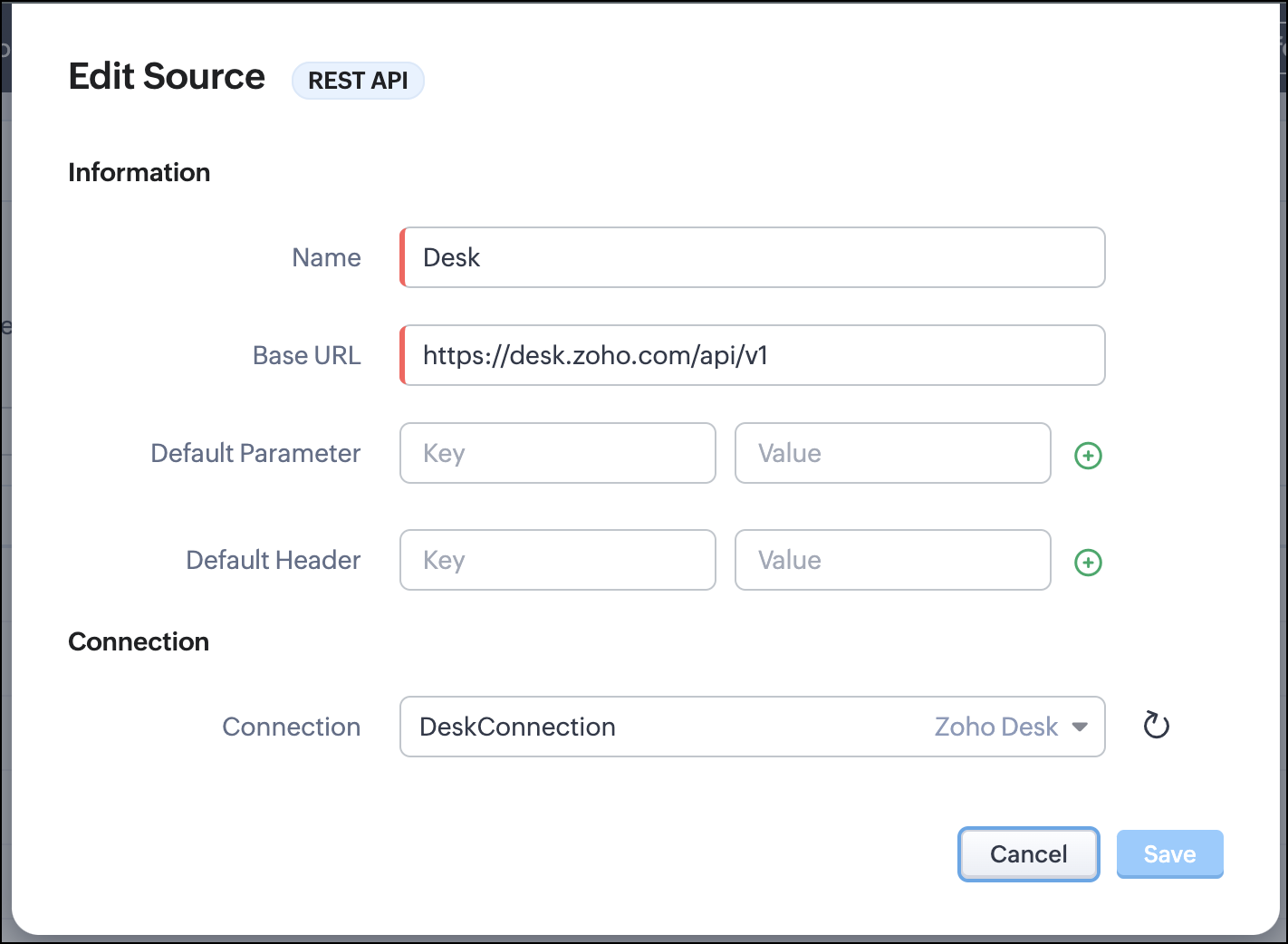
- Go to Setup > Developer Hub > Queries > Sources > Add Source.
- Under Information,
- Give a name for the source and its Base URL. Queries will make API calls to this URL to fetch data. Ensure to add this to Trusted Domain.
- Specify any default parameters and headers for this base URL.
- Under Connection, choose the connection you have created with Zoho Desk with the necessary scopes. If you haven't, create one.
- Click Save.

Note
Queries will make API calls to the URL you add in the Source and consume credits that are applicable in that service. Ensure you monitor your API usage in your source provider.
Step 2 - Create a REST API Query
- Go to Setup > Developer Hub > Queries > Add Query.
- Under Source, choose the source you created in step 1.
- Under Information,
- Enter the Name, API Name, and the Endpoint of the query.
- Specify the parameter email that takes the dynamic variable {{Contact_Email}} as its value. This is to fetch the latest ticket from Zoho Desk for a contact with the email in this variable during runtime. Refer to our Kaizen post on Handling Query Variables in Zoho CRM for additional details.
- Specify Headers, if any.
- You can serialize the output to fit your needs using JavaScript in the Serializer.
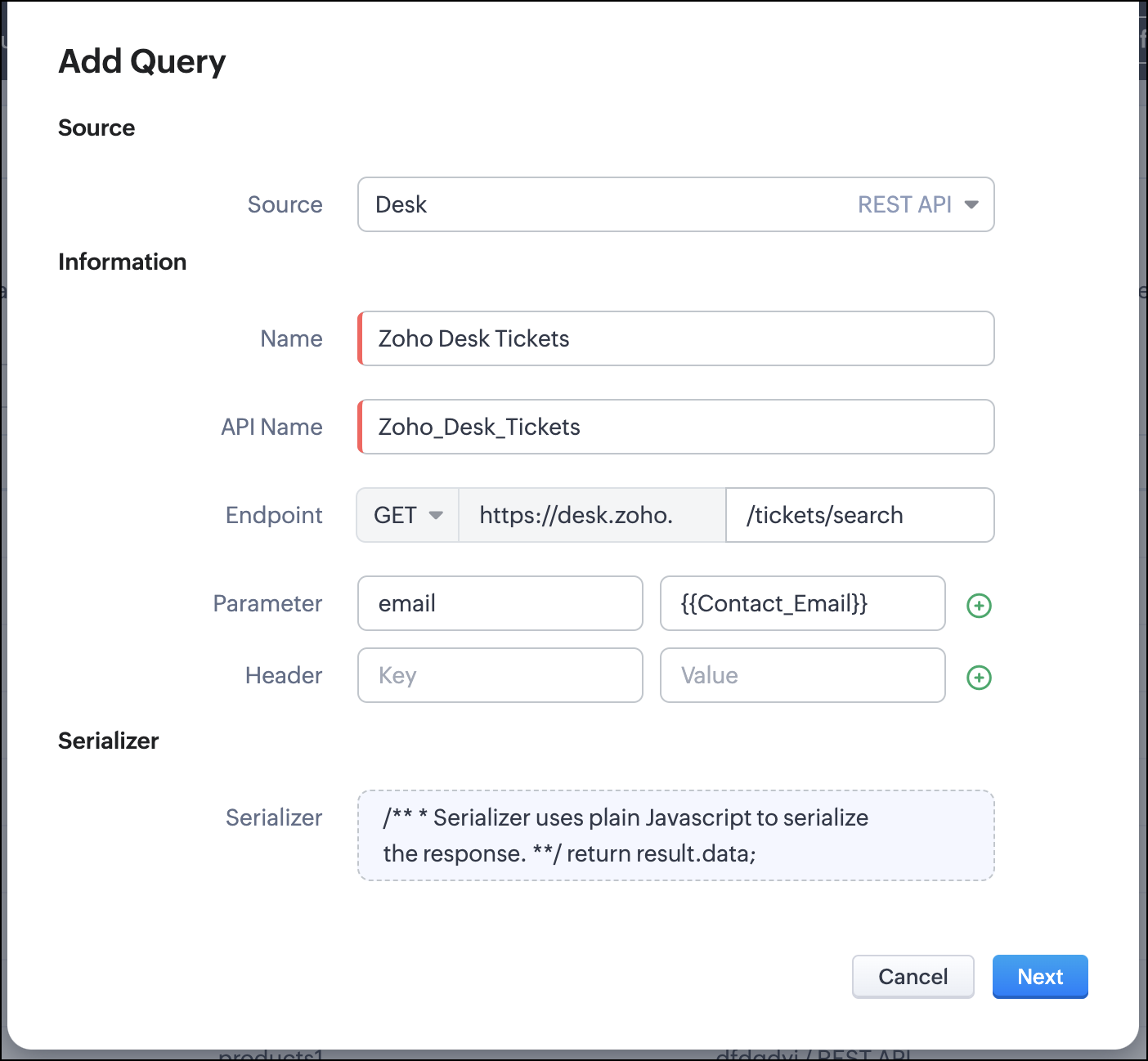
- Click Next.
- Enter an email address in the box to test the query.
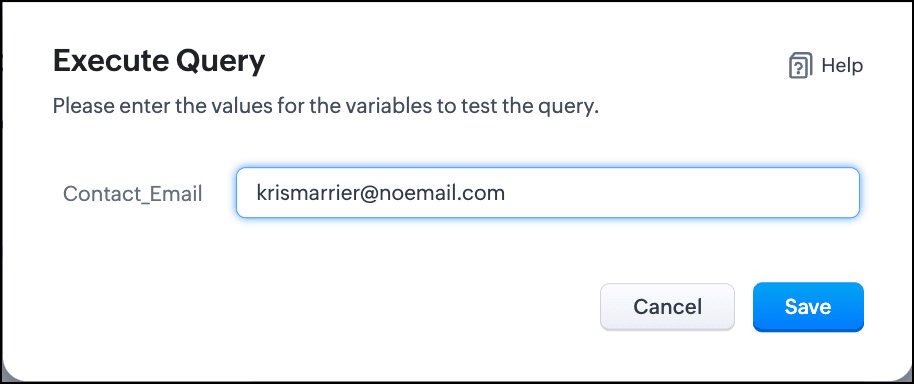
- Click Save. You can see the response of the query and the serialized response if you had serialized the output.
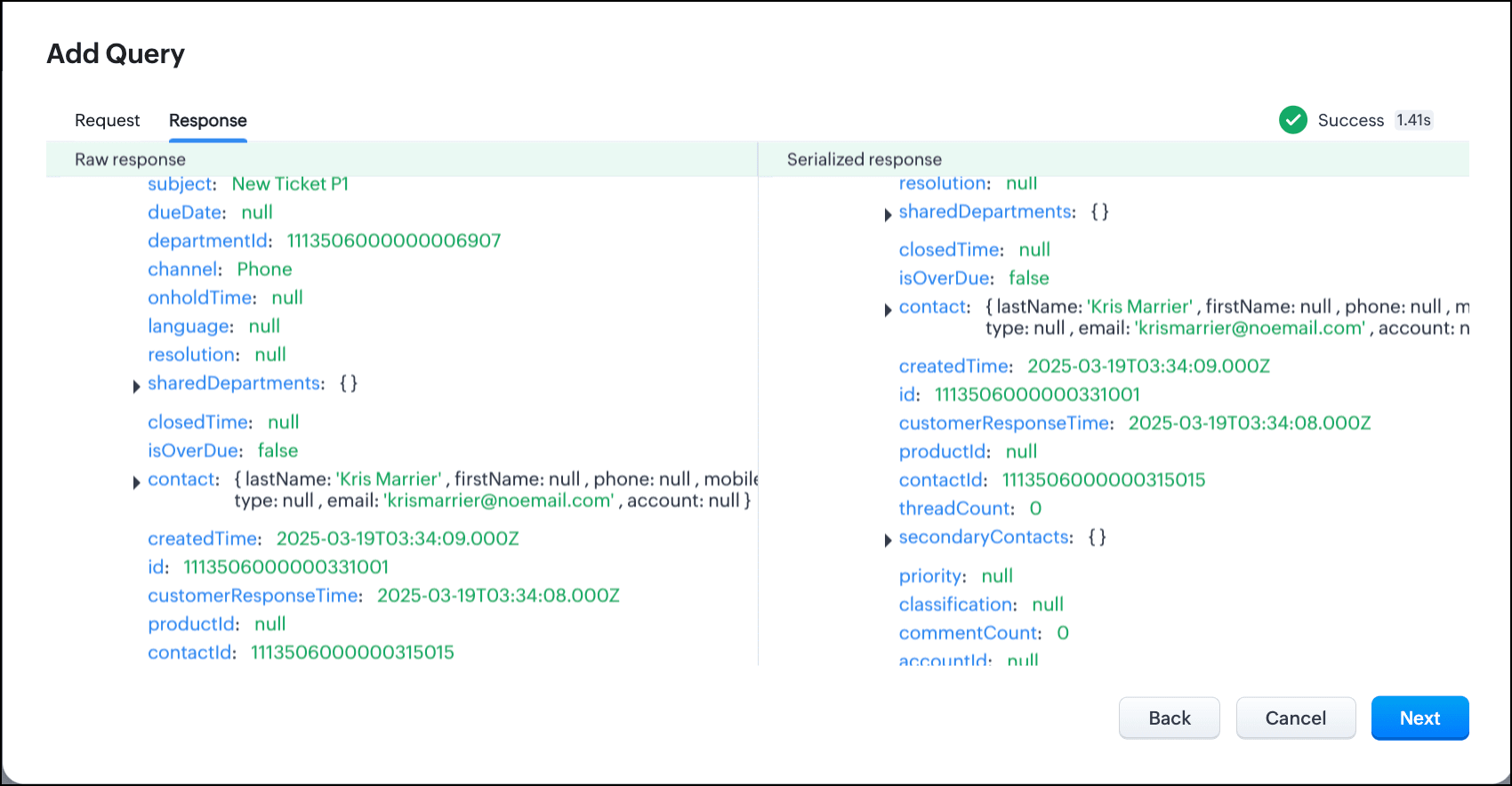
- Click Next.
- You can see the Schema of the query. The Schema acts as a bridge/mapping layer between external API responses and Zoho CRM's internal data structure. For example, the response of the Desk API returns result[].assignee.firstName, which is mapped to CRM as Assignee > FirstName. Schema ensures that the CRM UI knows how to display the field correctly.
With the right mapping in the schema, you can avoid manual data entry or syncing, and use the API data in workflows, reports, and dashboards.
You can change the CRM Field Type and Label to suit your needs. Refer to our Kaizen post on Serialization and Schema Management for more details. - Click Save to save the query.
Now that our query and fetching data from Zoho Desk is sorted, let's move on to the Canvas.
The Custom List view in Canvas enables you to stack records horizontally, one above the other.
Follow the steps in the How to Work with Canvas? guide to create a Custom List View Canvas for the Contacts module.
- On the Canvas, click the database icon for the Queries component.
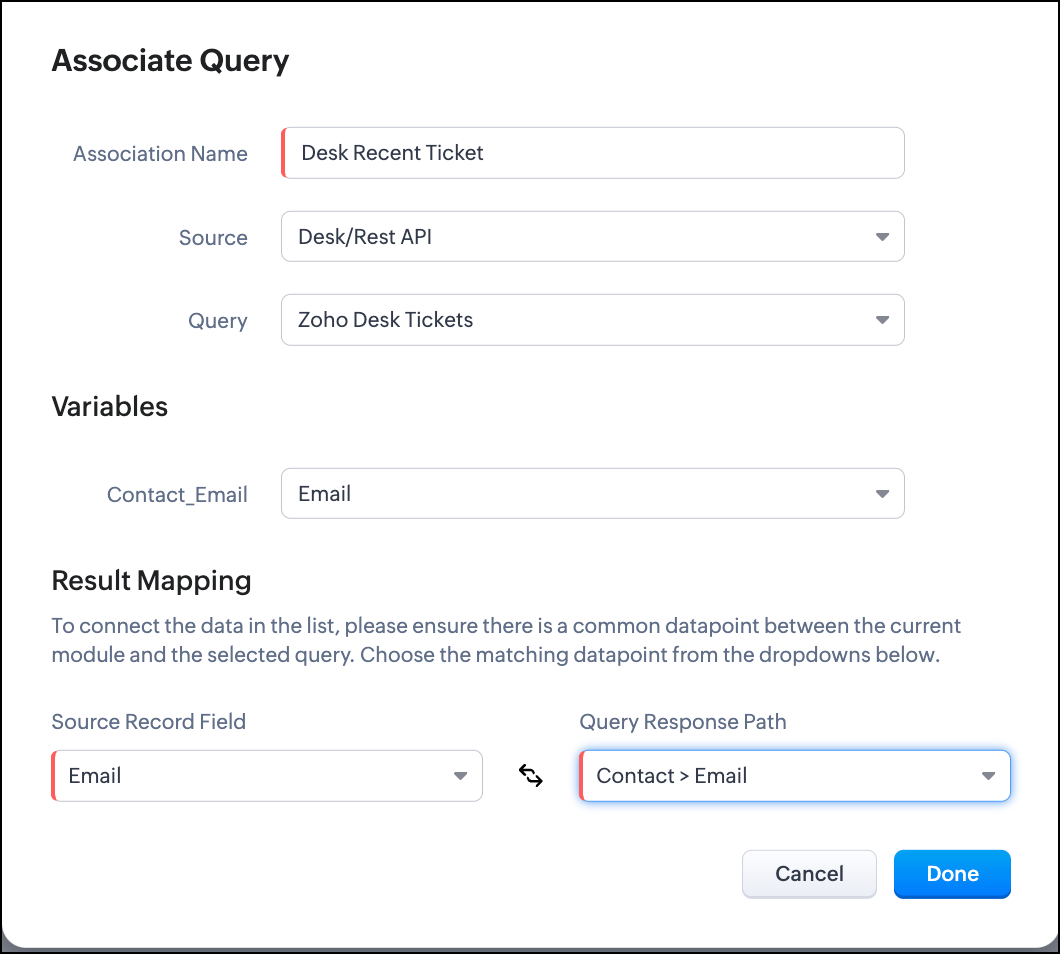
- Click Associate Query.
- Give an Association Name and select the Source(added in step 1) for the query.
- Under Query, select the query you created.
- The Variables section will contain the variables in the query. The drop-down displays all fields in the Contacts module. Select the Email field.
- Under Result Mapping, choose Email as the Source Record Field and Contact > Email as the Query Response Path. The Query Response Path is populated from the schema of the query.
- Click Done to associate the query with the canvas.
- You can see all the fields of the query on the left. Drag and drop the required fields on the canvas.
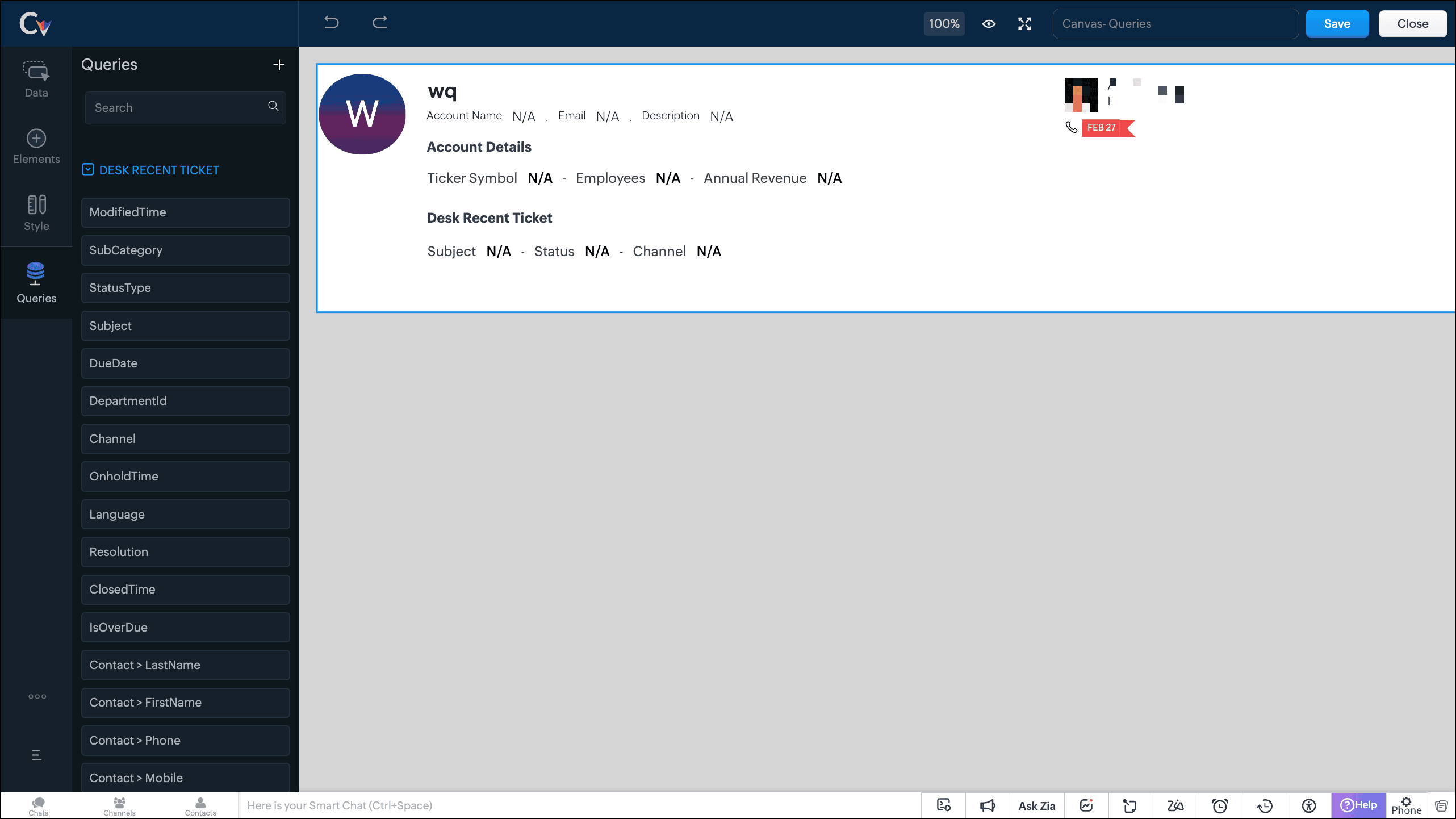
- Save the canvas.
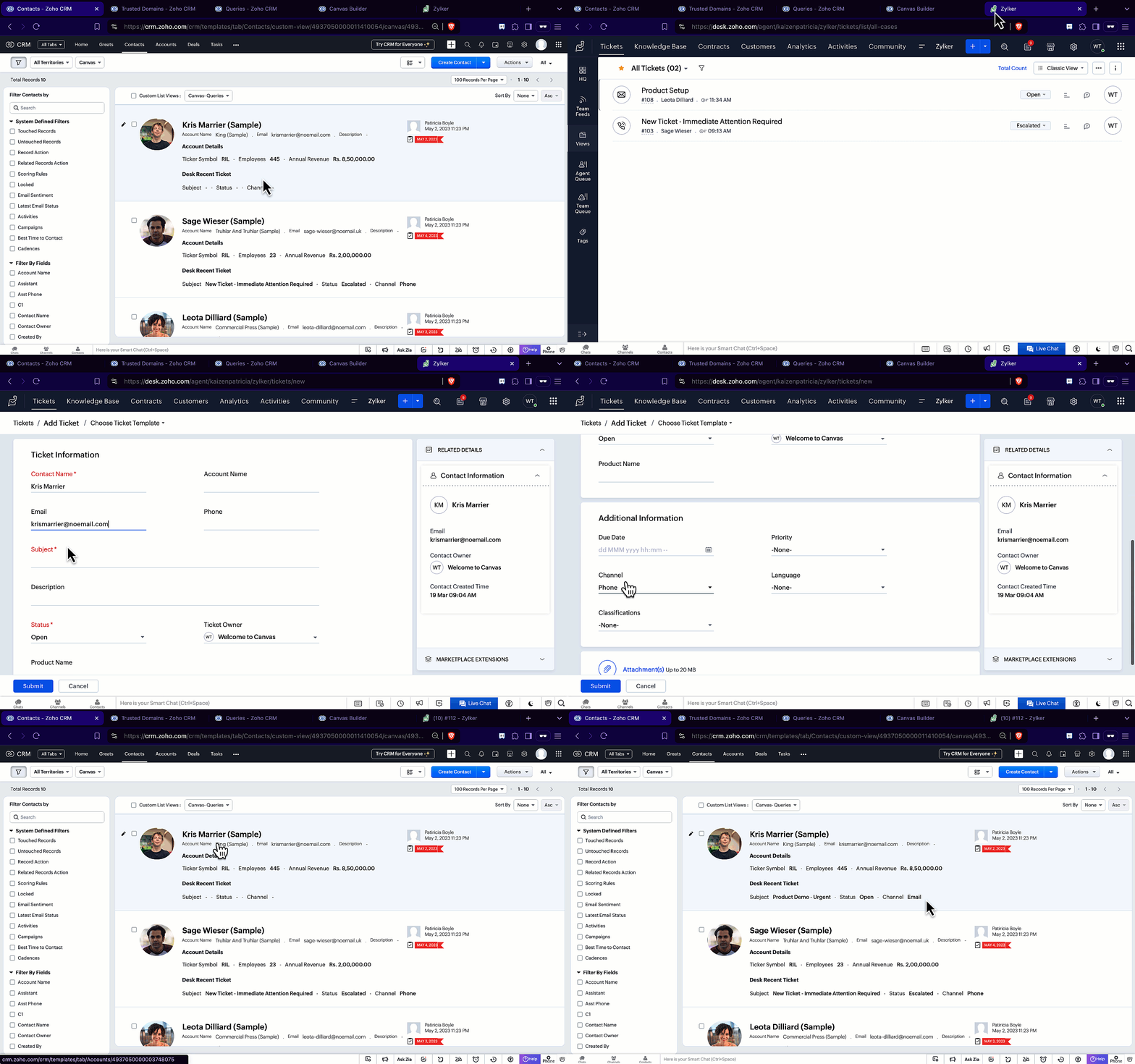
Time for the big reveal!
The following GIF shows how the ticket details from Zoho Desk are populated on the Canvas List View of the Contacts module.

Note that every time you reload the canvas, the query underneath makes an API call to the source provider to fetch data for the contacts in Zoho CRM. Ensure your API calls are monitored to avoid exhasuting your credits.
We hope you liked this post.
Topic suggestions are welcome! See you all next week!
Cheers!
----------------------------------------------------------------------------------------------------------------------------------------

See Also
Topic Participants
Shylaja S
Sticky Posts
Kaizen #217 - Actions APIs : Tasks
Welcome to another week of Kaizen! In last week's post we discussed Email Notifications APIs which act as the link between your Workflow automations and you. We have discussed how Zylker Cloud Services uses Email Notifications API in their custom dashboard.Kaizen #216 - Actions APIs : Email Notifications
Welcome to another week of Kaizen! For the last three weeks, we have been discussing Zylker's workflows. We successfully updated a dormant workflow, built a new one from the ground up and more. But our work is not finished—these automated processes areKaizen #152 - Client Script Support for the new Canvas Record Forms
Hello everyone! Have you ever wanted to trigger actions on click of a canvas button, icon, or text mandatory forms in Create/Edit and Clone Pages? Have you ever wanted to control how elements behave on the new Canvas Record Forms? This can be achievedKaizen #142: How to Navigate to Another Page in Zoho CRM using Client Script
Hello everyone! Welcome back to another exciting Kaizen post. In this post, let us see how you can you navigate to different Pages using Client Script. In this Kaizen post, Need to Navigate to different Pages Client Script ZDKs related to navigation A.Kaizen #210 - Answering your Questions | Event Management System using ZDK CLI
Hello Everyone, Welcome back to yet another post in the Kaizen Series! As you already may know, for the Kaizen #200 milestone, we asked for your feedback and many of you suggested topics for us to discuss. We have been writing on these topics over the
Recent Topics
Has anyone imported items and included the storage bin?
We have a large amount of Inventory Items. We would like to import these into Zoho Inventory but while we can import the majority of data, the storage bin refuses to map. Has anyone successfully imported the data and mapped the bin?Terms & Conditions add a rule.
Hi I'd like to format my T&C's to auto format a Deposit amount based on the Total. "Quotation is valid for 7 days from the date of issue. A 75% deposit ( R .00 )is required to confirm the booking. The remaining balance ( R .00)is due upon project completion.Zoho Inventory Feature Roadmap Visible To All
Hello, please consider making your feature roadmap visible to us users so that we know what to expect in future. This may appease current users who are seeking clarification on feature implementation dates, so that they can make an informed decision whethersend file to ftp or another external service
i'v created a zoho creator application for take a picture and rename it by phone. Now i need to send Each renamed pictures to my ftp or to specific folder on google drive...then, delete it from creator. (every picture recived it will processed by another program and stored on my Erp) HOW CAN I DO ??Feature Request - Improved booking layouts, specifically for individual booking links
I would like to see more layout options and specifically to have the meeting description beside the calendar booking function, when sharing booking links to specific consultations/meetings. Below is a screenshot from Calendly. I love this layout and itSet Conditional and Dependent Rules for Issues in Zoho Projects
An Issue Layout is a customizable form to add and update information about a specific issue. The fields in the issue layout can be changed dynamically based on user requirement using the issue layout rules. Consider a scenario where an electrical fluctuationAccounting on the Go Series-56: e-Way Bill Module in the Mobile App – A Handy Solution for Indian Businesses
Hello everyone, Managing e-Way bills just got more convenient with the Zoho Books mobile app! For businesses operating under the GST regime, e-Way bills are essential for tracking the movement of goods. Previously, you had to log in to the web app toCopying records from a Custom Module into Deals
Hello, I recently created a custom module to handle a particular type of order/transaction in our business. Having got this up and running I've realised that it would be much better to use the Deals module with a different layout instead. We've enteredCreator App on Mobile - Workflow "On Create / Edit - On Load" not triggered ?
Hi Everyone, I built an application to track assets, which is used both at the office (desktop) an in the field by technicians (mobile app). In the field, technicians open an existing form and add rows to a subform at some point. One field they have toHOW TO VIEW INDIVIDUAL COST OF NEWLY PURCHASED GOODS AFTER ALLOCATING LANDED COSTS
Hello, I have been able to allocate landed costs to the purchase cost of the new products. however, what i need to see now is the actual cost price (original cost plus landed cost), of only my newly purchased products to enable me set a selling priceCustom Function to get custom field of lookup type in Books
Hi, Here's the situation. In Purchase Order, there is a custom field (lookup) to SO. The requirement is to update to the related SO if PO get updated Right now facing challenge to get the id of custom field (lookup) in PO. Please find below the sampleCustom From Address is now Organizational Email
We're introducing a small yet meaningful change in Zoho Recruit, one that sets the foundation for bigger improvements coming your way. What’s changed? We’ve renamed the Custom From Address to Organizational Email. The new name was chosen to better reflectWhat's New in Zoho Billing Q2 2025
Hello everyone, We are excited to share the latest set of updates and enhancements made to Zoho Billing in Q2 2025, ranging from image custom fields to support for new languages. Keep reading to learn more. Upload Images From Your Desktop to Email NotificationsMap dependency on Multiselect picklist
I need help in Zoho CRM. I have 2 multi-select picklists. For example, Picklist A has country names. Picklist B has state names. Now I want to show states on the basis of the selected country from Picklist A. Both are multi-select fields, so the standardTip of the Week #63 – Keep personal emails out of team view.
Shared inboxes are great for teamwork—they let everyone stay on the same page, respond faster, and avoid duplicate replies. But not every message needs to be shared with the entire team. Think about those one-on-one chats with a manager, a quick internalEpisode III : Powering Automation: Custom Functions in Action
Hello Everyone, In our previous episodes, we explored custom functions and the Deluge programming language. If you’ve been wondering why the Episode series have been quiet, here’s the reveal! On our community, we've been showcasing custom functions integratedNarrative 2 - Understanding Organizational Departments
Behind the scenes of a successful ticketing system - BTS Series Narrative 2 - Understanding Organizational Departments A ticketing system's departments are essential because they provide an organized and practical framework for handling and addressingZoho Projects Plus for the healthcare industry
The global healthcare industry is complex and diverse; from patient record maintenance, healthcare supply chain, to manufacturing complex medical equipment, the industry functions on many layers. Managing all these layers requires tested out techniquesMissing Outlook calendar option in Calendar
Hi all I don't have an Outlook Calendar option in the Settings > Synchronise settings of Calendar. Any ideas why not?Whats App Automation
It would be nice to be able to send out an automated whats app message template on moving stages or creation of a ticket (same as you can do for automated emails). Currently only automated emails can be sent. Also, if whats app could be used more effectivelyZoho Projects Android app update: Enhanced Documents module within the projects.
Hello everyone! In the latest Android version(v3.9.35) of the Zoho Projects app update, we have enhanced the documents module within the projects. Now, you can view all the attachments that you have added across the project in tasks, bugs, comments, etc,Lead Source Disappears
When adding a new lead and saving the page, the page refreshes itself and the lead source field becomes blank. We set the "Lead source" as a required field to see if it would help, but the problem persists and we always have to re-enter the lead souInquiry Regarding Monitoring ZOHO CRM API Credit Usage
Hello ZOHO Community, I hope this message finds you well. I have a question regarding monitoring the usage and remaining credits of the ZOHO CRM API. I recently discovered that within ZOHO CRM, by navigating to Settings ⇒ Developer Hub ⇒ APIs & SDKs,Payment Gateways - A unified hub to manage all your payment integrations in Zoho Creator
Hello everyone, We're thrilled to announce that we've completely reimagined the way payment gateways are handled in Creator. The result is a centralized Payment Gateways section that provides a clean, user-friendly interface to configure and manage allCommunity Digest Julio 2025 - Todas las novedades en Español Zoho Community
¡Hola, Español Zoho Community! Ha pasado un tiempo desde el último Digest pero, ¡ya estamos de vuelta con las novedades más relevantes en las aplicaciones de Zoho y su universo! Si no te quieres perder ninguna de las novedades que vamos publicando, teTip #35- How to use Notifications in Zoho Assist to stay on top of session activities- 'Insider Insights'
Hello Zoho Assist Community! This week, we’re exploring Zoho Assist’s built-in notification system for improved visibility and accountability. Keeping track of session activity is crucial, especially when you're managing multiple remote devices and technicians.Assistance with Exporting Specific Data from Zoho CRM
Hi, Could you please guide me on how to export specific information, such as the model number and serial number, from the Accounts module in Zoho CRM? Thank you in advance for your assistance.Coming Soon in Zoho Invoice: Send Invoices Instantly via WhatsApp
We're working on bringing a new level of convenience to your invoicing experience. Introducing a much-requested feature in Zoho Invoice: You can now share invoices directly to your customers via WhatsApp! With this new option, you can: Share invoicesfield update from the value of another field
Hello, I need to do a field update from the value of another field, but i don´t know how can i do it. In the mass update option it is not possible... I need to put the last name value form the leads module to other custom field that i have created. thanks for your helpWhat is a realistic turnaround time for account review for ZeptoMail?
On signing up it said 2-3 business days. I am on business-day 6 and have had zero contact of any kind. No follow-up questions, no approval or decline. Attempts to "leave a message" or use the "Contact Us" form have just vanished without a trace. It stillIs there any way to prevent the row cloning feature(on edit page)
My initial requirement is to prevent some users from adding new rows in the subform. For that, I have implemented the client script, and the script is working fine. But users are able to clone the row and make changes. For that, I was unable to find anyUsing Another Field Value for Workflow Field Update
I'm trying to setup a Workflow with a "Field Update" action on the Lead module, but I would like the new value to actually be taken from a DIFFERENT Field's on the Lead record (vs just defining some static value..) Is this possible? Could I simply useHow Do I Change Business Location
Ive just shifted my business to a new country and would like to update my address and Business location in the "Organisation Profile" page but it is locked in the previous country. How do I unlock it / change it? ThanksVerify details pop-up windows
Hi, Is it possible to turn-off the anoying "Verify details" window that ask for closing date, "Reason for Lost" or other concepts. If I would like the user to enter such data, I will implement a rule .... How can I turn-off such pop-up? it's not necessaryMonthly overtime wrong after adding/changing attendance time for past month
Hi there, as I understand it, the montly overtime overview under attendance is calculated at the end of each month. If someone was not able to enter his attendance in time but entered it in the new month, this time will not be considered in the overview.As a security measure, you need to link your phone number with this account and verify it to proceed further.
I want to disable this feature as my one staff travels with different phone numbers so it is hard to verify by phone. How do I do that?Asset Tracking
I am looking to create custom modules to track customer assets. We install serialized and non-serialized equipment into customers vehicles. So we will have vehicles belonging to the customer then equipment that will belong to a vehicle (if installed)【参加無料】8月8日(金) 福岡 ユーザ交流会 参加登録 受付開始!
ユーザーの皆さま、こんにちは。コミュニティチームの藤澤です。 8月8日(金)に1年ぶりに、福岡でZoho ユーザー交流会を開催します! ユーザー事例セッションでは、CreativeStudio樂合同会社の前田 美知太郎さまが、労働時間を削減したZoho活用のリアルな工夫を語ります。 Zoho社員セッションでは、データ収集から自動処理まで一気に効率化できるZoho Formsの最新活用アイディアをお届けします。 ▷▷詳細はこちら:https://www.zohomeetups.com/Fukuoka2025#/?affl=fuk2508forumpostUnusable due to "server" issues but there's nothing on Zoho or Down Detector saying there's an outage
I just started the Zoho trial and I cannot do anything because no apps or even the "contact support" will actually load. I tried to create a project but it keeps giving me the error "server is unable to process your request at this time". I tried to loadIssue After Updating to Zoho Desk Android SDK v4.5.0 – Authentication Fails (Status Code 204)
Hi Zoho Support Team, I was previously using the Zoho Desk Android SDK with the following dependency: implementation 'com.zoho.desk:asapsdk:3.0_BETA_17' Everything was working as expected — including user authentication, the tickets section, and theNext Page