Kaizen #182 - Queries in Canvas List View

Hello everyone!
Welcome to another week of Kaizen!
We're back with another post in this series on Queries in Canvas List View.
Queries in Zoho CRM allow you to dynamically retrieve data from CRM as well as third-party services directly within the CRM platform.
You can construct a query of one of the following types:
- CRM Module type query to retrieve data from CRM modules.
- COQL type query to construct a query using the COQL API.
- REST API type query to fetch data from an external service and use it in Zoho CRM.
You can associate a query with the 'Decision' component of Kiosk, Canvas Detail View, or Canvas List View.
In this post, we will take up a use case and see how you can associate a query with Canvas List View.
Use case
Sales and support teams often need quick access to Zoho Desk tickets related to a contact in Zoho CRM. To avoid switching between apps to check ticket statuses, we can use the Queries feature to fetch the latest Zoho Desk ticket's details of a contact dynamically and display them on the Canvas List View page of the Contacts module.
This ensures that CRM users can instantly view the most recent ticket linked to a contact without leaving Zoho CRM.
Follow along to see how you can achieve this!
Step 1 - Add a Source
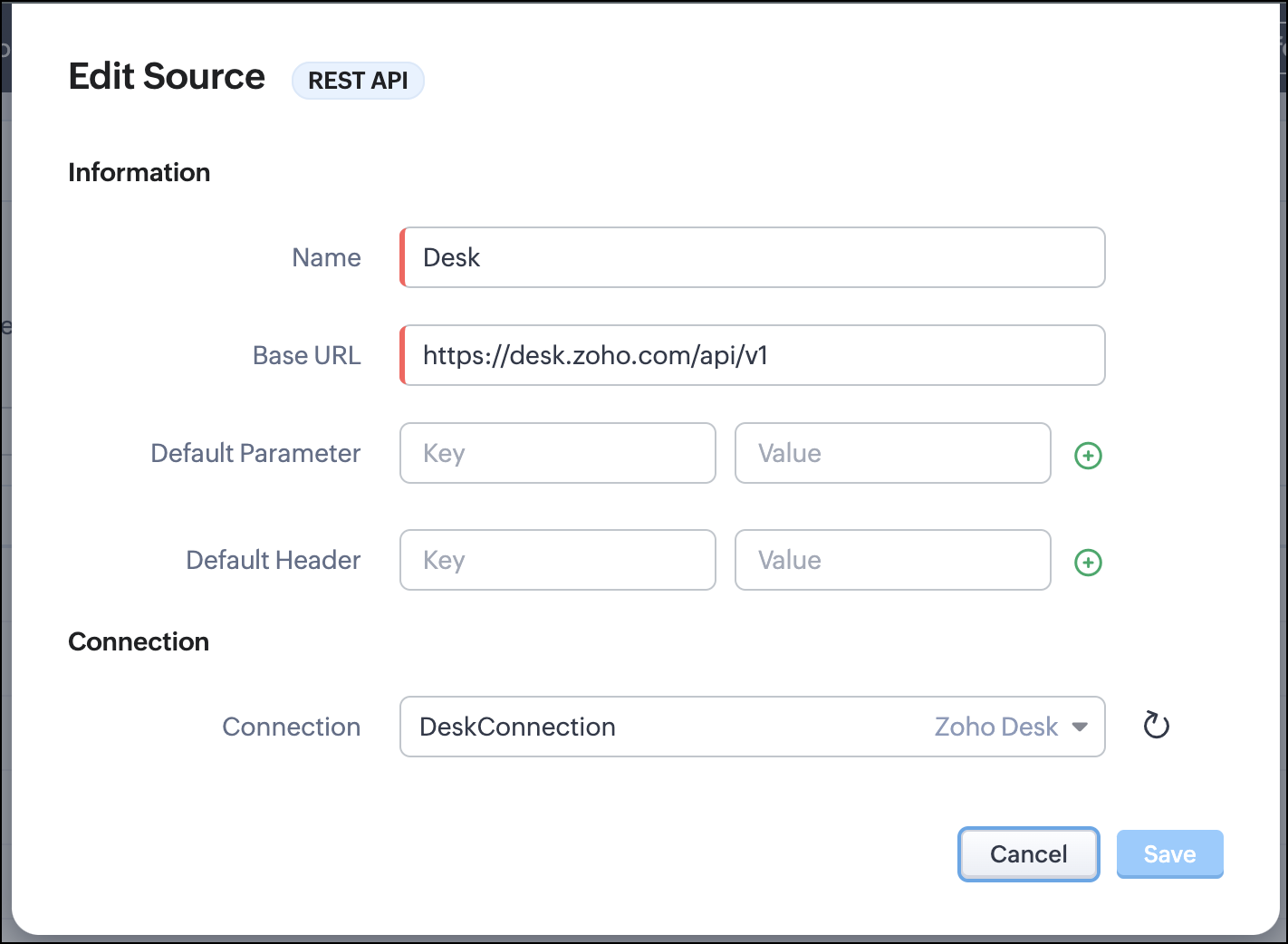
- Go to Setup > Developer Hub > Queries > Sources > Add Source.
- Under Information,
- Give a name for the source and its Base URL. Queries will make API calls to this URL to fetch data. Ensure to add this to Trusted Domain.
- Specify any default parameters and headers for this base URL.
- Under Connection, choose the connection you have created with Zoho Desk with the necessary scopes. If you haven't, create one.
- Click Save.

Note
Queries will make API calls to the URL you add in the Source and consume credits that are applicable in that service. Ensure you monitor your API usage in your source provider.
Step 2 - Create a REST API Query
- Go to Setup > Developer Hub > Queries > Add Query.
- Under Source, choose the source you created in step 1.
- Under Information,
- Enter the Name, API Name, and the Endpoint of the query.
- Specify the parameter email that takes the dynamic variable {{Contact_Email}} as its value. This is to fetch the latest ticket from Zoho Desk for a contact with the email in this variable during runtime. Refer to our Kaizen post on Handling Query Variables in Zoho CRM for additional details.
- Specify Headers, if any.
- You can serialize the output to fit your needs using JavaScript in the Serializer.
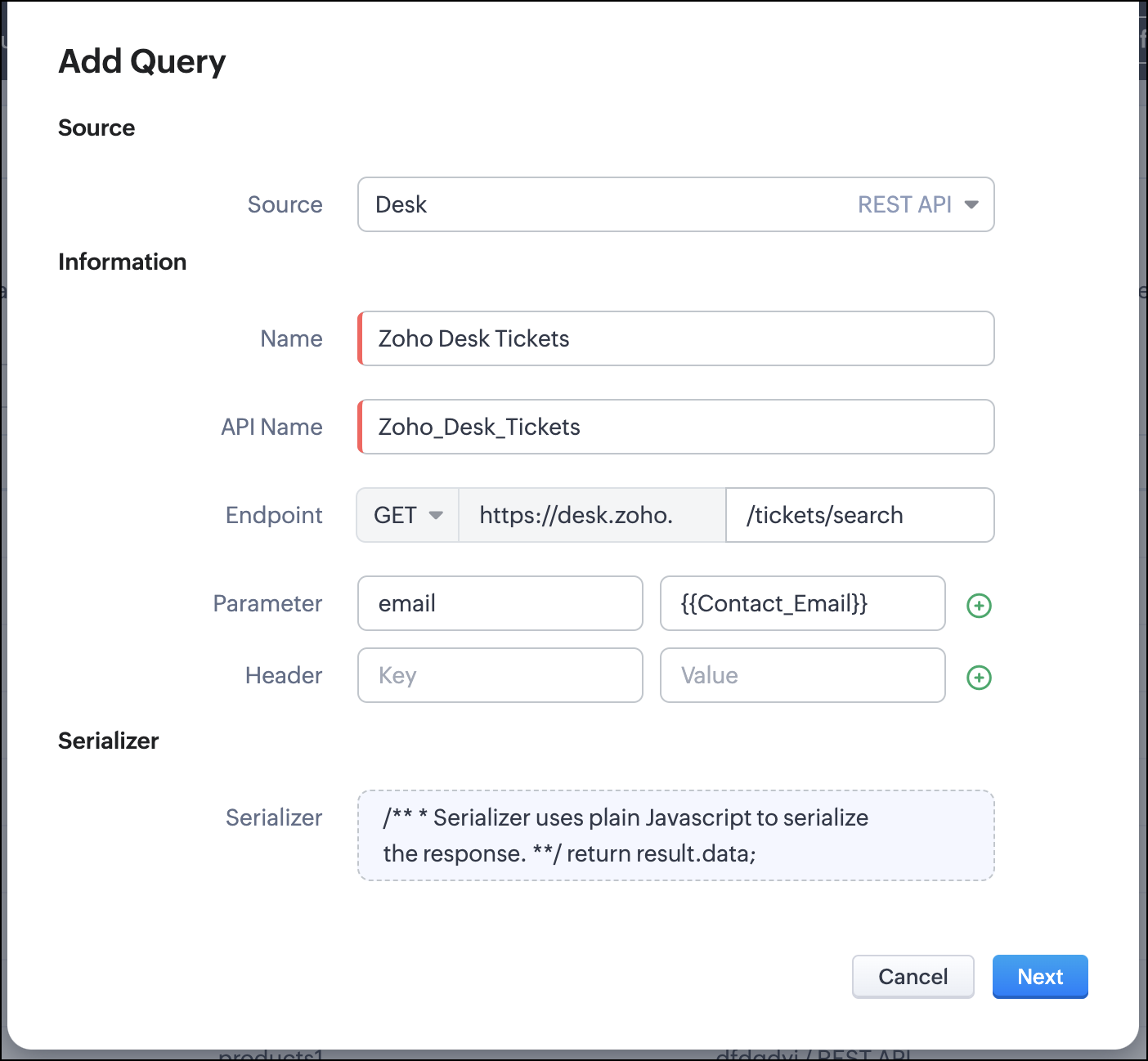
- Click Next.
- Enter an email address in the box to test the query.
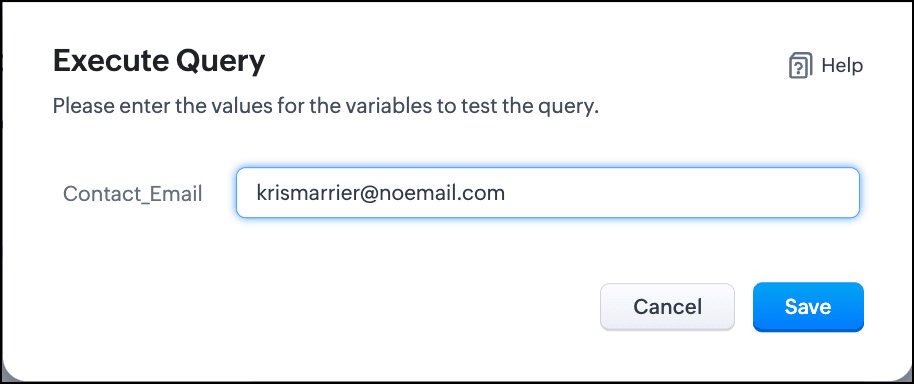
- Click Save. You can see the response of the query and the serialized response if you had serialized the output.
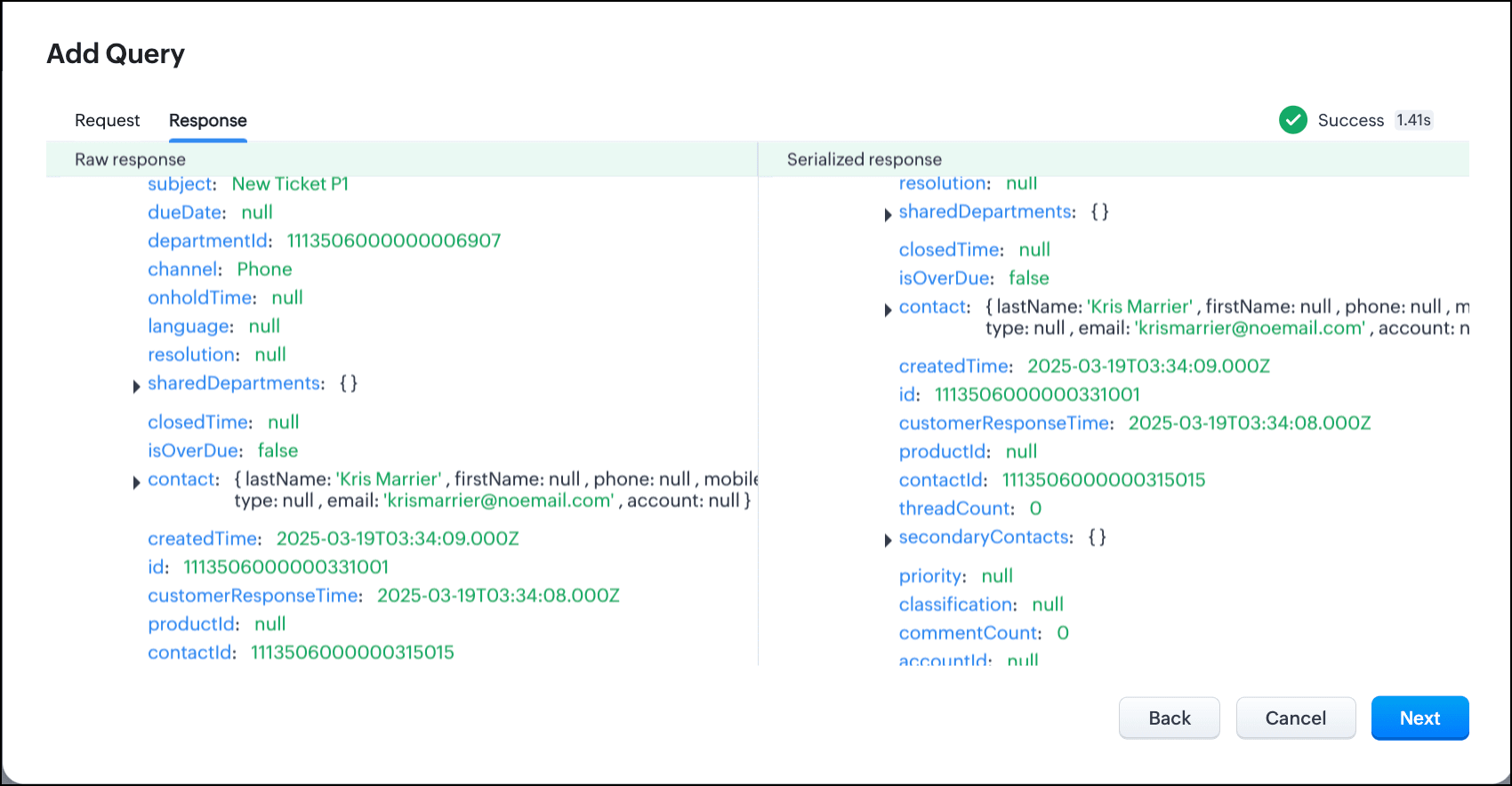
- Click Next.
- You can see the Schema of the query. The Schema acts as a bridge/mapping layer between external API responses and Zoho CRM's internal data structure. For example, the response of the Desk API returns result[].assignee.firstName, which is mapped to CRM as Assignee > FirstName. Schema ensures that the CRM UI knows how to display the field correctly.
With the right mapping in the schema, you can avoid manual data entry or syncing, and use the API data in workflows, reports, and dashboards.
You can change the CRM Field Type and Label to suit your needs. Refer to our Kaizen post on Serialization and Schema Management for more details. - Click Save to save the query.
Now that our query and fetching data from Zoho Desk is sorted, let's move on to the Canvas.
The Custom List view in Canvas enables you to stack records horizontally, one above the other.
Follow the steps in the How to Work with Canvas? guide to create a Custom List View Canvas for the Contacts module.
- On the Canvas, click the database icon for the Queries component.
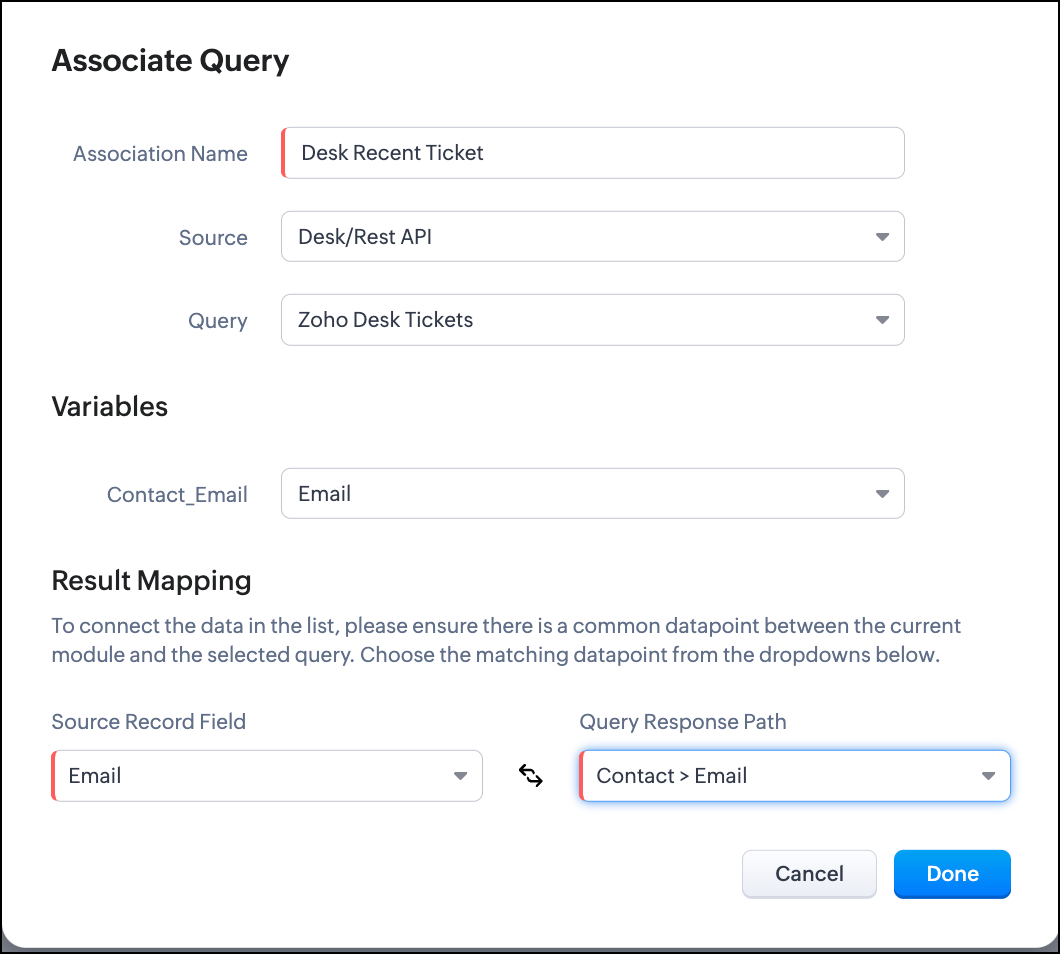
- Click Associate Query.
- Give an Association Name and select the Source(added in step 1) for the query.
- Under Query, select the query you created.
- The Variables section will contain the variables in the query. The drop-down displays all fields in the Contacts module. Select the Email field.
- Under Result Mapping, choose Email as the Source Record Field and Contact > Email as the Query Response Path. The Query Response Path is populated from the schema of the query.
- Click Done to associate the query with the canvas.
- You can see all the fields of the query on the left. Drag and drop the required fields on the canvas.
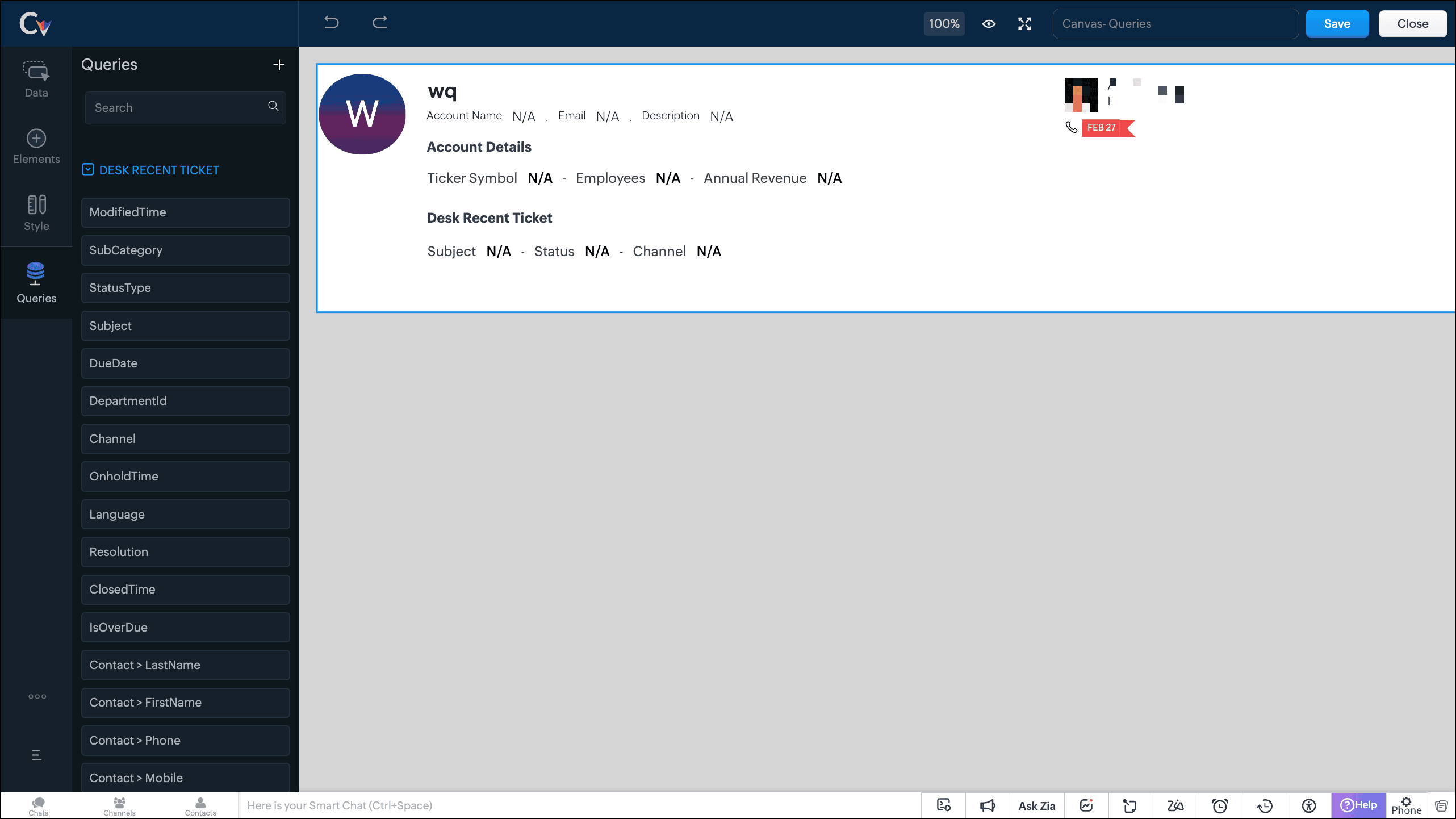
- Save the canvas.
Time for the big reveal!
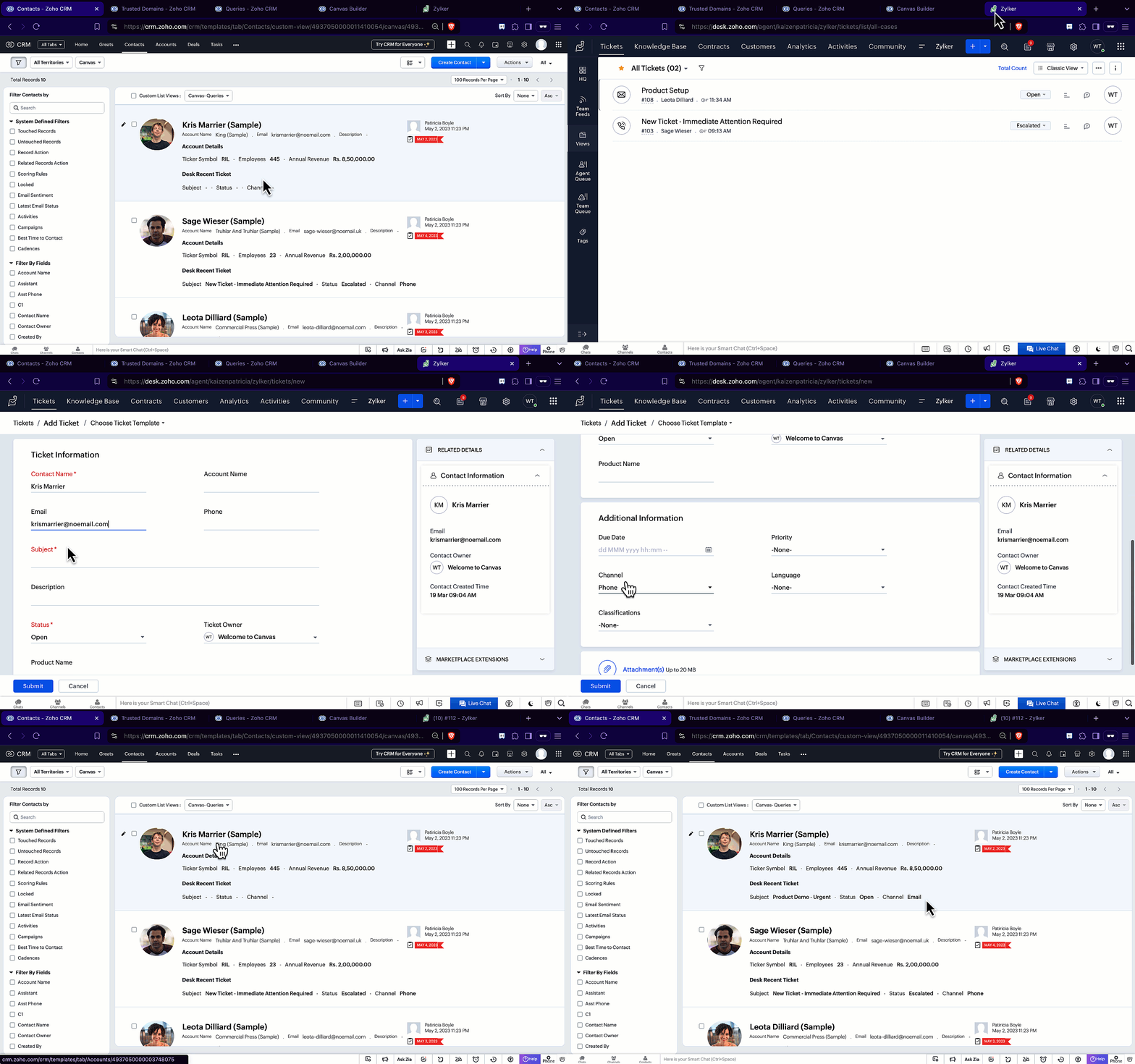
The following GIF shows how the ticket details from Zoho Desk are populated on the Canvas List View of the Contacts module.

Note that every time you reload the canvas, the query underneath makes an API call to the source provider to fetch data for the contacts in Zoho CRM. Ensure your API calls are monitored to avoid exhasuting your credits.
We hope you liked this post.
Topic suggestions are welcome! See you all next week!
Cheers!
----------------------------------------------------------------------------------------------------------------------------------------

See Also
Topic Participants
Shylaja S
Sticky Posts
Kaizen #217 - Actions APIs : Tasks
Welcome to another week of Kaizen! In last week's post we discussed Email Notifications APIs which act as the link between your Workflow automations and you. We have discussed how Zylker Cloud Services uses Email Notifications API in their custom dashboard.Kaizen #216 - Actions APIs : Email Notifications
Welcome to another week of Kaizen! For the last three weeks, we have been discussing Zylker's workflows. We successfully updated a dormant workflow, built a new one from the ground up and more. But our work is not finished—these automated processes areKaizen #152 - Client Script Support for the new Canvas Record Forms
Hello everyone! Have you ever wanted to trigger actions on click of a canvas button, icon, or text mandatory forms in Create/Edit and Clone Pages? Have you ever wanted to control how elements behave on the new Canvas Record Forms? This can be achievedKaizen #142: How to Navigate to Another Page in Zoho CRM using Client Script
Hello everyone! Welcome back to another exciting Kaizen post. In this post, let us see how you can you navigate to different Pages using Client Script. In this Kaizen post, Need to Navigate to different Pages Client Script ZDKs related to navigation A.Kaizen #210 - Answering your Questions | Event Management System using ZDK CLI
Hello Everyone, Welcome back to yet another post in the Kaizen Series! As you already may know, for the Kaizen #200 milestone, we asked for your feedback and many of you suggested topics for us to discuss. We have been writing on these topics over the
Recent Topics
How to make the add-on optional at the time of subscription?
The scenario is this, we have a service which has optional add-ons. Like the customer who purchased the subscription may or may not want to get the add-on. In our case if the customer choose the addon we have monetary benefit. In case the user does notUnable to add attachments to knowledge base anymore
I have been adding articles to knowledge base in Zoho Desk (as part of Zoho One). Today suddenly i found that I am unable to upload and attachments to the articles. I get the following error: "Attachment couldn't be added." I have uploaded the screenshotAdvanced factors for multiple scoring rules: Now with Zia scoring automations for all modules
Greetings all, We're happy to offer improved scoring features by adding extra scoring factors, including Zia Scores, in our multiple scoring rules (MSR) feature. These new factors—which empower existing traditional scoring factors—include criteria forRestrict Agents from Editing Shared Custom Views in Zoho Desk
Hello Zoho Desk Team, We hope you're doing well. We’d like to submit a feature request regarding the custom views functionality in Zoho Desk. 🎯 Background We’re actively using custom views to filter and display tickets for different teams based on specificIntroduction Dario Schiraldi Deutsche Bank Executive
Hello Everyone, Dario Schiraldi serves as a key leader at Deutsche Bank, where he plays a crucial role in shaping the bank's strategic direction and driving operational success. With a solid foundation in finance and leadership, Dario is committed toIs Zoho Shifts included in the Zoho One plan?
In case the answer is no: there's any plan to make it available via One? Thank youFeature Request: API Access for Managing Deluge Functions (with OAuth & Change Tracking)
Hi everyone, I wanted to share a thoughtful request that came in from one of our Zoho clients this week. I believe many of us as partners and developers might relate to it. “One quick item to flag: we’d love an official way to manage Deluge functionsMoving Subscriptions from one Customer to another
We frequently need to move subscriptions from one Customer to another Customer in Zoho Billing and the only way we have figured out to do this is to cancel it in the old owner's profile and manually recreate in in the new owner's profile. In doing this,how to add new line in Deluge?
I want to make string with line separation like this: this is the first line second line third line I have tried to use \n <br> or </br> inside the string but I can't achieve the result like the example above. I want to create a task by using custom functionHow to pause a subscription/recurring order ?
Hello, I'm evaluating Zoho Subscriptions for a food co-op where members order a box of produce every week. The software that we're currently using allows members to set up a recurring order. Members can pause the recurring order when they don't want a box for a while and then resume it later. Is it possible to pause/resume a subscription ? Thanks JohnHosted Payment Pages - how to update the address in zoho billing
I"m playing around with the muti-page hosted payment pages which have places for customers to enter their addresses when paying. Why does this not update their address in Zoho Billing after payment? What can I do to make this happen?Tracking training certification expirations
Hi Zoho Community! I'm looking for some input on the best and most efficient ways to track training expirations in Zoho CRM. I have a very specific workflow that I am looking for - my company offers trainings, and the certification expires every 2 toKaizen #164 : Client Credentials
Hello everyone, Welcome back to Kaizen. In this post, we will discuss Client Credentials Flow and when it can be used. What is Client Credentials Flow? According to RFC6749, the official specification for the OAuth 2.0 authorization framework, "The clientCRM Email Template Align Left Instead of Center
Is there a way to make a basic template align to the left instead of center? I know I'm likely forced to the 600px wide with the basic templates but I would REALLY like to set the email to the left instead of center. The basic templates make all the emailsClient Script - "Click' Button on Purchase Order - Specify "To Contact" or "To Supplier"
The send email button is unique on the purchase order in that is has an additional submenu to send email "To Contact" or "To Supplier" It appears that the "click" event in Client script doesn't work correctly, probably because the button click didn'tAdd Client Credentials Flow to Python SDK
The Zoho CRM API supports a client credentials flow to automatically generate ephemeral access tokens, and this can be done programatically. The Python SDK however requires you to provide a grant token, refresh token, or access token when initializingConditional display of fields in Zoho Books Custom modules based on another field
We're currently working with a Custom Module in Zoho Books and have a question about improving data entry efficiency and user experience. Our module includes a "Client Type" dropdown field, which determines the type of information to be collected. EachBackground Image for page in Zoho Creator
Is it possible to use an image as the background in a page in Zoho Creator? I see it is possible to use an image as the background within a panel, but about about the page itself?Zoho IP address blocked by Microsoft
Today I tried to send emails to Outlook email addresses and all of them failed. The log displays like this: Reporting-MTA: dns; mx.zohomail.jp Arrival-Date: Fri, 27 Jun 2025 12:52:30 +0800 Original-Recipient: rfc822; ######@outlook.com Final-Recipient:Request to Enable Full DNS Management Access for My Domain
Hello Zoho Support Team, I have purchased the domain "digimarts365.online" through Zoho, and I need to add A and CNAME records to connect it with my Shopify store. However, DNS Toolkit is not allowing me to edit or add any records. Kindly enable fullBackup flow, see change log / history
Hello, I would like to know, how flows can be saved, copied and tracked. If I work on a Flow with multiple other colleagues we need to see the Changes made by others. Is there a history, changelog or something else? Also we need to backup/import flowsProblème de validation du domaine spelam.ma
Bonjour équipe Zoho, J’ai l’honneur de vous contacter car je rencontre un problème technique au niveau de la validation de mon compte ou de mon domaine spelam.ma. En effet, j’ai déjà acheté le domaine, mais la validation ne semble pas être correctementCritical:- Eneble TDS filing for 26Q from the zoho book
We currently extract TDS data from Zoho Books and manually input it into a separate TDS software to generate the FUV file and file returns. Previously, while using Tally, we benefited from an integrated feature that seamlessly recorded transactions andAdd a way of clearing fields values in Flow actions
It would be great if there was an option to set a field as Null when creating flows. I had an instance today where I just wanted to clear a long integer field in the CRM based on an action in Projects but I had to write a custom function. It would beWriter loads as a blank page.
Hi, I'm new to zoho but I liked the idea of an online wordprocessor that I can use from multiple computers. I signed up a few hours ago while at work where our computers use Linus Ubuntu and a Firefox browser and the Writer came up fine. Now I'm home and using my Windows machine with Norton Firewall and Firefox and the writer opens as a blank page. I've checked my security options in both Firefox & Norton and I have received all the cookies from Zoho. What gives?Ensure Consistent Service Delivery with Comprehensive Job Sheets
We are elated to announce that one of the most requested features is now live: Job Sheets. They are customizable, reusable forms that serve as a checklist for the services that technicians need to carry out and as a tool for data collection. While onJOB Sheet can not send PDF as service rapports and more info needed other topic
Goedendag, - Jullie hebben nu job sheet erin gedaan en dar is echt super goed, enkel kunnen we de werkbon ( JOB sheet) nu niet verzenden als PDF als een service rapport naar onze hoofdaannemer hoe we dat nu doen als bewijs van de levering van het werkPublish a single Sheet stopped working
I used to have a published sheet on my Zoho Spreadsheet and that stopped working. If I want to publish it again, I only get the message that says "Published externally", but that does nothing, and if I change tabs and come back, the sheet gives me theDoes Zoho Contracts support white-labeling?
As the title says, do you provide us white-labeling solution?Constantly getting error 429 "Too Many Requests" despite not sending many requests.
I am currently working on developing an integration between our company's app and our zoho books setup using the api. When testing new functionality, I am very often having the calls fail with Error 429 'You have made too many requests continuously. PleaseNot receiving emails
I'm able to send emails, but I can't receive any. Please helpCapturing knowledge across many channels
We actively use Cliq for client discussions, product management etc. Often there are great answers to questions or key announcements. We have no way to tag or capture them along the way. Pinning only gets us so far. For example, imagine a product channelPrepayment of a sales order
How does everyone handle this common (at least it is common for us!) situation? We require all our orders to be fully prepaid before shipment since we manufacture made to order, custom products. Since ZOHO does not allow a sales order to be prepaid, we are forced to create an invoice at the time an order is placed to allow the customer to pay it. Our sales category is therefore skewed, since the sale was actually booked at the time an order was placed, rather then at the time it is shipped, whichZoho Campaigns Account Keeps Shutting Down
Hey hey, I am completely at a loss here. For months we have been back and forth with Zoho Campaigns Support on Spam Trap hits. Each time they can never provide us with a full list of emails, only 1 here or there. So internally we have setup a integrationNeed a way to run a client script longet than 10 seconds
By The Grace of G-D. Hi, Currently, Client Scripts are Timing out at 10 seconds. We have complex logics that needs more time. Can you add a feature request to increase the timeout?What’s New in 2025 (So Far)
Hey Recruiters, We’ve wrapped up the first half of 2025 with a few focused enhancements in Zoho Recruit—all aimed at simplifying your day-to-day recruitment tasks. Here’s a quick video that walks you through what’s new so far this year: Here’s a briefMulti-Department Approval for a Single Bill in Zoho Books
Hello everyone, Hope you're all doing well. I’d like to ask if anyone has found a good workaround for the following scenario in Zoho Books: Let’s say a corporate credit card bill or vendor invoice covers multiple purchases across different projects orZoho Landing Page "Something went wrong" Error
Hello, Every time I try to create a new landing page, I receive a "Something went wrong" error with no explanation. I cannot create any new pages, which means we cannot use this application. I did create one landing page successfully over a month ago,Composite items are not seen in zoho commerce
Composite items are not seen in zoho commerce. Are you scheduled to fix this error?not able to access Zoho from home WIFI
for some reasone i am not able to access Zoho on my laptop or my iphone while i am connected to my home Wifi, i am able to access these sites both on laptop as well as Iphone and associated apps on any other Wifi as well as when I am on my 4G connectionNext Page