Kaizen #182 - Queries in Canvas List View

Hello everyone!
Welcome to another week of Kaizen!
We're back with another post in this series on Queries in Canvas List View.
Queries in Zoho CRM allow you to dynamically retrieve data from CRM as well as third-party services directly within the CRM platform.
You can construct a query of one of the following types:
- CRM Module type query to retrieve data from CRM modules.
- COQL type query to construct a query using the COQL API.
- REST API type query to fetch data from an external service and use it in Zoho CRM.
You can associate a query with the 'Decision' component of Kiosk, Canvas Detail View, or Canvas List View.
In this post, we will take up a use case and see how you can associate a query with Canvas List View.
Use case
Sales and support teams often need quick access to Zoho Desk tickets related to a contact in Zoho CRM. To avoid switching between apps to check ticket statuses, we can use the Queries feature to fetch the latest Zoho Desk ticket's details of a contact dynamically and display them on the Canvas List View page of the Contacts module.
This ensures that CRM users can instantly view the most recent ticket linked to a contact without leaving Zoho CRM.
Follow along to see how you can achieve this!
Step 1 - Add a Source
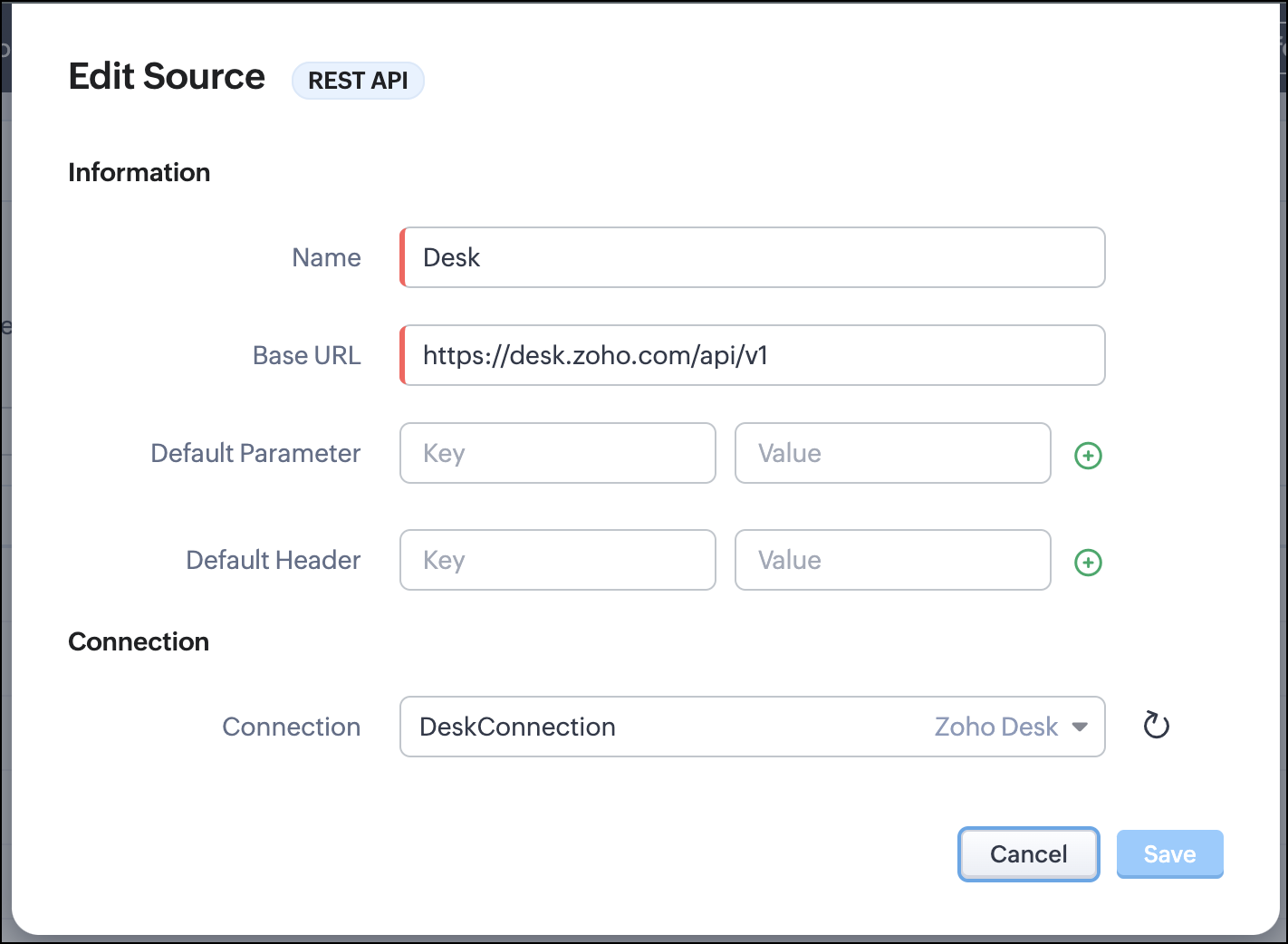
- Go to Setup > Developer Hub > Queries > Sources > Add Source.
- Under Information,
- Give a name for the source and its Base URL. Queries will make API calls to this URL to fetch data. Ensure to add this to Trusted Domain.
- Specify any default parameters and headers for this base URL.
- Under Connection, choose the connection you have created with Zoho Desk with the necessary scopes. If you haven't, create one.
- Click Save.

Note
Queries will make API calls to the URL you add in the Source and consume credits that are applicable in that service. Ensure you monitor your API usage in your source provider.
Step 2 - Create a REST API Query
- Go to Setup > Developer Hub > Queries > Add Query.
- Under Source, choose the source you created in step 1.
- Under Information,
- Enter the Name, API Name, and the Endpoint of the query.
- Specify the parameter email that takes the dynamic variable {{Contact_Email}} as its value. This is to fetch the latest ticket from Zoho Desk for a contact with the email in this variable during runtime. Refer to our Kaizen post on Handling Query Variables in Zoho CRM for additional details.
- Specify Headers, if any.
- You can serialize the output to fit your needs using JavaScript in the Serializer.
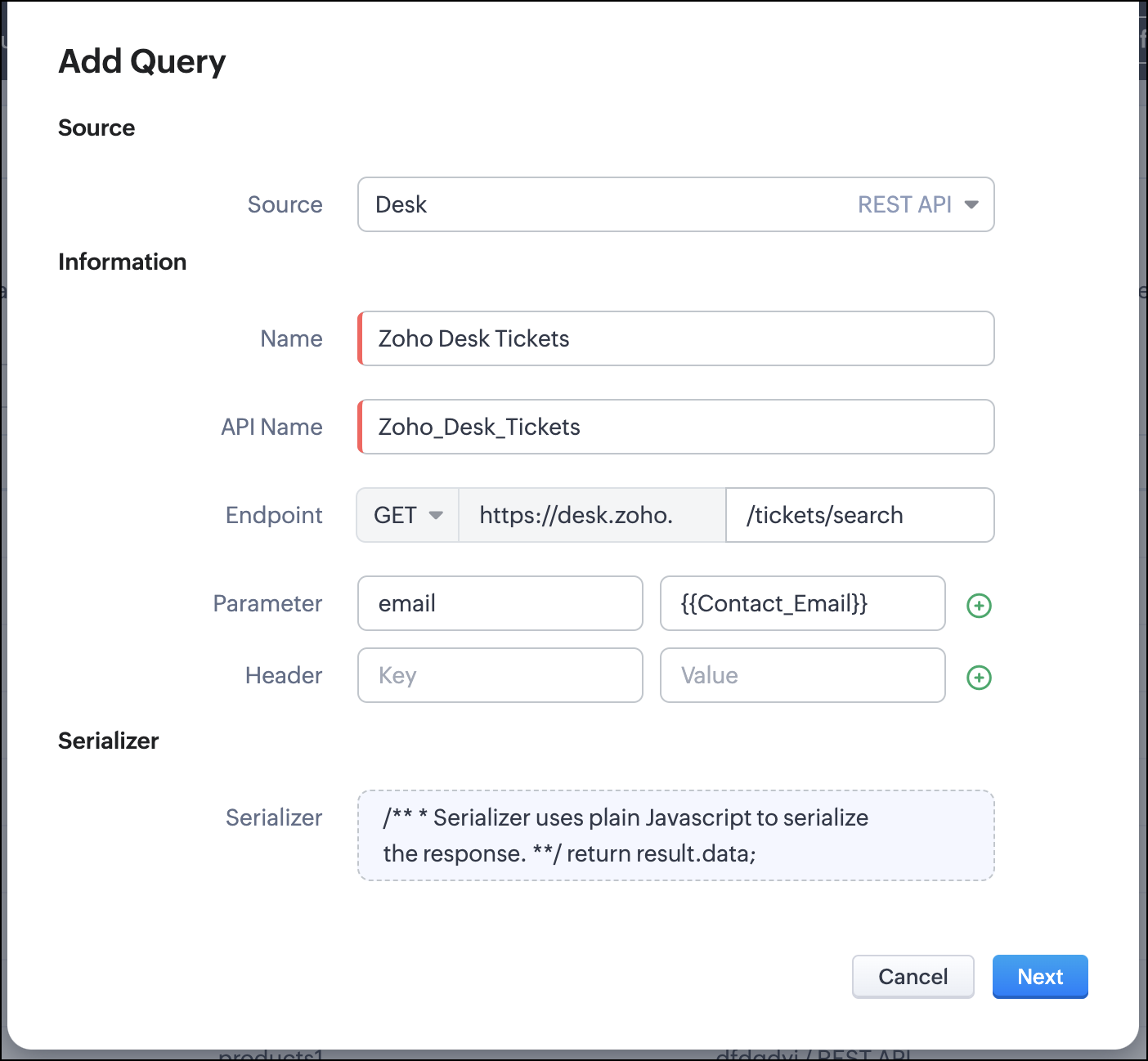
- Click Next.
- Enter an email address in the box to test the query.
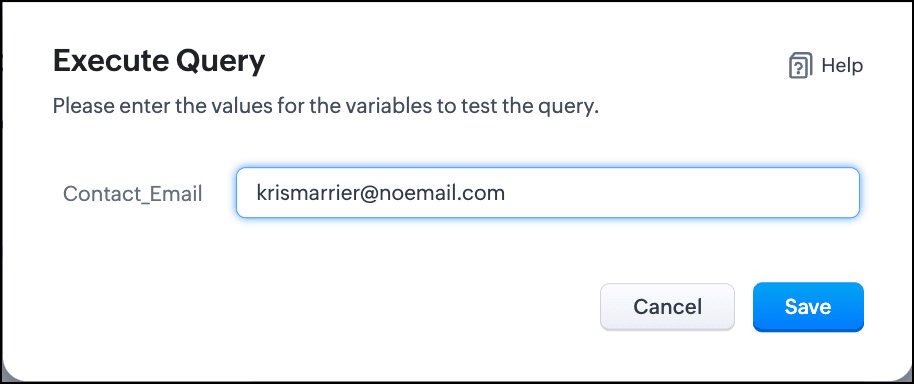
- Click Save. You can see the response of the query and the serialized response if you had serialized the output.
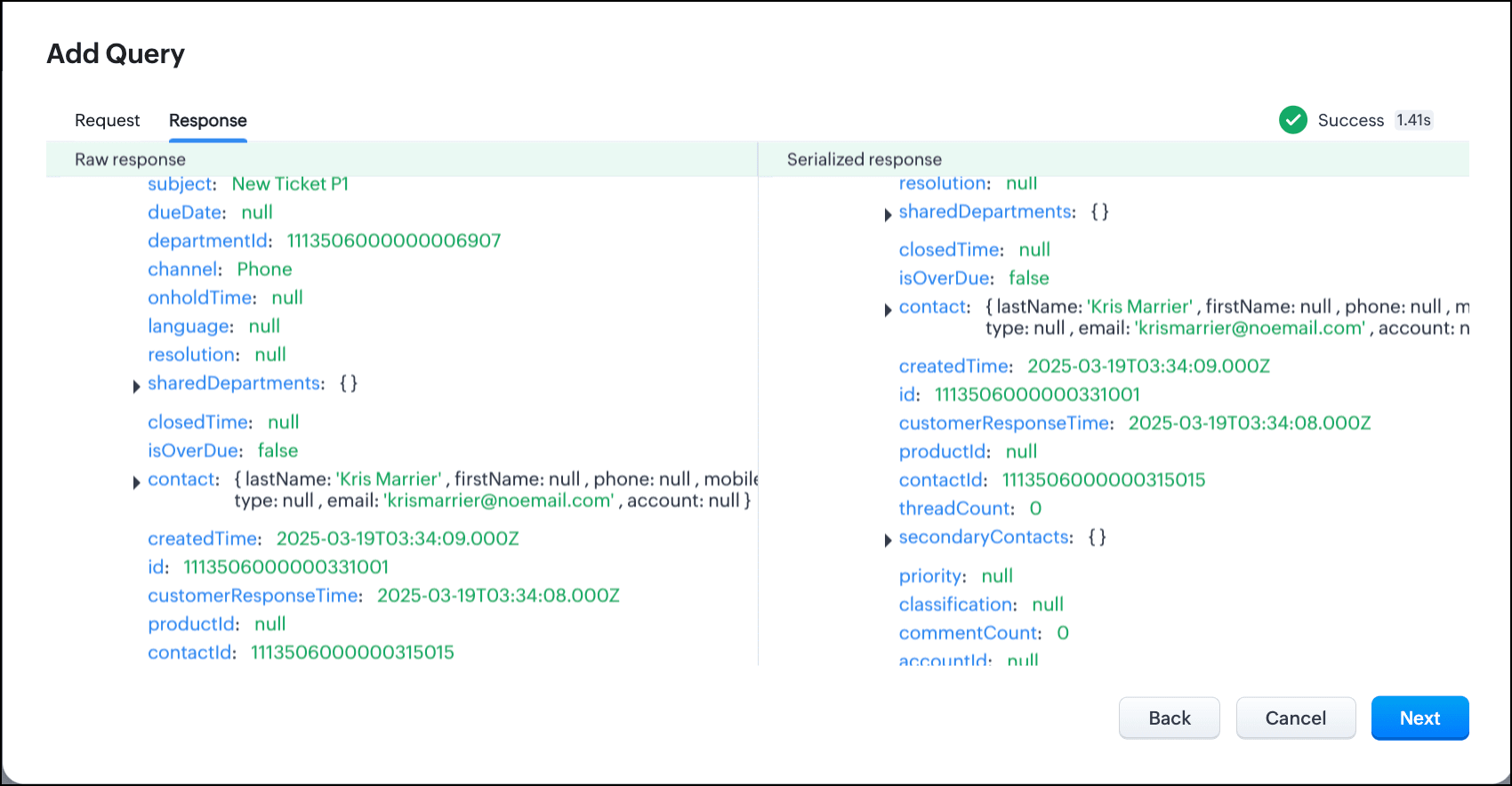
- Click Next.
- You can see the Schema of the query. The Schema acts as a bridge/mapping layer between external API responses and Zoho CRM's internal data structure. For example, the response of the Desk API returns result[].assignee.firstName, which is mapped to CRM as Assignee > FirstName. Schema ensures that the CRM UI knows how to display the field correctly.
With the right mapping in the schema, you can avoid manual data entry or syncing, and use the API data in workflows, reports, and dashboards.
You can change the CRM Field Type and Label to suit your needs. Refer to our Kaizen post on Serialization and Schema Management for more details. - Click Save to save the query.
Now that our query and fetching data from Zoho Desk is sorted, let's move on to the Canvas.
The Custom List view in Canvas enables you to stack records horizontally, one above the other.
Follow the steps in the How to Work with Canvas? guide to create a Custom List View Canvas for the Contacts module.
- On the Canvas, click the database icon for the Queries component.
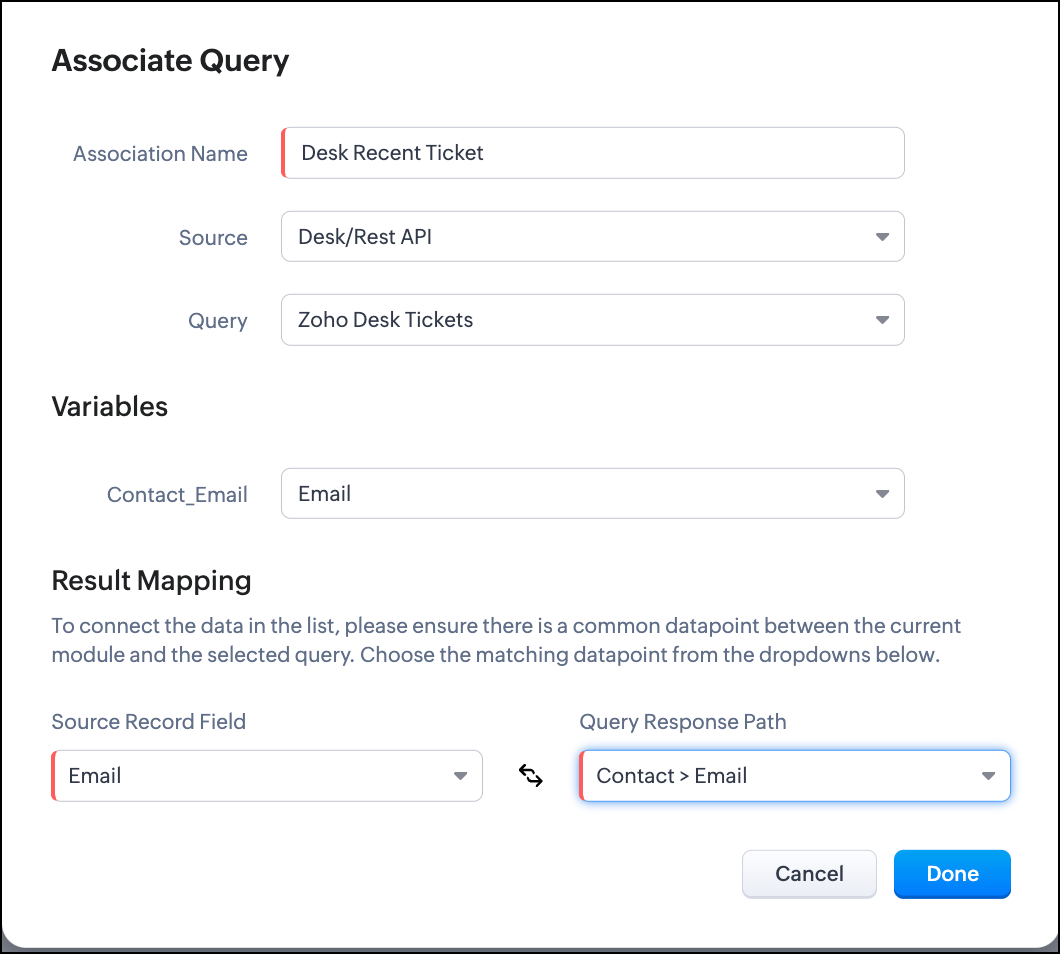
- Click Associate Query.
- Give an Association Name and select the Source(added in step 1) for the query.
- Under Query, select the query you created.
- The Variables section will contain the variables in the query. The drop-down displays all fields in the Contacts module. Select the Email field.
- Under Result Mapping, choose Email as the Source Record Field and Contact > Email as the Query Response Path. The Query Response Path is populated from the schema of the query.
- Click Done to associate the query with the canvas.
- You can see all the fields of the query on the left. Drag and drop the required fields on the canvas.
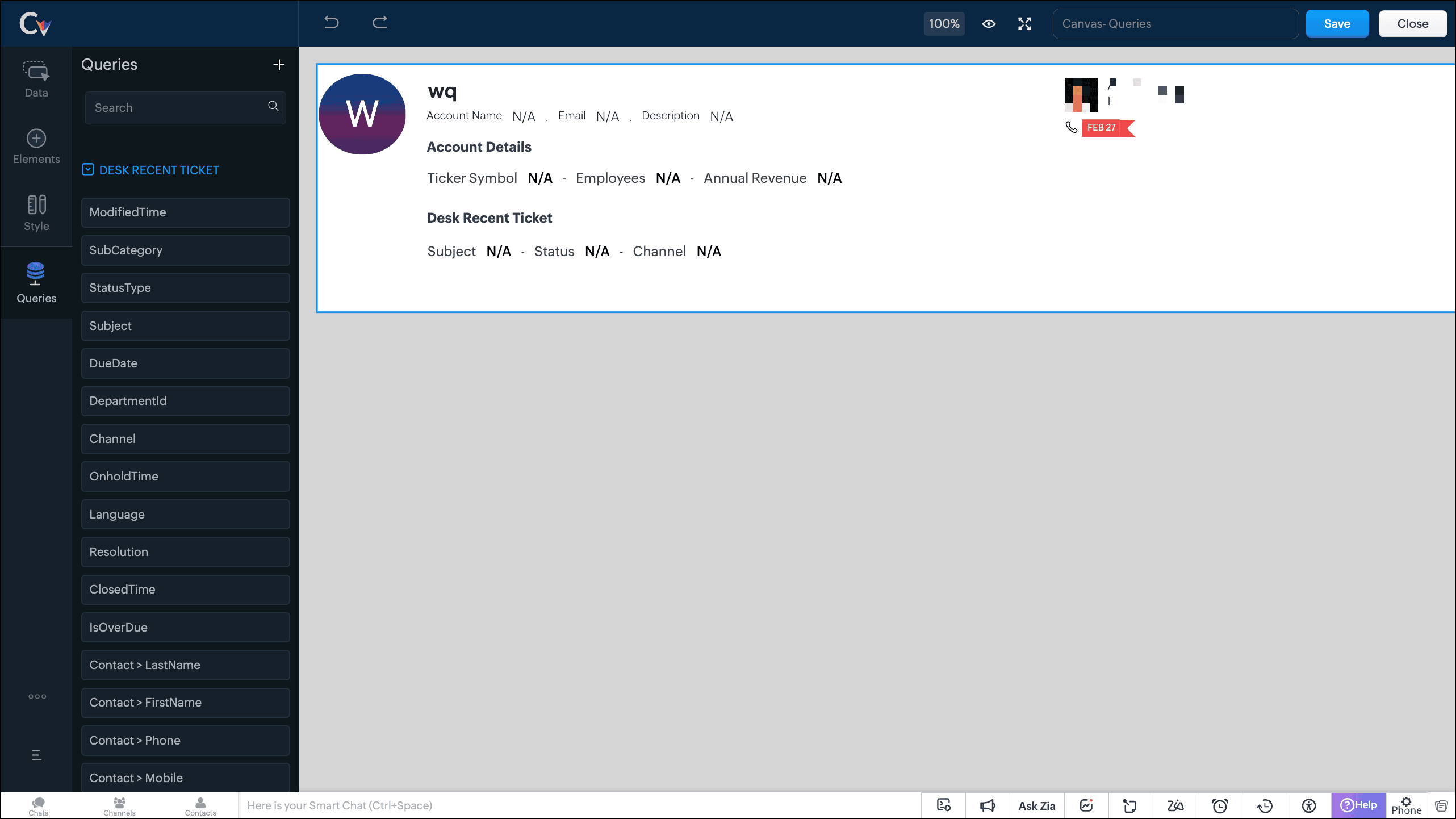
- Save the canvas.
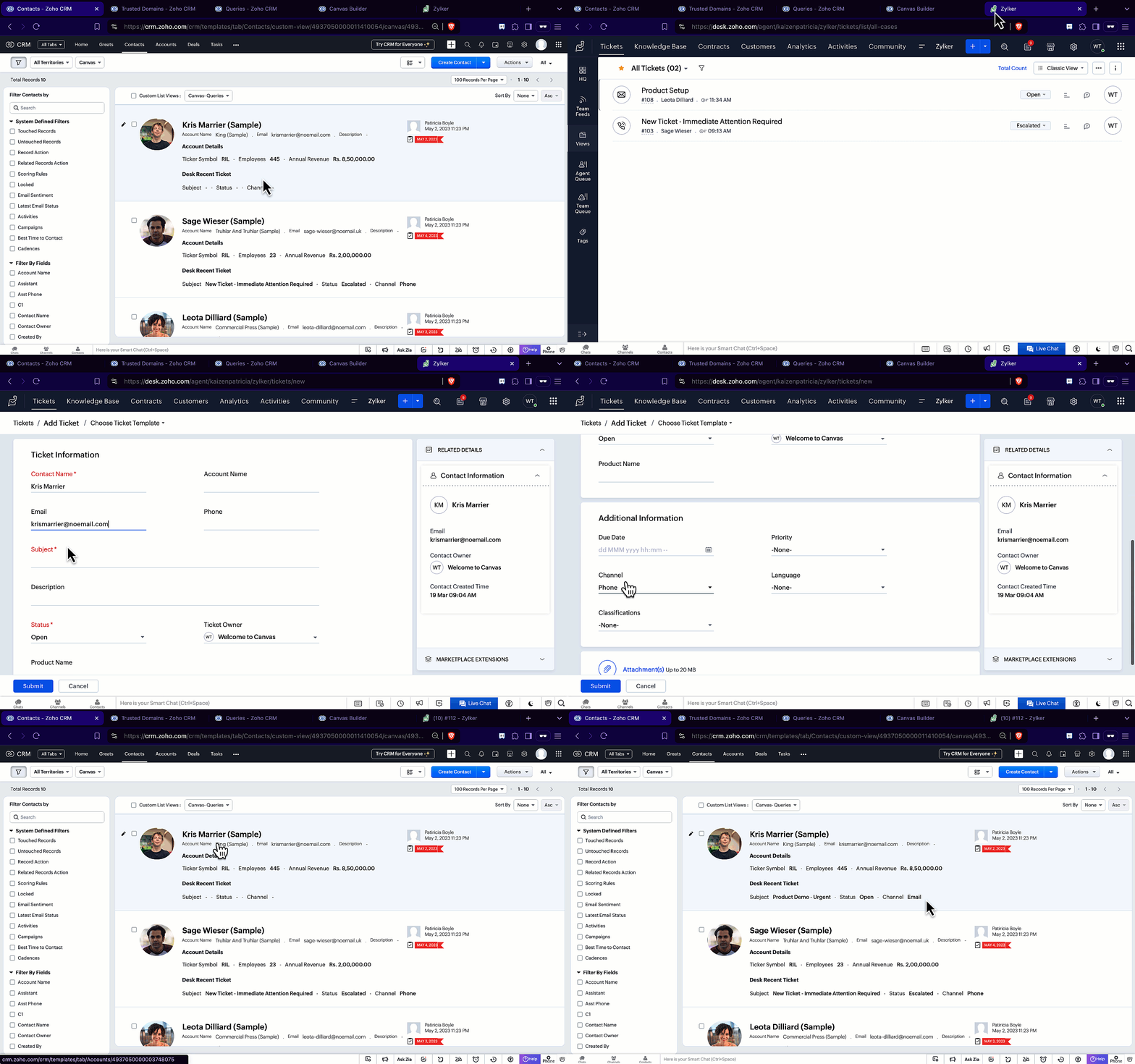
Time for the big reveal!
The following GIF shows how the ticket details from Zoho Desk are populated on the Canvas List View of the Contacts module.

Note that every time you reload the canvas, the query underneath makes an API call to the source provider to fetch data for the contacts in Zoho CRM. Ensure your API calls are monitored to avoid exhasuting your credits.
We hope you liked this post.
Topic suggestions are welcome! See you all next week!
Cheers!
----------------------------------------------------------------------------------------------------------------------------------------

See Also
Topic Participants
Shylaja S
Sticky Posts
Kaizen #217 - Actions APIs : Tasks
Welcome to another week of Kaizen! In last week's post we discussed Email Notifications APIs which act as the link between your Workflow automations and you. We have discussed how Zylker Cloud Services uses Email Notifications API in their custom dashboard.Kaizen #216 - Actions APIs : Email Notifications
Welcome to another week of Kaizen! For the last three weeks, we have been discussing Zylker's workflows. We successfully updated a dormant workflow, built a new one from the ground up and more. But our work is not finished—these automated processes areKaizen #152 - Client Script Support for the new Canvas Record Forms
Hello everyone! Have you ever wanted to trigger actions on click of a canvas button, icon, or text mandatory forms in Create/Edit and Clone Pages? Have you ever wanted to control how elements behave on the new Canvas Record Forms? This can be achievedKaizen #142: How to Navigate to Another Page in Zoho CRM using Client Script
Hello everyone! Welcome back to another exciting Kaizen post. In this post, let us see how you can you navigate to different Pages using Client Script. In this Kaizen post, Need to Navigate to different Pages Client Script ZDKs related to navigation A.Kaizen #210 - Answering your Questions | Event Management System using ZDK CLI
Hello Everyone, Welcome back to yet another post in the Kaizen Series! As you already may know, for the Kaizen #200 milestone, we asked for your feedback and many of you suggested topics for us to discuss. We have been writing on these topics over the
Recent Topics
Zoho Books for Service Enterproses
I would like to know how to use Zoho Books for services such as car rental, travel agency, and hotel services. I notice that Zoho Books is good for goods, but for services, it's very difficult to track the profit or loss on each invoice. I need to captureEmail Relay in Zoho Books
I have set up the email relay in Zoho books and the SMTP test was successful. However, I can't figure out how to sent the POs and invoices via the relay so the copy of the message shows in google workspace sent mail. Any guidance is appreciatedE-invoicing/Facturacion Electronica in Peru, SUNAT authority
Hi Zoho, you are promoting your product very actively in south america as well as in Peru, but since few years there is an obligation for e-invoicing, transmitting information directly to peruvian tax authority SUNAT. Do you have any solution for this?Project Accounting
Hello Zoho, Can we also bring project accounting in Zohobooks as a ne feature in upcoming developments? This will be helpful for specific business and industries. ThanksAccounts Payable
hi there i am using the free version to trial the software. I am working on the acrual basis. When i received a vendor invoice, it gets keyed into the systems as an unpaid invoice as the payment to from the vendor is 14 days. the unpaid invoice doesApproval Processes "Record Modification"
I didn't find any information about the "Record Modification" item in Zoho articles and Tutorials. I see that this item didn't exist a year ago. Help understand how it works, I tested it and didn't see any difference between "all fields" and "no fieHow do i add another purchase information heading?
i would like to add another section right here to enter an amount which then link directly to the cost of goods sold accountHelp with Zoho CRM API Integration in C# WinForms (Token Generation Issue)
Hi everyone, I need your help with integrating the Zoho CRM API into a C# desktop application. My goal is to build a WinForms app in Visual Studio that does the following: Fetch the full list of client projects (module: Deals) and display them in a searchableCan we share the URL of My zoho Sheets on other websites?
Hello everyone? I have sheets on Zoho and I want to share them on other websites like daraz, homeshopping, gepco duplicate bills, etc. I don't have much knowledge about online sharing question forums? I am a student and have a short survey about onlineAdd Support to Upload Inventory Items with Categories or Enable Separate Upload for Inventory Categories
Currently, Zoho Inventory does not support uploading new items along with their parent and sub inventory categories using the item import feature. This creates challenges for businesses with structured inventory hierarchies when trying to upload itemsin zoho books while categorizing need to add new name in category by replacing expanses how to edit or make changes need assistance
Tip of the Week #62– Use @mentions to loop in teammates.
Ever been stuck on a customer query because you needed input from someone else on your team? Maybe you were unsure about a refund policy or needed help answering a technical question. So you forward the message … and wait. Or worse, you forget to followSuggestions for Kiosk Functionality Improvements in Zoho People
Hello Zoho Team, I’d like to share some feedback and suggestions regarding the Kiosk functionality in Zoho People, as there are two important points that affect user experience and compliance: Visual Confirmation of Check-In Status It would be extremelyNeeds Separate Permissions levels for Record Attachments
Currently in Zoho Books Record attachments are tied to the general permission level For example if a role don't have the delete permission level they cannot delete the attachment as well If a role doesn't have the edit permission they cannot upload theZoho Books integration with Google workspace
How do I integrate Zoho books with Google Workspace? The steps outlined on the Zoho help sections do not correspond to the actual user interface in Google Workspace. Zoho books is installed on admin level for all users, all users can access it from theFields of Look up in Custom Modules
We need to create a custom module in Books for Proforma Invoices Now I created a Custom Module and added a Table and in the table added a lookup field and chose Items Now I want Specific fields of the item such as Tax, Item Cost etc but it only displaysShare work items across projects and users
Hello everyone, We're thrilled to introduce a new feature in Zoho Sprints: "Share work item" Collaboration across projects and users is now easier with the introduction of the Share work item feature. You can now share work items with users who are notPayment Terms Changing Upon Invoicing
Hello! Our standard payment terms for 95% of our customers are Net 30, and all of our customers that these terms apply to have that setting n their customer profile. However, over the last week or so, when an invoice is generated the majority of theseHow do I get a refund for email seats?
Hi, I've been using Zoho for awhile and have been paying for 2 seats. Recently, I created another 9 seats, but I also found out that Zoho does not support cold emails, so these 9 seats created for this purpose became useless. It's within 24 hours thatWork Orders / Bundle Requests
Zoho Inventory needs a work order / bundle request system. This record would be analogous to a purchase order in the purchasing workflow or a sales order in the sales cycle. It would be non-journaling, but it would reserve the appropriate inventory ofNarrative 1 - The significance of a business account
Behind the scenes of a successful ticketing system - BTS Series Narrative 1 - The significance of a business account Setting up a proper business account is a crucial step that is often overlooked when launching a ticketing system for your service company,Changed hosting for domain, Zoho mail stopped working.
I have changed hosting fro my domain and from that time my zoho email stopped workingwe need to add a Customer Number field to the PDF document templates
Hello everyone. We are currently using Zoho Inventory for our small business operations and have found it to be a valuable tool. However, we’ve encountered a specific requirement: we need to add a Customer Number field to the PDF document templates (suchJoining Two Reports
Hello Guys, I have three modules: - Orders - Custom module - Clients - Contacts - Basic Pay I am using the order module to store the revenue share amount for each order which will be paid a sales rep The Orders are child or clients so I am pulling a reportPower of Automation :: Notify users Automatically when @Mentioned in Tasks Description
Hello Everyone, A custom function is a software code that can be used to automate a process and this allows you to automate a notification, call a webhook, or perform logic immediately after a workflow rule is triggered. This feature helps to automateRecording a payment in foreign currency not allowed
Hi, my base currency is CHF. I made an invoice in EUR, which have been paid with an extra amount (which are the fees I guess). When I record that payment from the invoice page, I can select the EUR bank account. But the amount received is above the invoiceIntroducing WhatsApp integration and quick editing capabilities in Zoho Sign
Hi there, Zoho Sign already helps users collect signatures via email and SMS, and we're happy to announce that you can now send documents and authenticate recipients right through WhatsApp. Some of the key benefits include: Communication with recipientsOrder Wise Expense Tracking and Reporting Possible?
Hi, We are a manufacturing firm and take up several orders at the same time. Each order will be associated with a single sales order and then once completed to a single invoice. When recording expenses, is it possible to associate each expense with aLayout Rule Fields Appear in "Verify Details" Pop-up — Confirmed Working
Hey everyone — just wanted to share a quick discovery. I created a Layout Rule in the Deals module that makes two fields show up (and required) when the stage is set to Closed Won or Closed Lost — one pick list and one text field. To my surprise, thoseCan you please let us know how we can use Zoho for multi store?
Hello Team, Can you please let us know how we can use Zoho for multi store because when we connect our plugin to Zoho and we create a product and then on another store when we create product with same name then product already exist error occurs, so howZoho One Home Dashboard - My Tasks (Projects) & My Overdue Work Items (Projects) have no data.
The title basically covers the situation. I've set up the dashboard cards, and for a while, they were showing data. Now, they are both blank. Is anyone else experiencing this, or has anyone else experienced this, and if so, is there a fix?Zakya - Release in North America?
At Zoholics it was pitched like Zakya was already released in North America. However, when looking for it I couldnt find it. There isnt an integrated app available in Zoho. I figured maybe it was being released at Zoholics. Now over a month later, itsCustom Field Mapping in Outlook
I have 10 custom fields in Zoho is there a way to create and map them to the outlook contact?Custom module - change from autonumber to name
I fear I know the answer to this already, but thought I'd ask the question. I created a custom module and instead of having a name as being the primary field, I changed it to an auto-number. I didn't realise that all searches would only show this reference.Enhanced Zoho CRM and Office 365 calendar synchronization features!
Dear customers, We're excited to share some significant improvements to our Office 365 calendar synchronization features, aimed at providing you with more control and a more personalized experience. What’s new Choose your Office 365 calendar: During theProblemas de usarmos no Brasil
Somos usuários a exatamente um ano do Zoho Recruit, agora migramos para o Zoho One. Temos enfrentado por diversas vezes problemas da ferramenta não estar realmente preparada para funcionar corretamente na lingua portuguesa. Problema esse não específicoCERTIFICADO DIGITAL - BRASIL
Olá, Temos o ZOHO ONE e no Sign vemos de forma simples a assinatura digital, temos nos BRASIL certificado digital, de no CERTISIGN homologado pelo GOVERNO do BRASIL, há possibilidade de gerar a assinatura diante deste certificado?Zoho Duplicate Reference Numbers
I have 2 accounts through zoho. On one account if I enter a bill with the same number as a previous bill I get a warning message saying that there is already a bill with this number. However on the other account I do not get this message. How do I turnintegration between Zoho Site and Zoho Learn
integration between Zoho Site and Zoho Learn so that when a user registers on the Zoho Site, their account is automatically created in Zoho Learn!! the use case i have pro plan in zoho site and zoho learn and i have puted the zoho learn domain in zohoAutomation #6 - Prevent Re-opening of Closed Tickets
This is a monthly series where we pick some common use cases that have been either discussed or most asked about in our community and explain how they can be achieved using one of the automation capabilities in Zoho Desk. Typically when a customer submitsNext Page