Kaizen #182 - Queries in Canvas List View

Hello everyone!
Welcome to another week of Kaizen!
We're back with another post in this series on Queries in Canvas List View.
Queries in Zoho CRM allow you to dynamically retrieve data from CRM as well as third-party services directly within the CRM platform.
You can construct a query of one of the following types:
- CRM Module type query to retrieve data from CRM modules.
- COQL type query to construct a query using the COQL API.
- REST API type query to fetch data from an external service and use it in Zoho CRM.
You can associate a query with the 'Decision' component of Kiosk, Canvas Detail View, or Canvas List View.
In this post, we will take up a use case and see how you can associate a query with Canvas List View.
Use case
Sales and support teams often need quick access to Zoho Desk tickets related to a contact in Zoho CRM. To avoid switching between apps to check ticket statuses, we can use the Queries feature to fetch the latest Zoho Desk ticket's details of a contact dynamically and display them on the Canvas List View page of the Contacts module.
This ensures that CRM users can instantly view the most recent ticket linked to a contact without leaving Zoho CRM.
Follow along to see how you can achieve this!
Step 1 - Add a Source
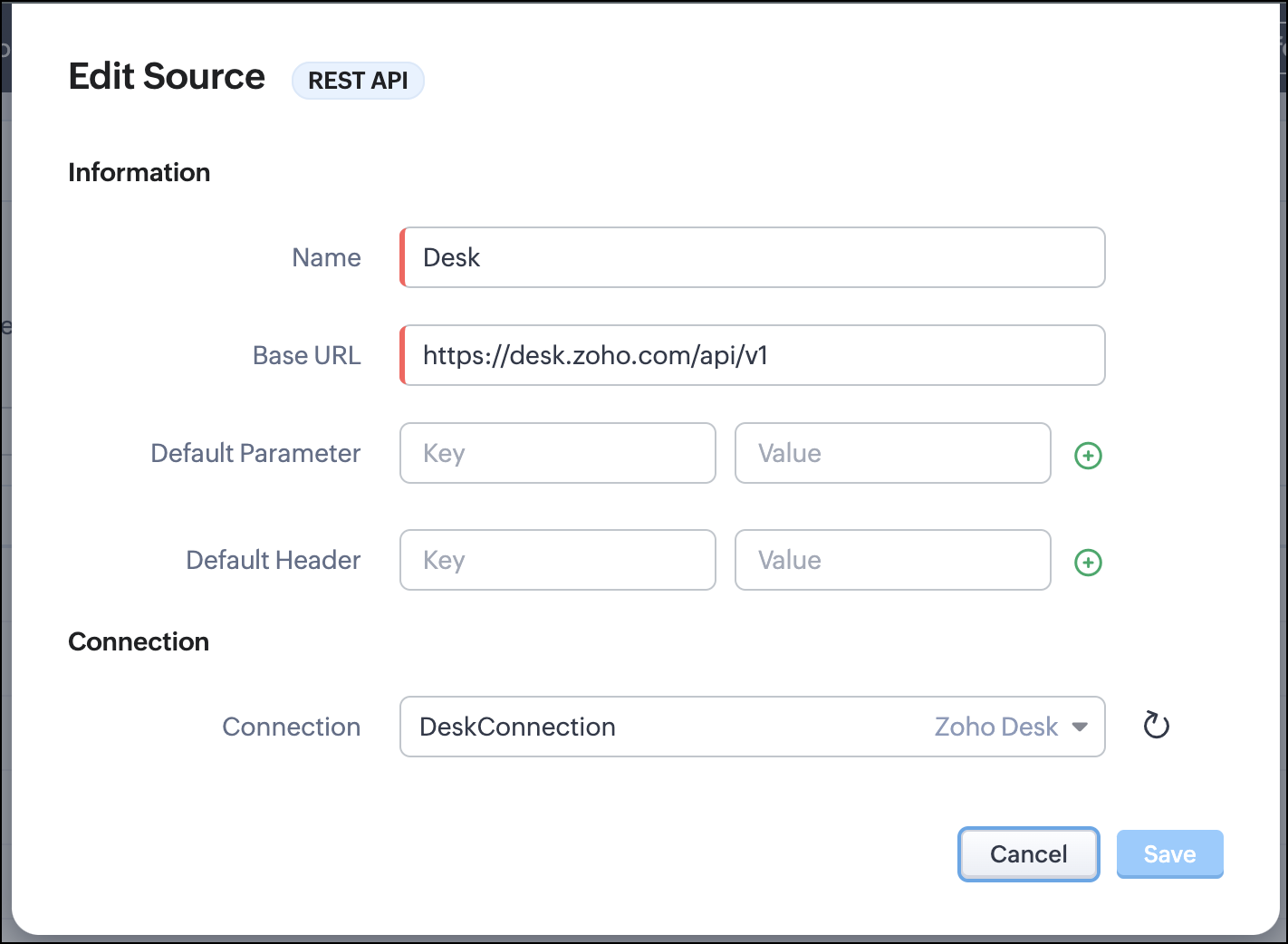
- Go to Setup > Developer Hub > Queries > Sources > Add Source.
- Under Information,
- Give a name for the source and its Base URL. Queries will make API calls to this URL to fetch data. Ensure to add this to Trusted Domain.
- Specify any default parameters and headers for this base URL.
- Under Connection, choose the connection you have created with Zoho Desk with the necessary scopes. If you haven't, create one.
- Click Save.

Note
Queries will make API calls to the URL you add in the Source and consume credits that are applicable in that service. Ensure you monitor your API usage in your source provider.
Step 2 - Create a REST API Query
- Go to Setup > Developer Hub > Queries > Add Query.
- Under Source, choose the source you created in step 1.
- Under Information,
- Enter the Name, API Name, and the Endpoint of the query.
- Specify the parameter email that takes the dynamic variable {{Contact_Email}} as its value. This is to fetch the latest ticket from Zoho Desk for a contact with the email in this variable during runtime. Refer to our Kaizen post on Handling Query Variables in Zoho CRM for additional details.
- Specify Headers, if any.
- You can serialize the output to fit your needs using JavaScript in the Serializer.
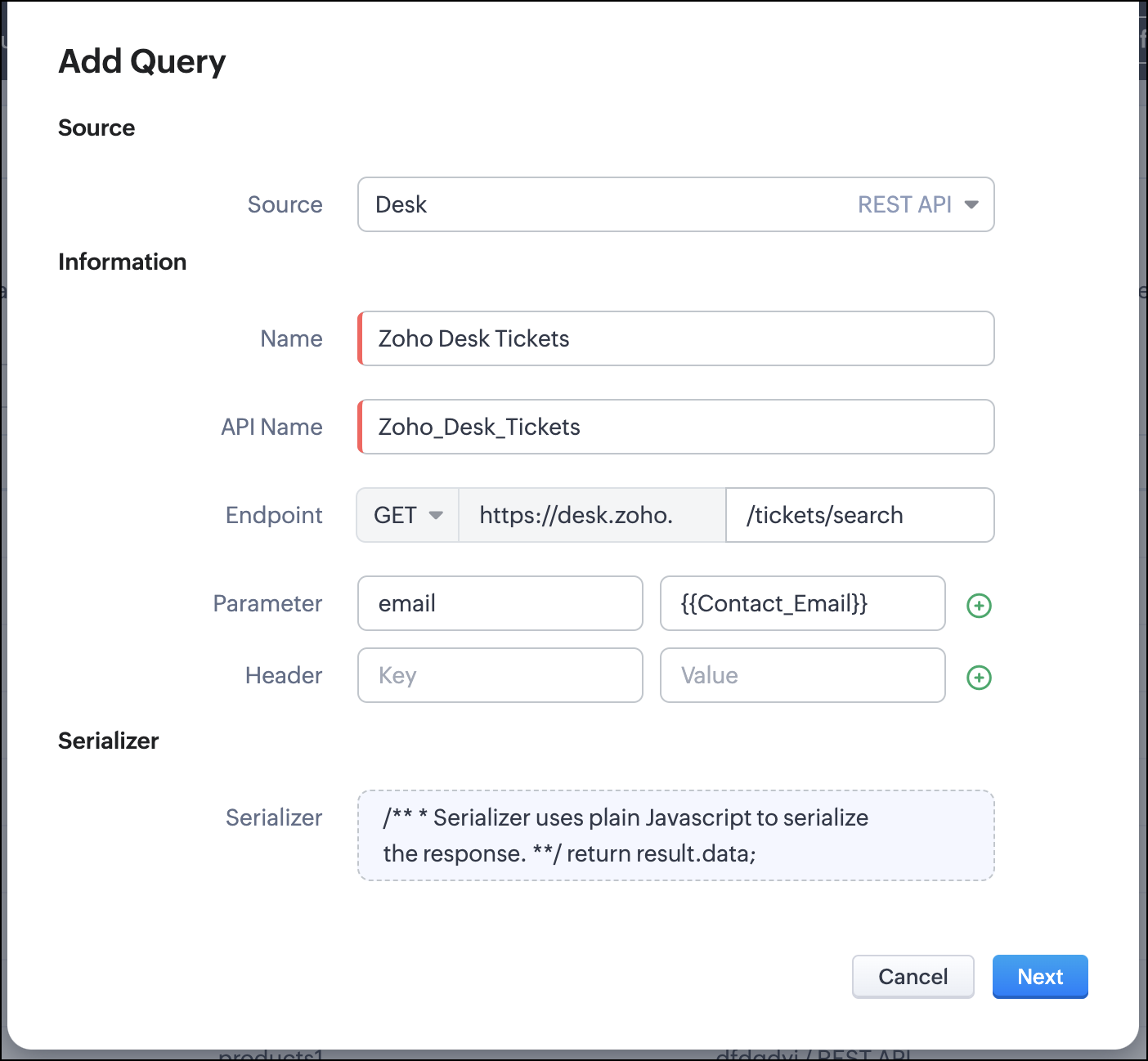
- Click Next.
- Enter an email address in the box to test the query.
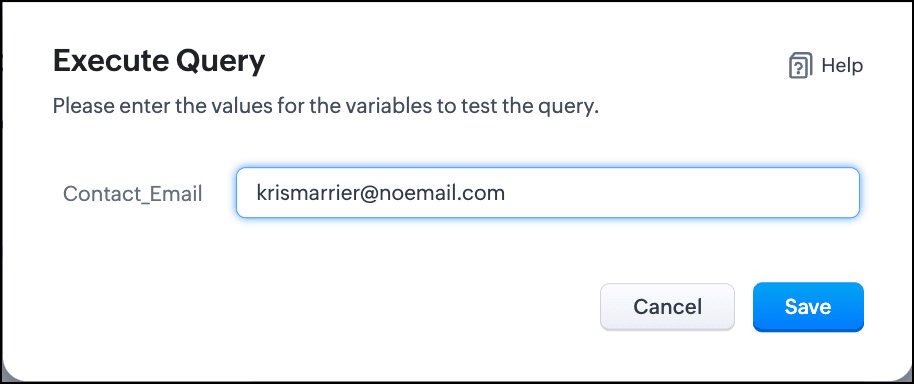
- Click Save. You can see the response of the query and the serialized response if you had serialized the output.
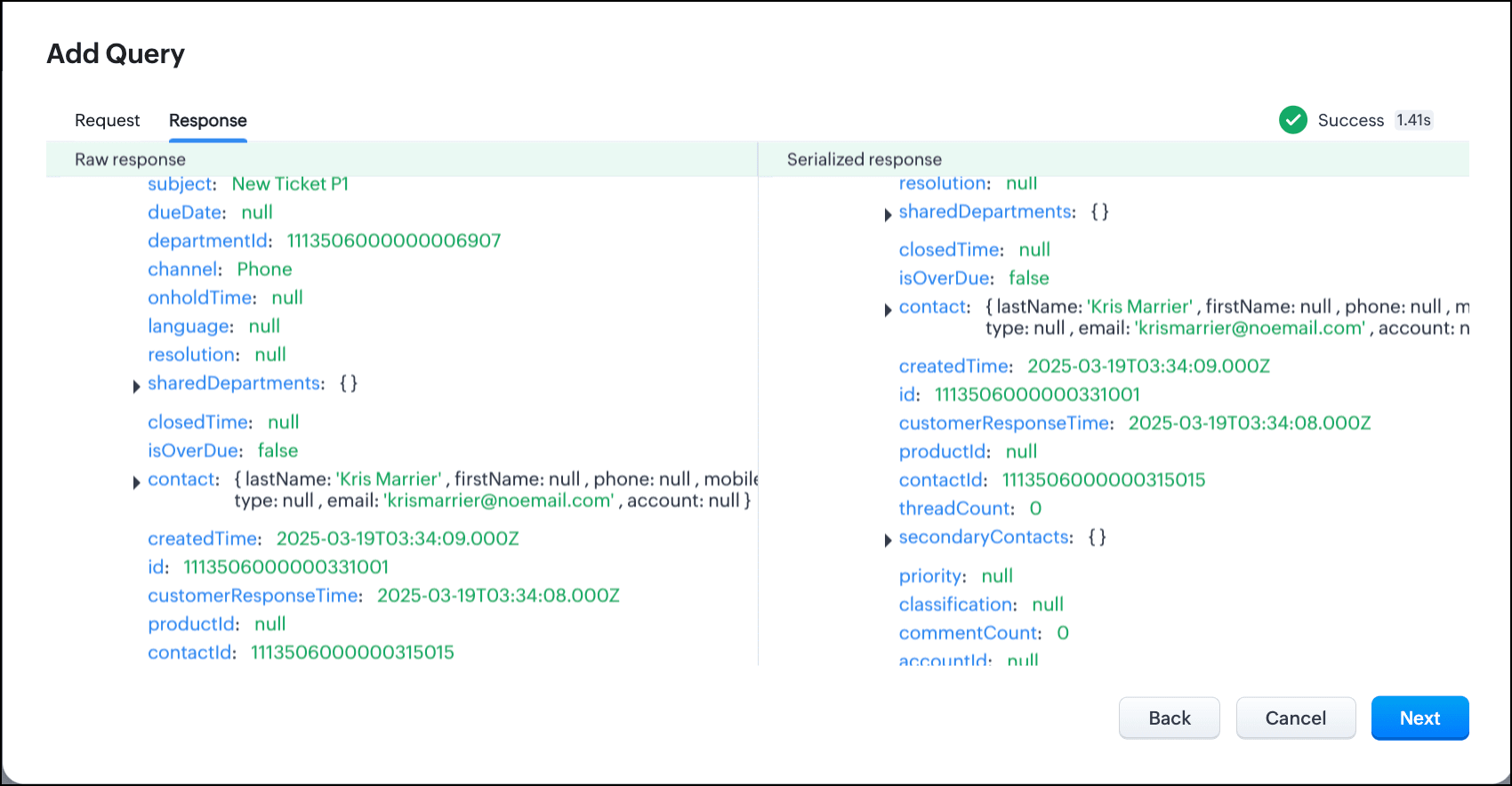
- Click Next.
- You can see the Schema of the query. The Schema acts as a bridge/mapping layer between external API responses and Zoho CRM's internal data structure. For example, the response of the Desk API returns result[].assignee.firstName, which is mapped to CRM as Assignee > FirstName. Schema ensures that the CRM UI knows how to display the field correctly.
With the right mapping in the schema, you can avoid manual data entry or syncing, and use the API data in workflows, reports, and dashboards.
You can change the CRM Field Type and Label to suit your needs. Refer to our Kaizen post on Serialization and Schema Management for more details. - Click Save to save the query.
Now that our query and fetching data from Zoho Desk is sorted, let's move on to the Canvas.
The Custom List view in Canvas enables you to stack records horizontally, one above the other.
Follow the steps in the How to Work with Canvas? guide to create a Custom List View Canvas for the Contacts module.
- On the Canvas, click the database icon for the Queries component.
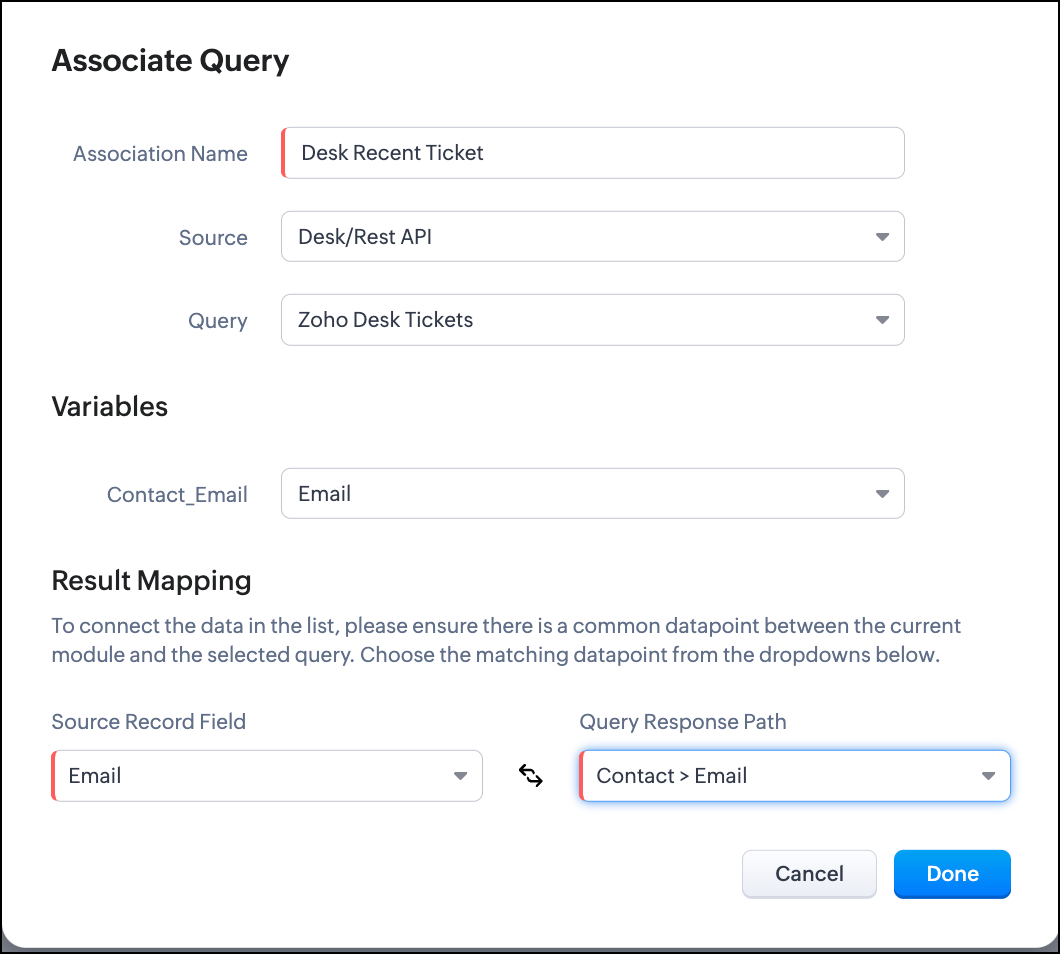
- Click Associate Query.
- Give an Association Name and select the Source(added in step 1) for the query.
- Under Query, select the query you created.
- The Variables section will contain the variables in the query. The drop-down displays all fields in the Contacts module. Select the Email field.
- Under Result Mapping, choose Email as the Source Record Field and Contact > Email as the Query Response Path. The Query Response Path is populated from the schema of the query.
- Click Done to associate the query with the canvas.
- You can see all the fields of the query on the left. Drag and drop the required fields on the canvas.
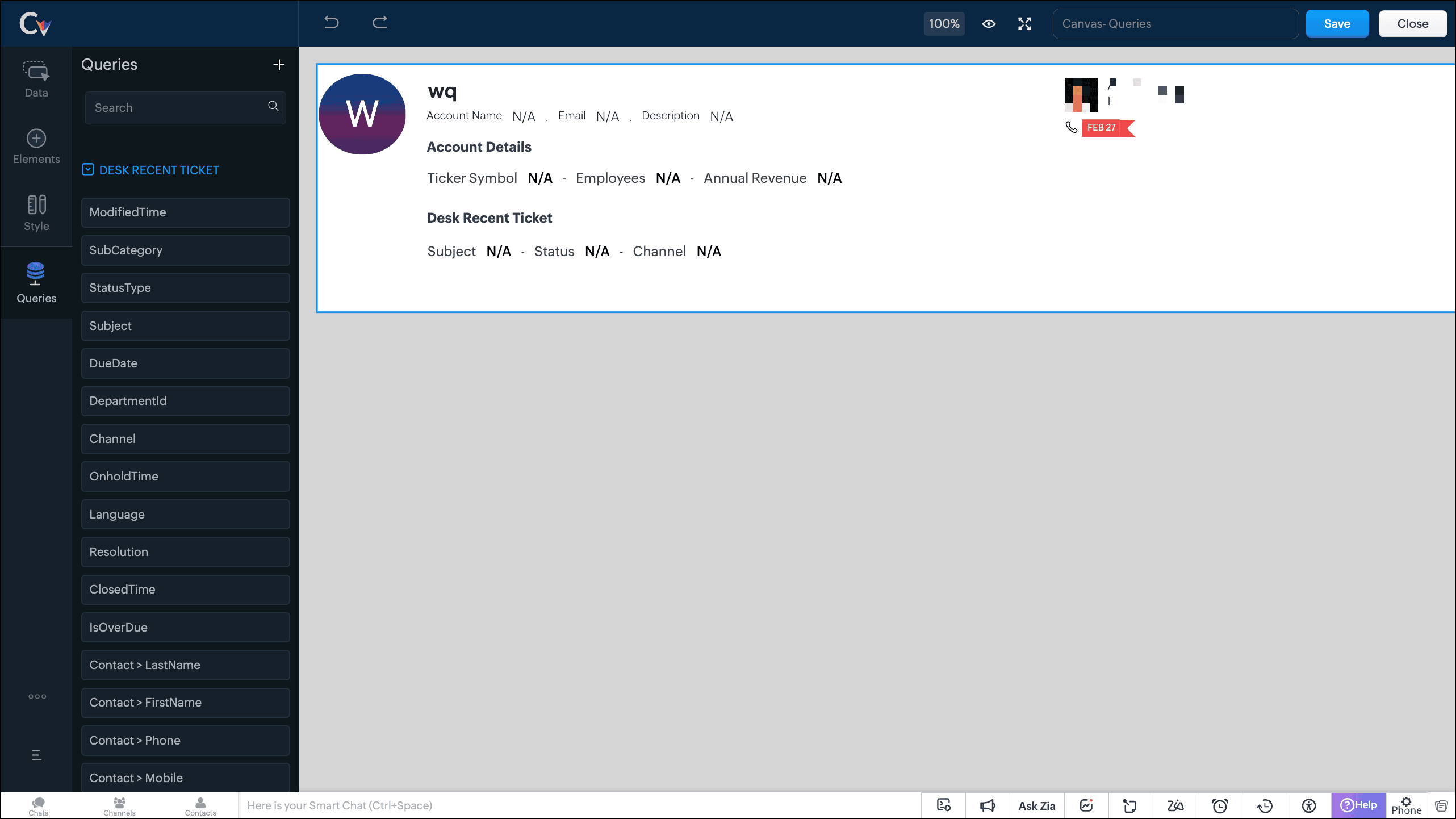
- Save the canvas.
Time for the big reveal!
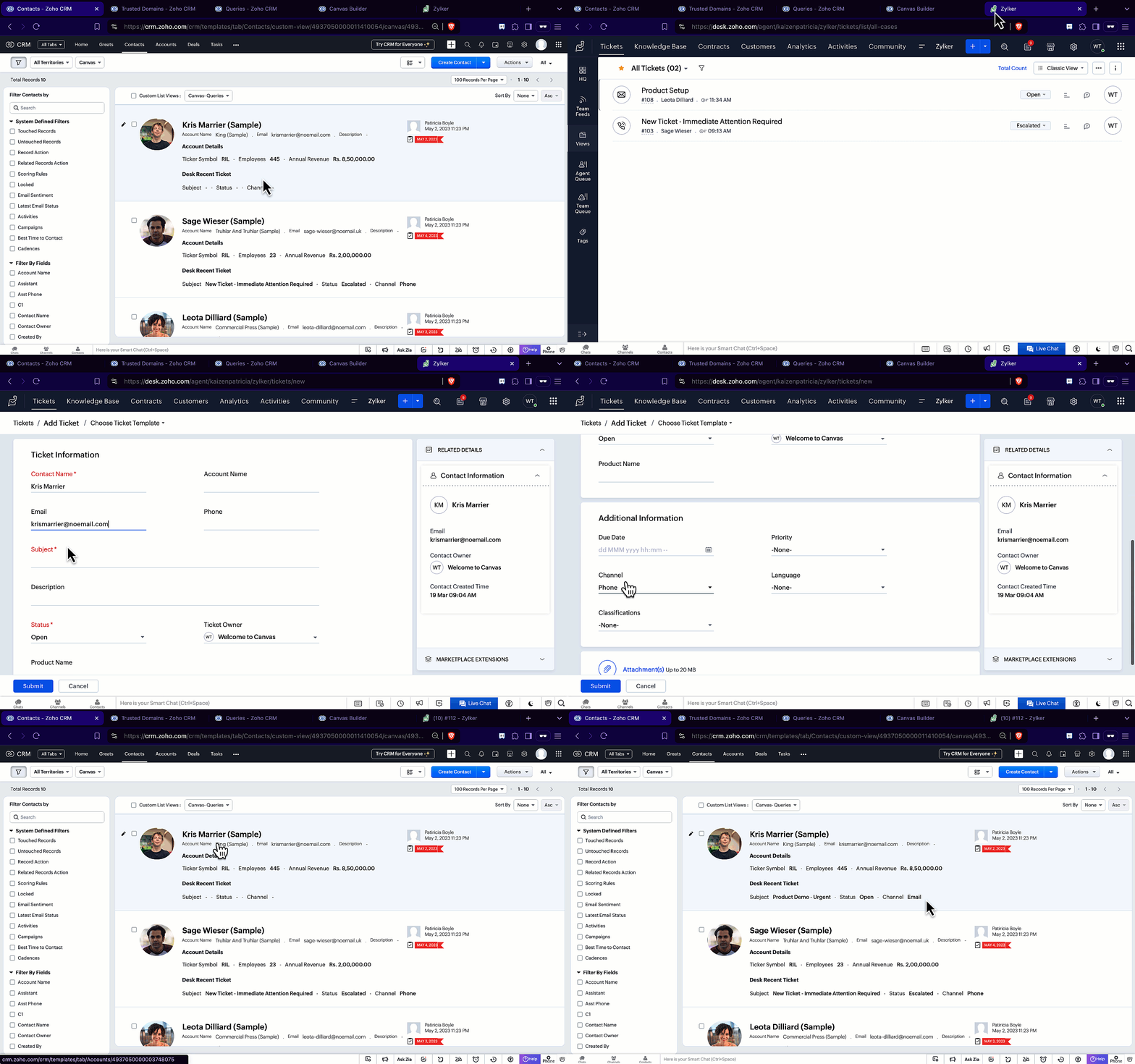
The following GIF shows how the ticket details from Zoho Desk are populated on the Canvas List View of the Contacts module.

Note that every time you reload the canvas, the query underneath makes an API call to the source provider to fetch data for the contacts in Zoho CRM. Ensure your API calls are monitored to avoid exhasuting your credits.
We hope you liked this post.
Topic suggestions are welcome! See you all next week!
Cheers!
----------------------------------------------------------------------------------------------------------------------------------------

See Also
Topic Participants
Shylaja S
Sticky Posts
Kaizen #217 - Actions APIs : Tasks
Welcome to another week of Kaizen! In last week's post we discussed Email Notifications APIs which act as the link between your Workflow automations and you. We have discussed how Zylker Cloud Services uses Email Notifications API in their custom dashboard.Kaizen #216 - Actions APIs : Email Notifications
Welcome to another week of Kaizen! For the last three weeks, we have been discussing Zylker's workflows. We successfully updated a dormant workflow, built a new one from the ground up and more. But our work is not finished—these automated processes areKaizen #152 - Client Script Support for the new Canvas Record Forms
Hello everyone! Have you ever wanted to trigger actions on click of a canvas button, icon, or text mandatory forms in Create/Edit and Clone Pages? Have you ever wanted to control how elements behave on the new Canvas Record Forms? This can be achievedKaizen #142: How to Navigate to Another Page in Zoho CRM using Client Script
Hello everyone! Welcome back to another exciting Kaizen post. In this post, let us see how you can you navigate to different Pages using Client Script. In this Kaizen post, Need to Navigate to different Pages Client Script ZDKs related to navigation A.Kaizen #210 - Answering your Questions | Event Management System using ZDK CLI
Hello Everyone, Welcome back to yet another post in the Kaizen Series! As you already may know, for the Kaizen #200 milestone, we asked for your feedback and many of you suggested topics for us to discuss. We have been writing on these topics over the
Recent Topics
I do not see the “Lead Forms” option under Integrations
Hi, I’m using Zoho Social on a Premium plan. I’ve connected LinkedIn Company Page and have a valid LinkedIn Ad Account with Lead Gen Forms. However, I do not see the “Lead Forms” option under Integrations, so I can’t enable LinkedIn Lead Generation. PleaseSTOCK function showing #N/A! even thought the Stock symbol is valid
Zoho Team, I use STOCK function on Zoho Sheet to fetch the recent Last Closing Price. Some stock symbols are valid but when the STOCK function is applied, it shows #N/A! Attaching an image for reference.What’s the Correct Integration Flow Between Zoho Inventory, ShipStation, and Multi-Channel Sales Platforms?
Hi Zoho Community, I’m currently implementing Zoho One to manage all of my business processes, and I’d appreciate some guidance on the correct integration flow for the tools I’m using. Here’s my current setup: Zoho Inventory is my central system for managingBeyond Email: #4 Note taking done right with Notes
With her favorite links now saved in Bookmarks, Sarah is feeling even more at home in Zoho Mail. As her day fills up with meetings and project discussions, she often finds herself scribbling quick ideas and reminders—only to lose track of them later.When will Sales Order and Invoice Synchronisation with Zoho CRM be Available?
When will Sales Orders and Invoices, created in Zoho Books or Inventory be made available in Zoho CRM? John Legg Owner: The Debug StoreGenerate Unique Customer ID for Each for All Contacts
Generate Unique Customer ID for Each for All ContactsBookings to Books automation using Flow
I'm using Zoho Flow to automate a process between Bookings and Books. When someone uses Bookings to schedule time with me I use Flow to automatically add the person as a customer in books, then create a Quote in Books for the type of consultation theyDifferent Canvas for Different account type
I would like to have a separate canvas for Customers and Resellers that auto-applies when I enter an ACCOUNT. Is this do-able?IMAP sync issues in Zoho CRM
We are using the Zoho CRM for a while, and we sync (via IMAP) our Google Apps email system. The sync works properly when looking at emails per account, contact or deal, etc. However, it does not function well in the "Messages" and "SalesSigns" features.Reporting tags for custom modules
Hi, it could be very useful. At field level and at sub table level. Thanks, EduardoCan't pass Dates and use date filtered Charts in Pages?
I don't mess with pages very much, but I'm trying to build a dashboard. I have a search element and several charts that need to be filtered. I also have a stateless form for a start/end date picker I am trying to use to filter data for the charts. HereZOHO FSM Trial - Assets
Hi I am currently using Zoho CRM and looking at adding FSM. I am trialing FSM at the moment, to potentially move away from my current programme (SimPro) but have a query on the Asset system within FSM It looks like you can only create 1 asset "type";Sending Email with Attachment (PDF, Excel file)
Hi, I'm new to Zoho CRM and I'm setting up a flow to send an Email with Attachment when user reaching a certain stage of a Deal. In detail, I've created a Blueprint which requires user to attach a PDF file when reaching a certain point of the stage andBased on the Assign To time task want to trigger also reminder for the task still move form fresh lead
If the leads is assigned To 1 am to 10.55 am task want to create 11am Then reminder want to go the person at 4pm If lead status not moved from fresh lead. From next on wards Reminder want to go 11 Am and 4pm Every day still the person moved to fresh leadEmails Not Sending
This has happened before. I contacted Zoho and it seemed to work, but now my emails are not sending or taking a long time to send and half the time attachments don't attach. It just keeps saying Sending... and I have to keep clicking it to make it send.[Free Webinar] Learning Table Series - AI-Enhanced Logistics Management in Zoho Creator
Hello Everyone! We’re excited to invite you to another edition of Learning Table Series, where we showcase how Zoho Creator empowers industries with innovative and automated solutions. About Learning Table Series Learning Table Series is a free, 45-60WhatsApp pricing changes: Pay per message starting July 1, 2025
Starting July 1, 2025, WhatsApp is shifting from conversation-based pricing to per-message billing. That means every business-initiated message you send will count. Not just the first one in a 24-hour window. Pricing updates on the WhatsApp Business PlatformCreate a button that converts Sales Order into a Custom Module
I am looking for a way of creating a button on Sales Orders that would automatically create a record in a custom module I have created called Contracts. The custom destination module "Contracts" has the following fields that I would need to populate [Contracts Name] populate with SalesOrderID [Account Name] populate with related Account Name [Contract Start Date] populate with the date that the record was created Could someone help or point me in the right direction? ThanksRemove all of the junk data that comes with the trial
How would I go about removing all of the junk data that comes with the trial of zoho crm?Video Interview Feature
Please add a text option as well while sending invitations to candidates for video interviews, candidates are missing out on the email. They are more convenient in text and it really helps Hope you would understand, thanksSingapore DBS Bank
Is there any schedule corresponding to DBS of Singapore?Including Contact and Account Information in Zoho Projects.
In Zoho Projects I have created a custom layout which already includes a 'Client Information' section. The 'Client Information' section already includes integrated fields (integrated with CRM) for various account and contact details. Here's what I wantUnable to Download CRM Contact Data: WorkDrive Integration Issues
## Problem Description We need to let users download contact information from CRM as CSV files to their local computers. Since we couldn't implement a direct download option, we're trying to use WorkDrive as a workaround - but we're encountering issuesApp Spotlight : PagerDuty for Zoho Cliq
App Spotlight brings you hand-picked apps to enhance the power of your Zoho apps and tools. Visit the Zoho Marketplace to explore all of our apps, integrations, and extensions. In today's fast-paced world, seizing every moment is essential for operationalCampaigns going to spam folder, how to build so that it goes to inbox
Hello, New to campaigns, now have it functioning correctly. In my test group of 10 email addresses 100% of the emails went to spam/junk folder and/or were blocked/captured by spam filters. What is the process to building a message or format that doesIntegrate QuickBooks with Bigin and streamline your sales and accounting!
If your business relies on Bigin for customer management and QuickBooks for accounting and invoicing, this new integration is here to make your operations more efficient. By connecting these two platforms, you can now manage your CRM and financial processesWhen a ticket is merged, the merged ticket's link should redirect to the remaining ticket.
Zoho Desk deletes merged tickets. Which is not ideal. The issue is if you have a link bookmarked, or even in your inbox from a ticket that was merged, when you visit you receive an error because merging tickets actually deletes the ticket that was merged.Pass data from a Zoho Desk ticket to a Zoho Form as pre-fill data?
Hello, I'm trying to pre-fill a Zoho form with client data based on the Zoho Desk ticket data that would be associated. Work flow i'm trying to create: 1. Ticket created for a sales order 2. order requires a site survey 3. link inside ticket links toGoods total weight in Sales Orders
Hello everyone, We want to automatically calculate the total weight in Sales Orders based on the weight data specified in the Items. Could you please suggest the simplest way to achieve this in Zoho Inventory? I would greatly appreciate any advice andProblem with pagination in Zoho Inventory API
Hello, I'm having an issue with the Zoho Inventory API when I try to use the pagination. When I send a request to https://inventory.zoho.com/api/v1/items?authtoken=XXXXXXXXXX&organization_id=YYYYYY&page=1&per_page=50, I get back 200 items. And when I send the same request for the second page, https://inventory.zoho.com/api/v1/items?authtoken=XXXXXXXXXX&organization_id=YYYYYY&page=2&per_page=50 I'm getting back the same 200 items I get with the first request. So I think neither the page parameterCan a user be assigned to an Account based on email domain?
Hi ZohoDesk, If I have a customer Account already configured is there any way I can use a domain matching rule to assign a new user to the correct account when logging a ticket by email? Many thanks RichCan't track conversions using GTM
We had to move the installation of the SalesIQ widget from GTM to directly do it in our wordpress site. The SalesIQ widget was being blocked by Adblockers which caused a lot of our visitors to not be able to see it. This issue was fixed from deletingWhatsApp Message Pricing Changes (Effective July 1, 2025)
Starting July 1, 2025, Meta will introduce a per-message pricing model on the WhatsApp Business Platform, replacing the current conversation-based billing. This update affects all WhatsApp messages sent through Zoho Marketing Automation. We’ve brokenParent-Child Tickets using API or Deluge
Hi Everyone, We are looking at the parent-child ticketing features in Zoho Desk. We want to be able to create a parent ticket at customer level and nest child tickets underneath. The issue we are facing is to be able to automate this. I'm checking theBlueprint transitions on locked records
We use the ability to automatically lock records (quotes, sales orders, etc.) based on criteria, such as stage. For instance, if a quote has been sent to a client, the quote is then locked for further edits. Our ideal quote stage process is: Draft>Sent>Won.CC from mail client to Zoho CRM
Hi, Is it possible to have emails sent outside of CRM use a CC that sends them into the CRM and attaches to the record? ThanksDepartment e-mail signatures
Hello everyone, We're just in the process of evaluating various help desk software alternatives and Zoho is looking pretty good to us at the moment. Our set up is a bit strange and I was wondering if this is possible. We have one tech who looks afterHow can I hide "My Requests" and "Marketplace" icon from the side menu
Hello everybody, We recently started using the new Zoho CRM for Everyone. How can I hide "My Requests" and "Marketplace" from the side menu? We don't use these features at the moment, and I couldn't find a way to disable or remove them. Best regards,Sites Speed and Performance Grades
I noticed that there are no recent inquiries or complaints about load speed or performance issues with Zoho Sites websites. However, I wanted to understand what Zoho has done to ensure that speed remains optimized, images are compressed and lazy loaded,Include Audio in Zoho Assist Session Recordings
Hello Zoho Assist Team, We hope you're doing well. We’d like to formally submit a feature request regarding session recordings in Zoho Assist. 🎯 Current Limitation When conducting a Zoho Assist session that includes voice and/or video chatting, the recordingNext Page