Kaizen #182 - Queries in Canvas List View

Hello everyone!
Welcome to another week of Kaizen!
We're back with another post in this series on Queries in Canvas List View.
Queries in Zoho CRM allow you to dynamically retrieve data from CRM as well as third-party services directly within the CRM platform.
You can construct a query of one of the following types:
- CRM Module type query to retrieve data from CRM modules.
- COQL type query to construct a query using the COQL API.
- REST API type query to fetch data from an external service and use it in Zoho CRM.
You can associate a query with the 'Decision' component of Kiosk, Canvas Detail View, or Canvas List View.
In this post, we will take up a use case and see how you can associate a query with Canvas List View.
Use case
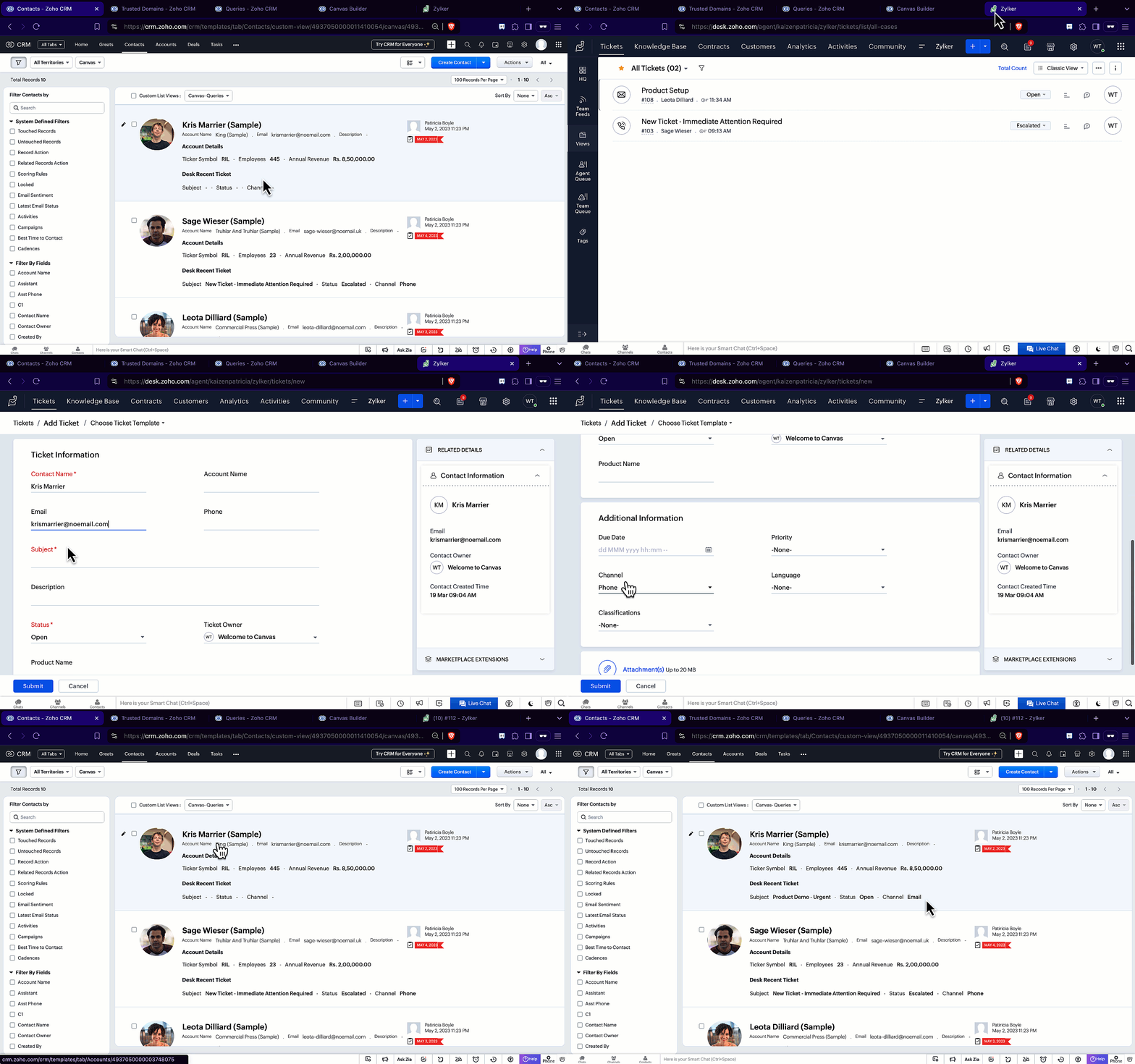
Sales and support teams often need quick access to Zoho Desk tickets related to a contact in Zoho CRM. To avoid switching between apps to check ticket statuses, we can use the Queries feature to fetch the latest Zoho Desk ticket's details of a contact dynamically and display them on the Canvas List View page of the Contacts module.
This ensures that CRM users can instantly view the most recent ticket linked to a contact without leaving Zoho CRM.
Follow along to see how you can achieve this!
Step 1 - Add a Source
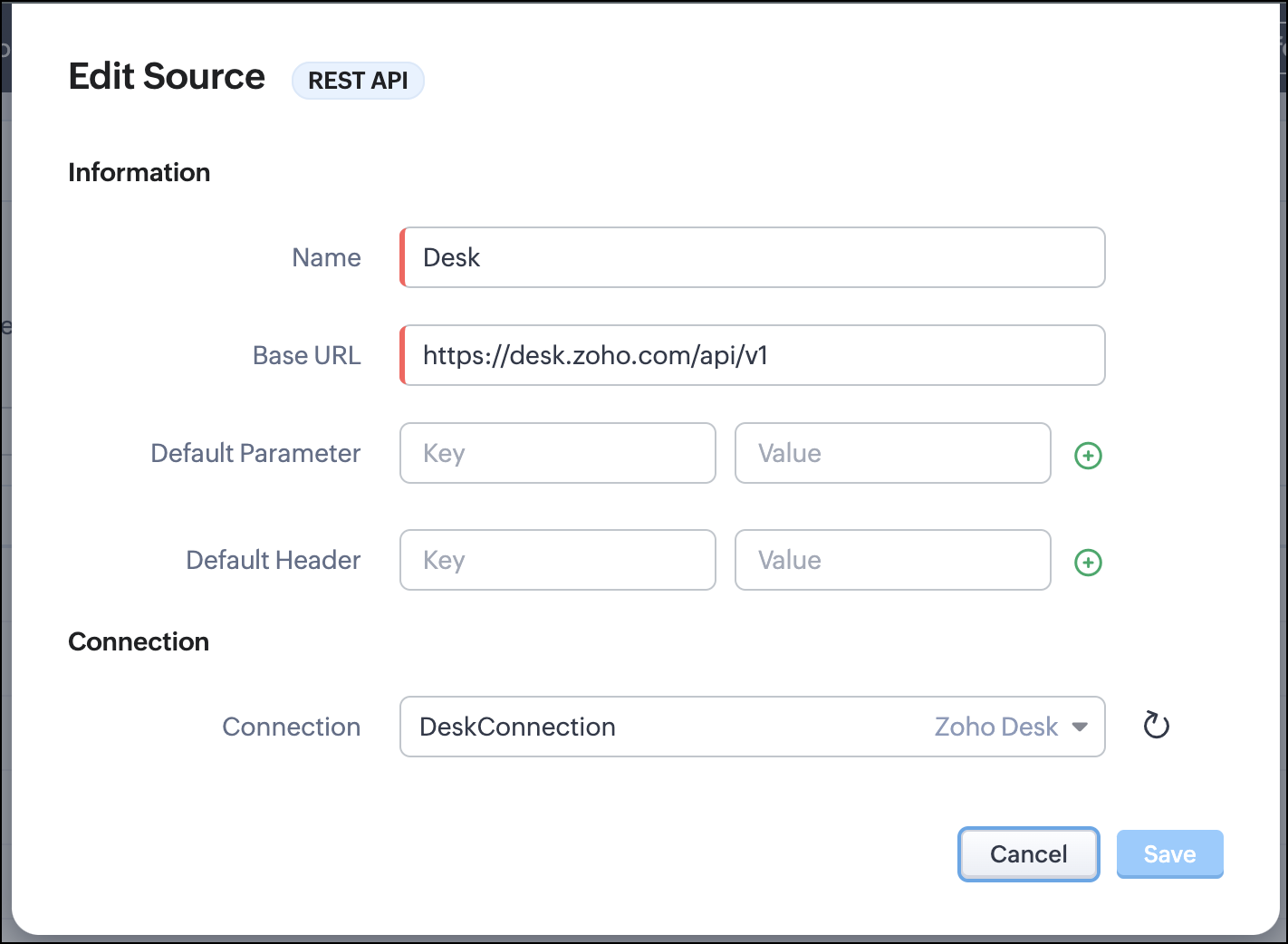
- Go to Setup > Developer Hub > Queries > Sources > Add Source.
- Under Information,
- Give a name for the source and its Base URL. Queries will make API calls to this URL to fetch data. Ensure to add this to Trusted Domain.
- Specify any default parameters and headers for this base URL.
- Under Connection, choose the connection you have created with Zoho Desk with the necessary scopes. If you haven't, create one.
- Click Save.

Note
Queries will make API calls to the URL you add in the Source and consume credits that are applicable in that service. Ensure you monitor your API usage in your source provider.
Step 2 - Create a REST API Query
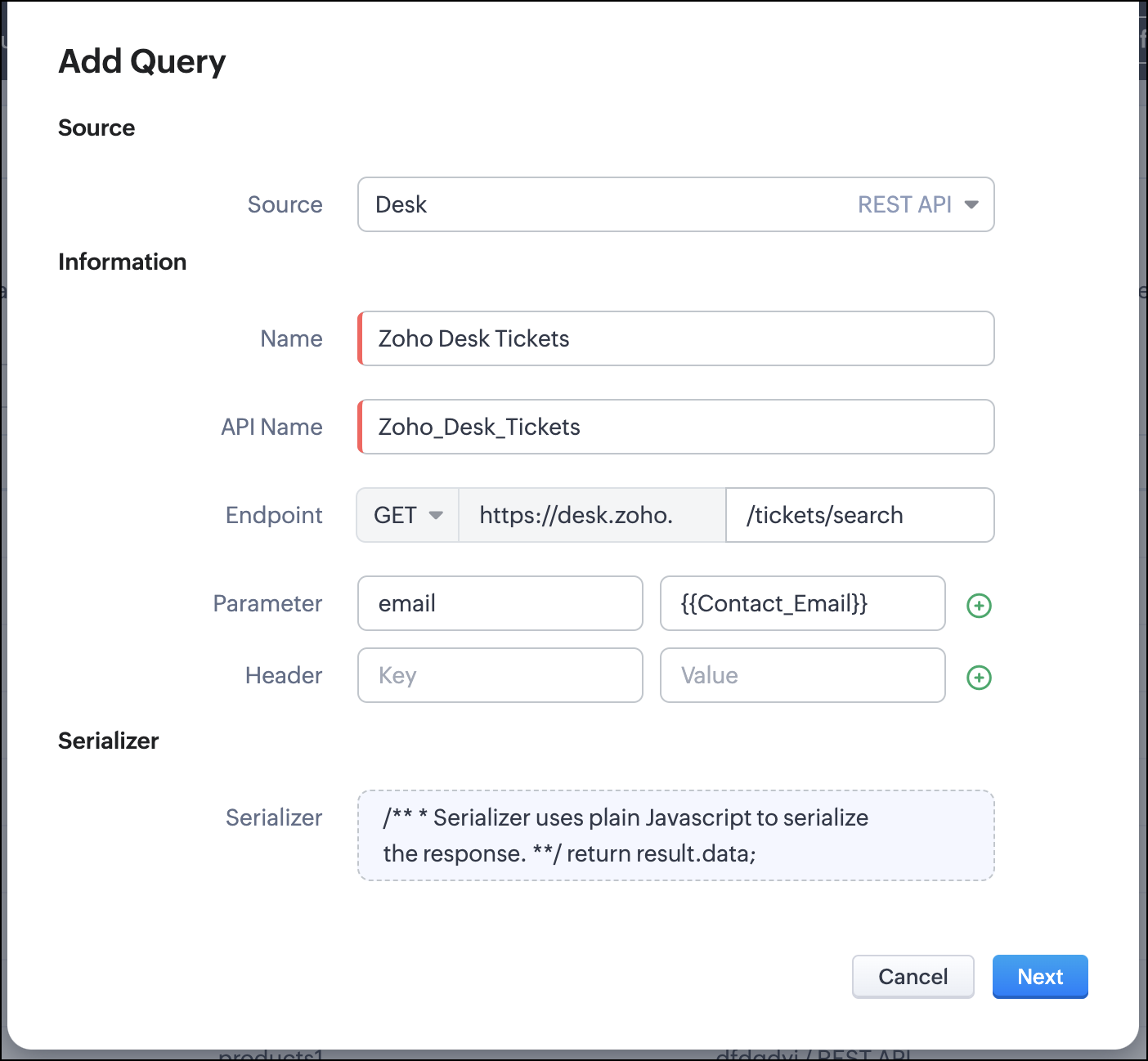
- Go to Setup > Developer Hub > Queries > Add Query.
- Under Source, choose the source you created in step 1.
- Under Information,
- Enter the Name, API Name, and the Endpoint of the query.
- Specify the parameter email that takes the dynamic variable {{Contact_Email}} as its value. This is to fetch the latest ticket from Zoho Desk for a contact with the email in this variable during runtime. Refer to our Kaizen post on Handling Query Variables in Zoho CRM for additional details.
- Specify Headers, if any.
- You can serialize the output to fit your needs using JavaScript in the Serializer.
- Click Next.
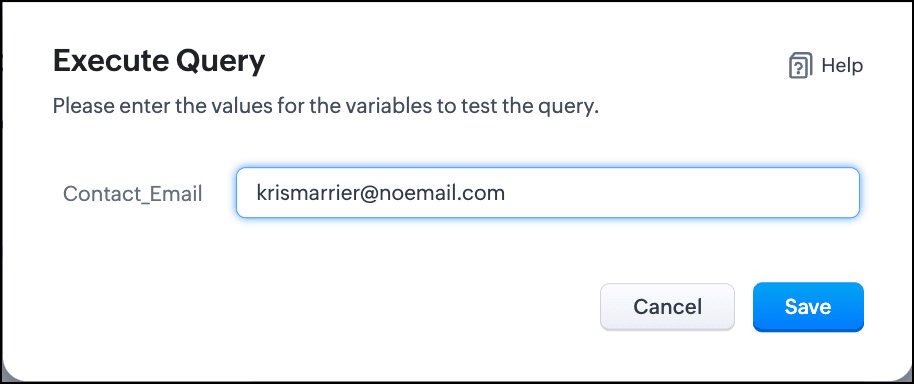
- Enter an email address in the box to test the query.
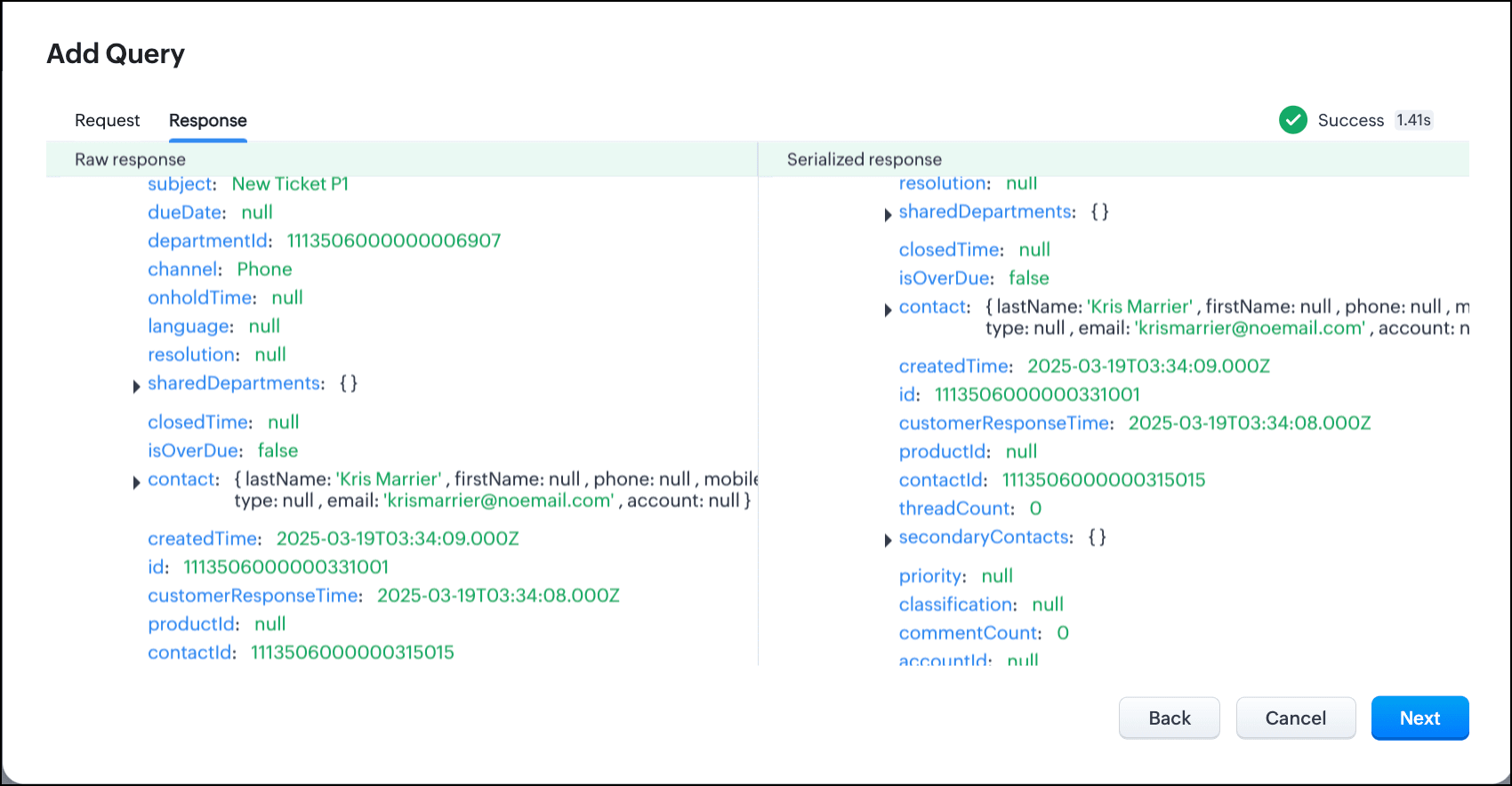
- Click Save. You can see the response of the query and the serialized response if you had serialized the output.
- Click Next.
- You can see the Schema of the query. The Schema acts as a bridge/mapping layer between external API responses and Zoho CRM's internal data structure. For example, the response of the Desk API returns result[].assignee.firstName, which is mapped to CRM as Assignee > FirstName. Schema ensures that the CRM UI knows how to display the field correctly.
With the right mapping in the schema, you can avoid manual data entry or syncing, and use the API data in workflows, reports, and dashboards.
You can change the CRM Field Type and Label to suit your needs. Refer to our Kaizen post on Serialization and Schema Management for more details. - Click Save to save the query.
Now that our query and fetching data from Zoho Desk is sorted, let's move on to the Canvas.
The Custom List view in Canvas enables you to stack records horizontally, one above the other.
Follow the steps in the How to Work with Canvas? guide to create a Custom List View Canvas for the Contacts module.
- On the Canvas, click the database icon for the Queries component.
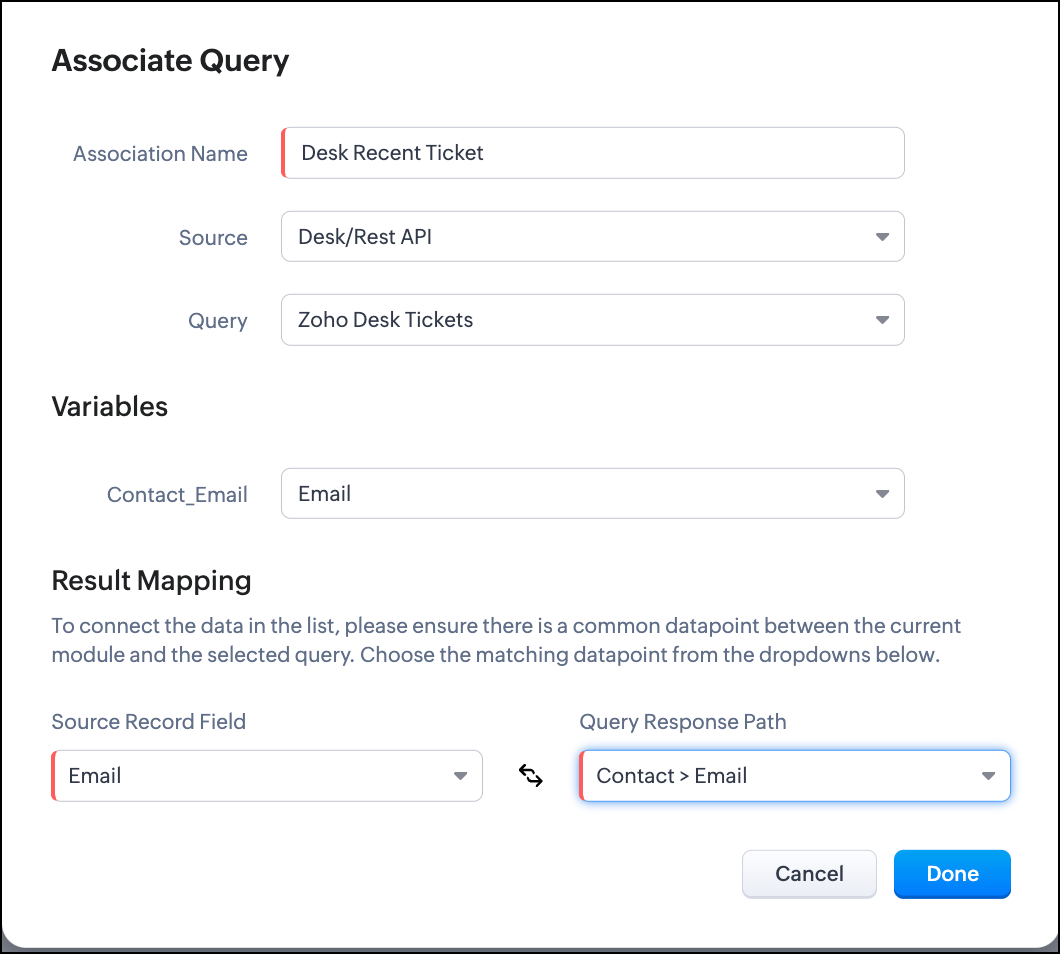
- Click Associate Query.
- Give an Association Name and select the Source(added in step 1) for the query.
- Under Query, select the query you created.
- The Variables section will contain the variables in the query. The drop-down displays all fields in the Contacts module. Select the Email field.
- Under Result Mapping, choose Email as the Source Record Field and Contact > Email as the Query Response Path. The Query Response Path is populated from the schema of the query.
- Click Done to associate the query with the canvas.
- You can see all the fields of the query on the left. Drag and drop the required fields on the canvas.
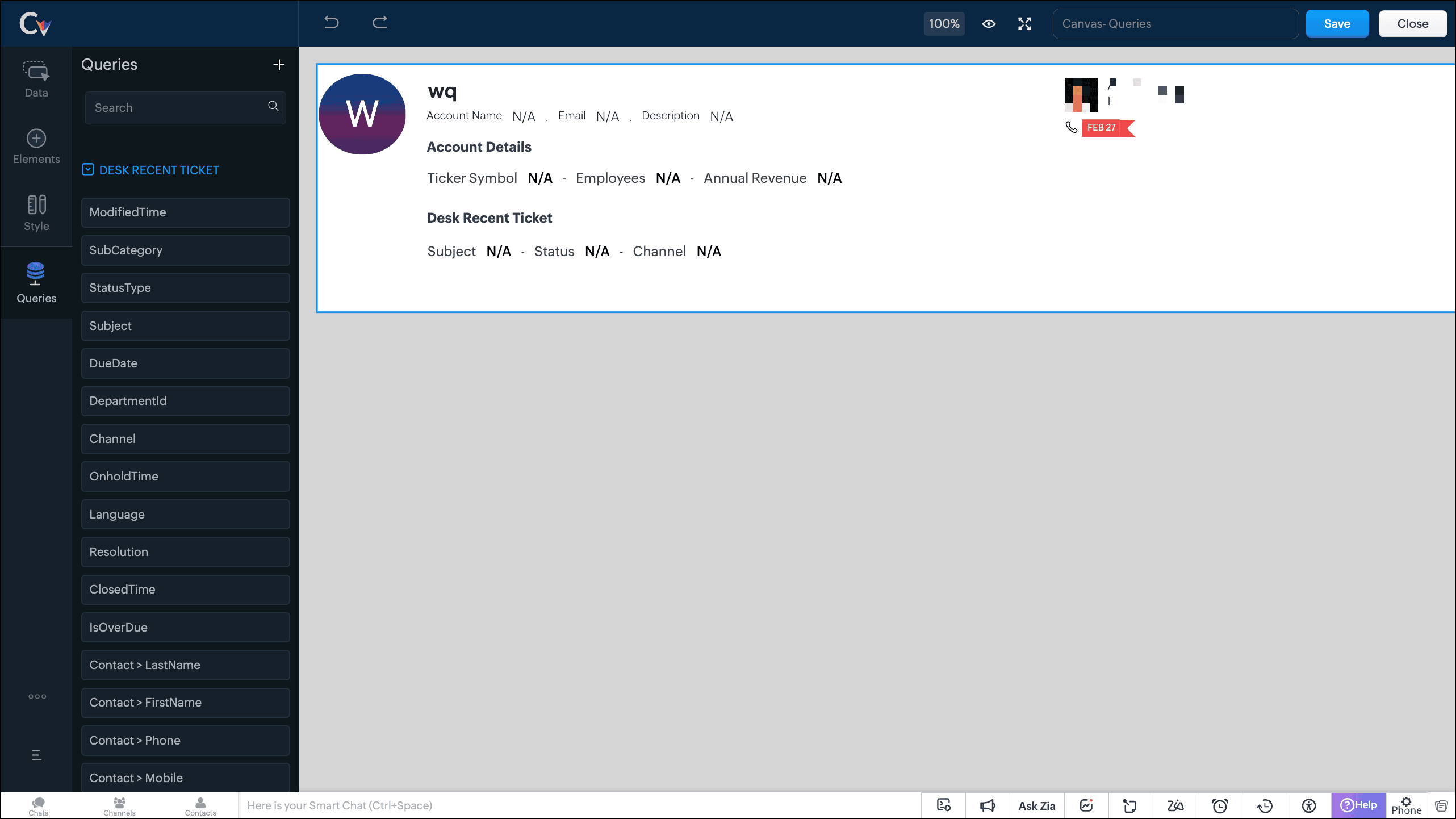
- Save the canvas.
Time for the big reveal!
The following GIF shows how the ticket details from Zoho Desk are populated on the Canvas List View of the Contacts module.

Note that every time you reload the canvas, the query underneath makes an API call to the source provider to fetch data for the contacts in Zoho CRM. Ensure your API calls are monitored to avoid exhasuting your credits.
We hope you liked this post.
Topic suggestions are welcome! See you all next week!
Cheers!
----------------------------------------------------------------------------------------------------------------------------------------

See Also
Topic Participants
Shylaja S
Sticky Posts
Kaizen #198: Using Client Script for Custom Validation in Blueprint
Nearing 200th Kaizen Post – 1 More to the Big Two-Oh-Oh! Do you have any questions, suggestions, or topics you would like us to cover in future posts? Your insights and suggestions help us shape future content and make this series better for everyone.Kaizen #226: Using ZRC in Client Script
Hello everyone! Welcome to another week of Kaizen. In today's post, lets see what is ZRC (Zoho Request Client) and how we can use ZRC methods in Client Script to get inputs from a Salesperson and update the Lead status with a single button click. In thisKaizen #222 - Client Script Support for Notes Related List
Hello everyone! Welcome to another week of Kaizen. The final Kaizen post of the year 2025 is here! With the new Client Script support for the Notes Related List, you can validate, enrich, and manage notes across modules. In this post, we’ll explore howKaizen #217 - Actions APIs : Tasks
Welcome to another week of Kaizen! In last week's post we discussed Email Notifications APIs which act as the link between your Workflow automations and you. We have discussed how Zylker Cloud Services uses Email Notifications API in their custom dashboard.Kaizen #216 - Actions APIs : Email Notifications
Welcome to another week of Kaizen! For the last three weeks, we have been discussing Zylker's workflows. We successfully updated a dormant workflow, built a new one from the ground up and more. But our work is not finished—these automated processes are
Recent Topics
E-Invoicing in Belgium with Zoho Billing
Starting January 1, 2026, Belgium is introducing mandatory electronic invoices (e-invoicing) for all B2B transactions between VAT-registered businesses. Invoices and credits notes must be exchanged in a prescribed digital format. How E-Invoicing worksdelayed: host mx2.zoho.com (136.143.183.44): Network error: Unexpectedly disconnected (STARTTLS)
Hi Team, I'm not receiving any email. Seems to be an issue. Sender sent me the error message they received: "delayed: host mx2.zoho.com (136.143.183.44): Network error: Unexpectedly disconnected (STARTTLS)" Please advise.Additional Address - Company Name
It would be very helpful to have a "Company Name" field in the Additional Address shipping section. In a situation where you drop-ship orders to a different address or different company entirely, it may be necessary to list the company name of the receiver. I understand that the Attention field can be used for that purpose, but that's not really the intended purpose of that field.Incorrect Email Notifications for Product Reviews
Dear Zoho Commerce Support Team, I am writing to report a technical issue that occurs frequently on our platform. Problem Description: We regularly receive email notifications informing us of new product reviews awaiting approval. However, when we accessCan we do Image swatches for color variants?
We want to do something like the attached screenshot on our new zoho store. We need image swatches instead of normal text selection. We want to user to select an image as color option. Is this doable? I don't see any option on zoho backend. Please hExport your notes from Notebook!
Dear users, The long awaited feature is now live. Yes, you can now export your notes from Notebook app in bulk. But the feature has just started with web app alone for now. You can try the export feature as mentioned below: Go to our web app, https://notebook.zoho.com Go to 'Settings' > 'Export' Now, select the format: You can select either ZNote or HTML Once done, you can use the same to import or can have this a local backup of your notes. Note: Export for other platforms are in development andPrepopulating Fields
Hello, I have a form (Assets) with 2 lookup fields: Client (from Clients) Site (from Client Sites) I modified the code (highlighted in red below), so the Site dropdown shows the list of sites related to the Client. must have Client_Site ( type = picklistREPORT THAT SHOWS SOH FOR ITEMS THAT HAVE ZERO SALES
When we started Zoho we imported a lot of inventory lines directly off our suppliers price list and have never ordered / sold. I want to clean up our data base and remove all these lines. What reeport will show me what lines have zero sales as well asAutomation series : Close all tasks once the project is completed
When a project is marked as Completed, it might still have open tasks such as recurring tasks that were not marked as complete, tasks that are no longer relevant, or tasks that no longer need attention after closure. To ensure the project reflects itsConverting Sales Order to Purchase Order
Hi All, Firstly, this code works to convert a sales order(SO) to a purchase order (PO) via a button, however I am running into an issue when I convert the SO where the values from the line items are not pulled across from the SO to the PO. The ones inHorrible Connectivity!
I have used Meetings several times, but most of the time the connection is horrible. The video freezes, the audio freezes, and we end up cancelling the meeting. I am on a high speed internet connection, and Zoom works fine, so I know it's not a problemIs it really true that I can't set the default 'deposit to' account in 2025?
I've been using Books for 7 years and the default account has never been a problem. I usually manually reconcile invoices and have never had a thought about which account. It has always been my account. However, I recently noticed that for the past 4Zoho DataPrep switching Date Format
When using a pipeline that is importing Zoho Analytics data into Zoho DataPrep, the month and day of date fields are switched for some columns. For example, a Zoho Analytics record of "Nov. 8, 2025" will appear in Zoho DataPrep as "2025/08/11" in "yyyy/MM/dd"Using Another Field Value for Workflow Field Update
I'm trying to setup a Workflow with a "Field Update" action on the Lead module, but I would like the new value to actually be taken from a DIFFERENT Field's on the Lead record (vs just defining some static value..) Is this possible? Could I simply useTax information
Hello, I need help/guidance on how to add my organization's Tax/VAT information. Thank you PavlyBuild smarter Guided Conversations with Fork Blocks
When your customers arrive on your support channel, they're not there to explore. They are usually confused and stuck while trying to fix something important. We understand how stressful that moment can feel and we want your bot to make things easier,Custom item field won't allow decimal.
Hello, I have a custom item field that needs to be able to have a value with a decimal place such as 6.7 or 6.18. I have tried custom formatting the input format but can not get the correct syntax to allow this. Is this possible in Zoho?Free webinar: Zoho Sign unwrapped – 2025 in review
Hey there! 2025 is coming to an end, and this year has been all about AI. Join our exclusive year-end webinar, where we'll walk you through the features that went live in 2025, provide answers to your questions, and give you a sneak peek on what to expectHubSpot CRM to Zoho Creator Integration
I'm trying to create an integration between HubSpot CRM and Zoho Creator with HubSpot being the push source (if a contact is created or updated in HubSpot, it pushes the information to Zoho Creator). I have two questions: 1- Is it best to use Zoho FlowGain control over record sharing with portal users through our new enhancement: criteria-based data exposure
Dear Customers, We hope you're well! Portals is a self-service avenue through which your clients can access and manage their direct and related data in Zoho CRM. This empowers them to be more independent and enables them to experience a sense of transparencyBest-practice setup in Zoho One for managing combined candidate pools and exporting anonymised CVs
We are new users of the Zoho One bundle and operate a consulting and engineering company. Our workforce model includes a mix of permanent employees, active job applicants, and freelance/independent consultants. All three groups need to be searchable,Meet Canvas' Grid component: Your easiest way to build responsive record templates
Visual design can be exciting—until you're knee-deep in the details. Whether it's aligning text boxes to prevent overlaps, fixing negative space, or simply making sure the right data stands out, just ironing out inconsistencies takes a lot of moving parts.hard-bounced email list
Hi, Below pops up when I try to send an Email to some of my customer. Please guide me how to take it out from hard-bounced list? I am not sure how they were marked in hard-bounced listRegister the 'Contact Role' addition and change as a Potential edition so it can trigger Workflows
We are trying to use "Contact Roles" in Potentials. Contact Roles are special and different than the other Related lists, so, it may have a special behavior. Something to keep in mind is that you will never have 100 Contact Roles as you can have 100 Tasks, Calls, or any other Related list. In our case we will have 2 in average and up to 4 or 5 maximum. The problem is that we need to bring information from 3 key Contact Roles to the Potential and adding a Contact to the Contacts Roles area never triggerCan I change the format of the buttons in the email templates?
Hi all! We have been working hard trying to brand our email templates, and have some way to go yet. One of the things we can't seem to edit is the green ${Cases.CUSTOMER_PORTAL_BUTTON} button and the font of the View Ticket text. Is there any way of doingBest practice to structure reporting to include events covering multiple months / quarters.
Hi, I'm new to Zoho, have some experience of more "enterprise" tools, looking for some input from the community. I'm looking to create a report that includes events that cover a long period, each event has a start / end date and I'm struggling undertandingMarketing Tip #11: Turn features into benefits that sell
We all love talking about our products, but here’s a secret: customers don’t just buy features, they buy benefits. Instead of just saying "Made from 100% organic cotton," try "Soft, breathable comfort that lasts all day." Benefits tell shoppers how yourSynchronise item image between Zoho Commerce and Zoho Books/Inventory/CRM
Here is a blindingly simple idea to tie several Zoho products together. Zoho - please include a method to synchronise the item image (or images) from one Zoho application to another. For example, if you upload an item image in Zoho Inventory, a user shouldHow do I migrate from zoho mail to Office 365?
The manual migration of Zoho Mail to Microsoft 365 typically requires using IMAP to move emails and configuring Microsoft Outlook to sync Zoho Mail. This approach can be error-prone, especially if there are multiple accounts or large email archives. Moreover,New Update: Convert External Users in Bulk in Zoho Directory
Greetings to all Zoho Directory users out there! We’re excited to introduce a new update that makes user management in Zoho Directory even more efficient; you can now convert external users in bulk! Earlier, admins could convert only one external userNew Update: Convert External Users in Bulk in Zoho One
Greetings to all Zoho One users out there! We’re excited to introduce a new update that makes user management in Zoho One even more efficient; you can now convert external users in bulk! Earlier, admins could convert only one external user at a time.How to edit form layout for extension
I am working on extension development. I have created all the fields. I want to rearrange the layout in Sigma platform. But there is no layout module in Sigma. How can I achieve this for extensions other than Zet CLI and putting the fields into widgetWebsite not properly connecting with Zoho Creator app portal (embed & data sync issue)
Hello Zoho Community, I’m currently facing an issue while trying to connect my external website with a Zoho Creator app portal. I have a tool-based website ( https://mygardencalculator.com/ ) where users interact with calculators and dynamic content.日本語フォントの選択肢拡充についての要望
日本語フォントの選択肢がとても少ないと感じたことはありませんか? 多くのアプリ(たとえば Invoice)ではフォントが1種類しかなく、正直あまり使いやすい・見た目が良いとも言えません。 そろそろ、もっと多くの日本語フォントを追加してほしい、そしてすべてのアプリで同じフォント選択肢を使えるようにしてほしいと、私たちユーザーが声を上げる時期だと思います。 ご存じのとおり、現状ではアプリごとにフォント周りの仕様にほとんど一貫性がありません。 みなさん、一緒に要望を出していきましょう!Does anyone know how to setup Zoho Desk or Zoho CRM as a custom outgoing/incoming Call Centre?
I need to setup a call center so I can setup agents to make phone calls across Canada to market our services. I am trying to figure out the most reliable and cost efficient way to do this? I am currently paying for two phone services and neither seemPrevent Unapproved Quotes from Exporting to Zoho CRM Finance Module
Is it possible to prevent unapproved quotes in Zoho Books from being exported from Zoho Finance module inside Zoho CRM?Request for Auto PO - Min–Max based Automated Purchase Feature
Dear Zoho POS Team, I’m writing to request a feature enhancement that would significantly streamline inventory management for businesses using Zoho POS — particularly supermarkets, FMCG retail, and multi-store operations like ours. Feature Requested:issue with deluge script
i used chat gpt to build this script and I am getting 2 errors which I cannot figure out how to fix: void monthly_sales_order_generation() { try { // ---------------- CONFIG ------------------- analytics_url_1 = "https://analytics.zoho.com/api/<workspaceID>/report/<reportID1>/data";Introducing LinkedIn Apply Connect for Zoho Recruit
Attract up to 3x more qualified candidates and hire more efficiently with LinkedIn Apply Connect. Let candidates fill-in job applications without any redirections, gain deeper insights with applicant highlights within Zoho Recruit, and keep candidatesRecruit paid support?
Hi all, Could anyone who has paid support package advise if it provides value for money with regards to support response times? Exploring the idea as unfortunately when we have faced issues with Recruit it has been a 7+ day timescale from reporting toNext Page