Kaizen 224 - Quote-driven Deal Reconciliation Using Zoho CRM Functions and Automation

Kaizen 224 - Quote-driven Deal Reconciliation Using Zoho CRM Functions and Automation


Hello everyone!
Welcome back to another instalment in the Kaizen series.

This post covers quote-driven deal reconciliation, emphasizing Functions and Automation to address practical sales challenges.

Business Challenge

Sales organizations often mark deals as Closed Won before commercial transactions fully conclude. Quotes generate promptly upon closure, yet businesses typically provide a brief window such as one week for renegotiation or payment. During this period, currency fluctuations, payment delays, and risk thresholds can significantly alter the final deal value.

This Kaizen demonstrates how Zoho CRM Functions and Automation work together to reconcile deal financials with quote activity over time. Sales, finance, and operations teams can thus access accurate, policy-compliant values.
Here is a typical sequence:
  1. Deal closes with Closed Won status
  2. Quote generates immediately
  3. Customer receives grace period (e.g., one week) for payment or adjustments
Key factors during this window:
  1. Exchange rates fluctuate
  2. Payments may succeed or fail
  3. Business absorbs limited losses(up to 10%, for example)
  4. Major variances trigger renegotiation
CRM must reflect actual outcomes rather than initial closure assumptions. Quotes serve as the authoritative commercial record, with final deal values depending on execution timing. This approach captures intermediate and final financial states to enable automated decisions and audits.

Key business scenarios covered

Scenario 1: Payment is made during the grace period

  1. Quote is generated on day 0
  2. Customer completes payment on day 7
  3. Exchange rate has changed since quote generation

Business Requirement

The business wants to calculate the actual payable amount using the exchange rate on the payment day and store it explicitly in CRM.

Outcome

The realized value is captured and stored, ensuring that reports and downstream systems reflect the true commercial result.

Scenario 2: Acceptable loss threshold (10%)

  1. Exchange rate movement results in a loss
  2. The business is willing to absorb losses up to 10%
  3. Loss exceeds the acceptable threshold

Business requirement

If the loss exceeds the defined tolerance, the quote should move to renegotiation instead of being accepted automatically.

Outcome

CRM enforces pricing policy consistently, without manual intervention or subjective judgment.

Scenario 3: Significant currency fluctuations

  1. Exchange rate volatility is unusually high
  2. Even if loss is within limits, risk exposure is significant

Business requirement

Large fluctuations should trigger renegotiation, regardless of absolute loss percentage.

Outcome

Financial risk is handled proactively based on measurable criteria.

Scenario 4: No payment after the grace period

  1. Customer does not pay within the allowed window
  2. Updated exchange rate is favorable to the business

Business Requirement

If the updated rate is profitable, the quote can be revised and reissued with the new amount.

Outcome

CRM reflects market-aligned pricing while maintaining transparency around why the amount changed.

Why Zoho CRM Functions is the best fit?

This reconciliation pattern requires the following capabilities beyond static configuration.
  1. Reading and reconciling data across Deals and Quotes
  2. Applying time-based and threshold-based business rules
  3. Writing calculated values into dedicated fields
  4. Supporting multiple decision paths(accept, renegotiate, revise)
  5. Running logic at specific business moments
Zoho CRM Functions provide the flexibility and control required to implement this logic cleanly, while automation ensures it runs consistently and reliably.

Custom fields used in this post

Deals

  1. Final Accepted Amount - Currency - Amount finally agreed and accepted
  2. FX Impact Percentage - Percent - Gain or loss due to exchange movement
  3. Reconciliation Status - Picklist - Accepted or Renegotiate
  4. Reconciled On - DateTime- Timestamp of final reconciliation

Quotes

  1. Quote Reference Amount - Currency - Amount at quote generation
  2. Quote Exchange Rate - Decimal - Exchange rate used in quote
  3. Payment Due Date - Date - End of grace period
  4. Potential Payable Amount - Currency - Recalculated amount at evaluation time
  5. FX Variance Percentage - Decimal - Difference vs quoted amount
  6. FX Evaluation Status - Picklist - Pending or Evaluated
  7. Recalculate FX - Checkbox - Explicit recalculation trigger
These fields capture commercial intent and outcome, not just static numbers.

High level automation flow

  1. Deal is marked Closed Won
    1. Workflow triggers a function to generate a Quote
  2. Business updates evaluation inputs when needed
  3. User explicitly triggers FX recalculation
  4. Function
    1. Calculates financial impact
    2. Updates quote and deal
    3. Applies business decisions
  5. CRM reflects finalized commercial reality

Function 1: Generate a Quote from the Deal

This function creates a Quote automatically when a Deal is closed, ensuring downstream processes start immediately and consistently.
void automation.generateQuoteFromDeal(int dealId)
{
deal = zoho.crm.getRecordById("Deals", dealId);
if(deal == null) return;

amount = deal.get("Amount");
exchangeRate = deal.get("Exchange_Rate");
account = deal.get("Account_Name");

productItem = Map();
productItem.put("product", {"id":"<PRODUCT_ID>"});
productItem.put("quantity", 1);
productItem.put("list_price", amount);

productList = List();
productList.add(productItem);

quoteMap = Map();
quoteMap.put("Subject", "Quote for Deal");
quoteMap.put("Deal_Name", dealId);
quoteMap.put("Account_Name", account.get("id"));
quoteMap.put("Product_Details", productList);
quoteMap.put("Quote_Stage", "Draft");
quoteMap.put("Valid_Till", zoho.currentdate.addDay(7));
quoteMap.put("Quote_Reference_Amount", amount);
quoteMap.put("Quote_Exchange_Rate", exchangeRate);

zoho.crm.createRecord("Quotes", quoteMap);
}

Function 2: Reconcile Deal from Quote

This function calculates payable values, evaluates financial impact, and updates the Deal with finalized financial information.
void automation.reconcileDealFromQuote(Int quoteId)
{
info "Starting FX reconciliation for Quote ID: " + quoteId;

// -------------------------------------------------
// Fetch Quote
// -------------------------------------------------
quote = zoho.crm.getRecordById("Quotes", quoteId);
if(quote == null)
{
info "Quote not found";
return;
}

dealInfo = quote.get("Deal_Name");
if(dealInfo == null)
{
info "Quote not linked to Deal";
return;
}

dealId = dealInfo.get("id");

deal = zoho.crm.getRecordById("Deals", dealId);
if(deal == null)
{
info "Deal not found";
return;
}

// -------------------------------------------------
// Mark FX Evaluation as PENDING
// -------------------------------------------------
zoho.crm.updateRecord(
"Quotes",
quoteId,
{"FX_Evaluation_Status" : "Pending"}
);

// -------------------------------------------------
// Read required FX inputs
// -------------------------------------------------
quotedAmount = quote.get("Quote_Reference_Amount");
quoteRate = quote.get("Quote_Exchange_Rate");
evaluationRate = quote.get("Evaluation_Exchange_Rate");

info "Quoted Amount: " + quotedAmount;
info "Quote Rate: " + quoteRate;
info "Evaluation Rate: " + evaluationRate;

if(quotedAmount == null || quoteRate == null || evaluationRate == null)
{
info "Missing required FX inputs";
return;
}

// -------------------------------------------------
// FX Calculations(rounded)
// -------------------------------------------------
payableAmount = (quotedAmount * evaluationRate / quoteRate).round(2);
fxVariance = (((payableAmount - quotedAmount) / quotedAmount) * 100).round(2);

info "Payable Amount: " + payableAmount;
info "FX Variance %: " + fxVariance;

// -------------------------------------------------
// Decide Quote Stage(Business decision here)
// -------------------------------------------------
quoteStage = "";
reconciliationStatus = "";

if(fxVariance <= 10)
{
quoteStage = "Acceptable FX Impact";
reconciliationStatus = "Accepted";
}
else
{
quoteStage = "FX Impact Exceeds Threshold";
reconciliationStatus = "Renegotiate";
}

// -------------------------------------------------
// Update Quote(Final state)
// -------------------------------------------------
quoteUpdate = Map();
quoteUpdate.put("Potential_Payable_Amount", payableAmount);
quoteUpdate.put("FX_Variance_Percentage", fxVariance);
quoteUpdate.put("FX_Evaluation_Status", "Evaluated");
quoteUpdate.put("Quote_Stage", quoteStage);
quoteUpdate.put("Recalculate_FX", false);

quoteResp = zoho.crm.updateRecord("Quotes", quoteId, quoteUpdate);
info "Quote update response:";
info quoteResp;

// -------------------------------------------------
// Update Deal
// -------------------------------------------------
dealUpdate = Map();
dealUpdate.put("Final_Accepted_Amount", payableAmount);
dealUpdate.put("FX_Impact_Percentage", fxVariance);
dealUpdate.put("Reconciliation_Status", reconciliationStatus);
dealUpdate.put(
"Reconciled_On",
zoho.currenttime.toString("yyyy-MM-dd'T'HH:mm:ssXXX")
);

dealResp = zoho.crm.updateRecord("Deals", dealId, dealUpdate);
info "Deal update response:";
info dealResp;

info "FX reconciliation completed successfully";
}

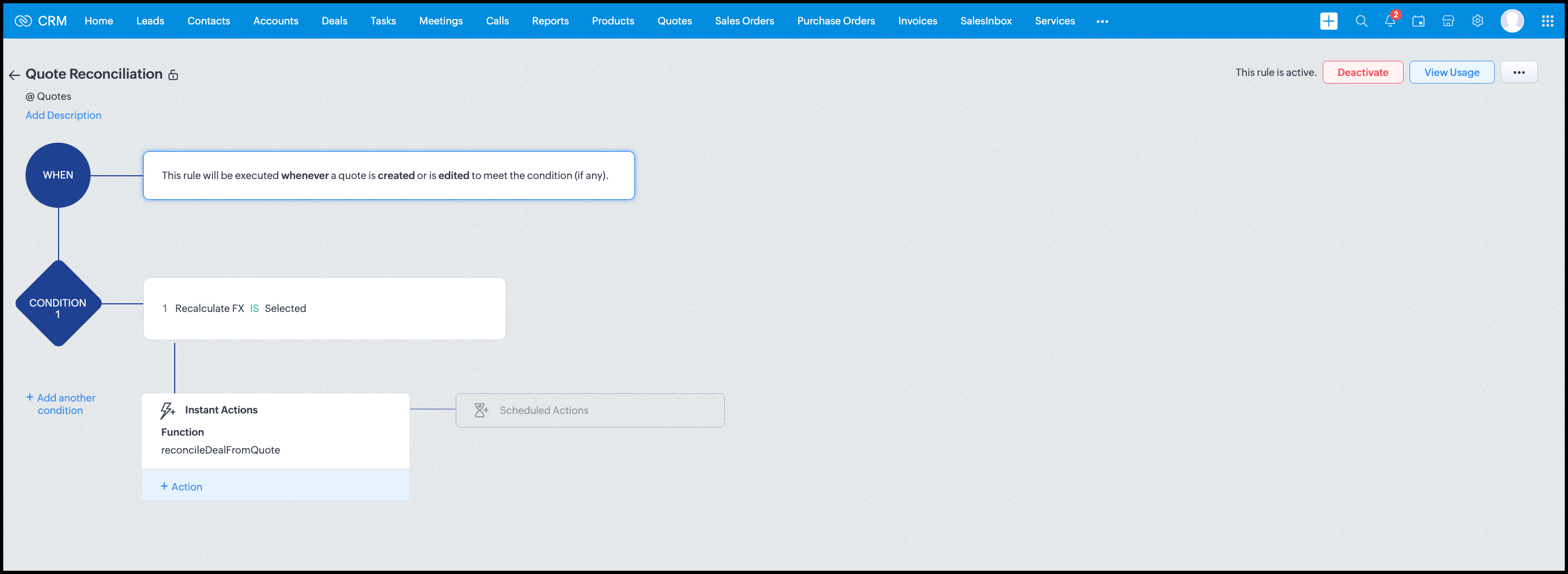
Workflow


Module: Quotes
Trigger: On create or edit
Condition: Recalculate FX = true
Action: Execute reconcileDealFromQuote
Argument: quoteId -> ${Quotes.id}

All decision logic lives inside the function.

Business Outcome

After implementing this pattern,
  1. Deals and quotes stay aligned with real-world behavior
  2. FX risk is measurable and auditable
  3. Renegotiation is policy-driven
  4. Reports reflect finalized values, not assumptions
  5. Sales and finance operate on the same truth.

Summary

Zoho CRM extends beyond static closures by reconciling deals against quote behavior. Functions plus Automation enforce pricing, limit exposure, and capture true outcomes reliably at scale.
The true value of this implementation is not the calculation itself, but the fact that it produces stable, auditable financial states that can be reused across reporting, approvals, integrations, and policy enforcement.

Further extensions

Executive reporting and dashboards

You can build Dashboards that answer questions like
  1. Total revenue before vs after FX reconciliation
  2. Total FX gain or loss by
    1. Region
    2. Currency
    3. Quarter
  3. Sales owner
  4. Percentage of deals renegotiated due to FX risk
Without the function,
  1. FX impact is implicit
  2. Numbers keep changing
  3. Finance does not trust reports
With the function,
  1. Final Accepted Amount is stable
  2. FX Impact % is explicit
  3. Reconciled On gives a time anchor

Policy enforcement and compliance

Examples
  1. Automatically flag deals where FX loss > 10% but status = Accepted
  2. Audit trail for
    1. Who recalculated FX
    2. When renegotiation was triggered
  3. SLA checks when Deals are not reconciled within 'X' days of quote creation
For many companies, FX policy violations are discovered at a later point in time, but you now enforce them at the moment of decision.

Sales coaching and deal hygiene

Unlock insights such as
  1. Which sales reps close deals with high FX volatility or frequently trigger renegotiation?
  2. Which regions or currencies produce unstable deals?
  3. Which deals are consistently over-optimistic at closure?

Other scenarios

  1. Approval and exception workflows
  2. Integration with ERP or accounting systems
  3. Predictive insights to forecast FX risk
  4. Historical snapshots for audit and analytics

We hope you found this post useful. Let us know your feedback in the comments or write to us at support@zohocrm.com.

Thanks!


=============================================================================


    • Sticky Posts

    • Kaizen #198: Using Client Script for Custom Validation in Blueprint

      Nearing 200th Kaizen Post – 1 More to the Big Two-Oh-Oh! Do you have any questions, suggestions, or topics you would like us to cover in future posts? Your insights and suggestions help us shape future content and make this series better for everyone.
    • Kaizen #226: Using ZRC in Client Script

      Hello everyone! Welcome to another week of Kaizen. In today's post, lets see what is ZRC (Zoho Request Client) and how we can use ZRC methods in Client Script to get inputs from a Salesperson and update the Lead status with a single button click. In this
    • Kaizen #222 - Client Script Support for Notes Related List

      Hello everyone! Welcome to another week of Kaizen. The final Kaizen post of the year 2025 is here! With the new Client Script support for the Notes Related List, you can validate, enrich, and manage notes across modules. In this post, we’ll explore how
    • Kaizen #217 - Actions APIs : Tasks

      Welcome to another week of Kaizen! In last week's post we discussed Email Notifications APIs which act as the link between your Workflow automations and you. We have discussed how Zylker Cloud Services uses Email Notifications API in their custom dashboard.
    • Kaizen #216 - Actions APIs : Email Notifications

      Welcome to another week of Kaizen! For the last three weeks, we have been discussing Zylker's workflows. We successfully updated a dormant workflow, built a new one from the ground up and more. But our work is not finished—these automated processes are
    • Recent Topics

    • Email from CRM being Blocked or Marked as Spam by Google (and maybe more)

      In the past 24 hours we’ve noticed that emails sent via Zoho CRM are being blocked or flagged as phishing, particularly by Google. The issue seems to occur specifically when emails contain links. URLs like www.domain.com or www.example.com are automatically
    • Introducing SlyteUI : From Idea to a Working Interface in Minutes

      Hello everyone! Are you spending hours building basic UIs? Does even the smallest customization feel like a major task? CRM customization should feel intuitive and straightforward, not time consuming or exhausting. SlyteUI makes this possible by simplifying
    • All new Address Field in Zoho CRM: maintain structured and accurate address inputs

      Availability Update: 29 September 2025: It's currently available for all new sign-ups and for existing Zoho CRM orgs which are in the Professional edition exclusively for IN DC users. 2 March 2026: Available to users in all DCs except US and EU DC. 24
    • Zoho Tables - Form default entry

      How so I set a form field to be populated with an entry from another table? I created a view on my source table limiting the results to just the one thing I want to see. When adding a Client via my Add Client form, I want the Client Type field to already
    • Payment Card or Identity form-fill from Vault?

      Hello! I'm working on replacing Bitwarden with Vault and one issue I've run into is that I can't find any option to fill address and payment forms from Payment Card or Identity info that has been saved in Vault. Is there a way to do this? Is it a planned
    • Please add Deluge code editing for Forms

      Assuming Forms is built on the same codebase as Creator, etc., it would be wonderful to be able to edit form code, cut and paste form elements across different forms, share code with other users, and so on.
    • Introducing Bin Locations In Zoho Inventory

      Hello users, We are excited to let you know that your wait for the Bin Locations feature has now come to an end! Yes, you heard us right! We are here to introduce the much-awaited Bin Locations now in Zoho Inventory. But before we dive into the feature
    • Add Actionable “Smart Commits” for GitHub Integration

      Hi Zoho Projects Team, I am submitting a feature request to introduce Smart Commits support for the GitHub integration in Zoho Projects. The Current Limitation: Currently, Zoho Projects offers a "passive" integration. Including a Task ID in a commit message
    • Item Details Field - New Barcode / Document option?

      Is this a new feature??? its in both books and inventory.
    • Items attribute questions

      Many of my items have attributes, such as size and color. How can I add new fields to the "New Items" screen to capture that in my Purchase Orders, Items, and Sales Order pages? I only see these attribute fields when adding an Item Group. Also, on the
    • SEO recommendation of H1 tag for website tittle

      The exact words are “ It is good practice to place the page title inside the H1tag.” Now I already have one H1 tag on my website but it is not website tittle. In the SEO recommendation that is clear too that I have h1 tag on my page. Now I don’t know
    • Anyone Building AI-Based SEO Dashboards in Zoho Analytics?

      Hey everyone, I’m currently working on an SEO reporting dashboard in Zoho Analytics and looking to enhance it with AI-based insights—especially around AI visibility, keyword trends, and traffic sources. The goal is to track not just traditional metrics
    • Knowledgebase SEO

      We have a custom-domain mapped help center that is not restricted via login. I have some questions: a) will a robots.txt file still allow us to control indexing? b) do we have the ability to edit the sitemap? c) do category URLs get indexed by search
    • Marketing Tip #15: Rank better with keyword-rich URLs for product pages

      Your product page URL is a small detail that can make a surprisingly big difference. Clean, readable URLs help in two ways: They’re easier for customers to trust and remember (no one likes clicking a link that looks messy or random). They help search
    • Marketing Tip #26: Optimize product images for SEO

      Product images can do more than make your store look good. They can also help customers discover your products through search. Since search engines can’t "see" images, they rely on text signals to understand what an image is about. Two small actions make
    • Zia Agents in Zoho CRM: a better way to set up digital employees

      Hello everyone, If you've been using Zia Agents in Zoho CRM, so far using Connections was the only deployment method you're familiar with. You create an agent in Zia Agents (define its objective, write instructions, use tools, add knowledge base) and
    • Cross Module Filtering – Use Fields from Lookup modules in Custom Views criteria and Advanced Filters

      Hello everyone, Zoho CRM now enables you to achieve deeper filtering of records in a module, using fields of a lookup, thereby enhancing your data management experience manifold. This filtering based on lookup module fields is now available in advanced
    • How can we use Loop Structures in Deluge script?

      Hi, I am using GetRecords() function to fetch records from a module in Zoho CRM,  the number of records is 800+, but GetRecords() function returns 200 records at one time,  So, I want to use loops to achieve my task, but it gives me error when i use any loop instead of For each loop. How can I perform my task? Please help Zoho community. Thanks 
    • Stock Count

      The stock count is a nice new feature, but we cannot figure out how to: 1. Use it without assigning to a person, we have a team or one of multiple do stock counts as do most any company. 2. Add any extra fields to what the "counter" sees. The most important
    • SalesIQ Operator Activity Reports in Zoho Analytics

      I'm busy building a dashboard in Zoho Analytics and I want to include SalesIQ stats in the dashboard, but I'm unable to get the statistics mentioned in the attached image. Any idea where I can get the stats for Operator Activity?
    • Multi-Select Field Option Limit Inquiry

      Hello FSM Team, We would like to inquire about the limitation of the Multi-Select field in Zoho FSM. Currently, the system allows a maximum of 10 selectable options, and we encountered the message: “Option count more than allowed count of 10.” Issue:
    • MS Teams integration

      I followed all the steps to configure the bot chanel notifications, for all events. All configuration worked fine, without issues, but I don´t recevie any notification in the Teams chanel. Must I configurate aditional permission set in MS 365 or Zoho
    • Zoho Bookings - Feature Request - Services Which Include A Resource and Consultant

      Hi Bookings Team, My feature request is to have the ability to add Consultants and Resources to Services. Use case: Your business provides first aid training and there are certain equpment you require to provide the half day training. There are only specific
    • Six important date functions every professional should know

      You probably use plenty of formulas already, but there are some that are essential for people in business roles, such as date functions. These tools help with scheduling, predicting, and tracking, and they can be useful whether you're dealing with payrolls,
    • Inactive Items - Make Less Prominent by Default

      Currently, when one marks an Item as "Inactive", it really doesn't do much of anything to hide it or get it out of the way. Search and reporting within Finance should, by default, hide inactive Items from standard reports, searches, etc. If one specifically
    • Why Contracts Should Not Be Downloaded And Sent During Negotiation

      During contract negotiation, it may seem easy to download a document, send it to the counterparty, have the counterparty make changes, and send it back. But this approach creates serious risks around security, version control, and compliance. ISO 27001:2022
    • Add Native “Create GitHub Branch” Action for Tasks and Bugs

      Hi Zoho Projects Team, I would like to submit a feature request to enhance the GitHub integration in Zoho Projects by adding the ability to initiate a GitHub branch directly from a Task or Bug. The Current Limitation: Currently, Zoho Projects lacks a
    • Super Admin Logging in as another User

      How can a Super Admin login as another user. For example, I have a sales rep that is having issues with their Accounts and I want to view their Zoho Account with out having to do a GTM and sharing screens. Moderation Update (8th Aug 2025): We are working
    • Solving the bug in Zoho Writer API for styling

      So... the Zoho Writer APIs for programatically creating a document do not respect a template's style. The result is that any document you generate via API needs to be manually, paragraph by paragraph, reformatted. That bug alone is sufficient to render
    • Is anyone else experiencing downtime on Desk?

      Desk is slow/crashing and not stable the last couple of hours. Is anyone else experiencing the same issues?
    • Push Notification for New Bookings in Zoho Bookings App

      when a someone schedules an appointment through the booking page, is there any option to receive a push notification in the mobile app?
    • Data Import into Zoho Forms

      Hi everyone, I am migrating several Google Forms into Zoho Forms. I can recreate the forms, but I also need to bring over historical response data currently stored in Google Sheets. I want to keep using that data inside Zoho for analysis, reporting, and
    • Add Native GitHub Pull Request Creation & Management from Tasks/Bugs

      Hi Zoho Projects Team, I am submitting a feature request to enhance our development lifecycle by enabling native GitHub Pull Request (PR) creation and management directly within Zoho Projects. The Current Limitation: Currently, the GitHub integration
    • Extend GitHub Commit Integration to Tasks in Zoho Projects

      Hello Zoho Projects Team, We hope you are doing well. We would like to submit a feature request regarding the current GitHub integration in Zoho Projects, specifically the ability to link commit information. Current Limitation: As of now, Zoho Projects
    • Zoho Projects API requests limit question

      Hello, Regarding the API request limit of 100 requests per 2 minutes, I have implemented a control mechanism which, if the limit is reached, will wait the required amount of time before sending new requests. However, this mechanism seems to be failing,
    • What is the esacalation email for Zoho Support/ Zoho One/ Zoho Workplace ?

      Hello, My business has been stalled due to Zoho duplicating workdrive with switching on zoho one trial. There are two workdrives - one with my files mapped to workplace and one empty mapped to zoho one.-- integrationg programs are super consfused and
    • How to show Assemblies AND component items in a report

      Hi Is there any way in Analytics to create a report that shows the Composite Item AND the Component Items with mapped quantity? It seems that the component item is not exposed in any table that I can find. Also, the same question but for Stock on Hand.....this
    • How can I use the API to add a drop-shipping address to a sales order for one-time use?

      I need to be able to add a drop-shipping address for one-time use to a sales order via the API. Adding every such address to the contact (customer), then feeding the shippingaddress_id into the sales order, is not an acceptable approach; we have some
    • Mass Update Option for Changing Work Order Owner

      Hello FSM Team/Mr. Abid, We would like to inquire if there is an option to mass update or bulk change the Owner of Work Orders in Zoho FSM. Current Situation: At the moment, the Owner of a Work Order can only be changed individually, which becomes time-consuming
    • Make and receive calls from Bigin's Android app

      Hello everyone! We're happy to announce that Bigin's Android app (version 2.0.0) now supports built-in telephony, RingCentral, and Zoho Voice, all of which enable users to make and receive calls from the Bigin app. You can only configure the telephony
    • Next Page