Kaizen 224 - Quote-driven Deal Reconciliation Using Zoho CRM Functions and Automation

Kaizen 224 - Quote-driven Deal Reconciliation Using Zoho CRM Functions and Automation


Hello everyone!
Welcome back to another instalment in the Kaizen series.

This post covers quote-driven deal reconciliation, emphasizing Functions and Automation to address practical sales challenges.

Business Challenge

Sales organizations often mark deals as Closed Won before commercial transactions fully conclude. Quotes generate promptly upon closure, yet businesses typically provide a brief window such as one week for renegotiation or payment. During this period, currency fluctuations, payment delays, and risk thresholds can significantly alter the final deal value.

This Kaizen demonstrates how Zoho CRM Functions and Automation work together to reconcile deal financials with quote activity over time. Sales, finance, and operations teams can thus access accurate, policy-compliant values.
Here is a typical sequence:
  1. Deal closes with Closed Won status
  2. Quote generates immediately
  3. Customer receives grace period (e.g., one week) for payment or adjustments
Key factors during this window:
  1. Exchange rates fluctuate
  2. Payments may succeed or fail
  3. Business absorbs limited losses(up to 10%, for example)
  4. Major variances trigger renegotiation
CRM must reflect actual outcomes rather than initial closure assumptions. Quotes serve as the authoritative commercial record, with final deal values depending on execution timing. This approach captures intermediate and final financial states to enable automated decisions and audits.

Key business scenarios covered

Scenario 1: Payment is made during the grace period

  1. Quote is generated on day 0
  2. Customer completes payment on day 7
  3. Exchange rate has changed since quote generation

Business Requirement

The business wants to calculate the actual payable amount using the exchange rate on the payment day and store it explicitly in CRM.

Outcome

The realized value is captured and stored, ensuring that reports and downstream systems reflect the true commercial result.

Scenario 2: Acceptable loss threshold (10%)

  1. Exchange rate movement results in a loss
  2. The business is willing to absorb losses up to 10%
  3. Loss exceeds the acceptable threshold

Business requirement

If the loss exceeds the defined tolerance, the quote should move to renegotiation instead of being accepted automatically.

Outcome

CRM enforces pricing policy consistently, without manual intervention or subjective judgment.

Scenario 3: Significant currency fluctuations

  1. Exchange rate volatility is unusually high
  2. Even if loss is within limits, risk exposure is significant

Business requirement

Large fluctuations should trigger renegotiation, regardless of absolute loss percentage.

Outcome

Financial risk is handled proactively based on measurable criteria.

Scenario 4: No payment after the grace period

  1. Customer does not pay within the allowed window
  2. Updated exchange rate is favorable to the business

Business Requirement

If the updated rate is profitable, the quote can be revised and reissued with the new amount.

Outcome

CRM reflects market-aligned pricing while maintaining transparency around why the amount changed.

Why Zoho CRM Functions is the best fit?

This reconciliation pattern requires the following capabilities beyond static configuration.
  1. Reading and reconciling data across Deals and Quotes
  2. Applying time-based and threshold-based business rules
  3. Writing calculated values into dedicated fields
  4. Supporting multiple decision paths(accept, renegotiate, revise)
  5. Running logic at specific business moments
Zoho CRM Functions provide the flexibility and control required to implement this logic cleanly, while automation ensures it runs consistently and reliably.

Custom fields used in this post

Deals

  1. Final Accepted Amount - Currency - Amount finally agreed and accepted
  2. FX Impact Percentage - Percent - Gain or loss due to exchange movement
  3. Reconciliation Status - Picklist - Accepted or Renegotiate
  4. Reconciled On - DateTime- Timestamp of final reconciliation

Quotes

  1. Quote Reference Amount - Currency - Amount at quote generation
  2. Quote Exchange Rate - Decimal - Exchange rate used in quote
  3. Payment Due Date - Date - End of grace period
  4. Potential Payable Amount - Currency - Recalculated amount at evaluation time
  5. FX Variance Percentage - Decimal - Difference vs quoted amount
  6. FX Evaluation Status - Picklist - Pending or Evaluated
  7. Recalculate FX - Checkbox - Explicit recalculation trigger
These fields capture commercial intent and outcome, not just static numbers.

High level automation flow

  1. Deal is marked Closed Won
    1. Workflow triggers a function to generate a Quote
  2. Business updates evaluation inputs when needed
  3. User explicitly triggers FX recalculation
  4. Function
    1. Calculates financial impact
    2. Updates quote and deal
    3. Applies business decisions
  5. CRM reflects finalized commercial reality

Function 1: Generate a Quote from the Deal

This function creates a Quote automatically when a Deal is closed, ensuring downstream processes start immediately and consistently.
void automation.generateQuoteFromDeal(int dealId)
{
deal = zoho.crm.getRecordById("Deals", dealId);
if(deal == null) return;

amount = deal.get("Amount");
exchangeRate = deal.get("Exchange_Rate");
account = deal.get("Account_Name");

productItem = Map();
productItem.put("product", {"id":"<PRODUCT_ID>"});
productItem.put("quantity", 1);
productItem.put("list_price", amount);

productList = List();
productList.add(productItem);

quoteMap = Map();
quoteMap.put("Subject", "Quote for Deal");
quoteMap.put("Deal_Name", dealId);
quoteMap.put("Account_Name", account.get("id"));
quoteMap.put("Product_Details", productList);
quoteMap.put("Quote_Stage", "Draft");
quoteMap.put("Valid_Till", zoho.currentdate.addDay(7));
quoteMap.put("Quote_Reference_Amount", amount);
quoteMap.put("Quote_Exchange_Rate", exchangeRate);

zoho.crm.createRecord("Quotes", quoteMap);
}

Function 2: Reconcile Deal from Quote

This function calculates payable values, evaluates financial impact, and updates the Deal with finalized financial information.
void automation.reconcileDealFromQuote(Int quoteId)
{
info "Starting FX reconciliation for Quote ID: " + quoteId;

// -------------------------------------------------
// Fetch Quote
// -------------------------------------------------
quote = zoho.crm.getRecordById("Quotes", quoteId);
if(quote == null)
{
info "Quote not found";
return;
}

dealInfo = quote.get("Deal_Name");
if(dealInfo == null)
{
info "Quote not linked to Deal";
return;
}

dealId = dealInfo.get("id");

deal = zoho.crm.getRecordById("Deals", dealId);
if(deal == null)
{
info "Deal not found";
return;
}

// -------------------------------------------------
// Mark FX Evaluation as PENDING
// -------------------------------------------------
zoho.crm.updateRecord(
"Quotes",
quoteId,
{"FX_Evaluation_Status" : "Pending"}
);

// -------------------------------------------------
// Read required FX inputs
// -------------------------------------------------
quotedAmount = quote.get("Quote_Reference_Amount");
quoteRate = quote.get("Quote_Exchange_Rate");
evaluationRate = quote.get("Evaluation_Exchange_Rate");

info "Quoted Amount: " + quotedAmount;
info "Quote Rate: " + quoteRate;
info "Evaluation Rate: " + evaluationRate;

if(quotedAmount == null || quoteRate == null || evaluationRate == null)
{
info "Missing required FX inputs";
return;
}

// -------------------------------------------------
// FX Calculations(rounded)
// -------------------------------------------------
payableAmount = (quotedAmount * evaluationRate / quoteRate).round(2);
fxVariance = (((payableAmount - quotedAmount) / quotedAmount) * 100).round(2);

info "Payable Amount: " + payableAmount;
info "FX Variance %: " + fxVariance;

// -------------------------------------------------
// Decide Quote Stage(Business decision here)
// -------------------------------------------------
quoteStage = "";
reconciliationStatus = "";

if(fxVariance <= 10)
{
quoteStage = "Acceptable FX Impact";
reconciliationStatus = "Accepted";
}
else
{
quoteStage = "FX Impact Exceeds Threshold";
reconciliationStatus = "Renegotiate";
}

// -------------------------------------------------
// Update Quote(Final state)
// -------------------------------------------------
quoteUpdate = Map();
quoteUpdate.put("Potential_Payable_Amount", payableAmount);
quoteUpdate.put("FX_Variance_Percentage", fxVariance);
quoteUpdate.put("FX_Evaluation_Status", "Evaluated");
quoteUpdate.put("Quote_Stage", quoteStage);
quoteUpdate.put("Recalculate_FX", false);

quoteResp = zoho.crm.updateRecord("Quotes", quoteId, quoteUpdate);
info "Quote update response:";
info quoteResp;

// -------------------------------------------------
// Update Deal
// -------------------------------------------------
dealUpdate = Map();
dealUpdate.put("Final_Accepted_Amount", payableAmount);
dealUpdate.put("FX_Impact_Percentage", fxVariance);
dealUpdate.put("Reconciliation_Status", reconciliationStatus);
dealUpdate.put(
"Reconciled_On",
zoho.currenttime.toString("yyyy-MM-dd'T'HH:mm:ssXXX")
);

dealResp = zoho.crm.updateRecord("Deals", dealId, dealUpdate);
info "Deal update response:";
info dealResp;

info "FX reconciliation completed successfully";
}

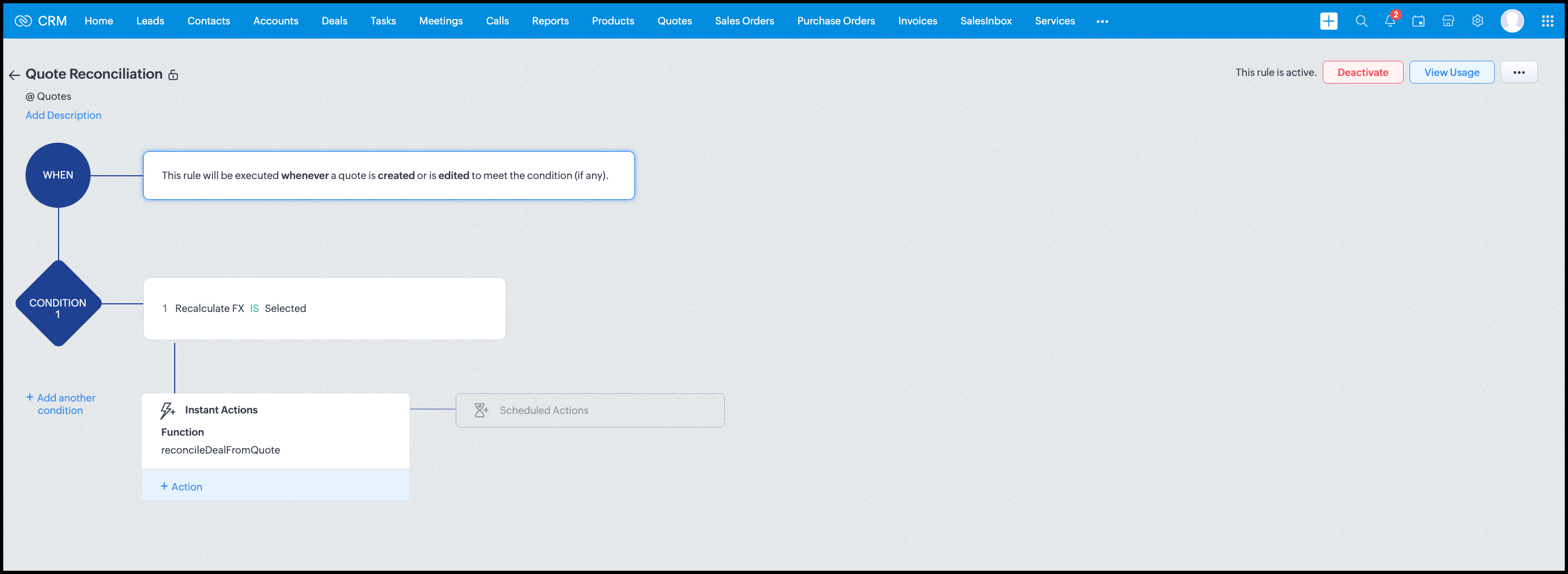
Workflow


Module: Quotes
Trigger: On create or edit
Condition: Recalculate FX = true
Action: Execute reconcileDealFromQuote
Argument: quoteId -> ${Quotes.id}

All decision logic lives inside the function.

Business Outcome

After implementing this pattern,
  1. Deals and quotes stay aligned with real-world behavior
  2. FX risk is measurable and auditable
  3. Renegotiation is policy-driven
  4. Reports reflect finalized values, not assumptions
  5. Sales and finance operate on the same truth.

Summary

Zoho CRM extends beyond static closures by reconciling deals against quote behavior. Functions plus Automation enforce pricing, limit exposure, and capture true outcomes reliably at scale.
The true value of this implementation is not the calculation itself, but the fact that it produces stable, auditable financial states that can be reused across reporting, approvals, integrations, and policy enforcement.

Further extensions

Executive reporting and dashboards

You can build Dashboards that answer questions like
  1. Total revenue before vs after FX reconciliation
  2. Total FX gain or loss by
    1. Region
    2. Currency
    3. Quarter
  3. Sales owner
  4. Percentage of deals renegotiated due to FX risk
Without the function,
  1. FX impact is implicit
  2. Numbers keep changing
  3. Finance does not trust reports
With the function,
  1. Final Accepted Amount is stable
  2. FX Impact % is explicit
  3. Reconciled On gives a time anchor

Policy enforcement and compliance

Examples
  1. Automatically flag deals where FX loss > 10% but status = Accepted
  2. Audit trail for
    1. Who recalculated FX
    2. When renegotiation was triggered
  3. SLA checks when Deals are not reconciled within 'X' days of quote creation
For many companies, FX policy violations are discovered at a later point in time, but you now enforce them at the moment of decision.

Sales coaching and deal hygiene

Unlock insights such as
  1. Which sales reps close deals with high FX volatility or frequently trigger renegotiation?
  2. Which regions or currencies produce unstable deals?
  3. Which deals are consistently over-optimistic at closure?

Other scenarios

  1. Approval and exception workflows
  2. Integration with ERP or accounting systems
  3. Predictive insights to forecast FX risk
  4. Historical snapshots for audit and analytics

We hope you found this post useful. Let us know your feedback in the comments or write to us at support@zohocrm.com.

Thanks!


=============================================================================


    • Sticky Posts

    • Kaizen #198: Using Client Script for Custom Validation in Blueprint

      Nearing 200th Kaizen Post – 1 More to the Big Two-Oh-Oh! Do you have any questions, suggestions, or topics you would like us to cover in future posts? Your insights and suggestions help us shape future content and make this series better for everyone.
    • Kaizen #226: Using ZRC in Client Script

      Hello everyone! Welcome to another week of Kaizen. In today's post, lets see what is ZRC (Zoho Request Client) and how we can use ZRC methods in Client Script to get inputs from a Salesperson and update the Lead status with a single button click. In this
    • Kaizen #222 - Client Script Support for Notes Related List

      Hello everyone! Welcome to another week of Kaizen. The final Kaizen post of the year 2025 is here! With the new Client Script support for the Notes Related List, you can validate, enrich, and manage notes across modules. In this post, we’ll explore how
    • Kaizen #217 - Actions APIs : Tasks

      Welcome to another week of Kaizen! In last week's post we discussed Email Notifications APIs which act as the link between your Workflow automations and you. We have discussed how Zylker Cloud Services uses Email Notifications API in their custom dashboard.
    • Kaizen #216 - Actions APIs : Email Notifications

      Welcome to another week of Kaizen! For the last three weeks, we have been discussing Zylker's workflows. We successfully updated a dormant workflow, built a new one from the ground up and more. But our work is not finished—these automated processes are
    • Recent Topics

    • WF On User Input of Field calling a function

      As the Title implies, I have an Invoice form with a Lookup field called Car. When the user enters a value, I want to create a series of SubForm (charge) rows with data entries that depend on the Car form. I have a Function that describes how many lines
    • site24x7

      regards the "www.site24x7.com" service is included in the service of zoho one If included please enable it in my zoho one service Thank you
    • UK MTD -- do we really need to map accounts every time we finalise a quarterly report?

      Hi, I've been using Books for years as a sole trader in the UK and been very happy with it overall. I was expecting that their implementation of features for MTD was going to be seamless and helpful. Unfortunately, it seems very bare bones and unclear.
    • How do I remove a data source from Zoho Analytics?

      I am unable to find a delte option on a datasource that i put in the system as an error. On teh web it refers to a setup icon but I do not see that on my interface?
    • How Can AI Agents Improve E-commerce Operations Efficiency?

      I’ve been thinking about this question recently: as e-commerce operations become more complex, can we use AI Agents to improve daily efficiency? Many e-commerce teams need to handle product management, order follow-up, inventory checks, customer replies,
    • Zoho Calendar Appointment Booking

      Hello, Community! We've all been there — the endless "Does Tuesday work?" → "How about 3pm?" → "Actually, can we do Thursday?" loop. Not anymore. Stop playing scheduling tag. Let your Calendar do it. Zoho Calendar's new Appointment Booking feature hands
    • Support for Custom Fonts in Zoho Recruit Career Site and Candidate Portal

      Dear Zoho Recruit Team, I hope you're doing well. We would like to request the ability to use custom fonts in the Zoho Recruit Career Site and Candidate Portal. Currently only the default fonts (Roboto, Lato, and Montserrat) are available. While these
    • Integrating Custom Zia Agents with Bigin

      Hello Biginners! With the introduction of Zoho's Zia Agents, automation in Bigin has moved beyond predefined rules into something much more dynamic and intelligent. Instead of building rigid workflows, you can now create custom Zia Agents that understand
    • Introducing the New Zoho Assist Quick Support Plugin

      We are thrilled to announce the new Zoho Assist Quick Support Plugin, the upgraded and enhanced version of the Zoho Assist Customer Plugin. This new plugin allows organizations and IT administrators to deploy it directly onto their customers’ devices,
    • Consider Making Printing Easier (UI)

      I'm using Zoho Analytics in much the way that it was intended when it was "Zoho Reports" - as a way to pull together information across several apps in the ecosystem. I have a dashboard that I need to run each week for every employee (change the filter
    • Project Management Bulletin: May, 2026

      Welcome back to our latest edition of Project Management Bulletin packed with our new releases, exciting new roadshows, and insider tips! But first, we have a question for you: Does your PM software adapt to your organization’s goals, or are you reshaping
    • Bank Feeds Missing some transactions and duplicating some

      Hello, I have been using Zoho or a number of years and have never had a real problem with bank feeds, however in the last month the feeds have not picked up all transactions, and sometimes a transaction is being duplicated. For example, the bank statement
    • Introducing Built-in Telephony in Zoho Recruit

      We’re excited to introduce Built-in Telephony in Zoho Recruit, designed to make recruiter–candidate communication faster, simpler, and fully traceable. These capabilities help you reduce app switching, handle inbound calls efficiently, and keep every
    • Allowed IP Addresses: Manage where users access your organization's email from

      Securing organizational email takes more than strong passwords and multi-factor authentication. The location from which a user signs in is just as important as the credentials they use, especially when the account holds sensitive business information.
    • How to set up on-demand badge printing?

      Hello, on the introduction page (https://www.zoho.com/backstage/check-in-and-badging.html), it is stated that on-demand badge printing is possible, i.e. printing the corresponding badge after check in via scanning the attendee's QR code. How can I set
    • Enhance Barcode/QR Code scanner with bulk scanning or continuously scanning

      Dear Zoho Creator, As we all know, after each scan, the scanning frame closes. Imagine having 100 items; we would need to tap 100 times and wait roughly 1 second each time for the scanning frame to reopen on mobile web. It's not just about wasting time;
    • What’s New in Zoho Inventory — Latest Features, Integrations & Updates | December 2025

      Zoho Inventory has evolved significantly over the past months, bringing you smarter, faster, and more connected tools to streamline your operations. Whether you’re managing multichannel sales, complex fulfillment workflows, or fast-moving stock, our newest
    • Creating Email template that attaches file uploaded in specific field.

      If there's a way to do this using Zoho CRM's built-in features, then this has eluded me! I'm looking to create a workflow that automatically sends an email upon execution, and that email includes an attachment uploaded in a specific field. Email templates
    • GEO and Zoho Desk

      Has anyone done anything with GEO (generative engine optimization) and zoho desk KB? Are there any plans from Zoho on adding the ability in inject GEO scripts in KB Articles?
    • Incoming Threads Report

      From data to decisions: A deep dive into ticketing system reports Customers raise questions and issues through multiple channels, such as email, chat, or tickets. To monitor the number of queries received on a specific day from each channel, leads can
    • Block opening tickets vía email DESK

      Hello, I want to block the functionality of opening tickets when someone send an email to our support email address. Actually everybody in the world can open a ticket in our systen just sending an email to our support email address I don´t want this feature!!!!
    • Autocomplete by email address

      Hi, Is it possible to add contacts via autocomplete using the email address? I have tried a number of contact option variations and cannot seem to get it to work, having this as an option would speed up composing an email greatly. thanks Ben
    • Switch between multiple LLMs instantly for tailored Zia experiences

      Availability Editions: Professional , Enterprise, Ultimate , CRMPlus , ZohoOne Release Plan: Available for all DCs Hello everyone, Previously, the multi-LLM feature supported only one LLM at a time for Zia Record Assistant, which restricted users' flexibility
    • Subscriptions for service call

      So we install products and we want to offer a service contract for the customers yearly service calls to be billed monthly. So ideally at some point we want to email them a quote for their needs. WE will choice it our end based on the equipment. It would
    • PHPMailer "Connection refused (111)" Error Despite Outbound Ports Being Open

      Hello everyone, I'm trying to send emails via Zoho SMTP using PHPMailer on my shared hosting environment. I've tried both port 465 (ssl) and 587 (tls), and I even added SMTPOptions to bypass SSL verification just in case it was an SSL certificate issue.
    • Power up your Kiosk Studio with Real-Time Data Capture, Client Scripts & More!

      Hello Everyone, We’re thrilled to announce a powerful set of enhancements to Kiosk Studio in Zoho CRM. These new updates give you more flexibility, faster record handling, and real-time data capture, making your Kiosk flows smarter and more efficient
    • Cliq iOS can't see shared screen

      Hello, I had this morning a video call with a colleague. She is using Cliq Desktop MacOS and wanted to share her screen with me. I'm on iPad. I noticed, while she shared her screen, I could only see her video, but not the shared screen... Does Cliq iOS is able to display shared screen, or is it somewhere else to be found ? Regards
    • email address autocomplete

      Is there a way to eliminate certain addresses from showing up in auto complete when entering an address? Many old and unused addresses currently show up, many of which I would like to get rid of. Thanks
    • Rename system-defined labels in Zoho CRM

      Renaming system-defined labels is now available across all DCs. Hello everyone, Zoho CRM includes predefined system fields across modules to support essential CRM operations. Until now, the labels of these fields were fixed and could not be edited from
    • What happens to my current site SEO if i opt for zoho creator?

      I have an existing website and I need to use Zoho creators for the rapid creation of my webpage creation. Currently, my IT team is creating the web pages, but I am concerned about the SEO of my current website if I shift to zoho will i loose it all?
    • Filter Pivot Chart by Criteria

      Hey There Amazing Zoho Team, I wanted to see if there is a way to filter criteria a "Pivot Chart" report in the same way I can filter "List", "Calendar", & "Summary" reports. Example: I can filter a normal report like this: http://monosnap.com/image/y5q0XGzDSGZpsnOjuBYpdeUOFtSmFd I would like to do the same with a "Pivot Chart".  What I've Tried: Filters and User filters are not what I am looking for. That just filters the data. I want to be able to filter criteria the data by connected forms. Like
    • Big Time HELP

      I am old, disabled and need to speak to a person. I needed to use a service to copy my zoom contacts to. I think I signed up for a security service, which I do not need. I don't know enough to choose from your many lists or how to see what I have and
    • #4 Setting Up Your Client the Right Way

      Creating invoices without properly setting up the customer can quickly lead to several inconsistencies, such as duplicate records, missing billing details, and poor customer management. This becomes even more important for businesses that use a connected
    • Functionality based URL to find records due today or in the next week

      I need to construct a URL to filter a view to records where the evaluation is due soon (i.e. in the next 7 days). To me, that includes today, but Zoho has a different opinion. Zoho defines 39 as NEXT_7_DAYS but this gives unexpected results. https://creatorapp.zoho.eu/...#Report:My_Evaluations?Evaluation_due_by_op=39
    • Email Parameter in Create Lead API

      In the Create Lead API , the email parameter as mandatory. This is creating issues because many leads only have mobile numbers and no email address. This is especially a problem for businesses focusing on WhatsApp marketing in Zoho Marketing Automation,
    • Automatic Email Alerts for Errors in Zoho Creator Logs

      Hello, We would like to request a feature enhancement in Zoho Creator regarding error notifications. Currently, Zoho Creator allows users to view logs and errors for each application by navigating to Zoho Creator > Operations > Logs. However, there is
    • Filter our rejected quote items from the inventory quote template

      Hello, I am trying to have rejections at the line level on my quotes so I can track what items are often removed, I do not want to claim the whole quote as lost just the individual items for better data tracking. However I cannot figure out how to filter
    • Configuring ZMA Webhook for Zoho Flow : Missing Key Information Error

      I'm looking to send a webhook to Zoho Flow at the end of a Marketing Automation journey in order to perform more actions that I can't do with just a journey. I have the Webhook created in Flow and set up in ZMA, however when I test it I get the error
    • Improve Zoho Vault search

      Hello, we started using Zoho Vault and we really appreciate the app. At the moment, when searching passwords, the search query only targets the password name. I think having the query search among Name, User name, URL, Notes and Tag would be a better
    • Ask the Experts 29: Knowledge Base, Community, and AI for smarter user education

      Hi Everyone, Welcome to Ask the Experts (ATE) 29, a live panel discussion. After the engaging text-based discussions in ATE 27 on onboarding and managing agents and ATE 28 on handling customer support with AI, we’re bringing you the next round of ATE
    • Next Page