Deal Notes Sentiment Analysis with Zia Assistant API, Workflow, Deluge in Zoho CRM

Deal Notes Sentiment Analysis with Zia Assistant API, Workflow, Deluge in Zoho CRM


Hello all! 
Welcome back to a fresh Kaizen week. 
In this post, we will explore how to detect negative sentiment in notes added to a deal in Zoho CRM using the Zia Assistant API with Workflow and Custom Functions.

Introduction

Sales teams capture every interaction in notes such as calls, emails, meetings, and feedback. These notes contain important signals that indicate whether a deal is progressing or at risk.
As deals grow, manually tracking every note becomes difficult. Important signals are often missed, leading to delayed actions.
This solution builds an automated system that reads notes, detects sentiment, assigns a risk score, tracks changes over time, sends alerts, and highlights high-risk deals.

Final output

Here is how the system automatically analyses and updates the deal when a negative sentiment note is added.


Let us look at an example scenario to understand the challenge.

Example Scenario

A team manages around 50 active deals, each with 8 to 10 notes. This results in hundreds of notes to review. It is not practical for a manager to read all of them. Signals like “customer is evaluating competitors” can easily go unnoticed, and by the time they are identified, the deal is already at risk.

The real cost of missed signals

When negative sentiment goes undetected:

What Happens

Business Impact

Customer says "too expensive" in a note

Deal lost to competitor offering lower price

Customer cancels 2 meetings in a row

Prevent deals from going cold by detecting repeated meeting cancellations early and triggering timely follow-ups.

Customer mentions "evaluating other options"

Identify when customers start evaluating other options and respond quickly before they finalize their decision.

Customer says "not a priority right now"

Deal sits in pipeline for months, inflating forecasts

The common thread? The warning signs were there in the notes, but no one caught them in time.

What sales teams need?
  1. Automatic monitoring of every deal note as it's added.
  2. Zia Assistant's analysis that understands context, not just keywords.
  3. Risk scoring that quantifies how much danger a deal is in.
  4. Trend tracking to see if things are getting better or worse.The system retrieves the existing risk from the deal and compares it with the new risk calculated by Zia. Based on this comparison, it sets the trend as Increasing, Decreasing, or Stable.
  5. Instant alerts via mail when a deal crosses into dangerous territory.

Solution

Using three native Zoho CRM capabilities with the Workflow Rule, Custom Functions, and Zia Assistant API, we built an end-to-end automation with 9 steps:
  1. Fetches deal details: Name, Stage, Amount, Close date, Owner, Existing risk.
  2. Collects all deal notes: Every note linked to the deal.
  3. Sends to Zia Assistant: With enhanced prompt and classification guidelines.
  4. Extracts AI response: Structured sentiment, Risk score, and AI Analysis.
  5. Parses & normalizes: Cleans up AI output to match exact field values.
  6. Calculates risk trend: Compares current risk vs previous risk.
  7. Updates deal record: Writes all 6 custom fields.
  8. Sends email alert: Notifies deal owner if risk > 8.
  9. Manages tags: Adds/removes High Risk Deal tag automatically.
The entire flow runs automatically in the background every time a note is added or modified. Zero manual effort from the sales team.

Prerequisites

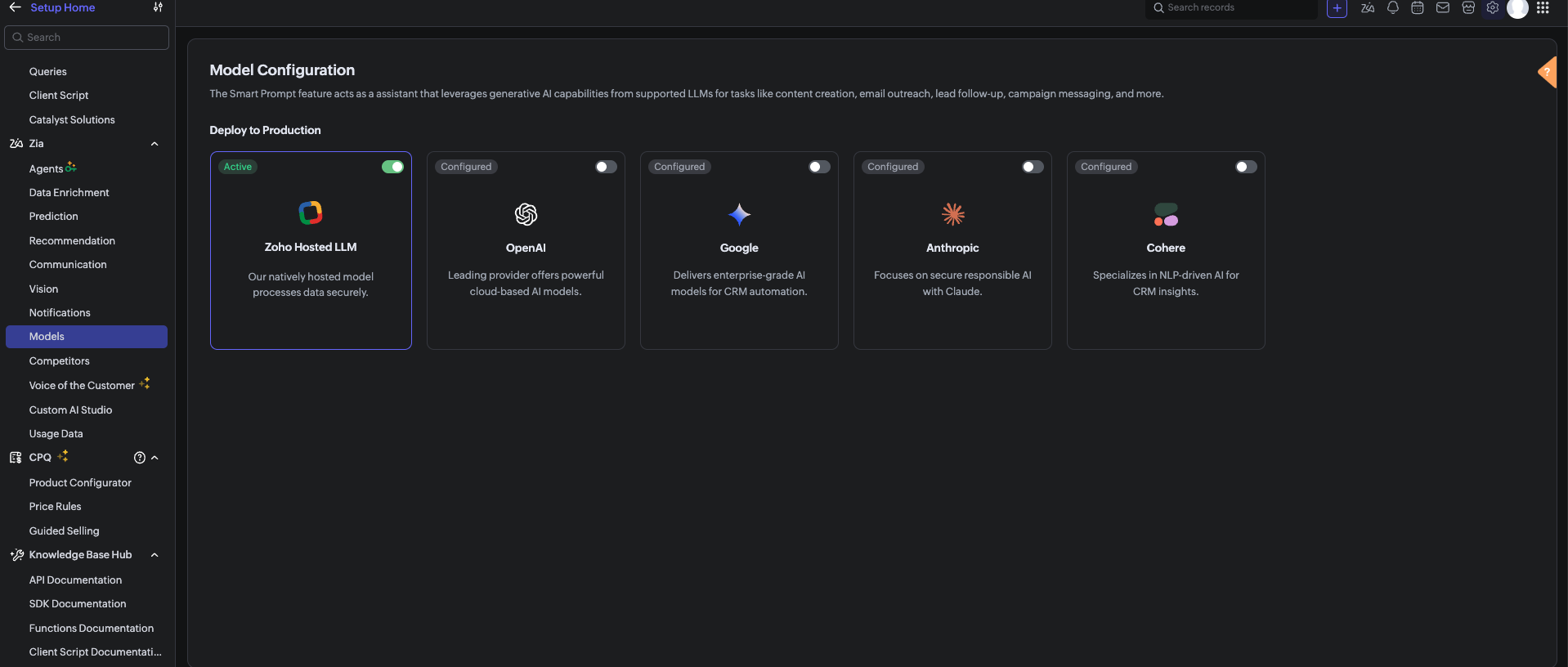
Before using the Zia Assistant API inside the Deluge function, make sure that AI is enabled in Zoho CRM.

To enable AI configuration, go to Setup > Zia > Models > Zoho Hosted LLM vendor.
Note: In V8, only the Zoho Hosted LLM vendor can be enabled and used.           


  1. CRM Connection: Connections with appropriate scopes.

Implementation steps

Step 1: Create custom fields

Navigate to Settings → Customization → Modules and Fields → Deals and create these 6 custom fields:

S.No

Field Label

API Name

Data Type

values

1

Risk

Risk

Picklist

1, 2, 3, 4, 5, 6, 7, 8, 9, 10

Risk: 1 = low risk, Risk 10 = high risk

2

Sentiment

Sentiment

Picklist

Positive, Neutral, Negative

3

AI Analysis

AI_Analysis

Multi-line Text

4

Previous Risk

Previous_Risk

Number

5

Risk Trend

Risk_Trend

Picklist

Increasing, Stable, Decreasing

6

Alert Sent

Alert_Sent

Checkbox


Note: After creating each field, verify the API Name matches exactly. Zoho sometimes appends numbers (example, Sentiment1) if a field name conflicts with existing or deleted fields. 

Step 2: Set up Zoho CRM Connection

  1. Go to Settings → Developer Space → Connections.
  2. Click Create Connection
  3. Select your services.
  4. Name the connection: zohocrm (used in this post)
  5. Add the required scopes
  6. Click Create and Connect
  7. Authorize the connection

Step 3: Create the custom function

  1. Go to Settings → Developer Space → Functions
  2. Click Create Function
  3. Display Name: Deal Notes Sentiment Analysis
  4. Function Name: DealNotesSentimentAnalysis
  5. Category: Automation
  6. Return Type: void
  7. Add Argument: dealId: Deals.Deal Id Type: int
  8. Click Save
      Note: The complete custom function code is provided at the end of this post.

Step 4: Configure the Workflow Rule

  1. Go to Settings → Automation → Workflow Rules
  2. Click Create Rule
  3. Module: Deals
  4. Rule Name: Deal Notes Sentiment Trigger
  5. When: A note is added or modified
  6. Condition: All Deals (or customize as needed)
  7. Instant Action: Associate the custom function →DealNotesSentimentAnalysis
  8. Map the dealId argument to the Deal's Record ID
  9. Click Save

What happens inside the custom function?

At this point, the workflow is fully set up. Whenever a note is added or modified in a deal, the workflow triggers the custom function. But what exactly happens inside this function?
Instead of going through the code line by line, let’s break it down into logical stages to understand how the system works end-to-end.
The snippets below highlight only the core logic for each step.

Note: The complete function code is provided in the next section for reference. You can use and adapt it based on your use case.

Step 1: Gathering complete deal context

The function begins by collecting key details about the deal:
  1.  Deal Name 
  2.  Stage 
  3.  Amount 
  4.  Close Date 
  5.  Deal Owner 
  6.  Existing Risk Score 
This ensures that the analysis is not done in isolation.
 The AI receives full deal context, which improves the accuracy of sentiment and risk evaluation.

dealData = zoho.crm.getRecordById("Deals", dealIdLong);
dealName   = ifnull(dealData.get("Deal_Name"), "");
dealStage  = ifnull(dealData.get("Stage"), "");
dealAmount = ifnull(dealData.get("Amount"), "0");
closeDate  = ifnull(dealData.get("Closing_Date"), "Not defined");
// Existing Risk
existingRisk = ifnull(dealData.get("Risk"), "0").toString().toNumber();
// Owner Info
owner = dealData.get("Owner");
ownerName  = ifnull(owner.get("name"), "");
ownerEmail = ifnull(owner.get("email"), "");


Step 2: Reading All deal notes

Next, the function fetches all notes associated with the deal.
Instead of analyzing only the latest note, it:
  1.  Collects every note.
  2.  Combines them into a structured format.
This allows the system to:
  1.  Identify repeated concerns.
  2.  Detect patterns across conversations.
  3.  Understand the overall direction of the deal.

dealNotes = zoho.crm.getRelatedRecords("Notes", "Deals", dealIdLong);

notesContext = "";
for each note in dealNotes
{
 notesContext = notesContext + "- " + ifnull(note.get("Note_Content"), "") + "\n";
}


Step 3: Sending data to Zia Assistant

The collected deal data and notes are sent to Zia Assistant using a carefully designed prompt.
The prompt includes:
  1.  Definitions of positive, negative, and neutral signals. 
  2.  Real-world sales scenarios (pricing concerns, delays, objections).
  3.  Clear risk scoring guidelines (1 to 10 scale).
This ensures that the AI response is:
  1.  Consistent.
  2.  Context-aware.
  3.  Aligned with real sales behavior.

chatEntry = Map();
chatEntry.put("role", "user");
chatEntry.put("content",
 "Deal Name: " + dealName +
 "\nStage: " + dealStage +
 "\nAmount: " + dealAmount +
 "\nClose Date: " + closeDate +
 "\n\n=== DEAL NOTES ===\n" + notesContext
);

assistantMap.put("chat_history", {chatEntry});
assistantMap.put("prompt", "<custom sentiment + scoring prompt>");

response = invokeurl
[
 type :POST
 parameters: payload.toString()
 connection:"zohocrm"
];

This is where AI transforms raw notes into structured insights.

Step 4: Interpreting the AI response

Zia Assistant analyzes the input and returns a structured response containing:
  1. Overall Sentiment (Positive / Neutral / Negative) 
  2.  Risk Score (1–10) 
  3.  AI Analysis (brief reasoning) 
The function extracts these values for further processing.


aiText = "";

if(response.get("assistant") != null)
{
 aiText = response.get("assistant").get("details").get("data");
}


Step 5: Normalizing the output

Since AI responses can vary slightly in format, the function standardizes the output:
  1. Ensures sentiment matches exact CRM field values 
  2.  Validates risk score within the 1–10 range 
  3.  Cleans up any extra characters or formatting 
This step ensures clean and consistent data inside the CRM.


// Extract & clean risk
riskLine = riskLine.replaceAll("[^0-9]", "", false);
riskScore = riskLine.toNumber();
if(riskScore > 10) riskScore = 10;
if(riskScore < 1)  riskScore = 1;

// Normalize sentiment
sentimentLower = sentiment.toLowerCase();
if(sentimentLower.contains("negative")) sentiment = "Negative";
else if(sentimentLower.contains("positive")) sentiment = "Positive";
else sentiment = "Neutral";


Step 6: Calculating risk trend

The system then compares:
  1. Previous Risk Score 
  2.  Current Risk Score 
Based on this, it determines whether the deal is:
  1. Increasing in risk
  2. Decreasing in risk
  3. Stable
This adds an important layer of intelligence and not just what the risk is, but how it is changing over time.


riskTrend = "Stable";

if(riskScore > existingRisk)
{
    riskTrend = "Increasing";
}
else if(riskScore < existingRisk)
{
    riskTrend = "Decreasing";
}


Step 7: Updating the deal record

Once all values are processed, the function updates the deal with:
  1. Risk 
  2.  Sentiment 
  3.  AI Analysis 
  4.  Previous Risk 
  5.  Risk Trend 
  6.  Alert Sent Flag 
At this stage, the deal record becomes a live reflection of customer sentiment.


updateMap = Map();
updateMap.put("Risk", riskScore.toString());
updateMap.put("Sentiment", sentiment);
updateMap.put("AI_Analysis", analysis);
updateMap.put("Previous_Risk", existingRisk.toString());
updateMap.put("Risk_Trend", riskTrend);
zoho.crm.updateRecord("Deals", dealIdLong, updateMap);


Step 8: Smart email alerting

If the risk score crosses a threshold (Risk > 8), the system triggers an alert to the record owner to take immediate action.
An email is sent to the Deal Owner with:
  1. Deal details 
  2. Risk score 
  3. Sentiment 
  4. Risk trend 
  5. AI analysis 
To avoid alert:
  1. The system checks whether an alert has already been sent. 
  2.  A new alert is triggered only if the risk increases further.
previousAlertSent = ifnull(dealData.get("Alert_Sent"), false);

if(riskScore > 8 && (previousAlertSent == false || riskScore > existingRisk) && ownerEmail != "")
{
    // Send alert email
    mailPayload = {
        "from": {"user_name": ownerName, "email": zoho.crm.getOrgVariable("defaultMail")},
        "to": {{"user_name": ownerName, "email": ownerEmail}},
        "subject": "🚨 Deal At Risk: " + dealName,
        "content": "Risk Score: " + riskScore + "/10<br>Sentiment: " + sentiment + "<br><br>" + analysis,
        "mail_format": "html"
    };

    invokeurl
    [
        url :"https://www.zohoapis.com/crm/v8/Deals/" + dealIdLong + "/actions/send_mail"
        type :POST
        parameters: {"data": {mailPayload}}.toString()
        headers: {"Content-Type":"application/json"}
        connection: "zohocrm"
    ];

    zoho.crm.updateRecord("Deals", dealIdLong, {"Alert_Sent": true});
}
else if(riskScore <= 8)
{
    // Reset alert flag
    zoho.crm.updateRecord("Deals", dealIdLong, {"Alert_Sent": false});
}

Step 9: Dynamic tag management

Finally, the system visually marks high-risk deals:
  1.  If Risk > 8 → Adds tag “High Risk Deal”
  2.  If Risk reduces → Removes the tag automatically 
This makes it easy for users to:
  1.  Identify risky deals instantly 
  2.  Prioritize follow-ups 

if(riskScore > 8)
{
 invokeurl
 [
 url :"https://www.zohoapis.com/crm/v8/Deals/" + dealIdLong + "/actions/add_tags"
 type :POST
 parameters: tagPayload.toString()
 connection:"zohocrm"
 ];
}
else
{
 invokeurl
 [
 url :"https://www.zohoapis.com/crm/v8/Deals/" + dealIdLong + "/actions/remove_tags"
 type :POST
 parameters: tagPayload.toString()
 connection:"zohocrm"
 ];


Complete custom function code
The complete Deluge script used in this implementation is provided below for reference and direct use:

Notes
  1. To get better sentiment detection, use a clear and strong prompt in the Zia Assistant API.
  2. The output depends on how well the prompt defines positive, negative, and neutral signals.
  3. Zia looks at the overall trend of notes, not just one note.
  4. If a deal had negative notes earlier but recent notes are positive, the risk (Risk field ) will decrease
  5. If new negative notes are added, the risk will increase.
  6. Sometimes Zia Assistant may not detect sentiment perfectly, as it is AI-based

Conclusion

This automation transforms deal notes from passive text into actionable intelligence. Instead of relying on sales managers to read hundreds of notes manually, Zia Assistant does it automatically detecting sentiment, scoring risk, tracking trends, alerting owners, and tagging high-risk deals all in real time.

We trust that this post meets your needs and is helpful. Let us know your thoughts in the comment section or reach out to us at support@zohocrm.com

Stay tuned for more insights in our upcoming Kaizen posts!

Happy coding!!!

Related Links:
  1. Kaizen Index
  2. Kaizen Directory
  3. API Directory
  4. Zoho CRM API Document


    • Sticky Posts

    • Kaizen #198: Using Client Script for Custom Validation in Blueprint

      Nearing 200th Kaizen Post – 1 More to the Big Two-Oh-Oh! Do you have any questions, suggestions, or topics you would like us to cover in future posts? Your insights and suggestions help us shape future content and make this series better for everyone.
    • Kaizen #226: Using ZRC in Client Script

      Hello everyone! Welcome to another week of Kaizen. In today's post, lets see what is ZRC (Zoho Request Client) and how we can use ZRC methods in Client Script to get inputs from a Salesperson and update the Lead status with a single button click. In this
    • Kaizen #222 - Client Script Support for Notes Related List

      Hello everyone! Welcome to another week of Kaizen. The final Kaizen post of the year 2025 is here! With the new Client Script support for the Notes Related List, you can validate, enrich, and manage notes across modules. In this post, we’ll explore how
    • Kaizen #217 - Actions APIs : Tasks

      Welcome to another week of Kaizen! In last week's post we discussed Email Notifications APIs which act as the link between your Workflow automations and you. We have discussed how Zylker Cloud Services uses Email Notifications API in their custom dashboard.
    • Kaizen #216 - Actions APIs : Email Notifications

      Welcome to another week of Kaizen! For the last three weeks, we have been discussing Zylker's workflows. We successfully updated a dormant workflow, built a new one from the ground up and more. But our work is not finished—these automated processes are
    • Recent Topics

    • Create Tasklist with Tasklist Template using API v3

      In the old API, we could mention the parameter 'task_template_id' when creating a tasklist via API to apply a tasklist template: https://www.zoho.com/projects/help/rest-api/tasklists-api.html#create-tasklist In API v3 there does not seem to be a way to
    • Add multiple users to a task

      When I´m assigning a task it is almost always related to more than one person. Practical situation: When a client request some improvement the related department opens the task with the situation and people related to it as the client itself, the salesman
    • iOS Books app shows filtered view after changing to All sales orders

      My boss often checks sales orders on his iPhone. The app is mostly working fine, but there's an ongoing issue: When switching between different filters (also called custom views on the web), going back to All doesn't often work. It typically gets stuck
    • Problem with the blueprint flow.

      Scenario: 3 departments in a single environment: A-B-C agents from department 1 D-E-F agents from department 2 G-H agents from department 3 Since we've been using Zohodesk (2023), agents can assign tickets to the correct department using the blueprint
    • Empowered Custom Views: Cross-Module Criteria Now Supported in Zoho CRM

      Hello everyone, We’re excited to introduce cross-module criteria support in custom views! Custom views provide personalized perspectives on your data and that you can save for future use. You can share these views with all users or specific individuals
    • Recurring Invoices

      I'm looking to set up recurring invoices on a monthly basis, using GoCardless as a payment gateway. I've done this successfully, however there's a big problem with the Invoice Date and Due Date. We prefer to provide sufficient notice of collection (10
    • Recurring Events Not Appearing in "My Events" and therefore not syncing with Google Apps

      We use the Google Sync functionality for our events, and it appears to have been working fine except: I've created a set of recurring events that I noticed were missing from my Google Apps calendar. Upon further research, it appears this is occurring
    • Vorrei disdire l'abbonamento

      Vorrei disdire l'abbonamento, ma non trovo il modo. Mi assistete?
    • Service line items

      Hello Latha, Could you please let me know the maximum number of service line items that can be added to a single work order? Thanks, Chethiya.
    • Has anyone successfully gotten conditional rendering to work in Zoho Books Sales Order HTML PDF templates?

      I’m trying to hide a custom field box when the custom field is blank. The value placeholder itself works perfectly: ${salesorder.cf_distribution_reference_numb} If the Sales Order has a value, it renders correctly. Example: 45488045. But when I wrap that
    • What's New in Zoho Inventory | April & May 2026

      Hello users, We're excited to roll out the latest Zoho Inventory updates for April and May 2026. These enhancements are designed to make your daily operations smoother and more efficient, from advanced inventory management and flexible pricing to automated
    • Latest updates to Zia in Office Integrator

      Hello Zoho Office Integrator users! We’re pleased to share exciting updates to the proofing capabilities of Zia, our AI-driven writing assistant, in Office Integrator. With these updates, you can now get spell and grammar check in Brazilian Portuguese,
    • How To Invoice Immediately for Future Subscription

      Hi, When a new subscription is created that has a future start date, Zoho Subscriptions does not invoice the customer until the start date of the subscription. Is there a way to immediately invoice the customer as soon as the subscription is created,
    • Implementing Back Button Navigation in Zoho Creator

      Zoho Creator does not currently support a native Back button within forms, so implementing backward navigation requires a workaround. We recently implemented this in an application that was split into 9 modular forms. Since users needed to move between
    • Deleted User Emails

      I need to delete a user as I need to re-use their license, but I'd like to keep all their emails that are attached to various contacts in the CRM. Their emails are hosted externally on an M365 license. Anyone any idea how best to engineer this? TIA
    • In wiki editor, dragging an image fails

      Expected behavior: Within the WYSIWYG editor, we have been able to select and drag an image (that is already inserted in the page) to move it to a different position on the page. Current behavior: For a few days recently (possibly longer and I didn't
    • Not able to see appointements when the territory permission is activated

      Hello, I created different territories to separate the various departments within the company that will be working on different projects. The issue I am currently experiencing is that when I enable territory-based permissions, I can see the work order
    • Print multiple uploaded images in an HTML snippet in a Page

      I have a Form: Job_Preparation It stores details of each new item that must be built by the fabricators in our workshop. The form has a field: Documents I upload 4 image files to the Documents field. I want to print a sheet for our workshop staff with
    • Quotes Module - import data

      Hello Zoho, is it possible to import Quotes records? I was trying and i have no results. Raport shows no data imported. Could you help me please how to do it?
    • Introducing the new Zoho Announcements Hub

      Hello, Enterprise Support Community! We are excited to announce a new way to keep up to date with recent product releases and announcements for the Zoho apps you use on a regular basis. Introducing our new centralized location to bring together all Zoho
    • Introducing Custom Columns in Forecasts in Zoho CRM

      Hello all, Forecasts in Zoho CRM help sales representatives, managers, and business stakeholders evaluate performance and plan future sales activities. While standard metrics such as Target, Achieved Amount, and Pipeline Amount provide a baseline view,
    • Can Zoho CRM Emails be used in Zoho Analytics in any capacity?

      We're wanting to display details about Lead Activity in regular reports through Zoho Analytics but we're having difficulty integrating Emails at all. We'd like to be able to note when an email is received and when it is sent somewhere other than just
    • Related list view for Assets

      We first set up all our parent assets in FSM and now we are adding child assets which are the parts for the parent assets. When under the customer related list, since it only displays 5 rows of data, I have to click through many assets to locate the parent
    • Zoho Books - France

      L’équipe de Zoho France reçoit régulièrement des questions sur la conformité de ses applications de finances (Zoho Books/ Zoho Invoice) pour le marché français. Voici quelques points pour clarifier la question : Zoho Books est un logiciel de comptabilité
    • Smart URL Determination

      I would like to see Vault implement some sort of "smart" URL determination. When one starts to add a new username-password combination from a new site, Vault brings in the exact URL of the page from which this is happening. All too often, it looks something
    • Project Statuses

      Hi All, We have projects that sometimes may not make it through to completion. As such, they were being marked as "Cancelled". I noticed that these projects still show as "Active" though which seems counter intuitive. In fact, the only way I can get them
    • Composite Services and Account Tracking

      I am looking to garner support/request the ability to make composite services. A quick search in the forums brings up multiple requests for this feature. I fail to see why an item is mandatory while services are optional. I also would like to see the
    • Marketer's Space: Lists vs. segments—what's the difference?

      Hello Marketers, Welcome back to another post in Marketer's Space! In email marketing, reaching the right audience is just as important as crafting the right message. Yet many marketers often confuse lists and segments, using them interchangeably without
    • Building a Multi-Step Form Experience in Zoho Creator Using Standard Forms

      Zoho Creator does not currently provide native multi-step form functionality. For applications with a large number of fields, a common requirement is to split data collection into manageable sections while maintaining a single application record. In this
    • Add Video link to interview record

      Hi Team, we are having team members consistently go to the interview record to find the link for their upcoming meeting and have been confused that they have not been able to find them. When the interview is created can you please upload the link to the
    • Zoho projects dependancies is a joke

      About to cancel our Zoho One subscription because Zoho Projects is a mess. Can't build a proper progream in it because the dependancies doesn't work properly. Can't believe this software is promoter as a project program when one can't even build a proper
    • Wiki Add Attachment upload fails at about 15.3 MB

      I am seeing consistent "Error in uploading file" for files larger than about 15,430 kB. For 15,300 kB or smaller, no problem, but 15,430 kB or larger always fail. This is over numerous trials. My test files, to examine this problem, were generated by
    • Stop Wasting Clicks: Let Us See All Notes in Quick View

      Hi Zoho Recruit team, I would like to suggest an improvement to the candidate/application experience in Zoho Recruit. Today, it is difficult to get a full picture of a candidate when working from the Quick View, since notes are split between: Notes related
    • Zoho Books | Product updates | June 2026

      Hello users, Welcome to this month's roundup of what's new in Zoho Books! We have an exciting line-up this time. The highlight is the launch of the all-new France Edition with full ISCA compliance. We're also introducing features such as Layout Rules
    • issue invoice for future subscription

      Hi, I selected the invoice at the date of subscription from the setting (since the alternative is to pre-set a date of a month) which is not my case. So, my question : Some times I need to create a subscription that will start at a future date but I need
    • Associate emails from both primary and secondary contacts to deal

      We need to associate emails from multiple contacts to a deal. Please advise how this can be achieved. At present, only emails from primary contacts can be associated. Thanks
    • How to set default reply email address depending on receipt email address

      Hi, I have a number of different customer support email addresses (info@XYZ.com, retuns@XYZ.com etc.) and want to set Zoho Desk so that the email address from which an agent replies is automatically defaulted to a predetermined address depending to which
    • Writer is horrible

      Form filling is about unusable for complex forms! I am so tired of it.
    • How to Migrate from MDaemon to Zoho Mail Account?

      Hi there, Zoho Mail is one of the most popular as well as leading competitor for several cloud email service providers. It is It provide cloud email service as well as desktop based email client. In recent years people are migrating from third party cloud servers to Zoho Mail. The reasons are plenty, i.e. the user interface, security, high performance and many countless amazing features. On the other hand MDaemon Mail (aka WorldClient) is also popular among cloud email servers. But there are some
    • Trigger workflows from SLA escalations in Zoho Desk?

      Hey everyone, I’m currently working with SLA escalation rules in Zoho Desk and ran into a limitation that I’m hoping someone here has solved more elegantly. As far as I can tell, SLA escalations only support fairly limited actions (like changing the ticket
    • Next Page