Deal Notes Sentiment Analysis with Zia Assistant API, Workflow, Deluge in Zoho CRM

Deal Notes Sentiment Analysis with Zia Assistant API, Workflow, Deluge in Zoho CRM


Hello all! 
Welcome back to a fresh Kaizen week. 
In this post, we will explore how to detect negative sentiment in notes added to a deal in Zoho CRM using the Zia Assistant API with Workflow and Custom Functions.

Introduction

Sales teams capture every interaction in notes such as calls, emails, meetings, and feedback. These notes contain important signals that indicate whether a deal is progressing or at risk.
As deals grow, manually tracking every note becomes difficult. Important signals are often missed, leading to delayed actions.
This solution builds an automated system that reads notes, detects sentiment, assigns a risk score, tracks changes over time, sends alerts, and highlights high-risk deals.

Final output

Here is how the system automatically analyses and updates the deal when a negative sentiment note is added.


Let us look at an example scenario to understand the challenge.

Example Scenario

A team manages around 50 active deals, each with 8 to 10 notes. This results in hundreds of notes to review. It is not practical for a manager to read all of them. Signals like “customer is evaluating competitors” can easily go unnoticed, and by the time they are identified, the deal is already at risk.

The real cost of missed signals

When negative sentiment goes undetected:

What Happens

Business Impact

Customer says "too expensive" in a note

Deal lost to competitor offering lower price

Customer cancels 2 meetings in a row

Prevent deals from going cold by detecting repeated meeting cancellations early and triggering timely follow-ups.

Customer mentions "evaluating other options"

Identify when customers start evaluating other options and respond quickly before they finalize their decision.

Customer says "not a priority right now"

Deal sits in pipeline for months, inflating forecasts

The common thread? The warning signs were there in the notes, but no one caught them in time.

What sales teams need?
  1. Automatic monitoring of every deal note as it's added.
  2. Zia Assistant's analysis that understands context, not just keywords.
  3. Risk scoring that quantifies how much danger a deal is in.
  4. Trend tracking to see if things are getting better or worse.The system retrieves the existing risk from the deal and compares it with the new risk calculated by Zia. Based on this comparison, it sets the trend as Increasing, Decreasing, or Stable.
  5. Instant alerts via mail when a deal crosses into dangerous territory.

Solution

Using three native Zoho CRM capabilities with the Workflow Rule, Custom Functions, and Zia Assistant API, we built an end-to-end automation with 9 steps:
  1. Fetches deal details: Name, Stage, Amount, Close date, Owner, Existing risk.
  2. Collects all deal notes: Every note linked to the deal.
  3. Sends to Zia Assistant: With enhanced prompt and classification guidelines.
  4. Extracts AI response: Structured sentiment, Risk score, and AI Analysis.
  5. Parses & normalizes: Cleans up AI output to match exact field values.
  6. Calculates risk trend: Compares current risk vs previous risk.
  7. Updates deal record: Writes all 6 custom fields.
  8. Sends email alert: Notifies deal owner if risk > 8.
  9. Manages tags: Adds/removes High Risk Deal tag automatically.
The entire flow runs automatically in the background every time a note is added or modified. Zero manual effort from the sales team.

Prerequisites

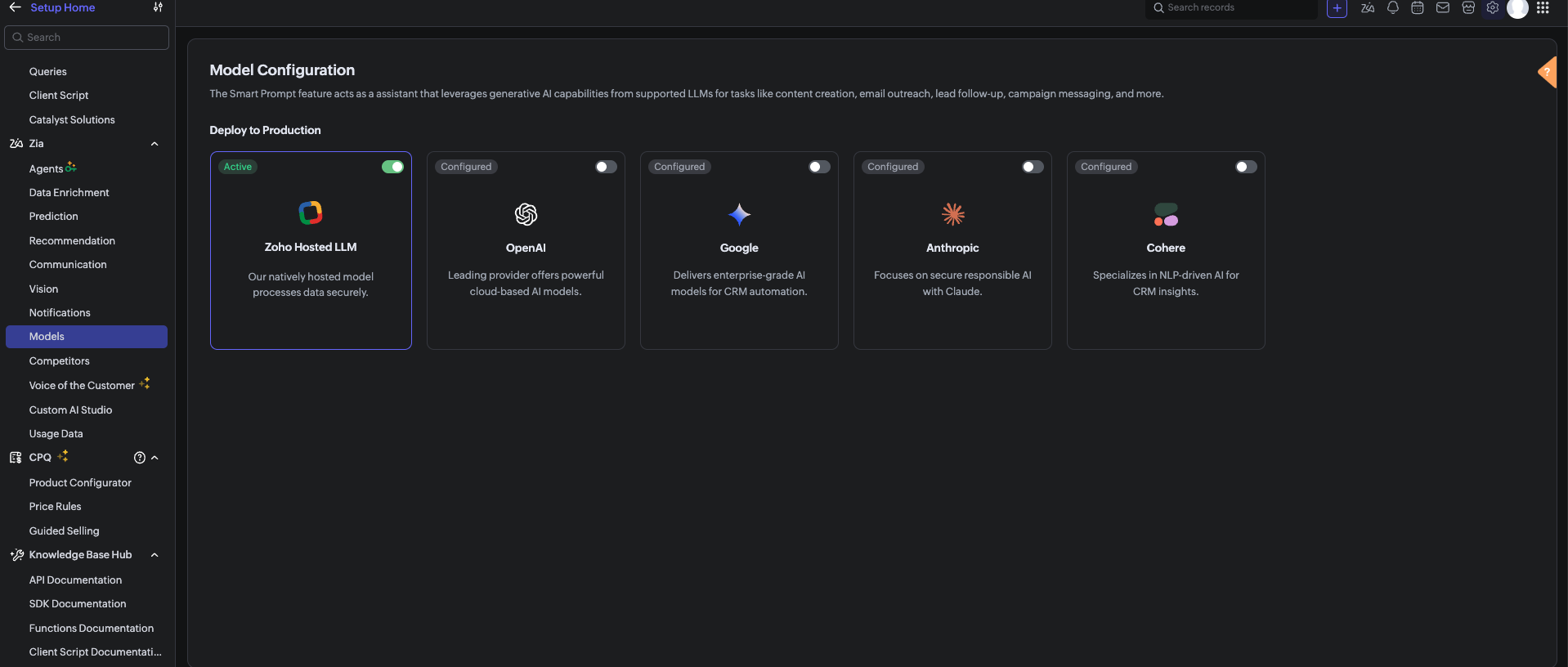
Before using the Zia Assistant API inside the Deluge function, make sure that AI is enabled in Zoho CRM.

To enable AI configuration, go to Setup > Zia > Models > Zoho Hosted LLM vendor.
Note: In V8, only the Zoho Hosted LLM vendor can be enabled and used.           


  1. CRM Connection: Connections with appropriate scopes.

Implementation steps

Step 1: Create custom fields

Navigate to Settings → Customization → Modules and Fields → Deals and create these 6 custom fields:

S.No

Field Label

API Name

Data Type

values

1

Risk

Risk

Picklist

1, 2, 3, 4, 5, 6, 7, 8, 9, 10

Risk: 1 = low risk, Risk 10 = high risk

2

Sentiment

Sentiment

Picklist

Positive, Neutral, Negative

3

AI Analysis

AI_Analysis

Multi-line Text

4

Previous Risk

Previous_Risk

Number

5

Risk Trend

Risk_Trend

Picklist

Increasing, Stable, Decreasing

6

Alert Sent

Alert_Sent

Checkbox


Note: After creating each field, verify the API Name matches exactly. Zoho sometimes appends numbers (example, Sentiment1) if a field name conflicts with existing or deleted fields. 

Step 2: Set up Zoho CRM Connection

  1. Go to Settings → Developer Space → Connections.
  2. Click Create Connection
  3. Select your services.
  4. Name the connection: zohocrm (used in this post)
  5. Add the required scopes
  6. Click Create and Connect
  7. Authorize the connection

Step 3: Create the custom function

  1. Go to Settings → Developer Space → Functions
  2. Click Create Function
  3. Display Name: Deal Notes Sentiment Analysis
  4. Function Name: DealNotesSentimentAnalysis
  5. Category: Automation
  6. Return Type: void
  7. Add Argument: dealId: Deals.Deal Id Type: int
  8. Click Save
      Note: The complete custom function code is provided at the end of this post.

Step 4: Configure the Workflow Rule

  1. Go to Settings → Automation → Workflow Rules
  2. Click Create Rule
  3. Module: Deals
  4. Rule Name: Deal Notes Sentiment Trigger
  5. When: A note is added or modified
  6. Condition: All Deals (or customize as needed)
  7. Instant Action: Associate the custom function →DealNotesSentimentAnalysis
  8. Map the dealId argument to the Deal's Record ID
  9. Click Save

What happens inside the custom function?

At this point, the workflow is fully set up. Whenever a note is added or modified in a deal, the workflow triggers the custom function. But what exactly happens inside this function?
Instead of going through the code line by line, let’s break it down into logical stages to understand how the system works end-to-end.
The snippets below highlight only the core logic for each step.

Note: The complete function code is provided in the next section for reference. You can use and adapt it based on your use case.

Step 1: Gathering complete deal context

The function begins by collecting key details about the deal:
  1.  Deal Name 
  2.  Stage 
  3.  Amount 
  4.  Close Date 
  5.  Deal Owner 
  6.  Existing Risk Score 
This ensures that the analysis is not done in isolation.
 The AI receives full deal context, which improves the accuracy of sentiment and risk evaluation.

dealData = zoho.crm.getRecordById("Deals", dealIdLong);
dealName   = ifnull(dealData.get("Deal_Name"), "");
dealStage  = ifnull(dealData.get("Stage"), "");
dealAmount = ifnull(dealData.get("Amount"), "0");
closeDate  = ifnull(dealData.get("Closing_Date"), "Not defined");
// Existing Risk
existingRisk = ifnull(dealData.get("Risk"), "0").toString().toNumber();
// Owner Info
owner = dealData.get("Owner");
ownerName  = ifnull(owner.get("name"), "");
ownerEmail = ifnull(owner.get("email"), "");


Step 2: Reading All deal notes

Next, the function fetches all notes associated with the deal.
Instead of analyzing only the latest note, it:
  1.  Collects every note.
  2.  Combines them into a structured format.
This allows the system to:
  1.  Identify repeated concerns.
  2.  Detect patterns across conversations.
  3.  Understand the overall direction of the deal.

dealNotes = zoho.crm.getRelatedRecords("Notes", "Deals", dealIdLong);

notesContext = "";
for each note in dealNotes
{
 notesContext = notesContext + "- " + ifnull(note.get("Note_Content"), "") + "\n";
}


Step 3: Sending data to Zia Assistant

The collected deal data and notes are sent to Zia Assistant using a carefully designed prompt.
The prompt includes:
  1.  Definitions of positive, negative, and neutral signals. 
  2.  Real-world sales scenarios (pricing concerns, delays, objections).
  3.  Clear risk scoring guidelines (1 to 10 scale).
This ensures that the AI response is:
  1.  Consistent.
  2.  Context-aware.
  3.  Aligned with real sales behavior.

chatEntry = Map();
chatEntry.put("role", "user");
chatEntry.put("content",
 "Deal Name: " + dealName +
 "\nStage: " + dealStage +
 "\nAmount: " + dealAmount +
 "\nClose Date: " + closeDate +
 "\n\n=== DEAL NOTES ===\n" + notesContext
);

assistantMap.put("chat_history", {chatEntry});
assistantMap.put("prompt", "<custom sentiment + scoring prompt>");

response = invokeurl
[
 type :POST
 parameters: payload.toString()
 connection:"zohocrm"
];

This is where AI transforms raw notes into structured insights.

Step 4: Interpreting the AI response

Zia Assistant analyzes the input and returns a structured response containing:
  1. Overall Sentiment (Positive / Neutral / Negative) 
  2.  Risk Score (1–10) 
  3.  AI Analysis (brief reasoning) 
The function extracts these values for further processing.


aiText = "";

if(response.get("assistant") != null)
{
 aiText = response.get("assistant").get("details").get("data");
}


Step 5: Normalizing the output

Since AI responses can vary slightly in format, the function standardizes the output:
  1. Ensures sentiment matches exact CRM field values 
  2.  Validates risk score within the 1–10 range 
  3.  Cleans up any extra characters or formatting 
This step ensures clean and consistent data inside the CRM.


// Extract & clean risk
riskLine = riskLine.replaceAll("[^0-9]", "", false);
riskScore = riskLine.toNumber();
if(riskScore > 10) riskScore = 10;
if(riskScore < 1)  riskScore = 1;

// Normalize sentiment
sentimentLower = sentiment.toLowerCase();
if(sentimentLower.contains("negative")) sentiment = "Negative";
else if(sentimentLower.contains("positive")) sentiment = "Positive";
else sentiment = "Neutral";


Step 6: Calculating risk trend

The system then compares:
  1. Previous Risk Score 
  2.  Current Risk Score 
Based on this, it determines whether the deal is:
  1. Increasing in risk
  2. Decreasing in risk
  3. Stable
This adds an important layer of intelligence and not just what the risk is, but how it is changing over time.


riskTrend = "Stable";

if(riskScore > existingRisk)
{
    riskTrend = "Increasing";
}
else if(riskScore < existingRisk)
{
    riskTrend = "Decreasing";
}


Step 7: Updating the deal record

Once all values are processed, the function updates the deal with:
  1. Risk 
  2.  Sentiment 
  3.  AI Analysis 
  4.  Previous Risk 
  5.  Risk Trend 
  6.  Alert Sent Flag 
At this stage, the deal record becomes a live reflection of customer sentiment.


updateMap = Map();
updateMap.put("Risk", riskScore.toString());
updateMap.put("Sentiment", sentiment);
updateMap.put("AI_Analysis", analysis);
updateMap.put("Previous_Risk", existingRisk.toString());
updateMap.put("Risk_Trend", riskTrend);
zoho.crm.updateRecord("Deals", dealIdLong, updateMap);


Step 8: Smart email alerting

If the risk score crosses a threshold (Risk > 8), the system triggers an alert to the record owner to take immediate action.
An email is sent to the Deal Owner with:
  1. Deal details 
  2. Risk score 
  3. Sentiment 
  4. Risk trend 
  5. AI analysis 
To avoid alert:
  1. The system checks whether an alert has already been sent. 
  2.  A new alert is triggered only if the risk increases further.
previousAlertSent = ifnull(dealData.get("Alert_Sent"), false);

if(riskScore > 8 && (previousAlertSent == false || riskScore > existingRisk) && ownerEmail != "")
{
    // Send alert email
    mailPayload = {
        "from": {"user_name": ownerName, "email": zoho.crm.getOrgVariable("defaultMail")},
        "to": {{"user_name": ownerName, "email": ownerEmail}},
        "subject": "🚨 Deal At Risk: " + dealName,
        "content": "Risk Score: " + riskScore + "/10<br>Sentiment: " + sentiment + "<br><br>" + analysis,
        "mail_format": "html"
    };

    invokeurl
    [
        url :"https://www.zohoapis.com/crm/v8/Deals/" + dealIdLong + "/actions/send_mail"
        type :POST
        parameters: {"data": {mailPayload}}.toString()
        headers: {"Content-Type":"application/json"}
        connection: "zohocrm"
    ];

    zoho.crm.updateRecord("Deals", dealIdLong, {"Alert_Sent": true});
}
else if(riskScore <= 8)
{
    // Reset alert flag
    zoho.crm.updateRecord("Deals", dealIdLong, {"Alert_Sent": false});
}

Step 9: Dynamic tag management

Finally, the system visually marks high-risk deals:
  1.  If Risk > 8 → Adds tag “High Risk Deal”
  2.  If Risk reduces → Removes the tag automatically 
This makes it easy for users to:
  1.  Identify risky deals instantly 
  2.  Prioritize follow-ups 

if(riskScore > 8)
{
 invokeurl
 [
 url :"https://www.zohoapis.com/crm/v8/Deals/" + dealIdLong + "/actions/add_tags"
 type :POST
 parameters: tagPayload.toString()
 connection:"zohocrm"
 ];
}
else
{
 invokeurl
 [
 url :"https://www.zohoapis.com/crm/v8/Deals/" + dealIdLong + "/actions/remove_tags"
 type :POST
 parameters: tagPayload.toString()
 connection:"zohocrm"
 ];


Complete custom function code
The complete Deluge script used in this implementation is provided below for reference and direct use:

Notes
  1. To get better sentiment detection, use a clear and strong prompt in the Zia Assistant API.
  2. The output depends on how well the prompt defines positive, negative, and neutral signals.
  3. Zia looks at the overall trend of notes, not just one note.
  4. If a deal had negative notes earlier but recent notes are positive, the risk (Risk field ) will decrease
  5. If new negative notes are added, the risk will increase.
  6. Sometimes Zia Assistant may not detect sentiment perfectly, as it is AI-based

Conclusion

This automation transforms deal notes from passive text into actionable intelligence. Instead of relying on sales managers to read hundreds of notes manually, Zia Assistant does it automatically detecting sentiment, scoring risk, tracking trends, alerting owners, and tagging high-risk deals all in real time.

We trust that this post meets your needs and is helpful. Let us know your thoughts in the comment section or reach out to us at support@zohocrm.com

Stay tuned for more insights in our upcoming Kaizen posts!

Happy coding!!!

Related Links:
  1. Kaizen Index
  2. Kaizen Directory
  3. API Directory
  4. Zoho CRM API Document


    • Sticky Posts

    • Kaizen #198: Using Client Script for Custom Validation in Blueprint

      Nearing 200th Kaizen Post – 1 More to the Big Two-Oh-Oh! Do you have any questions, suggestions, or topics you would like us to cover in future posts? Your insights and suggestions help us shape future content and make this series better for everyone.
    • Kaizen #226: Using ZRC in Client Script

      Hello everyone! Welcome to another week of Kaizen. In today's post, lets see what is ZRC (Zoho Request Client) and how we can use ZRC methods in Client Script to get inputs from a Salesperson and update the Lead status with a single button click. In this
    • Kaizen #222 - Client Script Support for Notes Related List

      Hello everyone! Welcome to another week of Kaizen. The final Kaizen post of the year 2025 is here! With the new Client Script support for the Notes Related List, you can validate, enrich, and manage notes across modules. In this post, we’ll explore how
    • Kaizen #217 - Actions APIs : Tasks

      Welcome to another week of Kaizen! In last week's post we discussed Email Notifications APIs which act as the link between your Workflow automations and you. We have discussed how Zylker Cloud Services uses Email Notifications API in their custom dashboard.
    • Kaizen #216 - Actions APIs : Email Notifications

      Welcome to another week of Kaizen! For the last three weeks, we have been discussing Zylker's workflows. We successfully updated a dormant workflow, built a new one from the ground up and more. But our work is not finished—these automated processes are
    • Recent Topics

    • Is there provision to charge the attendees to join the webinar?

      We want to host some webinar of public interest and want to charge them to participate in this. Does this feature in-build in the application? Offcourse, we will be having Razor pay account activated for these purpose.
    • Pricelists

      So we have them in books but I cannot find them in commerce?
    • Desktop app doesn't support notecards created on Android

      Hi, Does anybody have same problem? Some of last notecards created on Android app (v. 6.6) doesn't show in desktop app (v. 3.5.5). I see these note cards but whith they appear with exclamation mark in yellow triangle (see screenshot) and when I try to
    • Don't send customer email when creating a ticket

      Hi Is there an easy way to stop the system sending an email to the customer when we manually create ticket.
    • Connecting a contact with the deal + Emails not showing up under Deals

      Hello. I have two problems. Im not sure if the problem is due to level of my subscription - Im on Proffessional plan. 1. I have a JotForm connected with ZohoCRM which automatically creates a contact and a new deal based on form submission. That is done
    • How to add custom icons in Sites ?

      I've been trying to upload some of my own icons (specific to my business) to my zoho Site draft, and can't find a way to do it. I guess the workaround could be to insert images instead of icons and upload my icons as images, but I was wondering if its possible to customize the icon library.
    • Accessing GDPR Data Source metadata for workflows and Zoho Analytics

      Hi everyone, We have GDPR compliance enabled in Zoho CRM, which has added the Data Source section within the Data Privacy tab for Leads and Contacts. This section shows useful information such as: Original creation source, for example Zoho Forms Form
    • Tiktok

      When will Tiktok be added to the Zoho Social Platform?
    • Zoho Mail iOS app update: Spam Controls & Sender Verification

      Hello everyone! We are excited to introduce spam control enhancements in the Zoho Mail iOS app update. Let's dive into what's new. Spam Alerts in Mail Preview : Mail preview now shows warning alerts for emails identified as potentially harmful, helping
    • Mise à jour de Zoho Books – France

      Chers clients, Merci pour votre patience et votre soutien continu. Avec les évolutions réglementaires à venir en France nous introduisons de nouvelles fonctionnalités dans Zoho Books pour les clients français. Ces mises à jour ont été conçues pour répondre
    • Admin Logging in as another User

      How can a Super Admin login as another user. For example, I have a sales rep that is having issues with their Accounts and I want to view their Zoho Account with out having to do a GTM and sharing screens. Latest Update (27th April 2026): With the early
    • Zoho Books API: Bulk update thousands of records using Node.js with OAuth refresh, retries and resume support

      Hello everyone, During Zoho Books implementations, one common challenge is updating a large number of existing records. The current options are usually: Update records manually from the UI using Mass Update (with limited batch size). Update records one
    • SalesIQ's Summer '26 Release: For The Moments That Matter

      Every customer journey is made up of moments. The moment someone discovers your business. The moment they need help. The moment you decide to reach out. The moment a simple chat turns into something more. And the moments that continue long after the conversation
    • CNIL - Suivi de Pixel

      Bonjour à tous, À la suite de la nouvelle recommandation de la CNIL sur les pixels de suivi dans les e-mails, savez-vous si Zoho Campaigns permet : de conditionner le suivi des ouvertures au consentement de chaque contact ; de proposer un lien permettant
    • Customer/Vendor Portal session duration - can it be extended?

      Hi all, We'd like to know how long the login session lasts for the Customer/Vendor Portal in Zoho Books, and whether there's any way to extend it (either through settings or via support/API). Right now this is causing a pretty poor experience for our
    • Accessible & Customizable User Governance in Zoho Projects!

      As teams expand and collaborate with multiple external collaborators across projects, keeping control of user access to project data becomes a challenge. Mismanaged access can cause accidental or unauthorized edits, data leaks and lack of accountability.
    • Bulk deleting Zoho CRM records using Deluge, COQL and CRM API

      Hello everyone, During CRM implementations, data cleanup is a common task, especially after testing, migrations, imports, or integration development. The Zoho CRM UI allows deleting records in batches of 100, which is not practical when dealing with thousands
    • CNIL - Suivi de Pixel

      Bonjour à tous, À la suite de la nouvelle recommandation de la CNIL sur les pixels de suivi dans les e-mails, savez-vous si Zoho Campaigns permet : de conditionner le suivi des ouvertures au consentement de chaque contact ; de proposer un lien permettant
    • Zoho CRM Layout Rules: Nine New Actions, Profile-Based Execution, and Interactive Preview

      Hello everyone, Availability: This feature is now available for customers in the JP and SA DCs. It is planned to be released for other customers in soon. We’re excited to announce powerful new enhancements to Layout Rules in Zoho CRM - a feature built
    • How to View Part Inventory and Warehouse Location When Creating a Work Order in Zoho FSM

      Hi everyone, We’re currently setting up Zoho FSM and would like to improve how our team selects parts when creating a Work Order. Right now, when we add a part or item to a Work Order, we can select it from our Zoho Inventory list but we don’t see any
    • Zoho Sprints - Q2 Updates for 2026

      Improve your agile project management experience with the newly released capabilities in Zoho Sprints. This quarter we've shipped a few new features and enhancements that are built around smarter planning and execution tools, tighter integrations, and
    • Problem with currency field in Zoho CRM

      Hi Guys Zoho Books has a feature in currency fields that automatically converts decimal numbers with commas ( , ) to period format ( . ) when pasting them. For example: R$ 2,50 --> R$ 2.50 Is this behavior available in Zoho CRM? I couldn't find any configuration
    • Building extensions #5: Creating custom user interfaces using widgets

      In our last post, we looked at connections and how they help build a seamless integration with an example. In this post, we'll explore creating widgets in Zoho Sprints and their benefits with a real-time example. Widgets What and where? Widgets are custom
    • Images not saved in notes

      Created noteboards and create a note, copy pasted the image, close the note and open again, image is not coming this same problem occurs in note on notebook I have attached the replication steps as video url to analyse it, and also attached the videos
    • How to Change Notecard Color After It Is Created

      I would like to change the color of a Notecard that already exists in my notebook. I can't for the life of me figure out how to do it. I don't see an option or color picker anywhere.
    • Cannot export Zoho Notebook data nor search via MCP (GDPR)

      Hi, I'm using Zoho Notebook for a few years now. Not as my main notetaking app, but for specific usecases I did find it handy. Now I want to export all my data. Preferably all notes in html format with metadata like note title, included images and parent
    • Add a MATRIX field to the forms creation

      Same as Zoho forms, we need a Matrix field in Zoho Creator forms, is very usefull
    • incoming mails not received

      incoming mails not received
    • Integrate QuickBooks with Bigin and streamline your sales and accounting!

      If your business relies on Bigin for customer management and QuickBooks for accounting and invoicing, this new integration is here to make your operations more efficient. By connecting these two platforms, you can now manage your CRM and financial processes
    • Automatically calculate and include tax on quotes

      I've recently been VAT registered and now need to include VAT on my quotes. I have been able to set the tax label and amount but still need to click the tax link and select the tax I wish to include before it appears on the quote. Does anyone know of
    • Relative Dates

      Is there a way to apply a Relative Date filter in DataPrep (ie. Today or Yesterday)? I need to filter a dataset to only include rows with a created date of yesterday, but I’m not finding a way to do it?
    • Change email addresses - Advise how

      Good day, I need assistance to change all our users email addresses Please advise
    • email signature

      How do you add an email signature
    • Email Forwarding | How to Enable and Disable Email Forwarding on a Non-Admin User Account

      Email Forwarding Issue: Enable and Disable Email Forwarding
    • Ask the Experts 31: Improving support performance with reports and dashboards

      Hello everyone, Join us for the next Ask the Experts (ATE) session! Ask the Experts is an opportunity to connect with people who have deep knowledge of Zoho Desk. Let's look at the topic we're focusing on this month. Just as we rely on the right tools
    • Zia AI capabilities now available in all paid editions

      Hello everyone, We are expanding the availability of AI-powered features in Desk to the other paid subscriptions from 7th July 2026. Right now, the following AI-based features are available for Enterprise edition users: Intelligence: Sentiment analysis,
    • Product updates in Zoho Workplace applications | June 2026

      Hello Workplace Community, Let’s take a look at the new features and enhancements that went live across all Workplace applications for the month of June. Zoho Mail Alphanumeric support for attachment extensions in rule conditions Attachment extension
    • Biggest supported size of a note

      I'm still testing this ZOho Notebook before purchasing a premium licence and can't work with large notes. I store personal vocabulary in two 13,000-word / 83200-character notes. Same poor experience with PC, Web, and mobile apps: Is there an application
    • I need help lease Email

      I' not getting an email replay when someone open a ticket
    • Sigma function call hangs forever from Desk widget — app_install_id/encapiKey are null

      Calling ZOHODESK.request() from the widget to invoke a Sigma DRE function URL hangs forever (never resolves, never rejects, no error) until client timeout. Tried with merge fields app_install_id={{sigmaInstallId}}/{{installationId}} and encapiKey={{enCapApiKey}}
    • Next Page