Leverage layout rules to customize workflow
 Layout rules in Zoho Sprints primarily aim to customize the field layout of your creation forms to meet complex requirements. But it doesn't stop there. Its customization can push the boundaries of how your fields behave, how data is gathered, how processes are branched out, and how workflow is channeled.
Based on conditions, you can tailor field behavior, direct the life cycle of an item, mandate specific actions, restrict the field options, or auto-assign users. The possibilities are aplenty.
We've tried to provide a few sample scenarios that help you automate your data collection and progress tracking flow. If you have any specific requirements, please state them in the comments, and we'll find out if layout rules can help you.
Use case 1: Restricting item statuses based on work item types
With layout rules, each item type can have its own workflow. This means it can have its own unique set of statuses that align with its specific lifecycle.
Let's assume you have three item types: Bug, Story, and Task.
Each type follows its own lifecycle, represented by the following statuses.
- Bug goes through the To Do, In Progress, Bug Fixing, Bug Testing, and Done statuses.
- Story has To Do, Ideation, In Progress, Development, Review, and Done.
- And Task moves through a simple To Do, In Progress, and Done.
To align with these flows, certain statuses should not be available to specific item types. For instance, a story or a task should not be moved to the Bug Fixing status. Similarly, a bug or a task should not be moved to the Development status.
To enforce this, we can create layout rules that control which statuses are available based on the item type.
So, we'll create three conditions with each item type as the primary field.
- If the item type is Bug, specify the condition with the trigger action to restrict the status pick list to To Do, In Progress, Bug Fixing, Bug Testing, and Done.
- If the item type is Story, specify the condition with the trigger action to restrict the status pick list to To Do, Ideation, In Progress, Development, Review, and Done.
- If the item type is Task, specify the condition with the trigger action to restrict the status pick list to To Do, In Progress, and Done.
Together, these conditions control the status progression for each item type. So, when you create a bug, it will only progress into the statuses that belong to the Bug lifecycle.

Use Case 2: Restricting future statuses based on the item's current status
When your team requires a pre-defined strict workflow where an item can be moved from a specific status to only a few statuses, layout rules can help implement this. For example, an item in the Bug Fixing status should only move to Bug Testing, and no other status. This way, each status controls the next status in the workflow.
To ensure this, create layout rules specifying conditions for each of the item status:
- If the status is To do, specify the condition with the trigger action to restrict the status pick list to In progress and Rejected.
- If the status is In progress, specify the condition with the trigger action to restrict the status pick list to In progress and Development.
- If the status is Development, specify the condition with the trigger action to restrict the status pick list to Review Level 1.
- If the status is Review Level 1, specify the condition with the trigger action to restrict the status pick list to Reopen and Review Level 2.
- If the status is Reopen, specify the condition with the trigger action to restrict the status pick list to In progress.

Use case 3: Making a field mandatory based on item status or item type
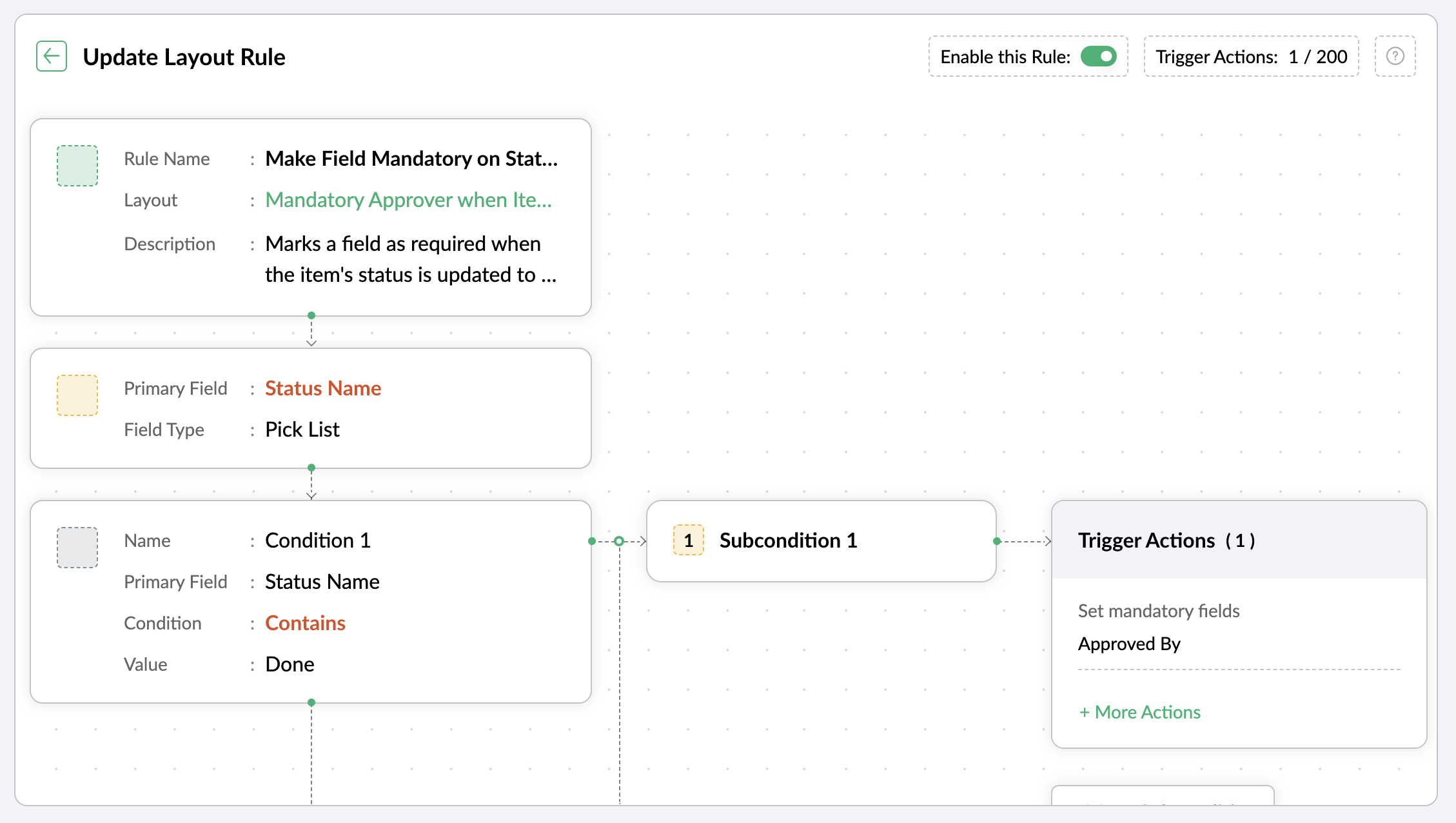
Let's assume you want a field to be made mandatory only when the item is moved to one particular status. Which implies the field will remain non-mandatory during other statuses and will be mandatory only at that particular status. So, the progress to that status must be allowed only when the mandatory field is updated.
For instance, when an item is moved to the Done status, the Approver field must become mandatory to record completion approval. To ensure that this process is executed, you can create a layout rule where the primary field is the Status Name. If the status field is updated to Done, specify the condition with the trigger action to set the Approver field as mandatory.
Use case 4: Showing or hiding a section or field based on item types
Layout rules enable you to show or hide fields or sections based on item type conditions.
Let's say a section with fields related to a new feature should only be visible when the item type is New Feature.
Similarly, when the item type is Security Issue, the section with fields related to Security issue must be visible.
To achieve this, create a layout rule with Item Type as the primary field.
- Create a condition for the New Feature item type with a trigger action to show the New Feature Details section.
- Create a condition for the Security Issue item type with a trigger action to show the Security Issue Details section.

Use case 5: Selecting specific assignees for item types and priorities
Layout rules can help you assign users based on the item type and priority. Let's say your team has a group of developers with varied levels of experience and expertise. You want to assign the high priority items to a more experienced member like John, while assigning low priority items to a novice like Peter.
If the item type is Bug and the priority level is Critical, you can assign the bug to John. If the priority level is High, it goes to Peter.
To meet this requirement, you can create a layout rule with Item Type as the primary field.
- Create a condition for the item type Bug with a subcondition where the priority level is Critical and the trigger action has the Set Field Value Assignee as John.
- For the same condition, add a subcondition where the priority level is High and the trigger action has the Set Field Value Assignee as Peter.
Similarly, say you want the Task item type with a medium priority level to go to Helen, and a low priority level should go to James.
- Create a condition for the item type Task with a subcondition where the priority level is Medium and the trigger action has the Set Field Value Assignee as Helen.
- For the same condition, add a subcondition where the priority level is Low and the trigger action has the Set Field Value Assignee as James.

These are just a few examples of how layout rules can streamline your project management. Do you have any particular scenario that needs resolution? Please share it with us.
Thanks,
Zoho Sprints Team
Topic Participants
Neethinila R
Sticky Posts
Tip #28 - Plan less and deliver more using WIP limit in Zoho Sprints
Hello, It's been a while since we met with a quick, interesting tip. As the saying goes, "Too much of anything is good for nothing", today the focus is on delivering your outcomes with the right amount of planning. Your plan should be practical, calculative, and achievable for driving a qualitative success. Laura's plan Laura has a habit of planning her project deliverables before assigning work to her team-mates. Once the plan is finalized, she schedules a general meeting with her team andTip # 3- Working on the Scrum board
Continuing from our Tip #2 on leading to a sprint, let's see how to manage the work items on the Scrum board. Once you start the sprint your work items are automatically displayed on the Scrum board where you will actually manage the work items. It is a snapshot of the backlog items identified for the current sprint. The layout of the Scrum board Simply put, the scrum board is just like a physical board with sticky notes on which the work items of the active sprint are displayed. The scrum boardTip#2- Leading you to a Sprint
Product Backlog After the user stories are written and finalized, they are sorted to create the Product Backlog for the project during the Backlog Grooming meeting. This is a master list of all the work items that have been identified for the project and sorted by priority. Requirements are not constant during this period.The Product Backlog is dynamic and is an ongoing process. Every user story in the Product Backlog is customer centric. The Product Backlog includes: User centric stories based onTip #1- Why swimlanes?
Lanes define a clear path to reach your destination. In Agile, swimlane is one such concept that sets a simple and clear process of the work that you do. The concept of swimlane can be related to the pool, where the swimmers gather in their respective lanes to start off. Similar to the pool, work items are grouped in different categories. Each category is referred as a lane and is displayed in horizontal format. Swimlanes are effective in categorizing the work items with respective to specific
Recent Topics
Zoho Analytics + Facebook Ads: Performance Alerts for Active Campaigns
Is it possible with integration of Zoho Analytics with Facebook Ads and set up alerts or notifications for active campaigns when performance drops? For example, triggering a notification if CTR goes below a defined threshold or if other key metrics (likeMultiple upload field CRM
I desperately need the functionality to add more than one upload field to web to contacts form. How can I do this?Sort by age
It would be very helpful if there was a way to sort by age in the Age column. Please add this function if possible. Thanks!Lookup Field Option Not Available in Customization
Hello, I am trying to customize different modules (e.g., Work Orders, Systems, and others), but I am unable to find the Lookup field option in the layout customization. When I go to: Setup → Customization → Modules and Fields → Add Field The Lookup fieldScheduled sending of a poll and its results
Is there a way to schedule sending a poll to all my users and have the results sent separately to the team?Canvas View bug
I would like to report a bug. When clone a canvas view from an existing canvas view, if the original canvas view have canvas button with client script. Then the new create canvas view will have canvas button, it is make sense. But when I try to deleteIntegrating Zoho Suite and apps more with Linux
I just got introduced with Zoho just couple of months ago, and I've already planned to contribute to it, even though it's not an open-source software. Still I have found it's potential to beat the tech giants and still being respective towards data privacyStore Submitted Forms as PDF
Hi there, Is there a method to store Form submissions as a PDF in workdrive for archival? I set the form to email the submission to the user and an internal inbox but I'd really love to store the final form as PDF in workdrive automatically. I can't seemSystem Components menu not available for Tablet to select language
I have attached a screenshot of my desktop, mobile, and tablet menu builder options. I am using 2 languages in my application. Language Selection is an option under the System Components part of the menu, but only for my desktop and phone(mobile). MySeparate Items & Services
Hi, please separate items and services into different categories. Thank youCRM->INVENTORY, sync products as composite items
We have a product team working in the CRM, as it’s more convenient than using Books or Inventory—especially with features like Blueprints being available. Once a product reaches a certain stage, it needs to become visible in Inventory. To achieve this,Add an option to disable ZIA suggestions
Currently, ZIA in Zoho Inventory automatically provides suggestions, such as sending order confirmation emails. However, there is no way to disable this feature. In our case, orders are automatically created by customers, and we’ve built a custom workflowPeppol: Accept Bill (Belgium)
Hi, This topic might help you if you're facing the same in Belgium. We are facing an issue while accepting a supplier bill received by Peppol in Zoho Books. There is a popup with an error message: This bill acceptance could not be completed, so it wasWant to use Zoho Books in Switzerland. CHF support planned?
Hi, We're a Swiss company using other Zoho suite software and I discovered Zoho Books and other accounting SaaS when looking for an accounting tool. Do you intend to cover Switzerland and CHF based accounting anytime soon? RoyFeature Request - Gift Cards or Gift Voucher Capability in Zoho Commerce
Hi Zoho Commerce team, I'm comming accross more and more retail businesses who sell gift cards. As there is currently no way to manage this in Zoho Commerce, it is a blocker to addoption. This is particularly popular in Europe and North America. I recentlyHighlight a candidate who is "off limits"
Hello: Is there a way to highlight a candidate who is "off limits"? I would like to have the ability to make certain candidate and / or Client records highlighted in RED or something like that. This would be used for example when we may have placed a candidate somewhere and we want everyone in our company to quickly and easily see that they are off limits. The same would apply when we want to put a client or former client off limits so no one recruits out of there. How can this be done? Cheers,Sendpulse SMTP/IMAP Issues
It’s possible Zoho made some changes on their side. Sometimes, even if your regular password works, Zoho requires an app-specific password for external apps like SendPulse to connect via IMAP. You can create this in Zoho’s security settings and use itClosing off tasks automatically based on project status
Is there a way to close off all open tasks when a project is set as Cancelled?[Free webinar] Understanding connections and datasources in Zoho Creator - Creator Tech Connect
Hello everyone, We’re excited to invite you to another edition of the Creator Tech Connect webinar. About Creator Tech Connect The Creator Tech Connect series is a free monthly webinar featuring in-depth technical sessions designed for developers, administrators,Bridge the Gap Between your Service and Finance Teams
In field service, the most expensive distance isn’t the drive to a customer’s home—it’s the gap between a finished job and a paid invoice. Zoho FSM leverages the power of Zoho Invoice to handle and manage billing operations. It enables you to: InstantlyDirect URL to "View Record"
I would like to create a button (Deluge Script) to jump to the "view record" without passing by the record menu, but I can not aford to find the right url. I don't want the "view record" as a single page. I want the "view record" in the application like the picture below: Thanks in advance for your helpLive Chat for user
Hi everyone, I’m new to Zoho Creator and wanted to ask if it’s possible to add a live chat option for all logged-in portal users so they can chat internally. I’m trying to create a customer portal similar to a service desk, but for vehicle breakdowns,SalesIQ Chat Owner to CRM Lead Owner Mapping
There is no proper mapping between the SalesIQ chat owner and the CRM lead owner. When a chat is assigned to an agent, the lead created in CRM is often assigned to a different user, forcing admins to manually change ownership every time. This createsProduct line search in quotes
Is there a way to change the search setting when you add a product line to a quote. We have created a field in products called 'Part Number' and I would like when I'm adding a product line to the quote that I can search on that field. At the moment it only searches on product description. In products I can search on the 'Part Number' field Any help welcome.Searching for an item from within an invoice should show any item containing the string, not just those that begin with the string.
Hello, I've found myself becoming increasingly frustrated with the limited line-item seach when adding new items to an invoice. The problem is that the characters being typed are only being matched from the beginning of the item name. This might be usableStorage Limits
Hello, What is the storage limitations for each user on professional edition? Thanks, MekkiZoho Recruit Community Meetup - London 🇬🇧
Hello Recruiters! We’re excited to announce that the Zoho Recruit team is coming to the UK for an in-person Zoho User Group (ZUG) Meetup in London! This is your chance to connect with fellow Zoho users, learn from experts, and walk away with actionablePower Pivot and Data Modeling functionality in Zoho Sheet
When will MS Excel functionalities like Power Pivot and Data Modeling functionalities be available in Zoho Sheet?Global Search placement in the new UI
Having a hard time with the global search placement in the UI redesign. Surely I can't be the only one. Previously global search placement was perfect. A bar at the top/center of the page. Exactly where you would expect it to be. Since the new UI hasWhat's New - January 2026 | Zoho Backstage
Welcome to 2026! If you thought last year was big, buckle up. We’re stepping into this year with a singular focus: unimaginable growth, elite scalability, and performance benchmarks that leave the old ways of event management in the rearview mirror. AsCliq on your mobile phone
Some of the employees in my company get their cliq on their mobile phones but it will not let them answer the call. The employee has to go to their laptop to access it.Bulk Delete Messages in Cliq
Isn't it possible to bulk delete messages in Cliq? I have them delivered to me as notifications from another service but most of them need to be deleted as not of value. I get dozens of them per day, and deleting them is already difficult is the "Delete"stock movement report by each transaction for each item
Dear Sir we are using zoho inventory for foodstuff and we lack the transaction report which clearly shows movement of an item from Opening balance of the month to Goods received in, Supplier return out, Invoice out, Sales return In, Transfer out and TransferUnable to change Company Logo
Hi Guys, I have an issue where I've uploaded a Company image in Gif format and the logo has now got a black background whereas the logo is supposed to be black not the background. I didn't think it would be an issue so I created a PNG version to uploadMetadata API Access to Functions
I think it would be incredibly helpful to have api access to every function's code. Our team primarily uses deluge functions to update fields across modules according to business logic. I would like to create a visual dependancy model for our CRM, butHistorical Sales Info - Blend with Finance Invoice Line Items, Access in CRM and Desk
My company has been using Zoho One since 2021, with sales data going back through 2020. However, we have been in business much longer, and we have historical sales information that we want to have at our fingertips when talking with customers (usuallyIntroducing Record Category in CRM: Group options to see record status at a glance.
Release update: Currently available for CN, JP, and AU, CA, Sa, and UAE DCs (all editions); EU, US, and IN (Standard and Professional editions). It will be made available to other DCs by mid-March. Hello everyone, We are pleased to introduce Record CategoryService disruption in Zoho Cliq (EU Region) – February 9, 2026
Hello everyone, We’d like to inform you about a brief service disruption that affected Zoho Cliq users in the EU region earlier today. The issue has been resolved, and all services are now operating normally. Summary On February 9, 2026, Zoho Cliq experiencedSpotlight series #26 - Build slides with visual clarity using Diagram
Hello all! The feature in the spotlight this month is Diagram. Let's say you are a part of a project kickoff meeting and your teammate starts explaining the project life cycle like this: "First we ideate, then we create an initial prototype and shareClient scripts for Zoho Books ?
Good day everyone, I am looking for a way to be able to interact with the Quotes and Invoices as they are being created. Think of it like Zoho client script in Zoho CRM. But for the life of me I dont see a way to do this. The issue with having functionNext Page