Optimiser le dossier d'équipe au sein de WorkDrive - 2e partie

La tâche de l'administrateur est de fournir l'accès juste aux bonnes personnes sans entraver l'accès aux documents quotidiens. Découvrons comment WorkDrive vous offre la possibilité d'optimiser les différentes tâches exécutées dans le dossier de l'équipe.
Éliminer les copies multiples d'un même document
L'une des façons d'éliminer les copies multiples d'un même document est la fonction de versions de la suite Zoho Office. Cela vous permet de
- Accéder à l'ancienne version du document, sans créer plusieurs documents.
- Connaître les modifications apportées au document.
- Créer un document individuel à partir de n'importe quelle version.
Contrôler l'accès aux fichiers
Pour empêcher d'autres utilisateurs de modifier un fichier, il suffit de le verrouiller. Une fois prêt à collaborer à nouveau, reprenez le fichier.
Bon à savoir
- Un utilisateur doit au moins avoir un accès d'édition au fichier pour pouvoir l'extraire (le verrouiller).
- Lorsqu'un fichier est verrouillé dans un dossier d'équipe, les membres ayant un rôle d'organisateur ou d'administrateur peuvent le déverrouiller.
Extraire un fichier
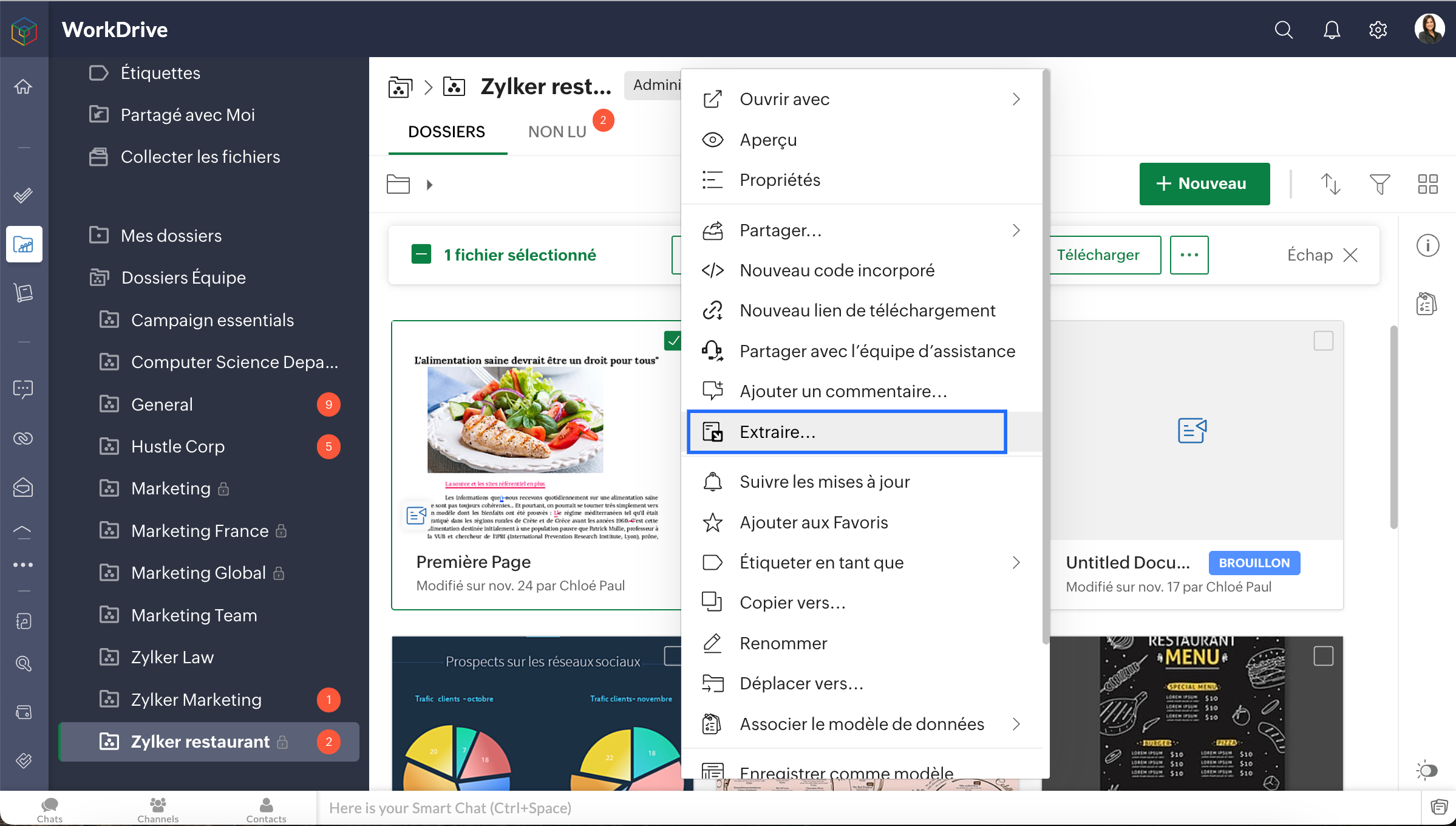
- Sélectionnez un fichier dans "Mes dossiers" ou "Dossier d'équipe".
- Cliquez sur l'icône "Autres" dans la barre d'actions en haut, sélectionnez "Extraire" dans la liste déroulante ou encore, faites un clic droit sur le fichier et sélectionnez "Extraire".
- L'onglet Versions du fichier s'ouvre dans un nouvel écran, cliquez sur "Extraire". Lorsque vous avez extrait un fichier, vos collaborateurs ne peuvent pas le modifier ni voir les modifications que vous avez apportées.
Pour récupérer un fichier
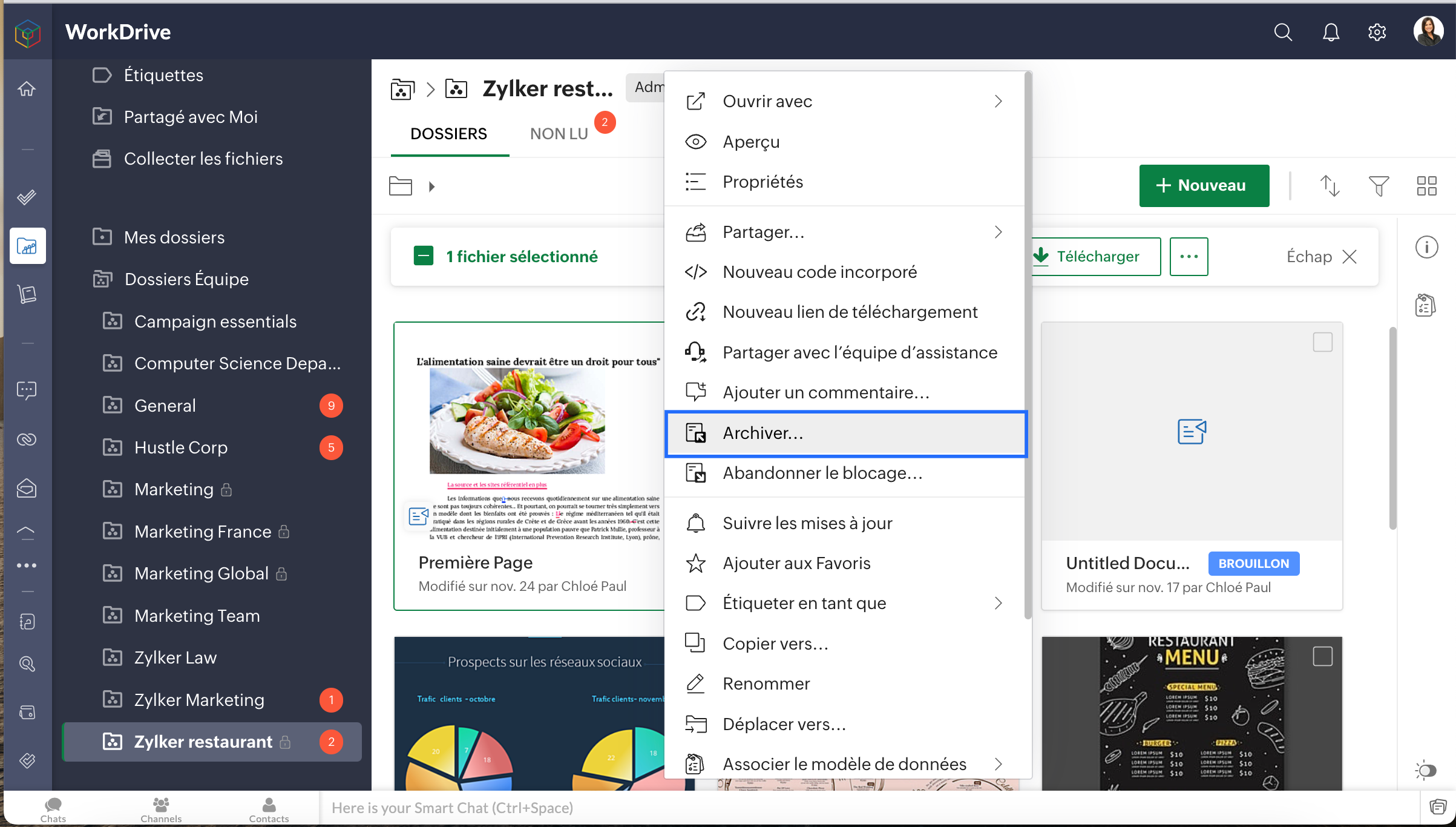
- Sélectionnez un document extrait, faites un clic droit sur le fichier et sélectionnez "Archiver"
- L'onglet Versions du fichier s'ouvre, ajoutez des notes de version pour référence ultérieure.
- Vérifier pour permettre à vos collaborateurs de voir les modifications que vous avez apportées.
Organiser le dossier d'équipe
Vous avez créé un fichier dans le mauvais dossier d'équipe ? Vous souhaitez partager un document de votre dossier personnel à un dossier d'équipe ? Ou vous voulez simplement organiser vos fichiers ? Ne vous inquiétez pas, la fonction "Déplacer et copier" de WorkDrive vous aide à le faire sans perdre les données et sans les inconvénients du téléchargement.
Bon à savoir
- Seuls les Organisateurs et Administrateurs d'un dossier d'équipe peuvent déplacer des fichiers et des dossiers dans le dossier d'équipe.
- Seuls les administrateurs de dossier d'équipe peuvent déplacer des documents de leur dossier d'équipe vers leurs "Mes Dossiers".
- Seuls les administrateurs de dossier d'équipe peuvent déplacer des fichiers et des dossiers de l'un vers un autre. Il doit avoir au moins le rôle d'éditeur dans le dossier d'équipe de destination.
- Seuls les administrateurs de dossier d'équipe peuvent déplacer des fichiers et des dossiers de ce dossier d'équipe vers un dossier partagé. Ils doivent avoir au moins le rôle d'éditeur dans le dossier de destination.
- Pour copier des fichiers et des dossiers au sein d'un dossier d'équipe, vous devez être membre du dossier d'équipe et avoir au moins le rôle d'éditeur.
- Pour copier des fichiers et des dossiers d'un dossier d'équipe vers Mes Dossiers, vous devez être un membre du dossier d'équipe et disposer de n'importe quel rôle.
- Un membre avec n'importe quel rôle dans un dossier d'équipe peut copier des fichiers vers un autre. Le membre doit avoir au moins le rôle d'éditeur dans le dossier de l'équipe de destination.
- Vous pouvez copier des fichiers et des dossiers d'un dossier d'équipe auquel vous avez un rôle quelconque vers un dossier partagé auquel vous avez au moins le rôle d'éditeur.
Afficher les propriétés du fichier
Sachez tout sur un fichier dans Zoho WorkDrive en visualisant ses propriétés. Découvrez comment visualiser les informations générales, les versions, l'activité et les statistiques d'accès d'un fichier.
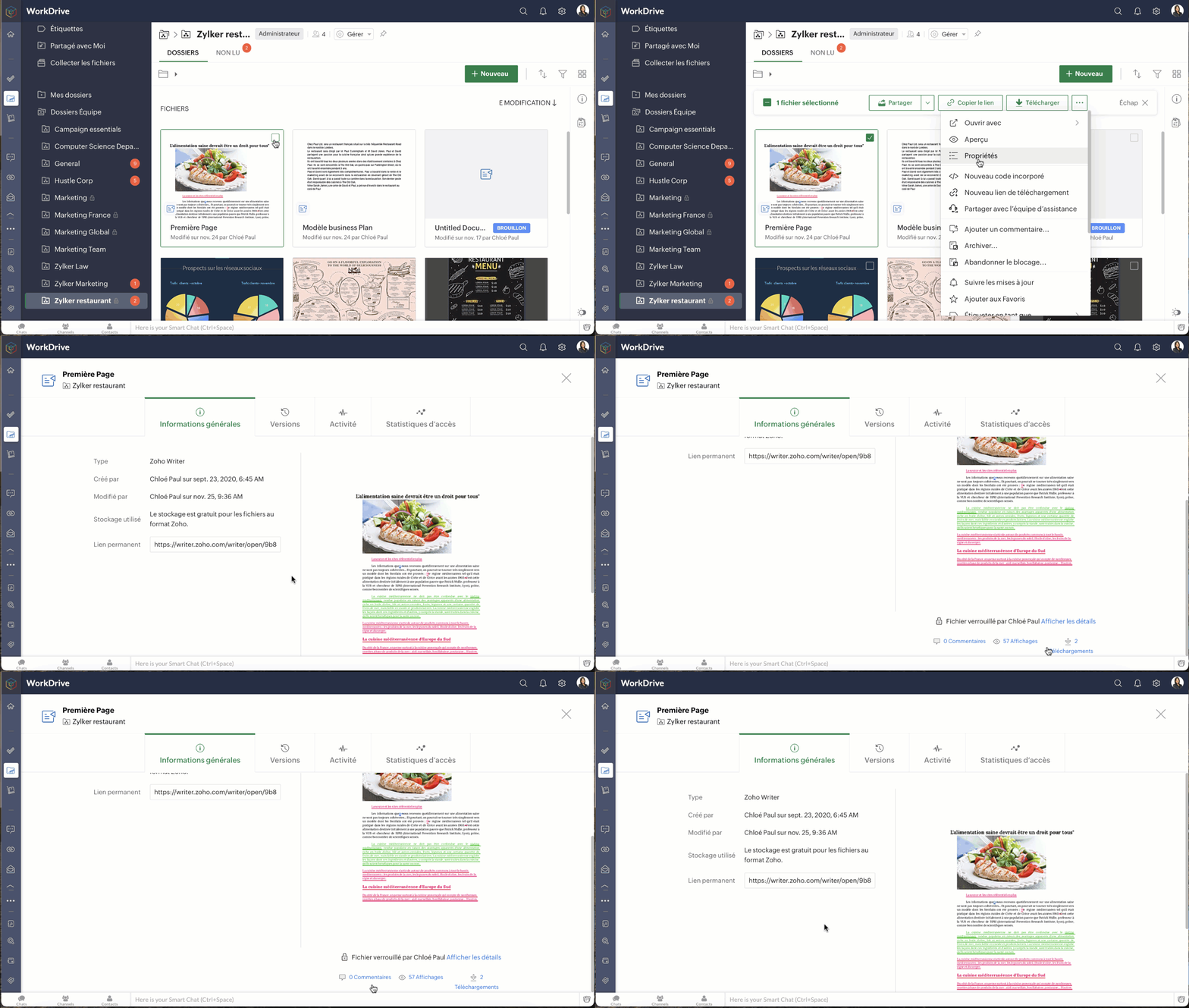
- Sélectionnez un fichier dans le dossier de l'équipe.
- Cliquez sur l'icône "Autres" dans la barre d'action en haut.
L'onglet Informations générales affiche les informations suivantes du fichier ;
- Format du fichier
- Utilisateur qui a créé le fichier et la date de création
- Utilisateur qui a modifié le fichier et la date de modification
- Taille (taille de la dernière version du fichier)
- Stockage utilisé (stockage total utilisé par les différentes versions du fichier)
- Lien permanent (lien d'accès au fichier)
- Nombre de commentaires
- Nombre de vues
- Nombre de téléchargements
Sous l'onglet Versions, vous pouvez consulter la liste des versions du fichier. La taille et les notes de la version du fichier sont également indiquées.
Cliquez sur l'icône des trois points verticaux sur une version de fichier. Vous pouvez faire les actions suivantes à partir de là :
- Restaurer la version comme version principale
- Télécharger la version
- Afficher un aperçu de la version
- Enregistrer la version comme un nouveau fichier
- Supprimer la version
Bon à savoir
- Pour les dossiers d'équipe privés, un membre doit avoir le rôle d'éditeur ou un rôle supérieur pour voir les versions d'un fichier.
- Pour les dossiers d'équipe publics, tout membre du dossier d'équipe peut visualiser les versions d'un fichier.
- Pour les fichiers partagés, tout membre de l'équipe peut visualiser les versions de ces fichiers.
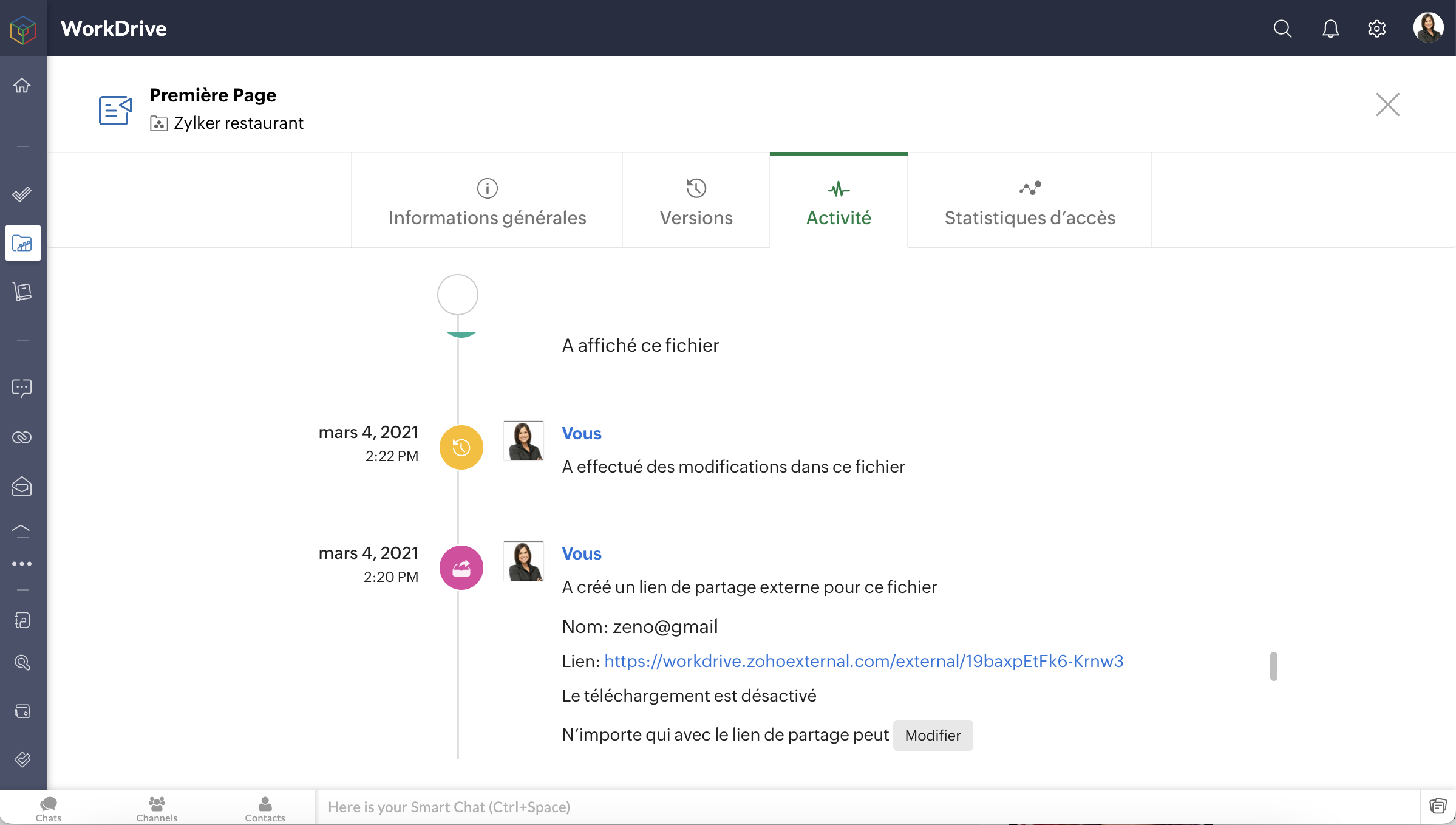
L'onglet Activité vous permet de voir toutes les activités sur le dossier par vous et vos collaborateurs, en fonction de la date et de l'heure.
Bon à savoir
- Pour les dossiers d'équipe privés et publics, un membre doit avoir le rôle d'éditeur ou un rôle supérieur pour afficher l'activité d'un dossier.
- Pour les fichiers partagés, un membre doit avoir l'autorisation de partage pour visualiser les activités sur ces fichiers.
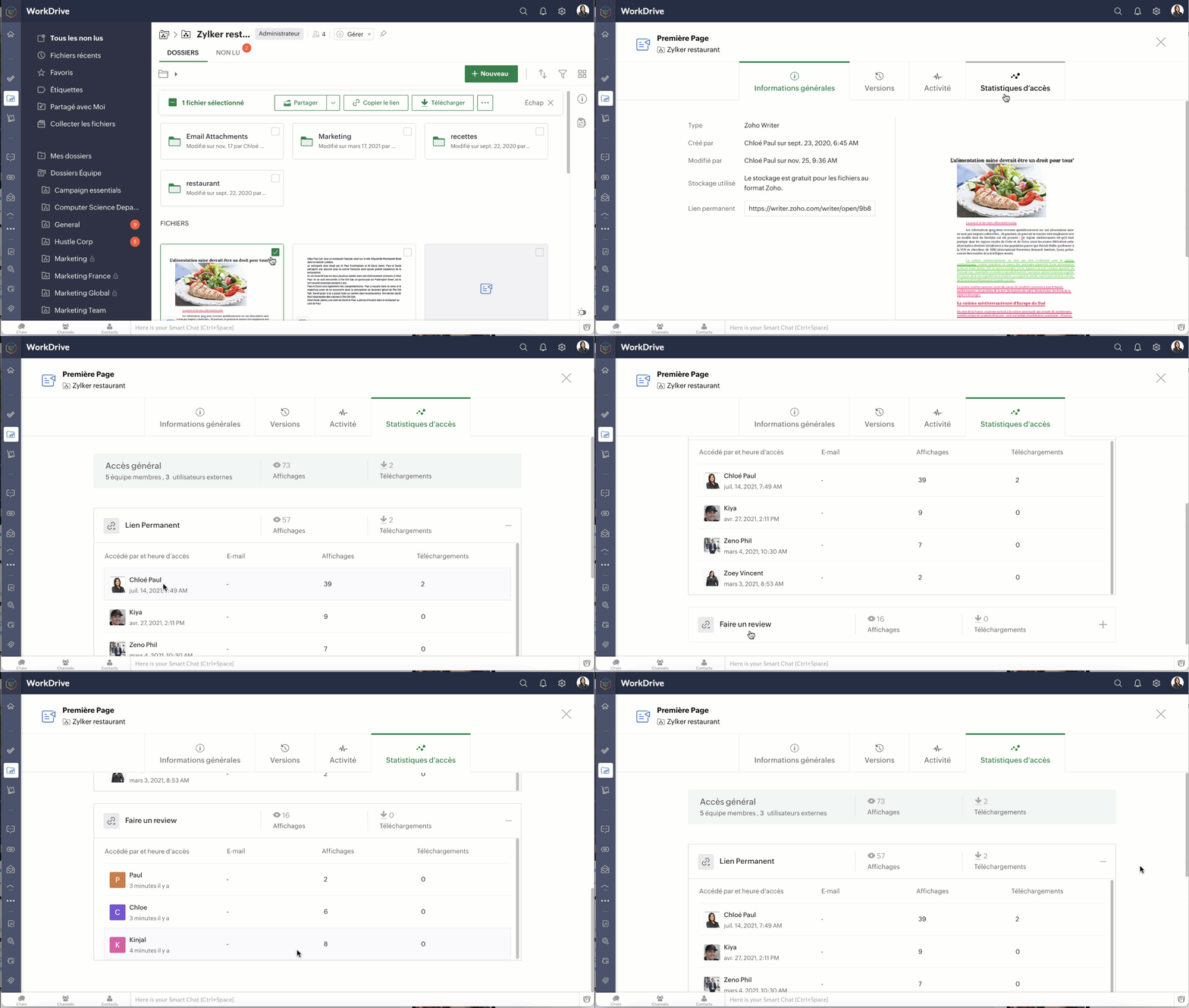
Les statistiques d'accès avancées d'un fichier vous permettent de voir qui a accédé à votre fichier (membres de l'équipe et utilisateurs externes) et quelles actions ils ont effectuées (nombre de consultations et de téléchargements).
- Sous accès global, vous pouvez voir le nombre de membres de l'équipe et d'utilisateurs externes qui ont accédé au fichier, ainsi que leur nombre total de consultations et de téléchargements.
- Le lien permanent ou lien de partage externe vous affiche le nombre total correspondant de consultations et de téléchargements pour le fichier.
- Cliquez sur Permalink pour afficher la liste des membres de l'équipe qui ont accédé au fichier, ainsi que la date et l'heure auxquelles ils y ont accédé.
- Cliquez sur un lien de partage externe pour afficher la liste des utilisateurs externes qui ont accédé au fichier ainsi que la date et l'heure auxquelles ils y ont accédé.
Bon à savoir
- Dans le cas d'un lien de partage externe, si les données de l'utilisateur telles que le nom, le numéro de téléphone et l'e-mail sont demandées, ces données seront également indiquées.
- Si le nom n'est pas demandé, les utilisateurs seront appelés en tant que Guest# (dans l'ordre Guest#1, Guest#2, etc.).
- Pour les dossiers d'équipe privés et publics, un membre doit avoir le rôle d'éditeur ou un rôle plus élevé pour voir les statistiques d'accès d'un fichier.
- Pour les fichiers partagés, un membre doit avoir l'autorisation de partage pour voir leurs statistiques d'accès.
N'hésitez pas à nous faire part de vos questions dans la partie commentaires ci-dessous.
L'équipe Zoho France
Topic Participants
Kinjal Lodaya
Sticky Posts
Collaboration sans faille avec Zoho One
Bonjour à tous, Dans cet article nous allons voir comment Zoho One permet une collaboration à différents niveaux . La façon dont nous travaillons évolue. À mesure que les entreprises se mondialisent, la plupart des activités sont menées en équipe.
Recent Topics
Calling the new 'Custom API' feature from within a Custom Widget
From what I've learned it is not possible to call an endpoint from the new "Custom API" feature within a Creator Widget. The SDK's doesn't support it yet, when calling it natively you end up with CORS issues or at least I couldn't get it working evenAnnouncing new features in Trident for Mac (1.32.0)
Hello everyone! We’re excited to introduce the latest updates to Trident, which are designed to reinforce email security and protect your inbox from evolving threats. Let’s take a quick look at what’s new. Deliver quarantined emails. Organization adminsZoho LandingPage is integrated with Zoho One!
Greetings to the Zoho One users out there! We're delighted to let you know that Zoho LandingPage is available in Zoho One too! With Zoho LandingPage, you can host custom-made landing pages, and persuade the visitors to dive deeper by making further clicks,Marketing Tip #5: Improve store speed with optimized images
Slow-loading websites can turn visitors away. One of the biggest culprits? Large, uncompressed images. By optimizing your images, your store loads faster and creates a smoother shopping experience leading to higher sales. It also indirectly improves SEO.in the Zoho creator i have address field based the customer lookup im selecting the addresss , some times the customer address getting as null i want to show as blank
in the Zoho creator i have address field based the customer lookup im selecting the addresss , some times the customer address getting as null ,i want to show as blank instead of showing null. input.Billing_Address.address_line_1 = ifNUll(input.Customers_Name.Address.address_line_1,"");PDF Attachment Option for Service Reports
Hello Team, I would like to check with you all if there is an option to attach PDF documents to the service reports. When I try to attach a file, the system only allows the following formats: JPEG, JPG, and PNG. Could you please confirm whether PDF attachmentsZOHO Work Drive Back Up
I am looking for a ZOHO Work Drive backup solution. Something that is cloud based. There's lots of these kinds of options for Google Drive and other providers, but I have not seen anything for WorkDrive. Any suggestions?Wrapping up 2025 on a high note: CRM Release Highlights of the year
Dear Customers, 2025 was an eventful year for us at Zoho CRM. We’ve had releases of all sizes and impact, and we are excited to look back, break it down, and rediscover them with you! Before we rewind—we’d like to take a minute and sincerely thank youIssue with Zoho Creator Form Full-Screen View in CRM Related List Integration
Hi Team, We have created a custom application in Zoho Creator and integrated it into Zoho CRM as a related list under the Vendor module, which we have renamed as Consignors. Within the Creator application, there is a form named “Pickup Request.” InsideRestrict Users access to login into CRM?
I’m wanting my employees to be able to utilize the Zoho CRM Lookup field within Zoho Forms. For them to use lookup field in Zoho Forms it is my understanding that they need to be licensed for Forms and the CRM. However, I don’t want them to be able toIntroducing workflow automation for the Products module
Greetings, I hope all of you are doing well. We're happy to announce a few recent enhancements we've made to Bigin's Products module. The Products module in Bigin now supports Workflows, enabling you to automate routine actions. Along with this update,Zoho Browser??
hai guys, this sounds awkward but can v get a ZOHO BROWSER same as zoho writer, etc. where i can browse websites @ home and continue browsing the same websites @ my office, as v have the option in Firefox, once i save and close the browser and again when i open it i will be getting the same sites. If u people r not clear with my explanation, plz let me know. Thanks, SandeepTask/Activity indicator in SalesPipeline overview has disappeared
I Just logged in my ZOHO CRM first 2026 checking my salespipeline overview , Every record card used to show an indication that there was an open task (Yellow if the expiry date was close, red if the expiry date was today and grey when it had expired).Notes badge as a quick action in the list view
Hello all, We are introducing the Notes badge in the list view of all modules as a quick action you can perform for each record, in addition to the existing Activity badge. With this enhancement, users will have quick visibility into the notes associatedSMS to customers from within Bigin
Hi All, Is there anyone else crying out for Bigin SMS capability to send an SMS to customers directly from the Bigin interface? We have inbuilt telephony already with call recordings which works well. What's lacking is the ability to send and receiveAdd multiple users to a task
When I´m assigning a task it is almost always related to more than one person. Practical situation: When a client request some improvement the related department opens the task with the situation and people related to it as the client itself, the salesmanAdmins cannot see each others' Scheduled Reports?!
Very frustrating that as an admin I cannot see what my reports my fellow admins have created and scheduled. After asking about this on the help chat, I was told the issue is trust and security. By giving someone Admin status, it means we trust them with those responsibilities. Please change this, it is not a good process to have to bother other users to change a report or change users within a report.Automatically CC an address using Zoho CRM Email Templates
Hi all - have searched but can't see a definitive answer. We have built multiple email templates in CRM. Every time we send this we want it to CC a particular address (the same address for every email sent) so that it populates the reply back into ourWriter update results in BitDefender blocking it as malware
After updating Writer to latest update, Bitdefender blocked the app and writer no longer runs.Is there a way to invoke deluge function from within a widget?
Hi! I have custom functions in deluge and I was wondering whether there is any way to call this function through a widget? Something like on click of a button inside a widget, run the deluge custom function. Would this be possible?Missing Import Options
Hello, do I miss something or is there no space import option inside of this application? In ClickUp, you can import from every common application. We don't want to go through every page and export them one by one. That wastes time. We want to centralizeZoho CRM Portal Field Level Permission Issue
Hi Support Team, I am using the Zoho CRM Portal and configuring field-level editing permissions. However, we are unable to restrict portal users from editing certain fields. We have created a portal and provided View and Edit (Shared Only) access forWhy am I seeing deleted records in Zoho Analytics syncing with Zoho CRM?
I have done a data sync between Zoho CRM and Zoho Analytics, and the recycle bin is empty. Why do I see deleted leads/deals/contacts in Zoho Analytics if it doesn't exist in Zoho CRM? How can I solve this problem? ThanksZoho Tables is now live in Australia & New Zealand!
Hey everyone! We’ve got some great news to share — Zoho Tables is now officially available in the Australian Data Center serving users across Australia and New Zealand regions! Yes, it took us a bit longer to get here, but this version of Zoho TablesCRM project association via deluge
I have created a workflow in my Zoho CRM for closing a deal. Part of this workflow leverages a deluge script to create a project for our delivery team. Creating the project works great however, after or during the project creation, I would like to associateCustom Fonts in Zoho CRM Template Builder
Hi, I am currently creating a new template for our quotes using the Zoho CRM template builder. However, I noticed that there is no option to add custom fonts to the template builder. It would greatly enhance the flexibility and branding capabilities ifIntroducing the Zoho Projects Learning Space
Every product has its learning curve, and sometimes having a guided path makes the learning experience smoother. With that goal, we introduce a dedicated learning space for Zoho Projects, a platform where you can explore lessons, learn at your own pace,Unknown table or alias 'A1'
I would like to create a subquery but i am getting the following error: Unknown table or alias 'A1' used in select query. This is the sql statement: SELECT A1.active_paying_customers, A1.active_trial_customers, A1.new_paying_signup, date(A1.date_active_customers),All new Address Field in Zoho CRM: maintain structured and accurate address inputs
The address field will be available exclusively for IN DC users. We'll keep you updated on the DC-specific rollout soon. It's currently available for all new sign-ups and for existing Zoho CRM orgs which are in the Professional edition. Latest updateCreate PO from an invoice
We are a hardware and software sales company which receives orders over the internet. We drop ship most of our products from a warehouse outside of our company. Our orders get sync'd into Zoho from our store via onesaas as invoices. It would be greatImport Function: ONLY update empty fields
When setting up an import from a spreadsheet to CRM, there is a checkbox "Don't update empty values for existing contacts" (see screenshot below). While I see some limited benefit from this functionality, I think there should also be an "ONLY update emptyCollaboration with customers made easy with Zoom Meeting and Zoho Desk integration
Hello everyone! We are happy to announce that you can now integrate your Zoho Desk account with Zoom Meeting. The integration bridges the gap between digital communication and human connection, empowering teams to deliver timely support when it mattersCRM Canvas - Upload Attachments
I am in the process of changing my screens to Canvas. On one screen, I have tabs with related lists, one of which is attachments. There doesn't appear to be a way to upload documents though. Am I missing something really obvious? Does anyone haveTrueSync regularly filling up my local disk
Seems that WorkDrive's TrueSync randomly starts filling up my local hard drive space. None of the folders have been set as "Make Offline" but still it seems to randomly start making file offline. The settings of the app is so minimal and is of no realKaizen #194 : Trigger Client Script via Custom buttons
Hello everyone! Welcome back to another interesting and useful Kaizen post. We know that Client Scripts can be triggered with Canvas buttons and we discussed this with a use case in Kaizen#180. Today, let us discuss how to trigger Client Script when a[Webinar] A recap of Zoho Writer in 2025
Hi Zoho Writer users, We're excited to announce Zoho Writer's webinar for January 2026: A recap of Zoho Writer in 2025. This webinar will provide a recap of the features and enhancements we added in 2025 to enhance your productivity. Choose your preferredPicklist field shows "none" as default
Hello, Is there an option to avoid showing "none" as the default value in a picklist field? I also don't want to see any option displayed. My expectation is to have a blank bar, and then when I display the drop-down list, I can choose whichever I waStage-probability mapping feature in custom module
Hi, I'm building a custom module for manage projects. I would like to implement the stage-probability feature that Potentials has. Is this possible?Create static subforms in Zoho CRM: streamline data entry with pre-defined values
Last modified on (9 July, 2025): This feature was available in early access and is currently being rolled out to customers in phases. Currently available for users in the the AU, CA, and SA DCs. It will be enabled for the remaining DCs in the next coupleField Description is very small
Hello, The field Description in the activity is very small. Why don't try open a new window, or a bigger popup, or increase the width of the "popup". Example:Next Page