Payment Gateways - A unified hub to manage all your payment integrations in Zoho Creator

Payment Gateways - A unified hub to manage all your payment integrations in Zoho Creator

Hello everyone,

We're thrilled to announce that we've completely reimagined the way payment gateways are handled in Creator. The result is a centralized Payment Gateways section that provides a clean, user-friendly interface to configure and manage all your payment integrations in one place.

Why it matters  
The all-new Payment Gateways section offers you a centralized way to manage payment configurations by replacing the earlier approach, which used connections. 

This brings several key advantages:

  • Centralized control: Manage all your payment gateways from one place.

  • Quick setup: Connect gateways without complex configurations.

  • Region-specific gateways: See only the gateways available in your region.

  • Extend functionality: Add payment gateway extensions (powered by Zoho Checkout) via Zoho Marketplace.

  • Flexible payments: Link multiple payment gateways to offer users a wider range of payment choices.

  • Easy access control: Admins can manage gateway access directly from both the live and edit modes of each application.

  • Diverse payment options: Choose from the entire suite of Zoho Checkout-supported gateways.

 Where to find it? 

  • C6: Go to Operations -> Payment Gateways.

  • C5: Go to Account Setup -> Payment Gateways. 

How does it work?
The Payment Gateways feature is powered by Zoho Checkout, our in-house payment processing solution. This integration brings the full capabilities of Zoho Checkout into Zoho Creator, giving you instant access to all supported payment gateways, including popular options like PayPal, Stripe, Razorpay, and more. Any new gateway added to Checkout becomes instantly usable here in Creator.  

  • The first time you visit Payment Gateways (before configuring Zoho Checkout within System Integrations), you'll be prompted to complete a one-time setup.

  • Choose your country, state, and currency. This ensures you see only the relevant gateways available in your region.

  • After setup, you'll be taken to the Payment Gateways landing page. 
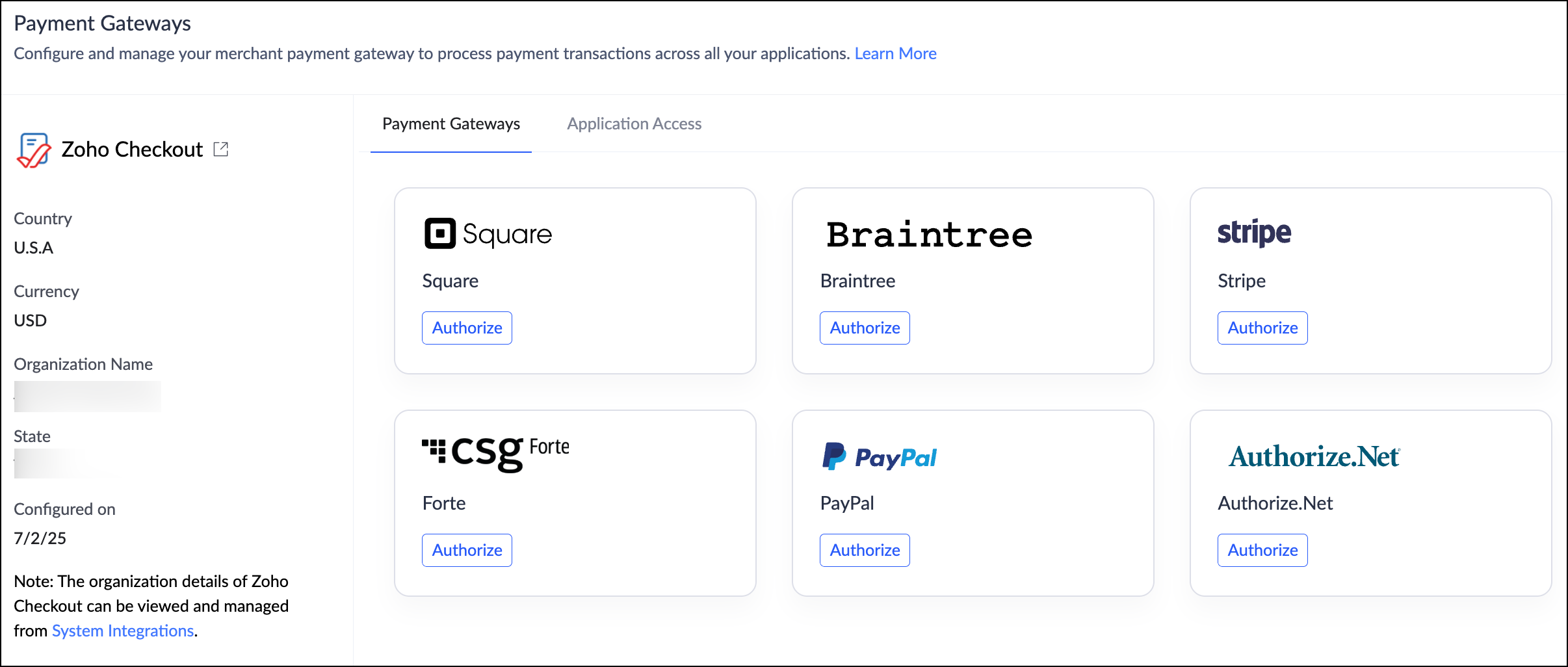

Managing payment gateways
For ease of use, this landing page has been divided into two sections:
  • Supported Gateways
    View, authorize, and manage your payment gateways. Click Authorize next to a provider and follow the guided steps to link it to your app.

  • Application Access
    Control which Creator apps can use authorized payment gateways.
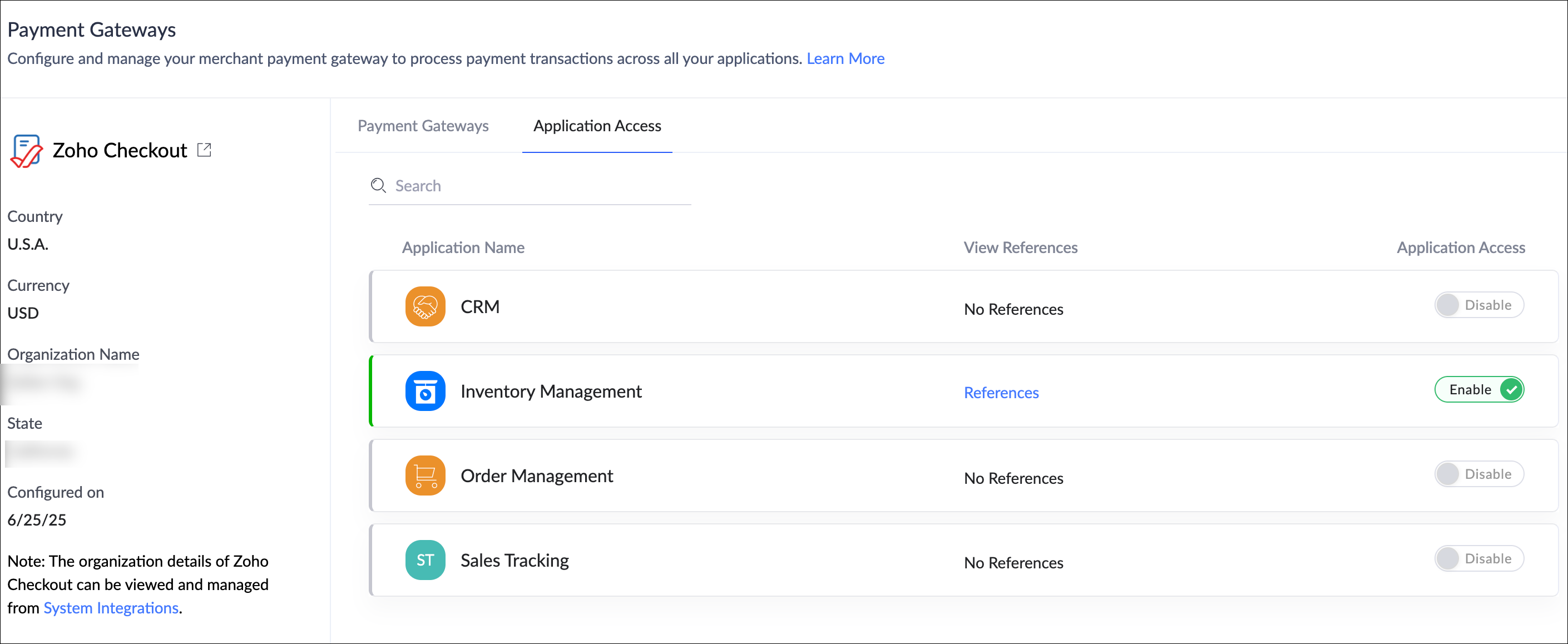
 
What you need to do 

  • Nothing is required on your end.

  • If you've already added PGs as connections in your applications, they will be automatically migrated to the new centralized location under Operations. 

Help documentation: Understanding Payment Gateways

Availability

  • This feature is available for both C5 and C6 users.

  • The availability of specific payment gateways may vary based on your data center and supported countries.

  • A detailed list of all supported gateways and regions is documented in the link provided above.


Release
The revamped Payment Gateways has been rolled out to all users starting June 26, 2025.

We're confident that this feature will significantly enhance your experience with Zoho Creator—and we'd love to hear your thoughts on this new feature!

If you need any assistance or have questions, please don't hesitate to reach out to us.

Sincerely,
The Zoho Creator Team
    • Sticky Posts

    • Introducing Zoho Creator's 2025 Release Projection 2

      Hello Creators! I'm Prakash, from the Creator product management team, and today I'm delighted to unveil our next set of features as part of Release Projection 2 for 2025. With thoughtful analysis and planning, we've curated powerful new capabilities
    • Zoho Creator - 2023 Release Projection 1

      Hello everyone! A very Happy New Year to you and your family. Hope you're all good and having a great time using Zoho Creator to make your lives easier and your businesses prosper. 2022 was an action-packed year for us at Creator, and we hope to continue
    • Zoho Creator User Group meetups in a city near you! - Oct - Nov, 2023

      Greetings from the Zoho Creator team! We're hosting a series of Zoho Creator meetups in various cities across the globe, and we'd love to meet you there! Our meetups are a great opportunity to network with industry peers, exchange ideas and best practices,
    • Zoho Creator - 2023 Release Projection 2

      Hello everyone! Time truly flies when you're having an incredible journey, and today we mark the completion of an eventful and action-packed six months. It feels like just yesterday when we embarked on this adventure together with the launch of our new
    • Upcoming Updates - August 2022

      Hi all, Greetings from the Zoho Creator team! Today we've got news for you on some exciting updates. And rest assured— there’s more to come! In this post, we'll be going over the upcoming features and improvements for this month as mentioned below. A
    • Recent Topics

    • Zia Agent built in ChatKit UI does not render markdown

      Hi, You have a major shortcoming in the Zia Agent UI. The test UI that is embedded in agents.zoho.com allows you to test the agent has full support for rendering markdown, but your ChatKit UI does not have support for rendering markdown. If I embed it
    • Team folder not created when creating project using zoho flow

      When I try to automate project creation using zoho flow, and I have enabled workdrive integration to automatically create team folders to attach to the project, this only works when I create a new project through the UI. But I am trying to automate project
    • Zoho Projects - Email notification relabelling of modules not present on default templates

      Hi Projects Team, I noticed that in the default email template notification, the word "bug" was not renamed to the lable I am using in my system. As many users may used the Bugs modules for various purposes including Changes, Revisions, Issues, etc...
    • GLM 5 not available

      Hello, I am trying to setup a Zia Agent using agents.zoho.com. The settings says that GLM5 is among the list of free zoho hosted models available. However, when I try to setup an agent and pick a model from the list only GLM 4.7 Flash is available. How
    • Set Custom Icon for Custom Modules in new Zoho CRM UI

    • Can not send or reply to mails

      Hello, I can not send mails or reply. If I try to send a mail i get "Unable to send message;Reason:553 Replaying disallowed. Invalid Domain - invata-programare.ro" Can you help me, please? Thank you!
    • Kaizen #241: Automating Deal risk escalation using Workflow APIs, Connected Workflows, and Functions

      Hello everyone! Welcome to another Kaizen week. In many organizations, sales teams work in Zoho CRM, finance teams manage invoices in Zoho Books, and support teams handle customer issues in Zoho Desk. Now consider this scenario: A sales representative
    • Upload own Background Image and set Camera to 16:9

      Hi, in all known online meeting tools, I can set up a background image reflecting our corporate design. This doesn't work in Cliq. Additionally, Cliq detects our cameras as 4:3, showing black bars on the right and left sides during the meeting. Where
    • Allow Super Admins to Edit Task “Created By” and Issue “Reporter” Fields

      Hello Zoho Projects Team, We hope you are doing well. We would like to submit a feature request regarding the ability to manage and correct system ownership fields in Zoho Projects, specifically: Task → Created By Issue → Reporter / Reported By Current
    • The Social Wall: April 2026

      Hello everyone, This month, we’re excited to bring you a set of new updates for Threads in Zoho Social, designed to make publishing, monitoring, and managing your content much easier Threads updates You’ll now see a few useful improvements in the compose
    • Sort or filter CRM report by count value

      Hi there, I'm trying to create a report that will show me high frequency bookings (leads) coming through within a time period for any particular account - this is so we can proactively reach out to these accounts. I have a report that shows the information
    • Error when changing user permission from read only to user.

      Hi there, Ive tried to change one of my users to be able to edit, however i kept getting the error user license exceed.
    • Marketing Tip #30: Promote your brand differently on each social platform

      Not all social platforms work the same way. Posting the same content in the same way across every channel can limit your reach. Each platform has its own discovery system, and understanding what it prioritizes can dramatically improve how your brand is
    • Whatsapp Limitation Questions

      Good day, I would like to find out about the functionality or possibility of all the below points within the Zoho/WhatsApp integration. Will WhatsApp buttons ever be possible in the future? Will WhatsApp Re-directs to different users be possible based
    • **Building Role-Appropriate Accountability Layers in Zoho Projects - Looking for Real-World Experience**

      We're a small ISP/telecom operator on Zoho One and I'm trying to solve what I think is a common organizational problem. Would love to hear from others who've tackled it. **The Core Problem** Staff will only consistently use a project management system
    • Duplicate entries for contacts birthdays

      Good morning I have recently started to use my Zoho calendar and noticed that there are multiple birthday events showing for some of my contacts. I have checked my contacts and there were duplicates for some contacts which I have now rectified but the
    • How to Generate Separate Labels for Each Invoice SKU Line Item in Zoho Books?

      Hi everyone, I’m trying to implement a requirement in Zoho Books where separate labels need to be generated for each SKU/item from an invoice. Scenario: One invoice can contain multiple products/SKU items Each item/box should have its own separate label
    • Using IMAP configuration for shared email inboxes

      Our customer service team utilizes shared email boxes to allow multiple people to view and handle incoming customer requests. For example, the customer sends an email to info@xxxx.com and multiple people can view it and handle the request. How can I configure
    • [Bug] WebAuthn passkey registration blocked on rpIds with TLDs longer than 6 characters (.accountant, .technology, etc.) — isValidDomain regex too strict

      Hi, Filing on behalf of an enterprise customer where Zoho Vault is deployed across the company. The Chrome extension blocks WebAuthn passkey registration on legitimate sites whose Relying Party ID (rpId) has a TLD longer than 6 letters. This affects every
    • What's New in Zoho Billing | March 2026

      March is here with a fresh wave of updates to Zoho Billing. From making compliance easier, reporting more flexible, to making day-to-day workflows smoother across the board. Here's everything that's new this month. Introducing Usage-Based Billing Reports
    • Subforms in Creator-Lookup Price

      I've got a modular called Price List with items and prices. Ive got another module called Estimates with a subform that looks up that Price List. I am trying to get the "Price" to auto-enter based on the Lookup field of the item name. Anyone know how
    • Feature request - pin or flag note

      Hi, It would be great if you could either pin or flag one or more notes so that they remain visible when there are a bunch of notes and some get hidden in the list. Sometimes you are looking for a particular name that gets lost in a bunch of less important
    • Tip #20 - Three things you probably didn't know you can do with picklists

      Hello Zoho Sheet users! We’re back with another quick tip to help you make your spreadsheets smarter. Picklists are a great tool to maintain consistency in your spreadsheet. Manually entering data is time-consuming and often leaves typos and irregular
    • Map Dependency Upgrades in Zoho CRM

      Map Dependency Fields enhancements are available in CA, SA, JP, CN, UAE, AU and EU DCs. Latest update: Also available in IN and US DCs. Hello everyone, We’ve introduced a set of enhancements to Map Dependency Fields to make setup simpler, faster, and
    • CRM to FSM Setup

      Good Afternoon, I am trying to connect CMS to FSM. My current field mapping is: Companies ↔ Accounts Contacts ↔ Contacts Service And Parts ↔ Products I'm setting this up for an elevator service company. The idea is that: Accounts represent Companies.
    • All new Address Field in Zoho CRM: maintain structured and accurate address inputs

      Availability Update: 29 September 2025: It's currently available for all new sign-ups and for existing Zoho CRM orgs which are in the Professional edition exclusively for IN DC users. 2 March 2026: Available to users in all DCs except US and EU DC. 24
    • Collapsible Sections & Section Navigation Needed

      The flexibility of Zoho CRM has expanded greatly in the last few years, to the point that a leads module is now permissible to contain up to 350 fields. We don't use that many, but we are using 168 fields which are broken apart into 18 different sections.
    • Create custom rollup summary fields in Zoho CRM

      Hello everyone, In Zoho CRM, rollup summary fields have been essential tools for summarizing data across related records and enabling users to gain quick insights without having to jump across modules. Previously, only predefined summary functions were
    • Inventory batch details

      Hi there, I'm trying to get the batch details of an item, here's what I've done so far. I've sent cUrl request to the below endpoint and I get a successful response. Within in the response I find the "warehouses" property which correctly lists all the
    • How do I edit the Calendar Invite notifications for Interviews in Recruit?

      I'm setting up the Zoho Recruit Interview Calendar system but there's some notifications I don't have any control over. I've turned off all Workflows and Automations related to the Calendar Scheduling and it seems that it's the notification that is sent
    • Unable to send emails from iPhone and iPad

      Curious, all of a sudden I'm unable to send emails from iPhone and iPad. I keeps asking for my password again and again. No problems from my MacBook Pro.
    • Journal Entries Do Not Show Multiple Entries to the Same Account

      Another basic accounting function that Books ... Accountants sometimes write journal entries, debiting and/or crediting the same account in the same entry. This is due to the need to record specific activity in an account when we pull reports especially
    • Create static subforms in Zoho CRM: streamline data entry with pre-defined values

      Last modified on (9 July, 2025): This feature was available in early access and is currently being rolled out to customers in phases. Currently available for users in the the AU, CA, and SA DCs. It will be enabled for the remaining DCs in the next couple
    • Partial customer Refund via customer Credit Card used to pay invoice

      How can we process a partial refund through the same credit card that a customer used to pay the initial invoice? - In other words, say a customer was sent an invoice for $1200.00 and they paid it through Zoho with our online credit processor, PayFlow
    • Partial refunds

      I am trying to process refund for a one item invoice, however the refund is partial: i am getting this error while creating credit note, can anyone share some wisdom about this
    • How in the heck do i record a (partial) refund???

      I have a client. wrote an invoice for 3 services totalling $520. He paid it online (we use zoho to authorize.net) We went out and couldn't do one of the services I didn't see a way to initiate a refund through zoho books, so i did a $250 refund through authorize.net. Tried to edit the payment on zoho books, but it won't let me b/c "this payment was made on line" When i try to edit the invoice i get a popup about it no longer matching the payment. What do I do??? And why is it so hard to do something
    • Action Required: Update your Zoho Projects – Zoho Analytics integration

      Dear Zoho Projects integration users, We would like to inform you about an upcoming update to the Zoho Projects–Zoho Analytics integration. Read the full migration announcement here. As shared in the announcement, we are updating the integration to support
    • Mirror Component in Zoho CRM: Access real-time related data without leaving your record

      Hi everyone, This feature is now available for the JP, CA, SA, UAE, and AU DCs. We're excited to bring to you Zoho CRM's mirror component, which presents relevant data on a record's details page and keeps everything users need in one place without having
    • Workflows fail silently in Zoho CRM and there is no native way to know

      Workflow automation is honestly one of the biggest reasons my clients choose Zoho. But there is one problem I keep running into across almost every implementation. When a workflow fails, nobody finds out. Email alerts hit daily limits and just stop. Custom
    • Office365(outlook emails) Zoho CRM integration

      Hi guys We're looking to buy Zoho CRM and are currently trialling. I'm working from a MacBook fyi. I've so spent 3 hours on live chat today with Zoho as we couldn't get the two to integrate properly, even with the plug in installed but finally managed
    • Next Page