Radar In Focus: Using Siri For Customer Support
Hello dear users,
Welcome to the 6th installment of the Radar In Focus series. In today's issue, we'll explore a Radar IOS exclusive that is a must-have to provide support on-the-go.
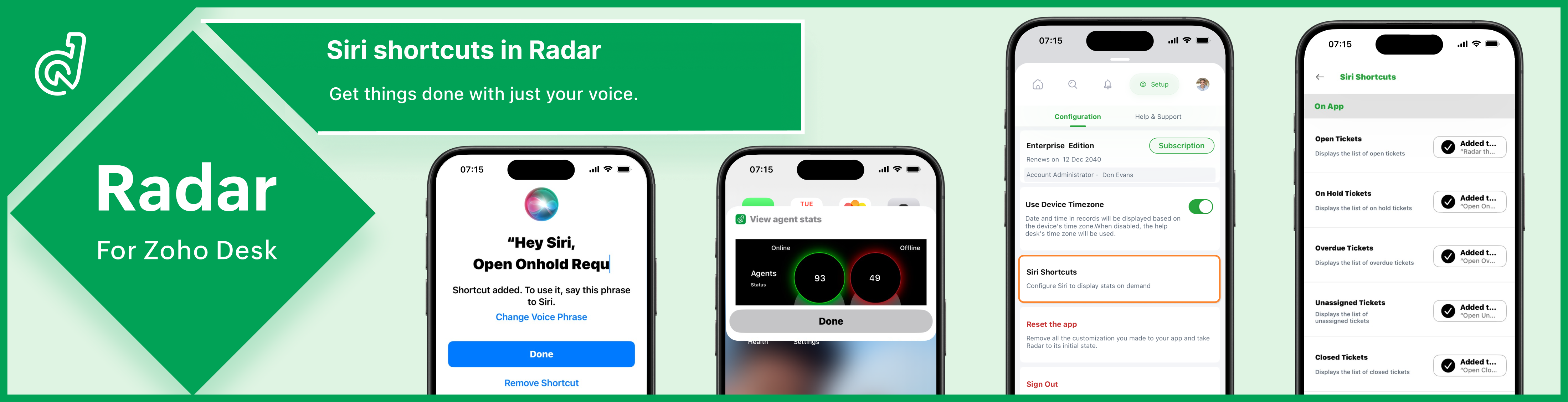
Just say the magic word 🪄
Computers make our lives easier by automating and expediting a variety of tasks like file sharing. As these machines evolve, so have the methods we use to interact with them. Voice control or voice command is a technology that provides a simple, natural, and spontaneous way of interacting with and operating devices. On computers and phones, voice-controlled digital assistants help us perform everyday tasks like setting an alarm, performing a web search, and texting a friend using simple vocal commands.
Amazon's Alexa, Apple's Siri, and Google Assistant are some of the most well-known and widely used voice-controlled digital assistants across the world.
What are the benefits of voice-operated digital assistants?
😀Ease of use
Speech is the primary form of communication among humans. It requires far less effort than typing and is a faster and more efficient form of computer input for many daily tasks. Using speech commands, you can instantly get things done, which otherwise require a lot of navigation and taps, clicks, or keystrokes.
✔️Great for on-the-go tasks
When using your device on-the-move, it can be quite challenging to maintain focus and avoid typos while using your fingers to input commands. Voice-controlled assistants help simplify the process and prevent mistakes.
🦾Accessibility for people with visual and motor challenges
Touch and type inputs on mobile devices may not be feasible options for users with visual impairments as they cannot perceive the screen visually. Similarly, people with motor disabilities and dexterity challenges also struggle with the standard inputs. For these people, voice-controlled assistants are a helpful solution.
🗣️Hands-free access
Since most virtual assistants are voice activated, you can leverage them to operate devices hands-free, opening the door to more effective multitasking.
What is Siri?
Siri is a digital assistant available across the Apple ecosystem of products via iPhone, iPad, MacBook, home pod.
Users can talk to Siri and ask it to complete simple tasks on their iPhones. To better understand what Siri says, they can personalize it by selecting the voice, language, and accent it should use.
Ever since it's inception in 2011, Siri has revolutionized the way users interact with their devices and has helped make them more accessible for users, including people with visual and motor impairments and elderly people.
 Radar integrates with Siri, allowing you to access customer and business insights using common phrases like, "Hey Siri, show average handling time."
 Why should you use Siri with Radar?
✨Pulls up stats instantly
When instructed, Siri immediately displays a Radar widget containing the requested stats for efficient monitoring.

✨Takes you to a specific insight
Siri can also take you to a specific page on Radar without requiring taps and swipes, enhancing efficiency and navigation
✨Enhances your experience
Siri shortcuts make Radar feel like an extension of your iPhone for a completely seamless experience.
✨Lets you customize the prompt
Radar gives you the option to use a custom phrase to invoke Siri. For example, you can colloquialize the phrase to display online agents as "Hey Siri, who's online?" for convenience.

✨Helps ensure security
Since Siri activates only to your voice, no one else will be able to access your help desk insights.
✨Can be configured in two simple steps
Go to Siri shortcuts on Radar setup and click "Add to Siri". That's all it takes to configure and use the digital assistant with Radar.
The feature is available for all iOS users. Configure Siri shortcuts now to unlock its awesome benefits. To learn how to set up Siri shortcuts in Radar, refer to: Configuring Siri shortcuts on Radar.
Regards,
Madumitha P
Team Zoho Desk

Topic Participants
Madumitha P
Sticky Posts
Zoho Desk Partners with Microsoft's M365 Copilot for seamless customer service experiences
Hello Zoho Desk users, We are happy to announce that Zoho Desk has partnered with Microsoft's M365 to empower customer service teams with enhanced capabilities and seamless experiences for agents. Microsoft announced their partnership during their keynoteWhatsApp pricing changes: Pay per message starting July 1, 2025
Starting July 1, 2025, WhatsApp is shifting from conversation-based pricing to per-message billing. That means every business-initiated message you send will count. Not just the first one in a 24-hour window. Pricing updates on the WhatsApp Business PlatformLive Webinar - Work smarter with Zoho Desk and Zoho Workplace integration
Hello customers! Zoho Desk and Zoho Workplace are coming together for a webinar on 14th May, 2024. Zoho Workplace is a suite of productivity apps for email, chat, docs, calls, and more at one single place. Zoho Desk is closely integrated with a few toolsApple iOS 17 and iPadOS 17 updates for Zoho Desk users
Hello Zoho Desk users! Apple recently announced the release of iOS 17 and iPad OS 17. These latest OS updates will help you stay productive and efficient, through interactive and seamless user experiences. Zoho Desk has incorporated the updates to helpZoho Desk Cheat Sheet For The Year-End
Check out these Zoho Desk best practices to end this year on a high and have a great one ahead! #1 Set Business (Holiday) Hours - If you have limited working hours, please make sure you restrict your business hours or set them as holidays for the coming days. Let your customers know when you will, and won't, be available. #2 Update the Annual Holiday List - Check the holidays for the new year and update the holiday schedule. Usually, holidays from the current year will be carried over for the next
Recent Topics
Data Import: New interface, improved field mapping, and more
Hello everyone! We’ve redesigned the data import process to ensure accurate field alignment and verify that every column in the uploaded file maps correctly with Desk fields before import. Here's how: Streamlined Import Steps Importing data is now moreAddress labels
Hi, we've been searching for a long time for a simple way for our employees to print address labels using a Dymo Label Writer 450. We came up with two alternatives that work, bur aren't really optimal. First one is WebMerge. Webmerge is a great application that does 100% what we need but it is way too expensive for our needs. We only need to print a couple of labels per month. The second one is the integrated print tool in Zoho CRM, (Print preview) You would think this is the obvious way to do thisThis domain is not allowed to add. Please contact support-as@zohocorp.com for further details
I am trying to setup the free version of Zoho Mail. When I tried to add my domain, theselfreunion.com I got the error message that is the subject of this Topic. I've read your other community forum topics, and this is NOT a free domain. So what is thePrint Labels
How can I configure my address to print my labels like this: Name Mailing Address Mailing City, Mailing State Mailing Zip Country Instead of: Name Mailing Address Mailing City Mailing State Mailing Zip Country Thanks!!!!Mailing labels - Improperly formatted
All I'm trying to do is print one, properly formatted, mailing label. I'm in the Contacts module. In the default "list view" for mailing labels I selected a single client, hit the "more actions" drop down and selected print mailing label. Unfortunately,Printing mailing labels
The ability to print mailing labels would seem to be an important, basic, function of a good CRM. I find it very surprising that this has still not been addressed adequately by Zoho. When trying to use the existing "mailing label" included: 1. the dataPageless mode needed to modernise Writer
When we switched from GSuite to Zoho, one of the easiest apps I found to give up, was Docs. In many ways, Writer has always been more powerful than Docs, especially in terms of workflows/fillable forms/etc. However, I went back into Docs because I noticeZoho Projects - Visual improvement to parent and sub-task relationship
Hi Projects Team, My feature request is to improve sub-task visibility. Please see screenshot below. I really think parent child relationships could be visually improved. Even if the first letter of the parent task was inline with other same level tasksAI Interview Insights: Turn Recorded Interviews into Quick Transcripts & Summaries
Evaluating interviews shouldn’t require replaying long recordings or taking manual notes. With AI Interview Insights, you can now review complete transcripts and AI-generated summaries of your One-way (Recorded) interviews right inside Zoho Recruit. ThisAPI method to get activity feed in Recruit
Hi community, I'm trying to figure out - is there any API method tto get information about datetime when Recruit/Candidates record tag where added?Printing Mailing labels
Is there any way to adjust the size of the printing labels? or product would I use to print labels from Zoho? Thanks, Josef Krieger Moderation Update (14th April 2025): We have another post discussing the same topic with votes and feedback from users.Default to Current Date
I'm importing data from a excel spread sheet that does not have date column and I'd like the date column in the Zoho Database to default to the current date. Any way I can do this?"Spreadsheet Mode" for Fast Bulk Edits
One of the challenges with using Zoho Inventory is when bulk edits need to be done via the UI, and each value that needs to be changed is different. A very common use case here is price changes. Often, a price increase will need to be implemented, andDifferent Company Name for billing & shipping address
We are using Zoho Books & Inventory for our Logistics and started to realize soon, that Zoho is not offering a dedicated field for a shipping address company name .. when we are creating carrier shipping labels, the Billing Address company name gets alwaysWhat's New in Zoho Inventory | Q2 2025
Hello Customers, The second quarter have been exciting months for Zoho Inventory! We’ve introduced impactful new features and enhancements to help you manage inventory operations with even greater precision and control. While we have many more excitingMake Packages from multiple sales order of a single customer
Our customers sends orders to us very frequently, some times what customer wants is to ship items from 5 to 6 sales orders in a single shipment. it will be very nice if, zoho can implement this function, in which we can select items from other sales orders of the customer.Print a price list or price book
Hi Community. Am I right in concluding that Zoho has no functionality to print a price list from either Zoho CRM, Zoho Inventory or Zoho Books? I won't get stuck on the fact that Zoho doesn't sync price books between Zoho CRM and Books/Inventory (moreStart Workflow from Deluge Script
I have developed a customized process from our CRM that leverages a deluge script to create a statement of work document. Once the document has been created via the merge and store function, I would like the ability to start a workdrive review & approveShow Custom Button in Portal Listview Canvas
I have created a custom button that shows in a list view of deals (internally I can see it). I have permissions to allow this button on the portal. But it is not displaying in the canvas list? Before I do too much leg work, is this function allowed?Zoho Survey Enhancements
We love Survey. We use it a ton. It needs some enhancements. Maybe some of these are already on the roadmap? API - this is crucial. We have some complex surveys that take place and need to update records, trigger other functions/automations, etc. I wouldZoho Sites "pages" management page
I have 80 plus pages on zoho sites. When I go to the "pages" link to view and edit pages, They are not in any kind of order, so I spend lots of time searching for pages when I need to edit or create new. How can I change the view order of all my pagesAI feature in Zoho Desk suggesting answers based on past ticket threads
Hi I would like to suggest something that would be very useful : instead of suggesting answers based on the Knowledge Base, I think it would be great if Zia could analyze the history of all customer and agents threads, to suggest answers in new tickets.Advanced Customization of the Help Center using JavaScript
Hello everyone, The Help Center in Zoho Desk can be customized by using HTML and CSS to provide structure and enhance the page's appearance—but what if you want to add interactive and dynamic elements? You can add these effects with JavaScript, a programmingIntroducing Zoho POS for the Kingdom of Saudi Arabia
Hey everyone, We are excited to kick-start December with a completely personalized edition of POS for retail businesses in Saudi Arabia to help run your operations with ease. It offers four different subscription plans—Free, Standard, Professional, andUnveiling Zoho Sites 2.0 - A new dimension in website building
Dear Zoho Sites Users, We are thrilled to announce the launch of Zoho Sites 2.0 today! This refresh represents a significant step forward in the capabilities of Zoho Sites and is crucial for creating a lasting and positive impact on our customers' businesses.Subform edits don't appear in parent record timeline?
Is it possible to have subform edits (like add row/delete row) appear in the Timeline for parent records? A user can edit a record, only edit the subform, and it doesn't appear in the timeline. Is there a workaround or way that we can show when a userScript Editor not an option
I am trying to apply a script to a sheet and Script Editor is not an option. I don't want to go outside Sheets to do this (like Creator) if it can be done inside Sheets.Zoho CRM - Writing Assistant Tone
Hi Zoho CRM Team, Text in my emails often gets underlined in yellow because I tend to use a more informal tone with my client's, like using "I'm" instead of "I am". Is there some way for me to tell the system that this is my preferred writing tone, soNot able to link email text.
Kindly check Zoho Sites. I am unable to turn a text into a email link. The save button does not work. Kindly try yourself to see it not responding to save.Adding Multiple Files to a Zoho Vault Entry
There is a old blog post talking about adding multiple file attachments to one Zoho Vault Secret: https://www.zoho.com/blog/vault/introducing-new-features-in-zoho-vault-powerful-password-sharing-wider-storing.html Is that still possible, I can see howMigrate data from old to new account
Hy, Have one Old Zoho Notebook Account with Data , want to migrate that whole Data to New Zoho Notebook Account which is in Zoho One . Is that possible ? If Yes then how?Zoho Analytics Regex Support
When can we expect full regex support in Zoho Analytics SQL such as REGEXP_REPLACE? Sometimes I need to clean the data and using regex functions is the easiest way to achieve this.RTL Support for Webforms in Zoho CRM
Dear Zoho CRM Support Team, We are writing to request an enhancement to the webform builder functionality within Zoho CRM. Currently, to create a webform in a right-to-left (RTL) language, the entire CRM instance must be set to RTL, which can be inconvenientAdd Custom Reports To Dashboard or Home Tab
Hi there, I think it would be great to be able to add our custom reports to the Home Tab or Dashboards. Thanks! ChadPricing Strategies: #1 Nuances in Pricing
When Clara first opened her digital printing shop, pricing was simple. She sold handmade greeting cards, planners, business cards, and other physical items at fixed label prices, individually and in bulk. One SKU, one price, one bill, and that's all it[Free Webinar] Learning Table Series – Education Management in Zoho Creator
Hello Everyone! We’re excited to invite you to another edition of Learning Table Series, where we showcase how Zoho Creator empowers industries with innovative and automated solutions. About the Learning Table Series The Learning Table Series is a free,CRM x WorkDrive: File storage for new CRM signups is now powered by WorkDrive
Availability Editions: All DCs: All Release plan: Released for new signups in all DCs. It will be enabled for existing users in a phased manner in the upcoming months. Help documentation: Documents in Zoho CRM Manage folders in Documents tab Manage filesMove attachments from one module to another with Deluge
I have created a button that works just like the convert button for my custom modules. I would like this custom function to move any attachments in this record to the new module. I can't seem to find any documentation on how this can be accomplished.Help in function code
Hi, could someone look at the code below and tell me what 's wrong with it? After a deal creation or edition the code should find the related Account, than all open Deals for that Account and copy the field Total_Open_Deals from the Account record toAutomation Series: Auto-update Phase Status
Hello Folks! You can auto-update your phase's status based on status of underlying tasks using custom functions. In this series, we will showcase how to create and run custom functions, using Deluge, with ease. Follow the steps below and automate yourNext Page