Subforms to Capture Multi-Row Data in Job Sheets

Subforms transform your job sheets from simple checklists to powerful, data-rich forms. In field service work — whether maintenance, inspection, installation, or repair — a single job can involve multiple repeatable entries: readings, parts used, activities performed, issues encountered, and more. Subforms give you the flexibility to capture repeatable data in a structured tabular format — without cluttering or overloading the main form.
What Can You Capture with Subforms? Plenty.
- Log multiple measurements or readings (pressure, temperature, voltage, etc) during maintenance or inspection.
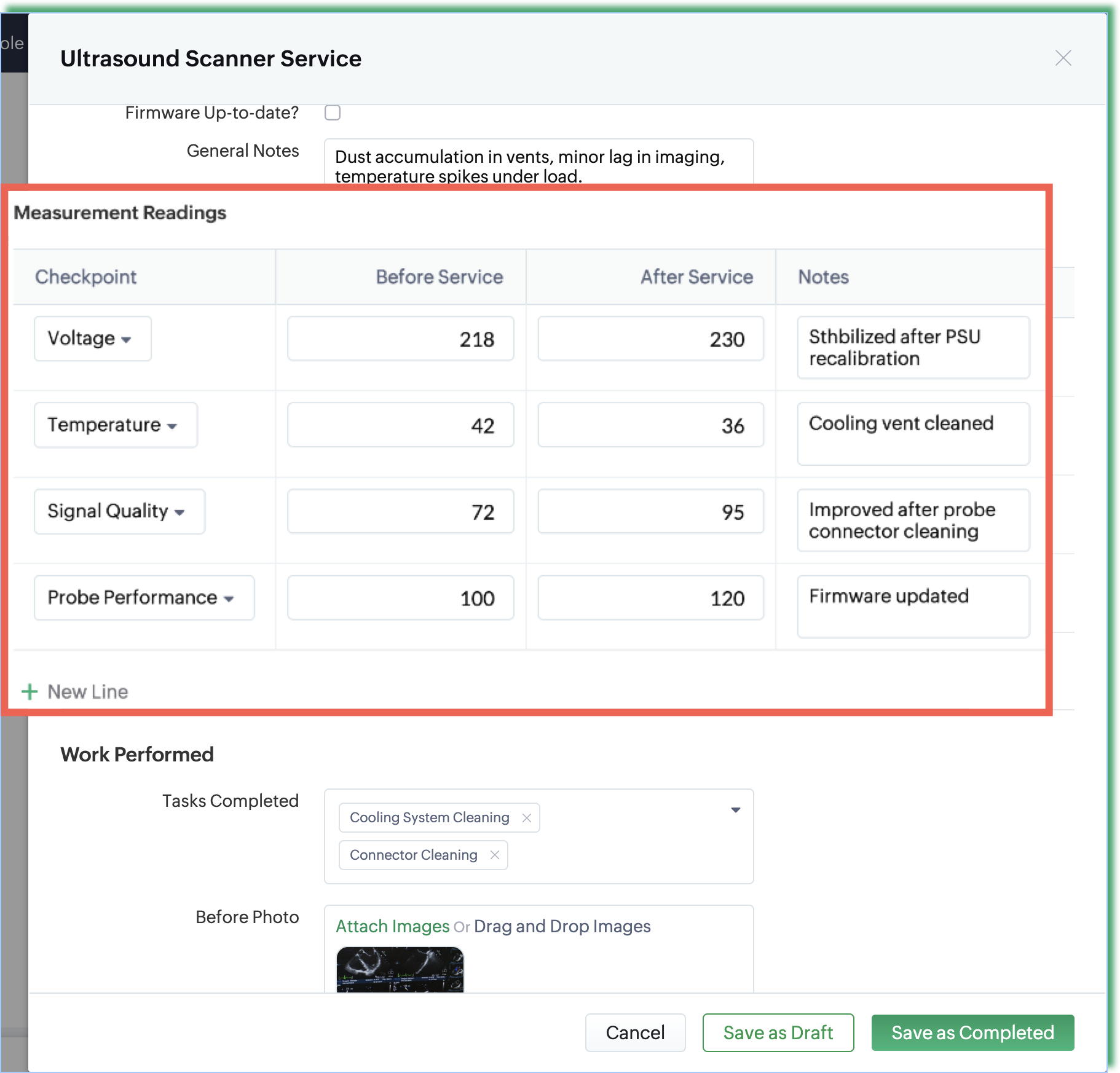
Example: A technician servicing an ultrasound scanner can record several checkpoints such as voltage, temperature, signal quality, and probe performance—both before and after service in the Measurement Readings subform. - Record repeated activities or checks (e.g. safety checklist, quality checkpoints) when there are many.
Example: During an HVAC preventive maintenance visit, a technician logs each repeated task—such as filter inspection, coil cleaning, refrigerant checks, and thermostat calibration—using a Maintenance Checklist subform. - Capture observations or issues found, along with actions taken — especially when multiple issues may occur in one job.
Example: During a routine equipment inspection, the technician uses the Observations & Issues subform to log multiple problems such as unusual noise, loose wiring, and signs of overheating. Each issue is recorded with details on severity and the action taken, creating a clear and structured record for follow-up or future visits. - Track all parts or consumables used on a job in an itemized manner.
Example: A technician is dispatched to fix a reported kitchen sink leak. During the repair, all replacement parts and consumables—such as the PVC P-trap, elbow joint, etc—are logged in the Parts & Consumables Used subform providing a clear audit trail of what was used and a reference for repeat service visits.
Creating Subforms Is Easy
Subforms in Zoho FSM can be created with simple drag-and-drop. Add the fields you need, rearrange them as you like, or remove anything unnecessary. You’re fully in control of how detailed—or how simple—you want your subforms to be.

Please refer to the help documentation for in-depth details. If you have any questions or feedback, feel free to leave a comment below or write to us at support@zohofsm.com.
Topic Participants
Latha Velu
Recent Topics
I can't add a new customer in Zoho invoice? Anyone had this issue before?
Ive been using Zoho invoice for over 6 years. Today I wanted to add a new customer to send an invoice to but it doesn't save when I try to access it from the pulldown menu when you go to send a new invoice.Spreadsheet View click & focus issue in Arabic (RTL) localization
Hello Zoho Support Team, I am facing an issue in Zoho Creator Spreadsheet View when using Arabic localization (RTL). Scenario: My app supports English (LTR) and Arabic (RTL). I created a Spreadsheet View for a form. In English, everything works correctly.Copy contents of File Upload Field into Workdrive
Hello, I have set up our CRM so that a Workdrive folder is automatically created for each Deal via workflow, this adds the id of the folder into a dedicated field. We also have a field on each Deal called 'Approved Layout', which is a file upload field.Customer address in Zoho Bookings
Hello, Is it possible to add customer address information to the Zoho bookings appointment screen? Or have it pull that information automatically from the CRM? We are wanting to use this as a field management software but it is difficult to pull the address from multiple sources when it would be ideal to have a clickable address on the appointment screen that opens up the user's maps. It would also be advantageous for the "list view" to show appointment times instead of just duration and bookingGhost email notification on a form
Hello, We have recently encountered an error where I can not see a email notification set up for a form which I am currently the owner, although neither the form nor the notification were created by me. However, neither can the Super Admin access theIntroducing Record Category in CRM: Group options to see record status at a glance.
Release update: Currently available for CN, JP, and AU DCs (all paid editions). It will be made available to other DCs by mid-March. Hello everyone, We are pleased to introduce Record Category in Zoho CRM - a new capability where the user can get an overviewbulk edit records and run internal logic
hi there is few logics in manner "it this than that" logics work well when i edit entry openning it one by one (via workflow "on add/edit - on success" , for custom field "on update/on user input") but when i try bulk edit records - logic does not work. how can i turn on logic to work as programmed - for mass editing records via bulk edit?Dheeraj Sudan and Meenu Hinduja-How do I customize Zoho apps to suit my needs?
Hi Everyone, I'm Meenu Hinduja and my husband Dheeraj Sudan, run a business. I’m looking to tweak a few things to fit my needs, and I’d love to hear what customizations others have done. Any tips or examples would be super helpful! Regards Dheeraj SudanBulk bank rule creatioin
Hi team, I am exploring Option to create a multiple bank rule. Could please suggest the option to implement this?Limitations on editing a message in Cliq
Hi I've checked the documentations and there's no mention of how many times a message can be edited. When trying with code, I get various numbers such as ~1000 edits or so. Please mention if there's a limit on how many times one can change a message viaemail address autocomplete
Is there a way to eliminate certain addresses from showing up in auto complete when entering an address? Many old and unused addresses currently show up, many of which I would like to get rid of. ThanksHow to use MAIL without Dashboard?
Whenever I open Mail, it opens Dashboard. This makes Mail area very small and also I cannot manage Folders (like delete/rename) etc. I want to know if there is any way to open only Mail apps and not the Dashboard.Introducing Radio Buttons and Numeric Range Sliders in Zoho CRM
Release update: Currently out for CN, JP, AU and CA DCs (Free and standard editions). For other DCs, this will be released by mid-March. Hello everyone, We are pleased to share with you that Zoho CRM's Layout Editor now includes two new field formats—User is already present in another account error in assigning users to marketing automation
Hello everyone Greeting, I had a problem in assigning user in marketing automation, when I try to add it I see this error: (User is already present in another account error) what should I do?How can i download and secure all my mails from the archive folders?
Hi, i would like to download all my mails from my archive folders and secure it on my external HDD. Is this possible? Thx. amirHow to open filtered report in popup using Zoho Creator Deluge?
First report: There is so many records in Report, If I click one record, pop up is occur. Second report (Pop up): there is also so many record data, and this pop up is also Report, not Form. First report: It has got "Sales Order" field. when I click anyMake panel configuration interface wider
Hi there, The same way you changed the custom function editor's interface wider, it would be nice to be able to edit panels in pages using the full width of the screen rather than the currently max-width: 1368px. Is there a reason for having the configuration panel not taking the full width? Its impossible at this width to edit panels that have a lot of elements. Please change it to 100% so we can better edit the layouts. Thanks! B.Can you default reports/charts to report the current week?
Our data table maintains two years of data. Management wants certain report to automatically filter the report to the latest calendar week. I know I can do this manually with filters but I want the report to automatically default to the latest calendarRendering PDF to view on page
My company upload lots of PDF files onto Zoho. But every time we open it, it downloads the file instead of viewing it on the web page. Does Zoho allow uploaded PDF files to be rendered to view on web page yet? I've been trying to use <embed> or <object> but it cannot be loaded. (similar thread: https://help.zoho.com/portal/community/topic/how-to-open-a-pdf-file-of-a-view-in-preview-mode)Overlapping Reports in Dashboards
It's rare, but occasionally it would be a good feature if I were able to overlap reports, either fully or partially in the Dashboards. Also, then having the ability to move objects to the front or rear, or make them transparent/translucent would be goodZoho Books Finance Modules Not Accessible in Zoho CRM Mobile App
We have integrated Zoho CRM with Zoho Books using the Zoho Finance Suite integration. In the CRM web version, we can see the Finance modules (Estimates/Quotes, Invoices, Sales Orders, Items, Payments) and are able to create invoices and quotes directlyFeature request - pin or flag note
Hi, It would be great if you could either pin or flag one or more notes so that they remain visible when there are a bunch of notes and some get hidden in the list. Sometimes you are looking for a particular name that gets lost in a bunch of less importantAdmin guide: Handling Mailbox Settings for better user management
Managing day-to-day email scenarios, such as supporting users with multiple email addresses, ensuring uninterrupted email access during employee absences, enabling secure mailbox sharing, and enforcing organizational security and compliance, can be challengingCisco Webex Calling Intergration
Hi Guys, Our organisation is looking at a move from Salesforce to Zoho. We have found there is no support for Cisco Webex Calling however? Is there a way to enable this or are there any apps which can provide this? Thanks!Designing a practical Zoho setup for a small business: lessons from a real implementation
I recently finished setting up a Zoho-based operating system for a small but growing consumer beauty business (GlowAtHomeBeauty), and I wanted to share a practical takeaway for other founders and implementers. The business wasn’t failing because of lackDKIM (Marketing emails) UNVERIFIED (Zoho One)
I'm having a problem with Zoho One verifying my Marketing Email DKIM Record for MYFINISHERPHOTOS.COM. I have removed and re-entered the ownership, DKIM (Transactional emails), SPF and Marketing DKIM and all of them come back verified except the DKIM (MarketingZoho Recruit Community Meet-up - India
Namaste, India. 🙏🏼 The Zoho Recruit team is hitting the road—and we 're absolutely excited behind the scenes. Join us for the Zoho Recruit India Meet-up 2026, a morning designed to make your recruiting life easier (and a lot more effective). Date CityGenerate a Zoho Sign link
From time to time I get a response "I never received your you e-document for electronic signature" is there a way to generate a Zoho Sign link to share.Zoho Social - Cliq Integration / Bot
Dear community / zoho, I am looking for a way to create a bot within Zoho Cliq to update my colleagues about our Zoho Social activities. For example, if a new post is published, it would be great if this post automatically would be shared in our socialCRM gets location smart with the all new Map View: visualize records, locate records within any radius, and more
Hello all, We've introduced a new way to work with location data in Zoho CRM: the Map View. Instead of scrolling through endless lists, your records now appear as pins on a map. Built on top of the all-new address field and powered by Mappls (MapMyIndia),Is it possible to create a word cloud chart in ZoHo Analystics?
Hi there, I have a volume of transaction text that I would like to analyse using word cloud (or other approcah to detect and present word frequency in a dataset). For example, I have 50,000 records describing menu items in restaurants. I want to be ableHow to Fix the Corrupted Outlook 2019 .pst file on Windows safely?
There are multiple reasons to get corrupted PST files (due to a power failure, system crash, or forced shutdown) and several other reasons. If You are using this ScanePST.EXE Microsoft inbuilt recovery tool, it only supports the minor corruption issue[Webinar] A recap of Zoho Writer in 2025
Hi Zoho Writer users, We're excited to announce Zoho Writer's webinar for January 2026: A recap of Zoho Writer in 2025. This webinar will provide a recap of the features and enhancements we added in 2025 to enhance your productivity. Choose your preferredHow to drag row(s) or column(s)?
Hi. Selecting a row or column and then dragging it to a new position does not seem to work. Am i missing something or this is just not possible in Zoho Sheet? Cheers, JayBuilding Toppings #5 - Creating and configuring custom service connections in Bigin Toppings
Hello Biginners, Integrating Bigin with external applications extends its capabilities and enables customized functionalities. In our last post, we saw how to create a default service connection. Today, we'll see how to create a custom service connectionAdmin asked me for Backend Details when I wanted to verify my ZeptoMail Account
Please provide the backend details where you will be adding the SMTP/API information of ZeptoMail Who knows what this means?Optimising CRM-Projects workflows to manage requests, using Forms as an intermediary
Is it possible to create a workflow between three apps with traceability between them all? We send information from Zoho CRM Deals over to Zoho Projects for project management and execution. We have used a lookup of sorts to create tasks in the past,Introducing real-time document commenting and collaboration in Zoho Sign
Hi, there! We are delighted to introduce Document commenting, a feature that helps you communicate with your recipients more efficiently for a streamlined document signing process. Some key benefits include: Collaborate with your recipients easily withoutConditional fields when converting a Lead and creating a Deal
Hi, On my Deal page I have a field which has a rule against it. Depending on the value entered, depends on which further fields are displayed. When I convert a Lead and select for a Deal to be created as well, all fields are shown, regardless of the valueCliq iOS can't see shared screen
Hello, I had this morning a video call with a colleague. She is using Cliq Desktop MacOS and wanted to share her screen with me. I'm on iPad. I noticed, while she shared her screen, I could only see her video, but not the shared screen... Does Cliq iOS is able to display shared screen, or is it somewhere else to be found ? RegardsNext Page