Tip #10: Various time zone settings on the bookings page
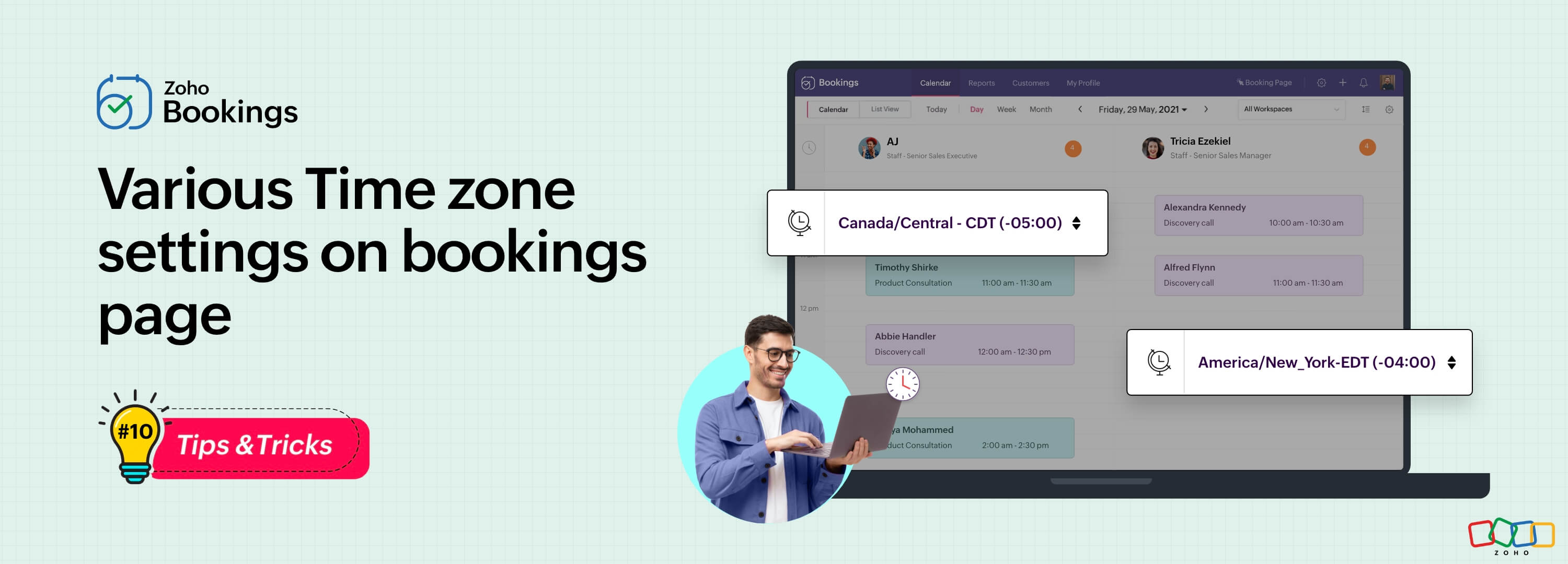
Let's assume you are an IT consultant who works with clients in multiple countries. To schedule appointments and avoid any time-zone related complications, your booking platform should provide automatic time zone conversion. Additionally, your clients should have the option to select their preferred time zones for appointments. This feature can greatly benefit consultants who frequently travel or meet clients and experience varying time zones on different days.
Likewise, a yoga studio can effortlessly arrange online sessions for its global clients, regardless of their time zones.
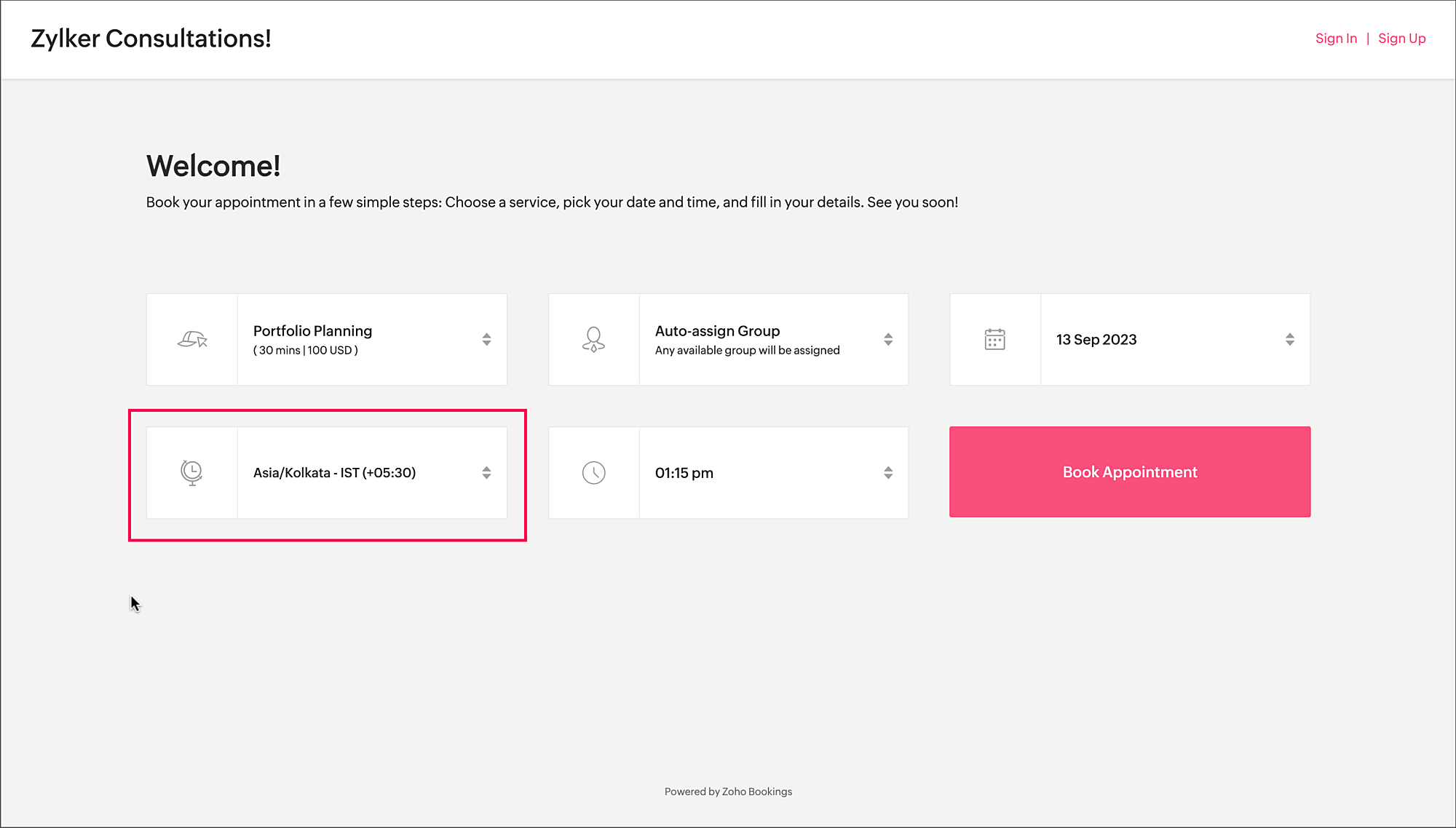
Zoho Bookings offers a range of time zone settings, simplifying the appointment scheduling process regardless of service provider and customer location.
Benefits
Minimized errors: Automatic time zone conversion reduces the risk of scheduling errors caused by manual time zone calculations.
Time zone selection control: Admins can determine whether the time zone option on the booking should be displayed, hidden, or made editable, offering greater flexibility that is tailored to specific needs.
Time zone-based notifications: Email notifications will be sent to both the staff and customers, according to their preferred time zones. For instance, if the staff works in an Australian time zone and the customer books in an American time zone, appointment emails will be sent to each party based on their selected time zones.
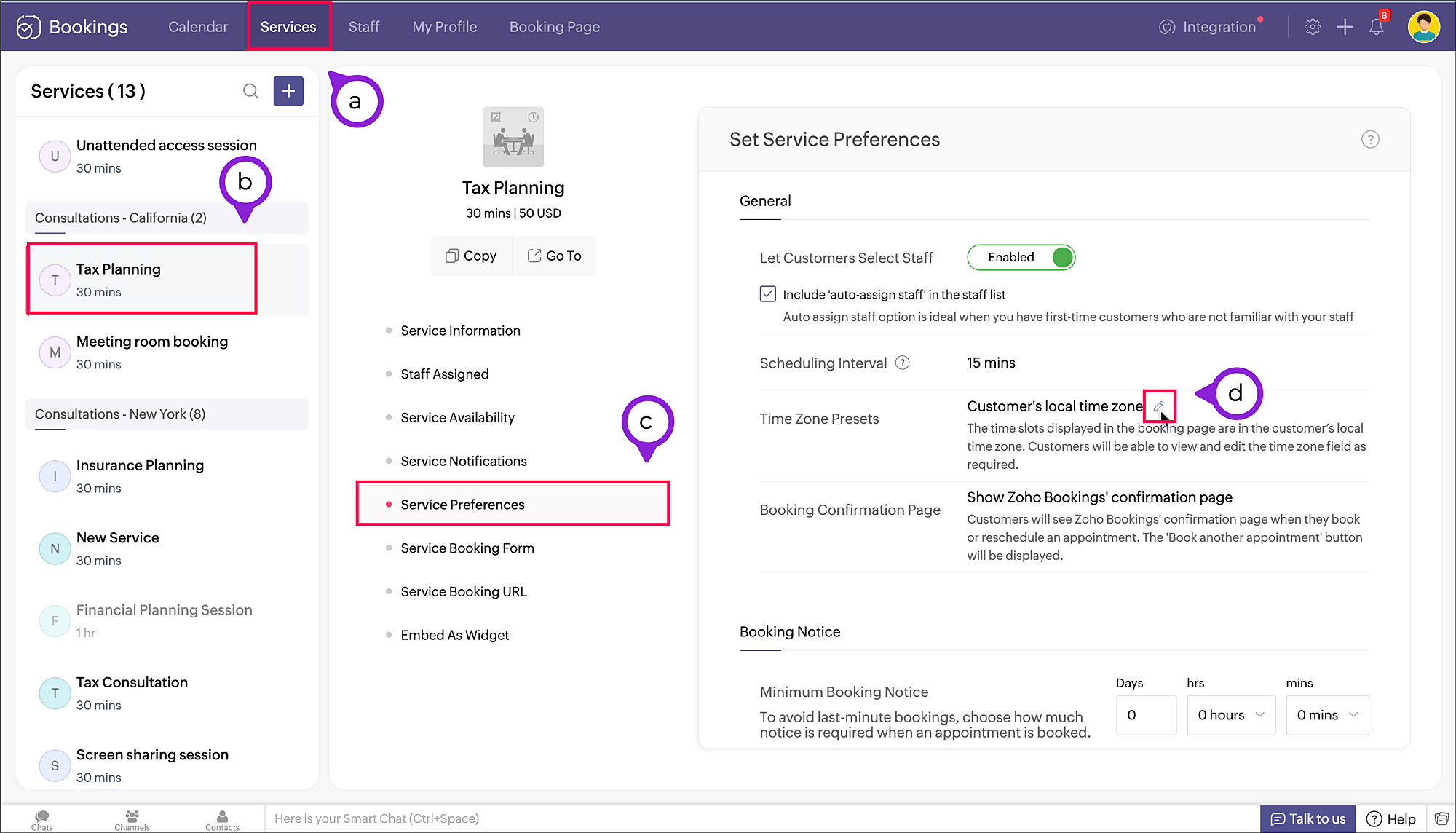
To access the time zone settings
- Navigate to Services > Select the required service > Service Preferences.
Note: For group and resource booking, the time zone settings can to be configured under Workspaces > Policies and Preferences. - Under General section, click the edit icon against Time Zone Presets.
- A pop-up appears where you can configure the time zone settings.
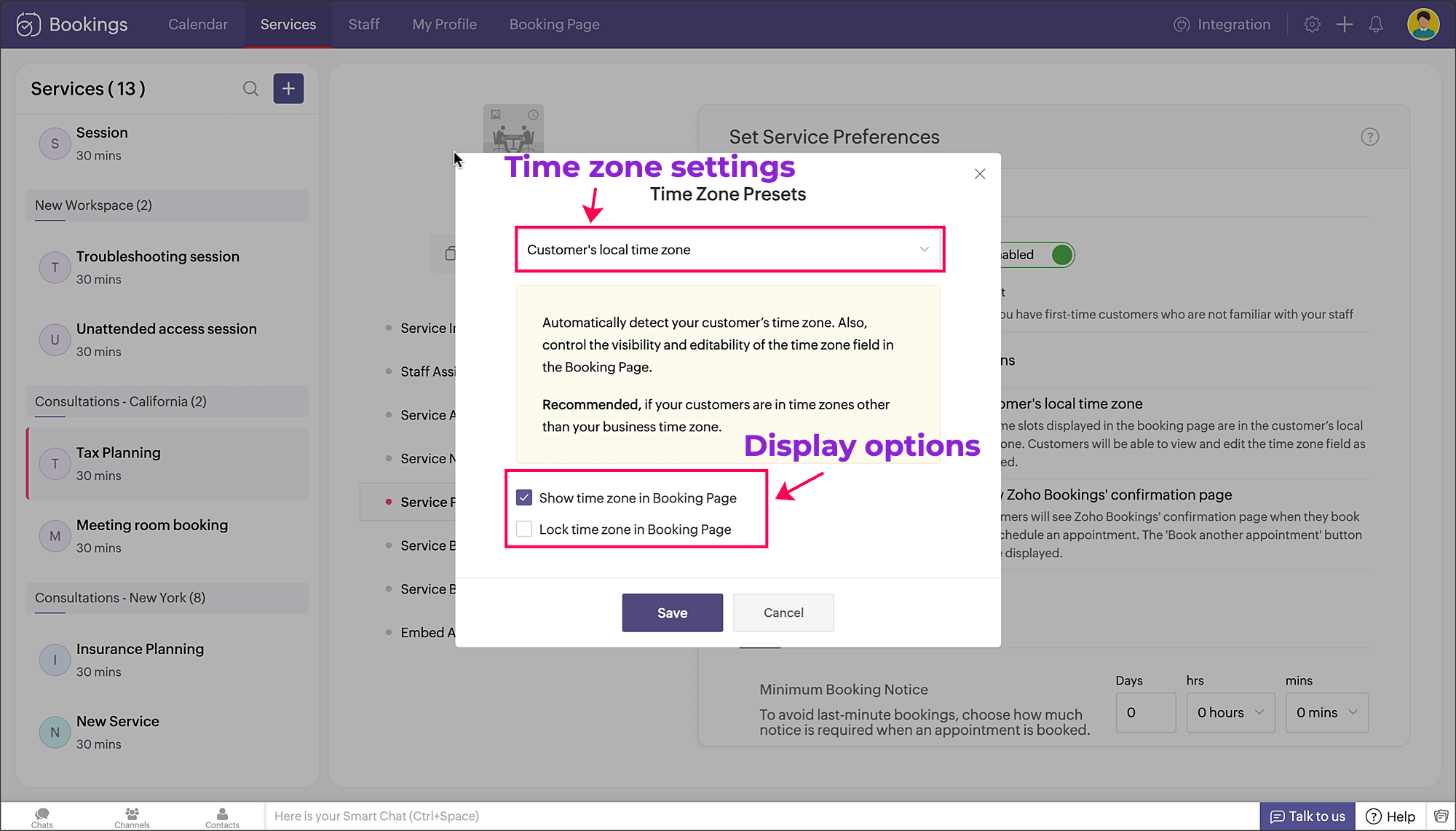
a. Time zone settings: The first dropdown is for choosing the time zone on the booking page. You have three options to choose from.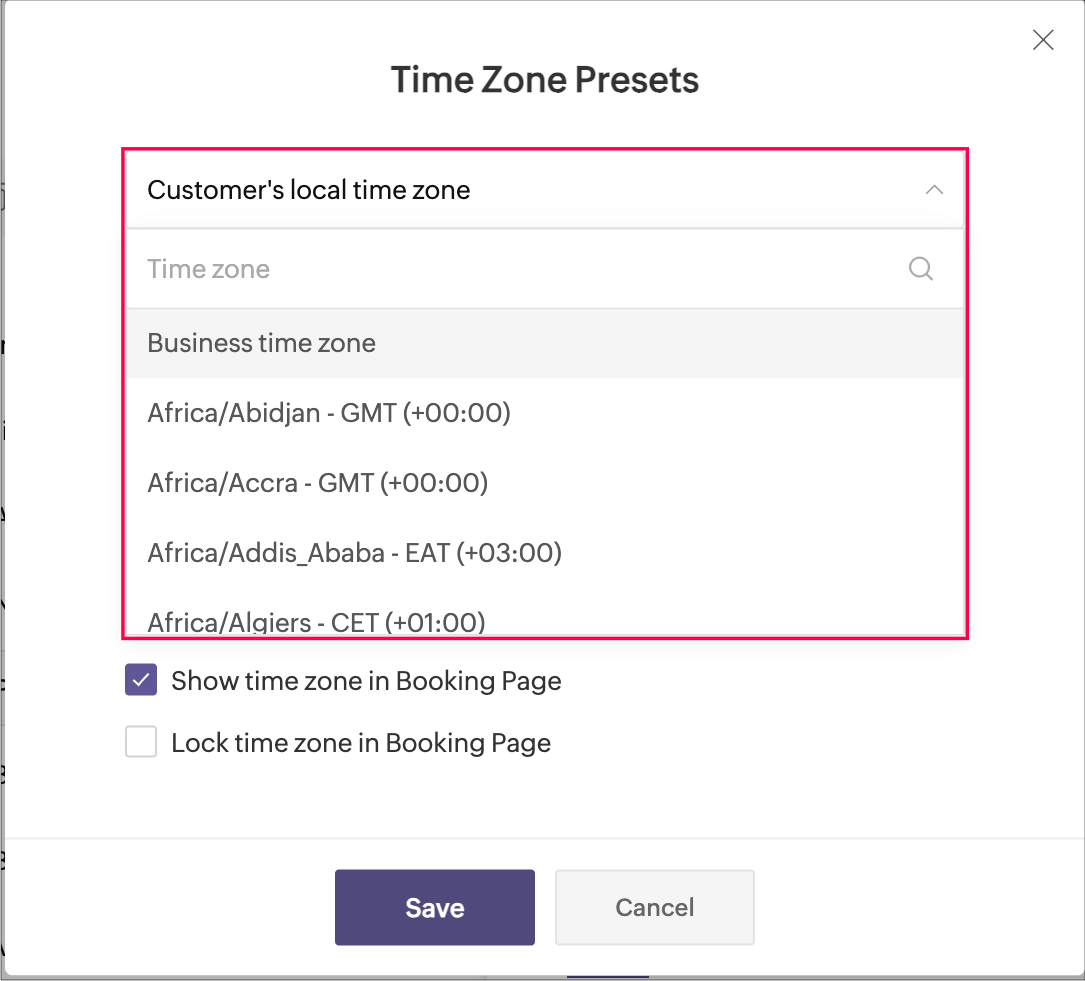
- Customer's local time zone: By choosing this, the customer's location will be detected and the corresponding time zone will be shown on the booking page.
- Business time zone: By choosing this, the default time zone of the business will be shown. This can be accessed under Settings > General > Basic Information > Time Zone.
- Any other time zone: You can choose any other time zone from the list of all time zones.

Visibility options:
- Show time zone: To show the time zone option on the booking page, select the checkbox next to Show time zone in Booking Page. This displays the time zone which is selected in the above pop-up.
- Hide time zone: To hide the time zone dropdown option on the booking page, deselect the checkbox next to Show time zone in Booking Page.
This means that the time zone selected on the above pop-up is suitable for the appointment. However, it's essential to ensure that all parties involved are on the same page regarding the appointment's timing, which might require additional communication or clarification.
Locking options:
- Lock time zone: To prevent the customer from changing the time zone, you can select the checkbox next to Lock time zone in Booking Page.
Here, the booking system displays the specified time zone without the option for customers to modify it. This can be beneficial when strict scheduling adherence is crucial, ensuring that all appointments are synchronized according to a predetermined time zone. - Unlock time zone: To allow the customer to edit/change the time zone, you can deselect the checkbox next to Lock time zone in Booking Page.
This option provides flexibility, allowing customers to select their preferred time zones, which can be particularly useful for businesses with a global customer base. It empowers customers to book appointments that align with their local time, reducing confusion and scheduling errors.
Combining the visibility and locking options, there are three display options as shown below.
Show | Lock | Result |
✓ | ✗ | Shows the time zone and allows customer to modify the time zone on the booking page |
✓ | ✓ | Shows the time zone but restricts the customer from modifying the time zone on the booking page |
✗ | N/A | Hides the time zone |
To conclude, implementing time zone settings and providing visibility or locking options on the booking page can greatly enhance user convenience, minimize scheduling errors, and ensure a smoother experience for both customers and service providers.
Hope this tip is useful, let us know your thoughts in the comments section.
Happy scheduling!
Topic Participants
Praveena Chandran
Michael Tarver
Akshara Amarnath
Sticky Posts
Tip #13: Identify where your bookings come from with Source Tracking
Source tracking is the practice of identifying where your bookings originated. This is important, because online bookings come from a wide variety of sources like social media platforms, your website, email and ad campaigns, partner websites, organicTip #17: How to mandate partial payment for your appointments
When you require partial payments during the booking process, customers can only schedule with you after paying a certain amount in advance. This deposit acts as a commitment between both parties. Apart from that, it has many more advantages. BenefitsTip #18: Organize a group workshop in a few steps
It's the season for workshops—they're everywhere, catering to diverse interests and needs. Whether for more professional goals like leadership development or creative endeavors like painting, there's an abundance of workshops offered every day. A schedulerTip #16: Custom labels for staff, service, and resources
Every industry uses its own jargon. Take healthcare, for example; when you visit a doctor, it's not just an appointment, it's a consultation. The people who provide consultations are the providers. Similarly, in the tranquil world of a spa, a massageTip #15: Customize service prices for each staff member
It's common practice for a service to be priced differently based on the staff member providing it. For example, an experienced hair stylist may charge more for a haircut compared to the other stylists. This pricing strategy allows businesses to charge
Recent Topics
Creating multiple CRM leads from a Zoho Forms subform
Hi all, We have a heavily used intake form that is used for new leads as a part of our intake. There is a subform that allows the lead to add additional team members, their titles and other basic info. That form submission creates a new Lead and the subformSeries Label in the Legend
My legend reads 'Series 1' and 'Series 2'. From everything I read online, Zoho is supposed to change the data names if it's formatted correctly. I have the proper labels on the top of the columns and the right range selected. I assume it's something inDynamic Signature - Record owner
Hi everyone, I’m using Zoho Writer merge templates from Zoho CRM and have two questions: Owner signature: How can I automatically insert the CRM record owner’s signature in the merged document? I’m not sure where this signature is stored or how to referenceSet Warehouse based on Vendor
Greetings. I would like to set automaticaly the Warehouse based on the Vendor. Context: I am working on an adaptation of a Purchase Order to be used as a Quotation. I have defined that when a user has to raise a quote the Vendor will be "PROCUREMENT" I would like to set the Warehouse to a predefined value when "PROCUREMENT" is set as Vendor. I have tried to do with the Automation feature using the Field Update option, but Warehouse does not is listed as a field. Can you help? Thanks in advance.Zoho CRM for Everyone's NextGen UI Gets an Upgrade
Hello Everyone We've made improvements to Zoho CRM for Everyone's Nextgen UI. These changes are the result of valuable feedback from you where we’ve focused on improving usability, providing wider screen space, and making navigation smoother so everythingsearch and Smart Bar both missing in Mail
One of the users on my account does not have the search bar at the top right or the Smart Bar at the bottom left of the desktop Mail app. Any ideas how to get those back?Printing from Zoho Creator hosted on my own server to printers hosted on my clients local network
Hello. Fairly new to Zoho Creator and looking for best options to be able to print from my application hosted on my own server to any printer hosted on my clients own local network. Any advice is welcome. Thank you.Add System Pre-Defined Lookup Field to Subform?
Hi there! New to using Zoho, so this may already exist, but I'm having trouble figuring it out. Is there a way to get the system pre-defined Account Lookup field (in our case, renamed to Company Name), as the starting point for a subform? In our company,Numbered / bullet point List in Zho Cliq
Hi, is there a way to format chat messages in Cliq like this Topic 1 Hey, I finished this project yesterday etc... Topic 2 I am still working on this etc...Cannot Access Subform Display Order in Deluge
As highlighted in this community post, we still have to deal with the significant limitation of not being able to access the user-sorted order of subform rows through Deluge. This creates a major disconnect between the UI capabilities and backend automation,How many groups in Zoho Mail can I make?
I'm currently on the free plan, which has a limit of 10 users. Does that limit includes groups too? If not, what is the limit for groups? Thanks!Feature Suggestion for Zoho Social: Auto-reply to Comments or Keywords
Hi Zoho team, I'd like to suggest a very specific feature that would be extremely helpful for customer engagement: the ability to automatically send a reply to comments on posts — either all comments or those containing specific keywords. For example,My domain did not activate
Hi, my domain (apsaindustrial.com.ar) did not activate, and the phone verification message never arrived. Please would you solve this problem? Thanks.Already have Zoho account. Not letting me log in
I already have a Zoho account that is associated with my Google email and my phone number. Even though I'm already logged in to Zoho, when I click on the mail icon to access my email, it takes me to the pricing page. When I click on the free option, itZOHO Mail App Not working
There seems to be an issue with Zoho Mail App today. It is not connecting to server, internet is working fine, tried uninstalling app and reinstalling, loading circle keeps spinning round. Is there an update on the way?facing error 550 5.4.6 while sending emails
Please help me fix this issueAllow Itemization for Recurring Expenses
For whatever reason, one cannot itemize a Recurring Expense. This capability should be added. The use cases to support this are largely the same as what they were to allow for itemization in Expenses. Anything that would need to be itemized for a regularZoho reply to not working. just reply to my self
Hello. i using on my wordpress website a contact form from Wsform. i can set the reply to email there. normally it works. but since i am using your wordpress plugin zoho mail it doesn`t work. its not using the reply to (email from customer). I just canPainfully Slow Zoho mail
Since yesterday Zoho Mail seems to have starting functioning very slowly and having a few bugs. It's slow to open mails, slow to send, slow to change between email accounts. Sometimes clicking on a particular folder (eg Sent folder) stops working andCan't receive any email from other platform
Hello,everyone, i'm just join zoho and create two email accounts for my own business. I was using it to get a verified email from stripe, but can't receive it. and I use my private gmail account to send test email twice, first time show below reply, butWeekly Tips: Secure your attachment downloads with Zoho Mail
Safety is one of our main concerns, whether it’s about device security or online protection. We use tools like fingerprint scanners, facial recognition, and two-factor authentication to keep our devices and email accounts secure. We use methods like OTPYour Incoming has been blocked and the emails will not be fetched in your Zoho account and POP Accounts
Can some on help me regarding our account . thank you so muchZoho Creator integration with Sage 50
Hi, Wondering if anyone has had any experience connecting Zoho to Sage 50 and could share any information on this matter. Thank you.Dropshipping Address - Does Not Show on Invoice Correctly
When a dropshipping address is used for a customer, the correct ship-to address does not seem to show on the Invoice. It shows correctly on the Sales Order, Shipment Order, and Package, just not the Invoice. This is a problem, because the company beingConditional Email Forwarding
How can I set conditional email forwarding of the users? For example: Mail should be forwarded to a address only if it comes from a particular sender. So, I want such email forwarding, which forwards mails based on particular conditions, like the incomingIncoming emails not appearing in Inbox
Hello, I have an issue with incoming emails sent from my website (domain: h2ostop.si). Emails are visible in the Sent folder, which means they are successfully sent through Zoho SMTP, but they never appear in my Inbox. Nothing arrives in Inbox, Spam,Automatic Matching from Bank Statements / Feeds
Is it possible to have transactions from a feed or bank statement automatically match when certain criteria are met? My use case, which is pretty broadly applicable, is e-commerce transactions for merchant services accounts (clearing accounts). In theseEmail Opt Out Question
Has the problem where if a customer is emailed opt out prevents you sending standard emails? For me this feature is simply to stop any email marketing and should not block people from receiving emails via Zoho mobile, which makes no sense.Can No Longer Access Zoho Email Accounts from iPhone or iPad Apple Mail Apps ,.
Keeps asking for password, Says ID or password incorrect. Tried creating a new app specific password. Same result. Is this possibly related to the server maintenance. Have verified all email settings, userid and password. This has worked for years untilLatest update caused issue in using marathi typingzoho
With latest update now marathi typing does Not work in zohonotebook. I preferred zoho over other because it was supporting marathi font without any distortion.. But after new update,keyborad simply does not workLogin verification emails never received.
I can't login to my account. You send a verification email, but it never arrives. This is a common problem, frequently caused by some relay point out there classifying the sender as a spammer. Is there anything I can do to bypass this? Maybe get a textZoho Bigin - should be able to link a "contact" to multiple "companies"
Hello Support, I called into telephone support and was told that a contact can only be linked to one company. We have situations were director are contacts of and directors of multiple companies so that seems a basic weakness in Bigin. When go to addCRM: hosting a single html file in Zoho and displaying it as a widget
I have seen that CRM offers the option of uploading a web project to Zoho itself and displaying it as a widget in CRM. The instructions then talk about setting a development environment with Node and developing an application to upload to Zoho. But IGlobal lists for Multi select
It would be great if I could select a global list to use for a multi select dropdown filed.Hotmail is blocking the zoho mail IP
Greetings, Since last Tuesday (5 days ago today) I wrote to Zoho support and I still haven't received a single response (Ticket ID: 2056917). Is this how you treat people who pay for your email service? I am making this public so that those who want toYahoo is rejecting e-mails sent from a Zoho server
Diagnostic-Code: 4.7.0 [TSS04] Messages from 136.143.169.51 temporarily deferred due to unexpected volume or user complaints - 4.16.55.1; see https://postmaster.yahooinc.com/error-codes Remote-MTA: dns; mta5.am0.yahoodns.netYahoo blocks e-mail sent from Zoho servers
Getting this for a bunch of Yahoo addresses. Do you know if some of your servers got blacklisted? Diagnostic-Code: 4.7.0 [TSS04] Messages from 136.143.169.51 temporarily deferred due to unexpected volume or user complaints - 4.16.55.1; see https://postmaster.yahooinc.com/error-codesWorking with dates and Function Field
Hello friends! I'm trying to add days to a date, however the field function will always shows 00:00:00 after the resultant date. How can I display only the date, whithout the time? toDate(input.request_date.addDay(input.Prazo_acordado),"MM,d,yyyy") The code above will result something like "11-Feb-2020 00:00:00", but I want to display only "11-Feb-2020"What's New in Zoho Analytics - November 2025
We're thrilled to announce a significant update focused on expanding your data connectivity, enhancing visualization capabilities, and delivering a more powerful, intuitive, and performant analytics experience. Here’s a look at what’s new. Explore What'sUnable to send message;Reason:550 5.4.6 Unusual sending activity detected. Please try after sometime.
Please help my account got blocked automatically, can you help me how to avoid it? Thanks so muchNext Page