Tips & Tricks #09 Automatiseren met Zoho Desk Deel 1

Tips & Tricks #09 Automatiseren met Zoho Desk Deel 1


Beste Community leden,

Zoals jullie weten hebben we in Nederland een woningtekort. Een oplossing hiervoor is de hoogbouw. Echter, om de de hoogte in te gaan moet er ook voor de juiste faciliteiten in flats worden gezorgd. Problemen kunnen we allemaal wel bedenken: de afvoer raakt verstopt, de lift is defect of het warme water werkt niet. Om dit op te lossen hebben we verschillende mensen nodig: een elektricien, loodgieter, rioolservice.

We willen natuurlijk dat onze problemen zo snel mogelijk kunnen worden opgelost. Dit kan gemakkelijk gedaan worden door het proces uit te schrijven en dit te automatiseren. Aan de hand van een voorbeeld zullen we jullie uitleggen om het proces te automatiseren met Zoho Desk.

De Zalmhaventoren, het hoogste gebouw van Nederland, bevat maar liefst 256 appartementen. Stel dat de verlichting van verdieping 49 ineens niet meer werkt, je wilt dit zo snel mogelijk melden, zodat het gerepareerd kan worden. Dit kan door bijvoorbeeld op elke verdieping en elke kamer een specifieke QR code op te hangen. Door de QR code te scannen kun je je probleem melden en zal de desbetreffende partij een melding ontvangen, in dit geval de elektricien. De elektricien zal binnen 24 uur langskomen om het probleem op te lossen.

Hoe ziet dit er nou uit in Zoho Desk?
  1. Binnenkomst van probleem en toewijzing naar de juiste afdeling
  2. Melding naar de juiste persoon
  3. 24 uur de tijd om het probleem op te lossen anders een escalatie.
Zoho App Mapping


Vereisten


Aanbevolen applicatie van Zoho

Klacht invoer

Zoho Forms


Toewijzen van agenten en probleem escalatie


Zoho Desk


Deze use case kan worden opgelost door gebruik te maken van Zoho Forms en Zoho Desk, waarbij Zoho Forms kan worden gebruikt om het klachtenformulier te maken en Zoho Desk de verzamelplaats is voor alle klachten als tickets.
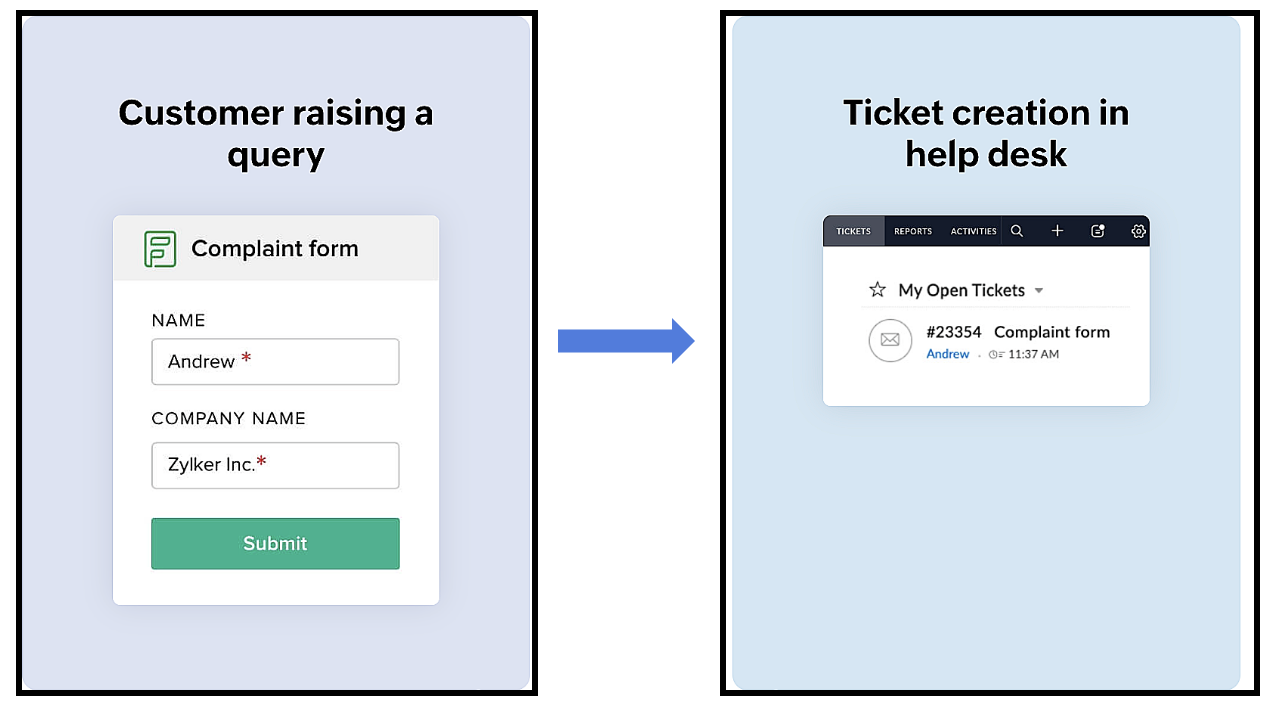


Het proces verloopt als volgt:
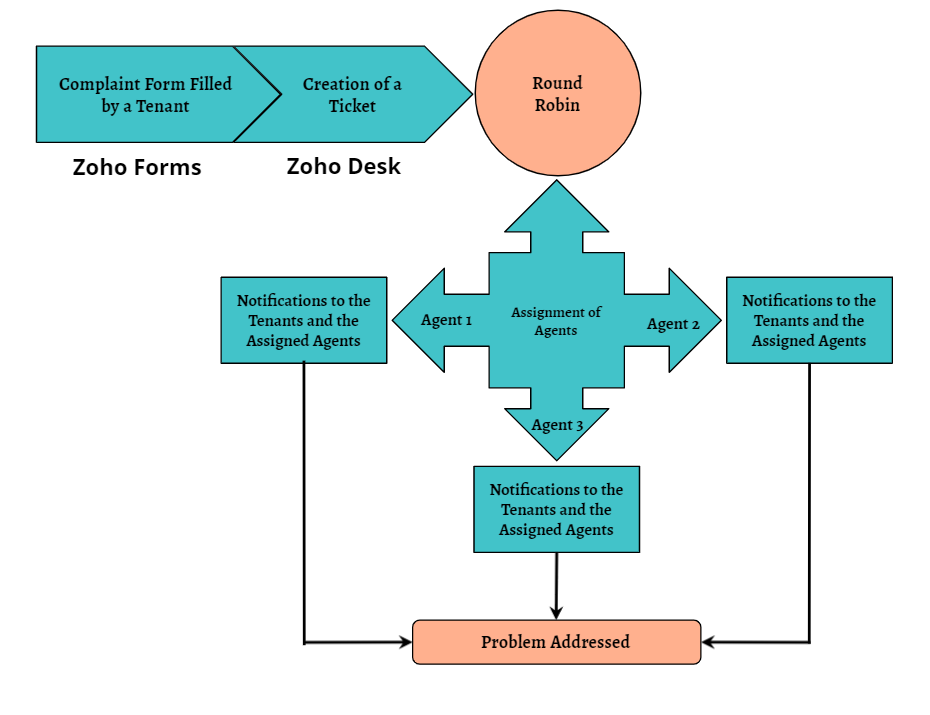
Een huurder scant de QR-code die beschikbaar is op elke verdieping van het gebouw om toegang te krijgen tot het klachtenformulier (dat is aangemaakt in Zoho Forms), om een klacht in te dienen. Zodra de huurder het formulier indient, wordt een ticket aangemaakt (in Zoho Desk) voor de klacht. Het aangemaakte ticket wordt toegewezen aan één van de medewerkers met behulp van de Round Robin toewijzingsregel. Zodra het ticket is toegewezen, ontvangen zowel de huurder als de medewerker aan wie het ticket is toegewezen een notificatie met relevante details. Vervolgens zal de medewerker het probleem aanpakken door de geschikte technici te sturen om het gemelde probleem op te lossen.
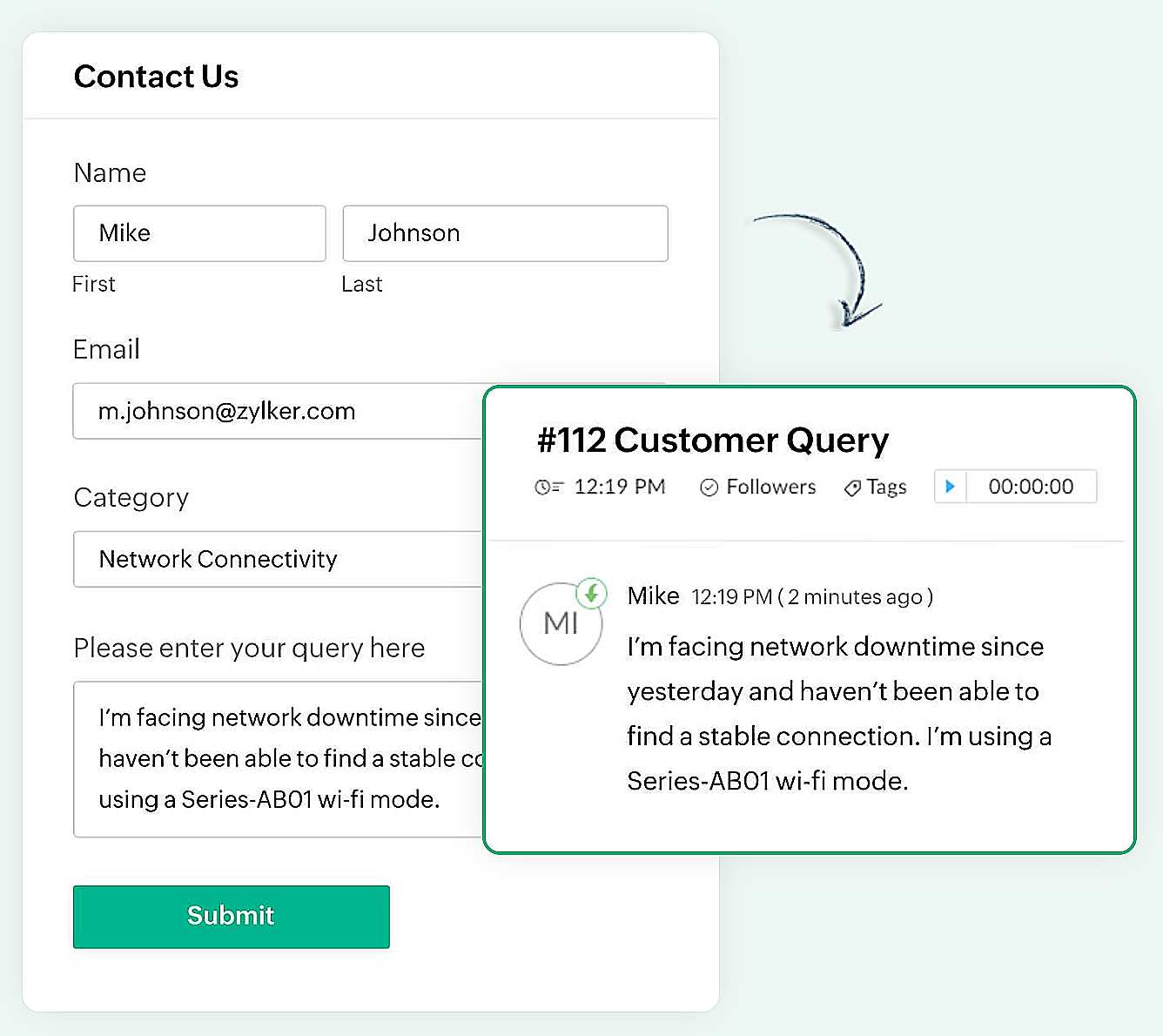

Er kan een eenvoudig formulier met alleen een naam en e-mailadres worden gemaakt of een complex formulier dat meerdere velden bevat om gedetailleerde informatie vast te leggen, zoals de problemen waarmee de huurder wordt geconfronteerd, de prioriteit van het probleem en enkele andere redenen kunnen ook gemakkelijk in Zoho Forms worden gemaakt.

Zoho Forms
Zoho Forms is een eenvoudig te gebruiken tool om formulieren te maken, zonder dat er downloads of installaties nodig zijn. Je kunt een formulier maken, delen en beginnen met het verzamelen van gegevens in slechts enkele minuten. Zoho Forms is toegankelijk vanaf laptops, tablets en mobiele telefoons.

Klachtenformulier maken in Zoho Forms
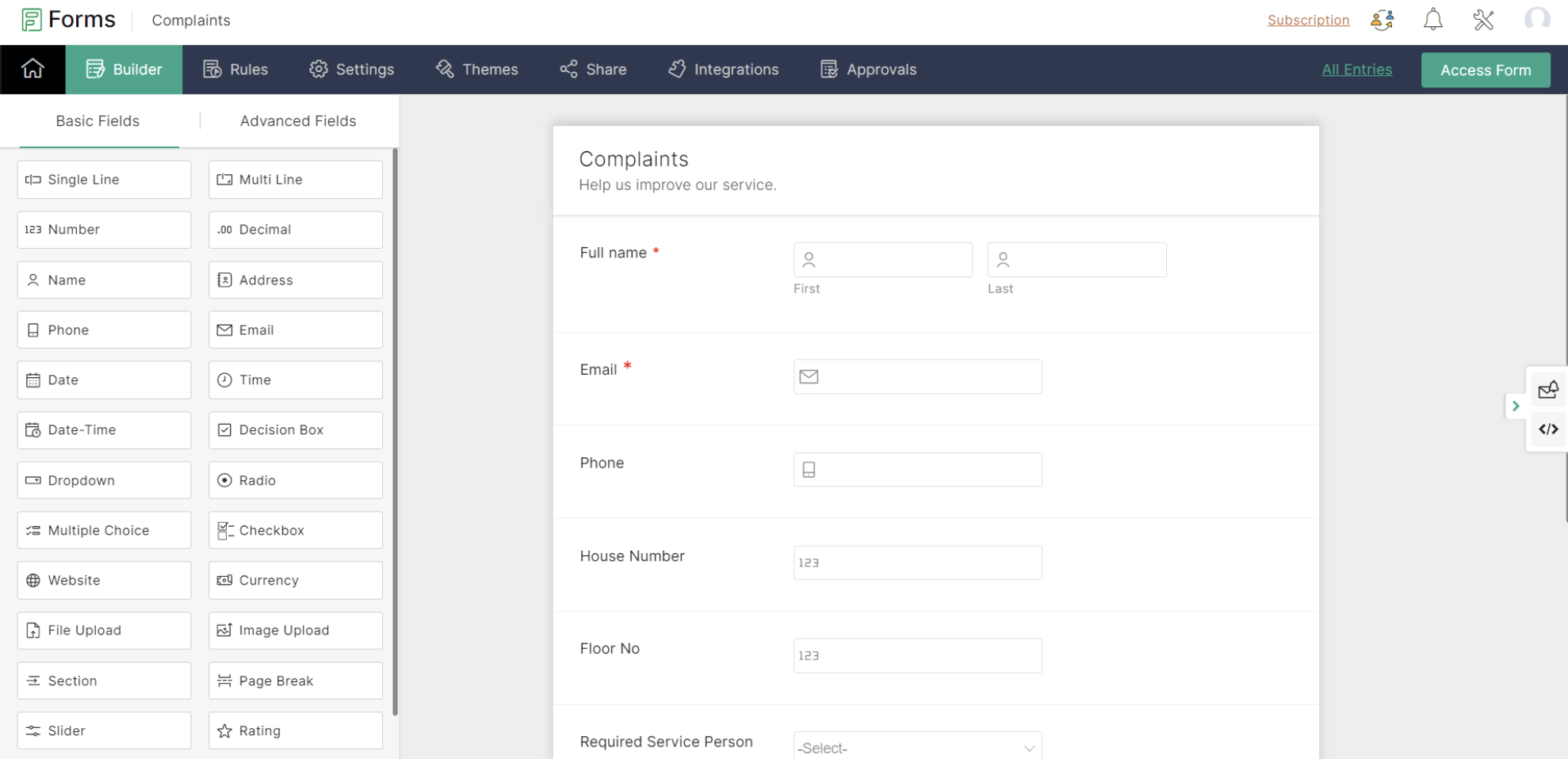


Met Zoho Forms kun je formulieren maken met een eenvoudige drag-and-drop optie.

- Begin met het geven van een formuliernaam (de gebruiker wordt doorgestuurd naar een formulierbouwpagina).
- Voeg de nodige velden toe om informatie van je huurders te verzamelen.
- Sla het formulier op.

Zoho Forms biedt kant-en-klare formulieren die geschikt zijn voor verschillende gelegenheden. Een nieuw formulier kan binnen enkele seconden worden gemaakt met behulp van deze sjablonen.

Klachtenformulier
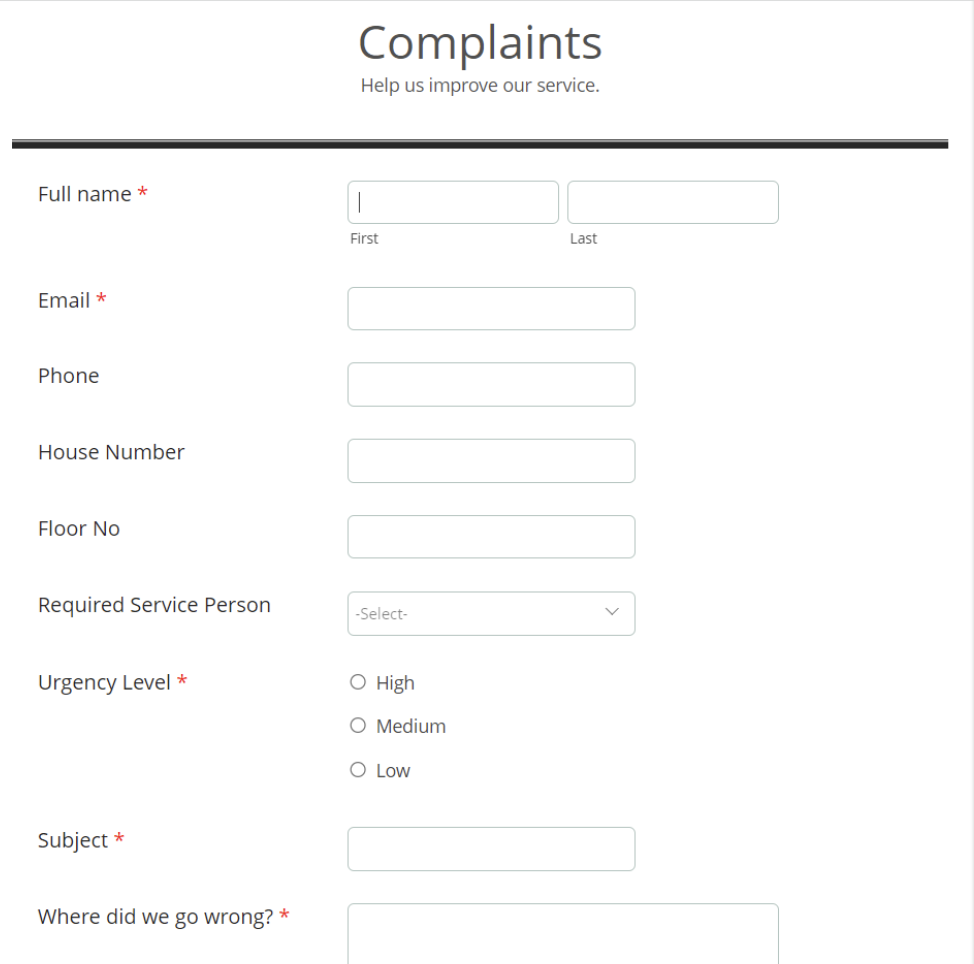

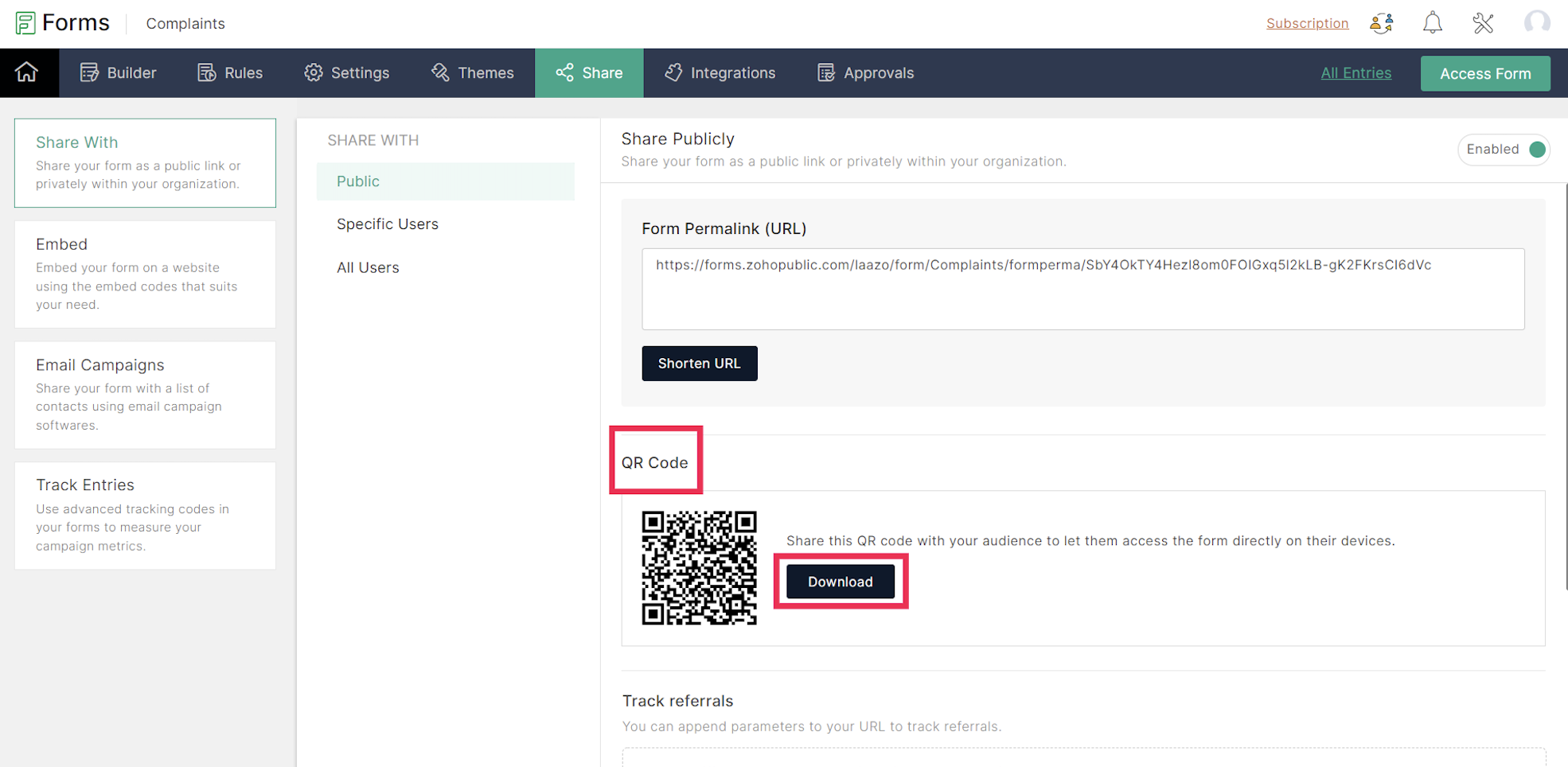
Een URL en een QR-code worden gegenereerd voor het aangemaakte formulier onder het tabblad Delen, dat in een png-vorm kan worden gedownload. De gedownloade QR-code kan worden afgedrukt en op alle muren van elke verdieping van het appartement worden geplakt voor de huurders.

De volgende stap is het integreren van Zoho Forms met Zoho Desk. Dit lees je in de volgende Tips & Tricks van Zoho Desk.

    • Sticky Posts

    • Doe mee aan de Zoho Desk Meetup op 7 maart in Antwerpen

      Beste Community leden, Wij nodigen jullie graag uit voor de Community Meetup van Zoho Desk! Op 7 maart komen we bij elkaar in Antwerpen, samen met een klant en de Zoho Experts van Brainsolutions. Onze experts zullen een live demo presenteren en jouw vragen
    • Doe mee aan de Zoho Desk Meetup op 16 Februari in Utrecht

      Beste Community leden, Wij nodigen jullie graag uit voor de Community Meetup voor Zoho Desk! Op 16 februari komen we bij elkaar in Utrecht, samen met Fleetkennis en de Zoho Expert van Mobile XL. Onze experts zullen een live demo presenteren en jouw vragen
    • Wat is er nieuw in Zoho Desk 2023

      Beste Community leden, Hoeveel je ook van je klanten en je werk houdt, als klantenservice medewerker zul je zeker een aantal zware dagen tegenkomen. We hebben het dan over de dagen dat je een paar keer op de snooze-knop drukt, koffie morst op je favoriete
    • Tips & Tricks #10 Automatiseren met Zoho Desk Deel 2

      In deel 1 van het automatiseren met Zoho Desk las je een use case over een probleem in een appartementencomplex en hoe dit door gebruik te maken van Zoho Forms en Zoho Desk kan worden opgelost. In deel 2 lees je meer over het integreren van Zoho Forms
    • Tips & Tricks #09 Automatiseren met Zoho Desk Deel 1

      Beste Community leden, Zoals jullie weten hebben we in Nederland een woningtekort. Een oplossing hiervoor is de hoogbouw. Echter, om de de hoogte in te gaan moet er ook voor de juiste faciliteiten in flats worden gezorgd. Problemen kunnen we allemaal
    • Recent Topics

    • Inclusion is the new engagement

      When in a very challenging situation, you may have peers or friends around you saying, “Everything will be okay.” They speak to you in a way that they are connected or in a language or tone that feels close. But your inner voice comes to you in a truly
    • Users may not pick the fields to be shown as columns in the Choose Account window when creating a new Deal record

      Hi there, by talking with other users I found out that I, as an Admin, am the only one who can pick fields to be shown as columns in the Choose Account window when creating a new Deal record. In fact, if other users click on the "Add Column" symbol on
    • Windows Desktop App - request to add minimization/startup options

      Support Team, Can you submit the following request to your development team? Here is what would be optimal in my opinion from UX perspective: 1) In the "Application Menu", add a menu item to Exit the app, as well as an alt-key shortcut for these menus
    • Allow selection of select inactive users in User data fields

      Hello, We sometimes need to select a previous employee that has an inactive account in the User data field. For example, when doing database cleanup and indicating actions are done by a certain employee that weren't filled out when they were part of the
    • [Webinar] Top 10 Most Used Zoho Analytics Features in 2025

      Zoho Analytics has evolved significantly over the past year. Discover the most widely adopted features in Zoho Analytics in 2025, based on real customer usage patterns, best practices, and high-impact use cases. Learn how leading teams are turning data
    • ZOHO.CRM.UI.Record.open not working properly

      I have a Zoho CRM Widget and in it I have a block where it will open the blocks Meeting like below block.addEventListener("click", () => { ZOHO.CRM.UI.Record.open({ Entity: "Events", RecordID: meeting.id }).catch(err => { console.error("Open record failed:",
    • I wish to upload 40000 Resumes in Zoho Recruit Database. Can I do this in batch of 1000 Resumes ?

      I would like to upload thousand or few hundred of resumes in Zoho Recruit in one go. Please let me know how can I do this Or migrate my 40000 resumes from previous ATS to Zoho Recruit.
    • How Does Knowledge Base Search and Article Recommendation Work?

      Hello, I would like to understand how the Knowledge Base search engine works. Specifically, does it search based on: The article title only? The full article content? Both, the article and the content? Keywords? Tags? Also, how does the system determine
    • Super Admin Logging in as another User

      How can a Super Admin login as another user. For example, I have a sales rep that is having issues with their Accounts and I want to view their Zoho Account with out having to do a GTM and sharing screens. Moderation Update (8th Aug 2025): We are working
    • Do buttons and vba msgbox work on mobile, specifially the iPhone zoho sheets app?

      In Zoho sheets on the web, I inserted a button and assigned a VBA macro to it. It pops up a msgbox with some text. When I go onto the iPhone mobile zoho sheets app, the button is there. When I click on that button, the spinning asterisk appears for a
    • [Webinar] Solving business challenges- Handling the challenge of transitioning to Zoho Writer from legacy tools

      Moving to Zoho Writer is a great way to consolidate your business tools and become more agile. With multiple accessibility modes, no-code automation, and extensive integration with business apps and content platforms, Zoho Writer helps solve your organization's
    • How exactly does "Reply assistance" work in Zoho Desk? What context is sent to the LLM?

      Hi, Im trying to better understand the technical behavior of the feature "Reply assistance" in Zoho Desk, and I couldn’t find detailed information in the current documentation. Specifically, I have questions about what data is actually being sent to the
    • Custom Fonts in Zoho CRM Template Builder

      Hi, I am currently creating a new template for our quotes using the Zoho CRM template builder. However, I noticed that there is no option to add custom fonts to the template builder. It would greatly enhance the flexibility and branding capabilities if
    • How can I effectively manage a website with your help?

      I’m wondering if it’s possible to develop a custom website with specific features using Zoho as an alternative platform. My goal is to create a website similar to https://tmsim.ph, with the same kind of functionality and user experience. I would truly
    • Introducing the Yes/No field: Binary decisions made beautiful

      Greetings, form architects! What would you do when you need a simple yes/no answer on your form? Normally, you add a Radio field. Type Yes. Type No. Until now. The new Yes/No field is purpose-built for binary decisions. It is preconfigured, visually consistent,
    • How to Invoice Based on Timesheet Hours Logged on a Zoho FSM Work Order

      Hi everyone, We’re working on optimizing our invoicing process in Zoho FSM, and we’ve run into a bit of a roadblock. Here’s our goal: We want to invoice based on the actual number of hours logged by our technicians on a job, specifically using the timesheets
    • Move email between inboxes?

      Is it possible to move emails from one team inbox to another? We would like to be able to have a single "catch-all" inbox for incoming requests, and then move the email to the appropriate department inbox. I was hoping we would be able to accomplish this
    • The power of workflows in Zoho Marketing Automation - Video Webinar

      In this Zoho Marketing Automation video webinar, our experts walk you through: Why you may want to create marketing workflows How to create marketing workflows Use Zoho CRM data and apply workflows to automate your marketing strategy How workflows can
    • Offer already made- but I withdrew it

      I made an offer letter, but made a mistake on it. I withdrew the offer but now I can't recreate the correct offer. Zoho keeps saying that "A same offer has already been made". I look in the "offers" and there are NO offers (this is the first time I've
    • Zoho CRM's sales trend and sales follow-up trend dashboards are now customizable

      Dear Customers, We're here with good news! Sales trend and sales follow-up trend are two system-defined dashboards that help you understand trends and anomalies in your sales outreach and conversion efforts. They use Zia's intelligence to identify patterns
    • Task list flag Internal/External for all phases

      Phases are commonly used in projects to note milestones in the progression of a project, while task lists can be used to group different types of tasks together. It makes sense to be able to define a task list as either internal or external however the
    • Approvals in Zoho Creator

      Hi, This is Surya, in one of  my creator application I have a form called job posting, and I created an approval process for that form. When a user submits that form the record directly adding to that form's report, even it is in the review for approval.
    • Introducing Rule-Based AI Coding Assistants for Zoho Finance Widgets

      Hello customers, We’ve introduced rule-based AI coding assistants to speed up Zoho Finance widget development. You can try them out in Cursor AI and GitHub Copilot. This helps you build widgets quickly using simple prompts, while ensuring the generated
    • Marketing Tip #21: Create an About Us page

      People don’t just buy products, they buy from brands they trust. An About Us page helps customers understand who you are, what you stand for, and why your business exists. It adds a human touch to your store and reassures shoppers that there’s a real
    • Zobot to handle single choice menu when dynamic list content is more than 10 items

      Whatsapp supports maximum of only 10 items for its single choice menu. When we need to show a dynamic list with content more than 10, this could be challenging. We essentially need to add a next and previous buton here in order to make it functional.
    • Add the ability to Hide Pages in Page Rules

      Hi, We have Field Rules to show and hide fields and we have page Rules, but we can't hide a page in Page Rules so it isn't completed before the previous page (And then have the Deny Rules to prevent submitting without both pages completed), we can only
    • Column letter from number

      Hello, I am trying to select a cell and i have the column number. How do i do this or is there a way of getting the letter from the number? Thank you
    • Zoho CRM for Everyone's NextGen UI Gets an Upgrade

      Hello Everyone We've made improvements to Zoho CRM for Everyone's Nextgen UI. These changes are the result of valuable feedback from you where we’ve focused on improving usability, providing wider screen space, and making navigation smoother so everything
    • Composite Product (kit) - Dynamic Pricing

      I am setting up Composite Products for item kits that I sell. I also sell the items from the kit individually. Problem is when pricing changes on an individual part, the Composite Product price does not change meaning when the cost of item # 2 in the
    • View Answer Bot conversations?

      We are trialing Zia and are experimenting with Answer Bot on our knowledge base. So far so good! Management asks me if it is possible to view Answer Bot conversations, the purpose being to look over its shoulder and confirm that it is working as des
    • Train Zia answer bot on only part of Knowledge Base?

      We are trialing Zia answer bot and hope to use it on the knowledge base to help our users find the information they are looking for. I have found how to train Zia on the entirety of our knowledge base. But is there a way to train it on only certain categories
    • Smarter holiday planning with yearly-specific Holiday Lists

      Hello everyone! Managing holidays and business hours is now easier and more efficient. Holiday Lists now support holidays that fall on different dates every year, while business hours now supports more than one holiday list. This helps businesses manage
    • Temporary Outage in Zoho Cliq Affecting US Users – July 23, 2025

      We experienced a service disruption in Zoho Cliq that impacted core functionality for users in the US region. The issue occurred between Jul 23, 2025, 06:54:00 PM IST and 07:13:13 PM IST, lasting approximately 19 minutes. To restore service stability,
    • Zoho Writer for Proposals

      Hi, one of the things we've struggled with since moving to Zoho ecosystem is our proposal software Qwilr does not integrate well. It surprises me Zoho doesn't have proposal software but given all the capabilities of Zoho Writer, I'm wonder if anyone is
    • How Do Mutliple Sales People Prospect in the "LEADS" module without calling the same leads?

      We have 4 sales reps and the Leads module does not have real time intuitive knowlodge to make the sales rteps dont call the same people at the same time. How can we crate a fluent prospecting sytem where the salres reps can go out bound without calling
    • Possible to delete the "Big Deal Alert" in Zoho CRM?

      Hi, Is it possible to delete the "Big Deal Alert" in Zoho CRM? My company has no need for it and I want to remove it to clean up my email templates list. Thank you.
    • How to Create a Fixed Sliding Time Window (D-45 to D-15) in Zoho Analytics ?

      Hello, I would like to create a report in Zoho Analytics based on a sliding time window between D-45 and D-15, with a fixed snapshot of that specific period. The data displayed should strictly reflect activity recorded between D-45 and D-15 only, without
    • Wie veröffentliche ich ein PDF Datei?

      Hallo! Wie veröffentliche ich PDF Datein ich habe ein PDF Datei und den sieht ihr im Upload ich möchte ihn veröffentlichen wie? Mit Freundlichen Grüßen, Herr Bahaa Addin Chkirid
    • 🚀 WorkDrive 6.0 (Phase 1): Empowering Teams with Content Intelligence, Automation, Accessibility, and Control

      Hello, everyone! WorkDrive continues to evolve from a robust file management solution into an intelligent, secure, and connected content collaboration platform for modern businesses. Our goal remains unchanged: to simplify teamwork, strengthen data security,
    • Zoho Campaigns: An Outstanding Email Marketing Tool

      Introducing Zoho Campaigns! A product designed by Zoho, the Zoho Campaigns is made to create, deliver, and manage integrated email campaigns that can help in boosting the sales of a company and its customer base. Zoho Campaigns is actually an email marketing
    • Next Page