Upcoming Updates - August 2022
Hi all,
Greetings from the Zoho Creator team! Today we've got news for you on some exciting updates. And rest assured— there’s more to come!
In this post, we'll be going over the upcoming features and improvements for this month as mentioned below. A few of these will be available immediately and the rest are planned for release in the coming weeks.
- Enabling dark mode for Android apps
- Introducing presets
- Customizing display titles for forms
- Launching a revamped UI for customer portals
- Announcing strict validation for the max length field property
In addition to the above, Creator 4 will be deprecated, and all the accounts still using it will be automatically upgraded to Creator 5 by August 31, 2022. Scroll down to know more!
Dark mode for Android
One of our most requested features is finally here: Dark mode!
Dark mode, which is currently supported in our iOS apps, has now been extended to Android apps as well. We have carefully designed every component and screen to have an overall balanced color scheme for your mobile apps. Dark mode will be automatically enabled based on your default system settings and has the following benefits:
- Reduces power usage by a significant amount (depending on your device's screen technology)
- Improves visibility for users with low vision and those who are sensitive to bright light
- Makes it easier for anyone to use their devices in low-light environments

Presets - panel configuration reusability
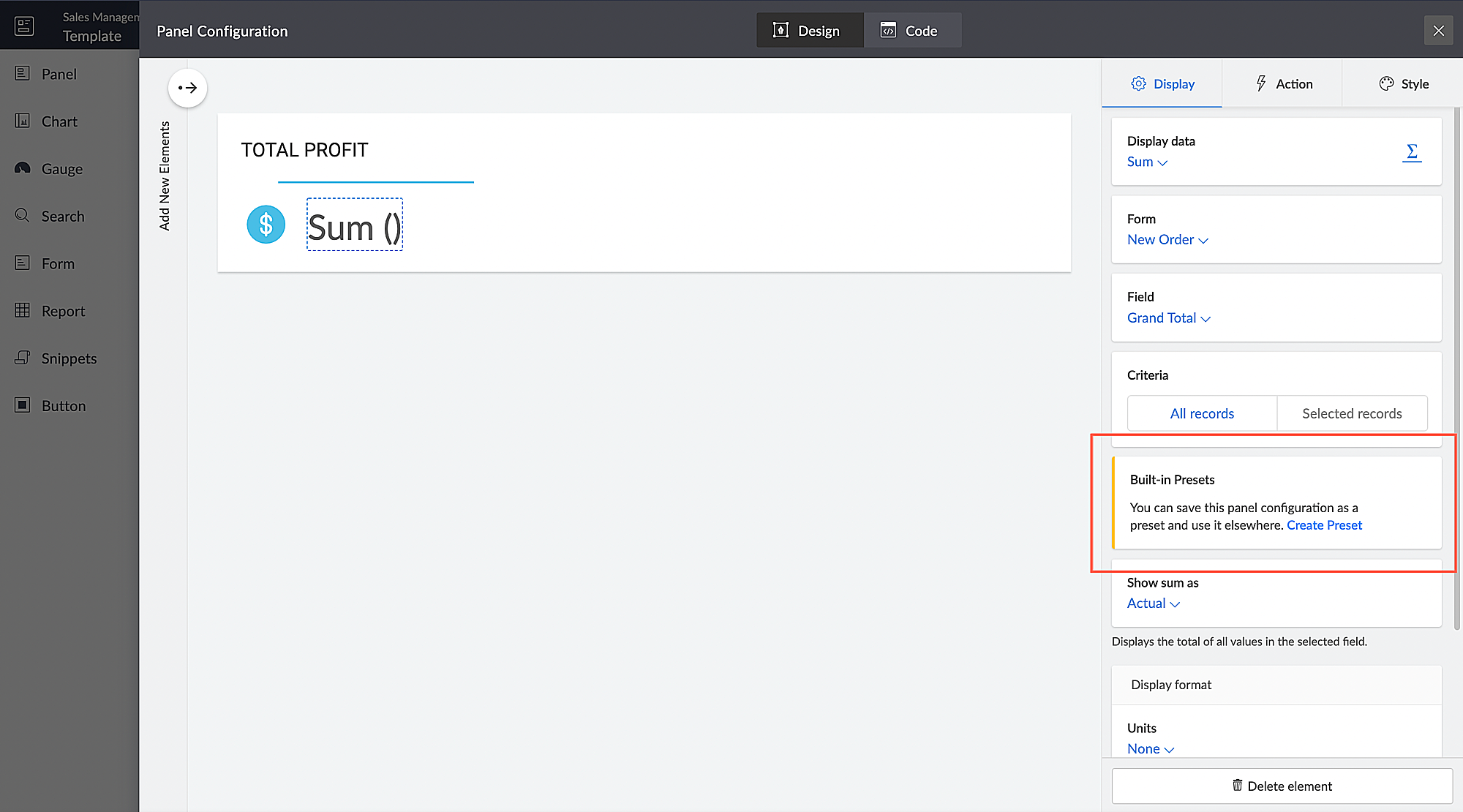
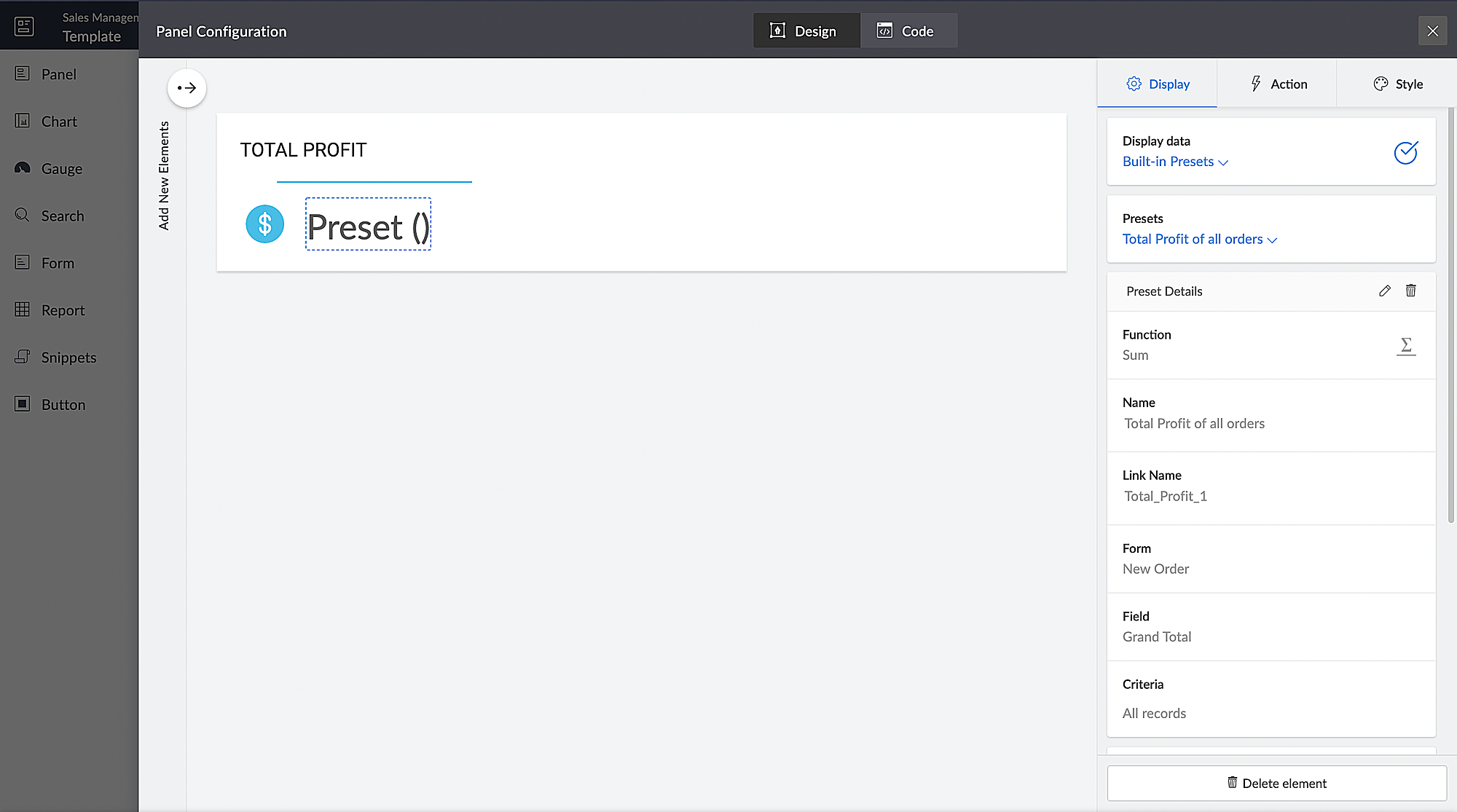
You can configure aggregates to be displayed on page panels. Currently, if such a configuration needs to be reused on a different panel on the same page or on a different page, it has to be manually reconfigured. With presets, the aggregate configuration can now be saved and used across apps in your Creator account, thereby preventing repeated manual configurations. The created presets will be available as a dropdown inside the panel element.
Presets are required in cases, where a configured aggregate value needs to be displayed in more than one panel, like if a user needs to display the Total Profit value in their dashboard, both as an actual value and as a percentage value. In this particular case, the user will have to manually configure the Total Profit value in two panels and choose a different Show As value (Actual in one panel and Percentage of a number in the other panel) in each panel. Using the preset capability, users can save the configuration and reuse it in different panels with only the Show As value being different.
Introducing different display titles for forms
Interacting with forms can become more meaningful when we have contextual information about the actions performed by users. We've introduced form titles that'll enable you to assign different customized titles to the forms displayed when a user is performing the following tasks:
- While adding record - The title that will be displayed when a user accesses the form to add a record.
- While editing record - The title that will be displayed when a user is editing an existing record.
By default, the form title for while adding to the form and while editing the form actions will be the same as the form name. Learn more

Revamped UI for customer portals
We're happy to announce the rolling out of a major refinement to the customer portal UI (sign in, signup, and reset password pages).
Portal users will now be able to use a one-time password (OTP) for signing in to your customer portal. Along with Google and Facebook, federated login can now be set up to allow users to sign in to the portal using their Apple IDs.
These refinements have been designed to ensure compatibility with upcoming features that we are working on. Although the feel and appearance of the new UI will be different from the existing one, we have ensured that it doesn't affect any of your existing portal functionalities. We'll have a separate detailed post on the changes for existing users once the feature is ready to go live.
Announcing strict validation for the max character length field property
In reference to this post, starting from August 31, 2022, maximum character length validation will be implemented strictly across Creator. If a record is added via Deluge, API, or email input, the maximum length property will be validated for all your form fields. This validation ensures that all the records added via various inputs undergo a thorough check for their field characters to ensure they're on par with the predefined character limits that you set, thereby minimizing error handling. After this update, errors might be shown in the following cases:
(i) Existing forms:
While editing/updating a record in an existing form, the maximum length property will be validated for all fields in that form.
(ii) Workflows
- On validate: Following this update, during the execution of the on validate script for a particular record, the maximum length validation will be strictly performed for all the fields that are associated with the script, and an appropriate error will be thrown.
- On success: Following this update, during the execution of the on success script, an exception will be thrown for varchar fields (email, single line) when a new record is successfully submitted to the database or when an existing record is updated or deleted from the database. In the case of number fields, the values will be truncated upon successful submission.
(iii) APIs
While adding/updating record values via API requests, the maximum length property will be validated for all fields.
Additionally, if a record is added via email input, the maximum length property for all the fields will be validated. As an admin, you can minimize errors by suitably adjusting your character limits. We also assure you that we've taken all necessary measures to ensure that the transition is seamless, with minimal impact on your end.
Upgradation to Creator 5
The majority of our users have already migrated to Creator 5 from the previous version (Creator 4). As the final step of this process, we'll be automatically migrating the remaining accounts using the older version to Creator 5 by August 31, 2022.
As you all know, Creator 5 empowers developers to customize traditional web-based apps for smartphones and tablets, opening up new possibilities and ensuring an all-around smoother experience. You will be notified via email prior to the migration and this will not affect the data in your existing Creator apps.
We hope this announcement serves to be helpful in planning your upcoming projects and apps. We'd also like to thank you once again for your loyalty and continued support. Please don't hesitate to reach out to us at support@zohocreator.com if you have any questions or concerns, or need assistance.
That's all for now!
Thanks,
The Zoho Creator Team.
Topic Participants
Meghaa
Meghaa Pradyumnan
George Thiess
Club De Baloncesto Soldados Elite
AP
Sticky Posts
Introducing Zoho Creator's 2025 Release Projection 2
Hello Creators! I'm Prakash, from the Creator product management team, and today I'm delighted to unveil our next set of features as part of Release Projection 2 for 2025. With thoughtful analysis and planning, we've curated powerful new capabilitiesZoho Creator - 2023 Release Projection 1
Hello everyone! A very Happy New Year to you and your family. Hope you're all good and having a great time using Zoho Creator to make your lives easier and your businesses prosper. 2022 was an action-packed year for us at Creator, and we hope to continueZoho Creator User Group meetups in a city near you! - Oct - Nov, 2023
Greetings from the Zoho Creator team! We're hosting a series of Zoho Creator meetups in various cities across the globe, and we'd love to meet you there! Our meetups are a great opportunity to network with industry peers, exchange ideas and best practices,Zoho Creator - 2023 Release Projection 2
Hello everyone! Time truly flies when you're having an incredible journey, and today we mark the completion of an eventful and action-packed six months. It feels like just yesterday when we embarked on this adventure together with the launch of our newUpcoming Updates - August 2022
Hi all, Greetings from the Zoho Creator team! Today we've got news for you on some exciting updates. And rest assured— there’s more to come! In this post, we'll be going over the upcoming features and improvements for this month as mentioned below. A
Recent Topics
Add "Groups" above "Users" in the Zoho Forms Left Menu
Hi, We have Groups but you have to go to a Form and Share or use the Directory App to manage them, please add "Groups" above "Users" in the Zoho Forms Left Menu so you can manage them in 1 place within Zoho Forms too. Thanks DanZoho Books | Product updates | October 2025
Hello users, We’ve rolled out new features and enhancements in Zoho Books. From iOS 26 updates to viewing reports as charts, explore the updates designed to enhance your bookkeeping experience. Zoho Books Updates for Apple Devices At WWDC 2025, AppleAdding Taxes to paid consultations in Zoho Bookings
I created a 'paid' consultation under Zoho Booking and integrated it with payment gateways for online/instant payment before a booking is done. How can I add 'taxes' to the price of consultation? I can add taxes to other Zoho apps (liks Books, Checkout,Zoho CRM Reports Module on Mobil App
I have the mobile app and the reports module doesn't appear in the sidebar for some reason. I saw a Youtube video where the user had the Reports module on mobile. Is there a setting to show it on mobile? Thanks.Inquiry on Help Centre Tab Customisation
Hi Zoho team, I’m wondering if it’s possible to further customise the Help Center tabs, specifically the descriptions under Knowledge Base, Community, and Tickets. While the current setup allows customising tab names, being able to tailor the descriptionsPassing a form object to a function
Suppose I have a sort_order field in multiple tables and I want to increment it by +1 onCreate of a new record. Is there a way to pass the form object as an argument into the function to keep things DRY? The following function from Zia works, but I'dCan you copy and paste a page within a form?
I have been looking at trying to copy/duplicate a whole page within a form. I can't see how I can do this without having to add all the data in again. This is very time consuming. Any help would be great.Unable to sort as Descending order
Trying to change the sort order for a lookup field (checkboxes) from Ascending to Descending and keep getting an error in Deluge that the order must be Ascending Did anyone ran into this? Thanks EyalHow do I copy an email message to one or more other folders?
I can move a message to another folder using the "move to" option but I can't figure out how to copy a message.New feature request: Allow copy of email message to another folder
Hello Zoho team, This is a suggested new feature to allow copy an email message to either another folder or the same folder. Within the same Zoho account. This is not a support request about "label". This is a suggested new feature to allow copies ofCreator Simplified #11: Create a custom button to download files
Hey there! This time, let's see how to create custom buttons to download the files uploaded in the file upload field. Sample use-case A training app has a module that provides the materials for all the available courses. Students can click on the correspondingHide horizontal lines at bottom of form
Hi I have a page with 3 forms embedded in html snippets. On each of the forms I can hide the submit button easily but I am left with the horizontal lines that bound that section and I cannot figure out to remove them (see below for the two sets of horizontalAutosaving of Form Field
HI can anyone suggest a way of autosaving or simulating an autosave function for a specific field in a form. The story is as follows. I have a bunch of technicians who write notes on how they do a repair. Sometimes they write for a couple of hours the troubleshooting process. If they click incorrectly, press ESC, Cancel or the browser crashes the information is lost which can be heartbreaking so my guys use notepad and then copy the information in. The only way around this is to click submit on theAsk the Experts 26: Brighten every customer interaction with Zoho Desk all year long
Hello everyone, Greetings and welcome to Ask the Experts 26. As we wrap up 2025, we are excited to invite you to the 26th episode of our Ask the Expert series. 🎄The Merry Metrics Edition = Best of Zoho Desk [Best Practices + Holiday Automation + Year-EndPricing calculator
Alright, so I'm trying to create a pricing calculator/pricing report generator to use in a cabinet shop. I did all the logic and such, and the calculator works. I have a few other things that I would need it to be able to do though, I'll do my best toBug Details
In the Bug detail the milestoneid is missingIs there a way to make a button scroll down?
Looking to have a button on a landing page scroll down to another section on the page. Any recomendations outside of coding?Stop completed task lists from disappearing?
Is there any way to stop projects from making tasks lists disappear when all the tasks in the list are completed? That's one of those little things where we're constantly fighting the product. For instance we have some projects which are ongoing - no start and end date. We use Kanban view to show the various task lists. We don't want the kanban list to disappear every time the items on it happen to be closed out. ThanksAllow customers to choose meeting venue and meeting duration on booking page
My business primarily involves one-to-one meetings with my clients. Given the hybrid-work world we now find ourselves in, these meetings can take several forms (which I think of as the meeting "venue"): In-person Zoom Phone call I currently handle theseBooking outside of scheduled availability
Is there a way for staff (such as the secretary) to book appointments outside of the scheduled availability? Right now to do this special hours must be set each time. There should be a quicker way. Am I missing something?Operation Questions.
Hello, I hope you are well. To explain a little, we are a company that sells services and products with a technical team responsible for installation and maintenance. Zoho FSM can be useful for the technical team, namely for the technical coordinatorUpdate date & time when a cell is edited
Hi All, I am desiring to have a cell update with the current date and time when another cell is edited. Any ideas? Thank youAdd "Groups" to "Share With" on Reports & All Entries
Hi, On Forms we can share Publicly, with Specific Users And/Or Specific Groups or All Users. With Reports and All Entries we lack the "Groups" option, please add this as with many users this saves a lot of work. Thanks DanAdd Pause / Resume Option to Zoho Quartz Recordings
Hi Zoho Team, We would like to request an enhancement to Zoho Quartz recordings: the ability to pause and resume an ongoing recording. Current Limitation: At the moment, when recording an issue with Zoho Quartz, the recording continues even when we areCustom Fields Not Showing Up in Invoice PDF Template Document Information
I have added 2 custom fields under Sales > Invoices > Manage Custom Fields. They are set to show in all PDFs. However when I am editing my Invoice PDF template, i do not see the custom fields under Document Information.ZOHO Books
Hi there, Why after I upgrade my Zoho invoice > Books then i wanted to add plugin which i cannot do. Please advise.How is Your eCommerce Experience w/Zoho Inventory?
First off, I'm SUPER grateful for the advent of Zoho Inventory and now the Zoho Commerce Suite. Overall, Inventory is a great product, especially for customers without an eCommerce presence. For eCommerce companies (especially those shipping more than ~10 packages/day), however, there are certain drawbacks that keep my clients from moving over to Zoho Inventory: Cons: 1. Invoice + Package Creation from Shopify/Other eCommerce Integrations: Zoho Inventory makes the somewhat perplexing decision toSimplify Mass Replies with Predefined Templates and Snippets
Hello everyone, We are happy to introduce a new enhancement to Mass Reply that helps agents respond to customers quickly and consistently. With the addition of Email Templates and Snippets in the reply window, agents can use predefined messages whileMapping custom fields from one module to another
I have a custom field, "Subscription Period" that appears as a required field in every Opportunity (Potential). I want that field to appear on any Quotes derived from that Opportunity (and have created a custom field of the same name in Quotes for thatThe Social Wall: November 2025
We’re nearing the end of the year, and the holiday season is officially kicking in! It’s that time when sales peak and your social media game needs to be stronger than ever. We’re back with exciting new updates across AI, analytics, and the mobile appHow to update Multi File upload field
Assume that i have a multi file upload field,how can i update the same field again?Customer Address Not on Standard Invoice when Address is on Contact Record
Hi, I entered the customer billing and shipping address in Zoho CRM. I created an invoice in Zoho Books with the same customer contact. The contact is correctly in Zoho Books with the billing and shipping address. The invoice for the customer does notApply partial payments to invoices from the Banking Module
We need this! Why is this not possible?Welcome to the Zoho Show Community Forums page!
Hello everyone, The Zoho Show community is a place for you to discuss and share anything and everything related to Zoho Show Presentations, our online presentation software. It includes users from all over the globe and all walks of life. Our community helps answer your Zoho Show questions with responses from other knowledgeable community members to give you the best experience creating and designing exciting presentations. Along the way, you'll meet recognized experts from our software team andHow can I convert an existing contact into a lead?
I imported many contacts into ZOHO CRM. In order to select a few of them as leads, I want to mark or convert a few hundred as Leads. Who can I do that?Price book functionality enhancement
A common use of price books is to create a price book for a given customer level or contract with a specific company. Given that this is done at a company/customer level it would be great to see a way to associate a price book to a given customer andCan we have 24x7 live support for Zohobooks ?
Can we have 24x7 live support for Zohobooks ?Important update about notification security in Business Messaging SDK
As part of our ongoing effort to strengthen the security of notification data, we have enhanced how notifications are processed and protected in our applications. These improvements ensure that all notification related data follows the most up-to-dateSync Zoho Marketing Automation with Zoho Forms
I can't find a section where the integration between Zoho Marketing Automation and Zoho form is explained. And how form subscription works with opt-in and consents.What is the difference between Zoho Campaigns and marketing hub?
Zoho Campaigns is a permission-based email marketing tool for sending marketing emails and mass emails. Marketing Automation is a multichannel marketing automation tool that caters to organizations looking for tools to engage their users across multipleNext Page