We’re transitioning from Zoho ShowTime to TrainerCentral
Hello everyone,
Zoho ShowTime was originally built as a training platform to serve training agencies, HR teams, and individual trainers. As the platform grew, we realized that more creators and businesses could benefit from its capabilities. That’s why we launched a new brand, TrainerCentral, a full-featured training platform that handles everything from course creation to live sessions. With a host of new features and added capabilities in TrainerCentral, we’re saying goodbye to Zoho ShowTime and transitioning to a more advanced, comprehensive platform.
With TrainerCentral, you can design multimedia-rich courses that combine videos, documents, quizzes, and assignments to offer self-paced training. Built-in live session tools allow you to host interactive sessions including polls, chats, and surveys, to keep learners engaged. The platform simplifies learner management with detailed progress tracking, analytics, and automated certificates, helping trainers measure performance and learning outcomes with ease.
It also offers a no-code website builder that enables users to create a professional, fully branded academy website to strategize and market their online courses effectively to learners. With its robust, integrated payment gateway system, it facilitates secure, frictionless transactions across global markets.
This migration from Zoho Showtime to TrainerCentral will provide you with access to enhanced features, improved performance, and a unified training experience.
How to migrate from Zoho ShowTime to TrainerCentral.
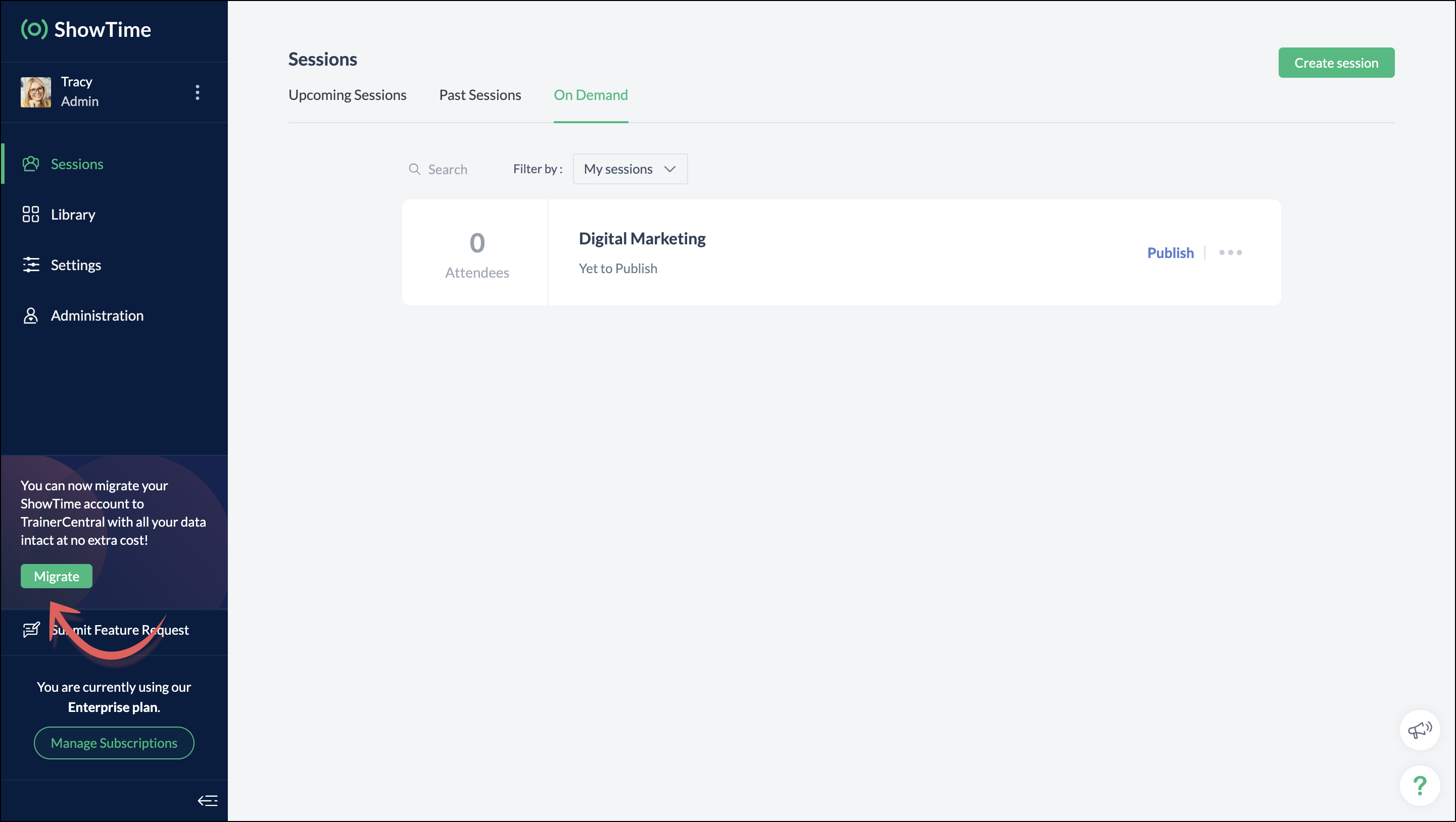
You can migrate your account from Zoho ShowTime to TrainerCentral anytime by clicking the Migrate button in the left pane and following the on-screen instructions. Once migrated, you’ll receive a notification, through which you can access your TrainerCentral account.
- Only the super admin of a Zoho ShowTime portal can migrate their portal's data to TrainerCentral.
- We’ll be disabling remote session scheduling and learner registration for on-demand sessions starting December 1, 2025. With this transition, Zoho ShowTime will reach its End of Life (EOL) on December 31, 2025.
To avoid any disruptions to your live classes, please move to TrainerCentral before December 31, 2025.
We hope this will elevate your experience to the next level.
If you have any questions, take a look at the FAQ section below, reach out to us at support@zohoshowtime.com, or just leave a comment here.
FAQ
FAQ
1. How long will the migration take?
The migration of your Zoho ShowTime data and account portal is expected to take approximately one to two hours. In the event of any technical issues or glitches during the migration, the product team will address them immediately. In such rare cases, the migration will be completed within 24–48 hours.
2. What will happen to my Zoho ShowTime account if it is not migrated before the sunset?
If you fail to migrate before the sunset, i.e., December 31, 2025, active Zoho ShowTime accounts will be automatically migrated to TrainerCentral.
3. What will happen after migration?
You will be able to access TrainerCentral with your Zoho ShowTime credentials and continue your teaching journey seamlessly, with the added benefit of new features.
4. Will there be any changes to my payment after migration?
No, there will be no changes to your payment. The amount you currently pay for your Zoho ShowTime subscription will remain the same after migration.
5. I am a Zoho ShowTime customer or Zoho One user. How will I be mapped to the TrainerCentral plan?
If you are a Zoho ShowTime customer or a Zoho One user, you will be mapped to the equivalent TrainerCentral plan automatically to ensure a seamless transition.
6. What happens if I choose not to migrate?
You can back up your data, including materials, recordings, and analytics associated with your account, and then contact our support team to delete your account.
7. I am a Zoho One user and purchased paid attendee add-ons. How do I enable them in TrainerCentral?
8. Will my configured payment gateway and ticket settings in Zoho ShowTime be migrated to my TrainerCentral account automatically?
All of the sessions and tickets created in Zoho ShowTime will be migrated without any changes to your TrainerCentral account. However, for any new sessions you create in TrainerCentral, you will need to set up your payment gateway and ticketing options again.
9. Where can I find my past sessions and library content from Zoho ShowTime in TrainerCentral after migration?

➤ Remote session: You can find previously created/conducted Zoho ShowTime remote sessions in Live Workshops → Past Sessions.
➤ On-demand session: You can find previously created/conducted Zoho ShowTime on-demand sessions in Live Workshops → On demand.
➤ All materials hosted in your ShowTime library will be moved to TrainerCentral's library.
10. Will my current integrations like Zoho CRM, Zapier, and Zoho Flow function seamlessly?
All of your Zoho CRM, Zapier, and Zoho Flow integrations and their functionalities will be migrated seamlessly to TrainerCentral. In Zapier and Zoho Flow, several additional triggers and actions are available for all courses and live workshops.
11. If I cancel my TrainerCentral subscription after migration, will I get the same plan when I resubscribe to a new TrainerCentral account?
No. The equivalent plan is provided only if you migrate from Zoho ShowTime. If you resubscribe for a new TrainerCentral account, you’ll be mapped to a new plan.
12. What if I can't see the Migrate button on my Zoho ShowTime portal?
If the Migrate button isn’t visible, please contact our support team to help you migrate from Zoho ShowTime to TrainerCentral.
Topic Participants
Neeraja Raghavendran
Sticky Posts
Video tip 02: Customize your feedback and evaluation forms in Zoho ShowTime
Hello everyone, Here's a new video tip for all our ShowTime users. Today we will learn few quick, effective ways to evaluate your participants and assess your trainings conducted on Showtime, like MCQs (multiple choice questions), text-boxes, and ratings scale. Watch the below video to learn how these assessment systems help you effectively evaluate course-related knowledge and skills of your trainees on a regular basis. Follow this page to learn more such tips and stay updated on all theVideo tip 05: Host training courses under your own personalized domain and white-label your email communications.
Hello everyone, As a trainer, having your own domain name increases your brand's positioning and reach through search results on top search engines like Google, Yahoo, and Bing. Prospective customers will more readily pay for courses from an organization with a professional, established online presence. A custom domain establishes you as a leader in your area of subject expertise, helping you promote your courses and build brand recognition with your global audience. In today's video tip, we atVideo tip 04: Do you want to set up repeated training sessions at regular intervals? Learn how.
Hello everyone, Sometimes it is difficult to organize and manage your everyday work and training sessions. Scheduling recurring or repeated sessions can be even more time-consuming as you need to create and maintain the training content, schedule multiple time slots for the training, manage registrants across each session, and more. Zoho ShowTime offers a smarter option for these cases that only takes a few clicks. Play the video below to learn how to use the same presentation content and setSpotlight 03: Connect and deliver more effective trainings with ShowTimes' Viewer app
With the growing need for virtual classroom learning, the use of mobile and tablet software is quickly becoming the most convenient way to share knowledge between educators and students. According to a 2018 study, nearly 67% of digital learners now use mobile devices to complete their online coursework. Additionally, smartphone learners complete course material 45% faster than those using a computer. Considering these facts, we now introduce our next community spotlight series that will focus on ZohoVideo tip 1: Record and share trainings on Zoho ShowTime.
Hello everyone, We are excited to launch our video tip of the month series within our ShowTime's community, aimed to help our trainers and educators with brief and practical tips on delivering more effective and comprehensive training. In this month's video tip, we will show you how to record your training sessions quickly and share them with your attendees and other prospective learners externally. We hope this tip was useful. ShowTime also allows you to automatically record your live trainings
Recent Topics
[Webinar] Automate generation of wills, trusts, POAs, and other estate planning documents with Zoho Writer
Managing the lifecycle of the estate planning documents such as wills, trusts, and POAs, from client intake to final storage, can be complex and time-consuming. Join our live webinar to learn how Zoho Writer transforms this process by automating documentDependent drop-downs... how?
Good day. I have 2 different situations where I need a dependent drop-down field. First is for a subform, where I want to show related fields for a specific customer on the main form. In my case it is a parent whose children make use of our school transportReporting Limitation on Lead–Product Relation in Zoho CRM
I noticed that Zoho CRM has a default Products related list under Leads. However, when I try to create a report for Lead–Product association, I’m facing some limitations. To fix this, I’m considering adding a multi-lookup field along with a custom relatedSeries Label in the Legend
My legend reads 'Series 1' and 'Series 2'. From everything I read online, Zoho is supposed to change the data names if it's formatted correctly. I have the proper labels on the top of the columns and the right range selected. I assume it's something inDynamic Signature - Record owner
Hi everyone, I’m using Zoho Writer merge templates from Zoho CRM and have two questions: Owner signature: How can I automatically insert the CRM record owner’s signature in the merged document? I’m not sure where this signature is stored or how to referenceSet Warehouse based on Vendor
Greetings. I would like to set automaticaly the Warehouse based on the Vendor. Context: I am working on an adaptation of a Purchase Order to be used as a Quotation. I have defined that when a user has to raise a quote the Vendor will be "PROCUREMENT" I would like to set the Warehouse to a predefined value when "PROCUREMENT" is set as Vendor. I have tried to do with the Automation feature using the Field Update option, but Warehouse does not is listed as a field. Can you help? Thanks in advance.Printing from Zoho Creator hosted on my own server to printers hosted on my clients local network
Hello. Fairly new to Zoho Creator and looking for best options to be able to print from my application hosted on my own server to any printer hosted on my clients own local network. Any advice is welcome. Thank you.Add System Pre-Defined Lookup Field to Subform?
Hi there! New to using Zoho, so this may already exist, but I'm having trouble figuring it out. Is there a way to get the system pre-defined Account Lookup field (in our case, renamed to Company Name), as the starting point for a subform? In our company,Numbered / bullet point List in Zho Cliq
Hi, is there a way to format chat messages in Cliq like this Topic 1 Hey, I finished this project yesterday etc... Topic 2 I am still working on this etc...Cannot Access Subform Display Order in Deluge
As highlighted in this community post, we still have to deal with the significant limitation of not being able to access the user-sorted order of subform rows through Deluge. This creates a major disconnect between the UI capabilities and backend automation,How many groups in Zoho Mail can I make?
I'm currently on the free plan, which has a limit of 10 users. Does that limit includes groups too? If not, what is the limit for groups? Thanks!Feature Suggestion for Zoho Social: Auto-reply to Comments or Keywords
Hi Zoho team, I'd like to suggest a very specific feature that would be extremely helpful for customer engagement: the ability to automatically send a reply to comments on posts — either all comments or those containing specific keywords. For example,My domain did not activate
Hi, my domain (apsaindustrial.com.ar) did not activate, and the phone verification message never arrived. Please would you solve this problem? Thanks.Already have Zoho account. Not letting me log in
I already have a Zoho account that is associated with my Google email and my phone number. Even though I'm already logged in to Zoho, when I click on the mail icon to access my email, it takes me to the pricing page. When I click on the free option, itZOHO Mail App Not working
There seems to be an issue with Zoho Mail App today. It is not connecting to server, internet is working fine, tried uninstalling app and reinstalling, loading circle keeps spinning round. Is there an update on the way?facing error 550 5.4.6 while sending emails
Please help me fix this issueAllow Itemization for Recurring Expenses
For whatever reason, one cannot itemize a Recurring Expense. This capability should be added. The use cases to support this are largely the same as what they were to allow for itemization in Expenses. Anything that would need to be itemized for a regularZoho reply to not working. just reply to my self
Hello. i using on my wordpress website a contact form from Wsform. i can set the reply to email there. normally it works. but since i am using your wordpress plugin zoho mail it doesn`t work. its not using the reply to (email from customer). I just canPainfully Slow Zoho mail
Since yesterday Zoho Mail seems to have starting functioning very slowly and having a few bugs. It's slow to open mails, slow to send, slow to change between email accounts. Sometimes clicking on a particular folder (eg Sent folder) stops working andCan't receive any email from other platform
Hello,everyone, i'm just join zoho and create two email accounts for my own business. I was using it to get a verified email from stripe, but can't receive it. and I use my private gmail account to send test email twice, first time show below reply, butYour Incoming has been blocked and the emails will not be fetched in your Zoho account and POP Accounts
Can some on help me regarding our account . thank you so muchZoho Creator integration with Sage 50
Hi, Wondering if anyone has had any experience connecting Zoho to Sage 50 and could share any information on this matter. Thank you.Conditional Email Forwarding
How can I set conditional email forwarding of the users? For example: Mail should be forwarded to a address only if it comes from a particular sender. So, I want such email forwarding, which forwards mails based on particular conditions, like the incomingIncoming emails not appearing in Inbox
Hello, I have an issue with incoming emails sent from my website (domain: h2ostop.si). Emails are visible in the Sent folder, which means they are successfully sent through Zoho SMTP, but they never appear in my Inbox. Nothing arrives in Inbox, Spam,Automatic Matching from Bank Statements / Feeds
Is it possible to have transactions from a feed or bank statement automatically match when certain criteria are met? My use case, which is pretty broadly applicable, is e-commerce transactions for merchant services accounts (clearing accounts). In theseEmail Opt Out Question
Has the problem where if a customer is emailed opt out prevents you sending standard emails? For me this feature is simply to stop any email marketing and should not block people from receiving emails via Zoho mobile, which makes no sense.Can No Longer Access Zoho Email Accounts from iPhone or iPad Apple Mail Apps ,.
Keeps asking for password, Says ID or password incorrect. Tried creating a new app specific password. Same result. Is this possibly related to the server maintenance. Have verified all email settings, userid and password. This has worked for years untilLatest update caused issue in using marathi typingzoho
With latest update now marathi typing does Not work in zohonotebook. I preferred zoho over other because it was supporting marathi font without any distortion.. But after new update,keyborad simply does not workLogin verification emails never received.
I can't login to my account. You send a verification email, but it never arrives. This is a common problem, frequently caused by some relay point out there classifying the sender as a spammer. Is there anything I can do to bypass this? Maybe get a textGlobal lists for Multi select
It would be great if I could select a global list to use for a multi select dropdown filed.Yahoo is rejecting e-mails sent from a Zoho server
Diagnostic-Code: 4.7.0 [TSS04] Messages from 136.143.169.51 temporarily deferred due to unexpected volume or user complaints - 4.16.55.1; see https://postmaster.yahooinc.com/error-codes Remote-MTA: dns; mta5.am0.yahoodns.netYahoo blocks e-mail sent from Zoho servers
Getting this for a bunch of Yahoo addresses. Do you know if some of your servers got blacklisted? Diagnostic-Code: 4.7.0 [TSS04] Messages from 136.143.169.51 temporarily deferred due to unexpected volume or user complaints - 4.16.55.1; see https://postmaster.yahooinc.com/error-codesWorking with dates and Function Field
Hello friends! I'm trying to add days to a date, however the field function will always shows 00:00:00 after the resultant date. How can I display only the date, whithout the time? toDate(input.request_date.addDay(input.Prazo_acordado),"MM,d,yyyy") The code above will result something like "11-Feb-2020 00:00:00", but I want to display only "11-Feb-2020"What's New in Zoho Analytics - November 2025
We're thrilled to announce a significant update focused on expanding your data connectivity, enhancing visualization capabilities, and delivering a more powerful, intuitive, and performant analytics experience. Here’s a look at what’s new. Explore What'sUnable to send message;Reason:550 5.4.6 Unusual sending activity detected. Please try after sometime.
Please help my account got blocked automatically, can you help me how to avoid it? Thanks so muchUnusual activity detected from this IP. Please try again after some time
When i try to create new addresses on my account i am getting this error, it has been 24 hours now and i am still getting this error can anyone helptemporary system errorlouis
J'essaye d'envoyer des mails avec mes 2 adresses mail qe nous avons sur le compte arthur@lepunch.fr et louis@lepunch.fr mais j'ai toujours le message temporaire system error, je reçois les mails mais impossible d'en envoyer a qui que ce soitHow to Cancel/Delete Queued Mail Merge?
Hi. I just tried to do a mail merge before realizing there's a limit on number of sends. I accidentally sent one of my lists twice, and all of those emails are currently queued. Is there any way to cancel or delete a queued mail merge? Would love to beNeed to add a new admin for my domain
Hello Zoho Support, I am the owner of the domain localeistanbul.com. The current super admin account (admin@localeistanbul.com) is not accessible. I do not want to reset or delete the existing account because I need to keep all existing emails. PleasePossible Fraud Site.
Hello. I received a text with the sender's name as zoho, claiming that my account was at risk and that I should sign in at https://verify.zohomails.ru/signin to verify my account. I signed in on the web address above, and a few days later someone hackedNext Page