Zoho CRM connector's export functionality enables end-to-end CRM data pipeline
We're thrilled to announce an update to our Zoho CRM connector that will enable you to create data pipelines to Zoho CRM.
The public beta of "export to Zoho CRM" is now available, and can be enabled for users requesting it via email.
Using the feature, you’ll be able to build a data pipeline: Zoho CRM (schedule data import) > Zoho DataPrep (prepare data) > Zoho CRM (schedule prepared data export).
An end-to-end data pipeline creates multiple advantages.
Eliminating invalid/duplicate entries
Blending data from different sources
Standardizing data
Optimizing data for downstream processes like analytics
On eliminating erroneous/duplicate data: Your Zoho CRM data can be captured from multiple sources, and sometimes involving manual data entry. This makes it prone to some errors at the time of capturing data. For example, your lead forms might contain duplicate or invalid entries. If left unchecked and unvalidated, this can lead to problems.
The enhanced Zoho CRM connector's "export to Zoho CRM" functionality gives organizations the power to eliminate errors.
Users can use the tightly integrated CRM connector to import data from Zoho CRM, use DataPrep's powerful transformations to cleanse, transform and standardize data and export it back into CRM records.
Some transforms that will help you “prepare” your CRM data
Deduplicate transform
Use the Deduplicate transform to eliminate duplicates from your imported Zoho CRM records. For example, if you’ve imported the leads module of Zoho CRM, you’ll be able to identify and eliminate all of the duplicate entries within a batch.
Watch this video to learn how Zoho DataPrep can help with cleansing Zoho CRM data.
You can use the Cluster and Merge transform when you find inconsistencies in your CRM records, and want to standardize them. For example, let’s say the country value has been recorded as United States of America, USA, US, etc. You can use "Cluster and Merge" to change it to "United States" consistently across records. This standardization will help you in downstream processes—for example, if you want to quickly analyze sales figures across the United States demographic.
Append transform
Granular controls help with setting up a data pipeline
DataPrep is a tool to democratize data management. Our easy to drag-and-drop functionality makes data preparation an enjoyable activity for non-technical business users.
We know that setting up a data pipeline and scheduling regular data preparation can be an unnerving task for some of you, especially when production data—like CRM—comes into play.
Which is why, with DataPrep, you’ll be in control every step of the way.
DataPrep will give you:
Granular control of how an export is executed via a preview.
Target matching to prevent errors.
Rollback sync in case of partial export failures.
Review records being added/Assess changes to system
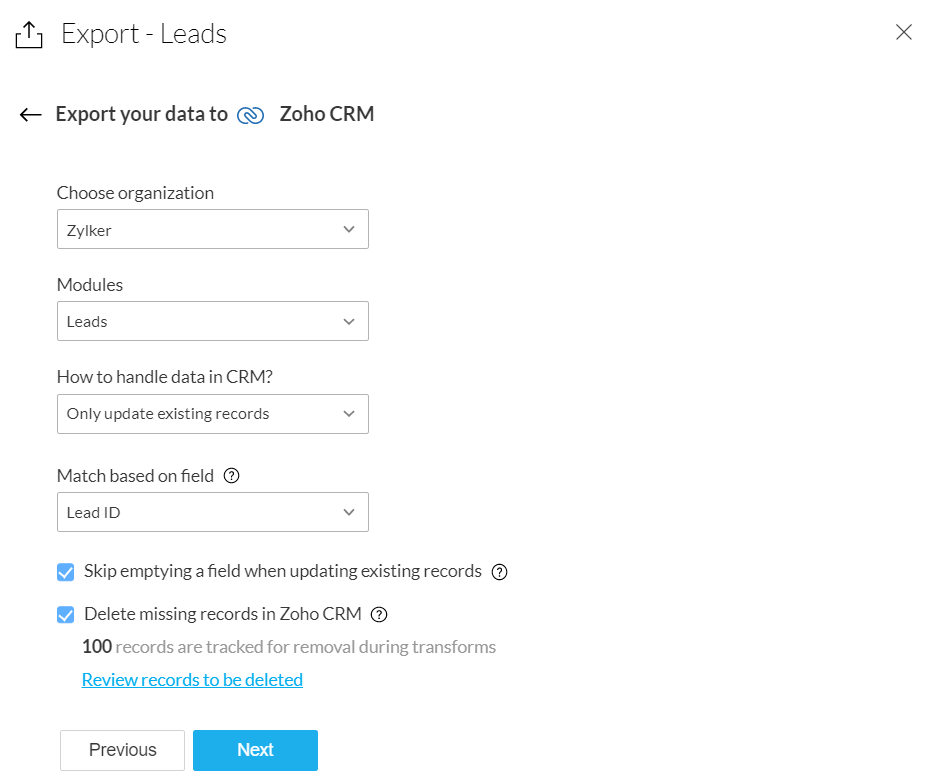
At the time of export to Zoho CRM, you can choose one of three options: only add new records, only update existing records, or add and update records.
This flexibility will help CRM admins determine the context in which the data preparation is being done.
If you’ve imported records from the Leads module for deduplication and cleansing, and you’re exporting the records back to the same CRM module, you can choose to delete the duplicate records.
At the time of export, you’ll be prompted to review the records that might be deleted, so you can rest assured that only the records you no longer want get deleted.
Refer to our knowledge base to learn more.
Use target matching to eliminate errors
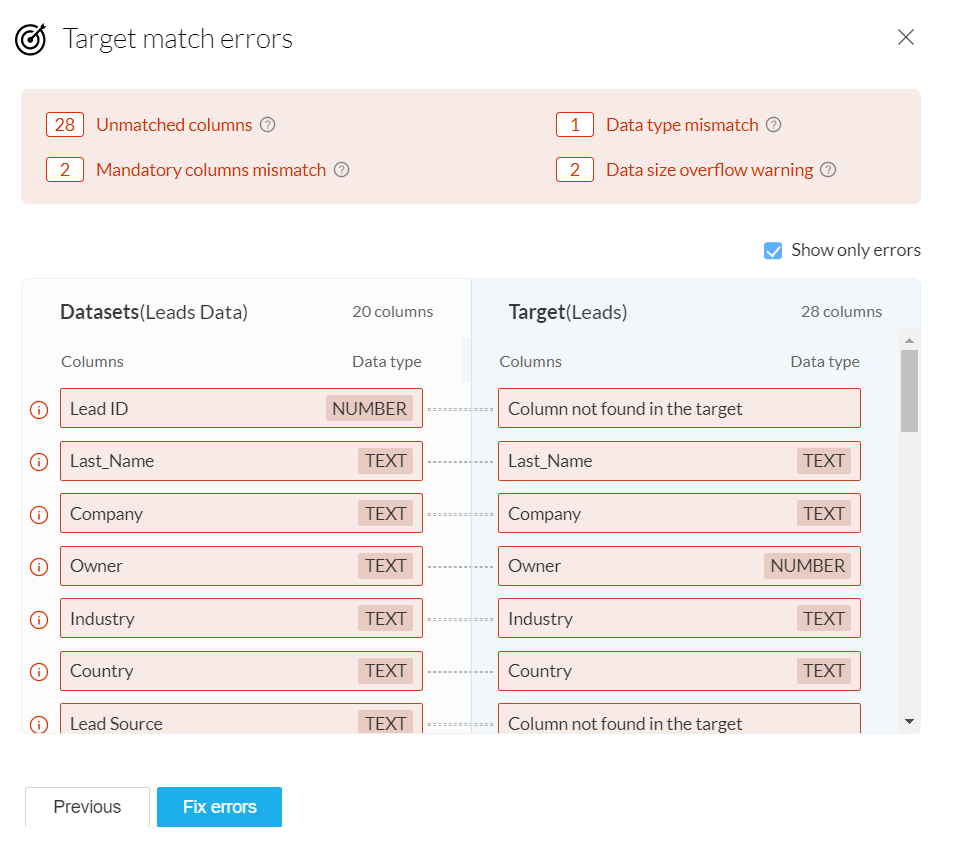
Target matching is a powerful feature that helps you match your data's schema to that of the CRM module you're exporting the data to. This will highlight errors such as unmatched columns, data type errors, and data format errors, before exporting the data.
Learn more about target matching.
You can view the error details for a detailed summary of target-matching errors. These errors could potentially fail the export when it happens, so you’ll have a chance to view them and fix them beforehand.
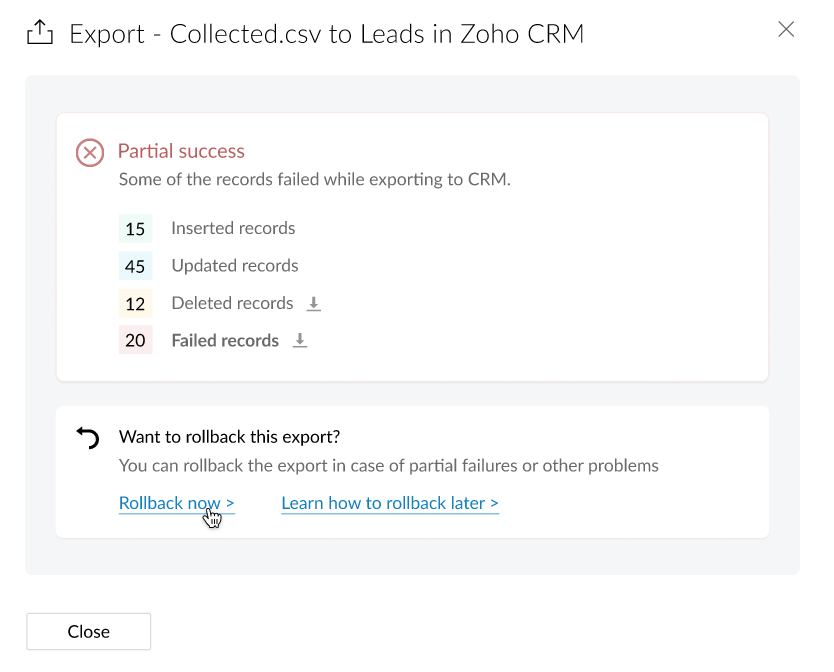
Sometimes an export can partially fail. This can happen due to extraneous reasons, like network connectivity problems.
In these cases, you have the option to rollback the export and restore the records back to their previous state.
Learn more about Rollback from our Knowledge Base.
You can also refer to DataPrep's solution guide for Zoho CRM for more use case-related details.
The features outlined here are now available for beta access. We invite you to try these features and share your feedback with us.
Also, because this is still in the beta stage, we urge you not to run critical DataPrep features on production data. Please try it on sample/test data only.
Topic Participants
Karthik Subramanian
Sticky Posts
Announcement: Zoho DataPrep to Deprecate Password-Only Authentication for Snowflake Connections on July 31, 2025
As part of our ongoing commitment to security and in alignment with Snowflake's pledge to the Cybersecurity and Infrastructure Security Agency (CISA) Secure by Design initiative, Zoho DataPrep will no longer support single-factor password authentication.Announcement: Zoho DataPrep 1.0 will be deprecated on January 31, 2026
We'd like to inform you that the Zoho DataPrep 1.0 version will be officially deprecated as of January 31, 2026. This aligns with our efforts to streamline and improve your overall experience with Zoho DataPrep 2.0 which was released in Sep 2024 . ToAnnouncement: Migrate your workspaces to Zoho DataPrep 2.0
Zoho DataPrep 2.0 was recently launched with exciting new updates to the platform. You can read more about the new updates in the previous announcement. To take full advantage of the new data pipeline features, migrate your existing workspaces from theAnnouncing Zoho DataPrep 2.0: An AI-Powered Data Management Platform
Originally launched in 2021, Zoho DataPrep started as an efficient self-service data preparation solution. We are excited to launch our new version 2.0, with significant enhancements to our platform to help you manage your end-to-end data needs with theAnnouncing DataPrep 2.0 Beta!
Being data-driven is an important end goal for all organizations, because when businesses can manage, analyze, and make actionable decisions based on data, they have a competitive advantage. With that said, how confident are you in making business decisions
Recent Topics
Introducing WhatsApp integration in Bigin
Greetings! In today's business landscape, messaging apps play a significant role in customer operations. Customers can engage with businesses, seek support, ask questions, receive personalized recommendations, read reviews, and even make purchases—allZoho Projects - Show Task List as dropdown field on Task records
Hi Project's Team, I noticed today that there is no field on a task record related to the task list it belongs to. A dropdown would be helpful for quickly moving tasks between lists while in a task. I know that you can go to "Other Actions" and chooseMy followed tickets extension is not working under the All departments view
Hi. I've installed the My followed tickets extension. However, when I try to open the extension under the all departments view, I get the following message: 'Sorry, this extension is not supported in the All Departments view.' How can I solve this pTicket Time Entry to Timesheet
The title just about sums it up. I have searched here and not found anything relevant, but If I overlooked, then please set me straight. We have staff that do nothing but close tickets in desk all day long. These tickets represent their timesheet. Is there a way to have this information sync or for a tech to go into their timesheet themselves and sync it with their tickets of the same timeframe?? We waste a ton of time doing timesheets and the old "Clock in/Clock out" isnt detailed enough for us!!Calls undetected.
The call is not showing on the call log.Calls undetected
Zoho is not reading calls made.Multi-currency and Products
One of the main reasons I have gone down the Zoho route is because I need multi-currency support. However, I find that products can only be priced in the home currency, We sell to the US and UK. However, we maintain different price lists for each.Missing information data Zoho inventory
there some missing data in Zoho inventory connection. pick list stock counts bin location we have requested it via mail and the support team doesn’t gove feedback. has anyone achieve to get these info or to ask other ya lesCalendar Events Issues
Not able to view scheduled events on my calendarExtensions 101 webinar series: Build, integrate, and monetize with extensions
Attention developers! Are you ready to take your extension development skills to the next level? We're excited to bring back the Extensions 101 webinar series with an expanded lineup of Zoho products and an introduction to more platform features. LastCustom Related List Inside Zoho Books
Hello, We can create the Related list inside the zoho books by the deluge code, I am sharing the reference code Please have a look may be it will help you. //..........Get Org Details organizationID = organization.get("organization_id"); Recordid = cm_g_a_data.get("module_record_id");Where are recordings stored?
I have hosted a couple of test meeting, used the "record" button to start and stop the recording but I am unable to find where are those recordings saved? Can anybody help? ThanksZoho Desk's integration with Microsoft PowerBI delivers advanced analytics insights
Hello everyone, Gaining advanced insights through reports and dashboards is one of the critical requirements of every business. In addition to key metrics tracked in Zoho Desk, such as agent performance, SLA adherence, and ticket lifecycle, businessesIMAP error message in Zoho mail
I cannot send emails today. Everything fine for years until today. Get a message: "You are yet to enable IMAP for your account. Please contact your administrator". Does anyone know how to correct this?IMAP stopped working today
Hello! I've been a paid customer for more than 10 years, IMAP was always working fine. But today this is the error I've got on my iPhone: I've tried toggling the IMAP for my account (Mail -> Settings -> Mail accounts) off and on again, but that did notAre custom portals accessible on the Zoho learn smartphone app?
In other words, can users external to my organisation, once signed up, use the app in the same way as internal users? ThanksZoho Books/Inventory - Update Marketplace Sales Order via API
Hi everyone, Does anyone know if there is a way to update Sales Orders created from a marketplace intigration (Shopify in this case) via API? I'm trying to cover a scenario where an order is changed on the Shopify end and the changes must be reflectedConditional Layouts On Multi Select Field
How we can use Conditional Layouts On Multi Select Field field? Please help.Multiple columns in a form
I am evaluating Zoho Creator. However, I am seeing almost no layout control on a form. Just a basic 1 or 2 column format that is then imposed on the entire form. That's not going to work for many, many real world cases. We need multiple columns per line, and we need each line/section to occupy a single column or be able to span the columns. Someone please tell me that I'm missing something and the capability is actually there.Global search
Hi! I think it would be great to have a global search that would give you results from all records of a database, no only for a single field of a single form as we have now. Thanks!Any insights about API/v2? Having problem for a while.
I don't know why it is throwing a 404 error, my report name is correct. Has someone had this issue and how you fix it?Edit QR code with redirect to form
Guten morgen, wir haben ein Formular Reklamation_erstellen. Dort soll ein QR Code erstellt werden, der im Lieferschein angezeigt wird. Beim Scannen auf dem soll das jeweilige Formular zum BEARBEITEN geöffnet werden. Leider bekomme ich es nur so hin, dassGetting all the ingredients together for baking an app
Good day everyone. After reading a lot of the help docs and watching videos, I now started on my app. To prevent hours and hours wasted on going down the wrong track, I would like some clarification on the following. But first some background: I haveHelp Needed with Configuring ZC Microservice
I'm attempting to create a simple microservice, but am running into problems with scope and auth. Using Custom API Builder, here's my setup: 1. Method: GET 2. Auth: OAuth2 3. User Scope: All users 4. Response: Standard 5. Function: A function that returnsCreator Simplified #10: Predefine Form Field Values and Make Them Read-Only for Users
Hey Creators, Ready for this week's tip in the Creator Simplified series? Today, we will explore how to have read only fields in a form. Use Case: Assume a scenario where the default value for a Department field needs to be English Literature, but youZoho Mail : Email Outgoing Blocked
I suddenly received the following message yesterday. I cannot send any mail. Please resolve as soon as possible, I cannot work without sending email. Dear User, We regret to inform you that your email outgoing has been blocked and you will not be ableCreator and Tables
Good day. I am trying to create my first application. I have imported my data into Tables and am creating my app in Creator. I do not see my tables and cannot see how to write forms data to a table. Even the Workflow just uses the form. In one of thecustomer Name and address details
i created one application there is no customer details in that . how to add customer details andRecalculate every row in the subform
Hello, Can anyone help me with a script, please? I have an issue. Sometimes it happens, that in a multi row subform one of the rows show an incorrect row total value. Not really understand how it can happen, if I have a 20 row subform, 19 rows show correctCreating Repeat Forms that remove redundancies
I wanted to understand if you can make multi-layer forms that reduce the need for users to input information in again and again. We want a form that our suppliers fill out per ingredient they sell, and the end result should have the Ingredient (SectionWhat is the difference between the free plan and the mail lite plan?
What is the difference between the free plan and the mail lite plan? How many emails can I send per day?Unblock email
Hi The outgoing mail from a client of me is blocked. I already made tickets and tickets are send to the EU desk but nobody is responding. The problem is already 4 days! There is absolutely no help from the support. I am really not satisfied at all! CanDomain verification failure
Hello Zoho Support, I purchased my domain directly through Zoho Mail, but the domain verification keeps failing with the message “TXT verification failed.” I’ve already waited and retried several times, but it still won’t verify. Could you please manuallyUnable to send message;Reason:554 5.1.8 Email Outgoing Blocked.
My email account is unable to send emails, and I urgently need to use it. How can I resolve this?If there is anything we have done wrong, please let us know in advance so we can actively cooperate to improve. User ID: 850482493URGENT: Email stopped workin - can't access admin panel
For some reason email sending stopped working. When I try to send an email it fails with "Unable to send message;Reason:451 4.7.1 Temporary system error" I can receive email just fine I see in my notifications some errors about the MX records, howeverCan I associate an invoice to a Project after the fact?
We have generated an invoice but would like to assoicate it to a Zoho Project after the fact. Is there any way to accomplish that? Thanks, ScottEmails I send as a cc or bcc NEVER GO THROUGH TO THA RECEIVER !!
every time i send a cc or bcc copy of an email to anyone when I’m using my zohomail.com email - no one ever gets the cc of bcc copy if the email: why???? And i triple check that the email addresses are correct; then i get back an email message (EVERYTIME)Cannot see correct DNS config for mail after moving domain to another provider
I have moved my domain from one provider to another and after that zoho mail stopped working (expected). Problem is, zoho mail admin panel still shows (10 hours after move) that all records are correct while I haven't changed anything in my domain DNSAdd Support for Authenticator App MFA in Zoho Desk Help Center
Hello Zoho Desk Team, We hope you are doing well. We would like to request an enhancement related to security for the Zoho Desk Help Center (customer portal). Currently, the Help Center supports MFA for portal users via SAML, JWT, SMS authentication,Auto-fill Contacts in Zoho Mail not working for me
We just switched to Zoho Mail for our company, and I am noticing that the "auto fill" feature when composing an email -- where the "to" field is autofilled (like in the attachment) from Contatcts works for everyone except me. Any way I might have madeNext Page