[Product Update] Zoho Projects and BugTracker Data Model Changes in Zoho Analytics Integration
Dear Zoho Projects and BugTracker integration users,
As a continuous effort of enhancing our product with latest API versions, we are updating Zoho Projects and BugTracker APIs in the Zoho Analytics integration framework. As a part of this upgrade, the existing users of Zoho Projects - Zoho Analytics integration have to migrate their integration setup to the latest version.
What are the changes implemented in this new version?
What are the changes implemented in this new version?
1) Task Owner table in Zoho Analytics will be renamed by Task Work Hours which will give additional granular data on Date, Day and Owner-wise Task Estimated Hours. Please note that this table name change will be handled automatically and it will be reflected in query tables, formula and reports.
2) The column Status in the Tasks table in Zoho Analytics will be deleted and the column New Status in the Tasks table will be renamed as Status. Hence, please remove the old Status column used in all dependant Formula Columns, Aggregate Formulas, Query Tables, Reports, Filters, User Filters, Sharing Filter Criteria and Widgets. To view the list of dependent views, please click on the 'Action Required' option in the Data Sources page in Zoho Analytics workspace.
Please note that it is mandatory to remove the 'Status' column from the affected views before proceeding with the migration process.
Please note that it is mandatory to remove the 'Status' column from the affected views before proceeding with the migration process.
3) The data present in the Status column in the Milestone table will be changed to reflect the latest values present in Zoho Projects. Please review and update the values if you have used the current Status column in the Milestone table statically in Query tables, Formulas, Share Filter Criteria, Data Alerts and in APIs after the migration.
4) The below ID columns were using Zoho User ID as the Unique ID. In the latest API from Zoho Projects will synchronize another unique IDs to replace the existing Zoho User IDs. Hence, please review and update the values if you have used them in statically in Query tables, Formulas, Share Filter Criteria, Data Alerts and in APIs after the migration.
i) 'Assignee ID' and 'Reported ID' in 'Bugs' table
ii) 'Owner ID' in 'Milestones' table
iii) 'Created by ID' and 'Owners ID' in Tasks table
iv) 'Owner ID' in Task Owner table
v) 'User ID' in Project Users table
vi) 'Associated By' in Tasks Bugs Mapping table
vii) 'User ID' and 'Approved by User ID' and 'Created By' in Timesheet table
viii) 'Owner ID', 'Created By' and 'Modified By' in Projects table
ix) 'Team Users' in 'Teams' table
x) 'User ID' in 'Users' table
xi) 'Created By' in 'Baseline' table
xii) 'User ID' in 'Project Group Users' table
What specific actions do users need to take?
What specific actions do users need to take?
Please access your Zoho Projects integration workspace in your Zoho Analytics account, open Data Sources tab at the left pane and click on 'Action Required' button. You can find the list of changes applied on your account.

Particularly, check the list of affected views. If you have used the 'Status' column from Task table or User ID column from any of the tables mentioned in point #4, you can manually edit and remove that field.
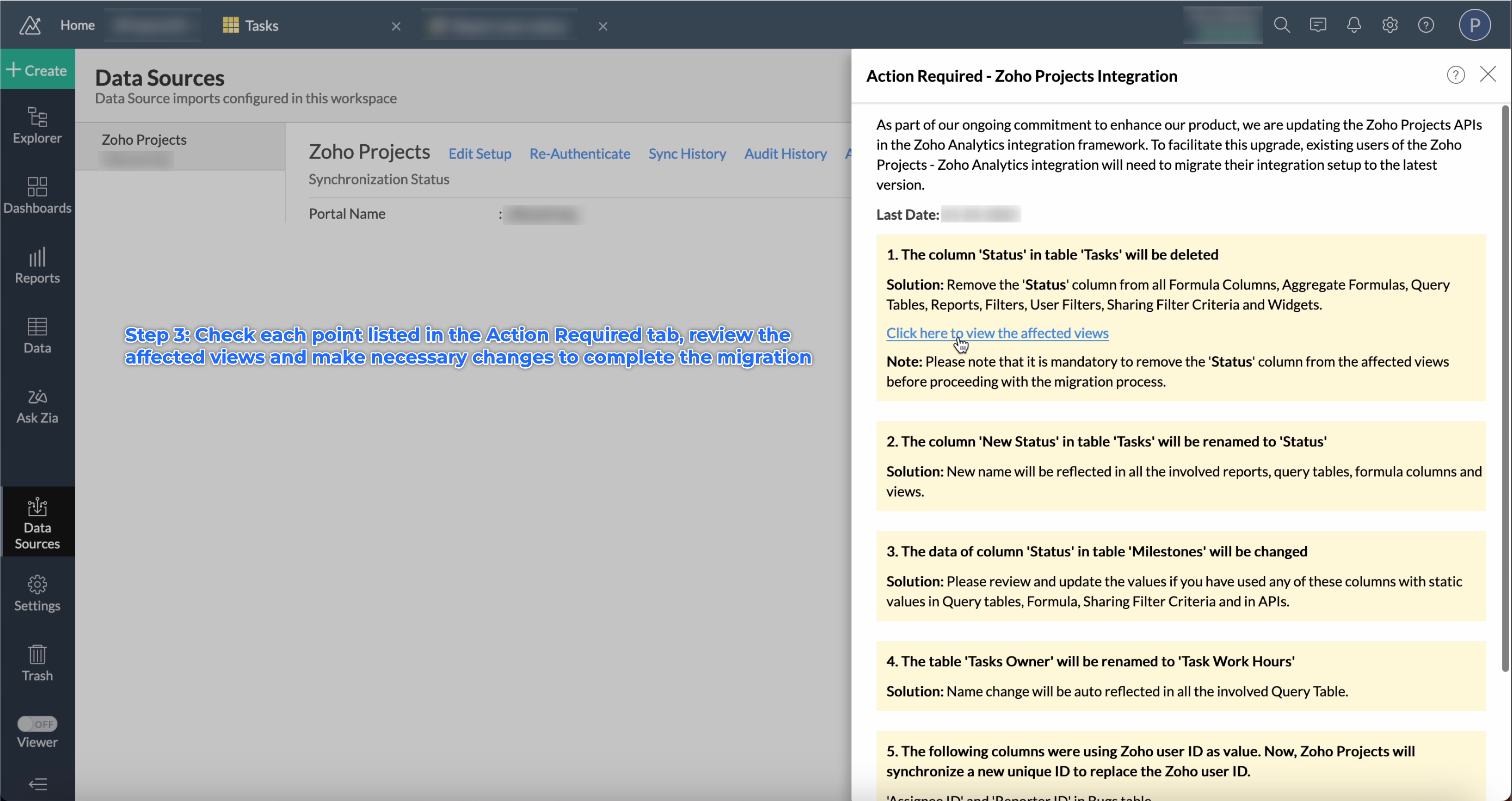
Once it is done, please click on Migrate button to complete the process.
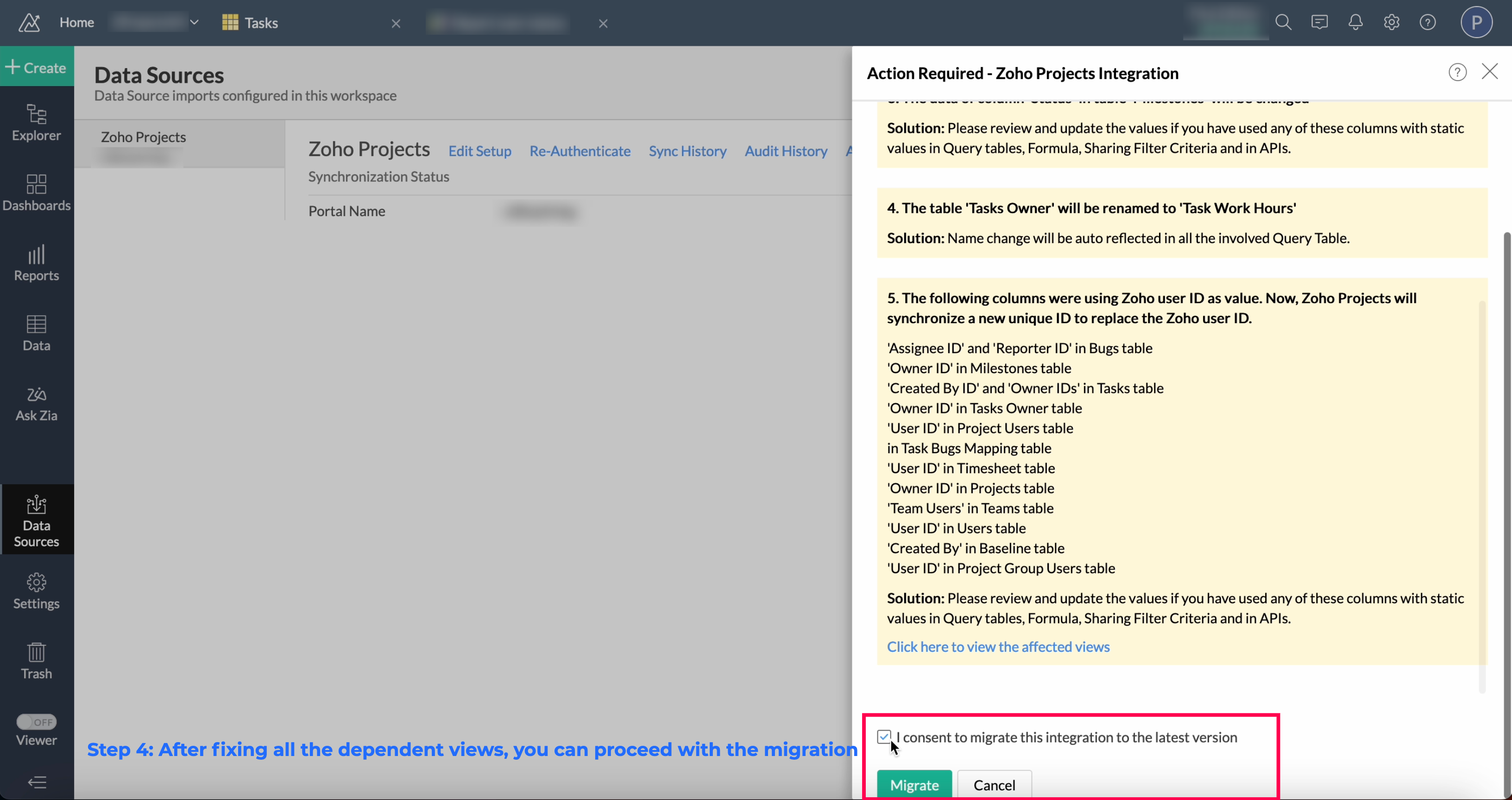
The current deadline to complete this migration is 31st December 2023. You can plan and execute the migration accordingly.
If you need any assistance or clarification during this migration, please get in touch with us through support@zohoanalytics.com. Our team can schedule a meeting and guide you further.
Please note that some of these actions have to be performed by existing Zoho Projects and BugTracker integration users in Zoho Analytics. For new users, the latest Zoho Projects and BugTracker integration data model will be available by default.
Edit on 22 July, 2023: Your Zoho Analytics account now has the option to migrate to the latest version. However, rest assured that the older version of the Zoho Projects integration will continue to function seamlessly without any disruptions. Given the manual effort required by certain users to replace columns in reports, we have intentionally refrained from setting a short deadline for this migration process. The current deadline for completion is 31st December 2023, providing you with sufficient time to plan and execute the migration at your own pace.
Edit on 23 July, 2023: Previously, there was a risk in the migration process where dependent reports could be automatically deleted if the 'Status' column from the Task table was not removed from associated views such as formula, query table, and reports. However, in response to user feedback, effective July 23, 2023, we have made a tweak to the migration process to prevent auto deletion. Now, users are required to manually eliminate the status column from the dependent views before proceeding with the migration process.
Thanks
Sailas
Product Manager | Zoho Analytics
Please note that some of these actions have to be performed by existing Zoho Projects and BugTracker integration users in Zoho Analytics. For new users, the latest Zoho Projects and BugTracker integration data model will be available by default.
Edit on 22 July, 2023: Your Zoho Analytics account now has the option to migrate to the latest version. However, rest assured that the older version of the Zoho Projects integration will continue to function seamlessly without any disruptions. Given the manual effort required by certain users to replace columns in reports, we have intentionally refrained from setting a short deadline for this migration process. The current deadline for completion is 31st December 2023, providing you with sufficient time to plan and execute the migration at your own pace.
Edit on 23 July, 2023: Previously, there was a risk in the migration process where dependent reports could be automatically deleted if the 'Status' column from the Task table was not removed from associated views such as formula, query table, and reports. However, in response to user feedback, effective July 23, 2023, we have made a tweak to the migration process to prevent auto deletion. Now, users are required to manually eliminate the status column from the dependent views before proceeding with the migration process.
Thanks
Sailas
Product Manager | Zoho Analytics
Topic Participants
Sailas S
JBMILAN
victor.gil
Sellers
Sven Mathes
Sticky Posts
What's New in Zoho Analytics - November 2025
We're thrilled to announce a significant update focused on expanding your data connectivity, enhancing visualization capabilities, and delivering a more powerful, intuitive, and performant analytics experience. Here’s a look at what’s new. Explore What'sWhat's New in Zoho Analytics - October 2025
Hello Users! We're are back with a fresh set of updates and enhancements to make data analysis faster and more insightful. Take a quick look at what’s new and see how these updates can power up your reports and dashboards. Explore What's New! ExtremeWhat’s New in Zoho Analytics – September 2025
Hello Users!! In this month’s update, we’re raising the bar across multiple touchpoints, from how you bring in data, plan and track projects to how you design and brand your dashboards. We’ve added the all-new Gantt chart for project visualization, expandedAnnouncing Agentic AI - Ask Zia!
We are delighted to roll out the new agentic AI capabilities in Ask Zia, where every stage of the BI workflow is assisted by AI. With a human-in-the-loop approach, Ask Zia ensures that you’re in command of the decision, while AI handles the complexity.Invitation-Based User Access in Zoho Analytics
Hello everyone, We’re rolling out an important update on how users are added to your Zoho Analytics Organization and Workspaces. Previously, when admins added users, they were automatically added to the organization. Moving forward, to improve security
Recent Topics
Bug Details
In the Bug detail the milestoneid is missingStop completed task lists from disappearing?
Is there any way to stop projects from making tasks lists disappear when all the tasks in the list are completed? That's one of those little things where we're constantly fighting the product. For instance we have some projects which are ongoing - no start and end date. We use Kanban view to show the various task lists. We don't want the kanban list to disappear every time the items on it happen to be closed out. ThanksOne Contact with Multiple Accounts with Portal enabled
I have a contact that manages different accounts, so he needs to see the invoices of all the companies he manage in Portal but I found it not possible.. any idea? I tried to set different customers with the same email contact with the portal enabled andChange of Blog Author
Hi, I am creating the blog post on behalf of my colleague. When I publish the post, it is showing my name as author of the post which is not intended and needs to be changed to my colleague's name. How can I change the name of the author in the blogs?? Thanks, RamananAllow customers to choose meeting venue and meeting duration on booking page
My business primarily involves one-to-one meetings with my clients. Given the hybrid-work world we now find ourselves in, these meetings can take several forms (which I think of as the meeting "venue"): In-person Zoom Phone call I currently handle theseBooking outside of scheduled availability
Is there a way for staff (such as the secretary) to book appointments outside of the scheduled availability? Right now to do this special hours must be set each time. There should be a quicker way. Am I missing something?Operation Questions.
Hello, I hope you are well. To explain a little, we are a company that sells services and products with a technical team responsible for installation and maintenance. Zoho FSM can be useful for the technical team, namely for the technical coordinatorDirect Access and Better Search for Zoho Quartz Recordings
Hi Zoho Team, We would like to request a few enhancements to improve how Zoho Quartz recordings are accessed and managed after being submitted to Zoho Support. Current Limitation: After submitting a Quartz recording, the related Zoho Support ticket displaysUpdate date & time when a cell is edited
Hi All, I am desiring to have a cell update with the current date and time when another cell is edited. Any ideas? Thank youAdd "Groups" to "Share With" on Reports & All Entries
Hi, On Forms we can share Publicly, with Specific Users And/Or Specific Groups or All Users. With Reports and All Entries we lack the "Groups" option, please add this as with many users this saves a lot of work. Thanks DanAdd Pause / Resume Option to Zoho Quartz Recordings
Hi Zoho Team, We would like to request an enhancement to Zoho Quartz recordings: the ability to pause and resume an ongoing recording. Current Limitation: At the moment, when recording an issue with Zoho Quartz, the recording continues even when we areCustom Fields Not Showing Up in Invoice PDF Template Document Information
I have added 2 custom fields under Sales > Invoices > Manage Custom Fields. They are set to show in all PDFs. However when I am editing my Invoice PDF template, i do not see the custom fields under Document Information.Tracking Non-Inventory Items
We have several business locations and currently use zoho inventory to track retail items (sales and purchase orders). We were hoping to use zoho inventory to track our non-inventory items as well (toilet paper, paper towels, etc). I understand that weCan I use a Standalone CRM Function as the Callback URL For Async Export Data API?
I am creating an export job using this API https://www.zoho.com/analytics/api/v2/bulk-api/export-data-async/create-export/view-id.html There is a "callbackUrl" key in the CONFIG object. I tried copying the URL for a standalone function in CRM which canZOHO Books
Hi there, Why after I upgrade my Zoho invoice > Books then i wanted to add plugin which i cannot do. Please advise.How is Your eCommerce Experience w/Zoho Inventory?
First off, I'm SUPER grateful for the advent of Zoho Inventory and now the Zoho Commerce Suite. Overall, Inventory is a great product, especially for customers without an eCommerce presence. For eCommerce companies (especially those shipping more than ~10 packages/day), however, there are certain drawbacks that keep my clients from moving over to Zoho Inventory: Cons: 1. Invoice + Package Creation from Shopify/Other eCommerce Integrations: Zoho Inventory makes the somewhat perplexing decision toError AS101 when adding new email alias
Hi, I am trying to add apple@(mydomain).com The error AS101 is shown while I try to add the alias.Simplify Mass Replies with Predefined Templates and Snippets
Hello everyone, We are happy to introduce a new enhancement to Mass Reply that helps agents respond to customers quickly and consistently. With the addition of Email Templates and Snippets in the reply window, agents can use predefined messages whileMapping custom fields from one module to another
I have a custom field, "Subscription Period" that appears as a required field in every Opportunity (Potential). I want that field to appear on any Quotes derived from that Opportunity (and have created a custom field of the same name in Quotes for thatThe Social Wall: November 2025
We’re nearing the end of the year, and the holiday season is officially kicking in! It’s that time when sales peak and your social media game needs to be stronger than ever. We’re back with exciting new updates across AI, analytics, and the mobile appItem name special charaters <>
Im trying to input speical characters such as < and > into item name and item description but comes up with following error: Invalid value passed for Item Name and Invalid value passed for Item Description How do i allow speical characters?How to update Multi File upload field
Assume that i have a multi file upload field,how can i update the same field again?Customer Address Not on Standard Invoice when Address is on Contact Record
Hi, I entered the customer billing and shipping address in Zoho CRM. I created an invoice in Zoho Books with the same customer contact. The contact is correctly in Zoho Books with the billing and shipping address. The invoice for the customer does notApply partial payments to invoices from the Banking Module
We need this! Why is this not possible?Welcome to the Zoho Show Community Forums page!
Hello everyone, The Zoho Show community is a place for you to discuss and share anything and everything related to Zoho Show Presentations, our online presentation software. It includes users from all over the globe and all walks of life. Our community helps answer your Zoho Show questions with responses from other knowledgeable community members to give you the best experience creating and designing exciting presentations. Along the way, you'll meet recognized experts from our software team andHow can I convert an existing contact into a lead?
I imported many contacts into ZOHO CRM. In order to select a few of them as leads, I want to mark or convert a few hundred as Leads. Who can I do that?Introducing Dedicated Modules for Plans, Addons, and Coupons in Zoho Billing
We’ve enhanced the way you manage Plans, Addons, and Coupons in Zoho Billing. Previously, all three grouped together under Subscription Items. Now, each one has its own dedicated module, giving you a cleaner and more intuitive experience. This updatePrice book functionality enhancement
A common use of price books is to create a price book for a given customer level or contract with a specific company. Given that this is done at a company/customer level it would be great to see a way to associate a price book to a given customer andContact data removes Account data when creating a quote
Hi, Our customer has address fields in their quote layout which should be the address of the Account. They prefill the information, adding the account name - the address data is populated as per what is in the account - great. However when they then addCan we have 24x7 live support for Zohobooks ?
Can we have 24x7 live support for Zohobooks ?Important update about notification security in Business Messaging SDK
As part of our ongoing effort to strengthen the security of notification data, we have enhanced how notifications are processed and protected in our applications. These improvements ensure that all notification related data follows the most up-to-date年内最後のユーザー向けイベント:5名限定! 課題解決型ワークショップイベント Zoho ワークアウト開催のお知らせ (12/18)
ユーザーの皆さま、こんにちは。コミュニティチームの中野です。 12月開催のZoho ワークアウトについてお知らせします。 今回はZoomにて、オンライン開催します。 参加登録はこちら(無料) https://us02web.zoom.us/meeting/register/QHn6kJAcRs-znJ1l5jk0ww ━━━━━━━━━━━━━━━━━━━━━━━━ Zoho ワークアウトとは? Zoho ユーザー同士で交流しながら、サービスに関する疑問や不明点の解消を目的とした「Zoho ワークアウト」を開催します。Sync Zoho Marketing Automation with Zoho Forms
I can't find a section where the integration between Zoho Marketing Automation and Zoho form is explained. And how form subscription works with opt-in and consents.What is the difference between Zoho Campaigns and marketing hub?
Zoho Campaigns is a permission-based email marketing tool for sending marketing emails and mass emails. Marketing Automation is a multichannel marketing automation tool that caters to organizations looking for tools to engage their users across multipleWebhook not firing.
I created a webhook using the Web UI, it looks very nice and the testing worked without an issue, but when i save/ update a ticket, the webhook is not firing. Here are the details of the web-hook i get from using the API "modifiedTime": "2019-10-22T09:23:37.380Z",Duplicate customers being created in Desk
Hi I've trying to work out why I've getting duplicated customers being created in my desk. I have an external booking system that generates an email when I get a customer booking a job. A booking email gets sent to Desk where I manage the booking andCreating a custom CSV file using deluge script/
I have an application I have developed and the client wants us to place an export file in csv onto an ftp server daily. Now I don't see au options in creator to change the separator to anything else. The client wants the separator to be the pipe symbol "|" I think i would be able to create schedule with some code to create the appropriate data in a string using deluge script but I haven't seen any functionality that would allow me to deposit that data as a file anywhere or attach it to an emailCan we add custom fields to portal community profiles?
How do we add custom fields to our profile pages in our portal community? If we have the ability to add custom fields, will we be able to access those fields via API? We want to use our Desk community in our help portal as our primary community and wouldCustomer ticket creation via Microsoft Teams
Hi all, I'm looking to see if someone could point me in the right direction. I'd love to make it so my customers/ end users can make tickets, see responses and respond within microsoft teams. As Admin and an Agent i've installed the zoho assist app withinE-Invoicing in Belgium with Zoho Billing
Starting January 1, 2026, Belgium is introducing mandatory electronic invoices (e-invoicing) for all B2B transactions between VAT-registered businesses. Invoices and credits notes must be exchanged in a prescribed digital format. How E-Invoicing worksNext Page