User Tips: Adding Multiple Products (Package) to a Quote v2.0 (with Client Script)

User Tips: Adding Multiple Products (Package) to a Quote v2.0 (with Client Script)

This solution is an improvement on the original idea which used deluge. My solution was posted in the comments are: https://help.zoho.com/portal/en/community/topic/adding-multiple-products-package-to-a-quote

The updated version uses client script instead of deluge.

Hopefully this might help a few people. It helps our reps speed up the process of creating quotes and quoting accurately.

Details below:


Problem:

We run numerous manufacturer promotions with various bundled items and discounts. Reps struggle to remember all details, leading to incorrect discounts on quotes.


Solution

I created a custom module for Product Packages. For each promotion, we create a "Package" including all products, discounts, and start/end dates. A quote lookup field allows users to select a package, automatically adding the related products with accurate pricing and information.

When a user selects a package, a client script retrieves all related products and discounts, adding them to the quote. The lookup field is then reset for additional product entries.

Some fields on the package layout include:

  1. Promotion type
  2. Status
  3. Start / End dates for the promotion. 
  4. Pop-up message field if we want to show the rep a message when quoting the package

I also have a workflow that sets the package to “Expired” when the record expiration date hits. The lookup is filtered in the quotes module to only show “Active” packages.

In Action (with lookup field to the package module):
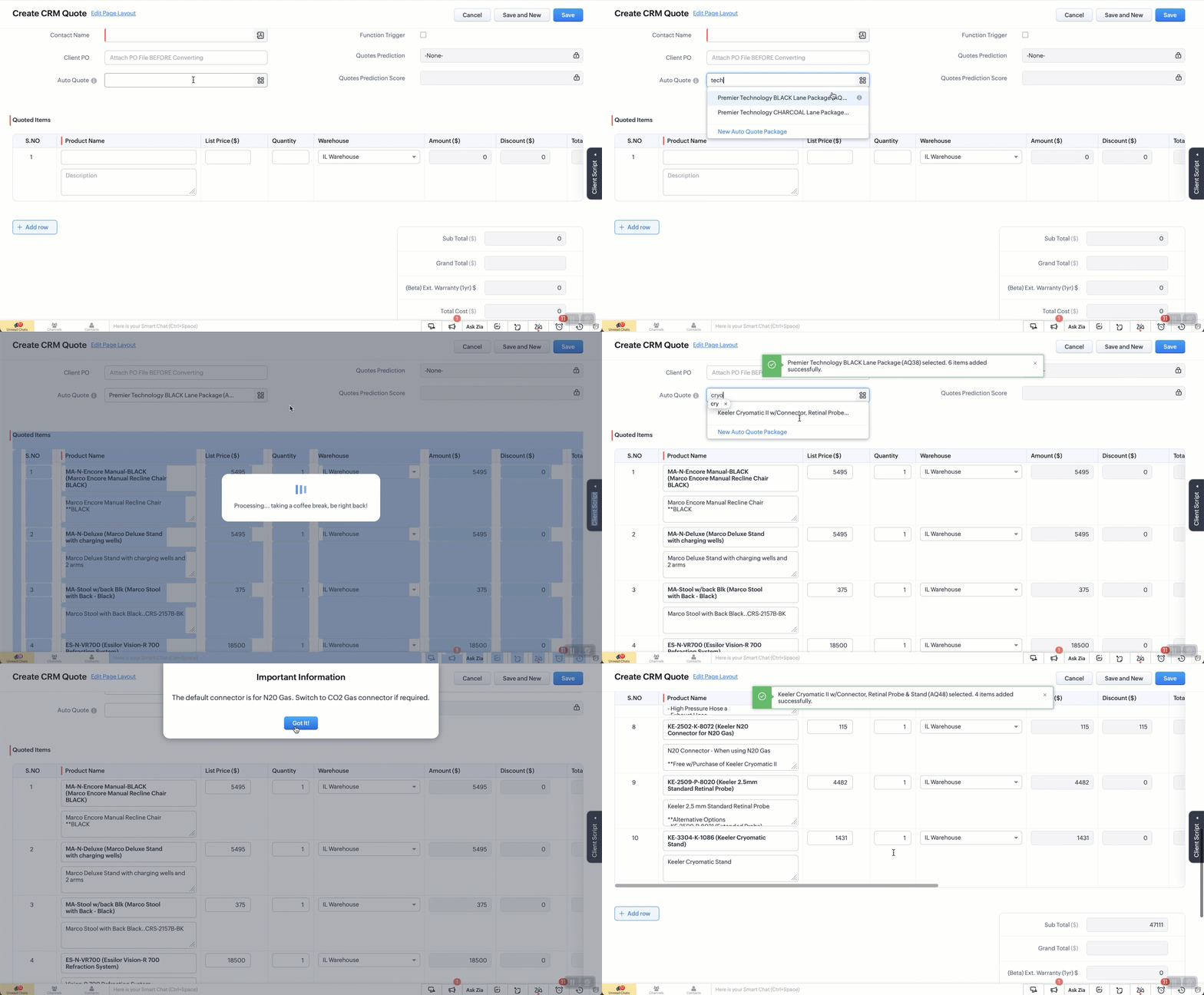


The Setup:
Create a custom module “Package Items”. Add the fields as below. 
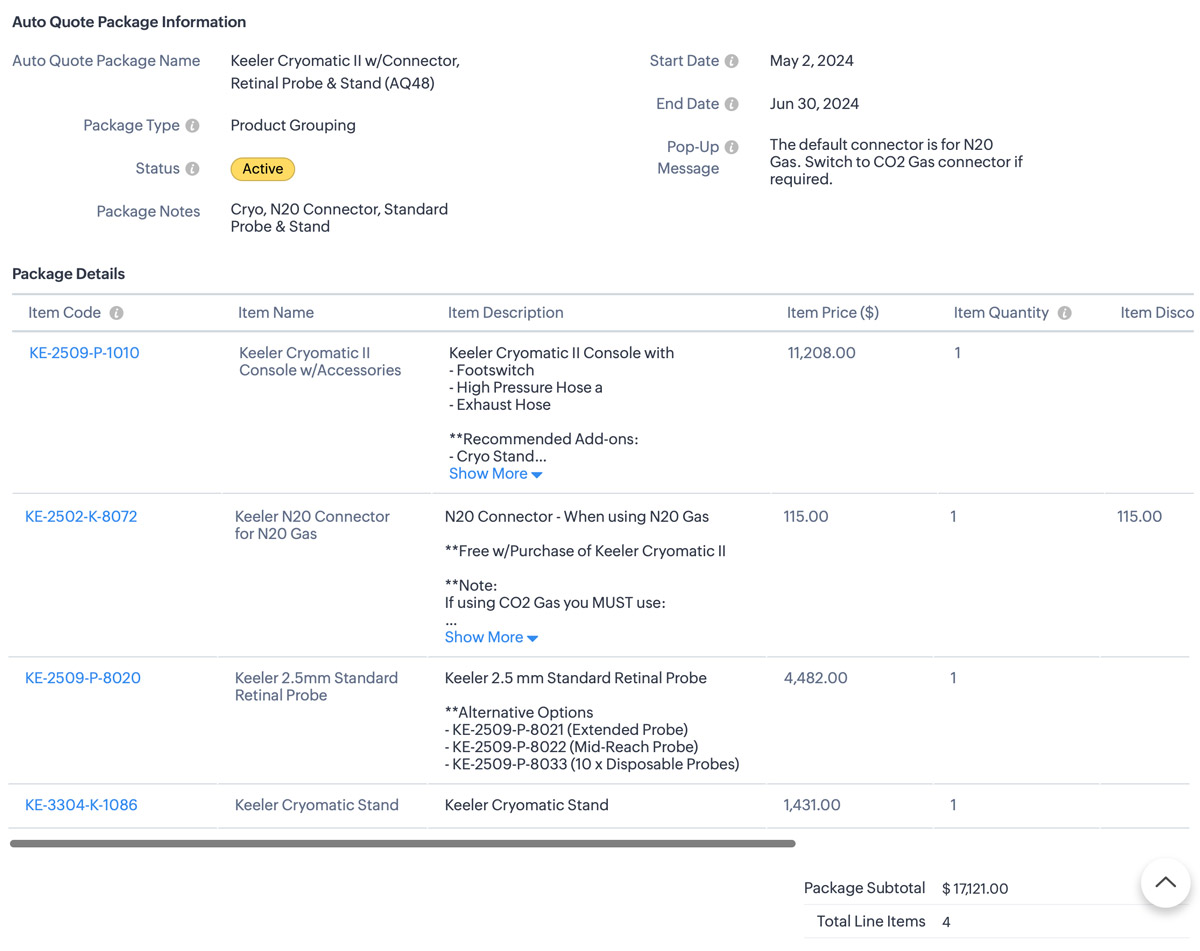


Additional Info
1. I also use client script to hide the “Auto-Quote” field when in a standard view page
2. When I name a package, a deluge script runs to append the Package ID number which is an auto-number field.


The Code: 

  1. try {
    // List of funny loading messages
    var loadingMessages = [
    "Cranking up the quote machine...",
    "One sec... just stepped out for coffee.",
    "Hold tight! The hamsters are running the wheels.",
    "Almost there... giving it a little extra attention.",
    "Loading... probably faster than your internet speed.",
    "Please hold while we make magic happen.",
    "Just a moment... our servers are stretching their legs.",
    "Your patience is appreciated... and rewarded!",
    "Brewing up your quote right now...",
    "Give us a second... we're flexing our technical muscles.",
    "Our system is doing some yoga... stay calm!",
    "Loading... don't worry, it's not stuck!",
    "Fetching your data... hopefully with no detours!",
    "Keep calm and let us handle the rest.",
    "Processing... taking a coffee break, be right back!",
    "Stay tuned... greatness is loading.",
    "Our system is running... faster than a cheetah!",
    "Looks like you're going all in on this quote!",
    "Getting things ready... just need a moment.",
    "Hold on... we're aligning some stars for you.",
    "Please wait... we're feeding the server squirrels.",
    "One moment... your quote is coming fresh out of the oven.",
    "Loading... just making sure everything is perfect!",
    "Generating your quote... thanks for your patience!",
    "Almost there... your quote is worth the wait!"
    ];

    // Select a random message from the list
    var randomMessage = loadingMessages[Math.floor(Math.random() * loadingMessages.length)];

    // Log the entire value object to see its structure
    log("Full value object: " + JSON.stringify(value));

    // Ensure value.id is defined before proceeding
    if (!value || !value.id) {
    log("No product selected or value.id is undefined");
    return; // Exit the script quietly since no valid product was selected
    }

    // Show loader
    ZDK.Client.showLoader({ type: 'page', template: 'vertical-bar', message: randomMessage });

    // Extract the product ID and name from the value passed in
    var packageId = value.id;
    var packageName = value.name;
    log("Product ID: " + packageId);
    log("Package Name: " + packageName);

    // Get the subform field from Quotes module
    var quotedItemsSubform = ZDK.Page.getField("Quoted_Items");

    // Fetch product information for the package ID
    var packageDetails = ZDK.Apps.CRM.Auto_Quote_Packages.fetchById(packageId);


    var packageStatus = packageDetails.Status; // Active or Expired.
    var popUpMessage = packageDetails.Pop_Up_Message; // Check the package for any Pop-up message we want to show
    log("Package Details: " + JSON.stringify(packageDetails));
    log("Package Status: " + packageStatus);
    log("Pop-Up Message: " + popUpMessage);

    // Initialize array for existing line items.
    var existingLineItems = quotedItemsSubform.getValue() || [];
    log("Existing line items: " + JSON.stringify(existingLineItems));
    //
    // Only include rows with products. Excude any blank rows from the quote
    var filteredExistingLineItems = existingLineItems.filter(function(item) {
    return item.Product_Name && item.Product_Name.id;
    }).map(function(item) {
    return {
    id: item.Product_Name.id // Include only the item ID
    };
    });
    log("Filtered existing line items: " + JSON.stringify(filteredExistingLineItems));

    // Array to hold new line items we are adding
    var newLineItemArray = [];

    // Check if package is active and populate new line items
    if (packageStatus === "Active") {
    var packageItems = packageDetails.Package_Details;
    packageItems.forEach(function(item) {
    var productLineItem = {
    Product_Name: {
    id: item.Item_Code.id,
    name: `${item.Item_Code.name} (${item.Item_Name})`
    },
    Product_List_Price: item.Item_Price,
    Description: item.Item_Description,
    List_Price: item.Item_Price,
    Quantity: item.Item_Quantity ?? 1, // Default to 1 if Qty is null or undefined
    Discount: Math.abs(item.Item_Discount ?? 0) // Get the discount or default to 0 if null
    };
    log("New product line item: " + JSON.stringify(productLineItem));
    newLineItemArray.push(productLineItem);
    });
    } else {
    // Show error message if the package is not active
    // My layout to only show Active items but if you don't do that this solves it.
    ZDK.Client.showMessage('This package / promo is no longer active. Please contact the admin for details.', { type: 'error' });
    ZDK.Client.hideLoader();
    return; // Exit the script since the package is not active
    }

    // Combine existing line items with new line items
    var updatedLineItemArray = filteredExistingLineItems.concat(newLineItemArray);
    log("Updated line items array: " + JSON.stringify(updatedLineItemArray));

    // Add all updated items to the Quotes page
    quotedItemsSubform.setValue(updatedLineItemArray);

    // Reset the pick list field so user can re-use
    ZDK.Page.getField("Auto_Quote").setValue(null);

    // Hide loader
    ZDK.Client.hideLoader();

    log("Final updated line items: " + JSON.stringify(updatedLineItemArray));

    // Function to show confirmation and number of items added back to the user
    var showSuccessMessage = function() {
    ZDK.Client.showMessage(`${value.name} selected. ${newLineItemArray.length} items added successfully.`, { type: 'success' });
    };

    // Function to show popup message and then success message
    var showAlertAndSuccess = function(message, heading, buttonText) {
    ZDK.Client.showAlert(message, heading, buttonText);
    showSuccessMessage();
    };

    // Check for pop-up message and show alert if it exists
    if (popUpMessage) {
    showAlertAndSuccess(popUpMessage, "Important Information", "Got It!");
    } else {
    // No pop-up message, show the success message
    showSuccessMessage();
    }
    } catch (error) {
    // Log the error
    log('Error: ' + error.message);

    // Show error message
    ZDK.Client.showMessage('An error occurred while adding items. Please try again.', { type: 'error' });

    // Hide loader
    ZDK.Client.hideLoader();
    }

    • Recent Topics

    • Two-Factor Authentication in Zoho Mail: Add an extra layer of security to your organization

      Account security is a critical aspect of managing any organization's email. With increasing risks of unauthorized access, a single password may not always be sufficient to keep accounts protected. Zoho Mail's Two-Factor Authentication (TFA) addresses
    • Dark Mode - Font Colors Don't Work

      When editing a document in Dark Mode and selecting font colors, they don't show up on screen.  Viewing/editing the same document in Light Mode shows them just fine.
    • API to post drafts for social media

      I we want to post draft posts to our zoho social account and then approve and schedule them within Zoho social. is this possible with for example: https://apis.zoho.com/social/v2/post TIA Jon
    • is it possible to add more than one Whatsapp Phone Number to be integrated to Zoho CRM?

      so I have successfully added one Whatsapp number like this from this User Interface it seems I can't add a new Whatsapp Number. I need to add a new Whatsapp Number so I can control the lead assignment if a chat sent to Whatsapp Phone Number 1 then assign
    • How to show product cards in your chatbot

      Hey everyone, If you are using Guided Conversations to help customers find products, you have probably run into this problem: the bot gives customers a list of options, but they still have no idea which one to pick. There will be no images, no specs,
    • Changing settings for auto logoff

      I've noticed that when I haven't used Cliq for a while, I have to re-enter my password. That is really clumsy, especially if you have a complicated password. Because it won't be filled in automatically. Is there a way to change that behaviour? We are
    • How do you create invoices before sending them through Zoho Invoice?

      Hi everyone, I'm curious how other businesses handle their invoicing workflow before sending invoices through Zoho Invoice. Do you: Create invoices directly inside Zoho? Prepare them first in another invoice tool or template? Use Excel or Word before
    • ZML Error/Bug

      Hi, I would like to request for your help regarding this kind of behavior. Requested_Start_Time & End_Time - date-time fields https://......#Page:PH_Calendar_Page?reqDate=08-04-2026 https://......#Page:PH_Calendar_Page?reqDate=07-31-2026 https://....#Page:PH_Calendar_Page?reqDate=08-03-2026
    • Item with name in different languate

      Hello, is there a way to have an item with its name in different languages? For example: I sell an item in different markets and I'd like to have a Proposal and the Invoice with the Item Name in a specific language. Rino Bertolotto Zoho Specialist, STESA srl
    • Migration of emails from Yandex to Zoho

      I am trying to migrate an yandex mail account to zoho mail account. I am confused with all the related articles/informations in the net. Could someone please outline the process to do it, just thinking about me as a novice with limited knowledge or experience. A couple of questions from the knowledge gained. 1. I believe we have to delete the yandex current MX from the website records and add Zoho MX. What happens to the emails as we remove the mail exchange record. Yandex stops updating emails and
    • Calling a function within another function

      Hello there, I have just found out that you can simply call up functions in other functions, regardless of the department. You can't create functions with the same name twice, even though you are in a different department. If you try it, you don't get
    • 【続々公開】Zoholics Japan 2026 セッション情報を更新しました!

      ユーザーの皆さま、こんにちは! Zoholics Japan 2026のセッション情報を続々と公開しています! 今年は3つのトラックで、Zohoの最新情報やAI活用、製品アップデート、 活用事例など、多彩なセッションをお届けします。 現在公開中のセッション(一部) ・Zoho CRM 製品アップデート ・Zoho CRM Plus 製品アップデート ・Zoho Community セッション ・Zoho Desk セッション ・中堅・成長企業の人事DX ~AI時代に何から始めるべきか?~ ・Zoho
    • New Ways to Personalize, Organize, and Share Your Notes

      We're excited to introduce a new set of enhancements in Zoho Notebook that make your note-taking experience cleaner, more flexible, and easier to share. With this update, you can create notes that automatically adapt to your device theme, browse your
    • Introducing spam detection for webforms: An additional layer of protection to keep your Zoho CRM clean and secure

      Greetings all, One of the most highly anticipated feature launches—Spam Detection in webforms—has finally arrived! Webforms are a vital tool for record generation, but they're also vulnerable to submissions from unauthenticated or malicious sources, which
    • Rich-text fields in Zoho CRM

      Moderation Update: During the initial release of Rich Text fields, it was supported only in the Enterprise and Ultimate editions. We have gradually extended Rich Text fields to all the paid editions of Zoho CRM. Hello everyone, We're thrilled to announce
    • Email-Data Synchronization with Zoho Analytics

      Hello, Enterprise Support Community! We're excited to announce the availability of Email Data Synchronization with Zoho Analytics! This highly requested enhancement allows you to sync email data from Zoho CRM into Zoho Analytics, making it easier to analyze
    • Zoho - shopify sales order - invoicing

      we have integrated zoho with shopify. so now , when an order comes through shopify-it raises a sales order in zoho. And at this time- the inventory goes down in shopify, according to the sale. Then we manually convert the sales order to an invoice, and
    • Enable Replenishments Option not Available

      I'm looking to turn on the replenishment option in Zoho Inventory and I'm not finding settings for it in Zoho Books or Zoho Inventory. This is the tutorial I was following from Zoho. Is there a step I'm missing to have Replenishments be available in Zoho
    • Kiosk Page Refresh

      We have a Kiosk running from a button in contacts to update values and also add related lists, which works great, but when the kiosk is finished the page does not refresh to show the changes. Is there a way to force the contact to refresh/update when
    • [Solution] Analyze, Act and Automate with Drill Actions

      Insights create value only when they lead to action. Traditional dashboards excel at helping you understand what is happening, but acting on those insights often requires manual intervention leaving the dashboard, opening another application, finding
    • Building extensions #6: Handling modal boxes to enhance user experience

      In our previous post, we explored creating custom graphical user interfaces using widgets. In this post, we'll learn about enhancing user experience through modal boxes. What is a modal box, and where is it used? A modal box is essentially a widget interface
    • Improve User Onboarding in Zoho Projects with Zoho DAP

      Rolling out new processes or onboarding new users in the tool comes with a familiar challenge: the employees need guidance at the moment they are doing the work. Traditional training sessions and knowledge sharing often require users to leave the application.
    • Zoho Social API for generating draft posts from a third-party app ?

      Hello everyone, I hope you are all well. I have a question regarding Zoho Social. I am developing an application that generates social media posts, and I would like to be able to incorporate a feature that allows saving these posts as drafts in Zoho Social.
    • Your CRO data is now on your AI Assistant: PageSense is live on Zoho MCP

      Hello Everyone, We are excited to announce Zoho PageSense is now live on Zoho MCP servers. Here is what that means for you. Every answer about your website lives behind tons of data across different modules. Which test is winning. Where visitors bail.
    • Feature Enhancement Request – Bulk Download of Signed Documents in Zoho Sign

      Hi Team, We would like to request a Bulk Download feature for signed documents in Zoho Sign. Currently, Zoho Sign allows users to send documents in bulk using an Excel sheet, but there is no option to download the completed signed documents in bulk. Users
    • delete a user on Zoho Desk

      Kindly I Need help to delete a user on Zoho Desk but I deactivated but not deactivated with licenses so what can I Do?
    • Unable to open Attendance Regularization request, reason?

      Unable to open Attendance Regularization request.
    • What's New in Zoho Inventory | June 2026

      Hello users, June 2026 introduces a range of exciting enhancements to Zoho Inventory. With the full rollout of the Zoho Inventory Windows application, the launch of Terminal Payments, and new tracking combinations in Advanced Inventory Tracking, you can
    • Tax/Vat Number Field As Standard - Customer & Vendor

      Hello, when are you'll going to have the customer & vendor tax/vat number as a standard field under the relevant profile pages? I find it strange that after 6 years of using Zoho Inventory that I still have to use a custom field for a tax/vat number,
    • Zoho CRM - Feature Request - Conditional Lead Conversion

      Hi CRM team, My feature request is to allow admins to create some conversion logic in the Lead Conversion settings. It is a common case where we want to convert a Lead to a Commercial or Residential Deal layout. Layout rules are not ideal because the
    • Zoho CRM Approval Process based on Field Update

      Hello, In current structure, Zoho CRM send records to approval based on record creation and edit.  I think, it should be to set approval process trigger based on any field update in record. When the user update any field, the record can assign to approval
    • Free webinar: Automate signature workflows with Zoho Sign and Zoho WorkDrive

      Hi there! Are you still storing and managing physical paperwork before and after signing? This traditional method is bulky, costly, and impractical at scale. Attend our free webinar to learn how you can connect Zoho Sign, our digital signature app, with
    • Global Sets for Multi-Select pick lists

      When is this feature coming to Zoho CRM? It would be very useful now we have got used to having it for the normal pick lists.
    • Introducing the Zoho Projects Learning Space

      Every product has its learning curve, and sometimes having a guided path makes the learning experience smoother. With that goal, we introduce a dedicated learning space for Zoho Projects, a platform where you can explore lessons, learn at your own pace,
    • Leave request problem on mobile phones

      Hello, When any employee attempts to submit a leave request on an Android or iOS phone, the error shown in the attachment appears. How can we solve this problem?
    • [Webinar] Digitizing forms and form-based workflows

      Live webinar on August 13, 2026 | Time: 2 PM IST | 2 PM EDT Hi, Struggling with paper forms, manual data entry, disconnected approvals, and form data that never reaches the apps that need it? Join our live webinar to learn how Zoho Writer's fillable templates
    • Multi-currency and Products

      One of the main reasons I have gone down the Zoho route is because I need multi-currency support. However, I find that products can only be priced in the home currency, We sell to the US and UK. However, we maintain different price lists for each. There
    • Price Book in foreign currency

      We have many customers who buy in foreign currency (USD), where our base currency is our local currency (AUD). It would be normal (it is in Zoho Books, Zoho Inventory etc.) to assign a currency to a price book, but I cannot find this option in Zoho CRM
    • Assign Price Book to Accounts (again!)

      I can see this topic has been bumping about for over 10 years and unfortunately Zoho hasn't seen the need (or use case) in CRM to be able to assign an account to a price book to automate quoting (amongst other things). Strange given they DO assign price
    • Remove "Subject" as a required field on quotations

      Not sure why, but Zoho has made 'Subject' a system defined required field. I'm not entirely sure why subject would be required as a key field (i.e. you cannot deactivate it or change it from required). It doesn't make much sense on many product quotations,
    • Next Page